前言
**欢迎观看Linux系列文章!!**第16篇主要讲述了实现日志和线程池以及线程安全,其中包含了重入问题、死锁和STL、智能指针的线程安全。
日志与策略模式
日志
相当于程序的日记,用来记录程序的运行情况。
一般格式如下(实际要什么格式是可以自己设计的,这里给出一个样例)
bash
[可读性好的时间][日志等级][进程pid][打印对应日志的文件名][行号] -- 消息内容(支持可变参数)
[2024-08-04 12:27:03] [DEBUG] [202938] [main.cc] [18] - hello world
[2024-08-04 12:27:03] [DEBUG] [202938] [main.cc] [20] - hello world
[2024-08-04 12:27:03] [DEBUG] [202938] [main.cc] [21] - hello world
[2024-08-04 12:27:03] [WARNING] [202938] [main.cc] [23] - hello world
日志等级------标志消息类型,一般有如下几个(也是可以自定义的)。
DEBUG:调试消息。
INFO:常规消息。
WARNING:告警消息,不影响运行过程和运行结果,但是有些调用有问题需要让程序员知道。
ERROR:错误消息,不影响运行过程,但是运行结果出现问题的情况。
FATAL:致命消息,出现导致程序无法再正常运行的错误,需要直接终止程序进行修复。
策略模式
其实就是决定好要把日志信息刷新到哪里(文件、显示器······),即刷新策略。
日志代码实现
代码如下:
Log.hpp
cpp
#ifndef __LOG_HPP__
#define __LOG_HPP__

#include <iostream>
#include <string>
#include <filesystem>//C++17
#include "Mutex.hpp"
#include <fstream>
#include <memory>
#include <unistd.h>
#include <ctime>
#include <cstdio>

using namespace std;

namespace LogMod
{
    using namespace MutexModule;

    const string gsep = "\r\n";
    // 刷新策略

    // 利用C++的多态,实现根据不同情况执行不同策略叫做策略模式
    //  刷新策略基类
    class LogStrategy
    {
    public:
        ~LogStrategy() = default;
        virtual void SyncLog(const string &message) = 0;
    };
    // 显示器策略子类
    class ConsoleLogStrategy : public LogStrategy
    {
    public:
        ConsoleLogStrategy()
        {
        }
        // 重载信息刷新函数
        void SyncLog(const string &message) override
        {
            // 加锁
            LockGuard lockguard(_mutex);
            cout << message << gsep;
        }
        ~ConsoleLogStrategy()
        {
        }

    private:
        Mutex _mutex;
    };
    // 默认路径和文件名
    const string defaultpath = "./log";
    const string defaultfile = "my.log";
    // 文件策略子类
    class FileLogStrategy : public LogStrategy
    {
    public:
        FileLogStrategy(const string &path = defaultpath, const string &file = defaultfile)
            : _path(path), _file(file)
        {
            // 判断当前路径下文件是否存在
            if (filesystem::exists(_path))
            {
                return;
            }
            // 为了预防创建失败,使用try-catch捕捉错误
            try
            {
                // 不存在就创建文件
                filesystem::create_directories(_path);
            }
            catch (const filesystem::filesystem_error &e)
            {
                std::cerr << e.what() << '\n';
            }
        }
        // 重载信息刷新函数
        void SyncLog(const string &message) override
        {
            string filename = _path + (_path.back() == '/' ? "" : "/") + _file;
            // 以追加写入(app)的方式打开输出流out
            ofstream out(filename, ios::app);
            if (!out.is_open())
            {
                return;
            }
            // 向输出流输出信息
            out << message << gsep;
            // 关闭输出流
            out.close();
        }
        ~FileLogStrategy()
        {
        }

    private:
        string _path; // 日志所在路径
        string _file; // 日志文件本身
    };
    // 日志等级
    enum class Loglevel
    {
        DEBUG,
        INFO,
        WARNING,
        ERROR,
        FATAL
    };
    //枚举类型需要额外设计接口转化为字符串,无法直接输入到流中
    string Level2Str(Loglevel level)
    {
        switch (level)
        {
        case Loglevel::DEBUG:
            return "DEBUG";
        case Loglevel::INFO:
            return "INFO";
        case Loglevel::WARNING:
            return "WARNING";
        case Loglevel::ERROR:
            return "ERROR";
        case Loglevel::FATAL:
            return "FATAL";
        default:
            return "UNKNOWN";
        }
    }

    // 消息时间
    string GetTimeStamp()
    {
        time_t curr = time(nullptr);
        struct tm curr_tm;
        localtime_r(&curr, &curr_tm);
        char timebuffer[128];
        snprintf(timebuffer, sizeof(timebuffer), "%4d-%02d-%02d %02d:%02d:%02d",
        curr_tm.tm_year + 1900,
        curr_tm.tm_mon,
        curr_tm.tm_mday,
        curr_tm.tm_hour,
        curr_tm.tm_min,
        curr_tm.tm_sec);
        return timebuffer;

        //struct tm{
        //int tm_sec;
        //int tm_min;
        //int tm_hour;
        //int tm_mday;
        //int tm_mon;
        //int tm_year;//这里是距离1900的差值
        //int tm_wday;
        //int tm_yday;
        //int tm_isdst;
        //}
    }
    // 日志类:由它来形成日志消息,并根据不同策略进行刷新
    class Logger
    {
    public:
        Logger()
        {
            EnableConsoleLogStrategy();
        }
        //文件策略
        void EnableFileLogStrategy()
        {
            _fflush_strategy = make_unique<FileLogStrategy>();
        }
        //显示器策略
        void EnableConsoleLogStrategy()
        {
            _fflush_strategy = make_unique<ConsoleLogStrategy>();
        }
        //内部类,表示未来的一条日志消息
        class LogMessage
        {
        public:
            LogMessage(Loglevel &level, string &src_name, int line_number, Logger &logger)
            :_curr_time(GetTimeStamp())
            ,_level(level)
            ,_pid(getpid())
            ,_src_name(src_name)
            ,_line_number(line_number)
            ,_logger(logger)
            {
                //合并以上参数,完成日志消息的左半部分
                //字符串流
                stringstream ss;
                ss << "[" << _curr_time << "]"
                << "[" << Level2Str(_level) << "]"
                << "[" << _pid << "]"
                << "[" << _src_name << "]"
                << "[" << _line_number << "]"
                << "- ";
                //把字符串流转为字符串
                _loginfo = ss.str();
            }
            template<typename T>
            LogMessage &operator << (const T &info)
            {
                //日志右边的可变参数部分。
                //LogMessage() << "hello world" << "XXXX" << 3.14 << 1234
                stringstream ss;
                ss << info;
                _loginfo += ss.str();
                return *this;
            }

            ~LogMessage()
            {
                if(_logger._fflush_strategy)
                {
                    _logger._fflush_strategy->SyncLog(_loginfo);
                }
            }
        private:
            string _curr_time;//当前时间
            Loglevel _level;//日志等级
            pid_t _pid;//进程ID
            string _src_name;//源文件名
            int _line_number;//行号
            string _loginfo;//合并后的完整消息
            Logger &_logger;
        };
        LogMessage operator()(Loglevel level, string name, int line)
        {
            return LogMessage(level, name, line, *this);
        }
        ~Logger()
        {
        }

    private:
        unique_ptr<LogStrategy> _fflush_strategy;
    };

    //全局日志对象
    Logger logger;

    //使用宏,简化用户操作,获取文件名和行号
    #define Log(level) logger(level, __FILE__, __LINE__)
    #define Enable_File_Log_Strategy() logger.EnableFileLogStrategy()
    #define Enable_Console_Log_Strategy() logger.EnableConsoleLogStrategy()
}

#endif
Mutex.hpp
cpp
#pragma once
#include <iostream>
#include <pthread.h>

namespace MutexModule
{
    class Mutex
    {
    public:
        Mutex()
        {
            pthread_mutex_init(&_mutex, nullptr);
        }
        void Lock()
        {
            int n = pthread_mutex_lock(&_mutex);
            (void)n;
        }
        void Unlock()
        {
            int n = pthread_mutex_unlock(&_mutex);
            (void)n;
        }
        ~Mutex()
        {
            pthread_mutex_destroy(&_mutex);
        }
        pthread_mutex_t *Get()
        {
            return &_mutex;
        }
    private:
        pthread_mutex_t _mutex;
    };

    class LockGuard
    {
    public:
        LockGuard(Mutex &mutex):_mutex(mutex)
        {
            _mutex.Lock();
        }
        ~LockGuard()
        {
            _mutex.Unlock();
        }
    private:
        Mutex &_mutex;
    };
}
Main.cpp
cpp
#include "Log.hpp"
#include <memory>

using namespace LogMod;

int main()
{
    //C++14,构建对象并返回智能指针
    //unique_ptr<LogStrategy> strategy = make_unique<FileLogStrategy>();
    //strategy->SyncLog("hello log!");


    //logger(Loglevel::DEBUG, "main.cc", 10) << "hello world";

    Enable_Console_Log_Strategy();
    Log(Loglevel::DEBUG) << "hello world" << 3.14;
    Log(Loglevel::DEBUG) << "hello world" << 3.14;
    Log(Loglevel::DEBUG) << "hello world" << 3.14;
    Log(Loglevel::DEBUG) << "hello world" << 3.14;
    return 0;
}
线程池
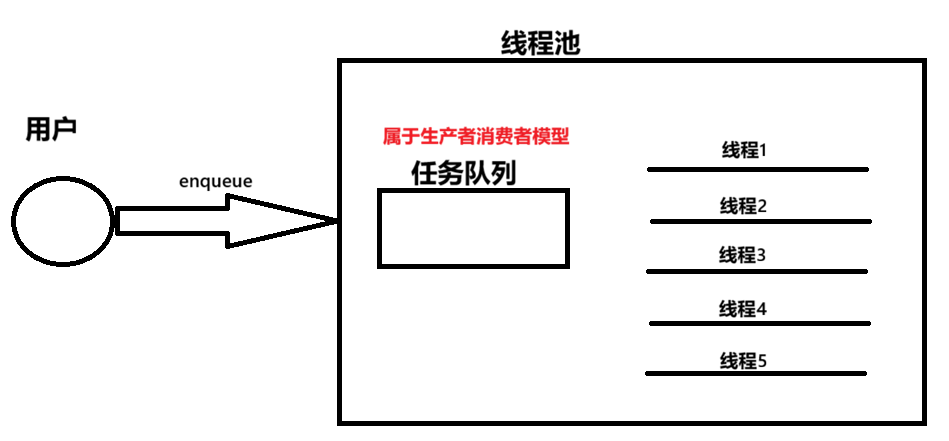
当线程池退出时,内部的线程状态:
1.等待
2.等待唤醒
3.处理任务
当线程池要退出的时候,内部的任务应该被完全取完,并且是非运行状态,才能让对应的线程退出。
线程池代码实现
关键代码:ThreadPool.hpp
cpp
#pragma once

#include <vector>
#include "Thread.hpp"
#include <string>
#include <queue>
#include "Log.hpp"
#include "Mutex.hpp"
#include "Cond.hpp"

namespace ThreadPoolMod
{
    using namespace CondModule;
    using namespace ThreadModlue;
    using namespace LogMod;

    static const int gnum = 5;
    template <typename T>
    class ThreadPool
    {
    private:
        void WakeUpAllThread()
        {
            LockGuard locgkuard(_mutex);
            if (_sleepernum)
                _cond.Broadcast();
            Log(Loglevel::INFO) << "唤醒所有休眠线程";
        }
        void WakeUpOne()
        {
            _cond.Signal();
            Log(Loglevel::INFO) << "唤醒一个休眠线程";
        }
    public:
        ThreadPool(int num = gnum)
            : _num(num), _isrunning(false), _sleepernum(0)
        {
            for (int i = 0; i < num; i++)
            {
                _threads.emplace_back(
                    [this]()
                    {
                        HandlerTask();
                    });
                Log(Loglevel::INFO) << "创建新线程成功";
            }
        }
        // 启动线程
        void Start()
        {
            if (_isrunning)
                return;
            _isrunning = true;
            for (auto &thread : _threads)
            {
                thread.Start();
                Log(Loglevel::INFO) << "启动新线程成功:" << thread.Name();
            }
        }
        void Stop()
        {
            if (!_isrunning)
                return;
            _isrunning = false;
            // 唤醒所有的线程
            WakeUpAllThread();
        }
        void Join()
        {
            for(auto &thread:_threads)
            {
                thread.Join();
            }
        }
        // 处理任务
        void HandlerTask()
        {
            char name[128];
            pthread_getname_np(pthread_self(), name, sizeof(name));
            while (true)
            {
                T t;
                {
                    LockGuard lockguard(_mutex);
                    // 队列为空,等待任务 或 线程池没有退出
                    while (_taskq.empty() && _isrunning)
                    {
                        _sleepernum++;
                        _cond.Wait(_mutex);
                        _sleepernum--;
                    }
                    // 内部线程已经被唤醒
                    if (!_isrunning && _taskq.empty())
                    {
                        Log(Loglevel::INFO) << name << "退出了,线程池退出&&任务队列为空";
                        break;
                    }

                    // 出循环则有任务
                    t = _taskq.front();
                    _taskq.pop();
                    //t(); // 处理任务
                }
            }
        }
        bool Enqueue(const T &in)
        {
            if(_isrunning)
            {
                LockGuard lockgurad(_mutex);
                _taskq.push(in);
                if(_threads.size() - _sleepernum == 0)
                    WakeUpOne();
                return true;
            }
            return false;
        }
        ~ThreadPool()
        {
        }

    private:
        vector<Thread> _threads;
        int _num; // 线程池中线程的个数
        queue<T> _taskq;
        Cond _cond;
        Mutex _mutex;
        bool _isrunning;
        bool _isdetach;
        int _sleepernum;
    };
}
Task.hpp:模拟需处理的任务
cpp
#pragma once
#include <iostream>
#include <unistd.h>
#include <functional>
#include "Log.hpp"


using namespace LogMod;
// 任务形式2
// 我们定义了一个任务类型,返回值void,参数为空
using task_t = std::function<void()>;

void Download()
{
    Log(Loglevel::DEBUG) << "我是一个下载任务...";
}

// 任务形式1
class Task
{
public:
    Task(){}
    Task(int x, int y):_x(x), _y(y)
    {
    }
    void Execute()
    {
        _result = _x + _y;
    }
    int X() { return _x; }
    int Y() { return _y; }
    int Result()
    {
        return _result;
    }
private:
    int _x;
    int _y;
    int _result;
};
Main.cpp
cpp
#include "Log.hpp"
#include "ThreadPool.hpp"
#include <memory>
#include "Task.hpp"

using namespace LogMod;
using namespace ThreadPoolMod;

int main()
{
    //C++14,构建对象并返回智能指针
    //unique_ptr<LogStrategy> strategy = make_unique<FileLogStrategy>();
    //strategy->SyncLog("hello log!");


    //logger(Loglevel::DEBUG, "main.cc", 10) << "hello world";

    //Enable_Console_Log_Strategy();
    //Log(Loglevel::DEBUG) << "hello world" << 3.14;
    //Log(Loglevel::DEBUG) << "hello world" << 3.14;
    //Log(Loglevel::DEBUG) << "hello world" << 3.14;
    //Log(Loglevel::DEBUG) << "hello world" << 3.14;

    Enable_Console_Log_Strategy();
    ThreadPool<task_t> *tp = new ThreadPool<task_t>();
    tp->Start();
    int count = 10;
    while(count)
    {
        tp->Enqueue(Download);
        sleep(1);
        count--;
    }
    sleep(5);
    //tq->Equeue()t;
    tp->Stop();
    sleep(1);
    tp->Join();
    return 0;
}
Thread.hpp:对线程的封装
cpp
#ifndef _THREAD_H_
#define _THREAD_H_

#include <iostream>
#include <string>
#include <pthread.h>
#include <cstdio>
#include <cstring>
#include <functional>
#include "Log.hpp"

namespace ThreadModlue
{
    using namespace LogMod;
    static u_int32_t number = 1; // bug

    class Thread
    {
        using func_t = std::function<void()>; // 暂时这样写,完全够了
    private:
        void EnableDetach()
        {
            _isdetach = true;
        }
        void EnableRunning()
        {
            _isrunning = true;
        }
        static void *Routine(void *args) // 属于类内的成员函数,默认包含this指针!
        {
            Thread *self = static_cast<Thread *>(args);
            self->EnableRunning();
            if (self->_isdetach)
                self->Detach();
            pthread_setname_np(self->_tid, self->_name.c_str());
            self->_func(); // 回调处理

            return nullptr;
        }
        // bug
    public:
        Thread(func_t func)
            : _tid(0),
              _isdetach(false),
              _isrunning(false),
              res(nullptr),
              _func(func)
        {
            _name = "thread-" + std::to_string(number++);
        }
        void Detach()
        {
            if (_isdetach)
                return;
            if (_isrunning)
                pthread_detach(_tid);
            EnableDetach();
        }

        string Name()
        {
            return _name;
        }

        bool Start()
        {
            if (_isrunning)
                return false;
            int n = pthread_create(&_tid, nullptr, Routine, this);
            if (n != 0)
            {
                return false;
            }
            else
            {
                return true;
            }
        }
        bool Stop()
        {
            if (_isrunning)
            {
                int n = pthread_cancel(_tid);
                if (n != 0)
                {
                    return false;
                }
                else
                {
                    _isrunning = false;
                    return true;
                }
            }
            return false;
        }
        void Join()
        {
            if (!_isdetach)
                return;
            int n = pthread_join(_tid, &res);
            if (n != 0)
            {
                Log(Loglevel::DEBUG) << "Join线程失败";
            }
            else
            {
                Log(Loglevel::DEBUG) << "Join线程成功";
            }
        }
        ~Thread()
        {
        }

    private:
        pthread_t _tid;
        std::string _name;
        bool _isdetach;
        bool _isrunning;
        void *res;
        func_t _func;
    };
}

#endif
线程安全
线程安全的单例模式
什么是单例模式
一个类在系统中只有一个实例,并提供一个全局访问点来获取这个实例.
简单理解:某个类只允许创建一次对象,之后所有地方拿到的都是同一个对象。比如配置管理器、日志对象、线程池、连接池等。
所以单例模式,指的就是单个实例的创建模式。
实现方式
饿汉模式:就像是吃完饭立刻洗碗,下一顿吃的时候就可以立刻拿碗吃饭。
懒汉模式:就像是吃完饭先放下碗,下一顿吃的时候要用到这个碗里,再洗了用。
饿汉模式
cpp
template<typename T>
class Singleton
{
    static T data;
public:
    static T* GetInstance()
    {
        return &data;
    }
};
因为利用了static静态加载的规则,创建进程时就创建好了这个静态对象,而且只有这一个静态对象。
一般单例的体积不大,不需要再创建新的对象时才用这种模式。绝大多数情况用的都是懒汉方式。
懒汉模式
cpp
template<typename T>
class Singleton
{
    static T* inst;
public:
    static T* GetInstance()
    {
        if(inst = null)
            inst =  new T();
        return inst;
    }
};
这里不需要想饿汉模式一样,只需要一个静态指针,不需要再加载进程时就把这个具体对象的空间创建出来。再需要这个具体对象(单例)的时候,才回去new一个对象。
如果已经new过了,就不会再创建一个对象了。
懒汉模式的核心思想是"延时加载",从而能够优化服务器的启动速度 。其次,在"延迟"的时候, 因为内存还未申请给懒汉使用,所以再给懒汉使用之前可以给他其他线程先用着,从而提高内存使用率。
但是上述代码存在严重问题:线程不安全。 如果两个线程同时调用GetInatance(),且该函数还未被调用过,就可能会创建出两个T对象的实例,这就破坏了单例模式的规定。当然了,要解决也很简单,加入互斥同步的代码即可。
把上述线程池的代码稍作修改和添加,就可以得到懒汉方式实现的单例模式线程安全的线程池。
ThreadPool.hpp:
cpp
class ThreadPool
{
    ······

    public:
        static ThreadPool<T> *GetInstance()
        {
        //单例对象也是全局的临界资源
        LockGuard lockguard(_lock);
            Log(Loglevel::DEBUG)<<"获取单例···";
            if(inc == nullptr)
            {
                Log(Loglevel::DEBUG) << "首次使用单例,创建之···";
                inc = new ThreadPool<T>();
                inc -> Start();
            }
            return inc;
        }

    ······

    private:
            ······

            static ThreadPool<T> *inc;//懒汉模式单例指针
            static Mutex _lock;//单例对象的锁

};
template<typename T>
ThreadPool<T> *ThreadPool<T>::inc = nullptr;//指针初始化

template<typename T>
Mutex ThreadPool<T>::_lock;
Main.cpp:
cpp
int main()
{

    Enable_Console_Log_Strategy();

    int count = 10;
    while(count)
    {
        sleep(1);
        //调用静态成员函数,不需要创建对象
        //tq->Equeue()t;
        ThreadPool<task_t>::GetInstance()->Enqueue(Download);
        count--;
    }
    sleep(5);
    ThreadPool<task_t>::GetInstance()->Stop();
    sleep(1);
    ThreadPool<task_t>::GetInstance()->Join();
    return 0;
}
线程安全和重入问题
概念
**线程安全:**多个线程在访问共享资源的时候能够正确地执行,不会互相干扰或破坏彼此的执行结果。再多全局变量或者静态变量进行操作,并没有锁的保护时,就会有该方面问题出现。
**重入:**同一个函数被不同的执行流调用,当前有一个流程还没有执行完,就有其他的执行流再次进入,就叫做重入。一个函数在重入的情况下,运行结果不会出现任何问题的,就叫这个函数为可重入函数,否则是不可重入函数。
**函数是可重入的,那就是线程安全的。但是线程安全了,不代表函数一定是重入的。**线程安全不保证同一线程内函数执行到一半时被再次进入也正确。比如:用锁实现线程安全时,如果函数持有锁期间被信号打断,信号处理函数又调用同一个函数,就会再次尝试获取同一个非递归锁,导致死锁(下文细说)。所以它线程安全,但不可重入。
死锁问题
什么是死锁
不管是单线程还是多线程都可能会出现死锁,单线程连续申请了同一把锁就会出现死锁(通常说的都是多执行流的场景,下文只讨论多执行流)。
死锁指的是一组进程中的各个进程均占用不会释放的资源,但因互相申请 ++被其他进程所占用不会释放的资源++而处于的一种永久等待状态。
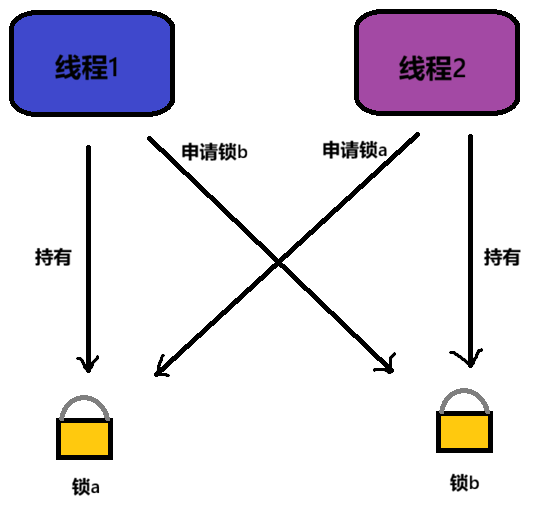
如图,双方都持有自己的锁且不会释放,并且都在申请对方的锁,由于双方都不会释放自己的锁,所以双方都只能挂起,什么都做不了。
死锁的四个必要条件
1️⃣互斥条件:一个资源只能被一个执行流使用,就是锁。(资源)
2️⃣请求与保持条件:一个执行流因为请求资源而阻塞时,对已获得的资源保持不放。(自己不愿意放弃资源)
3️⃣不剥夺条件:一个执行流已获得的资源,在未使用完之前,不能强行剥夺。(别人不能抢夺资源)
4️⃣循环等待条件:若干执行流之间形成一种头尾相接的循环等待资源的关系。(都期望获得他人资源,而且形成了环路)
避免死锁的方法
避免死锁,就破坏死锁的必要条件。
1️⃣破坏循环等待问题:资源一次性分配,使用超时机制,加锁顺序一致。
资源一次性分配:要么都没有锁,要么就一次性申请完所有锁。
加锁顺序一致:规定执行流只能按顺序申请锁,先申请锁a再申请锁b,这样就不会出现线程2先有锁b,再申请锁a的情况。
2️⃣破坏请求与保持条件
使用超时机制:一定时间内拿不到锁,就主动释放锁。
STL、智能指针和线程安全
STL容器是否线程安全?
C++的STL容器不是线程安全的。
为了将性能挖掘到极致,设计时舍去了加锁来保证线程安全的做法。对于不同的容器,加锁方式不同,性能可能也不同。所以默认STL容器不是线程安全的。如果需要再多线程环境下使用STL容器,往往需要调用者自行保证线程安全。
智能指针是否线程安全?
对于uniqu_ptr本身,因为只在当前的代码块范围内生效,因此不涉及线程安全的问题。
对于shared_ptr,多个对象需要共用一个引用计数变量,这个计数变量是临界资源,所以会存在线程安全问题,但是标准库在实现时已经考虑到这个问题了。设计shared_ptr时,设计者基于原子操作的前提下,最大程度保证了shared_ptr的高效性,因此也基本不会存在线程安全问题。
❤~~本文完结!!感谢观看!!接下来更精彩!!欢迎来我博客做客~~❤