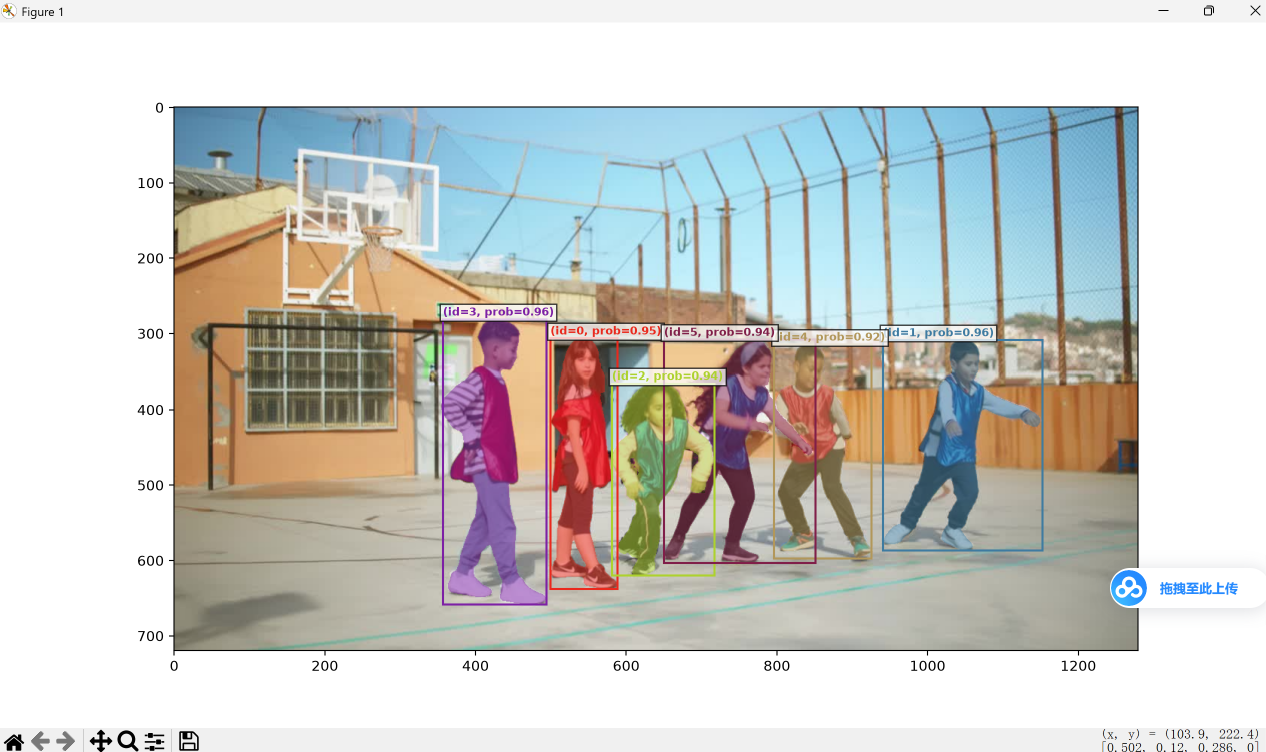
1.下载anacoda
地址:https://www.anaconda.com/download/success

2.给电脑配置anacoda的环境
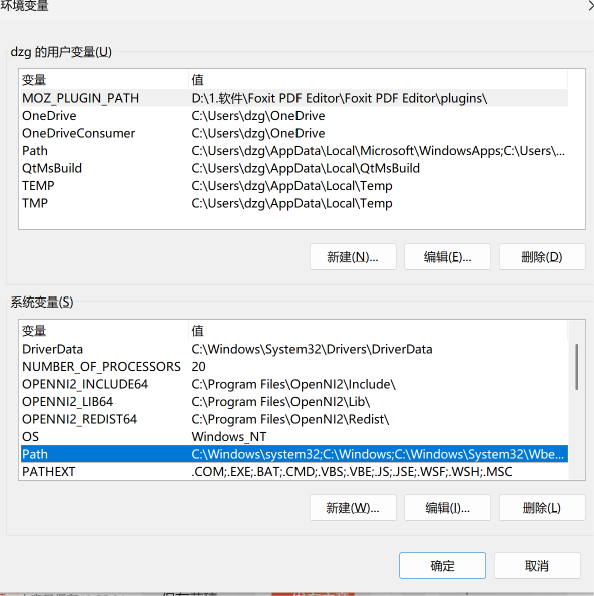
选择系统变量的Path
新增下载的地址(文件名可以自定义,但是保持末尾文件夹位置一致)
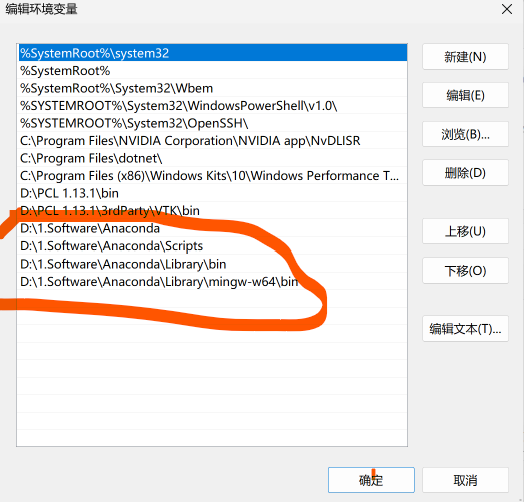
点击【确定】
3.验证conda是否安装完成
win+r
输入
bash
conda --version有输出就说明安装成功
4.下载sam3的项目文件
项目地址
bash
https://github.com/facebookresearch/sam3配置环境
依次执行
bash
conda create -n sam3 python=3.12
conda deactivate
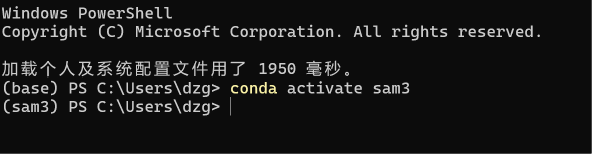
conda activate sam3
激活成功
安装pytorch
bash
pip install torch==2.10.0 torchvision --index-url https://download.pytorch.org/whl/cu1285.打开项目
bash
import torch
#################################### For Image ####################################
from PIL import Image
from sam3.model_builder import build_sam3_image_model
from sam3.model.sam3_image_processor import Sam3Processor
# Load the model
model = build_sam3_image_model()
processor = Sam3Processor(model)
# Load an image
image = Image.open("assets/images/test_image.jpg")
inference_state = processor.set_image(image)
# Prompt the model with text
output = processor.set_text_prompt(state=inference_state, prompt="shoe")

# Get the masks, bounding boxes, and scores
masks, boxes, scores = output["masks"], output["boxes"], output["scores"]
选择安装好的编译环境
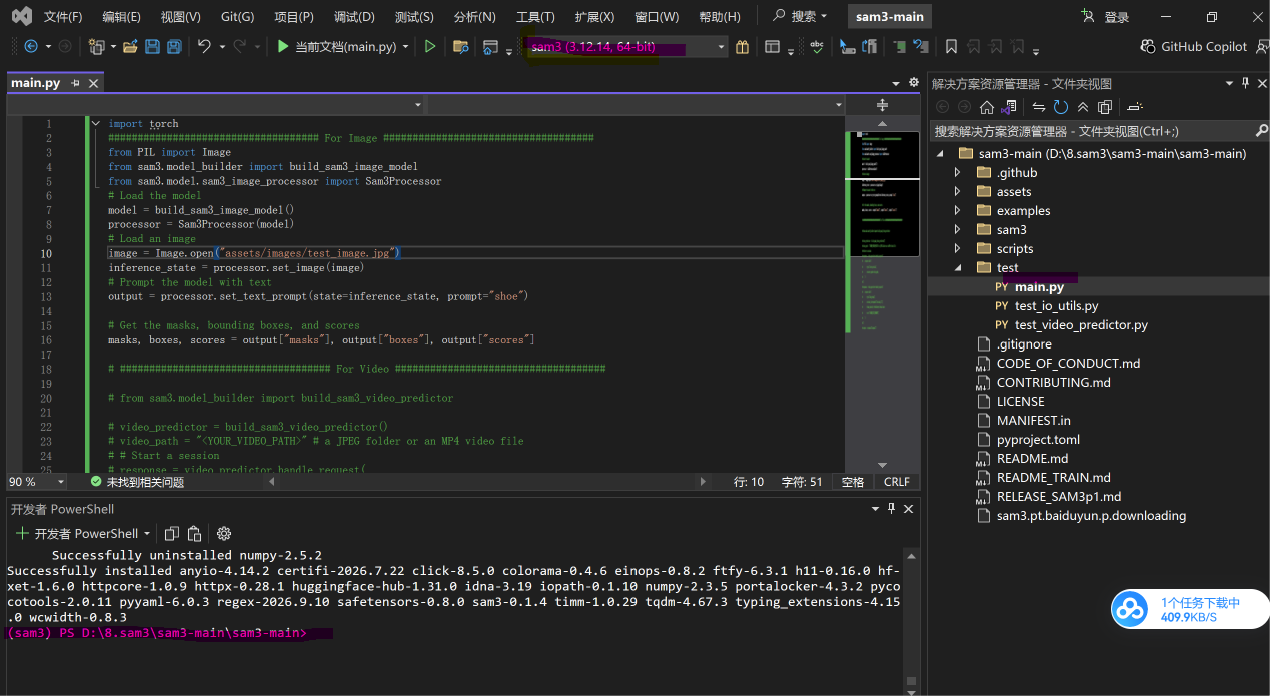
先运行,报错,没有sam3
安装
bash
pip install sam3报错没有No module named 'triton'
安装
bash
pip install triton-windows==3.3.0.post19同理,报错没有psutil,安装psutil
bash
pip install psutil读取本地sam3权重
将下面文件下的这个bool改成False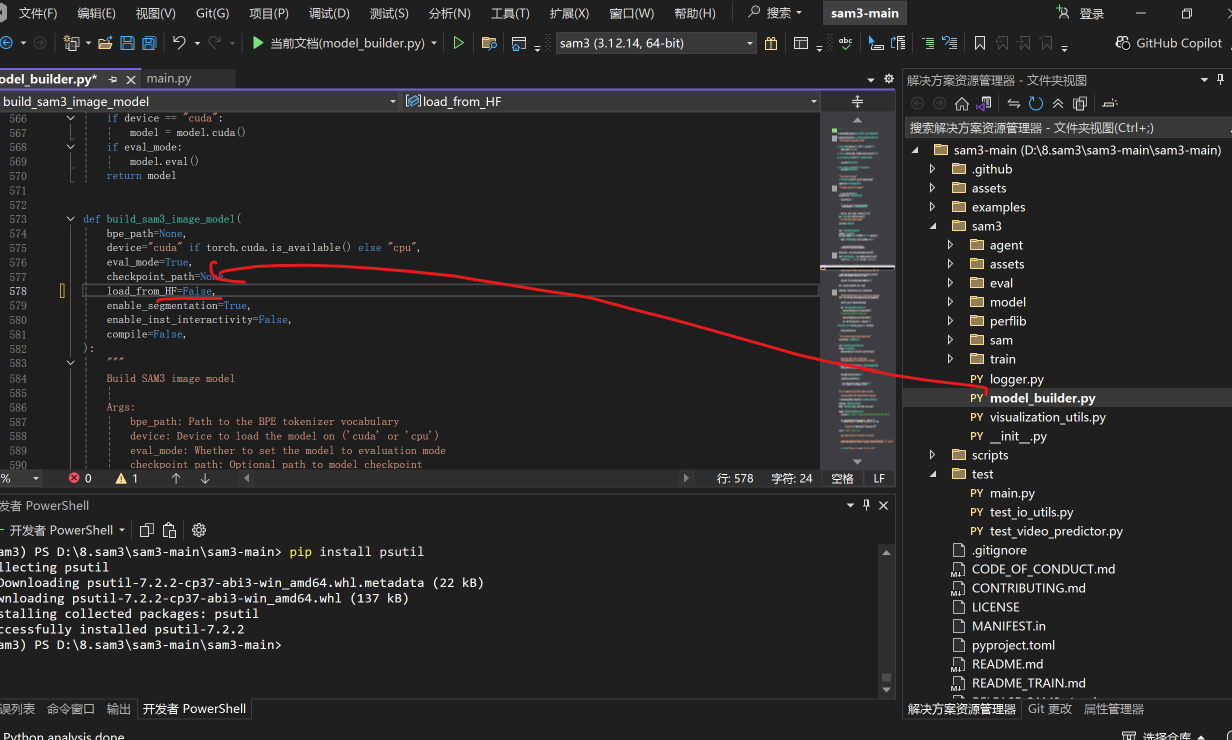
x修改sam3的权重地址,(记得将sam3下载放置在main.py的通一目录下)
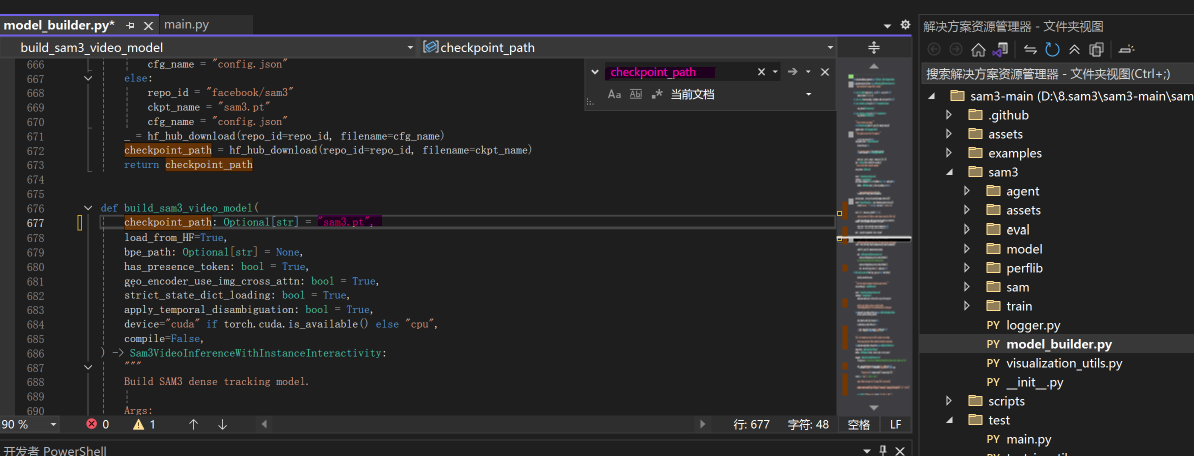
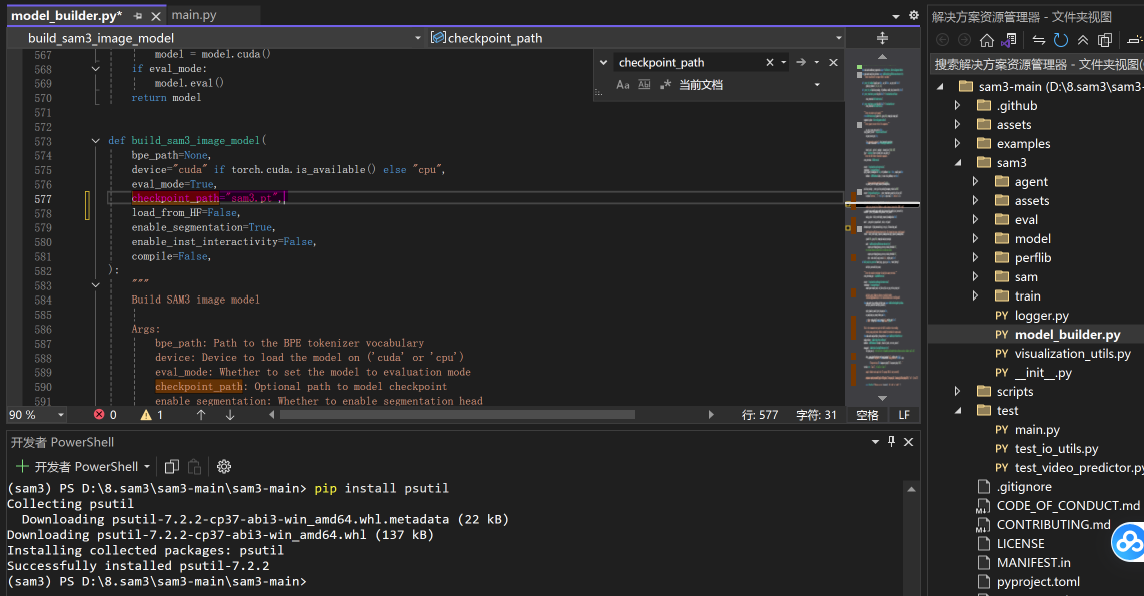
报错No module named 'pkg_resources'
bash
pip install "setuptools<82"这条命令会把 setuptools 降级到 82 版本以下,自动恢复 pkg_resources 模块。
报错cannot import name 'DecoupledTransformerDecoderLayerv2' from 'sam3.model.decoder' (C:\Users\dzg.conda\envs\sam3\Lib\site-packages\sam3\model\decoder.py)
报错原因一句话
环境里同时存在两套 SAM3:一套是你pip install sam3装在 conda 环境 site-packages 的 PyPI 包;另一套是你本地 D 盘下载的 github 源码文件夹。两个版本代码不一致,类名DecoupledTransformerDecoderLayerv2在 pip 安装包里面不存在,源码里面才有,发生冲突!
看报错路径:
C:\Users\dzg\.conda\envs\sam3\Lib\site-packages\sam3\model\decoder.py它跑到 conda 环境的 site-packages(pip 安装的 sam3 包)里面找文件,没有读取你 D 盘本地源码文件夹里面的 sam3 代码。
两种修复方案,选一个就行
方案 A(推荐,用本地源码)
-
在
(sam3)终端,卸载 pip 安装的 sam3 包pip uninstall sam3
-
在源码根目录(
D:\8.sam3\sam3-main\sam3-main)执行本地可编辑安装:pip install -e .
-e .的含义:把当前文件夹源码作为包,让 python 优先读取本地源码,不再读 C 盘 site-packages 里旧版本 sam3。
- 再次运行代码:
python main.py - 新增展示结果的代码
bash
import torch
#################################### For Image ####################################
from PIL import Image
from sam3.model_builder import build_sam3_image_model
from sam3.model.sam3_image_processor import Sam3Processor
from sam3.visualization_utils import draw_box_on_image, normalize_bbox,plot_results

# Load the model
model = build_sam3_image_model()
processor = Sam3Processor(model)
# Load an image
image = Image.open("assets/images/test_image.jpg")
inference_state = processor.set_image(image)
# Prompt the model with text
output = processor.set_text_prompt(state=inference_state, prompt="shoe")

# Get the masks, bounding boxes, and scores
masks, boxes, scores = output["masks"], output["boxes"], output["scores"]

plot_results(image,inference_state)
报错No module named 'cv2'
安装cv2
bash
pip install opencv-python报错No module named 'matplotlib'
bash
pip install matplotlib报错No module named 'pandas'
bash
pip install pandas报错No module named 'skimage'
bash
python -m pip install --upgrade pip wheel
pip install scikit-image --prefer-binary
报错No module named 'sklearn'
bash
pip install scikit-learn --prefer-binary报错RuntimeError: mat1 and mat2 must have the same dtype, but got BFloat16 and Float
mat1 and mat2 must have the same dtype, but got BFloat16 and Float 的本质是:
某个 Linear 层的权重是 BFloat16
送进来的输入张量是 Float32
两边 dtype 不一致,矩阵乘法直接崩。
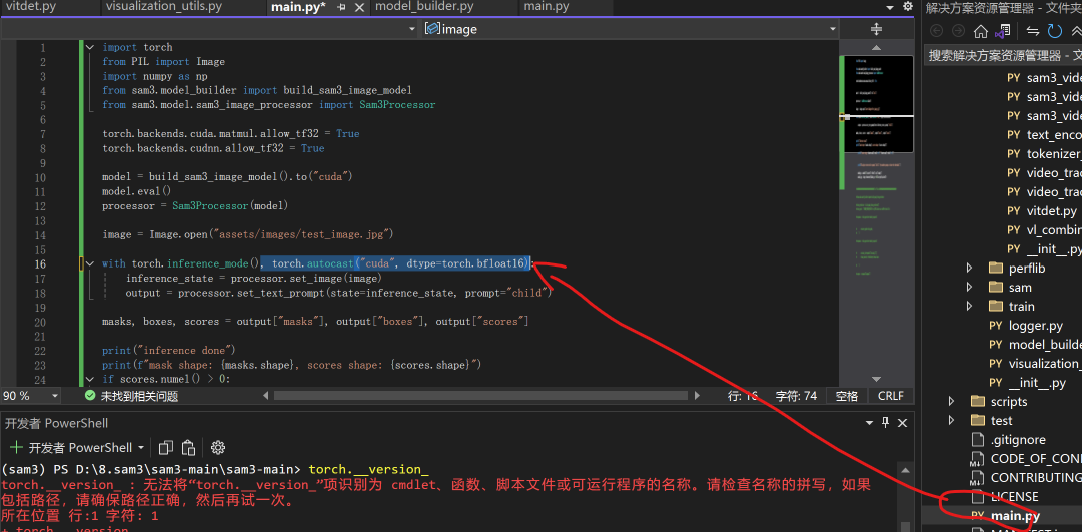
就多了 torch.autocast("cuda", dtype=torch.bfloat16) 这一项,用逗号并到同一个 with 里。
修改后的main.py 文件
bash
import torch
from PIL import Image
import numpy as np
from sam3.model_builder import build_sam3_image_model
from sam3.model.sam3_image_processor import Sam3Processor

torch.backends.cuda.matmul.allow_tf32 = True
torch.backends.cudnn.allow_tf32 = True

model = build_sam3_image_model().to("cuda")
model.eval()
processor = Sam3Processor(model)

image = Image.open("assets/images/test_image.jpg")

with torch.inference_mode(), torch.autocast("cuda", dtype=torch.bfloat16):
    inference_state = processor.set_image(image)
    output = processor.set_text_prompt(state=inference_state, prompt="child")

masks, boxes, scores = output["masks"], output["boxes"], output["scores"]

print("inference done")
print(f"mask shape: {masks.shape}, scores shape: {scores.shape}")
if scores.numel() > 0:
    print(f"score range: {scores.min().item():.4f} ~ {scores.max().item():.4f}")

if masks.shape[0] == 0:
    print("No object detected for prompt 'child'. Try another prompt or lower the threshold.")
else:
    mask_np = masks[0].squeeze().float().cpu().numpy()
    mask_img = Image.fromarray((mask_np * 255).astype(np.uint8))
    mask_img.save("mask.png")
    print(f"Mask saved: mask.png, total {masks.shape[0]} instance(s) detected.")
新增可视化功能
在main函数加上
bash
from sam3.visualization_utils import draw_box_on_image, normalize_bbox,plot_results
//保持不变
plot_results(image,inference_state)
修改后的main函数
bash
import torch
from PIL import Image
import numpy as np
from sam3.model_builder import build_sam3_image_model
from sam3.model.sam3_image_processor import Sam3Processor
from sam3.visualization_utils import draw_box_on_image, normalize_bbox,plot_results

torch.backends.cuda.matmul.allow_tf32 = True
torch.backends.cudnn.allow_tf32 = True

model = build_sam3_image_model().to("cuda")
model.eval()
processor = Sam3Processor(model)

image = Image.open("assets/images/test_image.jpg")

with torch.inference_mode(), torch.autocast("cuda", dtype=torch.bfloat16):
    inference_state = processor.set_image(image)
    output = processor.set_text_prompt(state=inference_state, prompt="child")

masks, boxes, scores = output["masks"], output["boxes"], output["scores"]

print("inference done")
print(f"mask shape: {masks.shape}, scores shape: {scores.shape}")
if scores.numel() > 0:
    print(f"score range: {scores.min().item():.4f} ~ {scores.max().item():.4f}")

if masks.shape[0] == 0:
    print("No object detected for prompt 'child'. Try another prompt or lower the threshold.")
else:
    mask_np = masks[0].squeeze().float().cpu().numpy()
    mask_img = Image.fromarray((mask_np * 255).astype(np.uint8))
    mask_img.save("mask.png")
    print(f"Mask saved: mask.png, total {masks.shape[0]} instance(s) detected.")
plot_results(image,inference_state)
进入plot_results函数下
新增这句话
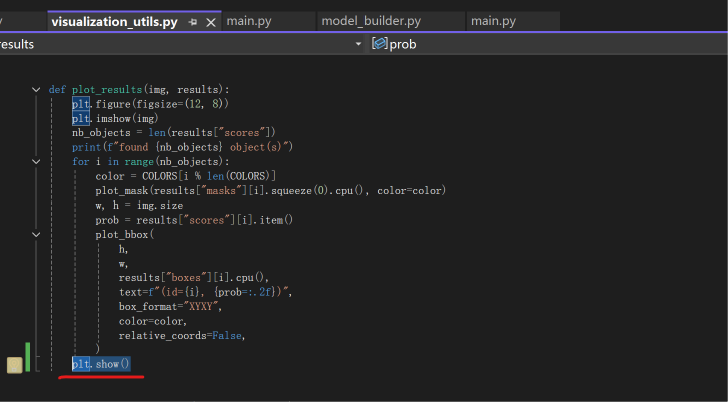
bash
plt.show()效果展示