01 为什么无界流处理必须有窗口
做实时计算的同学应该都有这个体会:对无界流做聚合,如果你不定义窗口,程序就会一直攒数据,永远不输出结果。比如统计"每分钟的 PV",如果没有窗口,程序会把所有历史 PV 加在一起,输出一个越来越大的数字,这显然不是我们想要的。
窗口(Window)就是用来解决这个问题的------它把无界流切成有界的"桶",每个桶里的数据单独计算,到时间就输出结果。窗口是流处理区别于批处理的核心概念之一,也是 Flink 最常用的功能。
这篇文章把 Flink Window 从分类、生命周期、内部机制到四种窗口的代码实现、触发器、驱逐器、迟到数据处理一次讲透,所有代码都可以直接复制运行。
02 Flink Window 分类全景
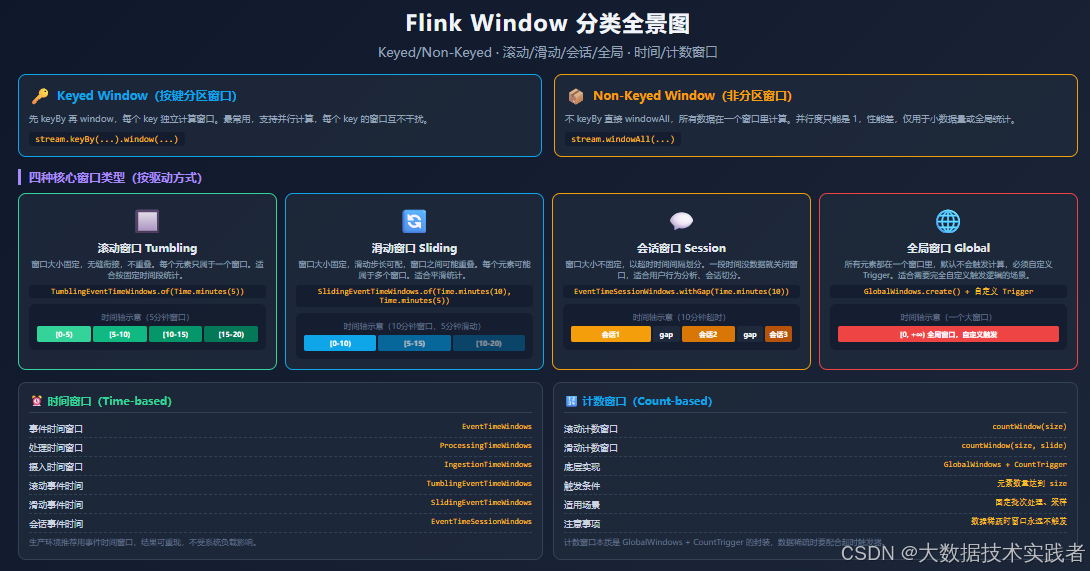
Flink 的窗口可以从三个维度分类:
维度一:Keyed vs Non-Keyed
Keyed Window(按键分区窗口) :先 keyBy 再 window,每个 key 独立计算窗口,支持并行计算。这是最常用的方式,99% 的场景都用这个。
java
stream.keyBy(event -> event.getUserId())
      .window(TumblingEventTimeWindows.of(Time.minutes(5)))
      .process(new MyWindowFunction());
Non-Keyed Window(非分区窗口) :不 keyBy 直接 windowAll,所有数据在一个窗口里计算,并行度只能是 1,性能差。仅用于小数据量或全局统计(比如全局 PV)。
java
stream.windowAll(TumblingEventTimeWindows.of(Time.minutes(5)))
      .process(new MyAllWindowFunction());
维度二:四种核心窗口类型
| 窗口类型 | 特点 | 适用场景 |
|---|---|---|
| 滚动窗口 Tumbling | 大小固定,无缝衔接,不重叠 | 按固定时间段统计(每分钟 PV) |
| 滑动窗口 Sliding | 大小固定,滑动步长可配,可能重叠 | 平滑统计(每 5 分钟输出最近 10 分钟的结果) |
| 会话窗口 Session | 大小不固定,以超时间隔划分 | 用户行为分析、会话切分 |
| 全局窗口 Global | 所有元素一个窗口,默认不触发 | 完全自定义触发逻辑 |
维度三:时间窗口 vs 计数窗口
时间窗口:按时间划分,包括事件时间(EventTime)、处理时间(ProcessingTime)、摄入时间(IngestionTime)。生产环境推荐用事件时间,结果可重现。
计数窗口 :按元素数量划分,countWindow(size) 是滚动计数窗口,countWindow(size, slide) 是滑动计数窗口。本质是 GlobalWindows + CountTrigger 的封装。
03 窗口生命周期与内部机制
理解窗口的内部机制,才能在出问题时知道该查哪里。一个窗口从创建到销毁分 5 步:
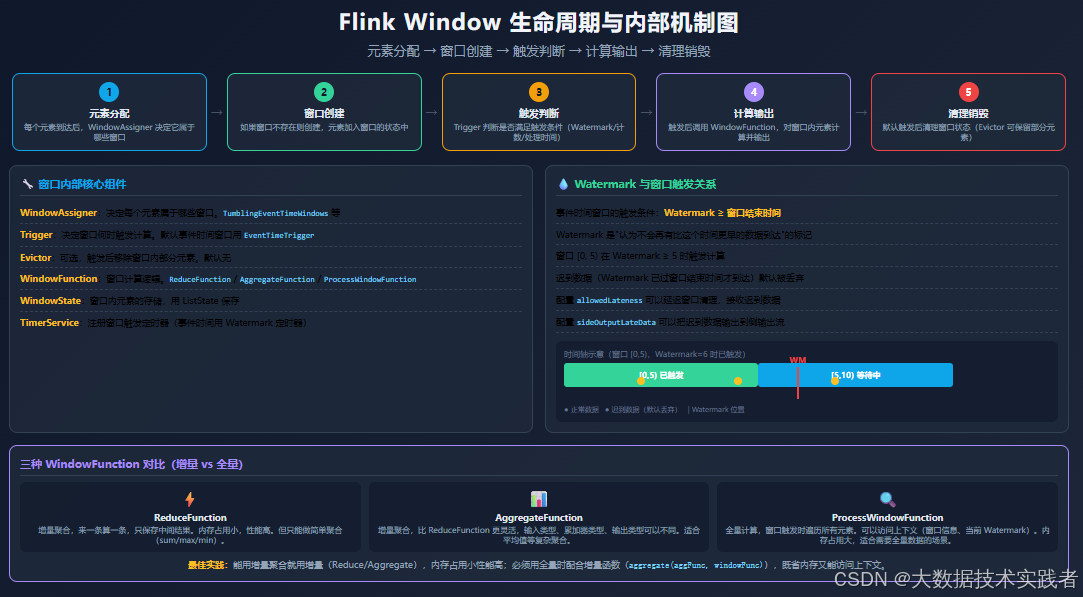
- 元素分配 :每个元素到达后,
WindowAssigner决定它属于哪些窗口(滑动窗口下一个元素可能属于多个窗口) - 窗口创建:如果窗口不存在则创建,元素加入窗口的状态中(ListState)
- 触发判断 :
Trigger判断是否满足触发条件(事件时间窗口是 Watermark ≥ 窗口结束时间) - 计算输出 :触发后调用
WindowFunction,对窗口内元素计算并输出 - 清理销毁:默认触发后清理窗口状态(如果配置了 allowedLateness,会延迟清理)
内部核心组件
- WindowAssigner:决定每个元素属于哪些窗口
- Trigger:决定窗口何时触发计算
- Evictor:可选,触发后移除窗口内部分元素
- WindowFunction:窗口计算逻辑(Reduce/Aggregate/ProcessWindowFunction)
- WindowState:窗口内元素的存储,用 ListState 保存
- TimerService:注册窗口触发定时器
三种 WindowFunction 对比
这是最容易踩坑的地方,三种 WindowFunction 的性能和能力差异很大:
| 函数类型 | 计算方式 | 内存占用 | 能力 | 适用场景 |
|---|---|---|---|---|
| ReduceFunction | 增量聚合 | 小(只存中间结果) | 弱(只能做简单聚合) | sum/max/min 等简单聚合 |
| AggregateFunction | 增量聚合 | 小(只存累加器) | 中(输入/累加器/输出类型可不同) | 平均值等复杂聚合 |
| ProcessWindowFunction | 全量计算 | 大(存所有元素) | 强(可访问上下文、窗口信息) | 需要全量数据、窗口信息的场景 |
最佳实践 :能用增量聚合就用增量,内存占用小性能高。必须用全量时,配合增量函数一起用(aggregate(aggFunc, windowFunc)),既省内存又能访问上下文。
04 滚动窗口详解及代码实现
滚动窗口是最常用的窗口类型,窗口大小固定,窗口之间无缝衔接,每个元素只属于一个窗口。
完整代码示例:每分钟用户 PV 统计
java
import org.apache.flink.api.common.eventtime.WatermarkStrategy;
import org.apache.flink.api.common.functions.AggregateFunction;
import org.apache.flink.api.java.tuple.Tuple2;
import org.apache.flink.streaming.api.datastream.DataStream;
import org.apache.flink.streaming.api.environment.StreamExecutionEnvironment;
import org.apache.flink.streaming.api.functions.windowing.ProcessWindowFunction;
import org.apache.flink.streaming.api.windowing.assigners.TumblingEventTimeWindows;
import org.apache.flink.streaming.api.windowing.time.Time;
import org.apache.flink.streaming.api.windowing.windows.TimeWindow;
import org.apache.flink.util.Collector;

import java.time.Duration;

public class TumblingWindowExample {

    // 用户访问事件
    public static class UserEvent {
        private String userId;
        private String page;
        private long timestamp;

        public UserEvent(String userId, String page, long timestamp) {
            this.userId = userId;
            this.page = page;
            this.timestamp = timestamp;
        }
        public String getUserId() { return userId; }
        public long getTimestamp() { return timestamp; }
    }

    // 输出结果
    public static class PvResult {
        private String userId;
        private long windowStart;
        private long windowEnd;
        private long pv;

        public PvResult(String userId, long windowStart, long windowEnd, long pv) {
            this.userId = userId;
            this.windowStart = windowStart;
            this.windowEnd = windowEnd;
            this.pv = pv;
        }
        @Override
        public String toString() {
            return String.format("用户=%s, 窗口[%d~%d), PV=%d", userId, windowStart, windowEnd, pv);
        }
    }

    // 增量聚合函数:计数
    public static class PvAggregator implements AggregateFunction<UserEvent, Long, Long> {
        @Override
        public Long createAccumulator() { return 0L; }
        @Override
        public Long add(UserEvent event, Long acc) { return acc + 1; }
        @Override
        public Long getResult(Long acc) { return acc; }
        @Override
        public Long merge(Long a, Long b) { return a + b; }
    }

    // 全量窗口函数:包装增量结果,输出带窗口信息
    public static class PvWindowFunction extends ProcessWindowFunction<Long, PvResult, String, TimeWindow> {
        @Override
        public void process(String userId, Context context, Iterable<Long> elements, Collector<PvResult> out) {
            long pv = elements.iterator().next();  // 增量聚合只有一个结果
            out.collect(new PvResult(userId, context.window().getStart(), context.window().getEnd(), pv));
        }
    }

    public static void main(String[] args) throws Exception {
        StreamExecutionEnvironment env = StreamExecutionEnvironment.getExecutionEnvironment();

        // 模拟数据源
        DataStream<UserEvent> source = env.fromElements(
            new UserEvent("user1", "home", 1000L),
            new UserEvent("user1", "product", 2000L),
            new UserEvent("user2", "home", 3000L),
            new UserEvent("user1", "cart", 61000L),
            new UserEvent("user2", "product", 62000L)
        );

        // 分配时间戳和 Watermark(允许 5 秒乱序)
        DataStream<UserEvent> withTimestamps = source.assignTimestampsAndWatermarks(
            WatermarkStrategy.<UserEvent>forBoundedOutOfOrderness(Duration.ofSeconds(5))
                .withTimestampAssigner((event, recordTimestamp) -> event.getTimestamp())
        );

        // 滚动事件时间窗口:5 分钟
        DataStream<PvResult> result = withTimestamps
            .keyBy(UserEvent::getUserId)
            .window(TumblingEventTimeWindows.of(Time.minutes(5)))
            .aggregate(new PvAggregator(), new PvWindowFunction());

        result.print();

        env.execute("Tumbling Window Example");
    }
}
输出结果
用户=user1, 窗口[0~300000), PV=2
用户=user2, 窗口[0~300000), PV=1
用户=user1, 窗口[60000~360000), PV=1
用户=user2, 窗口[60000~360000), PV=1
关键点说明
TumblingEventTimeWindows.of(Time.minutes(5))创建 5 分钟的滚动事件时间窗口- 用
aggregate(aggFunc, windowFunc)组合增量聚合和全量窗口函数,既省内存又能拿到窗口信息 - Watermark 允许 5 秒乱序,
forBoundedOutOfOrderness(Duration.ofSeconds(5)) - 窗口是左闭右开区间
[start, end),时间戳等于 end 的元素属于下一个窗口
05 滑动窗口详解及代码实现
滑动窗口的窗口大小固定,但滑动步长可以配置。如果步长小于窗口大小,窗口之间会重叠,一个元素可能属于多个窗口。
完整代码示例:每 5 分钟输出最近 10 分钟的平均响应时间
java
import org.apache.flink.api.common.eventtime.WatermarkStrategy;
import org.apache.flink.api.common.functions.AggregateFunction;
import org.apache.flink.streaming.api.datastream.DataStream;
import org.apache.flink.streaming.api.environment.StreamExecutionEnvironment;
import org.apache.flink.streaming.api.functions.windowing.ProcessWindowFunction;
import org.apache.flink.streaming.api.windowing.assigners.SlidingEventTimeWindows;
import org.apache.flink.streaming.api.windowing.time.Time;
import org.apache.flink.streaming.api.windowing.windows.TimeWindow;
import org.apache.flink.util.Collector;

import java.time.Duration;

public class SlidingWindowExample {

    public static class MetricEvent {
        private String api;
        private long latency;
        private long timestamp;
        public MetricEvent(String api, long latency, long timestamp) {
            this.api = api; this.latency = latency; this.timestamp = timestamp;
        }
        public String getApi() { return api; }
        public long getLatency() { return latency; }
        public long getTimestamp() { return timestamp; }
    }

    public static class AvgResult {
        private String api;
        private long windowStart;
        private long windowEnd;
        private double avgLatency;
        private long count;
        public AvgResult(String api, long ws, long we, double avg, long cnt) {
            this.api = api; this.windowStart = ws; this.windowEnd = we;
            this.avgLatency = avg; this.count = cnt;
        }
        @Override
        public String toString() {
            return String.format("API=%s, 窗口[%d~%d), 平均延迟=%.2fms, 请求数=%d",
                api, windowStart, windowEnd, avgLatency, count);
        }
    }

    // 累加器:总和 + 计数
    public static class LatencyAcc {
        long sum = 0;
        long count = 0;
    }

    // 增量聚合:计算平均延迟
    public static class AvgLatencyAggregator implements AggregateFunction<MetricEvent, LatencyAcc, AvgResult> {
        @Override
        public LatencyAcc createAccumulator() { return new LatencyAcc(); }
        @Override
        public LatencyAcc add(MetricEvent event, LatencyAcc acc) {
            acc.sum += event.getLatency();
            acc.count++;
            return acc;
        }
        @Override
        public AvgResult getResult(LatencyAcc acc) {
            double avg = acc.count > 0 ? (double) acc.sum / acc.count : 0;
            return new AvgResult(null, 0, 0, avg, acc.count);  // api 和窗口信息后面补
        }
        @Override
        public LatencyAcc merge(LatencyAcc a, LatencyAcc b) {
            a.sum += b.sum; a.count += b.count; return a;
        }
    }

    // 补全 api 和窗口信息
    public static class AvgWindowFunction extends ProcessWindowFunction<AvgResult, AvgResult, String, TimeWindow> {
        @Override
        public void process(String api, Context context, Iterable<AvgResult> elements, Collector<AvgResult> out) {
            AvgResult result = elements.iterator().next();
            out.collect(new AvgResult(api, context.window().getStart(), context.window().getEnd(),
                result.avgLatency, result.count));
        }
    }

    public static void main(String[] args) throws Exception {
        StreamExecutionEnvironment env = StreamExecutionEnvironment.getExecutionEnvironment();

        DataStream<MetricEvent> source = env.fromElements(
            new MetricEvent("/api/login", 100, 1000L),
            new MetricEvent("/api/login", 200, 2000L),
            new MetricEvent("/api/pay", 300, 3000L),
            new MetricEvent("/api/login", 150, 310000L),
            new MetricEvent("/api/pay", 250, 320000L)
        );

        DataStream<MetricEvent> withTimestamps = source.assignTimestampsAndWatermarks(
            WatermarkStrategy.<MetricEvent>forBoundedOutOfOrderness(Duration.ofSeconds(5))
                .withTimestampAssigner((event, rt) -> event.getTimestamp())
        );

        // 滑动事件时间窗口:窗口大小 10 分钟,滑动步长 5 分钟
        DataStream<AvgResult> result = withTimestamps
            .keyBy(MetricEvent::getApi)
            .window(SlidingEventTimeWindows.of(Time.minutes(10), Time.minutes(5)))
            .aggregate(new AvgLatencyAggregator(), new AvgWindowFunction());

        result.print();
        env.execute("Sliding Window Example");
    }
}
关键点说明
SlidingEventTimeWindows.of(Time.minutes(10), Time.minutes(5))创建 10 分钟窗口、5 分钟滑动一次- 窗口重叠时,一个元素会被加入多个窗口,计算量会增加(重叠越多计算量越大)
- 步长等于窗口大小时,就是滚动窗口;步长大于窗口大小时,会有数据不被任何窗口包含(丢数据),一般不这么用
06 会话窗口详解及代码实现
会话窗口的大小不固定,以"超时时间间隔"来划分------如果一段时间没有数据,就认为当前会话结束,下一个数据开启新会话。
完整代码示例:用户会话切分
java
import org.apache.flink.api.common.eventtime.WatermarkStrategy;
import org.apache.flink.streaming.api.datastream.DataStream;
import org.apache.flink.streaming.api.environment.StreamExecutionEnvironment;
import org.apache.flink.streaming.api.functions.windowing.ProcessWindowFunction;
import org.apache.flink.streaming.api.windowing.assigners.EventTimeSessionWindows;
import org.apache.flink.streaming.api.windowing.time.Time;
import org.apache.flink.streaming.api.windowing.windows.TimeWindow;
import org.apache.flink.util.Collector;

import java.time.Duration;
import java.util.ArrayList;
import java.util.List;

public class SessionWindowExample {

    public static class UserAction {
        private String userId;
        private String action;
        private long timestamp;
        public UserAction(String userId, String action, long timestamp) {
            this.userId = userId; this.action = action; this.timestamp = timestamp;
        }
        public String getUserId() { return userId; }
        public String getAction() { return action; }
        public long getTimestamp() { return timestamp; }
    }

    public static class SessionResult {
        private String userId;
        private long sessionStart;
        private long sessionEnd;
        private long duration;
        private int actionCount;
        private List<String> actions;
        public SessionResult(String userId, long ss, long se, long dur, int cnt, List<String> acts) {
            this.userId = userId; this.sessionStart = ss; this.sessionEnd = se;
            this.duration = dur; this.actionCount = cnt; this.actions = acts;
        }
        @Override
        public String toString() {
            return String.format("用户=%s, 会话[%d~%d], 时长=%dms, 操作数=%d, 操作=%s",
                userId, sessionStart, sessionEnd, duration, actionCount, actions);
        }
    }

    public static class SessionProcessFunction extends ProcessWindowFunction<UserAction, SessionResult, String, TimeWindow> {
        @Override
        public void process(String userId, Context context, Iterable<UserAction> elements, Collector<SessionResult> out) {
            List<String> actions = new ArrayList<>();
            long minTime = Long.MAX_VALUE;
            long maxTime = Long.MIN_VALUE;
            int count = 0;
            for (UserAction e : elements) {
                actions.add(e.getAction());
                minTime = Math.min(minTime, e.getTimestamp());
                maxTime = Math.max(maxTime, e.getTimestamp());
                count++;
            }
            long duration = maxTime - minTime;
            out.collect(new SessionResult(userId, context.window().getStart(),
                context.window().getEnd(), duration, count, actions));
        }
    }

    public static void main(String[] args) throws Exception {
        StreamExecutionEnvironment env = StreamExecutionEnvironment.getExecutionEnvironment();

        DataStream<UserAction> source = env.fromElements(
            // 用户1的第一个会话(间隔都小于 10 秒)
            new UserAction("user1", "login", 1000L),
            new UserAction("user1", "view_home", 3000L),
            new UserAction("user1", "view_product", 6000L),
            new UserAction("user1", "add_cart", 9000L),
            // 间隔 15 秒 > 10 秒超时,会话切换
            new UserAction("user1", "checkout", 24000L),
            new UserAction("user1", "pay", 26000L),
            // 用户2的会话
            new UserAction("user2", "login", 2000L),
            new UserAction("user2", "view_home", 5000L)
        );

        DataStream<UserAction> withTimestamps = source.assignTimestampsAndWatermarks(
            WatermarkStrategy.<UserAction>forBoundedOutOfOrderness(Duration.ofSeconds(2))
                .withTimestampAssigner((event, rt) -> event.getTimestamp())
        );

        // 会话窗口:超时时间 10 秒
        DataStream<SessionResult> result = withTimestamps
            .keyBy(UserAction::getUserId)
            .window(EventTimeSessionWindows.withGap(Time.seconds(10)))
            .process(new SessionProcessFunction());

        result.print();
        env.execute("Session Window Example");
    }
}
输出结果
用户=user1, 会话[1000~19000], 时长=8000ms, 操作数=4, 操作=[login, view_home, view_product, add_cart]
用户=user2, 会话[2000~15000], 时长=3000ms, 操作数=2, 操作=[login, view_home]
用户=user1, 会话[24000~36000], 时长=2000ms, 操作数=2, 操作=[checkout, pay]
关键点说明
EventTimeSessionWindows.withGap(Time.seconds(10))创建超时时间 10 秒的会话窗口- 会话窗口的结束时间 = 最后一个元素时间 + 超时时间
- 会话窗口不支持增量聚合的合并(因为窗口边界不固定),用 ProcessWindowFunction 更方便
- 会话窗口的并行度由 keyBy 决定,每个用户的会话独立计算
07 全局窗口与自定义 Trigger
全局窗口(GlobalWindows)把所有元素都放在一个窗口里,默认不会触发计算,必须自定义 Trigger。适合需要完全自定义触发逻辑的场景。
完整代码示例:自定义 Trigger------每 100 条数据或每 30 秒触发一次
java
import org.apache.flink.api.common.state.ValueState;
import org.apache.flink.api.common.state.ValueStateDescriptor;
import org.apache.flink.api.common.typeinfo.TypeInformation;
import org.apache.flink.streaming.api.windowing.triggers.Trigger;
import org.apache.flink.streaming.api.windowing.triggers.TriggerResult;
import org.apache.flink.streaming.api.windowing.windows.GlobalWindow;

// 自定义 Trigger:计数达到 100 或处理时间超过 30 秒触发
public class CountOrTimeTrigger extends Trigger<Object, GlobalWindow> {

    private final long maxCount;
    private final long intervalMs;

    // 计数状态
    private final ValueStateDescriptor<Long> countDesc =
        new ValueStateDescriptor<>("count", TypeInformation.of(Long.class));

    public CountOrTimeTrigger(long maxCount, long intervalMs) {
        this.maxCount = maxCount;
        this.intervalMs = intervalMs;
    }

    @Override
    public TriggerResult onElement(Object element, long timestamp, GlobalWindow window, TriggerContext ctx) throws Exception {
        ValueState<Long> countState = ctx.getPartitionedState(countDesc);
        long count = countState.value() == null ? 0 : countState.value();
        count++;
        countState.update(count);

        if (count >= maxCount) {
            countState.clear();
            return TriggerResult.FIRE_AND_PURGE;  // 触发并清理
        }

        // 注册处理时间定时器(第一次元素到达时注册)
        if (count == 1) {
            ctx.registerProcessingTimeTimer(ctx.getCurrentProcessingTime() + intervalMs);
        }

        return TriggerResult.CONTINUE;
    }

    @Override
    public TriggerResult onProcessingTime(long time, GlobalWindow window, TriggerContext ctx) throws Exception {
        // 清除计数状态
        ValueState<Long> countState = ctx.getPartitionedState(countDesc);
        countState.clear();
        return TriggerResult.FIRE_AND_PURGE;  // 触发并清理
    }

    @Override
    public TriggerResult onEventTime(long time, GlobalWindow window, TriggerContext ctx) throws Exception {
        return TriggerResult.CONTINUE;
    }

    @Override
    public void clear(GlobalWindow window, TriggerContext ctx) throws Exception {
        ValueState<Long> countState = ctx.getPartitionedState(countDesc);
        countState.clear();
        // 清理所有处理时间定时器
        ctx.deleteProcessingTimeTimer(ctx.getCurrentProcessingTime() + intervalMs);
    }

    // 使用示例
    public static void main(String[] args) throws Exception {
        // stream.keyBy(...)
        //       .window(GlobalWindows.create())
        //       .trigger(new CountOrTimeTrigger(100, 30000))
        //       .process(new MyProcessFunction());
    }
}
TriggerResult 四种返回值
| 返回值 | 含义 |
|---|---|
CONTINUE |
什么都不做,继续等待 |
FIRE |
触发计算,但不清理窗口状态(下次触发还能看到旧数据) |
PURGE |
不触发计算,直接清理窗口状态 |
FIRE_AND_PURGE |
触发计算并清理窗口状态(最常用) |
08 触发器、驱逐器与迟到数据处理
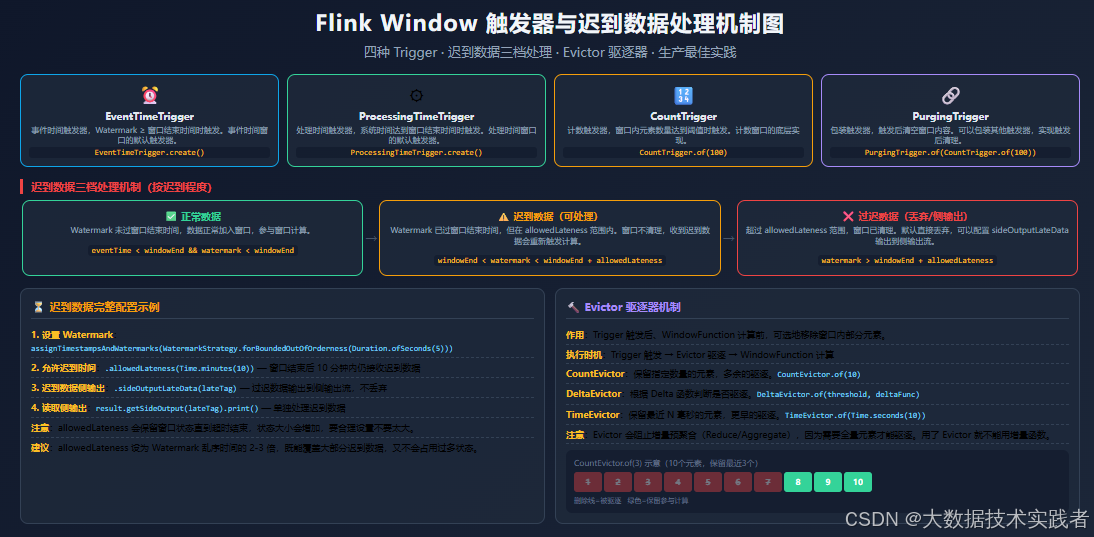
四种内置 Trigger
- EventTimeTrigger:Watermark ≥ 窗口结束时间时触发,事件时间窗口的默认触发器
- ProcessingTimeTrigger:系统时间达到窗口结束时间时触发,处理时间窗口的默认触发器
- CountTrigger:窗口内元素数量达到阈值时触发,计数窗口的底层实现
- PurgingTrigger:包装其他触发器,触发后清空窗口内容
迟到数据三档处理
迟到数据是事件时间窗口最容易出问题的地方。按迟到程度分三档:
- 正常数据:Watermark 未过窗口结束时间,数据正常加入窗口,参与计算
- 迟到数据(可处理) :Watermark 已过窗口结束时间,但在
allowedLateness范围内。窗口不清理,收到迟到数据会重新触发计算 - 过迟数据(丢弃/侧输出) :超过
allowedLateness范围,窗口已清理。默认直接丢弃,可以配置sideOutputLateData输出到侧输出流
完整代码示例:迟到数据完整配置
java
import org.apache.flink.api.common.eventtime.WatermarkStrategy;
import org.apache.flink.streaming.api.datastream.DataStream;
import org.apache.flink.streaming.api.datastream.SingleOutputStreamOperator;
import org.apache.flink.streaming.api.environment.StreamExecutionEnvironment;
import org.apache.flink.streaming.api.functions.windowing.ProcessWindowFunction;
import org.apache.flink.streaming.api.windowing.assigners.TumblingEventTimeWindows;
import org.apache.flink.streaming.api.windowing.time.Time;
import org.apache.flink.streaming.api.windowing.windows.TimeWindow;
import org.apache.flink.util.Collector;
import org.apache.flink.util.OutputTag;

import java.time.Duration;

public class LateDataExample {

    public static class Event {
        private String key;
        private long value;
        private long timestamp;
        public Event(String key, long value, long timestamp) {
            this.key = key; this.value = value; this.timestamp = timestamp;
        }
        public String getKey() { return key; }
        public long getValue() { return value; }
        public long getTimestamp() { return timestamp; }
    }

    // 迟到数据侧输出标签
    private static final OutputTag<Event> LATE_TAG = new OutputTag<Event>("late-data") {};

    public static class SumWindowFunction extends ProcessWindowFunction<Long, String, String, TimeWindow> {
        @Override
        public void process(String key, Context context, Iterable<Long> elements, Collector<String> out) {
            long sum = 0;
            for (Long v : elements) sum += v;
            out.collect(String.format("key=%s, 窗口[%d~%d), sum=%d",
                key, context.window().getStart(), context.window().getEnd(), sum));
        }
    }

    public static void main(String[] args) throws Exception {
        StreamExecutionEnvironment env = StreamExecutionEnvironment.getExecutionEnvironment();

        DataStream<Event> source = env.fromElements(
            new Event("key1", 10, 1000L),
            new Event("key1", 20, 2000L),
            // Watermark 推进到 60000 后,窗口 [0,60000) 已触发
            new Event("key1", 30, 59000L),  // 迟到但在 allowedLateness 内,重新触发
            new Event("key1", 40, 1000L)     // 过迟数据,侧输出
        );

        DataStream<Event> withTimestamps = source.assignTimestampsAndWatermarks(
            WatermarkStrategy.<Event>forBoundedOutOfOrderness(Duration.ofSeconds(2))
                .withTimestampAssigner((event, rt) -> event.getTimestamp())
        );

        SingleOutputStreamOperator<String> result = withTimestamps
            .keyBy(Event::getKey)
            .window(TumblingEventTimeWindows.of(Time.minutes(1)))
            // 允许迟到 30 秒:窗口结束后 30 秒内仍接收迟到数据
            .allowedLateness(Time.seconds(30))
            // 过迟数据输出到侧输出流(不丢弃)
            .sideOutputLateData(LATE_TAG)
            .sum("value")  // 简单 sum
            .process(new SumWindowFunction());  // 这里简化,实际用 aggregate

        // 主流输出
        result.print("主流");

        // 侧输出:过迟数据
        result.getSideOutput(LATE_TAG).print("过迟数据");

        env.execute("Late Data Example");
    }
}
关键点说明
allowedLateness(Time.seconds(30)):窗口结束后 30 秒内仍接收迟到数据,会重新触发计算sideOutputLateData(LATE_TAG):超过 allowedLateness 的数据输出到侧输出流,不丢弃result.getSideOutput(LATE_TAG):读取侧输出流,单独处理过迟数据- allowedLateness 会保留窗口状态直到超时结束,状态大小会增加,不要设太大
- 建议 allowedLateness 设为 Watermark 乱序时间的 2-3 倍
Evictor 驱逐器
Evictor 是可选组件,在 Trigger 触发后、WindowFunction 计算前,可选地移除窗口内部分元素。
- CountEvictor:保留指定数量的元素,多余的驱逐
- DeltaEvictor:根据 Delta 函数判断是否驱逐
- TimeEvictor:保留最近 N 毫秒的元素
注意:用了 Evictor 就不能用增量聚合(Reduce/Aggregate),因为 Evictor 需要全量元素才能驱逐。
09 生产环境最佳实践与常见坑
最佳实践
- 优先用事件时间窗口:结果可重现,不受系统负载影响。处理时间窗口只用于对实时性要求极高、可以接受结果不可重现的场景。
- 能用增量聚合就用增量 :ReduceFunction 和 AggregateFunction 内存占用小、性能高。必须用全量时配合增量函数(
aggregate(aggFunc, windowFunc))。 - 合理设置 Watermark 乱序时间:太小会丢数据,太大会延迟输出。根据实际数据乱序情况设置,一般 1-10 秒。
- 合理设置 allowedLateness:覆盖大部分迟到数据即可,不要设太大(会增加状态大小)。建议是 Watermark 乱序时间的 2-3 倍。
- Keyed Window 优先:windowAll 并行度只能是 1,性能差。除非必须全局统计,否则都用 keyBy + window。
- 滑动窗口注意重叠比例:窗口大小 / 滑动步长 = 重叠倍数,重叠越多计算量越大。一般不超过 4 倍。
常见坑
-
坑一:窗口不触发
- 原因:Watermark 没推进(没分配时间戳、数据源没结束、Watermark 策略有问题)
- 解决:检查
assignTimestampsAndWatermarks是否正确配置,用env.getConfig().setAutoWatermarkInterval()确认 Watermark 发送间隔
-
坑二:用了 ProcessWindowFunction 内存溢出
- 原因:全量计算把窗口内所有元素都存在状态里,大窗口 + 高吞吐 = OOM
- 解决:改用增量聚合(Reduce/Aggregate),或
aggregate(aggFunc, windowFunc)组合
-
坑三:迟到数据被丢弃
- 原因:没配置 allowedLateness,或 allowedLateness 太小
- 解决:配置
allowedLateness+sideOutputLateData,过迟数据输出到侧输出流单独处理
-
坑四:会话窗口永远不触发
- 原因:数据一直来,间隔永远小于超时时间,会话永远不结束
- 解决:合理设置超时时间,或配合全局超时(最大会话时长)
-
坑五:滑动窗口结果重复
- 原因:滑动步长小于窗口大小,同一个元素被多个窗口计算,输出多条结果(这是正常的,不是 bug)
- 解决:理解滑动窗口的语义,确认业务是否需要重叠统计
10 总结
Flink Window 是流处理的核心概念,把无界流切成有界的桶来计算。核心要点:
- 分类:Keyed/Non-Keyed × 滚动/滑动/会话/全局 × 时间/计数,生产环境 99% 用 Keyed + 事件时间滚动窗口
- 生命周期:元素分配 → 窗口创建 → 触发判断 → 计算输出 → 清理销毁,5 步走完一个窗口的一生
- 三种 WindowFunction:Reduce(简单增量)、Aggregate(灵活增量)、ProcessWindowFunction(全量+上下文),能用增量就用增量
- Trigger 和 Evictor:Trigger 决定何时触发,Evictor 决定触发后保留哪些元素,默认配置够用,高级场景再自定义
- 迟到数据:Watermark 决定窗口触发时机,allowedLateness 决定窗口清理时机,sideOutputLateData 决定过迟数据的去向,三者配合才能不丢数据