(本文使用 AI 辅助创作)
VirtualBox 是一个好用且开源的跨平台 虚拟机 软件, 支持在 GNU/Linux, Windows 等操作系统上运行虚拟机, 并且有方便操作的界面.
类似的虚拟化软件比如 QEMU/KVM 只支持在 Linux 上运行, 而 VirtualBox 还支持 Windows, 这是一个明显的优点.
本文给出自己从源代码编译 VirtualBox (在 ArchLinux 上运行) 的具体过程. 为了使编译尽量简单: (1) 借用 ArchLinux 官方的编译脚本 (类似 AUR). (2) 整个编译过程在 容器 (podman) 中进行.
这里是 (希望消除 稀缺 的) 穷人小水滴, 专注于 穷人友好型 低成本技术. (本文为 98 号作品. )
相关文章:
- 《在 VirtualBox 虚拟机中安装 Fedora CoreOS 操作系统》 juejin.cn/post/754656...
- 《离线安装 ArchLinux 操作系统 (DVD 光盘)》 juejin.cn/post/765584...
- 《在容器 (podman) 中运行虚拟机 (QEMU/KVM, libvirt)》 juejin.cn/post/740806...
- 《Linux 内核 BUG: Android 手机 USB 网络共享 故障》 juejin.cn/post/749222...
- 《低功耗低成本 PC (可更换内存条) 推荐 (笔记本, 小主机)》 juejin.cn/post/747924...
参考资料:
- www.virtualbox.org/wiki/Downlo...
- gitlab.archlinux.org/archlinux/p...
- wiki.archlinux.org/title/Arch_...
- wiki.archlinux.org/title/Podma...
- podman.io/
- aur.archlinux.org/
- github.com/fm-elpac/bu...
目录
- 1 准备工作
- 2 实际编译
- 3 测试运行
- 4 总结与展望
- 附录 1 github actions 自动化编译
1 准备工作
首先, 安装所需软件, 比如:
sh
> podman --version
podman version 6.1.2
> git --version
git version 2.55.0
下载 VirtualBox 编译脚本 (ArchLinux 官方的 PKGBUILD):
sh
git clone --single-branch --depth=1 "https://gitlab.archlinux.org/archlinux/packaging/packages/virtualbox.git"为了避免 每次编译 重复下载 VirtualBox 源代码, 我们提前下载源码包:
sh
mkdir -p out
cd out
curl -O "https://download.virtualbox.org/virtualbox/7.2.20/VirtualBox-7.2.20.tar.bz2"
提前拉取 ArchLinux (基础) 容器镜像:
sh
podman pull library/archlinux:base-devel虽然, 在国内拉取容器镜像比较麻烦 (你懂得), 但是啊, 只要思想不滑坡, 办法总比困难多, 努努力还是可以做到的:
sh
> podman images
REPOSITORY                                 TAG         IMAGE ID      CREATED        SIZE
localhost/archlinux                        base-devel  3ed18d5c7b24  3 days ago     967 MB
2 实际编译
文件 build-vbox-arch/build.sh:
sh
#!/usr/bin/env bash
# build-vbox-arch/build.sh
set -euo pipefail

# PKGBUILD
cp -r /build/virtualbox /build/tmp/virtualbox

# 源码包
cp /build/out/VirtualBox-7.2.20.tar.bz2 /build/tmp/virtualbox

# TODO patch

# DEBUG
echo "!!! /build/tmp/virtualbox/PKGBUILD"
cat /build/tmp/virtualbox/PKGBUILD

# 修复 编译报错:
# /build/tmp/virtualbox/src/VirtualBox-7.2.16/src/VBox/Runtime/common/misc/buildconfig.cpp:49:5: error: return-statement with no value, in function returning 'uint32_t' {aka 'unsigned int'} [-fpermissive]
#    49 |     return IPRT_BLDCFG_SCM_REV;
#       |     ^~~~~~
# kmk: *** [/build/tmp/virtualbox/src/VirtualBox-7.2.16/kBuild/footer-pass2-compiling-targets.kmk:277: /build/tmp/virtualbox/src/VirtualBox-7.2.16/out/linux.amd64/release/obj/RuntimeBldProg/common/misc/buildconfig.o] Error 1
rm -rf /build/tmp/virtualbox/.git

# 开始编译
echo "!!! building .. ."
chown -R builder:builder /build/tmp/virtualbox/

su builder -c "cd /build/tmp/virtualbox/ && makepkg -s --noconfirm"

# 编译结果
cp /build/tmp/virtualbox/*.pkg.tar.zst /build/out
文件 build-vbox-arch/Dockerfile:
Dockerfile
# build-vbox-arch/Dockerfile
FROM archlinux:base-devel

WORKDIR /build

# 国内镜像
RUN echo "Server = https://mirrors.pku.edu.cn/archlinux/\$repo/os/\$arch" > /etc/pacman.d/mirrorlist

# 安装依赖
RUN pacman -Syu --noconfirm && \
    pacman -S --needed --noconfirm git

# (archlinux) PKGBUILD
# git clone --single-branch --depth=1 "https://gitlab.archlinux.org/archlinux/packaging/packages/virtualbox.git"
COPY virtualbox virtualbox

# 安装 makedepends
RUN bash -c 'source virtualbox/PKGBUILD && pacman -S --needed --noconfirm "${makedepends[@]}"'

# 创建 编译用户
RUN useradd -m builder && \
    echo 'builder ALL=(ALL) NOPASSWD: ALL' > /etc/sudoers.d/builder

# 编译脚本
COPY build.sh .
# 容器挂载目录
RUN chmod +x build.sh && \
    mkdir -p /build/tmp && \
    mkdir -p /build/out

ENTRYPOINT ["/build/build.sh"]

# podman run --rm -v $PWD/tmp:/build/tmp -v $PWD/out:/build/out -v $PWD/build.sh:/build/build.sh build-vbox-1
首先制作 基础容器镜像:
sh
podman build -t build-vbox-1 .这个容器镜像会打包编译所需的所有依赖:
sh
> podman images
REPOSITORY                                 TAG         IMAGE ID      CREATED         SIZE
localhost/build-vbox-1                     latest      489541af4792  45 seconds ago  2.26 GB
localhost/archlinux                        base-devel  3ed18d5c7b24  3 days ago      967 MB
然后开始 实际编译:
sh
podman run --rm -v $PWD/tmp:/build/tmp -v $PWD/out:/build/out -v $PWD/build.sh:/build/build.sh build-vbox-1硬件: 小主机 GMK M5 (CPU r7-5825u, 8 核 16 线程, 15W 功耗, 内存 DDR4-3200 双通道).
16GB 内存 用于编译应该是够用的, 编译用时约 33 分钟, 总的磁盘占用约 8.7 GB.
编译结果:
sh
> cd out
> ls -l

-rw-r--r-- 1 s2 s2  70196173  9月25日 23:06 virtualbox-7.2.20-1-x86_64.pkg.tar.zst
-rw-r--r-- 1 s2 s2 256073076  9月25日 22:14 VirtualBox-7.2.20.tar.bz2
-rw-r--r-- 1 s2 s2 389365083  9月25日 23:06 virtualbox-debug-7.2.20-1-x86_64.pkg.tar.zst
-rw-r--r-- 1 s2 s2     45372  9月25日 23:06 virtualbox-ext-vnc-7.2.20-1-x86_64.pkg.tar.zst
-rw-r--r-- 1 s2 s2   1101661  9月25日 23:06 virtualbox-guest-utils-7.2.20-1-x86_64.pkg.tar.zst
-rw-r--r-- 1 s2 s2    545897  9月25日 23:06 virtualbox-guest-utils-nox-7.2.20-1-x86_64.pkg.tar.zst
-rw-r--r-- 1 s2 s2   2173504  9月25日 23:06 virtualbox-host-dkms-7.2.20-1-x86_64.pkg.tar.zst
-rw-r--r-- 1 s2 s2   9360692  9月25日 23:06 virtualbox-sdk-7.2.20-1-x86_64.pkg.tar.zst
源码包 (VirtualBox-7.2.20.tar.bz2) 256MB, 编译出的主包 (virtualbox-7.2.20-1-x86_64.pkg.tar.zst) 70MB.
3 测试运行
安装软件包:
sh
sudo pacman -U virtualbox-7.2.20-1-x86_64.pkg.tar.zst然后启动 VirtualBox:
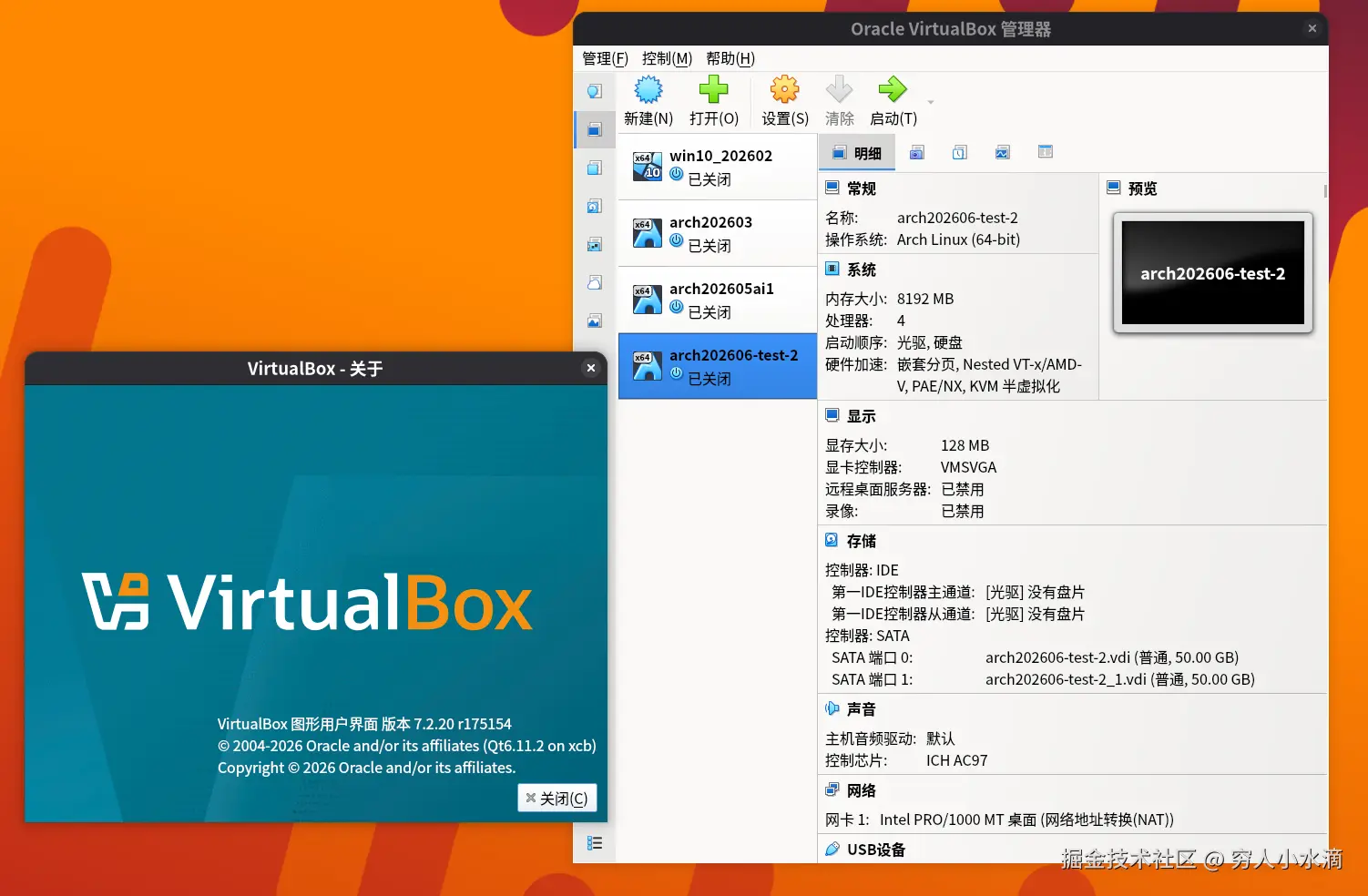
启动虚拟机:
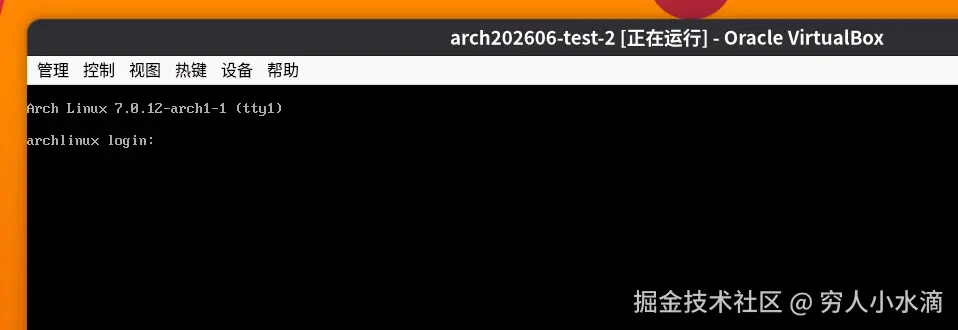
大成功 ! 撒花 ~~
4 总结与展望
借助 ArchLinux 官方的编译脚本, 以及容器, 从源代码编译 VirtualBox 还是比较容易的.
如果想对 VirtualBox 做高级的自定义修改 (改代码), 那么 编译 出来是必备的前置条件.
VirtualBox 的 Linux 版, 因为不涉及数字签名等复杂的东西, 编译相对比较简单. 而 Windows 版就麻烦多了, 不仅编译 (环境准备) 十分困难, 其 内核驱动 还涉及数字签名 (Oracle 官方发布的安装包有数字签名), 所以很不好弄. 技术问题 (具体如何编译) 还能想办法解决, 但 数字签名 是真的没有办法. 所以, 数字时代, 数字签名 即 权力 (狗头
附录 1 github actions 自动化编译
文件 build-vbox-arch/.github/workflows/build.yml:
yaml
# 手动运行: 编译
name: Build VirtualBox (patched)

on:
  workflow_dispatch:
    inputs:

jobs:
  build:
    runs-on: ubuntu-latest
    steps:
      - uses: actions/checkout@v7

      - run: git clone --single-branch --depth=1 "https://gitlab.archlinux.org/archlinux/packaging/packages/virtualbox.git"

      - run: mkdir tmp out

      - run: docker build -t build-vbox-1 .

      - run: docker run --rm -v $PWD/tmp:/build/tmp -v $PWD/out:/build/out build-vbox-1

      - uses: actions/upload-artifact@v7
        with:
          name: patched-virtualbox
          path: out/*.pkg.tar.zst
这个可以实现 一键 编译, 用时大约 34 分钟.
本文使用 CC-BY-SA 4.0 许可发布.