💁♂️个人主页:进击的荆棘
👇作者其它专栏:
目录
1.理解"文件"
2.C文件接口
3.系统文件I/O
4.理解"一切皆文件"
5.缓冲区
4.理解"一切皆文件"
首先,在windows中是文件的东西,在linux中也是文件;其次一些在windows中不是文件的东西,如:进程、磁盘、显示器、键盘这样的硬件设备也被抽象成了文件,可以使用访问文件的方法访问它们获得信息;甚至管道也是文件;将来网络编程中的socket(套接字)这样的东西,使用的接口跟文件接口也是一致的。
这样做最明显的好处是,开发者仅需使用一套API和开发工具,即可调取Linux系统中绝大部分的资源。例:Linux中几乎所有读(读文件,读系统状态,读PIPE)的操作都可以用read函数进行;几乎所有(更改文件,更改系统参数,写PIPE)的操作都可以用write函数来进行。
当打开一个文件是,操作系统为了管理所打开的文件,都会为这个文创建一个file结构体,该结构体定义在在/usr/src/kernels/3.10.0-1160.71.1.el7.x86_64/include/linux/fs.h下,以下展示了我们所关心的内容:
cpp
struct file {
    ...
    struct inode *f_inode; /* cached value */
    const struct file_operations *f_op;
    ...
    atomic_long_t f_count; // 表⽰打开⽂件的引⽤计数,如果有多个⽂件指针指
向它,就会增加f_count的值。
    unsigned int f_flags; // 表⽰打开⽂件的权限
    fmode_t f_mode; // 设置对⽂件的访问模式,例如:只读,只写等。所
有的标志在头⽂件<fcntl.h> 中定义
    loff_t f_pos; // 表⽰当前读写⽂件的位置
    ...
} __attribute__((aligned(4))); /* lest something weird decides that 2 is OK
*/
struct file中的f_op指针指向了一个file_operations结构体,这个结构体中的成员除了struct module* owner其余都是函数指针。该结构和struct file都在fs.h下
cpp
truct file_operations {
    struct module *owner;
    //指向拥有该模块的指针;
    loff_t (*llseek) (struct file *, loff_t, int);
    //llseek ⽅法⽤作改变⽂件中的当前读/写位置, 并且新位置作为(正的)返回值.
    ssize_t (*read) (struct file *, char __user *, size_t, loff_t *);
    //⽤来从设备中获取数据. 在这个位置的⼀个空指针导致 read 系统调⽤以 -
EINVAL("Invalid argument") 失败. ⼀个⾮负返回值代表了成功读取的字节数( 返回值是⼀个
"signed size" 类型, 常常是⽬标平台本地的整数类型).
    ssize_t (*write) (struct file *, const char __user *, size_t, loff_t *);
    //发送数据给设备. 如果 NULL, -EINVAL 返回给调⽤ write 系统调⽤的程序. 如果⾮负,
返回值代表成功写的字节数.
    ssize_t (*aio_read) (struct kiocb *, const struct iovec *, unsigned long,
loff_t);
    //初始化⼀个异步读 -- 可能在函数返回前不结束的读操作.
    ssize_t (*aio_write) (struct kiocb *, const struct iovec *, unsigned
long, loff_t);
    //初始化设备上的⼀个异步写.
    int (*readdir) (struct file *, void *, filldir_t);
    //对于设备⽂件这个成员应当为 NULL; 它⽤来读取⽬录, 并且仅对**⽂件系统**有⽤.
    unsigned int (*poll) (struct file *, struct poll_table_struct *);
    int (*ioctl) (struct inode *, struct file *, unsigned int, unsigned long);
    long (*unlocked_ioctl) (struct file *, unsigned int, unsigned long);
    long (*compat_ioctl) (struct file *, unsigned int, unsigned long);
    int (*mmap) (struct file *, struct vm_area_struct *);
    //mmap ⽤来请求将设备内存映射到进程的地址空间. 如果这个⽅法是 NULL, mmap 系统调⽤
返回 -ENODEV.
    int (*open) (struct inode *, struct file *);
    //打开⼀个⽂件
    int (*flush) (struct file *, fl_owner_t id);
    //flush 操作在进程关闭它的设备⽂件描述符的拷⻉时调⽤;
    int (*release) (struct inode *, struct file *);
    //在⽂件结构被释放时引⽤这个操作. 如同 open, release 可以为 NULL.
    int (*fsync) (struct file *, struct dentry *, int datasync);
    //⽤⼾调⽤来刷新任何挂着的数据.
    int (*aio_fsync) (struct kiocb *, int datasync);
    int (*fasync) (int, struct file *, int);
    int (*lock) (struct file *, int, struct file_lock *);
    //lock ⽅法⽤来实现⽂件加锁; 加锁对常规⽂件是必不可少的特性, 但是设备驱动⼏乎从不实
现它.
    ssize_t (*sendpage) (struct file *, struct page *, int, size_t, loff_t *,
int);
    unsigned long (*get_unmapped_area)(struct file *, unsigned long, unsigned
    long, unsigned long, unsigned long);
    int (*check_flags)(int);
    int (*flock) (struct file *, int, struct file_lock *);
    ssize_t (*splice_write)(struct pipe_inode_info *, struct file *, loff_t
*, size_t, unsigned int);
    ssize_t (*splice_read)(struct file *, loff_t *, struct pipe_inode_info *,
size_t, unsigned int);
    int (*setlease)(struct file *, long, struct file_lock **);
};
file_operation就是把系统调用和驱动程序关联起来的关键数据结构,这个结构的每一个成员都对应着一个系统调用。读取file_operation中相应的函数指针,接着把控制权转交给函数,从而完成Linux设备驱动程序的工作。
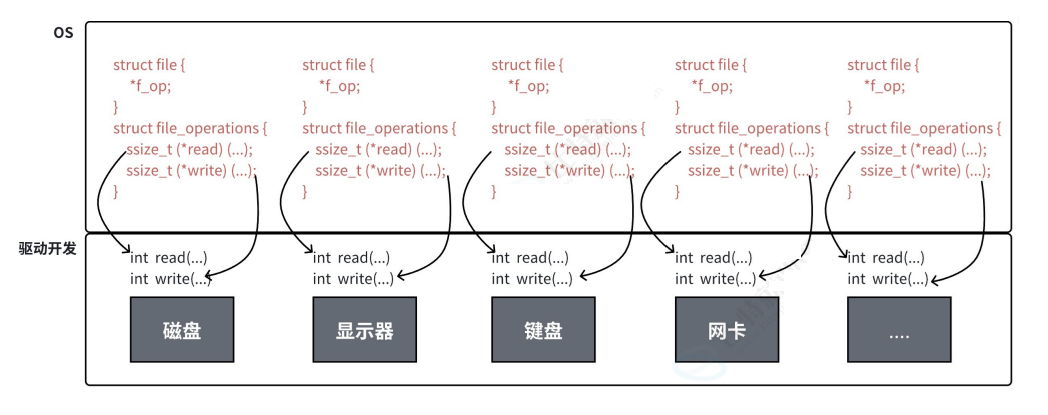
上图中的外设,每个设备都可以有自己的read、write,但一定是对应着不同的操作方法。但通过struct file下file_operation中的各种函数回调,让开发者只用file便可调取Linux系统中绝大部分的资源。
5.缓冲区
5.1什么是缓冲区
缓冲区是内存空间的一部分。即在内存空间预留了一定的存储空间,这些存储空间用来缓冲输入或输出的数据,这部分预留的空间就叫做缓冲区。缓冲区根据其对应的是输入设备还是输出设备,分为输入缓冲区和输出缓冲区。
5.2为什么要引入缓冲区机制
读写文件时,若不会开辟对文件操作的缓冲区,直接通过系统调用对磁盘进行操作(读、写等),那么每次对文件进行一次读写操作时,都需要使用读写系统调用来处理此操作,即需要执行一次系统调用,执行一次系统调用将涉及到CPU状态的切换,即从用户空间切换到内核空间,实现进程上下文的切换,这将损耗一定的CPU时间,频繁的磁盘访问对程序的执行效率造成很大的影响。
为了减少使用系统调用的次数,提高效率,我们就可以采用缓存机制。比如:从磁盘中取信息,可以在磁盘文件进行操作时,可以一次从文件中读出大量的数据到缓冲区中,以后对这部分的访问就不需要再使用系统调用了,等缓冲区的数据取完后再去磁盘中读取,这样就可以减少磁盘的读写次数,再加上计算机对缓冲区的操作大大快于对磁盘的操作,故应用缓冲区可大大提高计算机的运行速度。
又如:我们使用打印机打印文档,由于打印机的打印速度相对较慢,可以先把文档输出到打印机相应的缓冲区,打印机再自行逐步打印,这时CPU可以处理其它事情。可以看出,缓冲区就是一块内存区,它用再输入输出设备和CPU之间,用来缓存数据。它使得低速的输入输出设备和高速的CPU能够协调工作,避免低速的输入输出设备占用CPU,解放出CPU,使其能高效工作。
5.3缓冲类型
标准I/O提供了3种类型的缓冲区
●全缓冲区:这种缓存方式要求填满整个缓冲区后才进行I/O系统调用操作。对于磁盘文件的操作通常使用全缓冲的方式访问。
●行缓冲区:在行缓冲情况下,当输入和输出种遇到换行符时,标准I/O库函数将会执行系统调用操作。当所操作的流涉及一个终端时(如标准输入和标准输出),使用行缓冲方式。因为标准I/O库每行的缓冲区长度是固定的,所以只要填满了缓冲区,即使还没有遇到换行符,也会执行I/O系统调用操作,默认行缓冲区的大小是1024。
●无缓冲区:无缓冲区是指标准I/O库不对字符进行缓存,直接调用系统调用。标准出错流stderr通常是不带缓冲区的,这使得出错信息能够尽快地显示出来。
除了上述列举的默认刷新方式,下列特殊情况也会引发缓冲区的刷新:
1.缓冲区满时;
2.执行flsuh语句;
3.进程结束
cpp
#include <stdio.h>
#include <string.h>
#include <sys/types.h>
#include <sys/stat.h>
#include <fcntl.h>
#include <unistd.h>

int main() {
    close(1);
    int fd = open("log.txt", O_WRONLY | O_CREAT | O_TRUNC, 0666);
    if (fd < 0) {
        perror("open");
        return 0;
    }
    printf("hello world: %d\n", fd);
    close(fd);
    return 0;
}
这段代码的本意是应用重定向思维,让本应打印到显示器上的内容写到"log.txt"文件中,但实际上,程序运行结束后,文件中并没有写入内容:
cpp
[sjx@VM-8-12-centos buffer]$ ./myfile
[sjx@VM-8-12-centos buffer]$ ls
log.txt makefile myfile myfile.c
[sjx@VM-8-12-centos buffer]$ cat log.txt
[sjx@VM-8-12-centos buffer]$
这是因为我们将1号描述符重定向到磁盘文件后,缓冲区的刷新方式成为了全缓冲。而写入的内容并没有填满整个缓冲区,导致并不会将缓冲区的内容刷新到磁盘文件中。可以使用fflush强制刷新缓冲区。
cpp
#include <stdio.h>
#include <string.h>
#include <sys/types.h>
#include <sys/stat.h>
#include <fcntl.h>
#include <unistd.h>

int main() {
    close(1);
    int fd = open("log.txt", O_WRONLY | O_CREAT | O_TRUNC, 0666);
    if (fd < 0) {
        perror("open");
        return 0;
    }
    printf("hello world: %d\n", fd);
    fflush(stdout);
    close(fd);
    return 0;
}
还有一种解决方法,并且可以验证stderr是不带缓冲区的
cpp
#include <stdio.h>
#include <string.h>
#include <sys/types.h>
#include <sys/stat.h>
#include <fcntl.h>
#include <unistd.h>

int main() {
    close(2);
    int fd = open("log.txt", O_WRONLY | O_CREAT | O_TRUNC, 0666);
    if (fd < 0) {
        perror("open");
        return 0;
    }
    perror("hello world");
    close(fd);
    return 0;
}
这种方式可以将2号文件描述符重定向至文件,由于stderr没有缓冲区,"hello world"不用fflush就可以写入文件:
cpp
[sjx@VM-8-12-centos buffer]$ ./myfile
[sjx@VM-8-12-centos buffer]$ cat log.txt
hello world: Success
5.4FILE
●因为IO相关函数与系统调用接口对应,并且库函数封装系统调用,所以本质上,访问文件都是通过fd访问的
●所以C库中FILE结构体内部,必定封装了fd
cpp
#include <stdio.h>
#include <string.h>

int main()
{
    const char *msg0="hello printf\n";
    const char *msg1="hello fwrite\n";
    const char *msg2="hello write\n";
    printf("%s", msg0);
    fwrite(msg1, strlen(msg0), 1, stdout);
    write(1, msg2, strlen(msg2));
    fork();
    return 0;
}
结果:
hello printf
hello fwrite
hello write
但若对进程实现输出重定向,./hello > file,结果就变成了:
hello write
hello printf
hello fwrite
hello printf
hello fwrite
其中printf和fwrite(库函数)都输出了2次,而write只输出了一次(系统调用)。为什么fork会导致这种结果?
●一般C库函数写入文件时是全缓冲的,而写入显示器是行缓冲
●printf、fwrite库函数会自带缓冲区,当发生重定向到普通文件时,数据的缓冲方式由行缓冲变成了全缓冲
●而我们放出缓冲区中的数据,就不会被立即刷新,设置fork之后
●但是进程退出后,会统一属性,写入文件当中
●但是fork的时候,父子数据会发生写时拷贝,当父进程准备刷新的时候,子进程也就有了相同的一份数据,所以产生两份数据
●但write只输出一次,是因为,write是系统调用,直接写到内核缓冲区
综上:printf,fwrite库函数会自带缓冲区,而write系统调用没有带缓冲区。另外,上文提到的缓冲区,都是用户级缓冲区。实际上为了提升整机性能,OS也会提供相关内核级缓冲区。
那这个缓冲区由谁提供?printf,fwrite是库函数,write是系统调用,库函数在系统调用的"上层",是对系统调用的"封装",但是write没有提供缓冲区(用户级),而printf,fwrite有,就可以说明,该缓冲区是二次加上的,因为是C库函数,所以由C标准库提供。
C库中FILE结构体:
cpp
在/usr/include/libio.h
struct _IO_FILE {
    int _flags; /* High-order word is _IO_MAGIC; rest is flags.
*/
#define _IO_file_flags _flags
    //缓冲区相关
    /* The following pointers correspond to the C++ streambuf protocol. */
    /* Note: Tk uses the _IO_read_ptr and _IO_read_end fields directly. */
    char* _IO_read_ptr; /* Current read pointer */
    char* _IO_read_end; /* End of get area. */
    char* _IO_read_base; /* Start of putback+get area. */
    char* _IO_write_base; /* Start of put area. */
    char* _IO_write_ptr; /* Current put pointer. */
    char* _IO_write_end; /* End of put area. */
    char* _IO_buf_base; /* Start of reserve area. */
    char* _IO_buf_end; /* End of reserve area. */
    /* The following fields are used to support backing up and undo. */
    char *_IO_save_base; /* Pointer to start of non-current get area. */
    char *_IO_backup_base; /* Pointer to first valid character of backup area
    */
    char *_IO_save_end; /* Pointer to end of non-current get area. */
    struct _IO_marker *_markers;
    struct _IO_FILE *_chain;
    int _fileno; //封装的⽂件描述符
#if 0
    int _blksize;
#else
    int _flags2;
#endif
    _IO_off_t _old_offset; /* This used to be _offset but it's too small. */
#define __HAVE_COLUMN /* temporary */
    /* 1+column number of pbase(); 0 is unknown. */
    unsigned short _cur_column;
    signed char _vtable_offset;
    char _shortbuf[1];
    /* char* _save_gptr; char* _save_egptr; */
    _IO_lock_t *_lock;
#ifdef _IO_USE_OLD_IO_FILE
};
5.5手写一个简单的libc库
mystdio.h
cpp
#pragma once

#include <stdio.h>

#define MAX 1024
//缓冲区刷新
#define NONE_FLUSH 1
#define LINE_FLUSH 2
#define FULL_FLUSH 3

typedef struct IO_FILE{
  int fileno;
  int filemode;
  char outbuffer[MAX];
  int bufferlen;
  int flush_method;
}MyFile;

MyFile* MyFOpen(const char *path, const char *mode);
void MyFClose(MyFile *);
int MyFWrite(MyFile *,void *str,int len);
void MyFFlush(MyFile* );
mystdio.c
cpp
#include "mystdio.h"

#include <string.h>
#include <sys/types.h>
#include <sys/stat.h>
#include <fcntl.h>
#include <stdlib.h>
#include <unistd.h>

static MyFile* buyfile(int fd,int filemode){
  MyFile* file=(MyFile*)malloc(sizeof(MyFile));
  if(file==NULL) return NULL;
  file->filemode=filemode;
  file->fileno=fd;
  file->bufferlen=0;
  file->flush_method=LINE_FLUSH;
  memset(file->outbuffer,0,sizeof(file->outbuffer));
  return file;
}

MyFile* MyFOpen(const char *path, const char *mode){
  int fd=-1;
  int filemode=0;
  if(strcmp(mode,"w")==0){
    filemode=O_CREAT|O_WRONLY|O_TRUNC;
  }
  else if(strcmp(mode,"r")==0){
    filemode=O_RDONLY;
  }
  else if(strcmp(mode,"a")==0){
    filemode=O_CREAT|O_WRONLY|O_APPEND;
  }
  else{
    //
  }
  fd=open(path,filemode,0666);

  if(fd<0) return NULL;
  return buyfile(fd,filemode);
}

void MyFClose(MyFile *file){
  if(file->filemode<0) return ;
  MyFFlush(file);
  file->fileno=0;
  free(file);
}

int MyFWrite(MyFile *file,void *str,int len){
  //1.拷贝
  memcpy(file->outbuffer+file->bufferlen,str,len);
  file->bufferlen+=len;
  //判断刷新
  if((file->flush_method&LINE_FLUSH)&&(file->outbuffer[file->bufferlen-1]=='\n'))
    MyFFlush(file);
  return 0;
}

void MyFFlush(MyFile* file){
  //把数据从用户拷贝到内核文件缓冲区中
  int n=write(file->fileno,file->outbuffer,file->bufferlen);
  (void)n;//消除编译器报警
  fsync(file->fileno);//强制将文件数据和元数据从内核页缓存写入磁盘
  file->bufferlen=0;
}
usercode.c
cpp
#include "mystdio.h"
#include <string.h>
#include <unistd.h>

int main(){
  MyFile* fp=MyFOpen("log.txt","w");
  if(!fp){
    printf("MyfOpen failed\n");
    return 1;
  }
  const char* msg="hello world";
  int cnt=10;
  while(cnt--){
    MyFWrite(fp,(char*)msg,strlen(msg));
    MyFFlush(fp);
    printf("buffer:%s\n",fp->outbuffer);
    sleep(1);
  }
  MyFClose(fp);
  return 0;
}