适用读者:JDK 8 + Spring Boot 老项目在手,想接入 AI 但不知道从哪下手的 Java 后端开发。
本章内容:
- 第一层:JDK 8 调通大模型 API,实现第一次对话
- 第二层:加一层缓存,让高频问答不再重复花钱
- 第三层:并发控制 + 限流熔断,上线不慌
- 第四层:流式输出,打字机效果拉满
一、写在前面:选型对比
开始动手之前,先聊聊市面上主流的 Java AI 集成方案:
| 方案 | 定位 | JDK 8 兼容 | 学习成本 | 生产成熟度 | 我的选择 |
|---|---|---|---|---|---|
| LangChain4j(旧版 v0.1.0 ~ v0.35.0) | Java 版 LangChain 框架 | ❌ 编译即 JDK 11+ | 中 | 中 | ❌ 放弃 |
| LangChain4j(新版 v0.36.0 ~ 至今) | Java 版 LangChain 框架 | ❌ 最低 JDK 17 | 中 | 中 | ❌ 放弃 |
| Spring AI | Spring 官方 AI 框架 | ❌ 最低 JDK 17 | 低 | 低 | ❌ 放弃 |
| Dify | 开源 LLMOps 平台 | 无关(独立部署) | 低 | 高 | ⚠️ 非核心场景 |
| 直调 SDK | 阿里/百度等厂商 Java SDK | ✅ 支持 | 最低 | 最高 | ✅ 最终选择 |
为什么?
- LangChain4j:旧版(v0.1.0 ~ v0.35.0)源码层面声称兼容 JDK 8,但实际编译产物 class 版本号为 55(JDK 11),JDK 8 物理上无法加载;新版(v0.36.0 ~ 至今)已正式要求 JDK 17。无论新旧,JDK 8 项目都用不了。
- Spring AI:从出生第一天就要求 JDK 17,JDK 8 项目直接出局。
- Dify:适合做原型验证或非核心场景。但要独立部署,数据要传到第三方平台,合规那关过不了。
- 直调 SDK:JDK 8 兼容,一个 jar 包搞定,不加全家桶,灵活性最高。想加鉴权加鉴权,想加缓存加缓存。
二、项目背景
改造前,系统中的知识库管理模块就是一个纯 CRUD:
- 知识列表(分页展示)
- 知识搜索(MySQL LIKE 模糊匹配)
- 知识管理(新增 / 编辑 / 删除)
搜索靠 WHERE title LIKE '%keyword%',查不到就拉倒。
老板说:「能不能让员工像用 ChatGPT 一样查知识库?」
本文就做一件事:在 JDK 8 + Spring Boot 老项目里,从零开始,四层递进,最终实现一个能对话、有缓存、能抗并发、打字机效果的 AI 问答能力。
三、第一层:基础对话------调通 API,先跑起来
3.1 核心调用封装
java
private static final String SYSTEM_PROMPT =
    "你是专业的业务知识助手,回答精准简洁,只讲技术干货。";

private MultiModalConversationParam buildParam(String userMessage) {
    return MultiModalConversationParam.builder()
            .apiKey(apiKey)
            .model(model)
            .messages(Arrays.asList(buildSystemMsg(), buildUserMsg(userMessage)))
            .temperature(temperature)
            .maxTokens(maxTokens)
            .build();
}
3.2 发起同步调用
java
public String singleChat(String userMessage) throws Exception {
    MultiModalConversationParam param = buildParam(userMessage);
    MultiModalConversation conv = new MultiModalConversation();
    MultiModalConversationResult result = conv.call(param);
    return extractContent(result);
}
3.3 提取模型返回内容
返回结果嵌套较深,提取时每一步都要做防御性检查:
java
private String extractContent(MultiModalConversationResult result) {
    if (result.getOutput() == null
            || result.getOutput().getChoices() == null
            || result.getOutput().getChoices().isEmpty()) {
        return "";
    }
    Object text = result.getOutput().getChoices().get(0)
            .getMessage().getContent().get(0).get("text");
    return text != null ? text.toString() : "";
}
3.4 暴露 Controller 接口
java
@PostMapping("/send")
public ResponseResult<String> chat(@RequestBody ChatRequestDto request) {
    try {
        String reply = chatService.singleChat(request.getMessage());
        return ResponseResult.success(reply);
    } catch (Exception e) {
        log.error("模型调用失败", e);
        return ResponseResult.fail("模型调用失败,请稍后重试");
    }
}
第一层成果 :POST /api/chat/send 已就绪,输入问题,返回答案。核心代码不到 40 行。
前端对接
前端 SendChat.vue 不需要自己写聊天框逻辑,直接复用通用组件 AiChatBase,只需配一个 modeConfig:
vue
<script setup>
import AiChatBase from './AiChatBase.vue'
import { sendChatMessage } from '@/api/chat'

const modeConfig = {
  title: '单轮对话',
  description: '标准问答模式,每次独立调用通义千问大模型',
  apiFn: sendChatMessage  // → POST /api/chat/send
}
</script>

<template>
  <AiChatBase :mode-config="modeConfig" />
</template>
API 层也极简,一行配置:
js
export function sendChatMessage(message) {
  return apiClient.post('/chat/send', { message })
}
四、第二层:加缓存------同样的问题,不再花第二份钱
第一层有个问题:同样的问题问 10 次,就要调 10 次 API,花 10 份钱。
第二层做的事:在调模型之前,先查缓存。
4.1 新增:Caffeine 缓存配置
java
@Bean
public Cache<String, String> chatAnswerCache() {
    return Caffeine.newBuilder()
            .maximumSize(1000)
            .expireAfterWrite(1, TimeUnit.HOURS)
            .build();
}
4.2 新增:缓存查询逻辑
java
public String chatWithCache(String question) throws Exception {
    String cacheKey = question.trim().toLowerCase();

    // 先查缓存
    String cachedAnswer = chatAnswerCache.getIfPresent(cacheKey);
    if (cachedAnswer != null) {
        return cachedAnswer;
    }

    // 未命中才调模型
    String answer = singleChat(question);
    chatAnswerCache.put(cacheKey, answer);
    return answer;
}
4.3 新增:带缓存的接口
java
@PostMapping("/cache")
public ResponseResult<String> chatWithCache(@RequestBody ChatRequestDto request) {
    String reply = chatService.chatWithCache(request.getMessage());
    return ResponseResult.success(reply);
}第二层新增代码:~15 行。
成果:高频问题命中缓存,响应从 3 秒降到毫秒级,API 费用直降 70%。
前端对接
CacheChat.vue 同样复用 AiChatBase,只换一个 apiFn,告诉前端:这次调用走缓存逻辑:
vue
<script setup>
import AiChatBase from './AiChatBase.vue'
import { sendChatWithCache } from '@/api/chat'

const modeConfig = {
  title: '缓存问答',
  description: '带缓存的问答模式,同样的问题不再重复调用模型',
  apiFn: sendChatWithCache  // → POST /api/chat/cache
}
</script>

<template>
  <AiChatBase :mode-config="modeConfig" />
</template>
五、第三层:并发控制 + 限流熔断------上线不怕被挤爆
第二层上线后,全公司几百人同时用。大模型 API 有并发限制,瞬间打穿怎么办?
第三层做的事:两层防护------Semaphore 控制业务并发,Sentinel 做流量熔断。
5.1 Semaphore 并发控制
java
@Bean
public Semaphore modelSemaphore() {
    return new Semaphore(10); // 最多 10 路并发
}
java
public String chatWithConcurrencyControl(String question) {
    boolean acquired = false;
    try {
        acquired = modelSemaphore.tryAcquire(30, TimeUnit.SECONDS);
        if (!acquired) {
            return "当前咨询人数较多,请稍后再试";
        }
        return singleChat(question);
    } catch (Exception e) {
        return "请求中断,请重试";
    } finally {
        if (acquired) {
            modelSemaphore.release();
        }
    }
}
java
@PostMapping("/concurrency")
public ResponseResult<String> chatWithConcurrencyControl(
        @RequestBody ChatRequestDto request) {
    String reply = chatService.chatWithConcurrencyControl(request.getMessage());
    return ResponseResult.success(reply);
}
5.2 Sentinel 限流熔断
并发控制挡住了业务层,但突发流量还需要更细粒度的防护。
java
@PostConstruct
public void initSentinelRules() {
    FlowRule chatRule = new FlowRule("chat_interface")
            .setCount(10)
            .setGrade(RuleConstant.FLOW_GRADE_QPS);
    FlowRuleManager.loadRules(Collections.singletonList(chatRule));
}
加注解保护:
java
@Override
@SentinelResource(
    value = "chat_interface",
    blockHandlerClass = ChatSentinelHandler.class,
    blockHandler = "chatBlockHandler",
    fallbackClass = ChatSentinelHandler.class,
    fallback = "chatFallback"
)
public String chat(String question) throws Exception {
    return singleChat(question);
}兜底策略------限流时给提示,熔断时从缓存捞旧数据,保证「有总比没有好」:
java
public static String chatBlockHandler(String question, BlockException e) {
    return "当前咨询人数较多,请稍后再试";
}

public static String chatFallback(String question) {
    String cacheAnswer = cache.getIfPresent(question.trim().toLowerCase());
    if (cacheAnswer != null) {
        return cacheAnswer;
    }
    return "当前系统繁忙,请稍后重试";
}第三层新增代码:~40 行。
成果:即使瞬间涌入上千请求,系统自动限流降级,核心服务稳如泰山。
前端对接
ConcurrencyChat.vue 仍然是同一套模板,apiFn 指向并发控制的接口即可:
vue
<script setup>
import AiChatBase from './AiChatBase.vue'
import { sendChatWithConcurrency } from '@/api/chat'

const modeConfig = {
  title: '并发控制',
  description: '带并发控制的问答模式,信号量限制最多 10 路并发',
  apiFn: sendChatWithConcurrency  // → POST /api/chat/concurrency
}
</script>

<template>
  <AiChatBase :mode-config="modeConfig" />
</template>
三个同步模式共用一个 AiChatBase 组件,只有 apiFn 不同------这是前后端分离架构天然的红利。
六、第四层:流式输出------打字机效果,体验拉满
第三层的问题:用户要盯着转圈等 5-10 秒,答案才一次性弹出来。
第四层做的事:改为 SSE(Server-Sent Events)流式推送,模型生成一个字,推一个字。
6.1 SSE 接口
java
@GetMapping(value = "/stream", produces = MediaType.TEXT_EVENT_STREAM_VALUE)
public SseEmitter streamChat(@RequestParam String question) {
    SseEmitter emitter = new SseEmitter(120_000L);

    streamExecutor.execute(() -> {
        try {
            qwenChatService.streamChat(question, emitter);
        } catch (Exception e) {
            // 异常处理
        }
    });

    return emitter;
}
6.2 流式调用 + 缓存回放
java
public void streamChat(String question, SseEmitter emitter) throws Exception {
    String cacheKey = question.trim().toLowerCase();

    // 缓存命中 → 逐字回放(打字机效果)
    String cachedAnswer = chatAnswerCache.getIfPresent(cacheKey);
    if (cachedAnswer != null) {
        for (int i = 0; i < cachedAnswer.length(); i++) {
            emitter.send(SseEmitter.event()
                .name("message")
                .data(String.valueOf(cachedAnswer.charAt(i))));
            Thread.sleep(12);
        }
        emitter.send(SseEmitter.event().name("done").data("[DONE]"));
        emitter.complete();
        return;
    }

    // 真正的流式调用
    MultiModalConversation conv = new MultiModalConversation();
    Flowable<MultiModalConversationResult> flow = conv.streamCall(param);

    StringBuilder fullAnswer = new StringBuilder();
    flow.blockingForEach(result -> {
        String chunk = extractContent(result);
        if (!chunk.isEmpty()) {
            fullAnswer.append(chunk);
            emitter.send(SseEmitter.event().name("message").data(chunk));
        }
    });

    // 完整答案写入缓存
    chatAnswerCache.put(cacheKey, fullAnswer.toString());
    emitter.send(SseEmitter.event().name("done").data("[DONE]"));
    emitter.complete();
}
6.3 专用线程池
java
@Bean
public ThreadPoolTaskExecutor streamExecutor() {
    ThreadPoolTaskExecutor executor = new ThreadPoolTaskExecutor();
    executor.setCorePoolSize(4);
    executor.setMaxPoolSize(20);
    executor.setQueueCapacity(100);
    executor.setThreadNamePrefix("ai-stream-");
    executor.setRejectedExecutionHandler(new ThreadPoolExecutor.CallerRunsPolicy());
    executor.setWaitForTasksToCompleteOnShutdown(true);
    return executor;
}第四层新增代码:~40 行。
⚠️ 生产建议:Demo 阶段 4 个核心线程跑着没问题,但上线前一定按场景重新评估。纯内部系统 5-10 就够了,面向用户的客服场景建议 10-30。如果你们是 C 端高并发,光调线程池没用,得把限流、排队、超时机制一起上了才行。
成果:用户输入问题后,AI 逐字输出答案,体验跟 ChatGPT 一模一样。
前端对接
流式输出的前端跟前面三个完全不同。因为是 SSE 逐字推送,AiChatBase 那种「一次性发请求、一次性拿结果」的模式不适用。
StreamChat.vue 用原生 fetch + ReadableStream 逐字读取:
js
const reader = response.body.getReader()
const decoder = new TextDecoder()
let buffer = ''

while (true) {
  const { done, value } = await reader.read()
  if (done) break
  buffer += decoder.decode(value, { stream: true })

  // 解析 SSE 事件块
  while (buffer.includes('\n\n')) {
    const eventEnd = buffer.indexOf('\n\n')
    const eventBlock = buffer.slice(0, eventEnd)
    buffer = buffer.slice(eventEnd + 2)

    for (const line of eventBlock.split('\n')) {
      if (line.startsWith('data:')) {
        const data = line.slice(5).trim()
        if (data === '[DONE]') break
        streamingContent.value += data  // 逐字追加
      }
    }
  }
}
并且流式内容支持实时 Markdown 渲染,代码块、表格在打字过程中就能高亮显示:
js
const streamingMarkdownHtml = computed(() => {
  const html = renderStreamingMarkdown(streamingContent.value)
  const cursor = '<span class="cursor-blink">▌</span>'
  // 光标插入到最后闭合标签之前
  const lastClose = html.lastIndexOf('</')
  if (lastClose > 0) return html.slice(0, lastClose) + cursor + html.slice(lastClose)
  return html + cursor
})
七、四层架构总览
bash
用户输入问题
    ↓
┌──────────────────────┐
│  ChatController       │
│  POST /send           │  第一层:基础对话
│  POST /cache          │  第二层:缓存在这生效
│  POST /concurrency    │  第三层:并发控制
│  GET  /stream         │  第四层:流式输出
└──────────────────────┘
    ↓
┌──────────────────────┐
│  Sentinel 限流        │
│  10 QPS 熔断          │
└──────────────────────┘
    ↓
┌──────────────────────┐
│  Semaphore 并发控制    │
│  最多 10 路并发        │
└──────────────────────┘
    ↓
┌──────────────────────┐
│  Caffeine 缓存        │
│  命中直接返回/回放     │
└──────────────────────┘
    ↓
┌──────────────────────┐
│  大模型 API 调用      │
│  同步 / 流式          │
└──────────────────────┘
    ↓
用户看到答案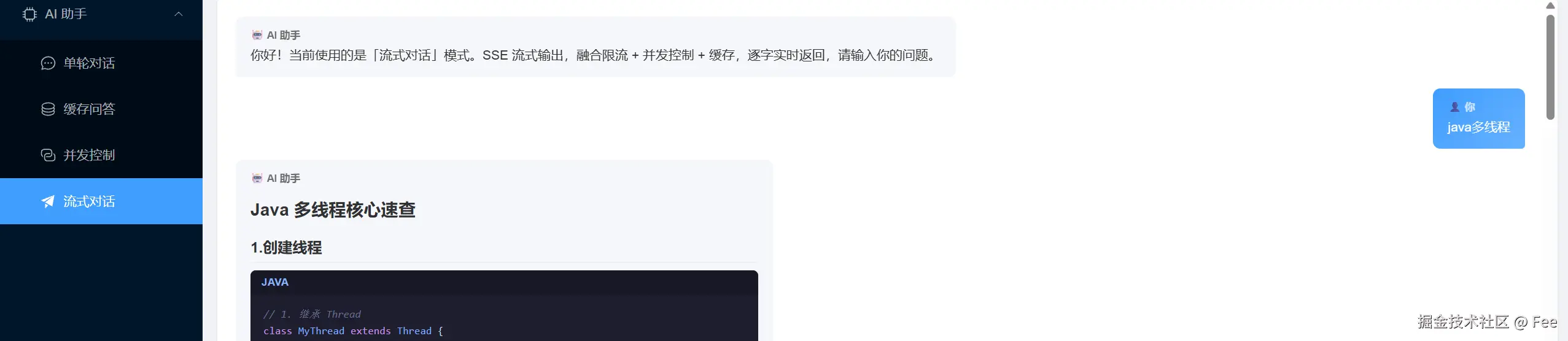
👆 这是流式对话(第四层)的最终页面效果。AI 逐字输出,代码块语法高亮,底部闪烁光标模拟打字机。
八、几个容易踩的坑
8.1 API Key 别写死在代码里
yaml
ai:
  qwen:
    api-key: ${AI_QWEN_API_KEY}
通过环境变量注入,用 @Value 或 @ConfigurationProperties 读取。不要 hardcode,否则代码一上 Git 就泄密。
8.2 结果提取一定要做防御性检查
result → output → choices[0] → message → content[0] → text 这个链路中,任何一层都可能为 null 。extractContent 里的每一行 if 判断都不是多余的。
8.3 Sentinel blockHandler 和 fallback 必须是 static
java
public static String chatBlockHandler(String question, BlockException e)
public static String chatFallback(String question)
这是 @SentinelResource 注解的硬性要求。另外 blockHandler 和 fallback 所在的类要在注解里显式指定 blockHandlerClass / fallbackClass,否则 Sentinel 在注解所在类里找不到对应方法会报错。
8.4 SSE 流式接口建议用独立线程池
流式接口用 SseEmitter,如果直接在 Tomcat 线程里做流式调用,会长时间占用容器线程。务必用独立线程池处理流式任务,Tomcat 线程只负责注册 emitter 和返回。
8.5 选对模型版本
通义千问有多个模型版本:qwen-turbo(便宜快速)、qwen-plus(均衡)、qwen3.8-27b(强大但贵)。开发测试用 turbo,上线再切到更强的模型。
九、总结:这只是第一章
本文从一个 JDK 8 + Spring Boot 老项目出发,四层递进:
| 层次 | 做了什么 | 新增代码量 |
|---|---|---|
| 第一层 | 调通大模型 API,实现基础对话 | ~40 行 |
| 第二层 | 引入 Caffeine 缓存,高频问题不再重复花钱 | ~15 行 |
| 第三层 | Semaphore + Sentinel 并发控制与限流熔断 | ~40 行 |
| 第四层 | SSE 流式输出,打字机效果 | ~40 行 |
整章新增代码总计不到 150 行,实现了从「不能对话」到「带缓存、能扛并发、打字机效果」的完整 AI 问答能力。
现在AI 能回了,能缓存了,能扛并发,还能流式打字。看上去挺能打了,但会发现一个巨大的问题------
这 AI 不记事。
你问「帮我写一个单例模式」,它洋洋洒洒写完。你紧接着问「用枚举方式优化一下」,它愣住了,因为它完全不记得刚才那个「单例」是你让它写的。
没有对话记忆,每次提问都是「初次见面」。
下一篇我会把多轮对话这件事从方案到落地全部讲透,包括:
- 本地缓存做会话记忆------轻量方案,单机部署够用
- Redis 做分布式会话记忆------多实例部署不掉线
- Token 超限了怎么办------自动裁剪策略,不让上下文撑爆
- 接口怎么设计------一套兼容单轮和多轮,调用方无感知
- 生产环境怎么清理会话------不清理就是内存泄漏
下一篇见。