SCP Firmware 负责系统中的电源域、时钟、传感器、通信接口等管理工作。为了控制复杂度,这些功能被拆分成相互独立的 Module。Module 之间既需要协作,又不应该彼此依赖具体实现,因此 Framework 提供了几种受控的交互方式,其中最重要的异步通信机制就是 Event 和 Notification。
本文面向第一次接触 SCP Firmware 的读者,从整体运行模型出发,逐步介绍 Event 和 Notification 的概念、数据结构、请求与响应机制,并结合 Sensor、Power Domain 和 Clock Module 的实际代码说明它们如何工作。
本文讨论的是 SCP Firmware 内部 Module 之间的通信,不是 SCP 与 AP 之间通过 MHU、SCMI 等协议进行的跨处理器通信。
1. 先建立整体认识
可以先用两句话概括二者:
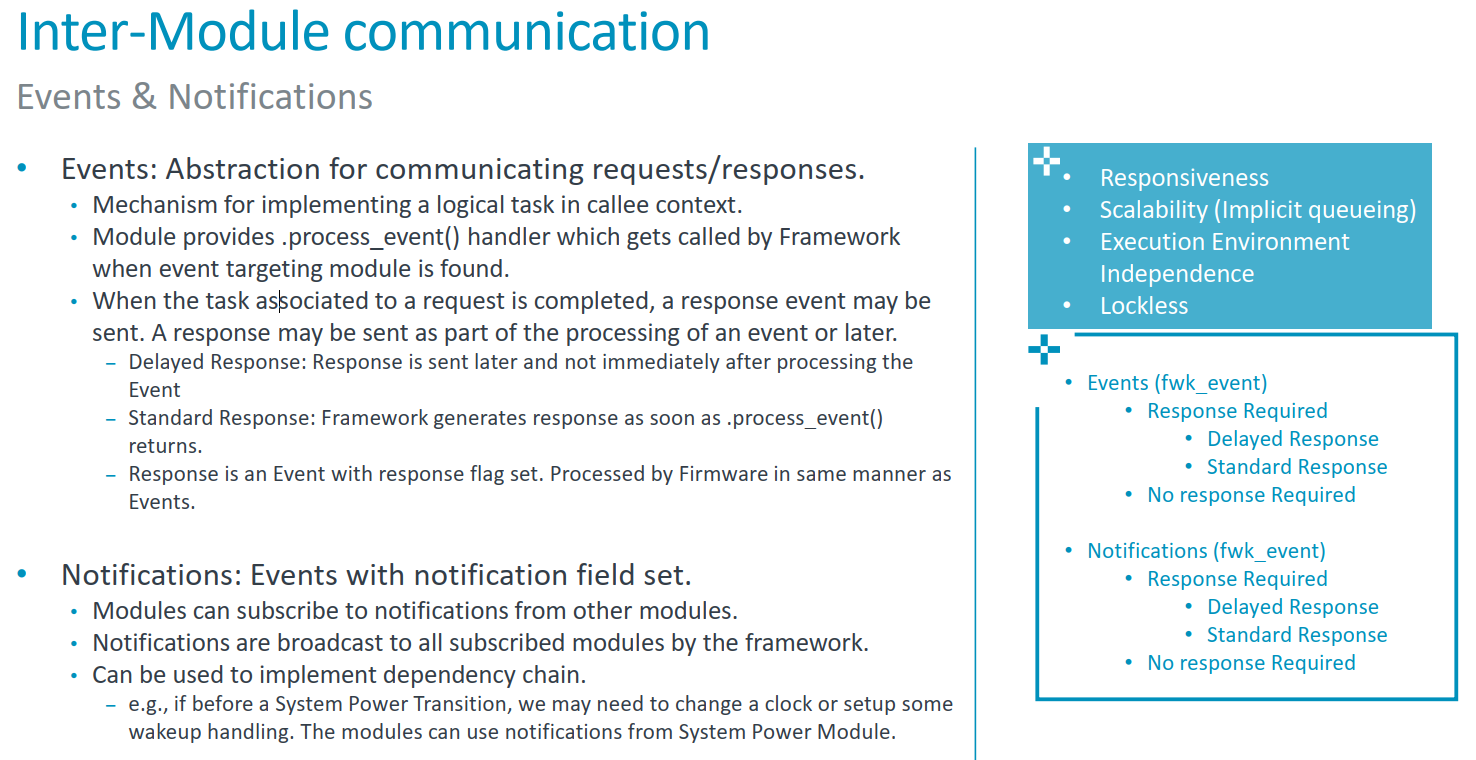
- Event 是点对点的异步消息:发送者知道接收者是谁,希望接收者执行一项工作,并且可以要求响应。
- Notification 是发布/订阅消息:发布者只声明"某件事发生了",Framework 将消息发送给所有提前订阅它的对象。
Arm® System Control Processor (SCP) Firmware-101
Notification 并不是一套独立于 Event 的底层设施。在 Framework 内部,Notification 本质上是一种特殊 Event :它同样使用 struct fwk_event,进入相同的事件队列,也支持普通响应和延迟响应。二者最主要的区别,是消息的寻址方式和所表达的业务语义。
2. Event 背后的运行模型
理解 Event 之前,需要先了解 SCP Firmware 的主循环。默认裸机运行模式下,它的核心逻辑可以简化为:
c
for (;;) {
    fwk_process_event_queue();

    if (fwk_log_unbuffer() == FWK_SUCCESS) {
        fwk_arch_suspend();
    }
}
主循环不断处理队列里的消息;当事件和缓存日志都处理完后,处理器进入休眠,等待中断再次唤醒。
Framework 主要维护三类队列:
text
free_event_queue   空闲 Event 对象池
event_queue        等待处理的普通 Event
isr_event_queue    中断上下文产生的 Event
调用 fwk_put_event() 时,Framework 从预分配的对象池中取得一个 Event,将调用者提供的内容复制进去,再放入普通队列或 ISR 队列。发送函数返回时,接收者通常还没有开始处理消息。
主循环取出 Event 后,根据 target_id 找到目标 Module,然后根据 is_notification 选择回调:
c
process = event->is_notification ?
    module->process_notification : module->process_event;
因此,默认情况下 SCP Firmware 是一种 run-to-completion 的协作式事件模型:一个普通事件回调开始执行后,会一直运行到返回,随后主循环才处理下一个 Event。它不是带线程、时间片和任务优先级的 RTOS 调度器。
这带来一个直接要求:process_event() 和 process_notification() 不应长时间阻塞。耗时操作应交给硬件、中断或后续 Event 完成。
3. Event:点对点的异步消息
3.1 Event 中保存了什么
struct fwk_event 的核心字段可以简化为:
c
struct fwk_event {
    fwk_id_t source_id;
    fwk_id_t target_id;
    uint32_t cookie;

    bool is_response;
    bool response_requested;
    bool is_notification;
    bool is_delayed_response;

    fwk_id_t id;
    uint8_t params[FWK_EVENT_PARAMETERS_SIZE];
};
各字段的作用如下:
| 字段 | 作用 |
|---|---|
source_id |
消息发送者,可以是 Module、Element 或 Sub-element |
target_id |
消息接收者 |
id |
Event 类型,由拥有该 Event 的 Module 定义 |
params |
请求或响应参数,当前固定为 16 字节 |
response_requested |
发送者是否要求响应 |
is_response |
当前消息是否是另一个 Event 的响应 |
is_delayed_response |
响应是否需要推迟发送 |
cookie |
Framework 分配的关联标识,用于匹配请求和延迟响应 |
3.2 Event ID 属于接收方
普通请求 Event 有一条非常重要的规则:
Event ID 由接收该请求的 Module 定义。
假设 Module A 向 Module B 发送请求,那么 event.id 应当是 Module B 公开或内部定义的 Event ID,target_id 也必须属于 Module B。它表达的语义是:"A 请求 B 执行一种由 B 定义的操作"。
一个典型的发送过程如下:
c
struct fwk_event request = {
    .target_id = target_id,
    .id = target_event_id,
    .response_requested = true,
};

struct request_params *params =
    (struct request_params *)request.params;

params->value = value;

status = fwk_put_event(&request);
如果代码正在处理另一个 Event,Framework 会把当前 Event 的目标实体作为新 Event 的 source_id。如果在启动阶段或中断上下文等位置发送消息,则通常需要显式提供合法的 source_id。
由于 Framework 会复制 Event,像上面这样使用栈变量是安全的。不过,params 中如果保存了指针,指针所指向对象的生命周期仍然必须覆盖整个异步处理过程。
3.3 接收 Event
能够接收 Event 的 Module 需要在描述符中提供 process_event:
c
static int module_process_event(
    const struct fwk_event *event,
    struct fwk_event *resp_event)
{
    switch (fwk_id_get_event_idx(event->id)) {
    case MODULE_EVENT_IDX_REQUEST:
        return process_request(event, resp_event);

    default:
        return FWK_E_PARAM;
    }
}

const struct fwk_module module_example = {
    .event_count = MODULE_EVENT_IDX_COUNT,
    .process_event = module_process_event,
};
process_event 接口参数: event 是收到的消息;当请求方要求响应时,resp_event 是 Framework 准备好的响应对象,接收方主要负责填写响应参数。
3.4 三种响应方式
Event 支持三种常见处理方式。
不需要响应
发送方保持:
c
event.response_requested = false接收方处理完 Event 后,本次交互结束。它适合 "触发一次动作,但发送者不关心结果" 的场景。
标准响应
发送方设置:
c
event.response_requested = trueFramework 会预先构造 resp_event,将请求的 source_id 和 target_id 对调。接收方填写响应参数并返回后,Framework 自动设置 is_response = true,再把响应放回事件队列。
完整过程是:
text
Module A             Framework              Module B
   |                     |                     |
   |--- request -------->|                     |
   |                     |--- process_event -->|
   |                     |<-- fill response ---|
   |                     |                     |
   |<-- response --------|                     |
响应仍是异步消息,不会在 Module B 返回时直接同步调用 Module A。Module A 最终也在自己的 process_event() 中收到它,并通过 event->is_response 判断消息方向。
延迟响应
如果接收方暂时得不到结果,可以在处理请求时设置:
c
resp_event->is_delayed_response = true;Framework 此时不会立即发送响应,而是把响应对象保存在目标实体的 delayed-response 列表中。等硬件操作或其他异步过程完成后,Module 可以通过 cookie 找回响应对象,填写结果,再调用 fwk_put_event() 发回请求者。
延迟响应适用于传感器采样、I2C 传输、电源状态切换等无法立即完成的操作。
标准响应 + 延迟响应 核心代码:
c
/*
 * framework/src/fwk_core.c
 */
static void process_next_event(void)
{
    int status;
    struct fwk_event *event, *allocated_event, async_response_event;
    const struct fwk_module *module;
    int (*process_event)(
        const struct fwk_event *event, struct fwk_event *resp_event);

    /* 从待处理事件队列中取出队首事件,并将其记录为当前事件。 */
    ctx.current_event = event = FWK_LIST_GET(
        fwk_list_pop_head(&ctx.event_queue), struct fwk_event, slist_node);

    /* Notification 和普通 Event 分别由不同的 Module 回调处理。 */
    module = fwk_module_get_ctx(event->target_id)->desc;
    process_event = event->is_notification ? module->process_notification :
                                             module->process_event;

    /* 只有发送方要求响应时,Framework 才会构造响应 Event。 */
    if (event->response_requested) {
        /*
         * 以请求 Event 为模板构造响应,保留 event id、cookie 和参数区等
         * 上下文;随后交换通信双方,使原接收者成为响应发送者。
         */
        fwk_str_memset(&async_response_event, 0, sizeof(async_response_event));
        async_response_event = *event;
        async_response_event.source_id = event->target_id;
        async_response_event.target_id = event->source_id;
        async_response_event.is_delayed_response = false;

        /*
         * 目标 Module 处理请求并填写响应参数。若结果暂时不可用,它可以
         * 将 is_delayed_response 置为 true,请求 Framework 暂存该响应。
         */
        status = process_event(event, &async_response_event);
        if (status != FWK_SUCCESS) {
            FWK_LOG_CRIT(err_msg_line, status, __func__, __LINE__);
        }

        /* 响应本身不能再次请求响应,避免形成递归响应链。 */
        async_response_event.is_response = true;
        async_response_event.response_requested = false;

        if (!async_response_event.is_delayed_response) {
            /* 即时响应:复制响应 Event,并直接放入待处理事件队列。 */
            (void)put_event(
                &async_response_event, UNKNOWN_STATE, FWK_EVENT_TYPE_STD);
        } else {
            /*
             * 延迟响应:先复制响应 Event,再保存到响应发送者对应的
             * delayed-response 列表。此时 source_id 是原请求的接收者,
             * 也就是负责在异步操作完成后发送响应的 Module/Element。
             */
            allocated_event =
                duplicate_event(&async_response_event, FWK_EVENT_TYPE_STD);
            if (allocated_event != NULL) {
                fwk_list_push_tail(
                    __fwk_get_delayed_response_list(
                        async_response_event.source_id),
                    &allocated_event->slist_node);
            }
        }
    }
	......
    /* 省略不要求响应时的处理分支以及当前事件的回收逻辑。 */
}
3.5 Light Event
Framework 还提供 struct fwk_event_light。它只保留 source_id、target_id、id 和 response_requested,不包含参数区和延迟响应所需字段。
Light Event 适合不需要携带数据、但对构造开销敏感的路径,例如部分 DVFS 场景。它不能用于 Notification,也不能用于 delayed response。
4. Notification:一对多的发布/订阅
Event 要求发送者明确填写 target_id。但有些消息并不是"请某个对象执行操作",而是"我的状态发生了变化,感兴趣的对象可以处理"。这正是 Notification 的用途。
Notification 的完整生命周期包括两个阶段:订阅和发布。
4.1 订阅
订阅者调用:
c
status = fwk_notification_subscribe(
    notification_id,
    source_id,
    target_id);
三个参数分别表示:
notification_id:希望接收哪一种通知;source_id:只接收哪个 Module 或 Element 发出的通知;target_id:通知到达后,交给订阅方的哪个实体处理。
订阅通常在 Module 的 start() 阶段完成,此时各 Module 已完成初始化和绑定。
4.2 Notification ID 属于发布方
Notification 与普通 Event 在 ID 所有权上正好相反:
Notification ID 由发布通知的源 Module 定义。
例如,Power Domain Module 定义"电源状态已经改变"通知。Clock Module 可以订阅它,但通知 ID 仍然属于 Power Domain,因为这条消息描述的是 Power Domain 自身的状态。
4.3 发布
发布者构造一个 struct fwk_event,但不需要逐个指定接收者:
c
struct fwk_event notification = {
.source_id = source_id,
.id = notification_id,
.response_requested = false,
};
status = fwk_notification_notify(¬ification, &subscriber_count);Framework 根据 notification_id + source_id 查询订阅表,为每个订阅者生成一份消息副本,填写不同的 target_id,然后逐一放入事件队列。
参数 subscriber_count 返回成功发送的通知数量。即使没有订阅者,发布操作也可以正常完成,此时计数为 0。
c
/*
 * framework/src/fwk_notification.c
 */
static void send_notifications(struct fwk_event *notification_event,
                               unsigned int *count)
{
    int status;
    struct fwk_dlist *subscription_dlist;
    struct fwk_dlist_node *node;
    struct __fwk_notification_subscription *subscription;

    /*
     * 根据通知类型和发布实体定位候选订阅链表。对于 Sub-element,
     * 这里得到的是其所属 Element 的共享订阅链表,尚未精确匹配发布源。
     */
    subscription_dlist = get_subscription_dlist(notification_event->id,
                                                notification_event->source_id);

    /* 将调用者提供的 Event 规范化为一条新的 Notification。 */
    notification_event->is_response = false;
    notification_event->is_notification = true;

    /* 遍历该通知类型对应的所有候选订阅项。 */
    for (node = fwk_list_head(subscription_dlist); node != NULL;
         node = fwk_list_next(subscription_dlist, node)) {
        subscription = FWK_LIST_GET(node,
            struct __fwk_notification_subscription, dlist_node);

        /*
         * Element 与其 Sub-element 共用订阅表,因此还必须比较完整的
         * source_id,避免把某个 Sub-element 的通知发给其他 Sub-element
         * 或其父 Element 的订阅者。
         */
        if (!fwk_id_is_equal(
                subscription->source_id, notification_event->source_id)) {
            continue;
        }

        /* 当前订阅项的 target_id 就是本次 Notification 的接收者。 */
        notification_event->target_id = subscription->target_id;

        /*
         * __fwk_put_notification() 会复制当前 Event 后再入队,因此可以
         * 复用 notification_event,继续为下一个订阅者改写 target_id。
         */
        status = __fwk_put_notification(notification_event);
        if (status == FWK_SUCCESS) {
            /* 只统计成功复制并加入事件队列的 Notification。 */
            (*count)++;
        }
    }
}
4.4 接收 Notification
订阅方通过 process_notification() 接收:
c
static int module_process_notification(
    const struct fwk_event *event,
    struct fwk_event *resp_event)
{
    if (event->is_response) {
        return process_notification_response(event);
    }

    if (fwk_id_is_equal(event->id, expected_notification_id)) {
        return process_state_change(event, resp_event);
    }

    return FWK_E_HANDLER;
}

const struct fwk_module module_example = {
    ......
    .process_notification= module_process_notification,
};
Notification 同样可以设置 response_requested = true。这时每个订阅者都会产生独立响应,发布者可以结合 subscriber_count 统计是否已收到全部响应。
这类机制特别适合构建依赖链。例如系统进入低功耗状态之前,Power Domain 先发出 pre-transition Notification;Clock、内存控制器或唤醒模块完成准备后分别响应;发布者收到所有响应后,才继续真正的状态切换。
Notification 是可选构建特性,需要启用 SCP_ENABLE_NOTIFICATIONS,相关代码通常由 BUILD_HAS_NOTIFICATION 条件编译保护。
5. Event 与 Notification 的区别
| 对比项 | Event | Notification |
|---|---|---|
| 通信模型 | 点对点 | 发布/订阅,一对多 |
| 接收者 | 发送时明确指定 | 由 Framework 查询订阅表决定 |
| ID 所属方 | 接收方 Module | 发布方 Module |
| 处理入口 | process_event() |
process_notification() |
| 典型语义 | 请求执行操作、推进状态机 | 宣布状态或事实发生变化 |
| 响应 | 可选,通常只有一个响应方 | 可选,每个订阅者分别响应 |
| 底层承载 | Event 队列 | 同一个 Event 队列 |
| 耦合程度 | 发送方知道目标 | 发布方不需要知道订阅者 |
选择时可以使用一个简单判断:
- 如果消息表达"请你完成某件事",并且目标明确,使用 Event;
- 如果消息表达"某件事已经或即将发生",可能有零个、一个或多个关注者,使用 Notification。
6. Event 实例:Sensor 的异步读取
Sensor Module 展示了 Event 与 delayed response 如何配合完成一次异步操作。阅读代码前,先区分参与流程的三个角色:
- Sensor Client:传感器数据的使用者,例如 Thermal Management 或 SCMI Sensor Module;
- Sensor HAL :
module/sensor,向 Client 提供统一的 Sensor API,并协调异步请求; - Sensor Driver:面向具体硬件的驱动,例如 Juno 平台的 PVT 温度传感器驱动。
下面以一次传感器读取为例说明主流程。代码基于 module/sensor/src/mod_sensor.c,省略了错误处理和并发控制。
6.1 Client 通过 API 发起读取
Client 通常在自己的 process_event() 中调用 Sensor HAL 的 get_data()。Sensor HAL 随后调用具体 Driver 的 get_value():
c
/*
 * module\sensor\src\mod_sensor.c
 */
static int get_data(fwk_id_t id, struct mod_sensor_data *data)
{
    int status;
    struct sensor_dev_ctx *ctx;
    struct fwk_event req;
    struct mod_sensor_event_params *event_params =
        (struct mod_sensor_event_params *)req.params;

    status = get_ctx_if_valid_call(id, data, &ctx);
	......

    if (ctx->concurrency_readings.pending_requests == 0) {
        /* 首个请求启动 Driver 读取;后续请求共用这次读取。 */
        status = ctx->driver_api->get_value(
            ctx->config->driver_id, &ctx->last_read.value);
        ctx->last_read.status = status;

        if (status == FWK_SUCCESS) {
#ifdef BUILD_HAS_SCMI_SENSOR_EVENTS
            trip_point_process(id, &ctx->last_read);
#endif
#ifdef BUILD_HAS_SENSOR_TIMESTAMP
            ctx->last_read.timestamp = sensor_get_timestamp(id);
#endif
            /* 同步完成:直接写入 Client 提供的数据对象。 */
            sensor_data_copy(data, &ctx->last_read);
            return status;
        } else if (status != FWK_PENDING) {
            return status;
        }
    }
	......

    /* 为异步读取建立从 Sensor HAL 返回 Client 的响应路径。 */
    req = (struct fwk_event){
        .target_id = id,
        .id = mod_sensor_event_id_read_request,
        .response_requested = true,
    };

    /* Event 参数区只保存指针;data 必须在异步处理结束前保持有效。 */
    event_params->sensor_data = data;

    status = fwk_put_event(&req);
    if (status != FWK_SUCCESS) {
        return status;
    }

    ctx->concurrency_readings.pending_requests++;
    return FWK_PENDING;
}
如果数据可以立即取得,Driver 返回 FWK_SUCCESS,调用过程同步结束。
对于需要启动硬件采样并等待中断的设备,Driver 返回 FWK_PENDING。这表示请求已被接受,但结果稍后才能提供。
Sensor HAL 随后提交一个要求响应的 READ_REQUEST Event,并向 Client 返回 FWK_PENDING:
虽然这个 Event 由 Sensor HAL 构造,并且目标也是 Sensor HAL 的 Sensor Element,但它并不是普通的"自己发给自己"。fwk_put_event() 会根据当前正在处理的 Event 自动补充 source_id,因此其逻辑方向是:
text
Client -> Sensor HAL这里的 READ_REQUEST 也不是让 Driver 再读取一次硬件。Driver 侧的读取流程已经由前面的 get_value() 发起;这个 Event 的主要作用是为异步结果建立一条返回 Client 的响应路径。
6.2 Sensor HAL 延迟响应
Framework 发现 response_requested 为 true 后,会为该请求准备一个响应 Event,并自动交换通信双方:
text
请求:Client     -> Sensor HAL
响应:Sensor HAL -> Client
当主循环把 READ_REQUEST 交给 sensor_process_event() 时,硬件采样还没有完成,因此 Sensor HAL 不立即发送这个响应,而是将其标记为 delayed response:
c
/*
 * module/sensor/src/mod_sensor.c
 */
static int sensor_process_event(const struct fwk_event *event,
                                struct fwk_event *resp_event)
{
    struct sensor_dev_ctx *ctx;
    enum mod_sensor_event_idx event_id_type;

    /* 省略 target_id 校验。 */
    ctx = ctx_table + fwk_id_get_element_idx(event->target_id);
    event_id_type = (enum mod_sensor_event_idx)fwk_id_get_event_idx(event->id);

    switch (event_id_type) {
    case SENSOR_EVENT_IDX_READ_REQUEST:
        /* 计数为 1 时,记录该请求的 cookie,供读取完成时定位响应。 */
        if (ctx->concurrency_readings.pending_requests == 1) {
            ctx->cookie = event->cookie;
        }

        /* 每个 READ_REQUEST 的响应都先由 Framework 暂存。 */
        resp_event->is_delayed_response = true;
        return FWK_SUCCESS;

    ......
    default:
        return FWK_E_PARAM;
    }
}
Framework 随后保存的是已经准备好的"Sensor HAL 到 Client"的响应 Event,而不是原始的请求 Event。cookie 用于在读取完成后找到与本次请求对应的响应。
6.3 Driver 通知读取完成
硬件采样完成后,具体 Driver 通常在处理中断或驱动内部 Event 时取得结果,然后通过 Sensor HAL 提供的 reading_complete() 回调上报数据。
reading_complete() 保存读取结果,并向 Sensor HAL 对应的 Sensor Element 提交一个 READ_COMPLETE Event。这个 Event 的方向是:
text
Sensor Driver -> Sensor HAL因此,READ_COMPLETE 只是 Driver 与 Sensor HAL 之间的内部完成事件,并不会直接发送给 Client。
6.4 Sensor HAL 将结果返回 Client
Sensor HAL 处理 READ_COMPLETE Event 时,使用先前保存的 cookie 取回 delayed response,将读取结果写入 Client 提供的数据对象,然后提交该响应:
c
/*
 *  module\sensor\src\mod_sensor.c
 */
static int sensor_process_event(const struct fwk_event *event,
                                struct fwk_event *resp_event)
{
    int status;
    struct sensor_dev_ctx *ctx;
    struct fwk_event read_req_event;
    struct mod_sensor_event_params *event_params =
        (struct mod_sensor_event_params *)read_req_event.params;
	......
    switch (event_id_type) {
    ......
    case SENSOR_EVENT_IDX_READ_COMPLETE:
        /* 按 cookie 定位并优先回复记录的那条读取请求。 */
        status = fwk_get_delayed_response(
            event->target_id, ctx->cookie, &read_req_event);
        if (status != FWK_SUCCESS) {
            return status;
        }

        /*
         * 响应参数中保存着该 Client 提供的数据对象地址。
         * 将 ctx->last_read 最新一次读到的数据拷贝进 Cline 数据对象
         */
        sensor_data_copy(
            (struct mod_sensor_data *)event_params->sensor_data,
            &ctx->last_read);

        status = fwk_put_event(&read_req_event);
        if (status != FWK_SUCCESS) {
            return status;
        }

        /* 使用同一份 last_read 完成其余等待中的请求(delayed-response 列表) */
        return process_pending_requests(
            event->target_id, (const struct mod_sensor_data *)event->params);

    default:
        return FWK_E_PARAM;
    }
}
这里单独按 cookie 回复,体现了优先完成所记录请求的意图。当前 process_pending_requests() 本身也会逐项取出延迟响应,因此在列表只包含本轮读取请求且顺序符合预期时,单独处理并不是完成全部请求的必要条件。传给该函数的 event->params 在当前实现中未被使用。
最终,Client 在自己的 process_event() 中收到来自 Sensor HAL 的响应,并继续处理传感器数据。完整流程如下:
text
Client                  Sensor HAL                     Sensor Driver
  |                          |                               |
  | get_data()               |                               |
  |------------------------->| get_value()                   |
  |                          |------------------------------>|
  |                          |           FWK_PENDING         |
  |        FWK_PENDING       |<------------------------------|
  |<-------------------------|                               |
  |                          |                               |
  | READ_REQUEST             |                               |
  |------------------------->| 保存 delayed response         |
  |                          |                               |
  |                          |   ...硬件采样 / 中断处理...   |
  |                          |                               |
  |                          | reading_complete()            |
  |                          | + READ_COMPLETE Event         |
  |                          |<------------------------------|
  | delayed response         |                               |
  |<-------------------------|                               |
需要注意,Client 最终收到的是 READ_REQUEST 的响应,而不是 READ_COMPLETE。Framework 沿用原请求的 Event ID,并通过 is_response 标记它是一个响应。
实际实现允许多个 Client 等待同一次硬件读取。第一个请求触发采样,后续请求先进入等待状态;读取完成后,process_pending_requests() 使用同一份最新数据依次完成这些请求,避免重复启动硬件采样。
7. Notification 实例:Power Domain 通知 Clock
Power Domain 和 Clock 的协作展示了典型的一对多状态传播。以下代码同样省略了上下文获取、条件编译和错误分支,只保留订阅与通知的主线。
Clock Element 在启动阶段订阅 Power Domain 的状态变化:
c
/*
 *  module\clock\src\mod_clock.c
 */
static int clock_start(fwk_id_t id)
{
	......
	/* pd_transition_notification_id 值通过 product\juno\scp_ramfw\config_clock.c 配置 */
    status = fwk_notification_subscribe(
        mod_clock_ctx.config->pd_transition_notification_id,
        ctx->config->pd_source_id,
        id);
	......
}
当 Power Domain 完成状态切换后,它发布状态变化 Notification:
c
/*
* module\power_domain\src\mod_power_domain.c
*/
static void process_power_state_transition_report(
struct pd_ctx *pd,
const struct pd_power_state_transition_report *report_params)
{
......
struct fwk_event notification_event = {
.id = mod_pd_notification_id_power_state_transition,
.response_requested = true,
.source_id = FWK_ID_NONE
};
......
status = fwk_notification_notify(
¬ification_event,
&pd->power_state_transition_notification_ctx.pending_responses);
......
}注意,这里实际上 mod_pd_notification_id_power_state_transition == pd_transition_notification_id
Framework 从订阅表中找到相关 Clock Element,把通知送入事件队列。Clock Module 最终在 process_notification() 中识别通知类型,并调用时钟驱动处理电源状态变化:
c
/*
 *  module\clock\src\mod_clock.c
 */
 static int clock_process_notification(
    const struct fwk_event *event,
    struct fwk_event *resp_event)
{
	......
	if (fwk_id_is_equal(event->id, pd_transition_notification_id)) {
	    return clock_process_pd_transition_notification(ctx, event);
	}
	......
}
Clock 随后还可以继续发布自己的 state_changed Notification,让依赖该时钟的其他 Module 感知变化。这样便形成:
text
Power Domain
     |
     | power-state-transition Notification
     v
Clock
     |
     | clock-state-changed Notification
     v
其他订阅者
Power Domain 并不需要知道哪些 Clock 或其他 Module 关注它,Clock 也不需要写死后续消费者。这正是 Notification 降低模块耦合的价值。
8. 常见误区与使用建议
8.1 不要混淆 ID 的归属
这是最常见的错误:
- 请求 Event 的 ID 属于目标 Module;
- Notification 的 ID 属于源 Module。
Framework 的调试构建会检查 ID 与 source/target 的 Module 索引是否匹配。
8.2 fwk_put_event() 成功不等于业务完成
它通常只表示 Event 已成功复制并进入队列。真正的处理结果需要通过响应 Event、Notification 响应或后续状态查询获得。
8.3 注意参数区大小和对象生命周期
params 只有 FWK_EVENT_PARAMETERS_SIZE,当前为 16 字节。参数结构必须保证能够放入其中,最好在编译期检查大小。
栈上的 Event 可以安全发送,因为 Framework 会复制它;但参数中的裸指针不会自动复制其指向的数据,异步处理时尤其要注意悬空指针问题。
8.4 Handler 应尽快返回
默认事件处理是串行的。一个 Handler 长时间忙等,会阻塞后续 Event、Notification 和日志输出。耗时操作应拆成"启动操作"和"完成事件"两个阶段。
8.5 Event 池是有限资源
Framework 使用预分配的 Event 对象池。若生产速度长期高于消费速度,fwk_put_event() 可能返回 FWK_E_NOMEM。发送方必须检查返回值,设计时也应避免无界地生成 Event。
8.6 ISR 中只做必要工作
ISR 可以产生 Event,Framework 会先将其放入 isr_event_queue,再交给普通事件上下文处理。推荐在 ISR 中完成清中断、读取必要状态和投递 Event,把复杂逻辑留给主循环。
8.7 Notification 发布者不要依赖固定订阅者
fwk_notification_notify() 返回的数量可能是 0。除非业务协议明确要求至少有一个订阅者,否则发布方不应把"无人订阅"当作异常。
9. 源码阅读路径
建议按照以下顺序阅读源码:
framework/include/fwk_event.h:Event 数据结构;framework/include/fwk_core.h:fwk_put_event()等接口;framework/src/fwk_core.c:事件池、队列、分发和响应;framework/include/fwk_notification.h:订阅与发布接口;framework/src/fwk_notification.c:订阅表和一对多投递;module/sensor/src/mod_sensor.c:delayed response 实例;module/power_domain/src/mod_power_domain.c与module/clock/src/mod_clock.c:Notification 依赖链实例。