Nginx Web服务应用实战
4、Python网站的搭建
4.1、CGI、FastCGI、SCGI、WSGI
- (1)CGI(Common Gateway Interface,通用网关接口)
CGI是一种通用网关接口规范,该规范详细描述了Web服务器和请求处理程序(脚本解析器)在获取及返回数据过程中传输数据的标准,如HTTP协议的参数名称等。大多数Web程序以脚本形式接收并处理请求,然后返回响应数据,如脚本程序PHP、JSP、Python等。 - (2)FastCGI(Fast Common Gateway Interface,快速通用网关接口)
FastCGI是CGI的增强版本,其将请求处理程序独立于Web服务器之外,并通过减少系统为创建进程而产生的系统开销,使Web服务器可以处理更多的Web请求。FastCGI与CGI的区别在于,FastCGI不像CGI那样对Web服务器的每个请求均建立一个进程进行请求处理,而是由FastCGI服务进程接收Web服务器的请求后,由自己的进程自行创建线程完成请求处理。 - (3)SCGI(Simple Common Gateway Interface,简单通用网关接口)
SCGI是CGI的替代版本,它与FastCGI类似,同样是将请求处理程序独立于Web服务器之外,但更容易实现,性能比FastCGI要弱一些。 - (4)WSGI(Web Server Gateway Interface, Web服务网关接口)
WSGI是为Python语言中定义的Web服务器与Python应用程序或框架间的通用通信接口,可以使Python应用程序或框架与支持这一协议的不同Web服务器进行通信。常见的Python Web框架都实现了该协议的封装。
4.2、uWSGI模块指令
uWSGI是Python实现WSGI、uWSGI(uWSGI独有的协议)、HTTP等协议功能的Web服务器,Nginx通过ngx_http_uwsgi_module模块实现与uWSGI服务器的数据交换并完成Python网站的请求处理。该模块默认编译在Nginx二进制文件中,无须单独编译。该模块的配置指令如表所示。
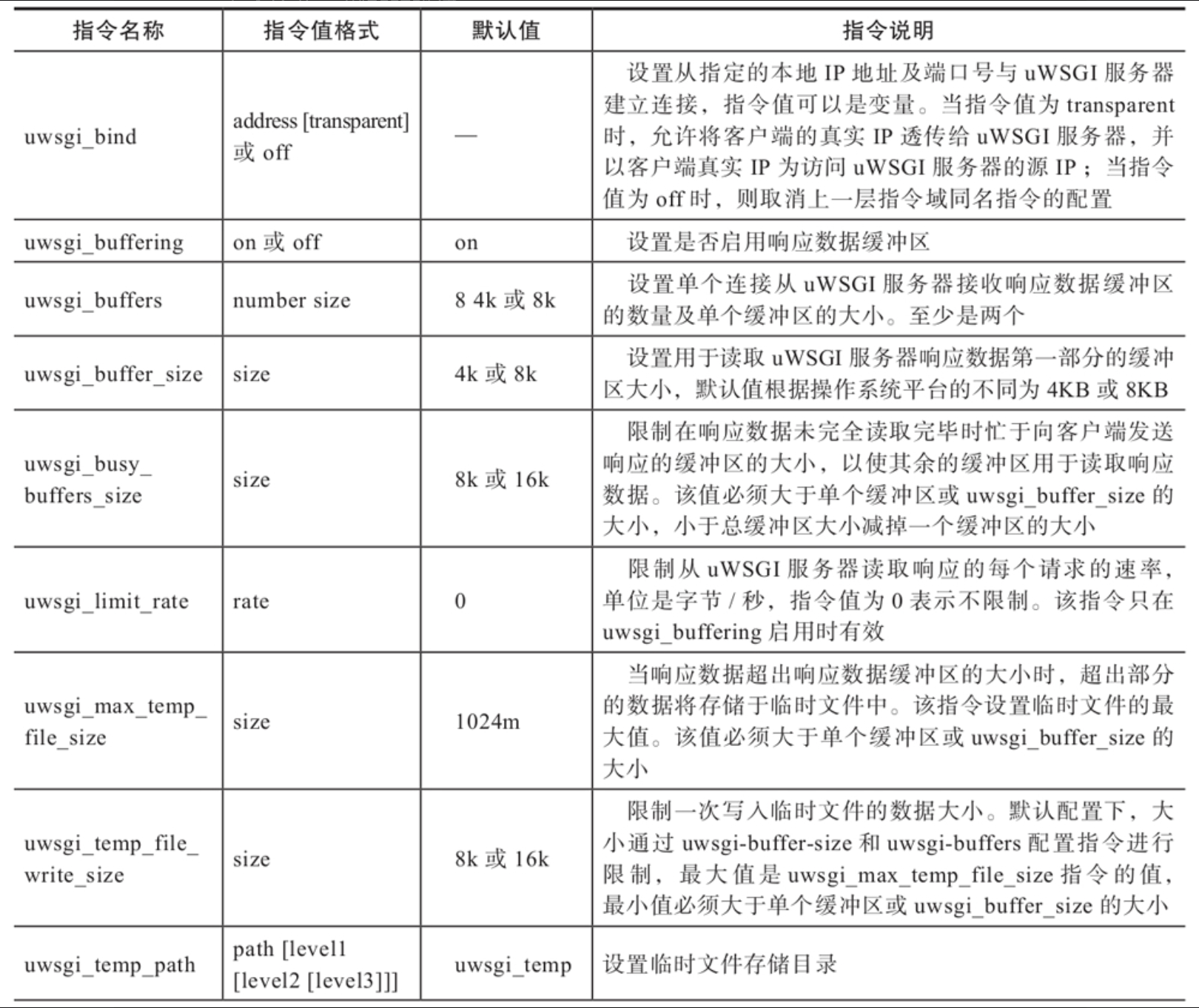
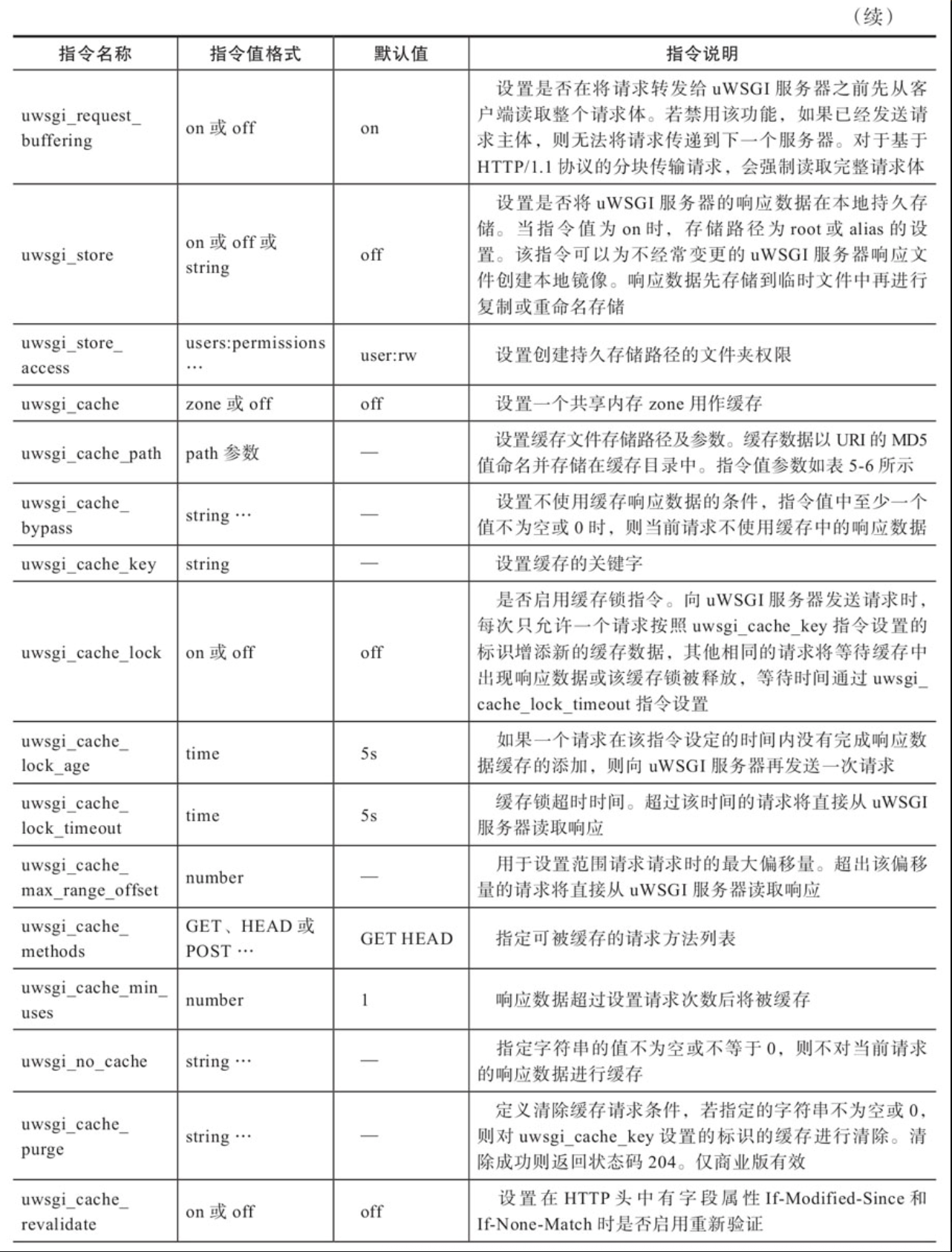
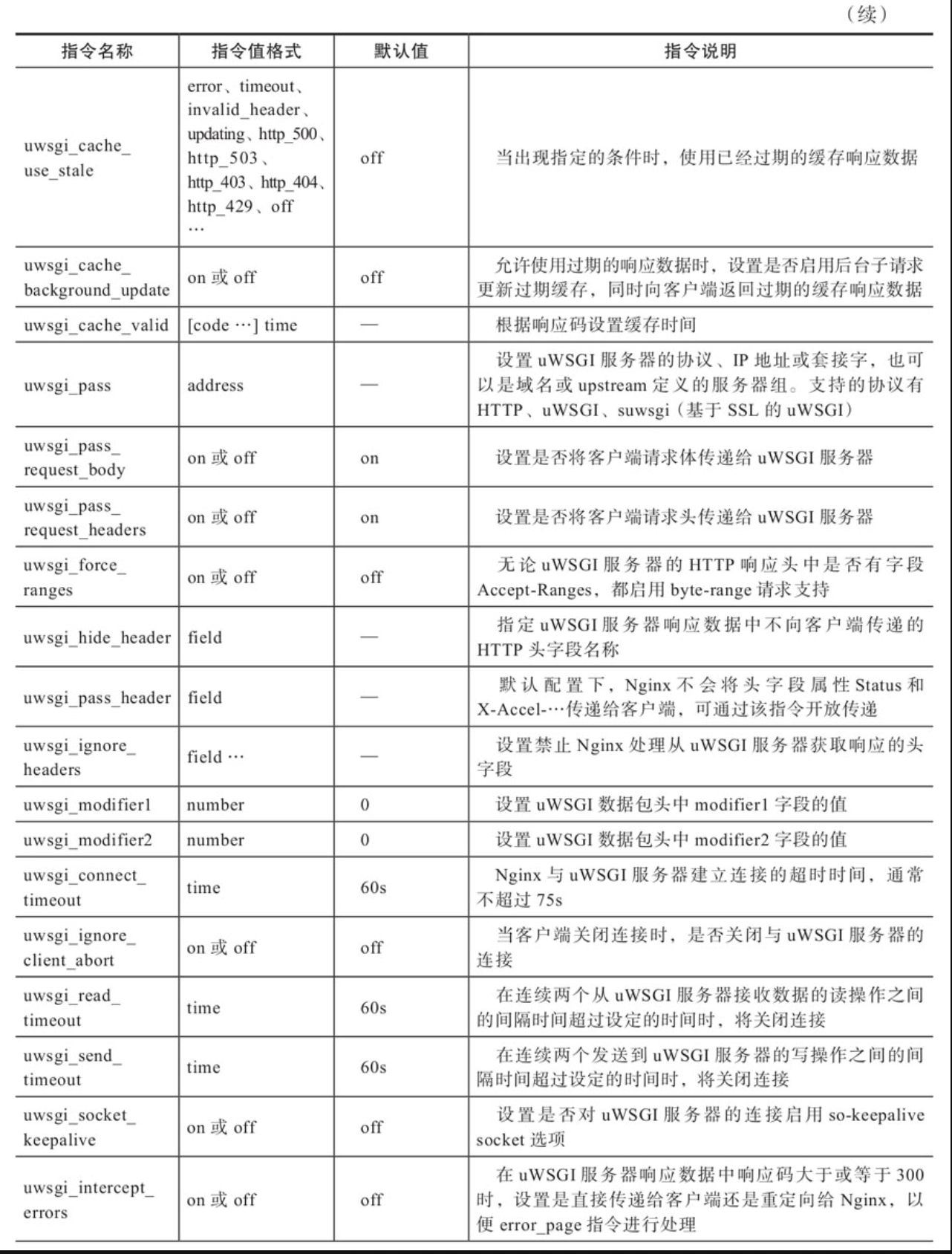
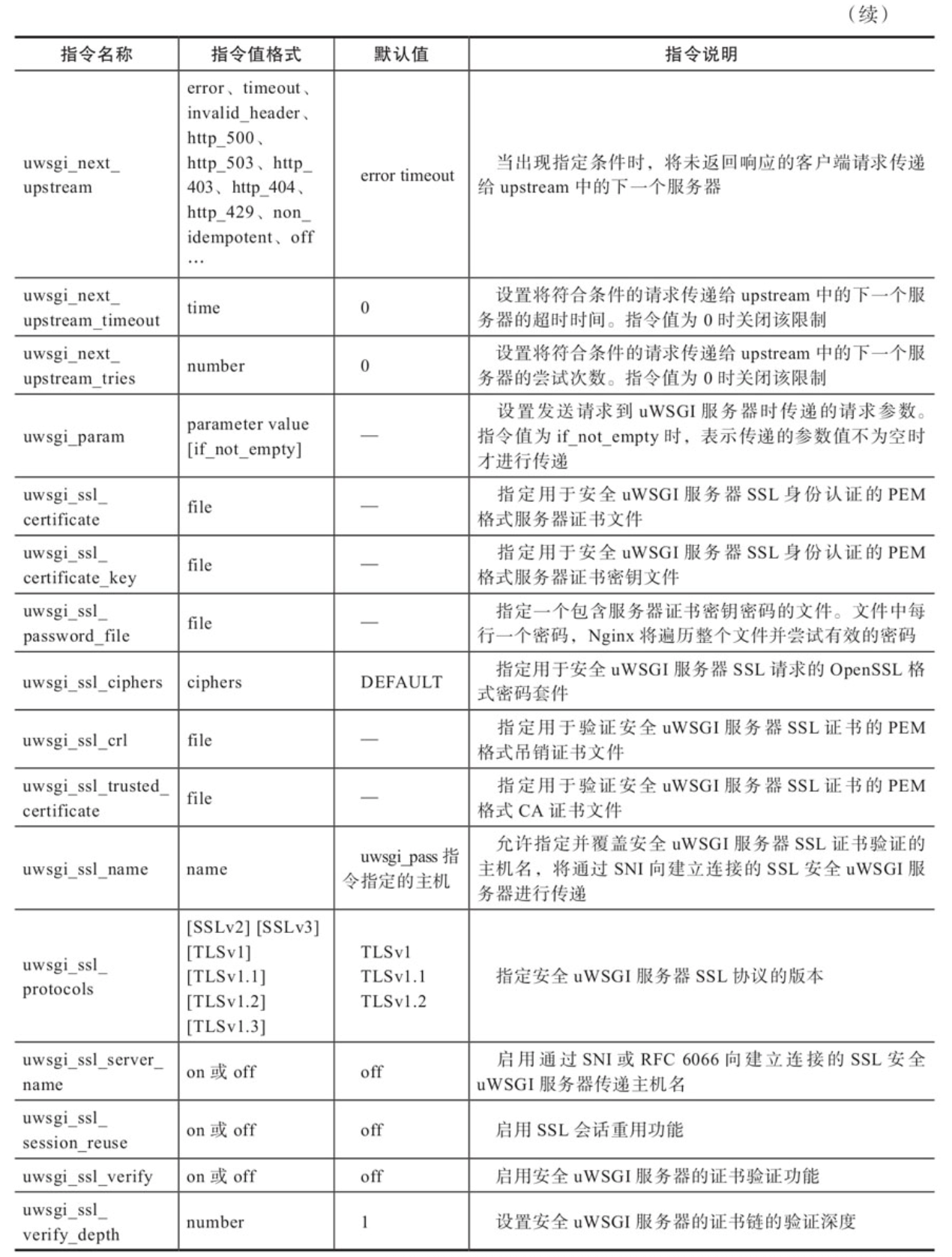
- 除uwsgi_cache_path指令外,uWSGI模块指令均可编写在http、server、location指令域中。
- uwsgi_cache_path指令只能编写在http指令域中。
- uwsgi_cache与uwsgi_store指令不可在同一指令域中同时使用。
- non_idempotent是指POST、LOCK、PATCH请求方法的处理。
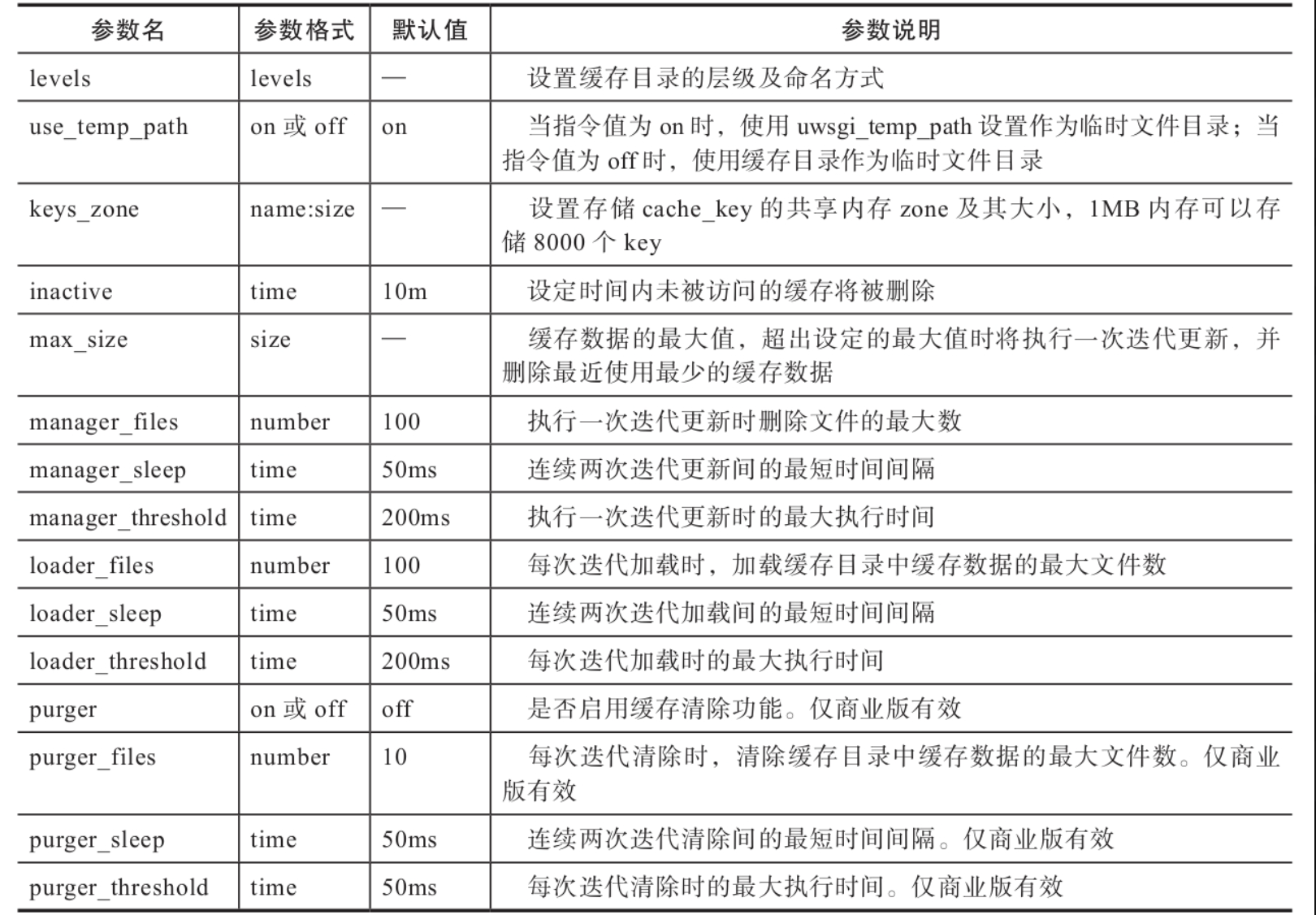
uwsgi_cache_path指令值参数如表所示。
4.3、Python网站的搭建
CentOS 7系统默认安装Python 2.7版本,本节搭建的是基于Python3的Django网站,所以需要升级到Python3版本。
-
(1)安装Python及Django
配置样例如下:bashyum install -y epel-release # 安装EPEL扩展源 yum install -y python36 python36-pip python36-devel \ sqlite-devel supervisor # 安装Python3.6及其工具组件 ln -s /usr/bin/pip3 /usr/bin/pip # 设置pip3为默认pip pip install --upgrade pip # 升级pip版本 echo "alias python='/usr/bin/python3.6'" >/etc/profile.d/python.sh # 添加Python 3.6为系统执行的默认Python echo "alias pip='/usr/local/bin/pip'" >>/etc/profile.d/python.sh # 添加pip为系统执行的默认pip source /etc/profile # 使系统配置生效 pip install django==2.0 uwsgi -i https://pypi.tuna.tsinghua.edu.cn/simple # 安装Django和uWSGI -
(2)创建测试Django项目demonginx及项目应用Nginx
配置样例如下:bashcd /opt/nginx-web/pythonweb django-admin.py startproject demonginx cd demonginx sed -i "s/ALLOWED_HOSTS = \[.*/ALLOWED_HOSTS = \['\*', \]/g" demonginx/settings.py # 创建项目应用Nginx及测试页面 django-admin.py startapp nginx cat >>nginx/views.py<<EOF from django.http import HttpResponse def index(request): return HttpResponse("<h1>Hello Nginx for Django!</h1>") EOF sed -i "/\]/i\ path('',nginx_views.index,name=\"index\")," demonginx/urls.py -
(3)创建默认admin管理后台账号
配置样例如下:bashpython manage.py migrate python manage.py createsuperuser --username admin --email admin@example.com启动测试Django项目测试Python网站的有效性,测试成功后关闭该进程。
bashpython manage.py runserver 0.0.0.0:9080 -
(4)配置uWSGI服务器
配置样例如下:bashcat>/opt/nginx-web/pythonweb/demonginx/nginx_uwsgi.ini<<EOF [uwsgi] socket = :9080 chdir = /opt/nginx-web/pythonweb/demonginx # 设置Python文件目录 module = demonginx.wsgi # demonginx项目的wsgi.py位置 master = true # 主进程模式 processes = 2 # 开启两个工作进程 vacuum = true # 退出时自动删除UNIX socket和PID文件 max-requests = 1000 # 每个工作进程设置请求数为1000 limit-as = 512 # 每个uWSGI工作进程的虚拟内存为512MB buffer-size = 32768 # uWSGI接收数据包的缓存区大小为32KB pidfile = /var/run/uwsgi9080.pid # 进程pid文件 daemonize = /opt/nginx-web/pythonweb/demonginx/uwsgi9080.log # 使进程在后台运行,并输出日志到uwsgi9080.log EOF -
(5)配置uWSGI服务器守护进程supervisord
配置样例如下:bash## 启用supervisord Web管理 sed -i "s/^;\[inet_http/\[inet_http/g" /etc/supervisord.conf sed -i "s/^;port/port/g" /etc/supervisord.conf ## 设置supervisord cat>/etc/supervisord.d/demonginx.ini<<EOF # 配置进程运行命令 [program:demonginx] command=/usr/local/bin/uwsgi --ini /opt/nginx-web/pythonweb/demonginx/nginx_uwsgi.ini directory=/opt/nginx-web/pythonweb/demonginx # 进程运行目录 startsecs=5 # 启动5秒后没有异常则退出表示进程正常启动,默认为1秒 autostart=true # 在supervisord启动的时候也自动启动 autorestart=true # 程序退出后自动重启 EOF # 启动demonginx的uWSGI服务 systemctl restart supervisord -
(6)Nginx配置
Nginx配置样例如下:bash## Python网站配置 server { listen 8083; server_name localhost charset UTF-8; client_max_body_size 75M; location / { include uwsgi_params; # 引入uWSGI默认参数配置 uwsgi_pass 127.0.0.1:9080; # uWSGI服务端口 uwsgi_read_timeout 2; } } ## supervisord Web管理配置 server { listen 9083; server_name localhost charset UTF-8; location / { allow 192.168.2.0/24; deny all; proxy_pass 127.0.0.1:9001; # supervisord服务端口 } } -
(7)启动Nginx服务
配置样例如下:bash# 测试Nginx配置 nginx -t # 重启Nginx服务 systemctl restart nginx