使用javassist生成类&&MyBatis中接口代理机制及使用
- 七、使用javassist生成类
-
- [7.1 Javassist的使用](#7.1 Javassist的使用)
- [7.2 使用Javassist生成DaoImpl类](#7.2 使用Javassist生成DaoImpl类)
- 八、MyBatis中接口代理机制及使用(动态生成对应接口的实现类)
七、使用javassist生成类
来自百度百科:
Javassist是一个开源的分析、编辑和创建Java字节码的类库。是由东京工业大学的数学和计算机科学系的 Shigeru Chiba (千叶 滋)所创建的。它已加入了开放源代码JBoss 应用服务器项目,通过使用Javassist对字节码操作为JBoss实现动态"AOP"框架。
7.1 Javassist的使用
我们要使用javassist,首先要引入它的依赖
xml
<dependency>
  <groupId>org.javassist</groupId>
  <artifactId>javassist</artifactId>
  <version>3.29.1-GA</version>
</dependency>
样例代码:
java
package com.powernode.javassist;

import javassist.ClassPool;
import javassist.CtClass;
import javassist.CtMethod;
import javassist.Modifier;

import java.lang.reflect.Method;

public class JavassistTest {
    public static void main(String[] args) throws Exception {
        // 获取类池
        ClassPool pool = ClassPool.getDefault();
        // 创建类
        CtClass ctClass = pool.makeClass("com.powernode.javassist.Test");
        // 创建方法
        // 1.返回值类型 2.方法名 3.形式参数列表 4.所属类
        CtMethod ctMethod = new CtMethod(CtClass.voidType, "execute", new CtClass[]{}, ctClass);
        // 设置方法的修饰符列表
        ctMethod.setModifiers(Modifier.PUBLIC);
        // 设置方法体
        ctMethod.setBody("{System.out.println(\"hello world\");}");
        // 给类添加方法
        ctClass.addMethod(ctMethod);
        // 调用方法
        Class<?> aClass = ctClass.toClass();
        Object o = aClass.newInstance();
        Method method = aClass.getDeclaredMethod("execute");
        method.invoke(o);
    }
}
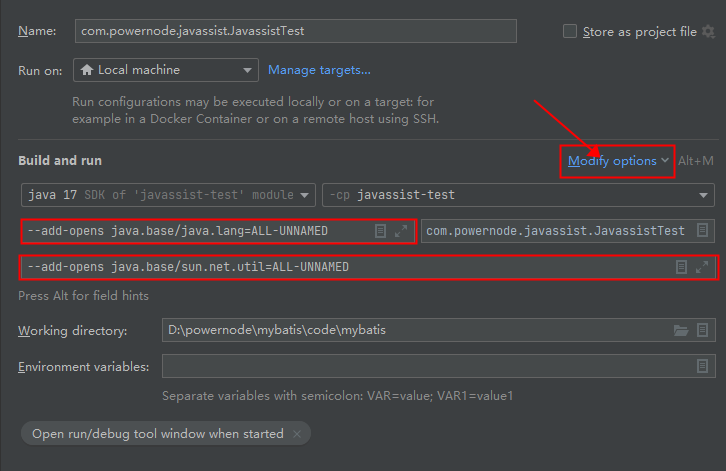
运行要注意:加两个参数,要不然会有异常。
- --add-opens java.base/java.lang=ALL-UNNAMED
- --add-opens java.base/sun.net.util=ALL-UNNAMED
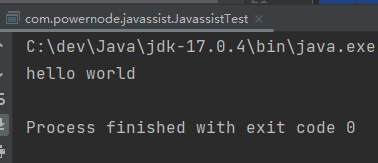
运行结果:
7.2 使用Javassist生成DaoImpl类
使用Javassist动态生成DaoImpl类
java
package com.powernode.bank.utils;

import org.apache.ibatis.javassist.CannotCompileException;
import org.apache.ibatis.javassist.ClassPool;
import org.apache.ibatis.javassist.CtClass;
import org.apache.ibatis.javassist.CtMethod;
import org.apache.ibatis.session.SqlSession;

import java.lang.reflect.Constructor;
import java.lang.reflect.Method;
import java.lang.reflect.Modifier;
import java.util.Arrays;

/**
 * 使用javassist库动态生成dao接口的实现类
 *
 * @author 老杜
 * @version 1.0
 * @since 1.0
 */
public class GenerateDaoByJavassist {

    /**
     * 根据dao接口生成dao接口的代理对象
     *
     * @param sqlSession   sql会话
     * @param daoInterface dao接口
     * @return dao接口代理对象
     */
    public static Object getMapper(SqlSession sqlSession, Class daoInterface) {
        ClassPool pool = ClassPool.getDefault();
        // 生成代理类
        CtClass ctClass = pool.makeClass(daoInterface.getPackageName() + ".impl." + daoInterface.getSimpleName() + "Impl");
        // 接口
        CtClass ctInterface = pool.makeClass(daoInterface.getName());
        // 代理类实现接口
        ctClass.addInterface(ctInterface);
        // 获取所有的方法
        Method[] methods = daoInterface.getDeclaredMethods();
        Arrays.stream(methods).forEach(method -> {
            // 拼接方法的签名
            StringBuilder methodStr = new StringBuilder();
            String returnTypeName = method.getReturnType().getName();
            methodStr.append(returnTypeName);
            methodStr.append(" ");
            String methodName = method.getName();
            methodStr.append(methodName);
            methodStr.append("(");
            Class<?>[] parameterTypes = method.getParameterTypes();
            for (int i = 0; i < parameterTypes.length; i++) {
                methodStr.append(parameterTypes[i].getName());
                methodStr.append(" arg");
                methodStr.append(i);
                if (i != parameterTypes.length - 1) {
                    methodStr.append(",");
                }
            }
            methodStr.append("){");
            // 方法体当中的代码怎么写?
            // 获取sqlId(这里非常重要:因为这行代码导致以后namespace必须是接口的全限定接口名,sqlId必须是接口中方法的方法名。)
            String sqlId = daoInterface.getName() + "." + methodName;
            // 获取SqlCommondType
            String sqlCommondTypeName = sqlSession.getConfiguration().getMappedStatement(sqlId).getSqlCommandType().name();
            if ("SELECT".equals(sqlCommondTypeName)) {
                methodStr.append("org.apache.ibatis.session.SqlSession sqlSession = com.powernode.bank.utils.SqlSessionUtil.openSession();");
                methodStr.append("Object obj = sqlSession.selectOne(\"" + sqlId + "\", arg0);");
                methodStr.append("return (" + returnTypeName + ")obj;");
            } else if ("UPDATE".equals(sqlCommondTypeName)) {
                methodStr.append("org.apache.ibatis.session.SqlSession sqlSession = com.powernode.bank.utils.SqlSessionUtil.openSession();");
                methodStr.append("int count = sqlSession.update(\"" + sqlId + "\", arg0);");
                methodStr.append("return count;");
            }
            methodStr.append("}");
            System.out.println(methodStr);
            try {
                // 创建CtMethod对象
                CtMethod ctMethod = CtMethod.make(methodStr.toString(), ctClass);
                ctMethod.setModifiers(Modifier.PUBLIC);
                // 将方法添加到类
                ctClass.addMethod(ctMethod);
            } catch (CannotCompileException e) {
                throw new RuntimeException(e);
            }
        });
        try {
            // 创建代理对象
            Class<?> aClass = ctClass.toClass();
            Constructor<?> defaultCon = aClass.getDeclaredConstructor();
            Object o = defaultCon.newInstance();
            return o;
        } catch (Exception e) {
            throw new RuntimeException(e);
        }
    }
}
修改AccountMapper.xml文件:namespace必须是dao接口的全限定名称,id必须是dao接口中的方法名:
xml
<?xml version="1.0" encoding="UTF-8" ?>
<!DOCTYPE mapper
        PUBLIC "-//mybatis.org//DTD Mapper 3.0//EN"
        "http://mybatis.org/dtd/mybatis-3-mapper.dtd">

<mapper namespace="com.powernode.bank.dao.AccountDao">
    <select id="selectByActno" resultType="com.powernode.bank.pojo.Account">
        select * from t_act where actno = #{actno}
    </select>
    <update id="update">
        update t_act set balance = #{balance} where actno = #{actno}
    </update>
</mapper>
修改service类中获取dao对象的代码:

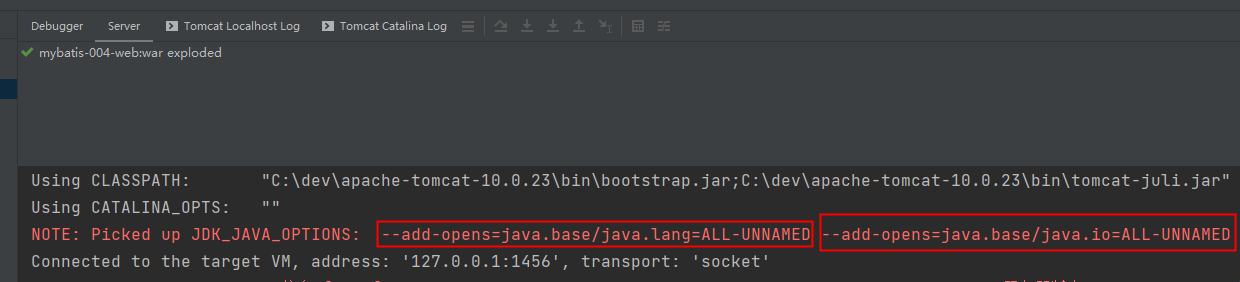
启动服务器:启动过程中显示,tomcat服务器自动添加了以下的两个运行参数。所以不需要再单独配置。
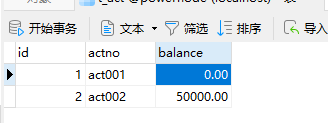
测试前数据:
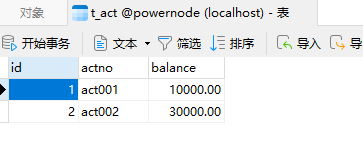
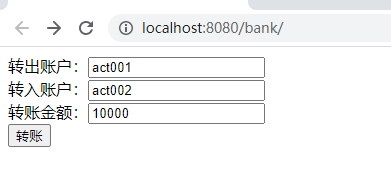
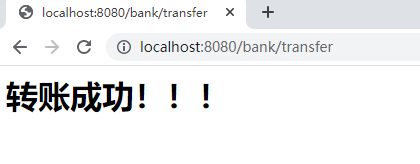
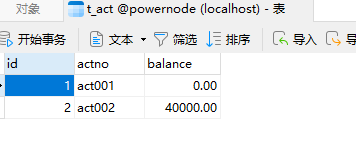
打开浏览器测试:
八、MyBatis中接口代理机制及使用(动态生成对应接口的实现类)
好消息!!!其实以上所讲内容mybatis内部已经实现了。直接调用以下代码即可获取dao接口的代理类:
java
AccountDao accountDao = (AccountDao)sqlSession.getMapper(AccountDao.class);使用以上代码的前提是:AccountMapper.xml文件中的namespace必须和dao接口的全限定名称一致,id必须和dao接口中方法名一致。
将service中获取dao对象的代码再次修改,如下:

测试前数据:
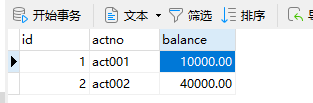
测试后数据: