作者:月夏 | 8 年前端 / 转型 Node.js 全栈 Day 1
关键词:xlsx、SheetJS、TypeScript、Commander、Node.js、踩坑
最近在练手 Node.js,想做一个能批量读 Excel 的 CLI 工具------手头没有合适数据,就用 mock 造了一份 12 个 sheet 的 demo(产品 A 到 L,都是化名,纯练手用),跑起来发现事情没那么简单。
用 SheetJS 三行代码------结果踩了 3 个坑,最后一个查遍 Stack Overflow 没答案,只能读源码解决。
最小代码(你以为这就完事了)
typescript
import * as XLSX from 'xlsx';

const wb = XLSX.readFile('./examples/demo.xlsx');
console.log(wb.SheetNames);  // ['产品 A', '产品 B', '产品 C', ...]
跑一下:
bash
Error: Cannot access file ./examples/demo.xlsx诶?文件明明在那里啊?
坑 1:xlsx 0.20 ESM 版读不到本地文件 ⭐⭐⭐
完整报错
bash
Error: Cannot access file ./examples/demo.xlsx
    at fileFree (xlsx.mjs:1:1)
官方推荐这么写
typescript
// 官方文档:把 Node 的 fs 挂到 globalThis
(globalThis as any)._fs = await import('node:fs');我照做了------结果还是抛一样的错。
读源码才明白
把 xlsx 的 xlsx.mjs 翻出来看,找到关键逻辑:
js
function get_fs() {
  if (typeof _fs !== 'undefined') return _fs;     // 找 globalThis._fs
  throw new Error('Cannot access file...');        // 找不到就抛
}
真相:xlsx 0.20 的 ESM/浏览器版故意不带 fs (避免被打包进前端构建),要求使用者自己注入。但 tsx 这种多模块上下文下注入会失效(模块作用域隔离),官方文档没说。
解决方案:自己读 Buffer 再喂给 xlsx
绕开 XLSX.readFile(),先用 Node 的 fs.readFileSync 读成 Buffer,再交给 XLSX.read() 解析:
typescript
import { readFileSync } from 'node:fs';

const buf = readFileSync('./examples/demo.xlsx');   // 手动开门
const wb  = XLSX.read(buf, { type: 'buffer' });     // 把屋里的东西直接给 SheetJS
跑一下:✅ 通过。后面所有代码都基于这个写法。
坑 2:type: 'buffer' 不是"文件类型" ⭐⭐
第一次写时我没明白第二个参数含义,文档说"input data type"------我以为是 Excel 文件的类型。
实测:改成 binary 直接抛错:
typescript
XLSX.read(buf, { type: 'binary' });
// TypeError: x.charCodeAt is not a function查源码才明白:type 是告诉 SheetJS 你传的这个 JS 变量是什么数据类型,不是文件本身:
type 值 |
期望的 JS 变量 | 我的 Buffer 能不能用 |
|---|---|---|
'buffer' |
Buffer 对象 |
✅ 能用 |
'binary' |
binary string(每字符=一字节) | ❌ Buffer 没有 charCodeAt |
'array' |
普通数组 | ❌ 维度对不上 |
'base64' |
base64 字符串 | ❌ 需要先编码 |
这坑的通用教训:用错类型参数时 SheetJS 不会友好提示"类型不匹配",它只会尝试在 Buffer 上调用字符串方法------TypeScript 类型系统存在的意义。
坑 3:tsx watch 默认启动 Inspector,污染控制台 ⭐
跑 npm run dev 准备热重载:
css
> ljy-cli-excel-tool@0.1.0 dev
> tsx watch src/index.ts

Debugger listening on ws://127.0.0.1:54165/9f912ea2-...
For help, see: https://nodejs.org/en/docs/inspector
Debugger attached.
什么鬼?我又没开调试器。
排查
- 查
NODE_OPTIONS环境变量:没设 - 查
.vscode/launch.json:项目内没有 - 查 tsx 版本:4.23.15
真相:tsx 4.x 的 watch 模式内置启用了 Node Inspector 端口(HMR 需要),没法通过 --inspect=false 关掉。
解决:用 nodemon + tsx 解耦
把 watch 和 TS 跑解耦:
json
{
  "scripts": {
    "dev": "nodemon --watch src --ext ts,json --exec \"tsx src/index.ts\""
  }
}nodemon接管 watch(不启 Inspector)tsx负责跑 TypeScript(不带 watch 模式)- 两个解耦,跨 Node 18 / 20 / 22 都稳
跑一下:
ini
[nodemon] 3.1.14
[nodemon] watching path(s): src\**\*
[nodemon] starting `tsx src/index.ts`

共 12 个 sheet,耗时 226 ms
[1] 产品 A
    rows=57  cols=29
...
完整代码
typescript
// src/index.ts
import { Command } from 'commander';
import { readFileSync } from 'node:fs';
import * as XLSX from 'xlsx';
import chalk from 'chalk';

interface SheetSummary {
  name: string;
  rows: number;
  cols: number;
  header: string[];
}

const program = new Command();
program
  .name('ljy-cli-excel')
  .argument('<file>', '输入 Excel 文件路径')
  .option('-v, --verbose', '显示详细表头')
  .option('--json', '以 JSON 格式输出')
  .action((file: string, opts: { verbose?: boolean; json?: boolean }) => {
    const buf = readFileSync(file);
    const wb  = XLSX.read(buf, { type: 'buffer' });

    const summaries: SheetSummary[] = wb.SheetNames.map(name => {
      const ws  = wb.Sheets[name];
      const ref = ws['!ref'] ? XLSX.utils.decode_range(ws['!ref']) : null;
      const header = ref
        ? Array.from(
            { length: ref.e.c - ref.s.c + 1 },
            (_, i) => ws[XLSX.utils.encode_cell({ r: ref.s.r, c: ref.s.c + i })]?.v
          )
        : [];
      return {
        name,
        rows: ref ? ref.e.r - ref.s.r : 0,
        cols: ref ? ref.e.c - ref.s.c + 1 : 0,
        header: header.slice(0, 6).map(String),
      };
    });

    if (opts.json) {
      console.log(JSON.stringify(summaries, null, 2));
      return;
    }

    console.log(chalk.bold(`共 ${summaries.length} 个 sheet\n`));
    summaries.forEach((s, i) => {
      console.log(chalk.cyan(`[${i + 1}] ${s.name}`));
      console.log(`    rows=${s.rows}  cols=${s.cols}`);
      if (opts.verbose) console.log(`    header: ${s.header.join(' | ')}`);
    });
  });

program.parse();
实战输出
shell
$ npx tsx src/index.ts examples/demo.xlsx -v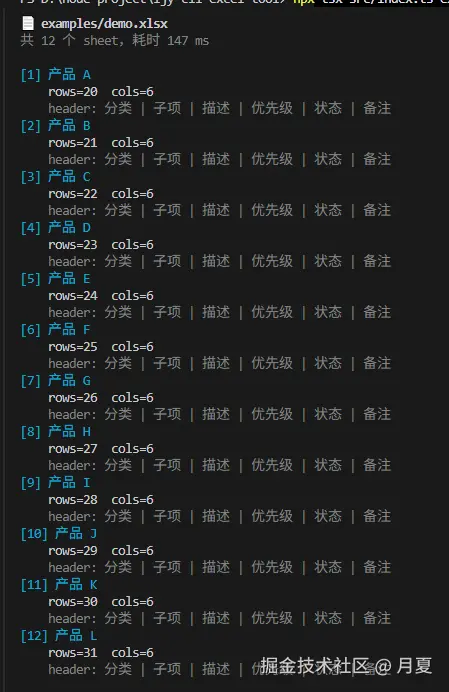
写在最后
3 个坑花了我整个下午,但这套脚手架我整理成了可复用的 skill,后续 12 周里我会按这个套路搭 8 个 Node 项目,目标是从 8 年前端转型到能独立交付的 Node 全栈。
如果你也在做 Node + Excel 工具,希望这篇文章能节省你的时间。
关于我:月夏 / 8 年 toB 前端 / 正在转 Node.js + Java 全栈 / 转型日记持续更新中,欢迎关注。