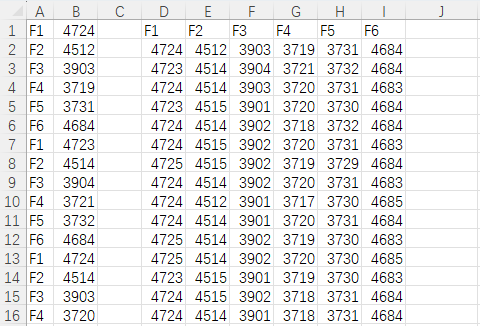
实现的效果是将上面的A B列数据拆分出来。
cpp
Sub SplitByColumnA()
    Dim ws As Worksheet
    Dim lastRow As Long, i As Long
    Dim key As String
    Dim dict As Object
    Dim keys() As String
    Dim colCount As Long
    Dim startCol As Long
    Dim idx As Long
    Dim rowPtr() As Long
    Dim maxRow As Long

    Set ws = ActiveSheet
    lastRow = ws.Cells(ws.Rows.Count, "A").End(xlUp).Row
    If lastRow < 1 Then
        MsgBox "A 列没有数据!"
        Exit Sub
    End If

    Set dict = CreateObject("Scripting.Dictionary")
    ReDim keys(1 To lastRow)
    colCount = 0

    ' 第一遍:按 A 列实际内容收集唯一标签(完全按原样,不删冒号)
    For i = 1 To lastRow
        key = Trim(ws.Cells(i, "A").value)
        If key <> "" Then
            If Not dict.Exists(key) Then
                colCount = colCount + 1
                dict.Add key, colCount
                keys(colCount) = key
            End If
        End If
    Next i

    If colCount = 0 Then
        MsgBox "A 列没有有效标签!"
        Exit Sub
    End If

    ' 自动找输出起始列:当前表最右边已用列再往右空一列
    startCol = ws.Cells(1, ws.Columns.Count).End(xlToLeft).Column + 2
    If startCol < 2 Then startCol = 2

    ' 写表头(第一行)
    For i = 1 To colCount
        ws.Cells(1, startCol + i - 1).value = keys(i)
    Next i

    ' 初始化每个标签的写入行指针,从第 2 行开始
    ReDim rowPtr(1 To colCount)
    For i = 1 To colCount
        rowPtr(i) = 2
    Next i

    ' 第二遍:按 A 列分组,把 B 列的值写入对应列
    For i = 1 To lastRow
        key = Trim(ws.Cells(i, "A").value)
        If key <> "" And dict.Exists(key) Then
            idx = dict(key)
            ws.Cells(rowPtr(idx), startCol + idx - 1).value = ws.Cells(i, "B").value
            rowPtr(idx) = rowPtr(idx) + 1
        End If
    Next i

    ' 找最大行数(用于后续画图或判断范围)
    maxRow = 1
    For i = 1 To colCount
        If rowPtr(i) - 1 > maxRow Then maxRow = rowPtr(i) - 1
    Next i

    ws.Columns("A:Z").AutoFit

    MsgBox "拆分完成!共 " & colCount & " 组,结果从第 " & startCol & " 列开始。"
End Sub