概念
人机协作(human-in-the-loop)(或"在环")工作流将人类输入集成到自动化流程中,允许在关键阶段进行决策、验证或更正
这在基于 LLM 的应用程序中尤其有用,因为底层模型可能会偶尔产生不准确的内容
在合规、决策或内容生成等低容错场景中,人类参与通过审查、更正或覆盖模型输出来确保可靠性
基于 LLM 应用程序中人机协作工作流的主要用例包括:
- 审查工具调用:人类可以在工具执行前审查、编辑或批准 LLM 请求的工具调用
- 验证 LLM 输出:人类可以审查、编辑或批准 LLM 生成的内容
- 提供上下文:使 LLM 能够明确请求人类输入以进行澄清或提供额外细节,或支持多轮对话
interrupt
自 LangGraph 0.2.31 起,推荐使用 interrupt 函数 来设置断点,因为它简化了人机协作(human-in-the-loop)模式
LangGraph 中的 interrupt 函数通过在特定节点暂停图,向人类呈现信息,并用人类的输入恢复图,从而实现人机协作工作流
此函数对于批准、编辑或收集额外输入等任务非常有用。interrupt 函数 与 Command 对象结合使用,以人类提供的值恢复图
js
import { interrupt } from "@langchain/langgraph";

// `humanNode`:图里的一个普通节点,专门用来做人工介入
// `interrupt(payload)`
// - 参数:`payload` 是传给前端 / 外部系统的数据(这里把 `state.some_text` 打包出去,给人看:需要人工修订这段文本)
//   - 执行行为:暂停
//   一旦执行 `interrupt()` → 图停止往下走,把这个 payload 暴露出来
//   - 返回值 `value`:不是立刻拿到,要等后续外部 resume 之后,才会把人类输入塞回来,作为 `interrupt()` 的返回值
// `return { some_text: value }`:恢复执行之后,把人类输入写回 state 的 `some_text`
function humanNode(state: typeof GraphAnnotation.State) {
  const value = interrupt(
    // Any JSON serializable value to surface to the human.
    // 将任何可序列化的 JSON 值呈现(surface to)给用户
    // For example, a question or a piece of text or a set of keys in the state
    // 示例,一个问题/一段文本/state中的一组key
    {
      text_to_revise: state.some_text,
    }
  );
  // Update the state with the human's input or route the graph based on the input
  // 使用人类的 input 更新 state,或者基于 input 路由  graph
  return {
    some_text: value,
  };
}

// 必须搭配 `checkpointer`(状态持久化),因为暂停时要保存当前图的执行断点 + state
const graph = workflow.compile({
  checkpointer, // Required for `interrupt` to work
});

// Run the graph until the interrupt
const threadConfig = { configurable: { thread_id: "some_id" } };
await graph.invoke(someInput, threadConfig);

// Below code can run some amount of time later and/or in a different process
// 如下代码可以过一段时间(some amount of time later),甚至另一个进程(different process)里执行

// 恢复这个 thread_id 的对话:
// 传入 `Command({ resume: xxx })`,告诉 LangGraph:把这个 value 作为 interrupt 的返回值,从断点继续往下执行
// 流程恢复:
// `interrupt()` 拿到 `valueFromHuman` → 赋值给 `value` → 节点 return 更新 state → 图继续往后跑剩下节点

// Human input
const valueFromHuman = "...";


// Resume the graph with the human's input
await graph.invoke(new Command({ resume: valueFromHuman }), threadConfig);
json
{
  some_text: "Edited text";
}
JS 版官方文档
When execution resumes (after you provide the requested input), the runtime restarts the entire node from the beginning---it does not resume from the exact line where interrupt was called. 恢复执行时,运行时会从头重启整个节点,不会从 interrupt 调用的精确代码行恢复
Python 版参考文档
A client resuming the graph must use the Command primitive to specify a value for the interrupt and continue execution. The graph resumes from the start of the node, re-executing all logic. 恢复执行时,图会从节点的开头恢复,重新执行所有逻辑
interrupt 强依赖 checkpointer。没有 checkpointer,断点无法保存,interrupt 不能工作。暂停时,checkpointer 会保存:
- 当前 thread_id 的执行栈(跑到哪个节点、卡在 interrupt)
- 当前完整 state
调用 graph,开始跑流程。当流程走到humanNode的interrupt,invoke 直接返回,不再继续执行
此时状态:线程some_id处于暂停状态
从返回结果里拿到interrupt抛出的 payload{text_to_revise: ...},展示给人看
此时进程可以退出!断点保存在 checkpointer(MemorySaver / Redis)里,不用一直 hold 住请求
完整时序
- invoke 启动图 → 一路执行到 humanNode
- 执行
interrupt({text_to_revise: xxx})→ 暂停,invoke 返回 - 外部系统拿到 payload,展示文本给人,人输入修改后的内容
valueFromHuman - 再次 invoke,传入
Command({resume: valueFromHuman}),同一个 thread_id - 图从刚才中断位置对应的节点恢复:
interrupt返回valueFromHuman(恢复时,从该节点头部开始重新运行) - humanNode 将 value 更新进 state,图继续执行后续节点
js
import { MemorySaver, Annotation, interrupt, Command, StateGraph } from "@langchain/langgraph";

// Define the graph state
const StateAnnotation = Annotation.Root({
  some_text: Annotation<string>()
});

function humanNode(state: typeof StateAnnotation.State) {
   const value = interrupt(
      // Any JSON serializable value to surface to the human.
      // For example, a question or a piece of text or a set of keys in the state
      {
         text_to_revise: state.some_text
      }
   );
   return {
      // Update the state with the human's input
      some_text: value
   };
}

// Build the graph
const workflow = new StateGraph(StateAnnotation)
// Add the human-node to the graph
  .addNode("human_node", humanNode)
  .addEdge("__start__", "human_node")

// A checkpointer is required for `interrupt` to work.
const checkpointer = new MemorySaver();
const graph = workflow.compile({
   checkpointer
});

// Using stream() to directly surface the `__interrupt__` information.
for await (const chunk of await graph.stream(
   { some_text: "Original text" },
   threadConfig
)) {
   console.log(chunk);
}

// Resume using Command
for await (const chunk of await graph.stream(
   new Command({ resume: "Edited text" }),
   threadConfig
)) {
   console.log(chunk);
}
js
{
   __interrupt__: [
      {
         value: { question: 'Please revise the text', some_text: 'Original text' },
         resumable: true,
         ns: ['human_node:10fe492f-3688-c8c6-0d0a-ec61a43fecd6'],
         when: 'during'
      }
   ]
}
{ human_node: { some_text: 'Edited text' } }
for await (const chunk of asyncIterable):专门用来遍历「异步可迭代对象」,一边等待异步数据分片到达,一边循环处理每一块数据
遇到中断(interrupt)时,stream 流就停止吐出 chunk,循环结束,此时图停在 humanNode
普通 for ... of 只能遍历同步迭代器;for await of 是异步版本的 for-of,在 async 函数内使用
interrupt 只是LangGraph 的图执行断点(保存在 checkpointer),不是 JS 代码断点
所以第一个 for await 进入 interrupt 跳出函数时,就去执行第二个 for await,第二个 for await 恢复执行时,继续将 humanNode 中 interrupt 位置的代码捡起来继续执行。
interrupt() 暂停的是 LangGraph StateGraph 的执行,不是暂停 JS 函数执行栈
- JS:第一次 for await 遇到中断 chunk,循环直接结束,JS 代码栈销毁
- LangGraph:在 checkpointer 持久化保存图执行到哪一行(humanNode 内 interrupt 位置),下次同 thread_id resume 时,从这一行之后继续跑节点内代码
准确来说,humanNode 函数是 LangGraph 托管的节点代码
js
import {
  StateGraph,
  Annotation,
  interrupt,
  Command,
  MemorySaver,
} from "@langchain/langgraph";

const State = Annotation.Root({
  input: Annotation(),
  result: Annotation(),
});

let runCount = 0;

function humanNode(state) {
  runCount += 1;
  console.log(`① 第 ${runCount} 次进入 humanNode 函数开头`);

  console.log("② 执行 interrupt 之前的代码");
  const userInput = interrupt({ question: "请输入内容" });
  console.log("③ 执行 interrupt 之后的代码,拿到值:", userInput);

  return { result: userInput };
}

const graph = new StateGraph(State)
  .addNode("humanNode", humanNode)
  .addEdge("__start__", "humanNode")
  .addEdge("humanNode", "__end__")
  .compile({ checkpointer: new MemorySaver() });

const config = {
  configurable: {
    thread_id: "test-thread-001",
  },
};

async function main() {
  console.log("===== 第一次运行图 =====");

  const res1 = await graph.invoke(
    { input: "初始输入" },
    config,
  );

  console.log("第一次运行结果(中断):", res1.__interrupt__);

  console.log("\n===== 第二次运行:resume 恢复 =====");

  const res2 = await graph.invoke(
    new Command({ resume: "用户输入的hello" }),
    config,
  );

  console.log("\n最终结果:", res2);
  console.log(`\n节点总共被执行了 ${runCount} 次`);
}

await main();
① 第 1 次进入 humanNode 函数开头
② 执行 interrupt 之前的代码
① 第 2 次进入 humanNode 函数开头
② 执行 interrupt 之前的代码
③ 执行 interrupt 之后的代码,拿到值:用户输入的hello
最终结果:{ input: '初始输入', result: '用户输入的hello' }
节点总共被执行了 2 次
要求
要在 Graph 中使用 interrupt,需要:
- 指定检查点 以在每一步之后保存图状态
- 在适当的位置调用 interrupt()。请参阅设计模式部分以获取示例
- 使用线程 ID 运行图,直到触发 interrupt
- 使用 invoke/stream 恢复执行(请参阅Command 原语)
设计模式
通过人机协作工作流执行三种不同的操作:
- 批准或拒绝:在关键步骤(例如 API 调用、工具调用)之前暂停图,以审查和批准操作。如果操作被拒绝,可以阻止图执行该步骤,并可能采取替代操作。此模式通常涉及根据人类输入对图进行路由
- 编辑图状态:暂停图以审查和编辑图状态。这对于纠正错误或使用附加信息更新状态很有用。此模式通常涉及使用人类输入更新状态
- 获取输入:在图的特定步骤中明确请求人类输入。对于收集额外信息或上下文以指导 Agent 的决策过程或支持多轮对话很有用
注意:
interrupt 函数通过抛出特殊的 GraphInterrupt 错误来传播。
因此,应该避免在 interrupt 函数周围使用 try/catch 块------如果确实使用了,请确保在 catch 块中再次抛出 GraphInterrupt 错误。
批准或拒绝
根据人类的批准或拒绝,图可以继续执行操作或采取替代路径
在关键步骤(例如 API 调用)之前暂停图,以审查和批准操作。如果操作被拒绝,可以阻止图执行该步骤,并可能采取替代操作
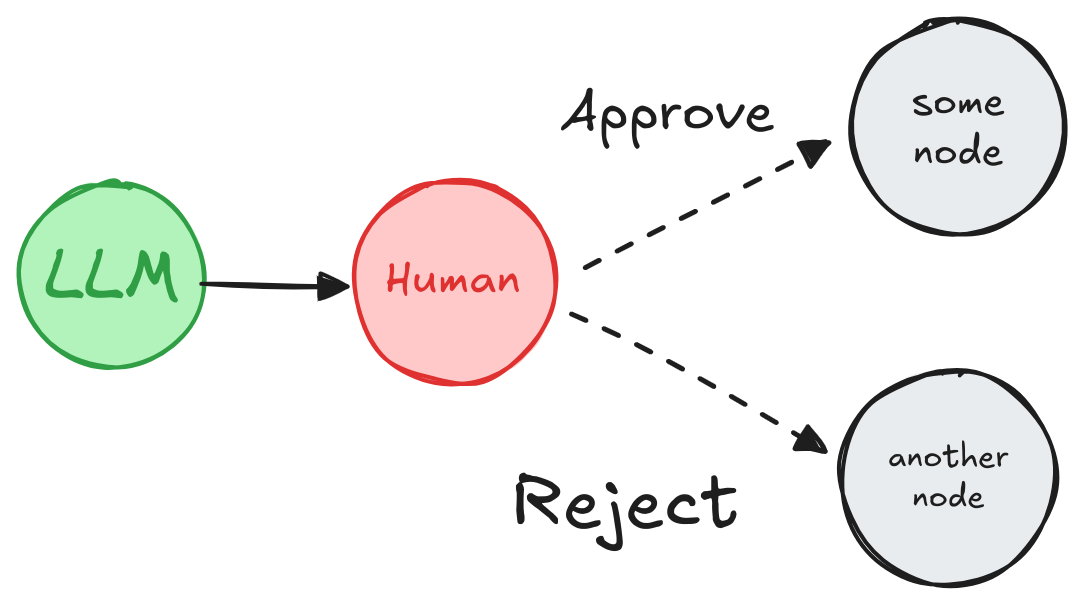
js
import { interrupt, Command } from "@langchain/langgraph";

function humanApproval(state: typeof GraphAnnotation.State): Command {
  const isApproved = interrupt({
    question: "Is this correct?",
    // Surface the output that should be
    // reviewed and approved by the human.
    llm_output: state.llm_output,
  });

  if (isApproved) {
    return new Command({ goto: "some_node" });
  } else {
    return new Command({ goto: "another_node" });
  }
}

// Add the node to the graph in an appropriate location
// and connect it to the relevant nodes.
const graph = graphBuilder
  .addNode("human_approval", humanApproval)
  .compile({ checkpointer });

// After running the graph and hitting the interrupt, the graph will pause.
// Resume it with either an approval or rejection.
const threadConfig = { configurable: { thread_id: "some_id" } };
await graph.invoke(new Command({ resume: true }), threadConfig);
审查与编辑状态(将LLM的信息进行修正后替换)
人类可以审查和编辑图的状态。这对于纠正错误或使用附加信息更新状态很有用
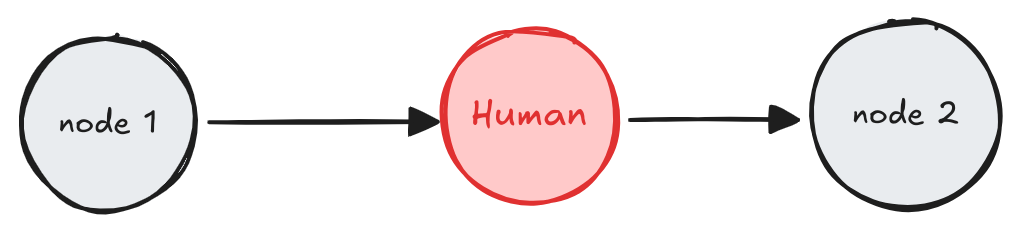
js
import { interrupt } from "@langchain/langgraph";

function humanEditing(state: typeof GraphAnnotation.State): Command {
  const result = interrupt({
    // Interrupt information to surface to the client.
    // Can be any JSON serializable value.
    task: "Review the output from the LLM and make any necessary edits.",
    llm_generated_summary: state.llm_generated_summary,
  });

  // Update the state with the edited text
  return {
    llm_generated_summary: result.edited_text,
  };
}

// Add the node to the graph in an appropriate location and connect it to the relevant nodes.
const graph = graphBuilder
  .addNode("human_editing", humanEditing)
  .compile({ checkpointer });

// After running the graph and hitting the interrupt, the graph will pause.
// Resume it with the edited text.
const threadConfig = { configurable: { thread_id: "some_id" } };
await graph.invoke(
  new Command({ resume: { edited_text: "The edited text" } }),
  threadConfig
);
<审查与编辑状态> 和下文 <审查工具调用> 的区别

审查工具调用(审批通过时才跳转工具执行节点)
人类可以在继续之前审查和编辑 LLM 的输出。这在 LLM 请求的工具调用可能敏感或需要人工监督的应用程序中尤为关键
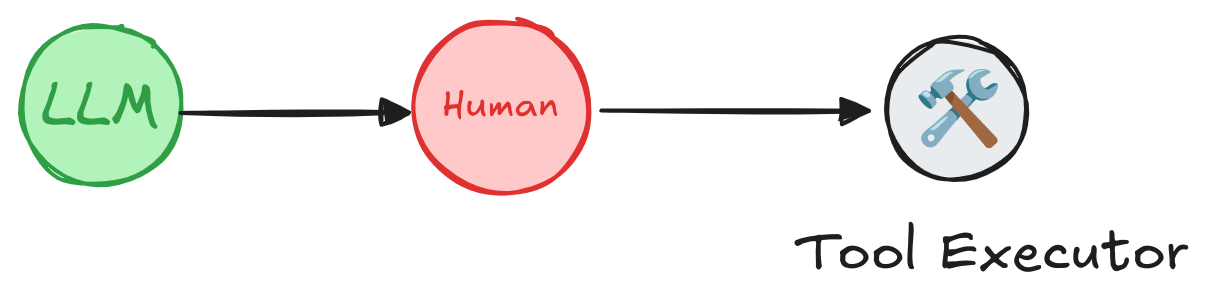
js
import { interrupt, Command } from "@langchain/langgraph";

function humanReviewNode(state: typeof GraphAnnotation.State): Command {
  // This is the value we'll be providing via Command.resume(<human_review>)
  const humanReview = interrupt({
    question: "Is this correct?",
    // Surface tool calls for review
    tool_call: toolCall,
  });

  const [reviewAction, reviewData] = humanReview;

  // Approve the tool call and continue
  // 批准,直接执行
  // 返回 `Command` 直接跳转到 `run_tool` 节点,正常执行工具调用
  if (reviewAction === "continue") {
    return new Command({ goto: "run_tool" });
  }

  // Modify the tool call manually and then continue
  // 用户手动修改了工具调用的参数 / 内容
  // 用 `update` 更新 state 里的 `messages`(注释特别提醒:要修改已有消息必须带上匹配的 message ID)
  // 改完状态后跳转到 `run_tool`,用修改后的内容去执行工具
  else if (reviewAction === "update") {
    const updatedMsg = getUpdatedMsg(reviewData);
    // Remember that to modify an existing message you will need to pass the message with a matching ID.
    return new Command({
      goto: "run_tool",
      update: { messages: [updatedMsg] },
    });
  }

  // Give natural language feedback, and then pass that back to the agent
  // `feedback` ------ 驳回,打回大模型重生成
  // 把用户反馈作为一条消息加入 state
  // 跳转回 `call_llm` 节点,让大模型根据用户反馈重新生成结果
  else if (reviewAction === "feedback") {
    const feedbackMsg = getFeedbackMsg(reviewData);
    return new Command({
      goto: "call_llm",
      update: { messages: [feedbackMsg] },
    });
  }
}
多轮对话
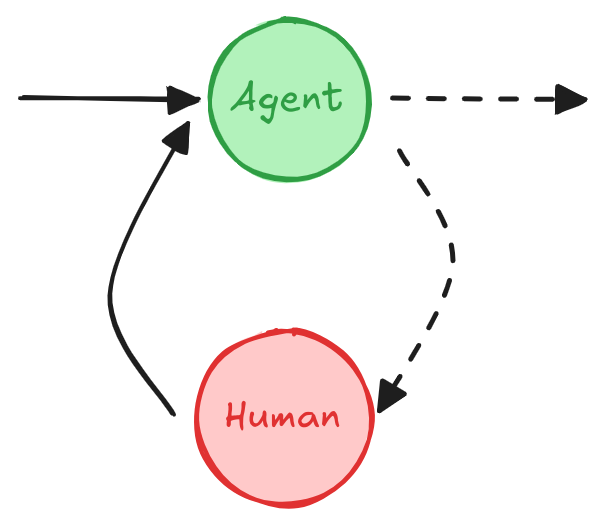
一种多轮对话架构,其中 Agent 和人类节点来回循环,直到 Agent 决定将对话移交给另一个 Agent 或系统的另一部分
多轮对话涉及 Agent 和人类之间的多次来回交互,这可以允许 Agent 以对话方式从人类那里收集额外信息
该设计模式在由多个 Agent 组成的 LLM 应用程序中很有用。一个或多个 Agent 可能需要与人类进行多轮对话,其中人类在对话的不同阶段提供输入或反馈。为简单起见,下面的 Agent 实现被说明为单个节点,但实际上它可能是由多个节点组成的更大图的一部分,并包含条件边。
每个 Agent 使用一个人类节点
在此模式中,每个 Agent 都有自己的人类节点用于收集用户输入
通过为人类节点使用唯一名称(例如,"Agent 1 的人类节点","Agent 2 的人类节点")或使用子图(其中子图包含人类节点和Agent节点)
js
import { interrupt } from "@langchain/langgraph";

function humanInput(state: typeof GraphAnnotation.State) {
  const humanMessage = interrupt("human_input");

  return {
    messages: [
      {
        role: "human",
        content: humanMessage
      }
    ]
  };
}

function agent(state: typeof GraphAnnotation.State) {
  // Agent logic
  // ...
}

const graph = graphBuilder
  .addNode("human_input", humanInput)
  .addEdge("human_input", "agent")
  .compile({ checkpointer });

// After running the graph and hitting the interrupt, the graph will pause.
// Resume it with the human's input.
await graph.invoke(
  new Command({ resume: "hello!" }),
  threadConfig
);
多个 Agent 共享人类节点
在此模式中,单个人类节点用于收集多个 Agent 的用户输入。活动 Agent 从状态中确定,因此在收集人类输入后,图可以路由到正确的 Agent
js
import { interrupt, Command, MessagesAnnotation } from "@langchain/langgraph";

function humanNode(state: typeof MessagesAnnotation.State): Command {
  /**
   * A node for collecting user input.
   */
  const userInput = interrupt("Ready for user input.");

	// 从 state 中决定 active agent,这样就可以将收集到的信息路由给对应的 agent
  // Determine the active agent from the state, so we can route to the correct agent after collecting input.
  // For example, add a field to the state or use the last active agent.
  // or fill in `name` attribute of AI messages generated by the agents.
  const activeAgent = ...;

  return new Command({
    goto: activeAgent,
    update: {
      messages: [{
        role: "human",
        content: userInput,
      }]
    }
  });
}
验证人类输入(多中断)
如果需要在图本身中(而不是在客户端)验证人类提供的输入,可以通过在单个节点中使用多个中断调用来实现
js
import { interrupt } from "@langchain/langgraph";

function humanNode(state: typeof GraphAnnotation.State) {
  /**
   * Human node with validation.
   */
  let question = "What is your age?";

  while (true) {
    const answer = interrupt(question);

    // Validate answer, if the answer isn't valid ask for input again.
    if (typeof answer !== "number" || answer < 0) {
      question = `'${answer}' is not a valid age. What is your age?`;
      continue;
    } else {
      // If the answer is valid, we can proceed.
      break;
    }
  }

  console.log(`The human in the loop is ${answer} years old.`);

  return {
    age: answer,
  };
}
Command 原语
当使用 interrupt 函数时,图将在中断处暂停并等待用户输入
图的执行可以使用 Command 原语恢复,该原语可以通过 invoke 或 stream 方法传递
Command 原语提供了几个选项来控制和修改恢复期间图的状态:
- 将值传递给 interrupt:使用 new Command({ resume: value }) 向图提供数据,例如用户的响应。执行从使用 interrupt 的节点的开头恢复,但是,这次 interrupt(...) 调用将返回在 new Command({ resume: value }) 中传递的值,而不是暂停图
js
// Resume graph execution with the user's input.
await graph.invoke(new Command({ resume: { age: "25" } }), threadConfig);- 更新图状态:使用 Command({ goto: ..., update: ... }) 修改图状态。注意,恢复从使用 interrupt 的节点的开头开始。执行从使用 interrupt 的节点的开头恢复,但带有更新后的状态
js
// Update the graph state and resume.
// You must provide a `resume` value if using an `interrupt`.
await graph.invoke(
  new Command({ resume: "Let's go!!!", update: { foo: "bar" } }),
  threadConfig
);
通过利用 Command,可以恢复图的执行,处理用户输入,并动态调整图的状态
与 invoke 结合使用
当使用 stream 运行图时,将收到一个 Interrupt 事件,它会通知 interrupt 已被触发
1. stream 模式:直接遍历事件拿中断(不用额外 getState)
js
// stream 模式:中断会作为事件直接流出来
const stream = await graph.stream(inputs, threadConfig);
for await (const chunk of stream) {
  // 直接判断是不是中断事件
  if (chunk.event === "interrupt") {
    console.log("触发中断,中断数据:", chunk.data);
    // 拿到中断信息,展示给用户
    break;
  }
}
但 invoke 不会返回中断信息。要访问此信息,必须在调用 invoke 后使用 getState 方法检索图状态
js
// Run the graph up to the interrupt
const result = await graph.invoke(inputs, threadConfig);

// Get the graph state to get interrupt information.
const state = await graph.getState(threadConfig);

// Print the state values
console.log(state.values);

// Print the pending tasks,打印挂起的任务
console.log(state.tasks);

// Resume the graph with the user's input.
await graph.invoke(new Command({ resume: { age: "25" } }), threadConfig);
stream 和 invoke 的区别

当使用 stream 运行图时,将收到一个 Interrupt 事件,它会通知 interrupt 已被触发
stream模式是事件驱动的流式输出,图执行过程中的所有事件(节点开始、节点结束、中断、生成内容等)都会实时推送出来- 一旦节点触发
interrupt(),流里会立刻产生一个Interrupt事件,事件里携带完整的中断数据(比如传给interrupt()的问题、工具调用、任务描述) - 调用方可以通过
for await遍历流,实时捕获中断并展示给用户,不需要额外查询
invoke 不会返回中断信息。要访问此信息,必须在调用 invoke 后使用 getState 方法检索图状态
invoke是一次性调用:要么图完整跑完返回最终结果,要么遇到中断就结束执行- 关键:
invoke的返回值不包含中断的详细载荷(比如要问的问题、待审核内容),只会标识 "图已暂停" - 正确做法:调用完
invoke后,再调用graph.getState(threadConfig)查询当前线程的完整状态,从中读取中断详情
json
{
  foo: "bar";
} // State values

[
  {
    id: "5d8ffc92-8011-0c9b-8b59-9d3545b7e553",
    name: "node_foo",
    path: ["__pregel_pull", "node_foo"],
    error: null,
    interrupts: [
      {
        value: "value_in_interrupt",
        resumable: true,
        ns: ["node_foo:5d8ffc92-8011-0c9b-8b59-9d3545b7e553"],
        when: "during",
      },
    ],
    state: null,
    result: null,
  },
]; // Pending tasks. interrupts
为什么 invoke 要设计成这样?
invoke的语义是「执行图,返回最终结果」;如果图跑完了,就返回最终 state;如果中途中断了,就执行到暂停处返回- 它的返回值结构是统一的,不会因为中断就改变返回格式;中断详情属于「运行时状态」,不属于「执行结果」,所以放在
getState()里 - 而
stream的语义是「流式输出所有执行事件」,中断本身就是一个事件,所以自然会吐出来
从中断恢复如何工作?
使用 interrupt 的一个关键方面是理解恢复的工作原理。当在 interrupt 后恢复执行时,图的执行从上次触发 interrupt 的图节点的开头开始。
从节点开头到 interrupt 的所有代码都将重新执行。
js
let counter = 0;

function node(state: State) {
  // All the code from the beginning of the node to the interrupt will be re-executed when the graph resumes.
  counter += 1;

  console.log(`> Entered the node: ${counter} # of times`);

  // Pause the graph and wait for user input.
  const answer = interrupt();

  console.log("The value of counter is:", counter);
  // ...
}
在恢复图时,计数器将第二次递增,导致以下输出:
text
> Entered the node: 2 # of times
The value of counter is: 2
常见陷阱
副作用
将带有副作用的代码(例如 API 调用)放在 interrupt 之后,以避免重复,因为这些代码在每次节点恢复时都会重新触发。
中断前的副作用(糟糕)
当节点从 interrupt 恢复时,此代码将再次重新执行 API 调用。如果 API 调用不是幂等的或者成本很高,这可能会导致问题。
js
import { interrupt } from "@langchain/langgraph";

function humanNode(state: typeof GraphAnnotation.State) {
  /**
   * Human node with validation.
   */
  apiCall(); // This code will be re-executed when the node is resumed.

  const answer = interrupt(question);
}
中断后的副作用(可以)
js
import { interrupt } from "@langchain/langgraph";

function humanNode(state: typeof GraphAnnotation.State) {
  /**
   * Human node with validation.
   */

  const answer = interrupt(question);

  apiCall(answer); // OK as it's after the interrupt
}
单独节点中的副作用(可以)
js
import { interrupt } from "@langchain/langgraph";

function humanNode(state: typeof GraphAnnotation.State) {
  /**
   * Human node with validation.
   */

  const answer = interrupt(question);

  return {
    answer
  };
}

function apiCallNode(state: typeof GraphAnnotation.State) {
  apiCall(); // OK as it's in a separate node
}
作为函数调用的子图(LangGraph 的嵌套子图 + 中断恢复)
当作为函数调用子图时,父图将从调用子图的节点开头(以及触发 interrupt 的地方)恢复执行。同样,子图将从调用 interrupt() 函数的节点开头恢复
例如:
js
async function nodeInParentGraph(state: typeof GraphAnnotation.State) {
    someCode();  // <-- This will re-execute when the subgraph is resumed.
    // Invoke a subgraph as a function.
    // The subgraph contains an `interrupt` call.
    const subgraphResult = await subgraph.invoke(someInput);
    ...
}
示例:父图和子图的执行流程
假设有一个包含 3 个节点的父图:
父图:node_1 → node_2(子图调用) → node_3
子图有 3 个节点,其中第二个节点包含 interrupt:
子图:sub_node_1 → sub_node_2(interrupt) → sub_node_3
恢复图时,执行将按以下方式进行:
- 跳过父图中的 node_1(已执行,图状态已保存为快照)
- 从头开始重新执行父图中的 node_2
- 跳过子图中的 sub_node_1(已执行,图状态已保存为快照)
- 从头开始重新执行子图中的 sub_node_2
- 继续执行 sub_node_3 和后续节点
这是一个缩写的示例代码,可以用来理解子图如何与中断一起工作。它计算每个节点进入的次数并打印计数。
js
import {
  StateGraph,
  START,
  interrupt,
  Command,
  MemorySaver,
  Annotation
} from "@langchain/langgraph";

// 定义共享的状态结构,`stateCounter` 使用累加 reducer:父子图状态合并时是相加,不是直接覆盖,避免同名字段冲突
const GraphAnnotation = Annotation.Root({
  stateCounter: Annotation<number>({
    // 累加式合并,不是覆盖
    reducer: (a, b) => a + b,
    default: () => 0
  })
})

let counterNodeInSubgraph = 0;

function nodeInSubgraph(state: typeof GraphAnnotation.State) {
  counterNodeInSubgraph += 1;  // This code will **NOT** run again!
  console.log(`Entered 'nodeInSubgraph' a total of ${counterNodeInSubgraph} times`);
  return {};
}

let counterHumanNode = 0;

async function humanNode(state: typeof GraphAnnotation.State) {
  counterHumanNode += 1; // This code will run again!
  console.log(`Entered humanNode in sub-graph a total of ${counterHumanNode} times`);
  const answer = await interrupt("what is your name?");
  console.log(`Got an answer of ${answer}`);
  return {};
}

const checkpointer = new MemorySaver();

// 子图(subgraph)线性流程:`some_node` → `human_node`
// `some_node`:普通业务节点,用全局计数器 `counterNodeInSubgraph` 记录进入次数,注释标注「不会重跑」
// `human_node`:带 `interrupt` 的人工节点,用全局计数器 `counterHumanNode` 记录进入次数,注释标注「会重跑」
// 子图独立启用 `checkpointer`,用于保存子图内部的执行进度
const subgraphBuilder = new StateGraph(GraphAnnotation)
  .addNode("some_node", nodeInSubgraph)
  .addNode("human_node", humanNode)
  .addEdge(START, "some_node")
  .addEdge("some_node", "human_node")
const subgraph = subgraphBuilder.compile({ checkpointer });

let counterParentNode = 0;

async function parentNode(state: typeof GraphAnnotation.State) {
  counterParentNode += 1; // This code will run again on resuming!
  console.log(`Entered 'parentNode' a total of ${counterParentNode} times`);

  // Please note that we're intentionally incrementing the state counter
  // in the graph state as well to demonstrate that the subgraph update
  // of the same key will not conflict with the parent graph (until
  const subgraphState = await subgraph.invoke(state);
  return subgraphState;
}

// 父图只有一个 `parent_node`:
// 全局计数器 `counterParentNode` 记录进入次数,注释标注「恢复时会重跑」
// 节点内部通过 `subgraph.invoke(state)` 手动调用整个子图,把子图的返回状态作为自己的返回值
// 父图也启用 checkpointer 保存自身执行状态
const builder = new StateGraph(GraphAnnotation)
  .addNode("parent_node", parentNode)
  .addEdge(START, "parent_node")

// A checkpointer must be enabled for interrupts to work!
const graph = builder.compile({ checkpointer });

const config = {
  configurable: {
    thread_id: crypto.randomUUID(),
  }
};

for await (const chunk of await graph.stream({ stateCounter: 1 }, config)) {
  console.log(chunk);
}

console.log('--- Resuming ---');

for await (const chunk of await graph.stream(new Command({ resume: "35" }), config)) {
  console.log(chunk);
}- 子图的
interrupt会向上冒泡,导致父节点整体终止执行,恢复时父节点会从头重跑 - 子图自带 checkpointer,已执行完成的普通节点不会重跑,只有触发中断的节点会按规则从头重跑
- 父子图通过 reducer 合并状态,同名字段不会冲突覆盖
为什么父节点会重跑,子图里的普通节点不会?
- 父节点视角:子图的 interrupt 会向上冒泡成父节点的中断,父节点相当于执行到一半被终止,和普通节点里遇到 interrupt 完全一样,所以恢复时父节点从头重跑
- 子图视角:子图有独立的执行进度和 checkpoint,已经完成的节点会被标记为已执行,恢复时直接回放结果,不会重复执行节点函数
这将打印出
text
--- First invocation ---
In parent node: { foo: 'bar' }
Entered 'parentNode' a total of 1 times
Entered 'nodeInSubgraph' a total of 1 times
Entered humanNode in sub-graph a total of 1 times
{ __interrupt__: [{ value: 'what is your name?', resumable: true, ns: ['parent_node:0b23d72f-aaba-0329-1a59-ca4f3c8bad3b', 'human_node:25df717c-cb80-57b0-7410-44e20aac8f3c'], when: 'during' }] }

--- Resuming ---
In parent node: { foo: 'bar' }
Entered 'parentNode' a total of 2 times
Entered humanNode in sub-graph a total of 2 times
Got an answer of 35
{ parent_node: null }
第 1 阶段:第一次运行,触发中断
- 父图启动,进入 parentNode
counterParentNode变为 1,打印Entered 'parent_node' a total of 1 times- 调用
subgraph.invoke(state),子图开始执行
- 子图执行普通节点 some_node
counterNodeInSubgraph变为 1,打印Entered 'nodeInSubgraph' a total of 1 times- 节点执行完成,子图 checkpointer 标记:
some_node已执行完毕
- 子图执行中断节点 human_node
counterHumanNode变为 1,打印Entered humanNode in sub-graph a total of 1 times- 执行到
interrupt("what is your name?"),触发中断 - 中断异常向上冒泡,穿透
subgraph.invoke,一直到父图运行时 - 父节点 parentNode 直接终止,后面的
return subgraphState不会执行 - 父子图的 checkpointer 分别保存各自的中断状态
- 第一次 stream 结束,控制台输出中断事件。
第 2 阶段:resume 恢复,继续执行
调用 graph.stream(new Command({ resume: "35" }), config) 恢复:
- 父图恢复,重新进入 parentNode
符合中断节点重跑规则:父节点被中断终止,恢复时从头执行。counterParentNode变为 2,打印Entered 'parent_node' a total of 2 times- 再次调用
subgraph.invoke(state)
- 子图读取 checkpoint,跳过已完成节点
子图通过 checkpointer 读取之前的执行进度,发现some_node已经执行完成,直接跳过,不会重跑。counterNodeInSubgraph保持 1 不变(这就是注释说的NOT run again)
- 子图恢复执行 human_node,中断节点从头重跑
和单图 interrupt 规则完全一致:中断节点恢复时一定从头重跑。counterHumanNode变为 2,打印Entered humanNode in sub-graph a total of 2 times- 再次执行到
interrupt(),这次不再暂停,直接返回 resume 的值"35" - 打印
Got an answer of 35 human_node执行完成,子图走完后续流程
- 子图执行完成,返回最终状态给
subgraphState - 父节点 parentNode 执行
return subgraphState,状态合并到父图 - 父图执行完成,第二次 stream 结束。
使用多个中断
在单个节点中使用多个中断可能有助于实现诸如验证人类输入之类的模式。然而,如果在同一节点中使用多个中断且不小心处理,可能会导致意外行为
当一个节点包含多个中断调用时,LangGraph 会为执行该任务的节点保留一个特定于任务的恢复值列表。每当执行恢复时,它都会从节点的开头开始。对于遇到的每个中断,LangGraph 都会检查任务的恢复列表中是否存在匹配的值。匹配是严格基于索引的,因此中断调用在节点中的顺序至关重要
为避免问题,请避免在执行之间动态更改节点结构。这包括添加、删除或重新排序中断调用,因为此类更改可能导致索引不匹配。这些问题通常源于非常规模式,例如通过 Command.resume(...).update(SOME_STATE_MUTATION) 改变状态或依赖全局变量动态修改节点结构
不正确的代码示例
当 Command 同时包含 update 和 resume 时,update 会先修改 state,再让节点从头重跑;重跑时原有的第一个中断点被条件跳过,resume 的值就被第二个中断点消费了,最终出现和直觉完全相反的结果
js
import { v4 as uuidv4 } from "uuid";
import {
  StateGraph,
  MemorySaver,
  START,
  interrupt,
  Command,
  Annotation
} from "@langchain/langgraph";

const GraphAnnotation = Annotation.Root({
  name: Annotation<string>(),
  age: Annotation<string>()
});

function humanNode(state: typeof GraphAnnotation.State) {
  let name;
  if (!state.name) {
    name = interrupt("what is your name?");
  } else {
    name = "N/A";
  }

  let age;
  if (!state.age) {
    age = interrupt("what is your age?");
  } else {
    age = "N/A";
  }

  console.log(`Name: ${name}. Age: ${age}`);

  return {
    age,
    name,
  };
}

const builder = new StateGraph(GraphAnnotation)
  .addNode("human_node", humanNode);
  .addEdge(START, "human_node");

// A checkpointer must be enabled for interrupts to work!
const checkpointer = new MemorySaver();

const graph = builder.compile({ checkpointer });

const config = {
  configurable: {
    thread_id: uuidv4(),
  }
};

for await (const chunk of await graph.stream({ age: undefined, name: undefined }, config)) {
  console.log(chunk);
}

// 同时包含 resume 和 update
for await (const chunk of await graph.stream(
  new Command({ resume: "John", update: { name: "foo" } }),
  config
)) {
  console.log(chunk);
}- 执行顺序:
Command({ resume, update })永远是 update 先执行,再恢复节点 ------ 先把 state 改掉,再从头运行节点函数 - 恢复规则:resume 恢复时,节点完整从头重跑,不是从上次中断代码行继续;重跑过程中,遇到的第一个
interrupt()才会消费 resume 的值
json
{ __interrupt__: [{
  value: 'what is your name?',
  resumable: true,
  ns: ['human_node:3a007ef9-c30d-c357-1ec1-86a1a70d8fba'],
  when: 'during'
}]}
Name: N/A. Age: John
{ human_node: { age: 'John', name: 'N/A' } }
Name: N/A. Age: John,这里 Name 本来是 John,然后才会再次咨询 Age
这是 LangGraph 多中断节点里非常高频的错误:
- 不要用 update 修改会影响中断条件的字段,否则会导致中断点漂移,resume 值被错误消费
- 一个节点尽量只放一个 interrupt,放在节点最开头,避免条件判断导致的中断点变化
- 如果必须有多个中断,resume 时不要同时 update 会影响前置条件的状态;如果要改状态,应该在 resume 之后、下一个节点再改