继续接上一篇 ,本篇主要介绍在代码中如何接入大模型 。
接入大模型首先要去大模型官网申请秘钥,这要根据自身情况确定接入什么模型 ? 国内常用的就是deepseek ,千问 ,豆包 。以下说明是以千问为例,通过千问官网如何申请sk-key以及进行内测。
1.大模型API密钥配置
获取API密钥并在代码中配置:
(1)登录阿里云通义千问控制台(需完成实名认证)。
(2)进入"API-KEY管理"页面,创建并复制个人API密钥(注意保密,避免泄露),具体如图1-1所示。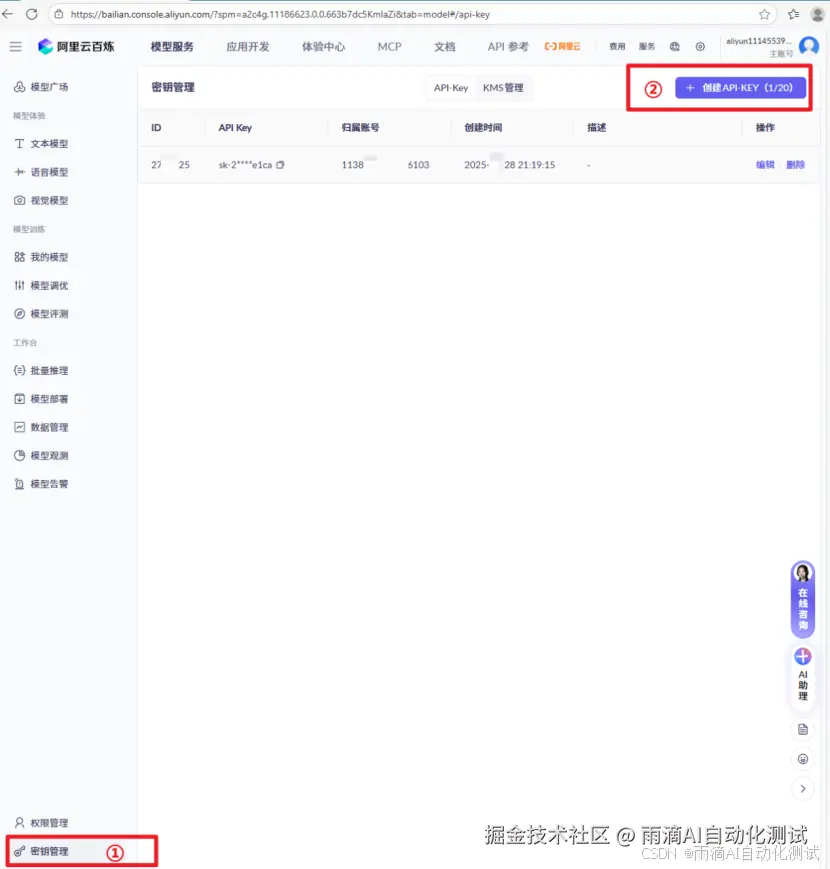
(3)在代码中配置,具体如下所示:
python
# 在代码中指定
TONGYI_API_KEY = "sk-xxx"  # 替换为你的实际API密钥
2.核心模块引入与功能验证
安装完成后,编写一个测试脚本进行验证(test.py),验证代码如下:
python
# 1. 引入核心模块
import requests
import json
import os  # 推荐用环境变量存 Key


# ==================== 自定义 LLM 封装类 ====================
class MyLLM:
    """封装通义千问 API 调用"""

    def __init__(self, dashscope_api_key, model_name="qwen-plus", temperature=0.3):
        self.api_key = dashscope_api_key  # 内部存储用 api_key
        self.model_name = model_name
        self.temperature = temperature
        self.url = "https://dashscope.aliyuncs.com/api/v1/services/aigc/text-generation/generation"

    def invoke(self, prompt):
        """发送 prompt 并返回模型生成的文本"""
        headers = {
            "Authorization": f"Bearer {self.api_key}",
            "Content-Type": "application/json"
        }
        payload = {
            "model": self.model_name,
            "input": {
                "messages": [
                    {"role": "user", "content": prompt}
                ]
            },
            "parameters": {
                "temperature": self.temperature
            }
        }
        try:
            resp = requests.post(self.url, headers=headers, json=payload, timeout=30)
            if resp.status_code == 200:
                result = resp.json()
                # 提取生成的文本(DashScope 返回结构)
                text = result.get("output", {}).get("text", "")
                if not text:
                    # 也可能是 choices 结构,兼容处理
                    choices = result.get("output", {}).get("choices", [])
                    if choices:
                        text = choices[0].get("message", {}).get("content", "")
                return text
            else:
                raise Exception(f"HTTP {resp.status_code}: {resp.text}")
        except Exception as e:
            raise RuntimeError(f"LLM 调用失败: {str(e)}")


# ==================== 自定义 Prompt 模板类 ====================
class MyPromptTemplate:
    """简易模板工具"""

    def __init__(self, template, input_variables):
        self.template = template
        self.input_variables = input_variables

    def format(self, **kwargs):
        """填充模板变量,返回格式化后的字符串"""
        for var in self.input_variables:
            if var not in kwargs:
                raise ValueError(f"缺少必需的模板变量: {var}")
        return self.template.format(**kwargs)


# ==================== 原有业务函数(仅替换类名)====================
def llm_connection(api_key):
    try:
        # 使用自定义 LLM 类,参数名改为 dashscope_api_key(与类定义一致)
        llm = MyLLM(
            dashscope_api_key=api_key,  # 这里传参名与类定义一致
            model_name="qwen-plus",
            temperature=0.3
        )
        # 发送简单请求验证
        response = llm.invoke("生成1条接口测试用例示例,格式:用例ID|用例类型|用例名称")
        print("大模型调用成功,响应结果:")
        print(response)
        return llm
    except Exception as e:
        raise RuntimeError(f"大模型引入失败:{str(e)}")


def prompt_template():
    # 使用自定义模板类
    prompt_template_obj = MyPromptTemplate(
        template="为{api_name}生成1条正常场景测试用例,请求参数约束:{params}",
        input_variables=["api_name", "params"]
    )
    formatted_prompt = prompt_template_obj.format(
        api_name="用户列表接口",
        params='pageIndex≥1,pageSize≤10,userName可为空'
    )
    print("\nPrompt格式化成功,结果:")
    print(formatted_prompt)
    return prompt_template_obj


# ==================== 主程序入口 ====================
if __name__ == "__main__":
    # 建议从环境变量读取,更安全
    TONGYI_API_KEY = os.getenv("DASHSCOPE_API_KEY", "your-sk-key")

    llm = llm_connection(TONGYI_API_KEY)
    prompt_template_obj = prompt_template()
运行上述脚本后,结果显示如下信息:
python
大模型调用成功,响应结果:
TC001|功能测试|用户登录接口_正常登录验证

Prompt格式化成功,结果:
为用户列表接口生成1条正常场景测试用例,请求参数约束:pageIndex≥1,pageSize≤10,userName可为空
那如果你用的不是千问模型咋把 ? 你可以把上面的代码封装成一个模块,什么模型都可以使用,只需要做个简单的配置就行
封装为通用模块
具体实现思路就是一个llm客户端,里面把各种大模型都封装到一起,使用那个只需修改个参数即可 ,以下是实现的简化版项目目录结构:
python
project_root/                        # 你的项目根目录(比如 pre_script)
│
├── .env                             # 环境变量(存放 API Key)
├── main.py                          # 业务入口(演示调用)
├── requirements.txt                 # 依赖清单(可选)
│
└── llm_client/                      # 核心模块(包)
    ├── __init__.py                  # 对外暴漏LLMClient
    ├── client.py                    # 核心客户端类
    ├── factory.py                    # 工厂 + 配置加载
    ├── models.py                    # 各种模型具体实现类
    └── config.yaml                    # 配置文件示例。
3.1 配置文件示例 - config.yaml
python
# 支持多个命名配置,每个配置必须包含 model_type 和 api_key,其他可选
models:
  qwen_default:
    model_type: qwen
    api_key: ${DASHSCOPE_API_KEY}   # 支持环境变量替换
    model_name: qwen-plus
    temperature: 0.3

  openai_default:
    model_type: openai
    api_key: ${OPENAI_API_KEY}
    model_name: gpt-3.5-turbo
    temperature: 0.5

  deepseek_default:
    model_type: deepseek
    api_key: ${DEEPSEEK_API_KEY}
    model_name: deepseek-chat
    temperature: 0.3

  doubao_default:
    model_type: doubao
    api_key: ${DOUBAO_API_KEY}
    model_name: doubao-pro-32k
    temperature: 0.4
    # 豆包可能需要额外参数,如 endpoint,可在此添加

  # 你可以定义多个不同用途的配置
  qwen_test:
    model_type: qwen
    api_key: ${DASHSCOPE_API_KEY}
    model_name: qwen-turbo
    temperature: 0.1
3.2 models.py -- 各模型具体实现
python
import requests
import json

class BaseLLM:
    def invoke(self, prompt: str) -> str:
        raise NotImplementedError

# ---------- 千问 ----------
class QwenLLM(BaseLLM):
    def __init__(self, api_key, model_name="qwen-plus", temperature=0.3, **kwargs):
        self.api_key = api_key
        self.model_name = model_name
        self.temperature = temperature
        self.url = "https://dashscope.aliyuncs.com/api/v1/services/aigc/text-generation/generation"

    def invoke(self, prompt: str) -> str:
        headers = {"Authorization": f"Bearer {self.api_key}", "Content-Type": "application/json"}
        payload = {
            "model": self.model_name,
            "input": {"messages": [{"role": "user", "content": prompt}]},
            "parameters": {"temperature": self.temperature}
        }
        resp = requests.post(self.url, headers=headers, json=payload, timeout=30)
        if resp.status_code == 200:
            data = resp.json()
            text = data.get("output", {}).get("text", "")
            if not text:
                choices = data.get("output", {}).get("choices", [])
                if choices:
                    text = choices[0].get("message", {}).get("content", "")
            return text
        raise RuntimeError(f"Qwen API error: {resp.text}")

# ---------- OpenAI ----------
class OpenAILLM(BaseLLM):
    def __init__(self, api_key, model_name="gpt-3.5-turbo", temperature=0.3, **kwargs):
        self.api_key = api_key
        self.model_name = model_name
        self.temperature = temperature
        self.url = "https://api.openai.com/v1/chat/completions"

    def invoke(self, prompt: str) -> str:
        headers = {"Authorization": f"Bearer {self.api_key}", "Content-Type": "application/json"}
        payload = {
            "model": self.model_name,
            "messages": [{"role": "user", "content": prompt}],
            "temperature": self.temperature
        }
        resp = requests.post(self.url, headers=headers, json=payload, timeout=30)
        if resp.status_code == 200:
            return resp.json()["choices"][0]["message"]["content"]
        raise RuntimeError(f"OpenAI API error: {resp.text}")

# ---------- DeepSeek(兼容OpenAI格式) ----------
class DeepSeekLLM(BaseLLM):
    def __init__(self, api_key, model_name="deepseek-chat", temperature=0.3, **kwargs):
        self.api_key = api_key
        self.model_name = model_name
        self.temperature = temperature
        self.url = "https://api.deepseek.com/v1/chat/completions"

    def invoke(self, prompt: str) -> str:
        headers = {"Authorization": f"Bearer {self.api_key}", "Content-Type": "application/json"}
        payload = {
            "model": self.model_name,
            "messages": [{"role": "user", "content": prompt}],
            "temperature": self.temperature
        }
        resp = requests.post(self.url, headers=headers, json=payload, timeout=30)
        if resp.status_code == 200:
            return resp.json()["choices"][0]["message"]["content"]
        raise RuntimeError(f"DeepSeek API error: {resp.text}")

# ---------- 豆包(火山引擎,示例) ----------
# 注意:豆包实际API可能需要签名,此处仅为示例结构,具体实现需参考火山引擎文档
class DoubaoLLM(BaseLLM):
    def __init__(self, api_key, model_name="doubao-pro-32k", temperature=0.3, endpoint=None, **kwargs):
        self.api_key = api_key
        self.model_name = model_name
        self.temperature = temperature
        self.endpoint = endpoint or "https://ark.cn-beijing.volces.com/api/v3/chat/completions"  # 示例

    def invoke(self, prompt: str) -> str:
        headers = {"Authorization": f"Bearer {self.api_key}", "Content-Type": "application/json"}
        payload = {
            "model": self.model_name,
            "messages": [{"role": "user", "content": prompt}],
            "temperature": self.temperature
        }
        resp = requests.post(self.endpoint, headers=headers, json=payload, timeout=30)
        if resp.status_code == 200:
            return resp.json()["choices"][0]["message"]["content"]
        raise RuntimeError(f"Doubao API error: {resp.text}")
3.3 factory.py -- 工厂 + 配置加载
python
import os
import yaml
from .models import QwenLLM, OpenAILLM, DeepSeekLLM, DoubaoLLM
from dotenv import load_dotenv

load_dotenv()

class LLMFactory:
    _registry = {
        "qwen": QwenLLM,
        "openai": OpenAILLM,
        "deepseek": DeepSeekLLM,
        "doubao": DoubaoLLM,
    }

    @classmethod
    def get_llm(cls, model_type, **kwargs):
        model_class = cls._registry.get(model_type.lower())
        if not model_class:
            raise ValueError(f"Unsupported model type: {model_type}")
        return model_class(**kwargs)

# ---------- 配置加载 ----------
def load_config(config_path=None):
    if config_path is None:
        # 默认取同目录下的 config.yaml
        config_path = os.path.join(os.path.dirname(__file__), "config.yaml")
    with open(config_path, 'r', encoding='utf-8') as f:
        raw = yaml.safe_load(f)
    # 环境变量替换(支持 ${VAR_NAME})
    def replace_env(value):
        if isinstance(value, str) and value.startswith('${') and value.endswith('}'):
            env_var = value[2:-1]
            return os.getenv(env_var, value)
        return value

    # 递归替换所有字符串
    def recursive_replace(obj):
        if isinstance(obj, dict):
            return {k: recursive_replace(v) for k, v in obj.items()}
        elif isinstance(obj, list):
            return [recursive_replace(v) for v in obj]
        elif isinstance(obj, str):
            return replace_env(obj)
        else:
            return obj

    return recursive_replace(raw)

# 全局配置缓存(按需加载)
_config_cache = None

def get_config():
    global _config_cache
    if _config_cache is None:
        _config_cache = load_config()
    return _config_cache
3.4 client.py -- 对外客户端类
python
from .factory import get_config, LLMFactory

class LLMClient:
    """统一客户端,只需传入配置名称即可"""
    def __init__(self, config_name: str):
        """
        :param config_name: 配置文件中的模型配置名称,例如 'qwen_default'
        """
        config = get_config()
        model_configs = config.get("models", {})
        if config_name not in model_configs:
            raise ValueError(f"配置 '{config_name}' 不存在,可用配置: {list(model_configs.keys())}")

        self.config_name = config_name
        self.params = model_configs[config_name].copy()
        self.model_type = self.params.pop("model_type")  # 移除并保存
        self.llm = LLMFactory.get_llm(self.model_type, **self.params)

    def invoke(self, prompt: str) -> str:
        """发送提示词并返回结果"""
        return self.llm.invoke(prompt)

    # 可选:直接暴露底层的 llm 对象,便于扩展
    def get_llm_instance(self):
        return self.llm
3.5 init.py -- 暴露入口
python
from .client import LLMClient

__all__ = ["LLMClient"]
3.6 .env - 配置sk-xxx
python
# 请替换成你自己的真实 API Key
DASHSCOPE_API_KEY=sk-你的千问key
OPENAI_API_KEY=sk-你的OpenAI key
DEEPSEEK_API_KEY=sk-你的DeepSeek key
DOUBAO_API_KEY=你的豆包key
3.7 main.py 项目入口
python
from llm_client import LLMClient

if __name__ == "__main__":
    # 只需传入配置名称(在 config.yaml 中定义)
    client = LLMClient("qwen_default")
    resp = client.invoke("用一句话解释工厂模式")
    print("千问回答:", resp)

    # 切换模型
    # client2 = LLMClient("deepseek_default")
    # print("DeepSeek回答:", client2.invoke("解释递归"))