Bash 工具
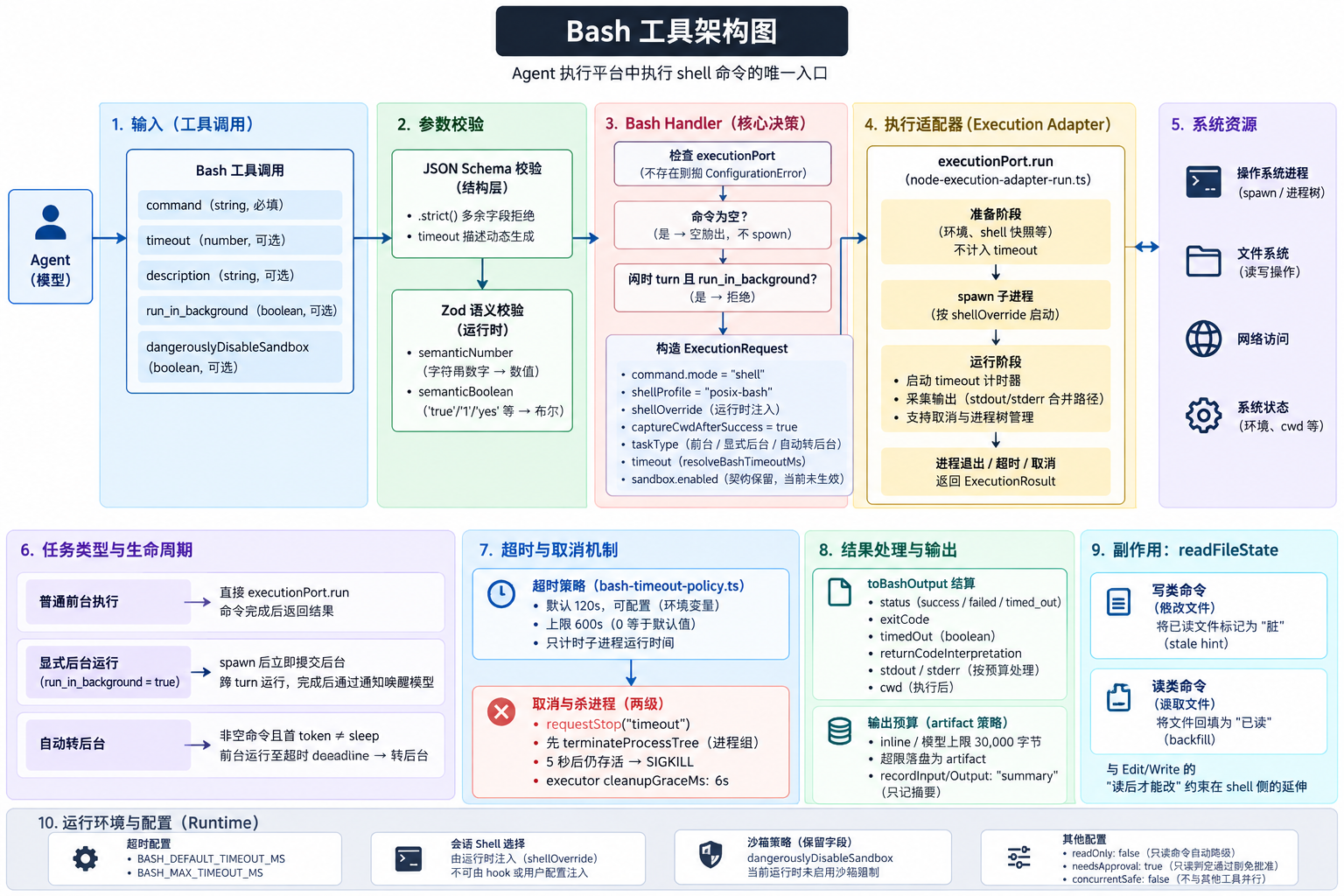
1. 定位
Bash 是 Agent 执行平台 shell 命令的唯一入口:装依赖、跑测试、查 git 状态、调 CLI 工具,都通过这个工具完成。它的 capability 是 "Execute platform shell commands through the execution adapter"(bash.ts:447),是内置工具中副作用范围最大、风险等级最高 的一个(sideEffectScope: "system",riskLevel: "high",needsApproval: true)------其他工具只在各自领域内动作,Bash 能触达进程、文件系统、网络与系统状态的任意组合。
它不只是"能跑命令",还承担三件系统级职责:
- 权限模型的主战场:只读命令自动免批准、命令级 allow/deny 规则、稳定前缀规则建议,都建立在 Bash 的命令解析之上(见第 8 节)。
- 长任务与回合解耦 :
run_in_background让命令脱离当前 turn 继续运行,完成后通过通知 turn 唤醒模型(见第 6 节)。 - readFileState 的双向锚点:写类命令会把模型已读过的文件改"脏"(stale hint),读类命令会把文件回填为"已读"(backfill)------这是 Edit/Write "读后才能改" 约束在 shell 侧的延伸(见第 9 节)。
2. 基本信息
| 属性 | 值 | 说明 |
|---|---|---|
| 工具名 | "Bash" |
命令是 sed -i 原地编辑时 UI 显示为 "Update"(bash-metadata.ts) |
| 只读 | readOnly: false |
默认按有副作用处理;只读命令经运行时判定后自动降级(第 8.1 节) |
| 批准 | needsApproval: true |
高风险;只读判定通过则免批准 |
| 并发 | concurrentSafe: false |
不与其他工具并行调用 |
| 默认超时 | 120s | 可被调用方 timeout 覆盖,上限 600s(第 4 节) |
| 取消 | 支持 | cleanup: "bestEffort";杀整个进程树(第 7.4 节) |
| 结果预算 | artifact 策略 | inline/模型上限 30,000 字节,超限落盘为 artifact(第 7 节) |
| 追踪 | recordInput/Output: "summary" |
只记摘要,不记全量输出 |
3. 输入参数
| 参数 | 类型 | 必填 | 说明 |
|---|---|---|---|
command |
string | 是 | 要执行的命令 |
timeout |
number | 否 | 超时毫秒数,上限 600,000;0/未传回落到默认值 |
description |
string | 否 | 命令用途的主动语态简述,展示给用户 |
run_in_background |
boolean | 否 | true 时后台运行,跨 turn 存活,退出后重新唤醒模型 |
dangerouslyDisableSandbox |
boolean | 否 | 契约保留字段:关闭沙箱模式 |
参数经两层校验:
- JSON Schema 层 (投给模型的结构):
.strict(),多余字段直接拒绝;timeout的描述文案按超时策略动态生成(createBashInputJsonSchema)。 - 运行时 Zod 语义层 (
BashInputSchema):semanticNumber把字符串数字(如"120000")归一为数值;semanticBoolean把"true"/"1"/"yes"/"y"/"on"与"false"/"0"/"no"/"n"/"off"及数字0/1归一为布尔------这些都是对模型偶发类型漂移的宽容,而不是放宽语义。
description 字段的描述文本本身就是一段提示词(contracts/src/tools/bash.ts:14):简单命令保持 5-10 词(git status → "Show working tree status"),管道或冷门参数命令要写清实际效果(git reset --hard origin/main → "Discard all local changes and match remote main"),且禁止出现 "complex"、"risk" 这类词------描述是给用户看的进度标签,不是风险评估。
关于 dangerouslyDisableSandbox:ExecutionSandboxPolicy 在契约中仍有定义(execution.port.ts:108),handler 也会把 sandbox.enabled 传进请求,但当前运行时已撤除沙箱强制 ------适配器中没有任何消费者读取该字段(node-execution-adapter-run.ts:276 注释明确记录了"protected-resource sandbox 时代"的历史)。该参数现在只做透传与输出回显,不代表存在沙箱边界。
4. 超时策略
ts
// bash-timeout-policy.ts
export const DEFAULT_BASH_TIMEOUT_MS = 120_000;
export const DEFAULT_BASH_MAX_TIMEOUT_MS = 600_000;

export function resolveBashTimeoutMs(inputTimeoutMs, policy) {
  return Math.min(inputTimeoutMs || policy.defaultTimeoutMs, policy.maxTimeoutMs);
}- 环境变量可调 :
BASH_DEFAULT_TIMEOUT_MS、BASH_MAX_TIMEOUT_MS(resolveBashTimeoutPolicy);配置后的 max 会被抬到不低于 default,避免出现"默认值大于上限"的倒挂。 timeout: 0等于默认值 ,不是"无限"。||短路把 0 归到 default------这是与旧 watchdog 的共用语义,历史 bug(字符串数字绕过 policy、0 被压成 1ms)的修复就是让 watchdog 与 handler 走同一个resolveBashTimeoutMs(bash.ts:542注释)。- 计时器只约束子进程运行 。timeout 计时器在
spawn完成后才启动(node-execution-adapter-run.ts:280);shell 快照采集、artifact 准备等异步准备阶段不算在 timeout 内,取消与关闭在准备期由stoppedBeforeSpawn兜底。 - 杀进程有两级 :
requestStop("timeout")先terminateProcessTree(进程组/taskkill),5 秒(FORCE_EXIT_AFTER_KILL_MS)后仍存活则 SIGKILL 并销毁输出管道------root shell 退出不代表它派生的后代已退出,必须防 orphan。executor 侧的cleanupGraceMs: 6_000与这 5 秒对应。 - 超时后
status: "timed_out"、timedOut: true、returnCodeInterpretation: "Command timed out",模型收到的是结果对象而不是异常。
5. 执行主流程
#mermaid-svg-sQcK6WYTaPUgkJxk{font-family:"trebuchet ms",verdana,arial,sans-serif;font-size:16px;fill:#333;}@keyframes edge-animation-frame{from{stroke-dashoffset:0;}}@keyframes dash{to{stroke-dashoffset:0;}}#mermaid-svg-sQcK6WYTaPUgkJxk .edge-animation-slow{stroke-dasharray:9,5!important;stroke-dashoffset:900;animation:dash 50s linear infinite;stroke-linecap:round;}#mermaid-svg-sQcK6WYTaPUgkJxk .edge-animation-fast{stroke-dasharray:9,5!important;stroke-dashoffset:900;animation:dash 20s linear infinite;stroke-linecap:round;}#mermaid-svg-sQcK6WYTaPUgkJxk .error-icon{fill:#552222;}#mermaid-svg-sQcK6WYTaPUgkJxk .error-text{fill:#552222;stroke:#552222;}#mermaid-svg-sQcK6WYTaPUgkJxk .edge-thickness-normal{stroke-width:1px;}#mermaid-svg-sQcK6WYTaPUgkJxk .edge-thickness-thick{stroke-width:3.5px;}#mermaid-svg-sQcK6WYTaPUgkJxk .edge-pattern-solid{stroke-dasharray:0;}#mermaid-svg-sQcK6WYTaPUgkJxk .edge-thickness-invisible{stroke-width:0;fill:none;}#mermaid-svg-sQcK6WYTaPUgkJxk .edge-pattern-dashed{stroke-dasharray:3;}#mermaid-svg-sQcK6WYTaPUgkJxk .edge-pattern-dotted{stroke-dasharray:2;}#mermaid-svg-sQcK6WYTaPUgkJxk .marker{fill:#333333;stroke:#333333;}#mermaid-svg-sQcK6WYTaPUgkJxk .marker.cross{stroke:#333333;}#mermaid-svg-sQcK6WYTaPUgkJxk svg{font-family:"trebuchet ms",verdana,arial,sans-serif;font-size:16px;}#mermaid-svg-sQcK6WYTaPUgkJxk p{margin:0;}#mermaid-svg-sQcK6WYTaPUgkJxk .label{font-family:"trebuchet ms",verdana,arial,sans-serif;color:#333;}#mermaid-svg-sQcK6WYTaPUgkJxk .cluster-label text{fill:#333;}#mermaid-svg-sQcK6WYTaPUgkJxk .cluster-label span{color:#333;}#mermaid-svg-sQcK6WYTaPUgkJxk .cluster-label span p{background-color:transparent;}#mermaid-svg-sQcK6WYTaPUgkJxk .label text,#mermaid-svg-sQcK6WYTaPUgkJxk span{fill:#333;color:#333;}#mermaid-svg-sQcK6WYTaPUgkJxk .node rect,#mermaid-svg-sQcK6WYTaPUgkJxk .node circle,#mermaid-svg-sQcK6WYTaPUgkJxk .node ellipse,#mermaid-svg-sQcK6WYTaPUgkJxk .node polygon,#mermaid-svg-sQcK6WYTaPUgkJxk .node path{fill:#ECECFF;stroke:#9370DB;stroke-width:1px;}#mermaid-svg-sQcK6WYTaPUgkJxk .rough-node .label text,#mermaid-svg-sQcK6WYTaPUgkJxk .node .label text,#mermaid-svg-sQcK6WYTaPUgkJxk .image-shape .label,#mermaid-svg-sQcK6WYTaPUgkJxk .icon-shape .label{text-anchor:middle;}#mermaid-svg-sQcK6WYTaPUgkJxk .node .katex path{fill:#000;stroke:#000;stroke-width:1px;}#mermaid-svg-sQcK6WYTaPUgkJxk .rough-node .label,#mermaid-svg-sQcK6WYTaPUgkJxk .node .label,#mermaid-svg-sQcK6WYTaPUgkJxk .image-shape .label,#mermaid-svg-sQcK6WYTaPUgkJxk .icon-shape .label{text-align:center;}#mermaid-svg-sQcK6WYTaPUgkJxk .node.clickable{cursor:pointer;}#mermaid-svg-sQcK6WYTaPUgkJxk .root .anchor path{fill:#333333!important;stroke-width:0;stroke:#333333;}#mermaid-svg-sQcK6WYTaPUgkJxk .arrowheadPath{fill:#333333;}#mermaid-svg-sQcK6WYTaPUgkJxk .edgePath .path{stroke:#333333;stroke-width:2.0px;}#mermaid-svg-sQcK6WYTaPUgkJxk .flowchart-link{stroke:#333333;fill:none;}#mermaid-svg-sQcK6WYTaPUgkJxk .edgeLabel{background-color:rgba(232,232,232, 0.8);text-align:center;}#mermaid-svg-sQcK6WYTaPUgkJxk .edgeLabel p{background-color:rgba(232,232,232, 0.8);}#mermaid-svg-sQcK6WYTaPUgkJxk .edgeLabel rect{opacity:0.5;background-color:rgba(232,232,232, 0.8);fill:rgba(232,232,232, 0.8);}#mermaid-svg-sQcK6WYTaPUgkJxk .labelBkg{background-color:rgba(232, 232, 232, 0.5);}#mermaid-svg-sQcK6WYTaPUgkJxk .cluster rect{fill:#ffffde;stroke:#aaaa33;stroke-width:1px;}#mermaid-svg-sQcK6WYTaPUgkJxk .cluster text{fill:#333;}#mermaid-svg-sQcK6WYTaPUgkJxk .cluster span{color:#333;}#mermaid-svg-sQcK6WYTaPUgkJxk div.mermaidTooltip{position:absolute;text-align:center;max-width:200px;padding:2px;font-family:"trebuchet ms",verdana,arial,sans-serif;font-size:12px;background:hsl(80, 100%, 96.2745098039%);border:1px solid #aaaa33;border-radius:2px;pointer-events:none;z-index:100;}#mermaid-svg-sQcK6WYTaPUgkJxk .flowchartTitleText{text-anchor:middle;font-size:18px;fill:#333;}#mermaid-svg-sQcK6WYTaPUgkJxk rect.text{fill:none;stroke-width:0;}#mermaid-svg-sQcK6WYTaPUgkJxk .icon-shape,#mermaid-svg-sQcK6WYTaPUgkJxk .image-shape{background-color:rgba(232,232,232, 0.8);text-align:center;}#mermaid-svg-sQcK6WYTaPUgkJxk .icon-shape p,#mermaid-svg-sQcK6WYTaPUgkJxk .image-shape p{background-color:rgba(232,232,232, 0.8);padding:2px;}#mermaid-svg-sQcK6WYTaPUgkJxk .icon-shape .label rect,#mermaid-svg-sQcK6WYTaPUgkJxk .image-shape .label rect{opacity:0.5;background-color:rgba(232,232,232, 0.8);fill:rgba(232,232,232, 0.8);}#mermaid-svg-sQcK6WYTaPUgkJxk .label-icon{display:inline-block;height:1em;overflow:visible;vertical-align:-0.125em;}#mermaid-svg-sQcK6WYTaPUgkJxk .node .label-icon path{fill:currentColor;stroke:revert;stroke-width:revert;}#mermaid-svg-sQcK6WYTaPUgkJxk :root{--mermaid-font-family:"trebuchet ms",verdana,arial,sans-serif;} 无
有
是
否
是且 run_in_background
否
是
否
是
否
Bash(command, ...)
BashInputSchema.parse
executionPort?
ConfigurationError
command 为空?
空输出,不 spawn
闲时 turn?
拒绝:闲时不支持后台
run_in_background?
显式后台生命周期
spawn 后立即提交后台
自动转后台资格?
非空命令且首 token ≠ sleep
前台先跑
超时 deadline 到 → 转后台
普通前台执行 executionPort.run
toBashOutput 结算
cwd 策略决策
readFileState 副作用
stale hint + backfill
返回 BashOutput
handler(bash.ts:104)构造 ExecutionRequest 时的关键决策:
| 决策 | 值 | 说明 |
|---|---|---|
command.mode |
"shell" + shellProfile: "posix-bash" |
固定值;shellProfile 是内部标记,决定走合并输出文件路径,且绝不能从 hook 或用户配置注入 |
shellOverride |
session shell selection | 由运行时注入的 shell 选择(第 10 节) |
captureCwdAfterSuccess |
仅前台为 true |
后台任务不捕获 cwd |
outputLimit.persistOutput |
后台 "always" / 前台 "on_truncate" |
Bash 从 spawn 起就直接写盘,此开关只控制结算后文件是否保留 |
bashPrelude |
embedded search prelude | posix/git-bash session 且 embedded search 开启时注入 find/grep shell 函数,把它们路由到内嵌搜索后端;此时工具描述的"避免命令"清单会去掉 find/grep |
sandbox |
{ enabled: !dangerouslyDisableSandbox } |
见第 3 节,当前无强制语义 |
空命令是合法输入 :command.trim() 为空时直接返回空输出(emptyBashOutput),不 spawn、不报错------模型偶尔会发出探针式调用,按"无事发生"处理最便宜。
6. 后台执行与完成通知
6.1 两种后台路径
显式后台 (run_in_background: true):走 runBashWithBackgroundLifecycle(mode: "explicit")。子进程 spawn 出来(收到 started 事件)后立即 提交后台(commitBackground):登记 exec_<uuid> 任务、脱离 parent turn 的 AbortSignal、清掉前台 deadline,工具调用随即返回 backgrounded 结果------模型拿到 backgroundTaskId 和输出文件路径,当前 turn 继续往下走。
超时自动转后台 (auto_on_timeout):符合条件的命令(非空、首 token 不是 sleep、未显式要求后台------isBashAutoBackgroundEligible)先前台执行;deadline 到了(即调用方的 timeout 用尽)不杀进程 ,而是把整个执行转成后台任务。关键细节(node-execution-adapter-lifecycle.ts:123):
ts
const runRequest: ExecutionRequest = {
  ...request,
  timeoutMs: 0,                    // 子进程永不被适配器超时杀掉
  outputLimit: { ..., persistOutput: "always" },
};
前台 deadline 是生命周期自己 setTimeout(commitBackground, timeoutMs) 实现的,与适配器的 timeout 计时器分离;转后台时原子提交状态(state = "backgrounded")→ 清 deadline → 脱离 parent abort → 登记任务,避免 abort/completion 在提交缝隙里误杀后台进程。
sleep 被排除在自动转后台之外:等待类命令转后台只是把"占着前台"换成"挂着后台",模型还得轮询,不如直接让超时语义生效。
6.2 后台期间的状态与事件顺序
runtime 命令队列 子进程 后台生命周期(适配器所有) Bash handler 模型(当前 turn) runtime 命令队列 子进程 后台生命周期(适配器所有) Bash handler 模型(当前 turn) #mermaid-svg-d2YnnhDWibdCUj9X{font-family:"trebuchet ms",verdana,arial,sans-serif;font-size:16px;fill:#333;}@keyframes edge-animation-frame{from{stroke-dashoffset:0;}}@keyframes dash{to{stroke-dashoffset:0;}}#mermaid-svg-d2YnnhDWibdCUj9X .edge-animation-slow{stroke-dasharray:9,5!important;stroke-dashoffset:900;animation:dash 50s linear infinite;stroke-linecap:round;}#mermaid-svg-d2YnnhDWibdCUj9X .edge-animation-fast{stroke-dasharray:9,5!important;stroke-dashoffset:900;animation:dash 20s linear infinite;stroke-linecap:round;}#mermaid-svg-d2YnnhDWibdCUj9X .error-icon{fill:#552222;}#mermaid-svg-d2YnnhDWibdCUj9X .error-text{fill:#552222;stroke:#552222;}#mermaid-svg-d2YnnhDWibdCUj9X .edge-thickness-normal{stroke-width:1px;}#mermaid-svg-d2YnnhDWibdCUj9X .edge-thickness-thick{stroke-width:3.5px;}#mermaid-svg-d2YnnhDWibdCUj9X .edge-pattern-solid{stroke-dasharray:0;}#mermaid-svg-d2YnnhDWibdCUj9X .edge-thickness-invisible{stroke-width:0;fill:none;}#mermaid-svg-d2YnnhDWibdCUj9X .edge-pattern-dashed{stroke-dasharray:3;}#mermaid-svg-d2YnnhDWibdCUj9X .edge-pattern-dotted{stroke-dasharray:2;}#mermaid-svg-d2YnnhDWibdCUj9X .marker{fill:#333333;stroke:#333333;}#mermaid-svg-d2YnnhDWibdCUj9X .marker.cross{stroke:#333333;}#mermaid-svg-d2YnnhDWibdCUj9X svg{font-family:"trebuchet ms",verdana,arial,sans-serif;font-size:16px;}#mermaid-svg-d2YnnhDWibdCUj9X p{margin:0;}#mermaid-svg-d2YnnhDWibdCUj9X .actor{stroke:hsl(259.6261682243, 59.7765363128%, 87.9019607843%);fill:#ECECFF;}#mermaid-svg-d2YnnhDWibdCUj9X text.actor>tspan{fill:black;stroke:none;}#mermaid-svg-d2YnnhDWibdCUj9X .actor-line{stroke:hsl(259.6261682243, 59.7765363128%, 87.9019607843%);}#mermaid-svg-d2YnnhDWibdCUj9X .innerArc{stroke-width:1.5;stroke-dasharray:none;}#mermaid-svg-d2YnnhDWibdCUj9X .messageLine0{stroke-width:1.5;stroke-dasharray:none;stroke:#333;}#mermaid-svg-d2YnnhDWibdCUj9X .messageLine1{stroke-width:1.5;stroke-dasharray:2,2;stroke:#333;}#mermaid-svg-d2YnnhDWibdCUj9X #arrowhead path{fill:#333;stroke:#333;}#mermaid-svg-d2YnnhDWibdCUj9X .sequenceNumber{fill:white;}#mermaid-svg-d2YnnhDWibdCUj9X #sequencenumber{fill:#333;}#mermaid-svg-d2YnnhDWibdCUj9X #crosshead path{fill:#333;stroke:#333;}#mermaid-svg-d2YnnhDWibdCUj9X .messageText{fill:#333;stroke:none;}#mermaid-svg-d2YnnhDWibdCUj9X .labelBox{stroke:hsl(259.6261682243, 59.7765363128%, 87.9019607843%);fill:#ECECFF;}#mermaid-svg-d2YnnhDWibdCUj9X .labelText,#mermaid-svg-d2YnnhDWibdCUj9X .labelText>tspan{fill:black;stroke:none;}#mermaid-svg-d2YnnhDWibdCUj9X .loopText,#mermaid-svg-d2YnnhDWibdCUj9X .loopText>tspan{fill:black;stroke:none;}#mermaid-svg-d2YnnhDWibdCUj9X .loopLine{stroke-width:2px;stroke-dasharray:2,2;stroke:hsl(259.6261682243, 59.7765363128%, 87.9019607843%);fill:hsl(259.6261682243, 59.7765363128%, 87.9019607843%);}#mermaid-svg-d2YnnhDWibdCUj9X .note{stroke:#aaaa33;fill:#fff5ad;}#mermaid-svg-d2YnnhDWibdCUj9X .noteText,#mermaid-svg-d2YnnhDWibdCUj9X .noteText>tspan{fill:black;stroke:none;}#mermaid-svg-d2YnnhDWibdCUj9X .activation0{fill:#f4f4f4;stroke:#666;}#mermaid-svg-d2YnnhDWibdCUj9X .activation1{fill:#f4f4f4;stroke:#666;}#mermaid-svg-d2YnnhDWibdCUj9X .activation2{fill:#f4f4f4;stroke:#666;}#mermaid-svg-d2YnnhDWibdCUj9X .actorPopupMenu{position:absolute;}#mermaid-svg-d2YnnhDWibdCUj9X .actorPopupMenuPanel{position:absolute;fill:#ECECFF;box-shadow:0px 8px 16px 0px rgba(0,0,0,0.2);filter:drop-shadow(3px 5px 2px rgb(0 0 0 / 0.4));}#mermaid-svg-d2YnnhDWibdCUj9X .actor-man line{stroke:hsl(259.6261682243, 59.7765363128%, 87.9019607843%);fill:#ECECFF;}#mermaid-svg-d2YnnhDWibdCUj9X .actor-man circle,#mermaid-svg-d2YnnhDWibdCUj9X line{stroke:hsl(259.6261682243, 59.7765363128%, 87.9019607843%);fill:#ECECFF;stroke-width:2px;}#mermaid-svg-d2YnnhDWibdCUj9X :root{--mermaid-font-family:"trebuchet ms",verdana,arial,sans-serif;} turn 结束,命令继续跑 另起一轮通知 turn 重新唤醒模型 Bash(command, run_in_background=true)runBashWithBackgroundLifecycle(explicit)spawn(timeoutMs=0,输出直写文件)started 事件{ kind: "backgrounded", taskId: "exec_xxx" }BashOutput(status="backgrounded",backgroundTaskId, rawOutputPath)进程退出,结算 ExecutionResultTaskNotificationRuntimeCommand 入队runTaskNotificationBatch(合并一批通知)
状态机(lifecycle.ts:145):preparing → foreground → backgrounded → settling → terminal。前台正常跑完不经过 backgrounded,直接 settling 落回 foreground 结果------"超时了但进程其实已经自己退出"这类竞态由 onExit 先行把状态推进到 settling,防止 deadline 再把已完成的命令转成后台。
6.3 闲时 turn 的特殊约束
闲时(off-peak)turn 显式拒绝 run_in_background,并同步关闭超时自动转后台(bash.ts:136 注释):后台命令完成后通知 turn 不带 turnExecutionModel,闲时 turn 结束后会落到用户自己的套餐上跑完整 agent loop。这与 subagent runner 的 BACKGROUND_UNAVAILABLE 对称。
6.4 后台任务的配套工具
- TaskOutput :查询后台任务状态与输出。运行中的 Bash 固定读输出文件头部 30,000 字节(
task-output-bash.ts:115注释------通用 8 MiB 尾读会让模型看到输出末尾,丢失开头的报错);已完成的任务走通用读取。执行端口还有readBackgroundBashOutput(固定尾读 8 KiB,BACKGROUND_BASH_OUTPUT_MAX_BYTES),供协议层做轻量预览。 - TaskStop :对
exec_<uuid>任务 abort,状态先标cancelled再异步结算。 - Read :
backgroundTaskId的输出文件路径就是普通文件,模型可直接 Read 看中间输出(模型可见文案里明确提示了这一点)。 - Ctrl+B 手动后台 :
backgroundedByUser是契约字段,模型可见文案为 "Command was manually backgrounded by user"。assistantAutoBackgrounded同为契约字段(assistant 模式 15 秒阻塞预算的自动后台化),当前检出的运行时代码未产生这两个标记,只有格式化层的消费文案(bash-model-content.ts:119)。
7. 输出
7.1 输出结构(BashOutput)
核心字段分五组:
| 组 | 字段 | 说明 |
|---|---|---|
| 正文 | stdout / stderr |
模型可见文本;isImage 时 stdout 是 data URL |
| 状态 | status / exitCode / signal / timedOut / cancelled / interrupted |
六种 status:completed / failed / timed_out / cancelled / spawn_error / backgrounded;非零退出码以结果返回,不抛异常 |
| 截断 | stdoutTruncated / stderrTruncated / stdoutBytes / stderrBytes |
bytes 是截断前的观测总量 |
| 持久化 | rawOutputPath / persistedOutputPath / stdout/stderrPersistedOutputPath + 各自 Size |
完整输出落盘位置 |
| 提示 | returnCodeInterpretation / staleReadFileStateHint / ghRateLimitHint / noOutputExpected |
语义化退出码、readFileState 提醒、gh 限流提醒、"该命令成功时本就无输出"标记 |
7.2 模型可见格式
formatBashModelContent(bash-model-content.ts)决定模型最终看到什么,按优先级四分叉:
- 结构化内容 :
structuredContent非空时直接透传。 - provider 错误 :
status: "failed"且非语义化非错误(见下)→ 纯文本Exit code N+ stdout + stderr + 后台信息 + hints。失败以纯文本进入上下文,不透出 JSON。 - 图片输出:stdout 是 data URL 时转成 image block。
- 正常文本 :stdout(去掉前导空行、掐掉尾部空白)+ stderr(被中断时追加
<error>Command was aborted before completion</error>)+ 后台信息 + stale hint + gh hint。
语义化非错误退出码 (bash-semantics.ts:98)防止把正常信号当失败:grep/rg/git grep 退出码 1 → "No matches found",diff → "Files differ",test/[ → "Condition is false",find → "Some directories were inaccessible"。这些解释命中的结果不按 provider error 处理 (不显示 Exit code 1 错误头)。判定看的是最后一条状态命令 ------命令行前面出现过 rg/grep 不会把后续 test 的 1 误判成 "No matches found"(bash-semantics.ts:146 注释)。
noOutputExpected 标记 cd、mkdir、mv、rm、export 等"成功即静默"的命令,供 UI 区分"命令没输出"与"输出丢了"。
7.3 输出限额与落盘
Bash 走合并输出文件 路径(shellProfile: "posix-bash" 触发 isBashMergedOutputRequest):stdout 和 stderr 从 spawn 起直接写入同一文件 <storage>/cli/exec/<sessionId>/<toolCallId>-stdout.log(模式 0600;ZCODE_STORAGE_DIR 可重定向存储根)。各层限额:
| 层 | 上限 | 说明 |
|---|---|---|
| inline / 模型正文 | 30,000 字节(MAX_INLINE_OUTPUT_BYTES) |
环境变量 BASH_MAX_OUTPUT_LENGTH 可调(默认 30,000,硬顶 150,000) |
| executor 结果预算 | maxModelBytes: 30,000,artifact 策略,tail 预览 |
超预算时正文替换为"落盘 envelope":2,000 字符预览 + persisted 路径(MODEL_RESULT_PREVIEW_CHARS = 2_000) |
| 落盘文件 | 5 GiB(BASH_RUNTIME_OUTPUT_LIMIT_BYTES) |
文件 watchdog 每 5 秒检查(OUTPUT_WATCH_INTERVAL_MS),严格超出后终止进程:"Command killed: output file exceeded 5GB" |
| 注册表元数据 | maxOutputBytes: 10_000_000 |
ToolEntry 级预算声明 |
artifactBytes 是 64 MiB cap 后的实际文件大小,而模型文案里的原始观测大小用截断前的 stream bytes------bash-output.ts:41 注释明确了这组数字不能混用。
进度事件 :运行 ≥2 秒后每 1 秒发一次 progress 事件(阈值 DEFAULT_PROGRESS_THRESHOLD_MS = 2_000、间隔 1s),携带输出字节数与尾部 4 KB 文本 (DEFAULT_PROGRESS_TAIL_BYTES);文件模式下 watchProgress 每次做有界尾读,计算 outputPreview(行数/字节数 + 预估)。handler 把它转成 ToolCallProgress 会话事件,UI 据此展示"还在动"。
7.4 取消与杀进程
取消(用户打断 / turn abort / adapter 关闭)触发 terminateProcessTree:POSIX 杀进程组,Windows 用 taskkill 树杀;root shell 退出后其派生后代可能仍持有输出管道,所以 5 秒后强制 SIGKILL 并 destroyChildOutputStreams 释放读端------不能让未知进程保活 CLI。合并文件模式下以退出码 143/137 收尾。取消后模型可见文案是被中断的 stderr + "Command was aborted before completion"。
7.5 图片输出
stdout 是图片 data URL 时(含从落盘文件回读识别,源文件 ≤ 20 MB),经 imageProcessorPort.resizeToFit 压到 2,000px 内转成 image block(bash-image-output.ts)。这是 best-effort 能力:resize 失败时先回退原始 data URL(magic 校验通过的图不该因优化失败降级成文本),解码彻底失败才回退普通文本------绝不把坏图片块发给 provider。provider error 状态不做图片识别。
7.6 gh 限流提醒
命令是 gh 子命令且输出命中 rate limit 文案时,追加一条 <system-reminder>("GitHub API rate limit exceeded (5,000/hr)... Run gh api rate_limit --jq .resources and sleep until reset... use ScheduleWakeup instead of retrying"),60 秒冷却 防止重复注入(bash-gh-rate-limit.ts)。
8. 权限
8.1 只读命令自动免批准
resolveBashPermissionCapability(bash.ts:77)对运行时判定为只读 的命令返回低风险能力(readOnly: true、needsApproval: false、sideEffectScope: "none"),其余命令维持 ToolEntry 的高风险默认。判定入口是 isRuntimeReadOnlyBashCommand(bash-semantics.ts:39),四道关卡:
analyzeBashCommand解析必须"安全"(无解析错误、无不支持语法、无动态词);git+ 目录切换(同现git与cd/pushd/popd)组合直接不合格------git 可能在目标目录加载 hooks/config(bash-git-runtime-safety.ts:37注释);git 命令还要求可信的 git 运行时上下文 :isGitRuntimeContextUnsafe沿 cwd 及祖先目录检查裸仓库指示(HEAD 文件、objects/refs)与.git指针(symlink /gitdir:文件)是否指向 cwd 内部或缺少.git段,不可信则 git 不享受只读放行;- 每条子命令不能带已知写选项(
hasKnownBashWriteOption),且逐条通过 readonly policy(bash-readonly-policy*.ts十余个模块:git 只读子命令表、gh 只读多词表、文件类命令的 flag 级判定等); - 必须至少命中一条只读命令。
8.2 命令解析是权限的地基
bash-command-parser.ts 用 unbash 解析命令(上限 10,000 字符),产出每条 invocation 的 argv、环境变量前缀、重定向与操作符。**"不安全"**指三种情况之一:
hasParseErrors:解析失败;hasUnsupportedSyntax:&&/||/管道/简单命令之外的容器语法(if/for/后台&等);hasDynamicWords:命令替换、进程替换、参数展开、算术展开等会在主命令前执行或产生不可静态确定文本的部分------权限判断不能把它们当普通 argv。
不安全的命令拿不到任何前缀规则,只能走整命令精确匹配------模型想绕过解析器的自由度被压到零。
8.3 规则评估与稳定前缀建议
Bash 的 permission 声明(bash.ts:470):
ts
permission: {
  permission: "bash",
  patternSources: ["command"],           // 按命令维度记录/匹配模式
  alwaysAllowPatternSources: ["command"],
  denyPriority: "beforeAsk",             // deny 规则在询问前生效
}resolveBashPermissionRulePolicy(bash-command-permission-policy.ts)做两件事:
- 规则评估 :把用户已保存的 allow/deny 规则应用到本次命令。可安全解析的命令会同时产出"raw subject"与"稳定 action subject"两组匹配目标------历史 bug 是 UI 保存
pnpm run lint:*后旧 evaluator 只拿原始 invocation 比较,下一轮命中不了(bash-command-permission-policy.ts:128注释)。 - 建议规则 :为"Always allow"生成稳定前缀规则 (最多 5 条,
prefix:*形式),而不是记整条命令。构造过程:- 先 unwrap 包装命令(
sudo、env、nohup、command、time,最多两层),跳过已知选项; - 高危根命令永不生成前缀规则 :
bash/sh/zsh/fish/cmd/powershell/pwsh(能再解释任意命令)与rm/rmdir/chmod/chown/chgrp/dd/mkfs/mount/umount; - 按生成的命令注册表(
generated/bash-command-registry.ts)逐级下钻子命令(如npm run <script>、python -m <module>、aws/az/gcloud/kubectl/docker compose的家族深度覆盖表),前缀至少要有"可执行文件 + 一个稳定 action"两个 token 才成立; - 走不到稳定前缀就退回整命令精确规则。
- 先 unwrap 包装命令(
9. readFileState 双向联动
前台命令执行成功后,applyBashReadFileStateEffects(bash-read-file-state.ts)做两件事(后台任务、图片输出、被中断、provider error 一律跳过------失败结果不能污染读取状态):
stale hint(写侧) :命令命中写类特征(--write、--fix、--in-place、run format、black、cargo fmt 等正则表)时,逐个 stat 当前 readFileState 里的已读文件;mtime 晚于本次命令启动时刻且晚于已记录 mtime 的文件被判定为"被改脏"。命中则在输出追加:
[This command modified N files you've previously read: a.ts, b.ts. Call Read before editing.]
最多展示 5 个路径,多余折叠为 "and K more"。这防止模型拿 Edit 的旧 old_string 盲改被 formatter/pnpm fix 动过的文件。
backfill(读侧) :cat/head/tail/sed -n 等读类命令输出的文件,若尚未在 readFileState 中且完整未截断,回填为"已读"(10 MB 上限,isPartialView: false)------模型用 Bash 看过的文件不必再 Read 一遍就能 Edit。stdout 被截断时不回填 :bash-read-file-state.ts:97 注释点明原因------回读完整文件会绕过 Edit/Write 的 read-before-write 语义(模型只看到了一半却说"读过了")。
10. Shell 选择与会话快照
Bash 不假设 /bin/bash,而是解析出一个 ExecutionShellSelection(adapters/src/exec/bash-shell-provider.ts):
| 平台 | 优先级 |
|---|---|
| Windows | 用户配置(git-bash 路径 / cmd)→ 自动 Git Bash(Program Files 固定路径,或从 git.exe 反推 ..\bin\bash.exe)→ legacy "system shell" |
| POSIX | $SHELL(bash/zsh)→ PATH 中的 bash/zsh → 固定目录(/bin、/usr/bin、/usr/local/bin、/opt/homebrew/bin)→ legacy fallback |
- 快照生命周期 :shell 是 session-start 快照------runtime 在首次真实执行前初始化一次(可以是 lazy resolver,已有快照的 session 不重复探测),持久化到 session store;resume 时恢复并处理差异(旧 Windows 会话升级后被 auto Git Bash 接管时,插入
shell_environment_change提醒,防止模型沿用旧 shell 习惯)。 - 防交互阻塞 :Git Bash / POSIX provider 注入
GIT_EDITOR=true与SHELL环境变量,配合工具描述里"交互式 flag(git rebase -i等)不受支持"的约定。 - 每次调用从用户 profile 快照初始化 :
shell-init-snapshot.ts用真实 shell 跑一次初始化采集(10s 超时、1 MB 上限),产物缓存 30 天------这解释了工具描述中"Shell state does not persist; the shell is initialized from the user's profile":环境变量和函数跨调用不保留,但 profile 里的 PATH/alias 每次都在。 - 工作目录跨调用持久 (
bash-cwd-policy.ts):仅当命令completed且exit 0且主线程 scope 时,捕获实际 cwd(pwd -P物理路径语义,symlink 经 realpath 等价判定);cwd 仍在 workspace 边界内(含/private/var→/var等 macOS 归一化)则保留,离开则重置回 workspaceRoot 并在 stderr 追加Shell cwd was reset to <root>。后台任务不捕获 cwd。这也对应工具描述的建议:"prefer absolute paths ---cdin a compound command can trigger a permission prompt"。
11. 错误处理一览
| 场景 | 行为 |
|---|---|
| ExecutionPort 未配置 | ConfigurationError(不可恢复) |
| 端口不支持后台生命周期却要求后台 | ConfigurationError |
| 闲时 turn 请求后台 | ToolExecutionFailed(可恢复),文案要求改前台执行 |
| 空命令 | 空输出,不报错 |
| 非零退出码 | 结果对象 status: "failed" + exitCode + 语义化解释;不抛异常 |
| 超时 | timed_out + "Command timed out",进程树两级击杀 |
| 取消 | cancelled,stderr 追加中断说明 |
| spawn 失败 | spawn_error + 错误消息 |
| 输出超 5 GiB | 终止进程:"Command killed: output file exceeded 5GB" |
| 输出超 inline 限额 | 正文截断 + 落盘 envelope(预览 + persisted 路径) |
| stdin 写入意外失败 | 升级为 failed(EPIPE 等预期关闭除外) |
契约还定义了完整的 BashErrorCode 表(COMMAND_NOT_PARSABLE、COMMAND_INJECTION_RISK、UNC_PATH_BLOCKED、SANDBOX_VIOLATION、OUTPUT_TOO_LARGE 等 13 项),供上层策略与遥测引用。
12. 相关文件索引
| 文件 | 职责 |
|---|---|
packages/contracts/src/tools/bash.ts |
输入/输出 schema、BashErrorCode、后台任务与权限类型 |
packages/contracts/src/interfaces/execution.port.ts |
ExecutionRequest/Result、shell 选择、输出限额、后台快照契约 |
packages/core/src/tool/handlers/bash.ts |
handler 主流程、ToolEntry 定义、后台/闲时/超时分岔 |
.../handlers/bash-prompt.ts |
provider 可见描述(避免命令清单、Git 约定) |
.../handlers/bash-metadata.ts |
UI 名称(sed -i → "Update")、活动描述、分类器输入 |
.../tool/bash-timeout-policy.ts |
默认/上限与 env 覆盖、resolveBashTimeoutMs |
.../handlers/bash-background-policy.ts |
自动转后台资格(排除 sleep) |
.../handlers/bash-background-lifecycle.ts |
后台生命周期端口能力探测 |
.../handlers/bash-cwd-policy.ts |
cwd 捕获、workspace 边界、重置文案 |
.../handlers/bash-command-parser.ts |
unbash 解析、安全性判定(动态词/不支持语法) |
.../handlers/bash-command-permission-policy.ts |
规则评估与稳定前缀建议(高危根命令清单) |
.../handlers/bash-readonly-policy*.ts + bash-semantics.ts |
只读判定族、退出码语义、静默命令表 |
.../handlers/bash-output.ts / bash-model-content.ts |
输出组装、模型可见格式、后台/持久化文案 |
.../handlers/bash-image-output.ts / bash-gh-rate-limit.ts / bash-read-file-state.ts |
图片输出、gh 限流提醒、readFileState 联动 |
.../handlers/task-output-bash.ts |
TaskOutput 对后台 Bash 的投影(运行中读头部 30KB) |
packages/adapters/src/exec/node-execution-adapter-run.ts |
子进程 run:spawn、超时/取消/输出限额三路停止、cwd 捕获 |
packages/adapters/src/exec/node-execution-adapter-lifecycle.ts |
后台生命周期状态机、runBashWithBackgroundLifecycle、通知结算 |
packages/adapters/src/exec/bash-shell-provider.ts |
平台 shell 解析(Git Bash/cmd/POSIX/legacy) |
packages/adapters/src/exec/bash-file-output.ts |
合并输出文件、5 GiB watchdog、进度尾读 |
packages/adapters/src/exec/bash-output-policy.ts |
BASH_MAX_OUTPUT_LENGTH 解析 |
packages/adapters/src/exec/shell-init-snapshot.ts |
用户 profile 初始化快照(30 天保留) |
packages/core/src/runtime/methods/session-shell-environment.ts |
session shell 快照的初始化/持久化/恢复 |
packages/core/src/runtime/methods/runtime-command-queue.ts |
后台完成通知批次(runTaskNotificationBatch) |