AskUserQuestion 工具
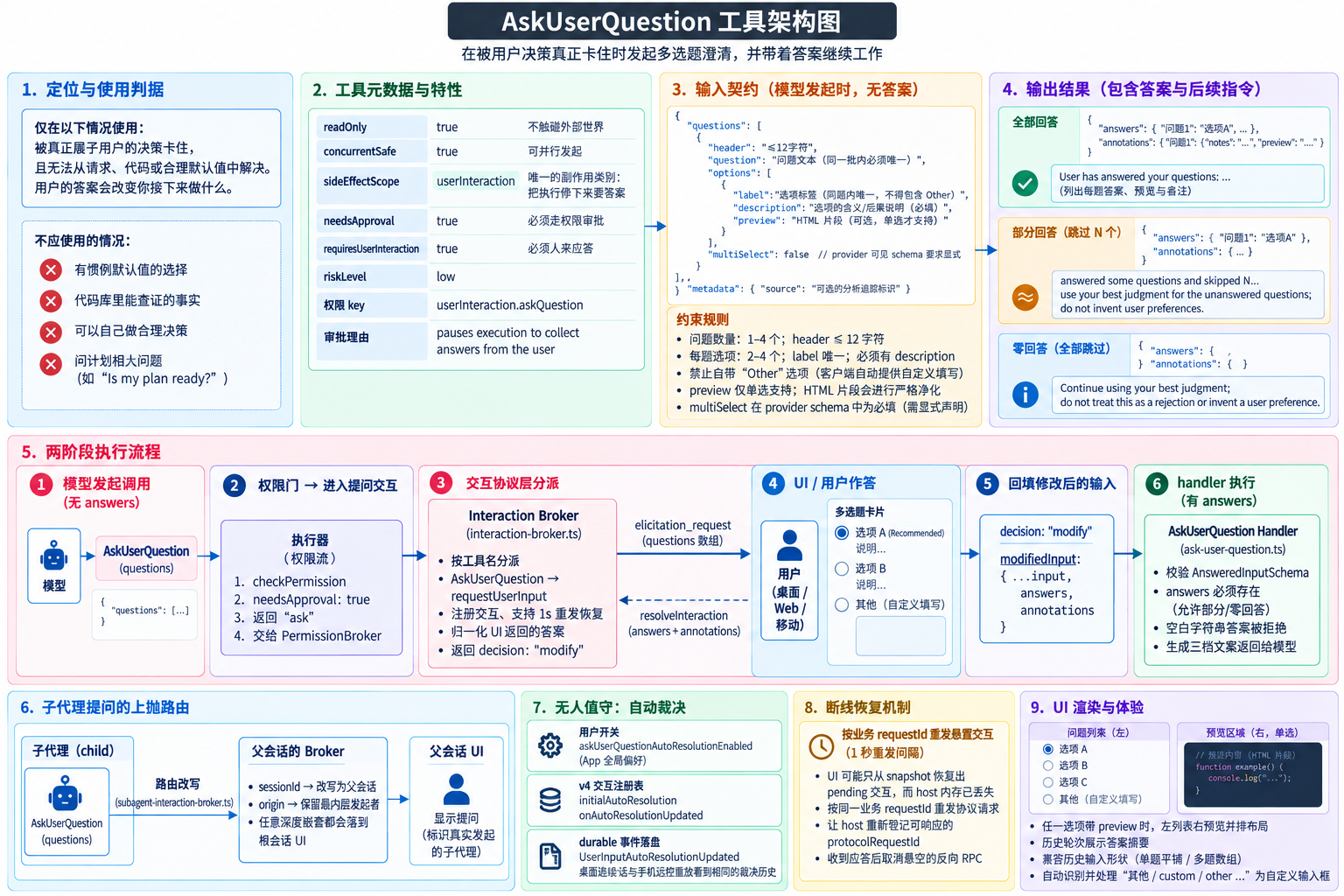
1. 定位
AskUserQuestion 让模型在被真正属于用户的决策卡住时发起多选题澄清,并带着答案继续工作。工具描述开篇就划定了使用门槛:
Use this tool only when you are blocked on a decision that is genuinely the user's to make: one you cannot resolve from the request, the code, or sensible defaults.
反过来说:有惯例默认值的选择、代码库里能自己查证的事实,都不该问------"pick the obvious option, mention it in your response, and proceed"。提问资格的判据是"用户的答案会不会改变你接下来做什么"。
它和 ExitPlanMode 有一条明确的边界(描述里专门写了 Plan mode note):切规划模式用 EnterPlanMode;规划模式里用它在定稿前澄清需求或方案取舍;严禁问 "Is my plan ready?" / "Should I proceed?"------用户在 ExitPlanMode 之前根本看不到计划,拿计划当问题前提是无效提问。
2. 基本信息:一个不寻常的元数据组合
ts
readOnly: true,                 // 不触碰外部世界
concurrentSafe: true,           // 可以与其他调用并行发起
sideEffectScope: "userInteraction",  // 独有的副作用类别
needsApproval: true,            // 但必须走权限审批
requiresUserInteraction: true,  // 且必须人来应答
readOnly: true 与 needsApproval: true 并存看似矛盾,实际是两个维度:不产生外部副作用(所以 riskLevel 仍是 low),但必须暂停等人 。sideEffectScope: "userInteraction" 是 40 个工具里唯一的取值------副作用就是"把执行停下来要答案"这件事本身。权限 key 为 userInteraction.askQuestion,审批理由写明 "pauses execution to collect answers from the user"。
3. 核心设计:两阶段执行模型
AskUserQuestion 最与众不同的地方是:模型发出的调用里没有答案,handler 执行时输入里必须有答案。两者之间隔着一次完整的 UI 交互,答案以"修改后的输入"形式回填。
UI / 用户 interaction-broker(协议层) 执行器 / 权限流 模型 UI / 用户 interaction-broker(协议层) 执行器 / 权限流 模型 #mermaid-svg-3LbL6jREKksNENRi{font-family:"trebuchet ms",verdana,arial,sans-serif;font-size:16px;fill:#333;}@keyframes edge-animation-frame{from{stroke-dashoffset:0;}}@keyframes dash{to{stroke-dashoffset:0;}}#mermaid-svg-3LbL6jREKksNENRi .edge-animation-slow{stroke-dasharray:9,5!important;stroke-dashoffset:900;animation:dash 50s linear infinite;stroke-linecap:round;}#mermaid-svg-3LbL6jREKksNENRi .edge-animation-fast{stroke-dasharray:9,5!important;stroke-dashoffset:900;animation:dash 20s linear infinite;stroke-linecap:round;}#mermaid-svg-3LbL6jREKksNENRi .error-icon{fill:#552222;}#mermaid-svg-3LbL6jREKksNENRi .error-text{fill:#552222;stroke:#552222;}#mermaid-svg-3LbL6jREKksNENRi .edge-thickness-normal{stroke-width:1px;}#mermaid-svg-3LbL6jREKksNENRi .edge-thickness-thick{stroke-width:3.5px;}#mermaid-svg-3LbL6jREKksNENRi .edge-pattern-solid{stroke-dasharray:0;}#mermaid-svg-3LbL6jREKksNENRi .edge-thickness-invisible{stroke-width:0;fill:none;}#mermaid-svg-3LbL6jREKksNENRi .edge-pattern-dashed{stroke-dasharray:3;}#mermaid-svg-3LbL6jREKksNENRi .edge-pattern-dotted{stroke-dasharray:2;}#mermaid-svg-3LbL6jREKksNENRi .marker{fill:#333333;stroke:#333333;}#mermaid-svg-3LbL6jREKksNENRi .marker.cross{stroke:#333333;}#mermaid-svg-3LbL6jREKksNENRi svg{font-family:"trebuchet ms",verdana,arial,sans-serif;font-size:16px;}#mermaid-svg-3LbL6jREKksNENRi p{margin:0;}#mermaid-svg-3LbL6jREKksNENRi .actor{stroke:hsl(259.6261682243, 59.7765363128%, 87.9019607843%);fill:#ECECFF;}#mermaid-svg-3LbL6jREKksNENRi text.actor>tspan{fill:black;stroke:none;}#mermaid-svg-3LbL6jREKksNENRi .actor-line{stroke:hsl(259.6261682243, 59.7765363128%, 87.9019607843%);}#mermaid-svg-3LbL6jREKksNENRi .innerArc{stroke-width:1.5;stroke-dasharray:none;}#mermaid-svg-3LbL6jREKksNENRi .messageLine0{stroke-width:1.5;stroke-dasharray:none;stroke:#333;}#mermaid-svg-3LbL6jREKksNENRi .messageLine1{stroke-width:1.5;stroke-dasharray:2,2;stroke:#333;}#mermaid-svg-3LbL6jREKksNENRi #arrowhead path{fill:#333;stroke:#333;}#mermaid-svg-3LbL6jREKksNENRi .sequenceNumber{fill:white;}#mermaid-svg-3LbL6jREKksNENRi #sequencenumber{fill:#333;}#mermaid-svg-3LbL6jREKksNENRi #crosshead path{fill:#333;stroke:#333;}#mermaid-svg-3LbL6jREKksNENRi .messageText{fill:#333;stroke:none;}#mermaid-svg-3LbL6jREKksNENRi .labelBox{stroke:hsl(259.6261682243, 59.7765363128%, 87.9019607843%);fill:#ECECFF;}#mermaid-svg-3LbL6jREKksNENRi .labelText,#mermaid-svg-3LbL6jREKksNENRi .labelText>tspan{fill:black;stroke:none;}#mermaid-svg-3LbL6jREKksNENRi .loopText,#mermaid-svg-3LbL6jREKksNENRi .loopText>tspan{fill:black;stroke:none;}#mermaid-svg-3LbL6jREKksNENRi .loopLine{stroke-width:2px;stroke-dasharray:2,2;stroke:hsl(259.6261682243, 59.7765363128%, 87.9019607843%);fill:hsl(259.6261682243, 59.7765363128%, 87.9019607843%);}#mermaid-svg-3LbL6jREKksNENRi .note{stroke:#aaaa33;fill:#fff5ad;}#mermaid-svg-3LbL6jREKksNENRi .noteText,#mermaid-svg-3LbL6jREKksNENRi .noteText>tspan{fill:black;stroke:none;}#mermaid-svg-3LbL6jREKksNENRi .activation0{fill:#f4f4f4;stroke:#666;}#mermaid-svg-3LbL6jREKksNENRi .activation1{fill:#f4f4f4;stroke:#666;}#mermaid-svg-3LbL6jREKksNENRi .activation2{fill:#f4f4f4;stroke:#666;}#mermaid-svg-3LbL6jREKksNENRi .actorPopupMenu{position:absolute;}#mermaid-svg-3LbL6jREKksNENRi .actorPopupMenuPanel{position:absolute;fill:#ECECFF;box-shadow:0px 8px 16px 0px rgba(0,0,0,0.2);filter:drop-shadow(3px 5px 2px rgb(0 0 0 / 0.4));}#mermaid-svg-3LbL6jREKksNENRi .actor-man line{stroke:hsl(259.6261682243, 59.7765363128%, 87.9019607843%);fill:#ECECFF;}#mermaid-svg-3LbL6jREKksNENRi .actor-man circle,#mermaid-svg-3LbL6jREKksNENRi line{stroke:hsl(259.6261682243, 59.7765363128%, 87.9019607843%);fill:#ECECFF;stroke-width:2px;}#mermaid-svg-3LbL6jREKksNENRi :root{--mermaid-font-family:"trebuchet ms",verdana,arial,sans-serif;} 用户选择选项 / 跳过 / 加备注 / Other 自填 AskUserQuestion(questions)(无 answers)checkPermission → "ask"(needsApproval: true)requestPermission(按 toolName 分派)interactionRequestUserInput→ elicitation_request 事件resolveInteraction(answers + annotations)decision: "modify"modifiedInput = { ...input, answers, annotations }handler 校验 AnsweredInputSchematool_result:答案回显 + 后续指令
阶段一:权限门即提问门。 needsApproval: true 使权限服务返回 "ask",代理请求进入 PermissionBrokerPort。协议层 broker 按工具名分派(interaction-broker.ts:48-54):AskUserQuestion 走 requestUserInput(多题交互),ExitPlanMode 走 plan-approval,其余工具走普通权限弹窗。
宿主适配层(zcodeTaskServiceAdapter.ts:3998-4003)还有一处刻意的抑制,注释说得很清楚:
AskUserQuestion/ExitPlanMode 的 permission.requested 只是 core 的等待态标记;真正需要展示的问题会通过 interaction/requestUserInput 到达。继续把它投成普通权限,UI 会出现 Allow/Deny 弹窗且无法把答案写回工具 input。
即普通权限弹窗只有 Allow/Deny 两个出口,承载不了答案回填,所以问题必须走专门的 elicitation 事件(带完整 questions 数组)到 UI。
阶段二:答案回填后 handler 才可能执行。 handler 里只认 AskUserQuestionAnsweredInputSchema:
ts
if (input.answers === undefined) {
  context.addIssue({ ..., message: "Answers have not been collected yet", path: ["answers"] });
}
schema 注释解释了分寸:"问题用于可选澄清,用户可以完整、部分或零回答;只有 answers 字段完全缺失才表示 permission 阶段尚未完成,必须阻止 handler 提前执行。" 若 answers 缺失就执行(意味着没人回答过),handler 抛可恢复错误 "AskUserQuestion requires user answers before execution"。答案本身允许部分缺失------跳过是合法应答(见第 5 节),但空白字符串答案被拒绝。
回填的实现是 broker 返回 decision: "modify"(interaction-broker.ts 的 userInputResponseToBrokerResult):
ts
return {
  decision: "modify",
  modifiedInput: { ...input, ...content },   // content 只含归一后的 answers/annotations
  resolvedAt: new Date(),
};
"modify" 是权限流的标准出口之一:执行器用 modifiedInput 替换原输入后调用 handler------这就是两阶段模型的合流点。
4. 输入契约:选项纪律与 preview 净化
契约(contracts/src/tools/ask-user-question.ts)对"什么是有效提问"有大量 schema 级约束:
问题(1--4 个) :question 文本必须唯一(superRefine 拦重);header 是 ≤12 字符的短标签(UI 渲染成 chip,ASK_USER_QUESTION_TOOL_CHIP_WIDTH = 12)。
选项(每题 2--4 个):
- label 在同题内必须唯一;
- 禁止自带 "Other" 选项------superRefine 直接拒绝 "Do not include an Other option; clients provide it automatically",兜底自填由客户端统一提供(工具描述同步告知模型 "Users will always be able to select Other");
- 每个选项必须带
description(选项的含义/后果说明); - 推荐项的约定在描述层:放第一位并在 label 尾部加 "(Recommended)"。
multiSelect 的双层口径 :Zod 里 default(false),但导出给 provider 的 JSON Schema 通过 withRequiredDefaultedMultiSelect 把 multiSelect 塞进 required------注释解释:provider-visible schema 要求显式(模型必须想清楚单选还是多选),运行时 Zod default 继续兼容省略该字段的旧调用。
preview 的 HTML 净化 :preview 允许是 HTML 片段(用于 UI mockup、代码片段等视觉对比),schema 用四个正则做净化(validateAskUserQuestionPreview):
- 含 HTML 标记时:禁止
<!doctype/<html>/<body>(必须是 fragment)、禁止<script>/<style>、且必须真的含 HTML 标签(防止纯文本误标)。 - 描述层约定:多行 markdown 支持等宽盒渲染;任一选项带 preview 时 UI 切换为左列表右预览的并排布局;previews 仅单选支持。
annotations :按问题文本键控的 { preview, notes }------用户选中带 preview 的选项时预览内容随之回传,自由备注(notes)也一并承载。
metadata.source :可选的分析追踪标识(如 /remember 命令发起的提问),不展示给用户。
5. 答案的三档语义与归一
formatModelContent(ask-user-question.ts:131-158)把回填结果翻译成三种模型可见文案,语义逐档放宽:
| 应答情况 | 模型看到的指令 |
|---|---|
| 零回答(answers 为空对象) | "Continue using your best judgment; do not treat this as a rejection or invent a user preference." |
| 部分回答 | "answered some questions and skipped N... use your best judgment for the unanswered questions; do not invent user preferences." |
| 全部回答 | "User has answered your questions: ..." |
两处防误读设计值得注意:跳过不等于拒绝 、沉默不等于偏好------禁止模型把没回答脑补成用户立场。回答的展示格式把 annotations 一并带出:选中 preview 时附 "selected preview:",有备注附 "user notes:"。
broker 的归一层(normalizeAskUserQuestionResponseContent / normalizeAskUserQuestionAnswers)处理两类边界:
- 旧客户端兼容 :旧 UI 会同时提交
answer_0/answer等兼容字段;AskUserQuestionInputSchema是.strict(),直接合并会炸 schema 校验------归一层只保留 schema 明确允许的answers/annotations,按问题文本键归位(多题按answer_<index>兜底,单题按answer兜底)。 - 空对象与缺失的区分 (schema 注释原文):"action=accept + content.answers={} 是 runtime 自动继续的显式成功语义;必须保留空对象,和 content 完全缺失(旧客户端批准但未提供答案)区分。" 空对象 = 用户看到问题后主动全部跳过 → 走"零回答"文案;完全缺失 = 旧客户端路径 → 不注入 answers 字段。
拒绝/取消的出口也在这里:action !== "accept" → broker 返回 deny("AskUserQuestion was declined / cancelled"),与普通权限拒绝同路。
6. 无人值守:自动裁决(auto-resolution)
提问会阻塞执行,无人值守场景(闲时任务、手机远控离线)需要自动收口。这套机制由三件东西支撑:
- 用户开关 :App 全局偏好
askUserQuestionAutoResolutionEnabled,由服务层syncAppRuntimePreferences同步到所有活动 workspace(zcodeAgentService.ts),不开就不自动裁决; - v4 交互注册表 :broker 注册交互时携带
initialAutoResolution,状态变化经onAutoResolutionUpdated回调; - durable 事件 :每次裁决状态变更经 runtime 落成
UserInputAutoResolutionUpdated事件(interaction-auto-resolution.ts)。注释点明了两条恢复链路的一致性要求:"事件必须走 runtime 的 durable append/sink 链路,让 desktop continuous 与 web remote replayable 都恢复同一组绝对时间"------桌面实时会话和手机远控重放看到同一份裁决历史。
7. 子代理提问的上抛与归属
子代理(subagent)发起的 AskUserQuestion 需要父会话的 UI 来应答。包装 broker(subagent-interaction-broker.ts)做的是路由改写:
ts
return parentBroker.requestPermission({
  ...request,
  sessionId: context.parentSessionId,   // 路由到父会话
  origin: request.origin ?? buildSubagentInteractionOrigin(context, request.turnId),
}, options);注释说明了双层语义的分工:sessionId 由最外层(离客户端最近的一层)最后改写 ------任意深度的嵌套子代理,提问最终都落到根会话的 UI;origin 保留最内层已有值------归属永远是真正发起提问的那个子代理,不会被外层覆盖成中间层。UI 与日志据此识别"这是哪个孩子的提问"。这个包装可叠加,逐层收敛。
8. 断线恢复:按业务 id 重发悬置交互
提问悬置期间 host 与 UI 的连接可能断开重连。withInteractionRequestRecovery(interaction-broker.ts)为此设置了 1 秒重发间隔(INTERACTION_REQUEST_REANNOUNCE_INTERVAL_MS = 1_000):
桌面/恢复链路里 UI 可能只从 snapshot 恢复出 pending 交互,但 host 里原 protocol id 对应的内存登记已丢失。等待用户响应期间按同一业务 requestId 重发现有协议请求,让 host 重新登记可响应的 protocolRequestId。
即重发不是重问,而是让 UI 恢复出的 pending 交互重新找到应答通道。v4 竞速命中应答时,内部 signal 会取消悬空的反向 RPC。
9. UI 渲染
- 提问卡 (
renderers/ask-question.tsx):渲染问题、选项、并排 preview 布局(任一选项带 preview 时左列表右预览);历史轮次里展示答案摘要。 - 防御性归一 (
lib/askUserQuestion.ts):UI 助手兼容多种输入形状------旧单题管线(question+options平铺)与多题数组共用展示管线;"自定义输入"选项的识别按中英文标签模式 (其他|其它|自定义|填写|other|custom|free text|specify...)判定,末位选项若被识别为自填项会被剥离成customInput输入框------契约禁止模型自带 Other,但历史数据里可能存在,UI 端兜底转成统一的自填体验。
10. 相关文件索引
| 文件 | 职责 |
|---|---|
packages/core/src/tool/handlers/ask-user-question.ts |
handler(AnsweredInputSchema 门禁)、ToolEntry、三档答案文案 |
packages/contracts/src/tools/ask-user-question.ts |
问题/选项契约、Other 禁令、preview HTML 净化、multiSelect 双层口径 |
apps/zcode-cli/packages/bootstrap/src/zcode-protocol/interaction-broker.ts |
按工具名分派、答案归一、modify 回填、1s 重发恢复 |
packages/services/src/zcode-agent/zcodeTaskServiceAdapter.ts |
抑制普通权限投影、pending → elicitation 事件、resolveInteraction 回执 |
packages/core/src/runtime/helpers/subagent-interaction-broker.ts |
子代理提问路由到父会话(sessionId 外层改写、origin 内层保留) |
packages/core/src/runtime/methods/interaction-auto-resolution.ts |
自动裁决状态的 durable 事件落盘 |
packages/services/src/zcode-agent/zcodeAgentService.ts |
askUserQuestionAutoResolutionEnabled 偏好同步 |
packages/ui/src/lib/askUserQuestion.ts |
UI 防御性归一(多形状兼容、自定义输入识别) |
packages/ui/src/ToolCallBlocks/renderers/ask-question.tsx |
提问卡渲染(并排 preview、答案摘要) |