今天不写一行 JS,也不写一行 CSS。只把 HTML 这一件事讲透。
文末有一个完整的
index.html,复制保存就能打开看效果------它把今天讲的所有标签都用上了。
一、HTML 到底是什么
HTML 不是编程语言,它是标记语言 。它只做一件事:告诉浏览器,这段内容是什么。
- 是标题?是段落?是图片?是导航?是表格?
- 浏览器拿到这些信息后,再去排版、渲染、给搜索引擎索引、给读屏软件朗读。
所以:HTML 写得越"对",后面的 CSS、JS、SEO、无障碍才越好做。
二、文档结构:每个页面的固定开头
html
<!DOCTYPE html>
<html lang="zh-CN">
<head>
    <meta charset="UTF-8">
    <meta name="viewport" content="width=device-width, initial-scale=1.0">
    <title>MiniMall - 首页</title>
    <meta name="description" content="MiniMall 商城,提供数码、家电、服饰等商品">
    <meta name="keywords" content="商城,数码,家电">
    <link rel="icon" href="/favicon.ico">
    <!-- 分享卡片 -->
    <meta property="og:title" content="MiniMall">
    <meta property="og:description" content="好物不贵">
    <meta property="og:image" content="/share.jpg">
</head>
<body>
    ...
</body>
</html>
要点:
| 项 | 说明 |
|---|---|
<!DOCTYPE html> |
声明这是 HTML5,不写会进怪异模式,布局乱掉 |
lang="zh-CN" |
影响翻译提示、读屏发音、搜索引擎地域判断 |
charset="UTF-8" |
必须第一行之一,否则中文乱码 |
viewport |
响应式的门票,没有它手机端字会小到看不见 |
description |
搜索结果里标题下面那行灰字,直接影响点击率 |
og:* |
微信、钉钉、Twitter 分享时显示的卡片内容 |
三、语义化标签:把 div soup 换成人话
新手最容易犯的错:全篇 <div>。语义化标签的作用是让机器读懂结构。
html
<header>     页头:logo、搜索框、登录入口
<nav>        导航栏:分类菜单、面包屑
<main>       页面主体内容,一个页面只能有一个
<section>    有明确主题的一块:热销区、新品区
<article>    独立完整的内容:一篇商品详情、一篇博客
<aside>      侧边栏:筛选条件、推荐位
<footer>     页脚:版权、备案、联系方式
对照关系(记这个就行):
div= 没有语义的容器(用来做布局)section= 有主题的分块article= 能单独拎出去发布的内容aside= 和主体相关但可分离的附属内容
四、文本类标签
html
<h1>~<h6>   标题层级,h1 一页只用一个,且不要跳级(h1 直接接 h3 是错的)
<p>          段落
<br>         换行(别用它代替段落)
<hr>         主题分隔线
<strong>     重要(加粗+语义)
<em>         强调(斜体+语义)
<b> / <i>    纯样式加粗/斜体,无语义
<mark>       高亮(搜索结果关键词常用)
<del> / <ins> 删除线 / 下划线(改价、划线价场景)
<sub> / <sup> 下标 / 上标(化学式、脚注)
<code> / <pre> 代码、保留空格换行
<blockquote> 长引用(cite 属性放来源 URL)
<q>          短引用(自动加引号)
<time datetime="2026-01-15">1月15日</time>  机器可读时间
<address>    联系信息(页脚常用)
<small>      附属小字(免责声明、版权)
<span>       无语义行内容器,专门给 CSS/JS 挂钩用
五、列表
html
<ul><li>商品A</li><li>商品B</li></ul>          无序列表:导航、标签、规格项
<ol><li>第一步</li><li>第二步</li></ol>        有序列表:步骤、排行榜
<dl><dt>运费</dt><dd>满99免邮</dd></dl>        定义列表:键值对(商品参数最合适)
商品参数表用
<dl>,比一堆<div>专业得多,也利于 SEO。
六、链接与图片
html
<a href="/detail.html" target="_blank" rel="noopener noreferrer">详情</a>
<a href="/a.pdf" download>下载说明书</a>
<a href="mailto:hi@example.com">联系我们</a>
<a href="tel:4001234567">拨打电话</a>
<a href="#comments">跳到评论区</a>          锚点跳转

<img src="p.jpg" alt="iPhone 17 深空黑色正面图" width="300" height="400" loading="lazy">
<figure>
  <img src="p.jpg" alt="...">
  <figcaption>图1:产品外观</figcaption>
</figure>
要点:
alt不能省,图片加载失败时显示它,也是读屏软件的唯一依据。width/height写上可以避免页面加载时抖动(CLS 指标)。loading="lazy"首屏之外的图片延迟加载,提升打开速度。target="_blank"必须配rel="noopener noreferrer",否则有安全风险。
七、表格(后台数据展示必用)
html
<table>
  <caption>订单列表</caption>
  <thead><tr><th scope="col">订单号</th><th scope="col">金额</th></tr></thead>
  <tbody><tr><td>20260101001</td><td>199.00</td></tr></tbody>
  <tfoot><tr><td>合计</td><td>199.00</td></tr></tfoot>
</table>thead/tbody/tfoot分开,打印和滚动表头时才有意义。scope="col"/scope="row"让表头和单元格对应起来,无障碍必备。colspan/rowspan合并行列(合并单元格报表常用)。
八、表单(最复杂也最重要的一块)
html
<form action="/search" method="GET" autocomplete="on" novalidate>
  <fieldset>
    <legend>搜索条件</legend>

    <label for="kw">关键词</label>
    <input id="kw" name="kw" type="search" placeholder="输入商品名"
           required minlength="2" maxlength="50" autocomplete="off">

    <input type="text" name="phone" pattern="^1[3-9]\d{9}$" title="请输入11位手机号">
    <input type="email" name="email">
    <input type="number" name="qty" min="1" max="99" step="1" value="1">
    <input type="range" name="price" min="0" max="9999">
    <input type="date" name="start">
    <input type="color" name="color">
    <input type="file" name="img" accept="image/*" multiple>
    <input type="hidden" name="csrf" value="xxx">

    <input type="radio" name="sort" value="price" id="s1"><label for="s1">价格</label>
    <input type="checkbox" name="onlyStock" id="c1"><label for="c1">仅看有货</label>

    <select name="cate" multiple size="3">
      <optgroup label="数码"><option value="phone">手机</option></optgroup>
    </select>

    <textarea name="remark" rows="3" maxlength="200" placeholder="备注"></textarea>

    <button type="submit">搜索</button>
    <button type="reset">重置</button>
    <button type="button" disabled>不可点</button>
  </fieldset>
</form>
表单核心规则(背下来):
- 每个 input 都要有 label ,用
for关联id,点击文字也能聚焦。 - 优先用对的 type :
email/number/date/tel/search,手机端会弹出对应键盘。 - 校验优先用原生属性 :
required/pattern/min/max/minlength/maxlength,JS 只是补充。 - radio 的 name 要相同 才能互斥;checkbox 的 name 通常带
[]表示数组。 - 敏感操作加隐藏字段做 CSRF 令牌。
autocomplete合理设置能提升填写效率(地址、姓名、手机号)。
九、多媒体与嵌入
html
<audio src="bg.mp3" controls preload="metadata"></audio>
<video src="demo.mp4" controls width="640" poster="cover.jpg">
  <track kind="subtitles" src="zh.vtt" srclang="zh" label="中文">
  您的浏览器不支持视频
</video>
<iframe src="https://www.bilibili.com/blackboard/html5mobileplayer.html"
        width="560" height="315" frameborder="0"
        allowfullscreen loading="lazy" referrerpolicy="no-referrer"></iframe>
<embed src="manual.pdf" type="application/pdf" width="500" height="400">controls不加就没有播放控件。poster是视频封面,影响首屏观感。<track>做字幕,外贸站必备。- iframe 一定要设
loading="lazy",否则拖慢整页。
十、HTML5 交互新标签(不用 JS 也能交互)
html
<details open>
  <summary>常见问题</summary>
  <p>支持7天无理由退货。</p>
</details>

<progress value="70" max="100"></progress>   进度条
<meter value="0.6" min="0" max="1"></meter>   仪表盘式刻度

<dialog open>
  <p>弹窗内容</p>
  <form method="dialog"><button>关闭</button></form>
</dialog>

<template id="tpl">...</template>             客户端模板,JS 克隆使用
details/summary是做 FAQ、折叠面板最轻量的方案,很多站点还在用 JS 硬写。
dialog是原生模态框,按 ESC 能关闭,焦点管理浏览器帮你做了。
十一、全局属性(所有标签都能用)
| 属性 | 用途 |
|---|---|
id |
唯一标识,锚点和 JS 查询用 |
class |
样式和 JS 批量选择 |
data-* |
自定义数据,如 data-spu-id="1001",JS 用 dataset 读取 |
title |
鼠标悬停提示(别滥用) |
hidden |
隐藏元素,比 display:none 语义更准 |
tabindex |
控制 Tab 键顺序,0 进顺序,-1 可编程聚焦 |
contenteditable |
让元素可编辑(简易富文本原型) |
draggable |
拖拽配合 Drag & Drop API |
style |
内联样式(尽量不用) |
aria-label / role |
无障碍补充,图标按钮必加 aria-label |
十二、SEO 与无障碍:三句话记住
- 标题层级不乱跳,h1 只有一个。
- 图片有 alt,按钮有 aria-label,表单有 label。
- 能用语义标签就别用 div + class 模拟。
再加一条工程习惯:注释写清楚区块起止。
html
<!-- /header -->
<!-- /main: product-list -->
页面一长,这条能救命。
今日小项目:MiniMall 首页骨架
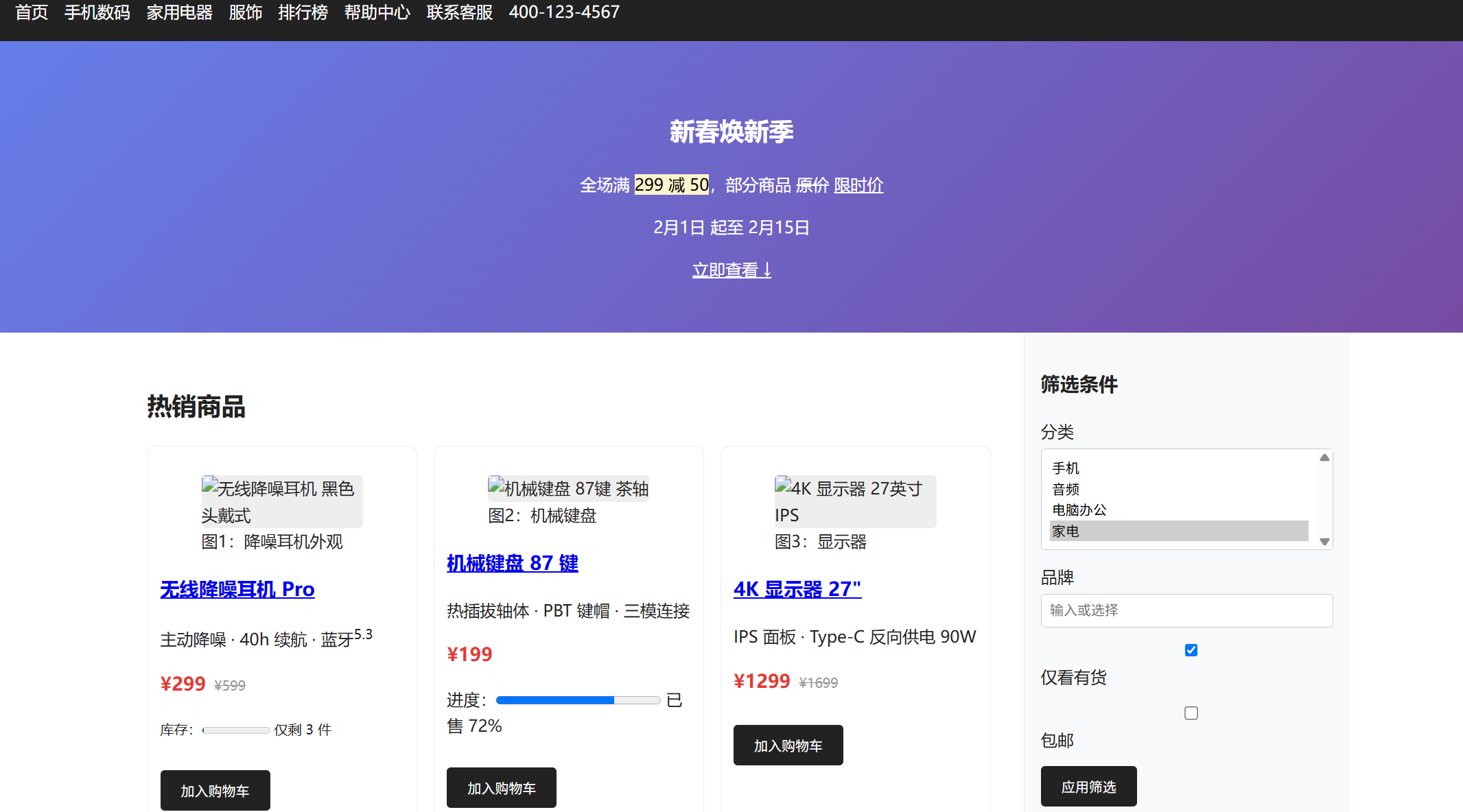
目标 :一个纯 HTML 文件,包含页头、导航、轮播占位、商品列表、参数表、FAQ、搜索表单、侧边栏、页脚。
用法 :复制下面全部内容 → 存成 index.html → 双击打开。
html
<!DOCTYPE html>
<html lang="zh-CN">
<head>
<meta charset="UTF-8">
<meta name="viewport" content="width=device-width, initial-scale=1.0">
<title>MiniMall - 企业级商城实战演示站</title>
<meta name="description" content="MiniMall:一个从零搭建的企业级商城,本文是第1天:HTML5语义化骨架">
<meta name="keywords" content="HTML5,商城,语义化,前端实战">
<link rel="icon" href="data:,">
<style>
/* 只为看得清结构,不是重点 */
* { box-sizing: border-box; }
body { font-family: system-ui, sans-serif; margin: 0; color: #222; line-height: 1.6; }
header, nav, main, aside, footer, section, article { padding: 16px; }
header { background: #f8f9fa; border-bottom: 2px solid #e9ecef; }
nav { background: #222; color: #fff; display: flex; gap: 16px; flex-wrap: wrap; }
nav a { color: #fff; text-decoration: none; }
nav a:hover { text-decoration: underline; }
.banner { background: linear-gradient(135deg, #667eea, #764ba2); color: #fff; text-align: center; padding: 48px 16px; }
.container { display: flex; gap: 0; max-width: 1200px; margin: 0 auto; }
main { flex: 3; }
aside { flex: 1; background: #f8f9fa; border-left: 1px solid #e9ecef; }
.grid { display: grid; grid-template-columns: repeat(auto-fill, minmax(220px, 1fr)); gap: 16px; }
.card { border: 1px solid #e9ecef; border-radius: 8px; padding: 12px; }
.card img { width: 100%; height: 160px; object-fit: cover; background: #eee; border-radius: 4px; }
.price { color: #e53935; font-weight: bold; font-size: 18px; }
.old { text-decoration: line-through; color: #999; font-size: 13px; margin-left: 8px; }
table { width: 100%; border-collapse: collapse; margin: 12px 0; }
th, td { border: 1px solid #e9ecef; padding: 8px; text-align: left; }
th { background: #f8f9fa; }
form label { display: block; margin-top: 10px; font-weight: 500; }
form input, form select, form textarea { width: 100%; padding: 8px; margin-top: 4px; border: 1px solid #ccc; border-radius: 4px; }
button { background: #222; color: #fff; border: none; padding: 10px 20px; border-radius: 4px; cursor: pointer; margin-top: 12px; }
button:hover { background: #444; }
footer { background: #222; color: #ccc; text-align: center; }
footer a { color: #fff; }
mark { background: #fff3cd; }
@media (max-width: 768px) { .container { flex-direction: column; } }
</style>
</head>
<body>
<!-- ========== 页头 ========== -->
<header>
<h1><a href="/" style="text-decoration:none;color:inherit;">MiniMall</a></h1>
<p><small>企业级商城实战 · 第1天 · HTML5 语义化骨架</small></p>
<!-- 搜索表单:GET 提交,语义化 input 类型 -->
<form action="/search" method="GET" role="search">
<label for="kw">搜索商品</label>
<input type="search" id="kw" name="kw" placeholder="输入关键词,如「耳机」" required minlength="1" maxlength="50">
<input type="hidden" name="from" value="header">
<button type="submit">搜索</button>
</form>
</header>
<!-- ========== 导航 ========== -->
<nav aria-label="主导航">
<a href="#home">首页</a>
<a href="#phone">手机数码</a>
<a href="#home-appliance">家用电器</a>
<a href="#clothes">服饰</a>
<a href="#rank">排行榜</a>
<a href="#help">帮助中心</a>
<a href="mailto:service@minimall.com">联系客服</a>
<a href="tel:4001234567">400-123-4567</a>
</nav>
<!-- ========== 横幅 ========== -->
<div class="banner">
<h2>新春焕新季</h2>
<p>全场满 <mark>299 减 50</mark>,部分商品 <del>原价</del> <ins>限时价</ins></p>
<p><time datetime="2026-02-01">2月1日</time> 起至 <time datetime="2026-02-15">2月15日</time></p>
<a href="#goods" style="color:#fff;text-decoration:underline;">立即查看 ↓</a>
</div>
<div class="container">
<!-- ========== 主体内容 ========== -->
<main id="home">
<!-- 商品列表:section + article + figure -->
<section id="goods" aria-labelledby="goods-title">
<h2 id="goods-title">热销商品</h2>
<div class="grid">
<article class="card">
<figure>
<img src="" alt="无线降噪耳机 黑色 头戴式" width="300" height="160" loading="lazy">
<figcaption>图1:降噪耳机外观</figcaption>
</figure>
<h3><a href="/detail.html" target="_blank" rel="noopener">无线降噪耳机 Pro</a></h3>
<p>主动降噪 · 40h 续航 · 蓝牙<sup>5.3</sup></p>
<p><span class="price">¥299</span><span class="old">¥599</span></p>
<p><small>库存:<meter value="3" min="0" max="100">3件</meter> 仅剩 3 件</small></p>
<button type="button" data-spu-id="1001" data-action="add-cart">加入购物车</button>
</article>
<article class="card">
<figure>
<img src="" alt="机械键盘 87键 茶轴" width="300" height="160" loading="lazy">
<figcaption>图2:机械键盘</figcaption>
</figure>
<h3><a href="#">机械键盘 87 键</a></h3>
<p>热插拔轴体 · PBT 键帽 · 三模连接</p>
<p><span class="price">¥199</span></p>
<p>进度:<progress value="72" max="100"></progress> 已售 72%</p>
<button type="button" data-spu-id="1002" data-action="add-cart">加入购物车</button>
</article>
<article class="card">
<figure>
<img src="" alt="4K 显示器 27英寸 IPS" width="300" height="160" loading="lazy">
<figcaption>图3:显示器</figcaption>
</figure>
<h3><a href="#">4K 显示器 27"</a></h3>
<p>IPS 面板 · Type-C 反向供电 90W</p>
<p><span class="price">¥1299</span><span class="old">¥1699</span></p>
<button type="button" data-spu-id="1003" data-action="add-cart">加入购物车</button>
</article>
</div>
</section>
<!-- 商品参数:dl 与 table 两种写法对比 -->
<section id="params" aria-labelledby="params-title">
<h2 id="params-title">商品参数</h2>
<p>同一份数据,两种 HTML 写法:</p>
<h4>写法一:定义列表(适合键值少的场景)</h4>
<dl>
<dt>品牌</dt><dd>MiniMall 自营</dd>
<dt>型号</dt><dd>MM-2026-A</dd>
<dt>重量</dt><dd>256 g</dd>
<dt>化学式示例</dt><dd>H<sub>2</sub>O(下标)、E=mc<sup>2</sup>(上标)</dd>
</dl>
<h4>写法二:表格(适合多 SKU 对比)</h4>
<table>
<caption>表1:三个 SKU 参数对比</caption>
<thead>
<tr><th scope="col">参数</th><th scope="col">标准版</th><th scope="col">Pro</th><th scope="col">Max</th></tr>
</thead>
<tbody>
<tr><th scope="row">续航</th><td>30h</td><td>40h</td><td>50h</td></tr>
<tr><th scope="row">降噪</th><td>---</td><td>有</td><td>自适应</td></tr>
<tr><th scope="row">价格</th><td>¥199</td><td>¥299</td><td>¥399</td></tr>
</tbody>
<tfoot>
<tr><td colspan="4">数据来源:官方规格页,更新于 <time datetime="2026-01-10">2026-01-10</time></td></tr>
</tfoot>
</table>
</section>
<!-- 下单表单:覆盖主要 input 类型 -->
<section id="order" aria-labelledby="order-title">
<h2 id="order-title">快速下单</h2>
<form action="/order" method="POST" autocomplete="on">
<fieldset>
<legend>收货信息</legend>
<label for="uname">姓名 <abbr title="required">必填</abbr></label>
<input type="text" id="uname" name="name" required minlength="2" maxlength="20" autocomplete="name" placeholder="张三">
<label for="uphone">手机号</label>
<input type="tel" id="uphone" name="phone" pattern="^1[3-9]\d{9}$" autocomplete="tel" placeholder="13800000000" title="请输入11位手机号">
<label for="uemail">邮箱(接收订单通知)</label>
<input type="email" id="uemail" name="email" autocomplete="email" placeholder="you@example.com">
<label for="uaddr">地址</label>
<textarea id="uaddr" name="address" rows="3" maxlength="200" autocomplete="street-address" placeholder="省市区 + 详细地址"></textarea>
</fieldset>
<fieldset>
<legend>商品选项</legend>
<label>版本</label>
<input type="radio" name="ver" value="std" id="v1" checked><label for="v1" style="display:inline;width:auto;">标准版 ¥199</label>
<input type="radio" name="ver" value="pro" id="v2"><label for="v2" style="display:inline;width:auto;">Pro ¥299</label>
<input type="radio" name="ver" value="max" id="v3"><label for="v3" style="display:inline;width:auto;">Max ¥399</label>
<label for="color">颜色</label>
<select id="color" name="color">
<optgroup label="经典色">
<option value="black" selected>曜石黑</option>
<option value="white">珍珠白</option>
</optgroup>
<optgroup label="限定色">
<option value="blue">深海蓝</option>
</optgroup>
</select>
<label for="qty">数量</label>
<input type="number" id="qty" name="qty" min="1" max="10" step="1" value="1">
<label for="budget">心理价位区间</label>
<input type="range" id="budget" name="budget" min="0" max="5000" step="100" value="500">
<label for="invoice">上传发票信息(可选)</label>
<input type="file" id="invoice" name="invoice" accept=".pdf,.jpg,.png" multiple>
<label><input type="checkbox" name="gift" value="1"> 需要礼品包装</label>
<label><input type="checkbox" name="agree" required> 我已阅读并同意 <a href="/terms" target="_blank">《用户协议》</a></label>
<input type="hidden" name="csrf_token" value="demo-token-12345">
<input type="hidden" name="sku_id" value="1001-pro-black">
</fieldset>
<button type="submit">提交订单</button>
<button type="reset">重置</button>
<button type="button" disabled title="活动未开始">立即购买(未开始)</button>
</form>
</section>
<!-- 多媒体:音视频与嵌入 -->
<section id="media" aria-labelledby="media-title">
<h2 id="media-title">商品视频与音频介绍</h2>
<video src="demo.mp4" controls width="100%" poster="cover.jpg" preload="metadata">您的浏览器不支持 video 标签</video>
<p><audio src="intro.mp3" controls preload="metadata">您的浏览器不支持 audio 标签</audio> 产品介绍语音版</p>
<p>说明书预览:<embed src="manual.pdf" type="application/pdf" width="100%" height="300"></p>
</section>
<!-- 列表:导航、排行、键值 -->
<section id="lists" aria-labelledby="lists-title">
<h2 id="lists-title">三种列表的实际用法</h2>
<h4>无序列表:面包屑导航</h4>
<nav aria-label="面包屑">
<ul>
<li><a href="/">首页</a></li>
<li><a href="/digital">数码</a></li>
<li><a href="/audio">音频</a></li>
<li aria-current="page">降噪耳机 Pro</li>
</ul>
</nav>
<h4>有序列表:下单流程</h4>
<ol>
<li>选择规格与数量</li>
<li>填写收货信息</li>
<li>支付订单</li>
<li>等待发货</li>
</ol>
<h4>定义列表:售后政策</h4>
<dl>
<dt>退换货</dt><dd>7天无理由,15天质量问题换新</dd>
<dt>保修</dt><dd>主机1年,电池6个月</dd>
<dt>客服</dt><dd>工作日 9:00--18:00</dd>
</dl>
</section>
<!-- 交互:details/summary 做 FAQ,零 JS -->
<section id="help" aria-labelledby="help-title">
<h2 id="help-title">常见问题</h2>
<details>
<summary>支持哪些支付方式?</summary>
<p>支持微信支付、支付宝、银联云闪付。企业采购可对公转账。</p>
</details>
<details open>
<summary>发货时效是多久?</summary>
<p>工作日 16:00 前下单当日发出,预计 2--3 天送达。</p>
</details>
<details>
<summary>如何开发票?</summary>
<p>下单时勾选开票,电子发票将在确认收货后发送至邮箱。</p>
</details>
</section>
<!-- 其他文本语义演示 -->
<section>
<h2>文本语义速查</h2>
<p><strong>strong:重要内容</strong>,<em>em:强调语气</em>,<b>b:纯加粗</b>,<i>i:纯斜体</i>。</p>
<p>原价 <del>599</del>,现价 <ins>299</ins>,关键词 <mark>降噪</mark> 高亮。</p>
<blockquote cite="https://developer.mozilla.org/docs/Web/HTML">
<p>HTML 是 Web 的核心标记语言,用于定义内容的含义与结构。</p>
</blockquote>
<p>引文出处:<cite>MDN Web Docs</cite></p>
<pre><code><article class="card">
<h3>商品名称</h3>
<p class="price">¥299</p>
</article></code></pre>
<address>
商家信息:MiniMall 自营旗舰店 · <a href="mailto:shop@minimall.com">shop@minimall.com</a>
</address>
</section>
</main>
<!-- ========== 侧边栏 ========== -->
<aside aria-label="辅助信息">
<h3>筛选条件</h3>
<form action="/filter" method="GET">
<label for="cate">分类</label>
<select id="cate" name="cate" multiple size="4">
<option value="phone">手机</option>
<option value="audio" selected>音频</option>
<option value="pc">电脑办公</option>
<option value="home">家电</option>
</select>
<label for="brand">品牌</label>
<input list="brands" id="brand" name="brand" placeholder="输入或选择">
<datalist id="brands">
<option value="MiniMall">
<option value="SoundPro">
<option value="KeyMaster">
</datalist>
<label><input type="checkbox" name="stock" checked> 仅看有货</label>
<label><input type="checkbox" name="freeShip"> 包邮</label>
<button type="submit">应用筛选</button>
</form>
<h3>销量排行</h3>
<ol>
<li><a href="#">降噪耳机 Pro</a></li>
<li><a href="#">机械键盘 87 键</a></li>
<li><a href="#">4K 显示器 27"</a></li>
</ol>
<h3>订阅优惠</h3>
<form action="/subscribe" method="POST">
<label for="sub-email" hidden>邮箱</label>
<input type="email" id="sub-email" name="email" placeholder="你的邮箱" required>
<button type="submit">订阅</button>
</form>
<h3>公告</h3>
<p hidden id="notice-old">已过期公告(hidden 属性演示)</p>
<p contenteditable="true" style="border:1px dashed #ccc;padding:8px;" title="可编辑区域演示">这段文字可以点进来直接编辑(contenteditable 演示)</p>
</aside>
</div><!-- /.container -->
<!-- ========== 页脚 ========== -->
<footer>
<nav aria-label="页脚导航">
<a href="/about">关于我们</a> |
<a href="/terms">用户协议</a> |
<a href="/privacy">隐私政策</a> |
<a href="/sitemap.xml">站点地图</a>
</nav>
<p><small>© 2026 MiniMall. 保留所有权利。</small></p>
<p><small>本页面为《企业级平台技术底座》第1天配套演示,<a href="#home">回到顶部 ↑</a></small></p>
</footer>
<!-- 模板:后续 JS 渲染商品卡片用 -->
<template id="product-tpl">
<article class="card">
<img src="" alt="" width="300" height="160" loading="lazy">
<h3></h3>
<p class="price"></p>
<button type="button" data-action="add-cart">加入购物车</button>
</article>
</template>
</body>
</html>这个页面覆盖了今天的全部要点
✅ DOCTYPE / lang / charset / viewport / meta SEO / OG
✅ header / nav / main / section / article / aside / footer
✅ h1--h4 层级、p、br、hr、blockquote、cite、address、small、time
✅ strong / em / b / i / mark / del / ins / sub / sup / code / pre
✅ ul / ol / dl + optgroup / datalist
✅ a(target/rel/download/mailto/tel/锚点/aria-current)
✅ img(alt/width/height/loading=lazy)+ figure/figcaption
✅ table(thead/tbody/tfoot/caption/th scope/colspan)
✅ form 全套:label/fieldset/legend + 所有 input 类型 + 校验属性 + select/textarea/button
✅ audio / video(poster/track)/ embed / iframe
✅ details/summary、progress、meter、dialog、template
✅ 全局属性:id/class/data-*/title/tabindex/contenteditable/draggable/hidden/style/aria-label/role
✅ SEO 与无障碍:alt、label、scope、aria-labelledby、aria-current、heading 层级
明天做什么
Day 2:CSS 盒模型 ------ 给今天的骨架加上真正的布局。
我们会把这个页面的商品卡片、表格、表单,从"能看"变成"好看",同时讲清楚 content-box vs border-box 这个坑(90% 的布局问题都源于此)。
你可以先把上面的 index.html 打开看看,试着往里面加一个商品卡片、加一列表格参数。动手改一遍,比读十遍记得牢。