深入理解代替单纯记忆
支持阿拉伯语、希伯来语等 RTL(从右向左)语言,需要同时处理资源语言、布局环境和内容语义。
本文先解释相关属性及其历史,再讨论应用内即时切换的实现方式与边界
对于自行实现的即时切换,可采用切换资源+覆盖环境方向+保留控件语义的职责划分。但覆盖方向 trait 不会同步改写应用级方向,也不能替代完整的系统语言环境切换。
优先考虑系统提供的每App 语言设置
iOS 13 起,用户可以为某个 App 单独选择语言,无须改变设备整体语言。
Apple 在 WWDC19 建议:App 内如需语言入口,应引导用户前往该 App 的系统设置,由系统在目标语言下重新启动 App,并通过状态恢复改善返回体验。WWDC24 再次介绍了这种每 App 语言设置。
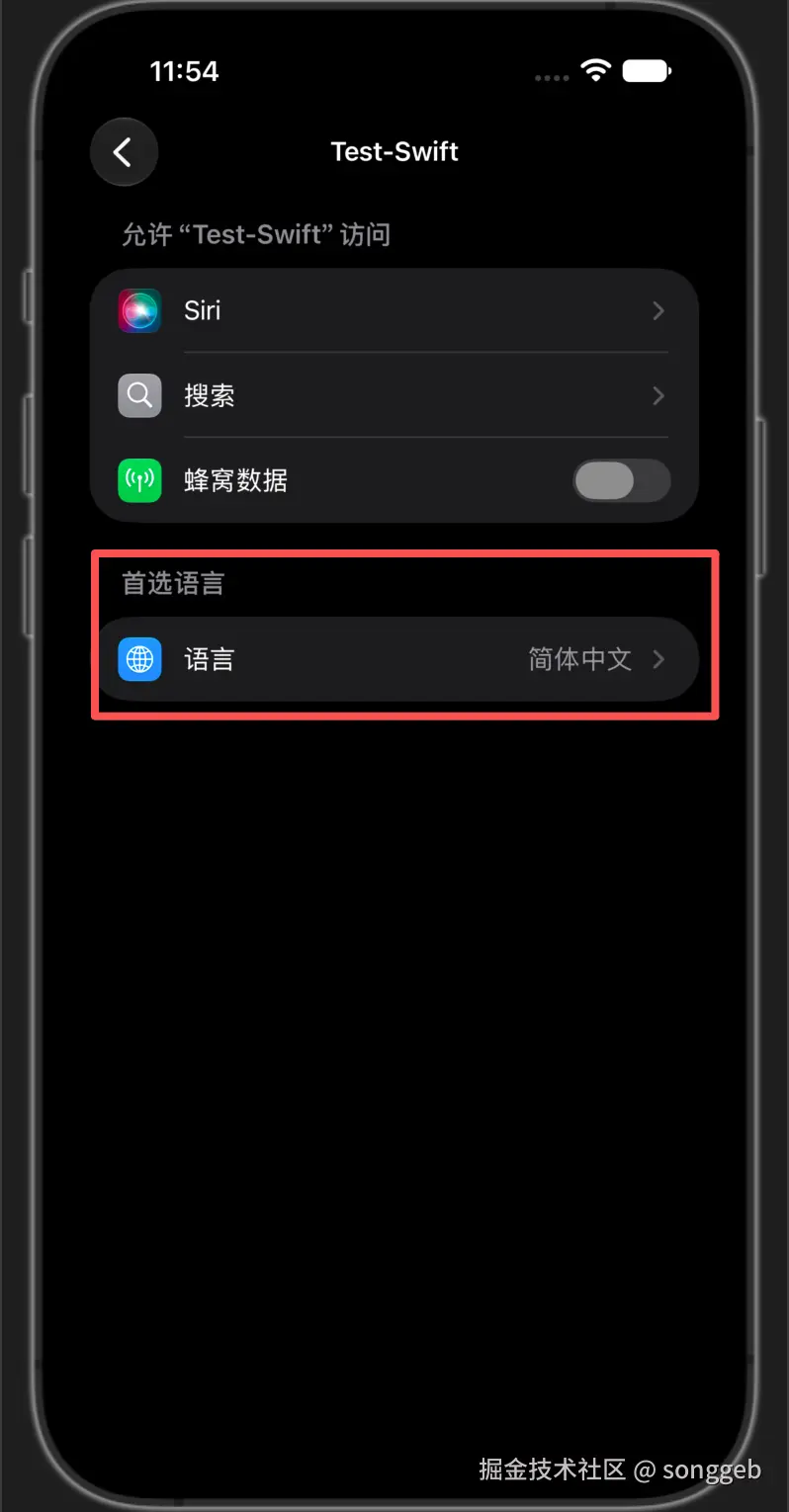
如果产品允许跳转设置并重启,优先使用这条系统路线。如果产品明确要求语言在 App 内即时生效,则需要自行管理资源与方向,并验证系统组件和第三方组件的行为。后一种做法是满足产品约束的工程方案,不等同于 Apple 推荐的完整语言切换流程。
参考:WWDC19:Creating Great Localized Experiences with Xcode 11,约 2:32--3:30;WWDC24:Build multilingual-ready apps。
相关属性与历史
trait 表示界面环境的一项特征,例如水平/垂直 size class、显示缩放倍率,以及布局方向。
其中的每一项都是一个trait,UITraitCollection是这些trait的集合
-
iOS 8开始引入了trait概念,
UITraitCollection、UITraitEnvironment- 常用的 UIView、UIViewController、UIPresentationController 和 UIScreen 等类型遵循
UITraitEnvironment。UIWindow 通过 UIView 继承相关能力;UIWindowScene 自 iOS 13 起提供,并遵循该协议。
- 常用的 UIView、UIViewController、UIPresentationController 和 UIScreen 等类型遵循
-
iOS 10
UITraitCollection中增加了表示布局方向的layoutDirection;- 同时也引入了表示有效布局方向的
effectiveUserInterfaceLayoutDirection
- 同时也引入了表示有效布局方向的
-
iOS 17(WWDC23)统一了视图与控制器的 trait 继承路径,并引入更直接的 traitOverrides API;trait 继承和控制器层级的覆盖能力在此之前已经存在
semanticContentAttribute
semanticContentAttribute是iOS 9引入的UIView的可读可写属性,表示内容想要表达的语义特性
| 英文取值 | Apple 英文说明 | 易懂的中文标识 | 具体含义 |
|---|---|---|---|
.unspecified |
The default value for views. | 默认语义,顺应环境 | 没有特殊方向要求,按所在视图环境解析方向。例如,加粗/斜体按钮组通常属于这种情况。 |
.playback |
A view representing the playback controls, such as Play, Rewind, or Fast Forward buttons or playhead scrubbers. | 媒体播放语义,保持方向 | 用于播放、快退、快进、播放进度条等;切换 LTR/RTL 时不镜像排列。 |
.spatial |
A view representing a directional control, such as a segment control for text alignment, or a D-pad control for a game. | 绝对空间语义,保持方向 | 用于左/右对齐、游戏方向键等;物理左右的含义不随阅读方向改变。 |
.forceLeftToRight |
A view that's always displayed using a left-to-right layout. | 强制从左到右 | 无论环境方向如何,内容始终采用 LTR 布局。 |
.forceRightToLeft |
A view that's always displayed using a right-to-left layout. | 强制从右到左 | 无论环境方向如何,内容始终采用 RTL 布局。 |
UITraitCollection.layoutDirection
layoutDirection是iOS 10引入的UITraitCollection的只读trait属性,表示与当前环境关联的布局方向
arduino
enum UITraitEnvironmentLayoutDirection : Int {
    case unspecified = -1
    case leftToRight = 0
    case rightToLeft = 1
}layoutDirection是UITraitCollection的属性,且UITraitCollection又是UITraitEnvironment协议中的内容- 常用 UIKit 视图与控制器通过该协议提供 traitCollection,但不能据此认为所有 UI 相关对象都遵循了
UITraitEnvironment;应从遵循协议的具体对象读取 traitCollection,再访问其中的layoutDirection
与UIApplication.userInterfaceLayoutDirection的区别
objectivec
typedef NS_ENUM(NSInteger, UIUserInterfaceLayoutDirection) {
    UIUserInterfaceLayoutDirectionLeftToRight,
    UIUserInterfaceLayoutDirectionRightToLeft,
} API_AVAILABLE(ios(5.0)) API_UNAVAILABLE(watchos);userInterfaceLayoutDirection是iOS 5引入的属性,同样表示布局方向UIApplication.userInterfaceLayoutDirection和UITraitCollection.layoutDirection都是只读读取入口。前者表示应用级界面方向;后者表示当前对象所在 trait 环境的方向,可通过相应的覆盖 API 为指定范围提供不同值。手动加载阿语资源或覆盖局部 trait,不会反向改写 UIApplication 的只读属性。
修改layoutDirection
读取到的 UITraitCollection.layoutDirection 是只读值。改变环境方向时,应使用覆盖 API 提供新的 trait 值,而不是直接修改读取到的 collection 或重写其 getter。
- iOS 10--16 可由父容器控制器使用
UIViewController.setOverrideTraitCollection(_:forChild:) - iOS 17开始,使用
traitOverrides.layoutDirection
iOS 17+ 的
traitOverrides可用于 UIWindowScene、UIView(包括 UIWindow)、UIViewController 和 UIPresentationController。覆盖作用于相应环境及其下层;下层已有的显式覆盖仍会影响最终结果。旧版的setOverrideTraitCollection(_:forChild:)只覆盖指定子控制器及其继承范围,不能据此修改 scene 或整个进程的语言环境。
semanticContentAttribute vs layoutDirection
前面分别讲了这两个属性,我最初有一个疑问:为什么要搞两个属性来进行布局呢?
答案是,因为相同环境,对于不同内容可能产生不同的布局要求
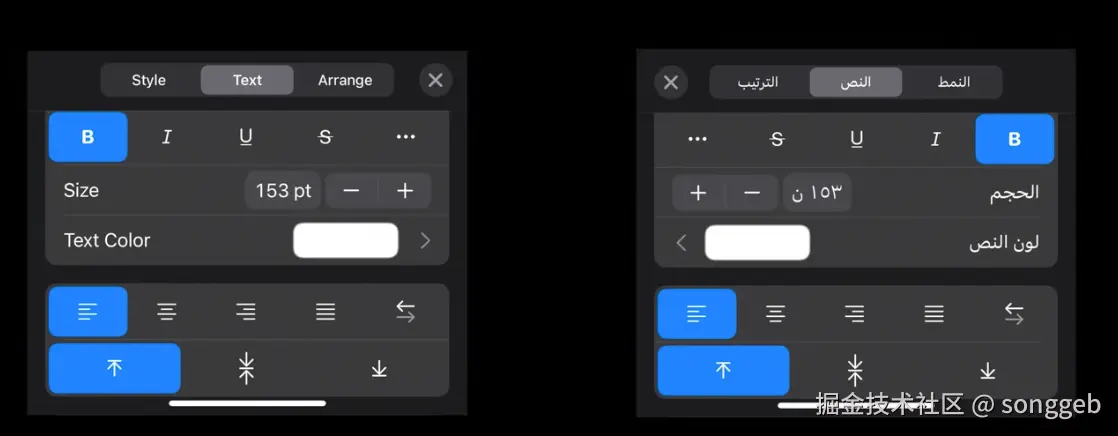
以上图中的官方例子说明:左侧是英语界面,右侧是阿语界面。上方的加粗/斜体等按钮称为样式组,下方的文字对齐按钮称为对齐组
| 组别 | 语言 | semanticContentAttribute | layoutDirection | effectiveUserInterfaceLayoutDirection | |
|---|---|---|---|---|---|
| 样式组 | 英语 | .unspecified |
LTR | LTR | |
| 样式组 | 阿语 | .unspecified |
RTL | RTL | |
| 对齐组 | 英语 | .spatial |
LTR | LTR | |
| 对齐组 | 阿语 | .spatial |
RTL | LTR |
- 样式组,我们设置语义(
semanticContentAttribute)为unspecified,即对样式组的内容没有特别要求,顺应环境即可。所以,当不同语言下,对容器视图设置了不同layoutDirection后,最终呈现的效果(effectiveUserInterfaceLayoutDirection)也跟随layoutDirection变化 - 对齐组,希望内容是绝对空间
spatial语义,即希望内容不要跟随环境变化。所以,无论layoutDirection怎么变,最终呈现的效果都是LTR
UIView.effectiveUserInterfaceLayoutDirection
effectiveUserInterfaceLayoutDirection是iOS 10引入的UIView的只读属性,表示有效的布局方向
环境方向与内容语义共同影响视图排列。自定义布局或绘制某个视图的直接内容时,应查询该视图的 effectiveUserInterfaceLayoutDirection,不能假定整个子树的有效方向都相同。例如,环境为 RTL 的空间方向控件仍可能使用 LTR。Apple API 文档。
UIApplication.userInterfaceLayoutDirection 的来源与边界
- iOS 5 引入的是
UIApplication.userInterfaceLayoutDirection属性 - iOS 9 引入的是
UIView.userInterfaceLayoutDirection(for:)类方法
后者结合传入的内容语义与应用级方向进行解析,可用于当时的自定义布局判断。
正常本地化流程中,系统结合用户的语言偏好和 App 支持的本地化,选出 App 的运行语言;
没有匹配项时回退到开发语言。
设备的首选语言不一定就是 App 实际采用的语言,地区格式偏好也不等于界面方向。Apple QA1828:How iOS Determines the Language For Your App。
据公开文档,可以将正常行为理解为:用户语言偏好+App 支持的本地化 → App 运行语言 → 应用级界面方向 → 结合控件语义解析局部方向。Apple 未公开 iOS 5--9 每个版本 getter 的具体实现,不能把某个语言查询表达式当作其内部源码。
在测试中,上述差异可以复现:系统改为阿语后,应用级方向(userInterfaceLayoutDirection)变为 RTL;系统保持中文、仅在 App 内切换业务语言时,它仍为 LTR。切换资源、覆盖 scene/window/控制器的方向 trait,或设置内容语义,都不会通过公开 API 同步改写 userInterfaceLayoutDirection 这个 只读 属性。
即时切换语言实现策略
一句话:切资源、改环境方向、保留控件语义;刷新后按视图的有效方向布局。
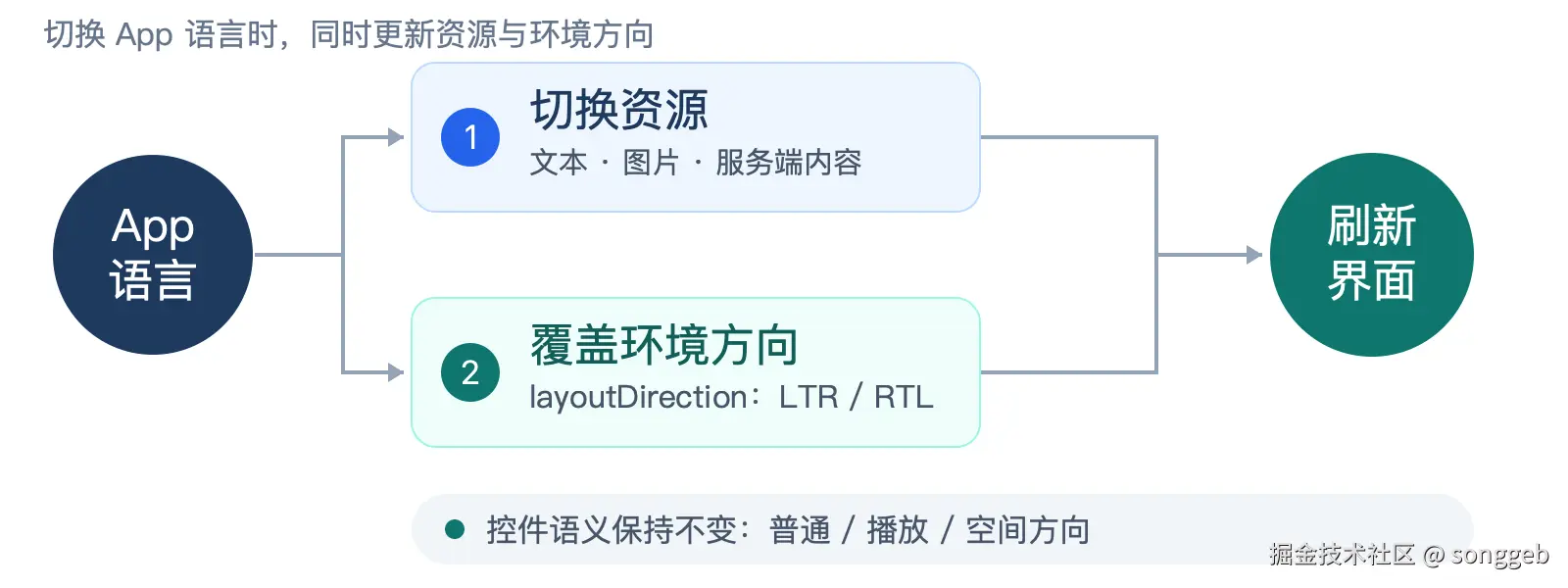
| 处理项 | 具体做法 | 备注 |
|---|---|---|
| 切换资源 | 统一选择文本、图片和服务端内容;更新既定的格式化策略。 | 保存的 App 语言+统一资源入口 |
| 覆盖方向 | 由 App 语言决定 LTR/RTL,在合适的公共祖先集中设置。 | layoutDirection 的覆盖 API,可以参考上文的修改layoutDirection |
| 保留语义 | 普通:.unspecified 播放:.playback 物理方向:.spatial |
通常不需要修改semanticContentAttribute |
刷新与验收: 保留导航和编辑状态,在合适的布局阶段读取视图的 effectiveUserInterfaceLayoutDirection。分别检查新 scene、模态界面和附加窗口。WWDC23:trait 更新与继承。
边界: UIApplication.userInterfaceLayoutDirection 不会同步更新;系统组件与安全区仍需验证。
已知问题
不要用semanticContentAttribute实现语言设置
- 在一些项目中会使用类似设置
UIView.appearance().semanticContentAttribute的方式达到RTL效果 - 虽然看上去效果可能对,但这并不符合
semanticContentAttribute对于语义的定义 - 而且在iPhone Duo模拟器上已经出现问题,因为这样的设置而引发了错误的
safeArea,导致布局错误
参考
- WWDC16-What's New in International User Interfaces
- WWDC23-Unleash the UIKit trait system
- WWDC15 Session 222:New UIKit Support for International User Interfaces(Apple 官方幻灯片)
- Apple QA1828:How iOS Determines the Language For Your App
- WWDC19:Creating Great Localized Experiences with Xcode 11
- WWDC22:Get it right (to left)
- WWDC24:Build multilingual-ready apps
- UIView.effectiveUserInterfaceLayoutDirection
- Apple:Building an Adaptive Interface