
Rust+Slint 实现高级动态消息提示框源码分享
一、效果展示


二、源码分享
1、工程结构
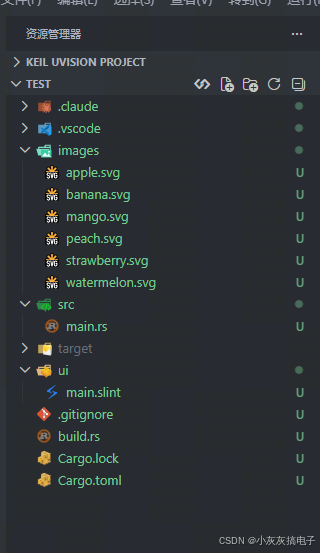
2、main.rs
rust
slint::include_modules!();

use slint::{Model, ModelRc, SharedString, Timer, TimerMode, VecModel};
use std::cell::{Cell, RefCell};
use std::collections::HashSet;
use std::rc::Rc;
use std::time::{Duration, Instant};

/// 消息条目
struct MessageEntry {
    base_time: Instant,
    accumulated_ms: u64,
    duration_ms: u64,
    paused: bool,
}

impl MessageEntry {
    fn new(duration_ms: u64) -> Self {
        Self {
            base_time: Instant::now(),
            accumulated_ms: 0,
            duration_ms,
            paused: false,
        }
    }

    fn elapsed_ms(&self, now: Instant) -> u64 {
        if self.paused {
            self.accumulated_ms
        } else {
            self.accumulated_ms + now.duration_since(self.base_time).as_millis() as u64
        }
    }

    /// 暂停:冻结当前进度
    fn pause(&mut self, now: Instant) {
        if !self.paused {
            self.accumulated_ms += now.duration_since(self.base_time).as_millis() as u64;
            self.paused = true;
        }
    }

    /// 恢复:重置基准时间
    fn resume(&mut self, now: Instant) {
        if self.paused {
            self.base_time = now;
            self.paused = false;
        }
    }
}

fn main() {
    let ui = MainWindow::new().expect("无法创建主窗口");

    // ── 消息模型 ──
    let model: Rc<VecModel<MessageItem>> = Rc::new(VecModel::from(vec![]));
    ui.set_messages(ModelRc::new(model.clone()));

    let entries: Rc<RefCell<Vec<MessageEntry>>> = Rc::new(RefCell::new(Vec::new()));
    let counter = Rc::new(Cell::new(0_i32));

    // ── 悬停暂停:追踪正在被悬停的消息 ID ──
    let hovered_ids: Rc<RefCell<HashSet<i32>>> = Rc::new(RefCell::new(HashSet::new()));

    // ── add-message 回调 ──
    {
        let model = model.clone();
        let entries = entries.clone();
        let counter = counter.clone();
        let hovered_ids = hovered_ids.clone();

        ui.on_add_message(move |msg_type, title, content, action_label, action_result_text| {
            let id = counter.get();
            counter.set(id + 1);

            model.push(MessageItem {
                id,
                r#type: msg_type,
                title,
                content,
                progress: 0.0,
                removing: false,
                action_label,
                action_result_text,
            });

            // 创建新条目,如果当前有消息被悬停则立即暂停
            let mut entries_mut = entries.borrow_mut();
            entries_mut.push(MessageEntry::new(5000));
            if !hovered_ids.borrow().is_empty() {
                let now = Instant::now();
                entries_mut.last_mut().unwrap().pause(now);
            }
        });
    }

    // ── dismiss-message 回调 ──
    {
        let model = model.clone();
        let entries = entries.clone();

        ui.on_dismiss_message(move |id| {
            if let Some(idx) = model.iter().position(|m| m.id == id) {
                let mut item = model.row_data(idx).unwrap();
                item.removing = true;
                model.set_row_data(idx, item);
            }

            let model_clone = model.clone();
            let entries_clone = entries.clone();
            slint::Timer::single_shot(Duration::from_millis(350), move || {
                if let Some(idx) = model_clone.iter().position(|m| m.id == id) {
                    model_clone.remove(idx);
                    entries_clone.borrow_mut().remove(idx);
                }
            });
        });
    }

    // ── action-result 回调 ──
    {
        let model = model.clone();
        let entries = entries.clone();
        let counter = counter.clone();
        let hovered_ids = hovered_ids.clone();

        ui.on_action_result(move |id, action_label, result_text| {
            if let Some(idx) = model.iter().position(|m| m.id == id) {
                let mut item = model.row_data(idx).unwrap();
                item.removing = true;
                model.set_row_data(idx, item);

                let model_rm = model.clone();
                let entries_rm = entries.clone();
                slint::Timer::single_shot(Duration::from_millis(350), move || {
                    if let Some(idx) = model_rm.iter().position(|m| m.id == id) {
                        model_rm.remove(idx);
                        entries_rm.borrow_mut().remove(idx);
                    }
                });
            }

            let new_id = counter.get();
            counter.set(new_id + 1);
            model.push(MessageItem {
                id: new_id,
                r#type: MessageType::Info,
                title: action_label,
                content: result_text,
                progress: 0.0,
                removing: false,
                action_label: SharedString::default(),
                action_result_text: SharedString::default(),
            });

            // 创建新条目,如果当前有消息被悬停则立即暂停
            let mut entries_mut = entries.borrow_mut();
            entries_mut.push(MessageEntry::new(4000));
            if !hovered_ids.borrow().is_empty() {
                let now = Instant::now();
                entries_mut.last_mut().unwrap().pause(now);
            }
        });
    }

    // ── set-hovered 回调(来自 changed is-hovered) ──
    {
        let hovered_ids = hovered_ids.clone();
        let entries = entries.clone();

        ui.on_set_hovered(move |msg, is_hovered| {
            let now = Instant::now();
            let mut ids = hovered_ids.borrow_mut();
            let was_empty = ids.is_empty();
            if is_hovered {
                ids.insert(msg.id);
                if was_empty {
                    // 第一张卡片悬停 → 暂停所有消息
                    drop(ids);
                    for entry in entries.borrow_mut().iter_mut() {
                        entry.pause(now);
                    }
                }
            } else {
                ids.remove(&msg.id);
                if ids.is_empty() && !was_empty {
                    // 最后一张卡片离开 → 恢复所有消息
                    drop(ids);
                    for entry in entries.borrow_mut().iter_mut() {
                        entry.resume(now);
                    }
                }
            }
        });
    }

    // ── 进度更新定时器:每 50ms ──
    {
        let model = model.clone();
        let entries = entries.clone();

        let progress_timer = Timer::default();
        progress_timer.start(
            TimerMode::Repeated,
            Duration::from_millis(50),
            move || {
                let entries_ref = entries.borrow();
                let now = Instant::now();

                for (idx, entry) in entries_ref.iter().enumerate() {
                    let elapsed = entry.elapsed_ms(now) as f64;
                    let progress = (elapsed / entry.duration_ms as f64).min(1.0);

                    if let Some(mut item) = model.row_data(idx) {
                        if (item.progress - progress as f32).abs() > 0.01 {
                            item.progress = progress as f32;
                            model.set_row_data(idx, item);
                        }
                    }
                }
            },
        );
        std::mem::forget(progress_timer);
    }

    // ── 自动移除定时器:每 100ms ──
    {
        let model = model.clone();
        let entries = entries.clone();

        let cleanup_timer = Timer::default();
        cleanup_timer.start(
            TimerMode::Repeated,
            Duration::from_millis(100),
            move || {
                let entries_ref = entries.borrow();
                let now = Instant::now();

                let expired: Vec<usize> = entries_ref
                    .iter()
                    .enumerate()
                    .filter(|(_, entry)| entry.elapsed_ms(now) >= entry.duration_ms)
                    .map(|(idx, _)| idx)
                    .collect();

                drop(entries_ref);

                for &idx in &expired {
                    if let Some(mut item) = model.row_data(idx) {
                        if !item.removing {
                            item.removing = true;
                            model.set_row_data(idx, item);
                        }
                    }
                }

                if !expired.is_empty() {
                    let model_clone = model.clone();
                    let entries_clone = entries.clone();
                    let expired_idxs: Vec<usize> = expired.clone();

                    slint::Timer::single_shot(Duration::from_millis(350), move || {
                        let mut entries_mut = entries_clone.borrow_mut();
                        for &idx in expired_idxs.iter().rev() {
                            if idx < model_clone.row_count() {
                                model_clone.remove(idx);
                                if idx < entries_mut.len() {
                                    entries_mut.remove(idx);
                                }
                            }
                        }
                    });
                }
            },
        );
        std::mem::forget(cleanup_timer);
    }

    // ── 悬停状态安全清理定时器:每 200ms ──
    // 清理模型中已不存在的消息 ID,防止 hovered_ids 残留导致永久暂停
    {
        let model = model.clone();
        let hovered_ids = hovered_ids.clone();
        let entries = entries.clone();

        let stale_timer = Timer::default();
        stale_timer.start(
            TimerMode::Repeated,
            Duration::from_millis(200),
            move || {
                let mut ids = hovered_ids.borrow_mut();
                if ids.is_empty() {
                    return;
                }

                // 收集模型中所有现存消息 ID
                let existing: HashSet<i32> = (0..model.row_count())
                    .filter_map(|i| model.row_data(i))
                    .map(|m| m.id)
                    .collect();

                // 移除已不存在的过期 ID
                let stale: Vec<i32> = ids.iter().filter(|id| !existing.contains(id)).cloned().collect();
                for id in &stale {
                    ids.remove(id);
                }

                // 如果没有消息被悬停了,恢复所有计时
                if ids.is_empty() {
                    let now = Instant::now();
                    drop(ids);
                    for entry in entries.borrow_mut().iter_mut() {
                        entry.resume(now);
                    }
                }
            },
        );
        std::mem::forget(stale_timer);
    }

    ui.run().expect("运行 UI 失败");
}3、build.rs
rust
fn main(){
    slint_build::compile("ui/main.slint")
        .unwrap()
}
4、main.slint
rust
import { Button, VerticalBox, HorizontalBox, LineEdit, ScrollView } from "std-widgets.slint";

// 消息类型枚举
export enum MessageType {
    success,
    error,
    warning,
    info
}

// 通知位置枚举
export enum NotificationPosition {
    top-left,
    top-center,
    top-right,
    bottom-right
}

// 消息数据结构
export struct MessageItem {
    id: int,
    type: MessageType,
    title: string,
    content: string,
    progress: float,
    removing: bool,
    action-label: string,
    action-result-text: string,
}

// 颜色常量
global MessageTheme {
    out property <color> success-color: #10b981;
    out property <color> success-bg: #ecfdf5;
    out property <color> error-color: #ef4444;
    out property <color> error-bg: #fef2f2;
    out property <color> warning-color: #f59e0b;
    out property <color> warning-bg: #fffbeb;
    out property <color> info-color: #3b82f6;
    out property <color> info-bg: #eff6ff;
    in-out property <NotificationPosition> position: NotificationPosition.top-right;
}

// 可复用按钮组件
component MsgButton inherits Rectangle {
    in property <image> icon-src;
    in property <string> label;
    in property <color> accent;
    callback clicked();

    height: 50px;
    width: 130px;
    border-radius: 25px;
    border-width: 2px;
    border-color: accent;
    background: accent;
    opacity: area.has-hover ? 0.8 : 1.0;

    HorizontalBox {
        padding: 12px;
        alignment: center;
        spacing: 8px;

        Rectangle {
            Image {
                width: 16px;
                height: 16px;
                vertical-stretch: 0;
                source: icon-src;
                colorize: white;
            }
        }

        Text {
            text: label;
            color: white;
            font-size: 16px;
            font-weight: 600;
            vertical-stretch: 0;
            vertical-alignment: center;
        }
    }

    area := TouchArea {
        width: 100%;
        height: 100%;
        clicked => { root.clicked(); }
        mouse-cursor: pointer;
    }
}

// 位置选择按钮组件
component PosButton inherits Rectangle {
    in property <string> label;
    in property <bool> active;
    callback clicked();

    width: 70px;
    height: 32px;
    border-radius: 16px;
    background: active ? #ffffff : #ffffff33;
    border-width: 1px;
    border-color: active ? #ffffffaa : #ffffff55;

    Text {
        text: label;
        font-size: 12px;
        font-weight: 600;
        color: active ? #764ba2 : #ffffffcc;
        horizontal-alignment: center;
        vertical-alignment: center;
    }

    area := TouchArea {
        width: 100%;
        height: 100%;
        clicked => { root.clicked(); }
        mouse-cursor: pointer;
    }
}

// 单条消息组件
component MessageCard inherits Rectangle {
    in property <MessageItem> message;
    callback dismiss(int);
    callback action-clicked(int, string, string);
    callback set-hovered(MessageItem, bool);

    width: 380px;
    height: message.action-label != "" ? 110px : 80px;
    border-radius: 12px;

    property <color> accent: message.type == MessageType.success ? MessageTheme.success-color :
                             message.type == MessageType.error ? MessageTheme.error-color :
                             message.type == MessageType.warning ? MessageTheme.warning-color :
                             MessageTheme.info-color;

    property <color> bg: message.type == MessageType.success ? MessageTheme.success-bg :
                         message.type == MessageType.error ? MessageTheme.error-bg :
                         message.type == MessageType.warning ? MessageTheme.warning-bg :
                         MessageTheme.info-bg;

    background: bg;
    border-width: 2px;
    border-color: accent;

    animate x { duration: 400ms; easing: cubic-bezier(0.34, 1.56, 0.64, 1); }
    animate opacity { duration: 300ms; easing: ease-in-out; }
    animate height { duration: 200ms; easing: ease-in-out; }
    opacity: message.removing ? 0.0 : 1.0;

    // ======== 层叠顺序(从底到顶) ========
    // 第一层:不可交互的视觉元素
    // 图标区域
    Rectangle {
        x: 12px;
        y: 16px;
        width: 48px;
        height: 48px;
        border-radius: 24px;
        background: accent;

        Image {
            x: 12px;
            y: 12px;
            width: 24px;
            height: 24px;
            source: message.type == MessageType.success ? @image-url("../images/icon-success.svg") :
                    message.type == MessageType.error ? @image-url("../images/icon-error.svg") :
                    message.type == MessageType.warning ? @image-url("../images/icon-warning.svg") :
                    @image-url("../images/icon-info.svg");
        }
    }

    // 文字内容区域
    VerticalBox {
        x: 72px;
        y: 12px;
        width: root.width - 120px;
        height: root.height - (message.action-label != "" ? 42px : 24px);

        Text {
            text: message.title;
            font-size: 15px;
            font-weight: 600;
            color: #1f2937;
            overflow: elide;
        }

        Text {
            text: message.content;
            font-size: 13px;
            color: #6b7280;
            overflow: elide;
        }
    }

    // 进度条
    Rectangle {
        x: 12px;
        y: root.height - 6px;
        width: (root.width - 24px) * (1.0 - message.progress);
        height: 3px;
        border-radius: 1.5px;
        background: accent;
        animate width { duration: 100ms; easing: linear; }
    }

    // 第二层:覆盖整个卡片的 TouchArea(检测悬停,不拦截点击)
    hover-area := TouchArea {
        width: 100%;
        height: 100%;
    }

    // 第三层:可交互按钮(在最上层,优先接收点击)
    // 操作按钮 TouchArea
    action-ta := TouchArea {
        x: 72px;
        y: root.height - 38px;
        width: message.action-label != "" ? 160px : 0px;
        height: message.action-label != "" ? 28px : 0px;
        mouse-cursor: pointer;
        clicked => { action-clicked(message.id, message.action-label, message.action-result-text); }
    }

    // 操作按钮可见部分
    if message.action-label != "" : Rectangle {
        x: 72px;
        y: root.height - 38px;
        width: 160px;
        height: 28px;
        border-radius: 14px;
        background: action-ta.has-hover ? accent : #00000010;
        border-width: 1px;
        border-color: accent;
        animate background { duration: 150ms; }

        Text {
            text: message.action-label;
            font-size: 12px;
            font-weight: 600;
            color: action-ta.has-hover ? white : accent;
            horizontal-alignment: center;
            vertical-alignment: center;
            animate color { duration: 150ms; }
        }
    }

    // 关闭按钮(最顶层,优先接收点击)
    Rectangle {
        x: parent.width - 32px;
        y: 8px;
        width: 24px;
        height: 24px;
        border-radius: 12px;
        property <bool> touched: close-btn.has-hover;
        background: touched ? #00000015 : transparent;

        Text {
            text: "×";
            font-size: 16px;
            font-weight: 700;
            color: touched ? #1f2937 : #9ca3af;
            horizontal-alignment: center;
            vertical-alignment: center;
        }

        close-btn := TouchArea {
            width: 100%;
            height: 100%;
            clicked => { dismiss(message.id); }
            mouse-cursor: pointer;
        }
    }

    // ======== 悬停检测 ========
    property <bool> is-hovered: hover-area.has-hover || action-ta.has-hover || close-btn.has-hover;

    // 观察变化,通知 Rust(直接求值而非读取 self.is-hovered)
    changed is-hovered => {
        set-hovered(message, hover-area.has-hover || action-ta.has-hover || close-btn.has-hover);
    }
}

export component MainWindow inherits Window {
    title: "高级消息提示框";
    preferred-width: 1000px;
    preferred-height: 700px;

    in property <[MessageItem]> messages: [];

    callback add-message(MessageType, string, string, string, string);
    callback dismiss-message(int);
    callback action-result(int, string, string);
    callback set-hovered(MessageItem, bool);

    background: @linear-gradient(135deg, #bd1092 0%, #14a5d1 100%);

    property <length> content-height: messages.length * 122px;
    property <length> msg-x: MessageTheme.position == NotificationPosition.top-left ? 20px :
                            MessageTheme.position == NotificationPosition.top-center ? (root.width - 380px) * 0.5 :
                            root.width - 400px;
    property <length> msg-y: MessageTheme.position == NotificationPosition.bottom-right ?
                            root.height - 20px - sv.height : 20px;

    VerticalBox {
        padding: 40px;

        Text {
            //text: "高级消息提示框 · 增强版";
            font-size: 28px;
            font-weight: 700;
            color: white;
            horizontal-alignment: center;
        }

        Rectangle { height: 16px; }

        // 消息类型按钮
        Rectangle {
            height: 80px;
            border-radius: 16px;
            background: #ffffff1a;
            border-width: 1px;
            border-color: #ffffff33;

            HorizontalBox {
                padding: 15px;
                alignment: space-around;

                MsgButton {
                    icon-src: @image-url("../images/btn-success.svg");
                    label: "成功";
                    accent: #10b981;
                    clicked => { add-message(MessageType.success, "操作成功", "您的更改已保存并同步到云端。", "", ""); }
                }

                MsgButton {
                    icon-src: @image-url("../images/btn-error.svg");
                    label: "错误";
                    accent: #ef4444;
                    clicked => { add-message(MessageType.error, "发生错误", "无法连接到服务器,请检查网络。", "重试连接", "正在重新连接..."); }
                }

                MsgButton {
                    icon-src: @image-url("../images/btn-warning.svg");
                    label: "警告";
                    accent: #f59e0b;
                    clicked => { add-message(MessageType.warning, "注意", "存储空间即将用尽,请及时清理。", "立即清理", "正在清理缓存文件..."); }
                }

                MsgButton {
                    icon-src: @image-url("../images/btn-info.svg");
                    label: "信息";
                    accent: #3b82f6;
                    clicked => { add-message(MessageType.info, "系统提示", "新版本 v2.0 已发布,点击查看详情。", "查看详情", "正在打开更新页面..."); }
                }
            }
        }

        Rectangle { height: 12px; }

        // 通知位置选择
        Rectangle {
            height: 60px;
            border-radius: 16px;
            background: #ffffff1a;
            border-width: 1px;
            border-color: #ffffff33;

            HorizontalBox {
                padding-left: 20px;
                padding-right: 20px;
                padding-top: 14px;
                padding-bottom: 14px;
                alignment: start;
                spacing: 12px;

                Text {
                    text: "通知位置:";
                    font-size: 14px;
                    font-weight: 600;
                    color: #ffffffcc;
                    vertical-alignment: center;
                    vertical-stretch: 0;
                }

                PosButton {
                    label: "左上";
                    active: MessageTheme.position == NotificationPosition.top-left;
                    clicked => { MessageTheme.position = NotificationPosition.top-left; }
                }
                PosButton {
                    label: "顶部居中";
                    active: MessageTheme.position == NotificationPosition.top-center;
                    clicked => { MessageTheme.position = NotificationPosition.top-center; }
                }
                PosButton {
                    label: "右上";
                    active: MessageTheme.position == NotificationPosition.top-right;
                    clicked => { MessageTheme.position = NotificationPosition.top-right; }
                }
                PosButton {
                    label: "右下";
                    active: MessageTheme.position == NotificationPosition.bottom-right;
                    clicked => { MessageTheme.position = NotificationPosition.bottom-right; }
                }
            }
        }

        Rectangle { height: 12px; }
    }

    // 消息提示框容器
    sv := ScrollView {
        x: root.msg-x;
        y: root.msg-y;
        width: 380px;
        height: root.content-height > root.height - 40px ? root.height - 40px : root.content-height;

        viewport-y: sv.visible-height - sv.viewport-height;
        vertical-scrollbar-policy: always-off;

        VerticalLayout {
            spacing: 12px;
            alignment: start;

            for msg in messages : MessageCard {
                message: msg;
                dismiss(id) => { dismiss-message(id); }
                action-clicked(id, label, result-text) => { action-result(id, label, result-text); }
                set-hovered(msg-data, value) => { set-hovered(msg-data, value); }
            }
        }
    }
}
5、Cargo.toml
rust
[package]
name = "modbus-debug-assistant"
version = "0.1.0"
edition = "2024"

[dependencies]
slint = "1.17.1"


[build-dependencies]
slint-build = "1.17.1"
三、实现原理
本项目的核心在于 Rust 与 Slint 的深度协作:Rust 负责消息数据的生命周期管理与计时逻辑,Slint 负责界面渲染与交互反馈。两者通过 Slint 生成的类型安全接口进行通信,实现了高效且解耦的架构。下面从数据模型、计时机制、交互反馈三个维度,逐步拆解每个模块的实现细节。
1、消息生命周期管理
每条消息从创建到消失,都经历「创建 → 展示 → 移除」三个阶段。Rust 侧使用 VecModel<MessageItem> 作为数据源,配合 MessageEntry 结构体记录每条消息的计时状态(基准时间、累计时长、总时长、是否暂停)。
创建阶段 :当用户点击按钮触发 on_add_message 回调时,Rust 先生成一个自增 ID(counter),然后构造 MessageItem 结构体推入 VecModel。与此同时,创建一个 MessageEntry 计时条目,base_time 记录当前时刻,accumulated_ms 初始为 0,duration_ms 设为 5000ms(5 秒)。这里的关键设计是:模型与计时条目通过数组下标一一对应 ,即 model 中第 i 个元素对应 entries 中第 i 个条目,后续所有更新都依赖这一映射关系。
展示阶段 :Slint 侧通过 for msg in messages 遍历模型,为每条消息实例化一个 MessageCard 组件。卡片根据 message.type 动态选择主题色(成功绿、错误红、警告橙、信息蓝),并渲染标题、内容、进度条和操作按钮。
移除阶段 :当消息到期或被用户关闭时,Rust 先将 removing 置为 true,Slint 侧据此将卡片透明度渐变为 0;随后通过 Timer::single_shot 延迟 350ms 后真正从模型中移除,保证淡出动画完整播放。移除时同时删除模型元素和对应的计时条目,保持两者下标同步。
2、进度条驱动机制
进度条通过一个每 50ms 触发的 Timer 驱动,采用「轮询 + 差值更新」的策略。
计时计算 :每次定时器触发时,Rust 遍历所有 MessageEntry,调用 elapsed_ms(now) 计算当前已流逝时间。该方法在未暂停时返回 accumulated_ms + now.duration_since(base_time),即「历史累计 + 本次运行时长」;暂停时直接返回 accumulated_ms,保证进度冻结。
进度映射 :将流逝时间与总时长的比值作为进度值,即 progress = elapsed / duration_ms,并通过 .min(1.0) 限制上限为 1。随后更新到模型中对应的 MessageItem.progress 字段。
差值过滤 :为避免每 50ms 都触发一次 UI 刷新造成不必要的渲染开销,代码中加入了 (item.progress - progress).abs() > 0.01 的判断------只有当进度变化超过 1% 时才更新模型。这样既保证了进度条视觉上的平滑,又减少了 Rust 与 Slint 之间的通信频率。
视觉呈现 :Slint 侧通过 width: (root.width - 24px) * (1.0 - message.progress) 将进度值映射为进度条的剩余宽度 ------进度越大,剩余越短。配合 animate width { duration: 100ms; easing: linear; } 实现平滑的收缩动画,视觉上呈现「倒计时」的效果。
3、悬停暂停与恢复
悬停暂停是本项目最精妙的设计之一,它让用户有充足时间阅读消息内容而不必担心消息消失。
悬停检测 :Slint 侧在 MessageCard 中定义 is-hovered 属性,由三个 TouchArea(覆盖层、操作按钮、关闭按钮)的 has-hover 状态取或得到。通过 changed is-hovered 回调,将悬停状态实时通知给 Rust 侧的 on_set_hovered 回调。
状态集合 :Rust 侧维护一个 HashSet<i32> 类型的 hovered_ids,记录当前所有被悬停的消息 ID。之所以用集合而非单个布尔值,是因为多条消息可能同时被悬停(例如用户快速移动鼠标划过多个卡片)。
暂停逻辑 :当 hovered_ids 从空变为非空时(即第一张卡片被悬停),遍历所有 MessageEntry 调用 pause(now)。pause 方法将当前流逝时间累加到 accumulated_ms,并置 paused = true,从而冻结进度。
恢复逻辑 :当 hovered_ids 从非空变为空时(即最后一张卡片离开),遍历所有条目调用 resume(now)。resume 方法将 base_time 重置为当前时刻,并置 paused = false,进度从冻结位置继续。
安全清理 :为防止消息被移除后 hovered_ids 中残留过期 ID 导致永久暂停,代码额外设置了一个每 200ms 的清理定时器。它收集模型中所有现存消息 ID,与 hovered_ids 求差集,移除已不存在的 ID;若清理后集合为空,则恢复所有计时。这一设计保证了极端情况下(如消息在悬停瞬间被移除)系统仍能自愈。
4、消息移除与动画衔接
消息移除采用「先标记、后删除」的两段式策略,这是保证动画流畅的关键。
触发来源 :消息移除有三种触发途径------用户点击关闭按钮(dismiss-message)、用户点击操作按钮(action-result)、计时自然到期(自动清理定时器)。无论哪种途径,最终都走同一条移除流程。
第一阶段:标记 。Rust 将对应 MessageItem.removing 置为 true。Slint 侧通过 opacity: message.removing ? 0.0 : 1.0 将卡片透明度渐变为 0,同时 animate x 触发位移动画,animate height 让卡片高度收缩,形成「淡出 + 上移」的视觉反馈。
第二阶段:删除 。通过 Timer::single_shot(Duration::from_millis(350)) 延迟 350ms 后执行真正的数据移除。350ms 与 Slint 侧 animate opacity { duration: 300ms } 的动画时长匹配,确保动画完整播放后再释放资源,避免界面闪烁。
下标同步 :删除时同时操作 model.remove(idx) 和 entries.borrow_mut().remove(idx),保证两个数组始终一一对应。自动清理定时器中采用倒序遍历 (.rev())删除多个过期消息,避免下标错位。
5、整体数据流
下图展示了从用户点击按钮到消息消失的完整数据流:
#mermaid-svg-e8z5xFX4TSVlkXWX{font-family:"trebuchet ms",verdana,arial,sans-serif;font-size:16px;fill:#333;}@keyframes edge-animation-frame{from{stroke-dashoffset:0;}}@keyframes dash{to{stroke-dashoffset:0;}}#mermaid-svg-e8z5xFX4TSVlkXWX .edge-animation-slow{stroke-dasharray:9,5!important;stroke-dashoffset:900;animation:dash 50s linear infinite;stroke-linecap:round;}#mermaid-svg-e8z5xFX4TSVlkXWX .edge-animation-fast{stroke-dasharray:9,5!important;stroke-dashoffset:900;animation:dash 20s linear infinite;stroke-linecap:round;}#mermaid-svg-e8z5xFX4TSVlkXWX .error-icon{fill:#552222;}#mermaid-svg-e8z5xFX4TSVlkXWX .error-text{fill:#552222;stroke:#552222;}#mermaid-svg-e8z5xFX4TSVlkXWX .edge-thickness-normal{stroke-width:1px;}#mermaid-svg-e8z5xFX4TSVlkXWX .edge-thickness-thick{stroke-width:3.5px;}#mermaid-svg-e8z5xFX4TSVlkXWX .edge-pattern-solid{stroke-dasharray:0;}#mermaid-svg-e8z5xFX4TSVlkXWX .edge-thickness-invisible{stroke-width:0;fill:none;}#mermaid-svg-e8z5xFX4TSVlkXWX .edge-pattern-dashed{stroke-dasharray:3;}#mermaid-svg-e8z5xFX4TSVlkXWX .edge-pattern-dotted{stroke-dasharray:2;}#mermaid-svg-e8z5xFX4TSVlkXWX .marker{fill:#333333;stroke:#333333;}#mermaid-svg-e8z5xFX4TSVlkXWX .marker.cross{stroke:#333333;}#mermaid-svg-e8z5xFX4TSVlkXWX svg{font-family:"trebuchet ms",verdana,arial,sans-serif;font-size:16px;}#mermaid-svg-e8z5xFX4TSVlkXWX p{margin:0;}#mermaid-svg-e8z5xFX4TSVlkXWX .label{font-family:"trebuchet ms",verdana,arial,sans-serif;color:#333;}#mermaid-svg-e8z5xFX4TSVlkXWX .cluster-label text{fill:#333;}#mermaid-svg-e8z5xFX4TSVlkXWX .cluster-label span{color:#333;}#mermaid-svg-e8z5xFX4TSVlkXWX .cluster-label span p{background-color:transparent;}#mermaid-svg-e8z5xFX4TSVlkXWX .label text,#mermaid-svg-e8z5xFX4TSVlkXWX span{fill:#333;color:#333;}#mermaid-svg-e8z5xFX4TSVlkXWX .node rect,#mermaid-svg-e8z5xFX4TSVlkXWX .node circle,#mermaid-svg-e8z5xFX4TSVlkXWX .node ellipse,#mermaid-svg-e8z5xFX4TSVlkXWX .node polygon,#mermaid-svg-e8z5xFX4TSVlkXWX .node path{fill:#ECECFF;stroke:#9370DB;stroke-width:1px;}#mermaid-svg-e8z5xFX4TSVlkXWX .rough-node .label text,#mermaid-svg-e8z5xFX4TSVlkXWX .node .label text,#mermaid-svg-e8z5xFX4TSVlkXWX .image-shape .label,#mermaid-svg-e8z5xFX4TSVlkXWX .icon-shape .label{text-anchor:middle;}#mermaid-svg-e8z5xFX4TSVlkXWX .node .katex path{fill:#000;stroke:#000;stroke-width:1px;}#mermaid-svg-e8z5xFX4TSVlkXWX .rough-node .label,#mermaid-svg-e8z5xFX4TSVlkXWX .node .label,#mermaid-svg-e8z5xFX4TSVlkXWX .image-shape .label,#mermaid-svg-e8z5xFX4TSVlkXWX .icon-shape .label{text-align:center;}#mermaid-svg-e8z5xFX4TSVlkXWX .node.clickable{cursor:pointer;}#mermaid-svg-e8z5xFX4TSVlkXWX .root .anchor path{fill:#333333!important;stroke-width:0;stroke:#333333;}#mermaid-svg-e8z5xFX4TSVlkXWX .arrowheadPath{fill:#333333;}#mermaid-svg-e8z5xFX4TSVlkXWX .edgePath .path{stroke:#333333;stroke-width:2.0px;}#mermaid-svg-e8z5xFX4TSVlkXWX .flowchart-link{stroke:#333333;fill:none;}#mermaid-svg-e8z5xFX4TSVlkXWX .edgeLabel{background-color:rgba(232,232,232, 0.8);text-align:center;}#mermaid-svg-e8z5xFX4TSVlkXWX .edgeLabel p{background-color:rgba(232,232,232, 0.8);}#mermaid-svg-e8z5xFX4TSVlkXWX .edgeLabel rect{opacity:0.5;background-color:rgba(232,232,232, 0.8);fill:rgba(232,232,232, 0.8);}#mermaid-svg-e8z5xFX4TSVlkXWX .labelBkg{background-color:rgba(232, 232, 232, 0.5);}#mermaid-svg-e8z5xFX4TSVlkXWX .cluster rect{fill:#ffffde;stroke:#aaaa33;stroke-width:1px;}#mermaid-svg-e8z5xFX4TSVlkXWX .cluster text{fill:#333;}#mermaid-svg-e8z5xFX4TSVlkXWX .cluster span{color:#333;}#mermaid-svg-e8z5xFX4TSVlkXWX div.mermaidTooltip{position:absolute;text-align:center;max-width:200px;padding:2px;font-family:"trebuchet ms",verdana,arial,sans-serif;font-size:12px;background:hsl(80, 100%, 96.2745098039%);border:1px solid #aaaa33;border-radius:2px;pointer-events:none;z-index:100;}#mermaid-svg-e8z5xFX4TSVlkXWX .flowchartTitleText{text-anchor:middle;font-size:18px;fill:#333;}#mermaid-svg-e8z5xFX4TSVlkXWX rect.text{fill:none;stroke-width:0;}#mermaid-svg-e8z5xFX4TSVlkXWX .icon-shape,#mermaid-svg-e8z5xFX4TSVlkXWX .image-shape{background-color:rgba(232,232,232, 0.8);text-align:center;}#mermaid-svg-e8z5xFX4TSVlkXWX .icon-shape p,#mermaid-svg-e8z5xFX4TSVlkXWX .image-shape p{background-color:rgba(232,232,232, 0.8);padding:2px;}#mermaid-svg-e8z5xFX4TSVlkXWX .icon-shape .label rect,#mermaid-svg-e8z5xFX4TSVlkXWX .image-shape .label rect{opacity:0.5;background-color:rgba(232,232,232, 0.8);fill:rgba(232,232,232, 0.8);}#mermaid-svg-e8z5xFX4TSVlkXWX .label-icon{display:inline-block;height:1em;overflow:visible;vertical-align:-0.125em;}#mermaid-svg-e8z5xFX4TSVlkXWX .node .label-icon path{fill:currentColor;stroke:revert;stroke-width:revert;}#mermaid-svg-e8z5xFX4TSVlkXWX :root{--mermaid-font-family:"trebuchet ms",verdana,arial,sans-serif;} 是
否
是
用户点击消息按钮
Rust 回调 on_add_message
创建 MessageEntry 计时条目
推入 VecModel 消息模型
Slint 渲染 MessageCard 卡片
进度 Timer 每 50ms 更新 progress
悬停检测
暂停所有消息计时
计时到期 / 点击关闭 / 点击操作
标记 removing 触发淡出动画
Timer::single_shot 延迟 350ms
从模型移除消息
消息消失
