背景
我在掘金上写过 用 Tkinter 实现简单的论语第一章阅读器 一文,那篇文章只涉及《论语》的第一章《学而》。交互很轻:
- 左侧是一块 4×4 的数字按钮,对应《學而》的十六节
- 中间显示繁体原文,右侧显示英译
- 点数字按钮或前后翻页,两侧文字一起切换,当前小节的按钮变灰(禁用)
- 底部还有
<</>>用来上一节、下一节
界面不复杂,但有几个点很适合拿来练手:按比例分栏、一组互斥的状态按钮、长文本自动换行 。考虑到现在 AI 编程非常方便,我借助 trae 写了 Java 版。Java 版本的代码里会用到 JDK 自带的 Swing,不引入任何第三方依赖,单文件即可运行。
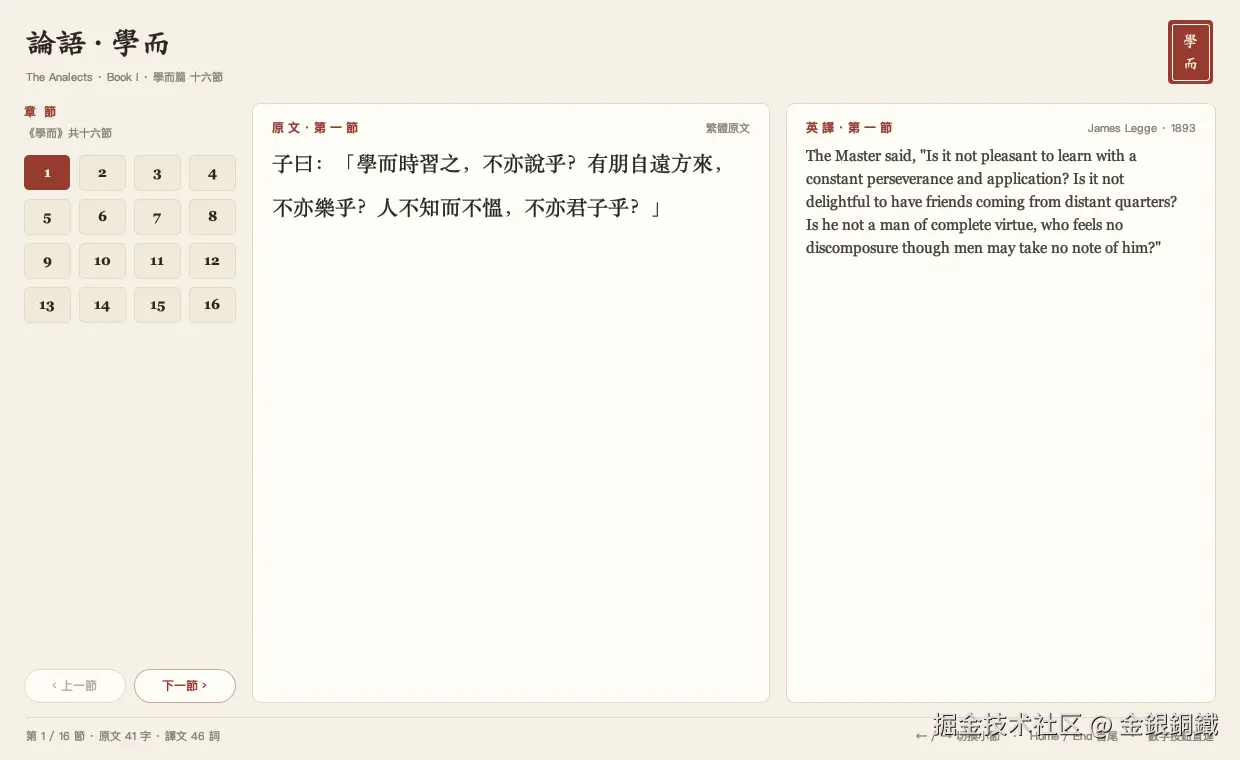
相比原版,Java 版本做了这些调整:
- 版式重写:宣纸底色、圆角"书页卡片"、右上角一枚朱砂印章
- 数字按钮、翻页按钮、印章全部不依赖 Look & Feel
- 加了键盘导航(
←→HomeEnd) - 加了离屏出图模式:不弹窗,直接把界面渲染成
PNG
两边的技术对照大致是这样 ⬇️
原版(Tkinter) |
本实现(Swing) |
|---|---|
Frame + pack / grid |
JFrame + BorderLayout + GridLayout |
数字按钮,当前项 state = disabled |
自绘 JToggleButton + ButtonGroup |
<< / >> 翻页 |
PillButton「上一節 / 下一節」 |
可自动换行的 Text 组件 |
JTextPane + StyledDocument |
静态配色(bg / fg) |
调色板常量 + paintComponent |
下面把这几个部分拆开讲。完整代码放在文末,可以直接运行。
注意事项
- 单文件
AnalectsReaderGui.java,只需要 JDK(javax.swing/java.awt/javax.imageio),无任何依赖 - 文本块需要
JDK 15+;写作本文时我用的是JDK 21 - 界面文案以繁体为主(因为正文是繁体),所以对字族有要求。代码里用"候选字族 + 自动回退"的方式,macOS 上是楷体/宋体,换到 Windows/Linux 会退到可用字体
- 离屏出图在无显示环境下同样可用,适合写文章时固定状态截屏
- 十六节原文与英译都写在代码里的两个
String[]数组,英译取自 James Legge(1893)的译本
正文
界面是我借助 trae 生成的。为了行文连贯,完整代码放在文末的 完整代码 一节。
如何运行
把 完整代码 保存为 AnalectsReaderGui.java,编译 ⬇️
bash
javac -d /tmp/analects-build AnalectsReaderGui.java编译后会生成 8 个 class 文件 ⬇️
AnalectsReaderGui.classAnalectsReaderGui$1.class(键盘绑定里的匿名AbstractAction)AnalectsReaderGui$Card.class、$SectionButton.class、$PillButton.class、$SealLabel.class(四个自绘控件)AnalectsReaderGui$SectionButton$1.class、$PillButton$1.class(两个按钮内部的鼠标监听器)
直接运行 ⬇️
bash
java -cp /tmp/analects-build AnalectsReaderGui几个可选参数 ⬇️
bash
# 打开时直接停在第 15 节
java -cp /tmp/analects-build AnalectsReaderGui --section 15

# 不弹窗,把第 8 节的界面渲染成 PNG
java -Djava.awt.headless=true -cp /tmp/analects-build AnalectsReaderGui --preview preview.png 8
界面一览
窗口是一个 BorderLayout,分四块 ⬇️
| 区域 | 内容 | 对应组件 |
|---|---|---|
页头 NORTH |
标题「論語 · 學而」、英文副标题、右侧朱砂印章 | JLabel + SealLabel |
左侧 WEST |
「章 節」小标题 + 4×4 数字按钮 + 上一節/下一節 | GridLayout(4, 4, 8, 8) |
中间 CENTER |
繁体原文卡片,标题「原 文 · 第 n 節」 | Card + JTextPane |
右侧 EAST |
英译卡片,标题「英 譯 · 第 n 節」 | Card + JTextPane |
页脚 SOUTH |
一条细分割线 + 进度与快捷键提示 | JLabel |
外层容器加了 20/24/16/24 的内边距,三栏之间留 16px 间隙 ⬇️
java
JPanel panel = new JPanel(new BorderLayout(0, 0));
panel.setBackground(PAPER);
panel.setBorder(new EmptyBorder(20, 24, 16, 24));
panel.add(buildHeader(), BorderLayout.NORTH);

JPanel body = new JPanel(new BorderLayout(16, 0));
body.setOpaque(false);
body.add(buildNavigator(), BorderLayout.WEST);
body.add(buildChineseCard(), BorderLayout.CENTER);
body.add(buildEnglishCard(), BorderLayout.EAST);
panel.add(body, BorderLayout.CENTER);

panel.add(buildFooter(), BorderLayout.SOUTH);
左栏固定 212px,右栏固定 430px,中间那栏用掉剩余宽度 ⬇️
java
navigator.setPreferredSize(new Dimension(212, 0));
card.setPreferredSize(new Dimension(430, 0));
这样窗口拉宽时,只有中文原文那一栏变宽,两侧导航不会被挤压变形。
数据与状态:一个 showSection 管全部联动
十六节文本是两张"表",下标即小节号减一 ⬇️
java
private static final String[] CHINESE = {
        "子曰:「學而時習之,不亦說乎?有朋自遠方來,不亦樂乎?人不知而不慍,不亦君子乎?」",
        // ... 共 16 节
};

private static final String[] ENGLISH = {
        """
        The Master said, "Is it not pleasant to learn with a constant perseverance and application? ..."\
        """,
        // ... 共 16 节
};
英译写成了 Java 文本块,行尾加 \ 抑制换行,这样一段译文在源码里是"多行书写、单段字符串"。
切换小节只调一个方法,所有联动都收在这里 ⬇️
java
private void showSection(int number) {
    section = clamp(number);
    int index = section - 1;

    fillPane(chinesePane, CHINESE[index], CHINESE_FONT, 0.42f, INK);
    fillPane(englishPane, ENGLISH[index], ENGLISH_FONT, 0.28f, BODY_ENGLISH);
    chineseHeading.setText("原 文 · 第 " + chineseNumber(section) + " 節");
    englishHeading.setText("英 譯 · 第 " + chineseNumber(section) + " 節");

    for (int i = 0; i < SECTION_COUNT; i++) {
        sectionButtons[i].setSelected(i + 1 == section);
        sectionButtons[i].setEnabled(i + 1 != section);
    }
    previousButton.setEnabled(section > 1);
    nextButton.setEnabled(section < SECTION_COUNT);
    progressLabel.setText(String.format("第 %d / %d 節 · 原文 %d 字 · 譯文 %d 詞",
            section, SECTION_COUNT, CHINESE[index].length(),
            ENGLISH[index].split("\\s+").length));
    resetScroll();
}
几个容易忽略的细节:
- 数字按钮既"选中"也"禁用" 。这是 Tkinter 那版的效果:当前小节高亮,同时点不动。但
Swing的禁用态默认会盖掉选中色,所以数字按钮必须自绘,后面会说。 - 用
ButtonGroup管理16个JToggleButton,保证任何时刻只有一个"按下"。 - 翻页按钮的禁用只和边界有关:
section > 1、section < SECTION_COUNT,第 1 节点不了"上一節",第16节点不了"下一節"。 - 每次切换都把两个滚动条归零,避免上一节的滚动位置被带过来 ⬇️
java
private void resetScroll() {
    chineseScroll.getViewport().setViewPosition(new Point(0, 0));
    englishScroll.getViewport().setViewPosition(new Point(0, 0));
}
第 8 节与第 16 节的效果如下,注意按钮的选中态和边界禁用态 ⬇️
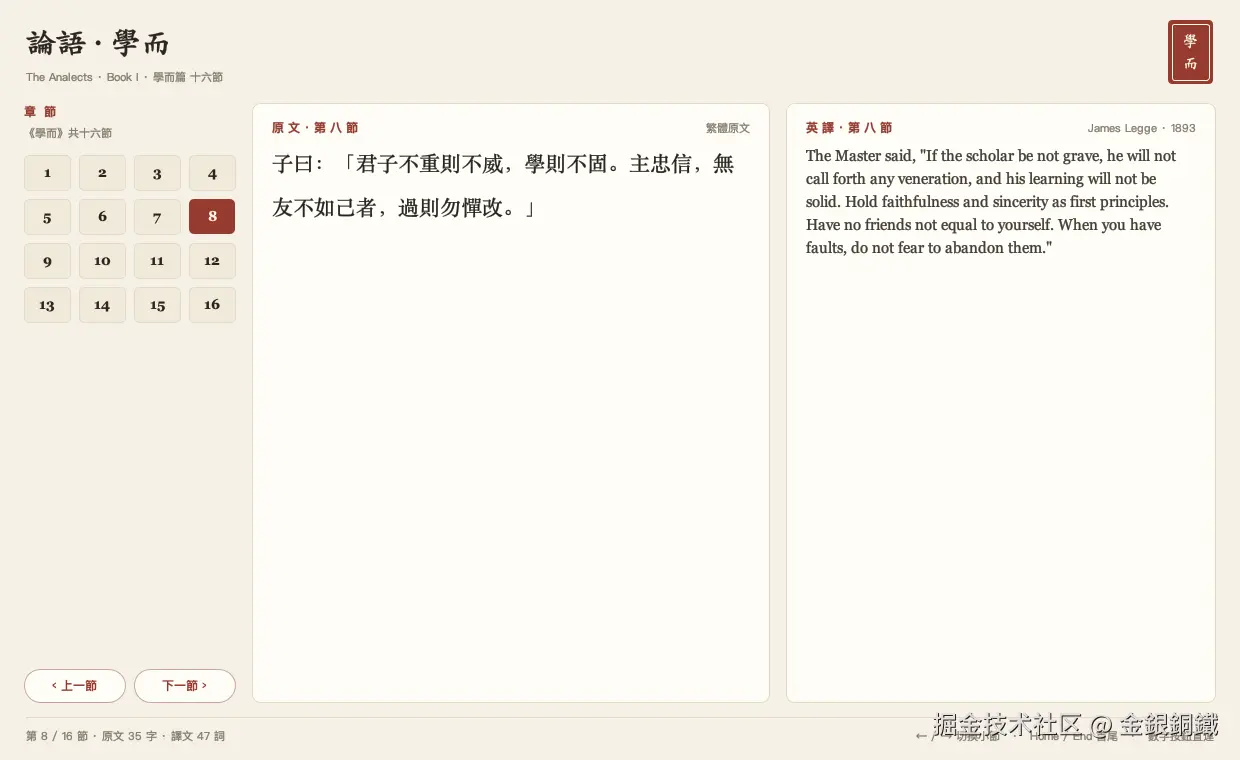
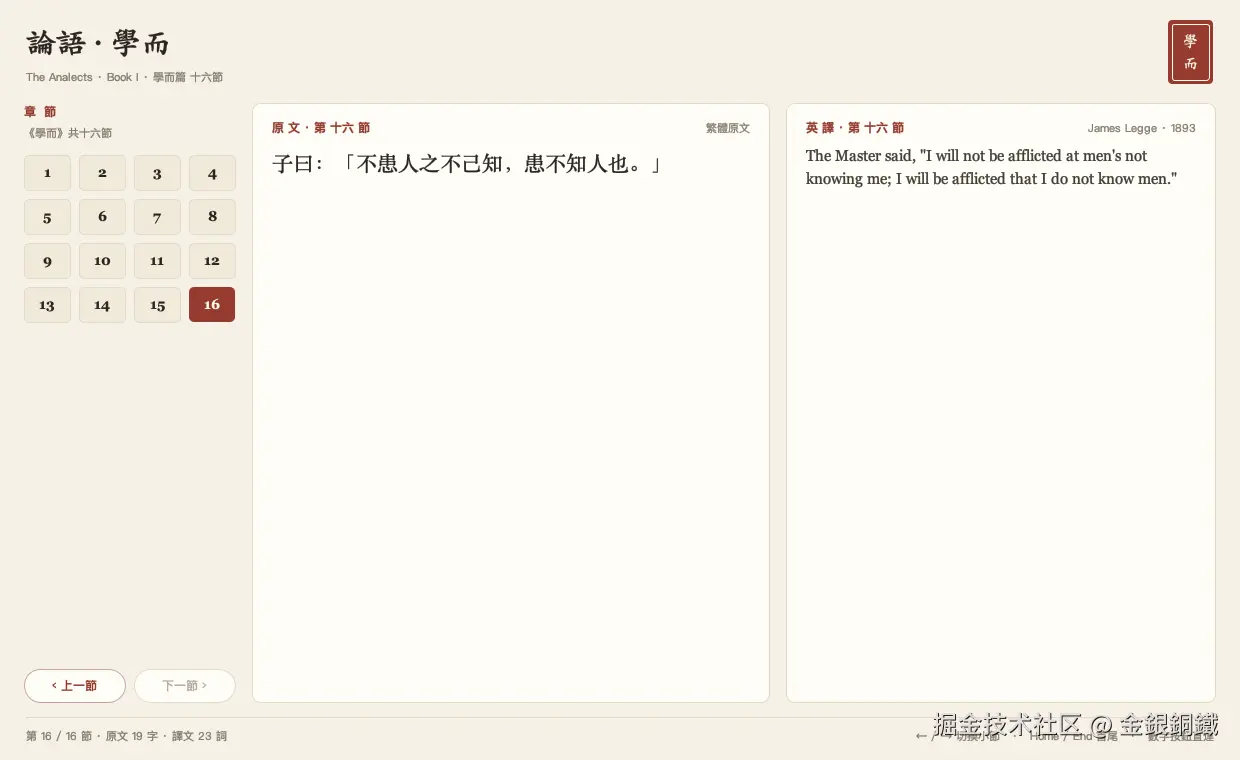
页脚里那句"原文 x 字 · 譯文 x 詞"不是硬编码,是按当前文本长度算的,顺便也能看出哪几节特别长(第 15 节 93 字,第 8 节只有 35 字)。
自绘控件:让外观不受 Look & Feel 影响
原版里按钮是什么样,取决于运行环境的主题。Swing 也一样:默认 JButton 在 macOS 上是圆角渐变,在 Metal 上是另一套。为了让版式和"纸墨朱砂"这套配色绑定,四个小控件都是自己画的 ⬇️
1)小节数字按钮 :先关掉 LAF 的填充、边框与 hover 效果,再在 paintComponent 里画一块圆角矩形 ⬇️
java
setFocusPainted(false);
setContentAreaFilled(false);
setBorderPainted(false);
setOpaque(false);
setRolloverEnabled(false);   // 否则 LAF 的 hover 会盖掉自绘
绘制部分按"选中 / 悬停 / 常态"三态取色,然后把文字居中画上去 ⬇️
java
Color fill;
Color ink;
if (selected) {
    fill = ACCENT;          // 朱砂
    ink = CREAM;
} else if (hover && isEnabled()) {
    fill = BUTTON_HOVER;
    ink = INK;
} else {
    fill = BUTTON_IDLE;
    ink = INK;
}
g.fillRoundRect(0, 0, width - 1, height - 1, 10, 10);因为选中态和禁用态都是由我们自己画,所以"高亮但点不动"这个状态可以原样保留------isSelected() 为真时一律用朱砂填充,isEnabled() 只影响 hover。
2)书页卡片 Card:圆角 16、1px 描边,画完再交给父类 ⬇️
java
g.setColor(CARD);
g.fillRoundRect(0, 0, getWidth() - 1, getHeight() - 1, 16, 16);
g.setColor(LINE);
g.setStroke(new BasicStroke(1f));
g.drawRoundRect(0, 0, getWidth() - 1, getHeight() - 1, 16, 16);
super.paintComponent(graphics);
3)翻页胶囊 PillButton:arc 直接取高度,就是两端半圆;禁用时边框和文字一起变浅 ⬇️
java
Color fill = enabled && hover ? PILL_HOVER : CARD;
Color border = enabled ? (hover ? ACCENT : new Color(0xC9, 0xA7, 0x9F)) : LINE;
Color ink = enabled ? ACCENT : DISABLED_INK;
g.fillRoundRect(0, 0, width - 1, height - 1, height - 1, height - 1);
4)印章 SealLabel:46×46 的朱砂方块,里面套一个浅色细框,再把两个字竖排 ⬇️
java
int lineHeight = metrics.getAscent() + metrics.getDescent();
int startY = (height - lineHeight * 2) / 2 + metrics.getAscent();
g.drawString(top, (width - metrics.stringWidth(top)) / 2, startY);
g.drawString(bottom, (width - metrics.stringWidth(bottom)) / 2, startY + lineHeight);
两个字的纵向间距直接用字体度量算,所以换成楷体、宋体都不会错位。
四个控件里都开了一行抗锯齿,否则圆角会毛边 ⬇️
java
g.setRenderingHint(RenderingHints.KEY_ANTIALIASING, RenderingHints.VALUE_ANTIALIAS_ON);中文排版:JTextPane + StyledDocument
第一个想法是 JTextArea,但它只有"字体 + 颜色",调不了行距,而且自动换行要靠 lineWrap 开关。真正需要的是"按宽度自动重排 + 可调行距 + 富文本属性",所以用 JTextPane ⬇️
java
private static void fillPane(JTextPane pane, String text, Font font,
        float lineSpacing, Color color) {
    pane.setText(text);
    StyledDocument document = pane.getStyledDocument();
    SimpleAttributeSet attributes = new SimpleAttributeSet();
    StyleConstants.setFontFamily(attributes, font.getFamily());
    StyleConstants.setFontSize(attributes, font.getSize());
    StyleConstants.setForeground(attributes, color);
    StyleConstants.setLineSpacing(attributes, lineSpacing);   // 行距,单位是"行高倍数之外"的增量
    int length = document.getLength();
    document.setParagraphAttributes(0, length, attributes, false);
    document.setCharacterAttributes(0, length, attributes, false);
    pane.setCaretPosition(0);
}
要点:
setParagraphAttributes管段落(行距、对齐),setCharacterAttributes管字符(字体、颜色)。只设其中一个,另一部分不会生效。- 中文正文行距给
0.42f,英译给0.28f。中文是方块字,行距小了会"糊"在一起;英文有升降部,太松又散。 JTextPane放在JScrollPane里,并且HORIZONTAL_SCROLLBAR_NEVER,宽度变化时自动重排,不会横向滚动。- 文本只读:
setEditable(false)、setFocusable(false)、setOpaque(false)(露出卡片的纸色)、setBorder(null)。
字号是"中文字大、英文小":中文 21pt Songti,英文 15pt Georgia。同样一段内容,中文占的行数少、视觉更重,这样两栏看起来才平衡。
键盘也能翻页
鼠标点按钮之外,注册了四个方向键动作,作用域是"窗口内任意组件聚焦时"⬇️
java
private static void bind(JComponent target, String keyStroke, Runnable action) {
    target.getInputMap(JComponent.WHEN_IN_FOCUSED_WINDOW).put(
            KeyStroke.getKeyStroke(keyStroke), keyStroke);
    target.getActionMap().put(keyStroke, new AbstractAction() {
        @Override
        public void actionPerformed(ActionEvent e) {
            action.run();
        }
    });
}
绑定关系是 ← 上一节、→ 下一节、Home 第一节、End 最后一节。showSection 内部有 clamp,所以在第 1 节再按 ← 只是原地不动,不会越界。
不弹窗也能"截图":离屏渲染 PNG
写文章需要固定状态的截图,每次都手动摆窗口再截屏太低效。所以加了一个 --preview 模式:把同一个面板画到 BufferedImage 里,再写 PNG ⬇️
java
int width = 1240;
int height = 760;
AnalectsReaderGui reader = new AnalectsReaderGui(startSection);
JPanel panel = reader.buildPanel();
panel.setSize(new Dimension(width, height));
layoutAll(panel);                     // 关键:未显示的容器不会自动布局

BufferedImage image = new BufferedImage(width, height, BufferedImage.TYPE_INT_RGB);
Graphics2D g = image.createGraphics();
g.setColor(PAPER);
g.fillRect(0, 0, width, height);
panel.printAll(g);
g.dispose();
ImageIO.write(image, "png", Path.of(output).toFile());
这里的 layoutAll 是必须的:容器只有在"被显示"时才会由布局管理器递归计算子组件位置;离屏时得自己 doLayout() 一遍,而且要从上到下递归 ⬇️
java
private static void layoutAll(Container container) {
    container.doLayout();
    for (Component child : container.getComponents()) {
        if (child instanceof Container nested) {
            layoutAll(nested);
        }
    }
}
配合 -Djava.awt.headless=true,整个流程不需要显示器,在 CI 或纯命令行环境里也能出图。
可能踩坑的地方
1)JFrame 不能提前创建。最初写成了字段初始化 ⬇️
java
private final JFrame frame = new JFrame("論語 · 學而 · 閱讀器"); // ✘headless 模式下,类一加载就会抛 HeadlessException,连预览都进不去。把窗口改成"用到时再建"就好了 ⬇️
java
private JFrame frame; // ✔ 只在 show() 里创建2)字体不能写死 。楷体在 macOS 上叫 Kaiti SC,Windows 上未必有,Linux 上更常见的是 LXGW WenKai、Noto Serif CJK。做法是给一串候选,运行时检查系统里到底有哪些 ⬇️
java
private static Font chooseFont(List<String> families, int style, int size) {
    String[] available = GraphicsEnvironment.getLocalGraphicsEnvironment()
            .getAvailableFontFamilyNames();
    for (String family : families) {
        for (String name : available) {
            if (name.equalsIgnoreCase(family)) {
                return new Font(name, style, size);
            }
        }
    }
    return new Font(Font.SERIF, style, size);
}
这样在没装楷体的机器上会退到宋体/衬线体,排版不会崩,只是风格朴素一点。
3)数字按钮的"选中即禁用"必须自绘 。如果直接用默认 JToggleButton,禁用后文字和底色都变成 LAF 的灰,看不出当前是哪一节。自绘以后,禁用只影响"能不能点",不影响配色。
4)-Xlint:all 下的序列化警告 。JPanel / JButton / JLabel 都实现了 Serializable,四个内部类都补上一行就好 ⬇️
java
private static final long serialVersionUID = 1L;5)布局别用绝对坐标 。整个界面没有一处 setBounds,全靠 BorderLayout + GridLayout + EmptyBorder 的内边距。窗口从 1040×640 拉到 1600×900,卡片只是变宽变高,圆角、间距、按钮尺寸都不变。
小结
这个阅读器不大,但把 Swing 里几个常用的点串起来了:
- 用布局管理器做"比例分栏",而不是算坐标
- 用
paintComponent把按钮、卡片、印章做成统一的设计语言 - 用
JTextPane+StyledDocument处理中文长文本的换行与行距 - 用
InputMap/ActionMap让键盘和按钮共用同一套动作 - 用离屏渲染把界面变成可复现的图片
完整代码
java
import java.awt.BasicStroke;
import java.awt.BorderLayout;
import java.awt.Color;
import java.awt.Component;
import java.awt.Container;
import java.awt.Dimension;
import java.awt.Font;
import java.awt.FontMetrics;
import java.awt.Graphics;
import java.awt.Graphics2D;
import java.awt.GridLayout;
import java.awt.Insets;
import java.awt.Point;
import java.awt.RenderingHints;
import java.awt.event.ActionEvent;
import java.awt.event.MouseAdapter;
import java.awt.event.MouseEvent;
import java.awt.image.BufferedImage;
import java.io.IOException;
import java.nio.file.Path;
import java.util.List;
import javax.imageio.ImageIO;
import javax.swing.AbstractAction;
import javax.swing.Box;
import javax.swing.BoxLayout;
import javax.swing.ButtonGroup;
import javax.swing.JButton;
import javax.swing.JComponent;
import javax.swing.JFrame;
import javax.swing.JLabel;
import javax.swing.JPanel;
import javax.swing.JScrollPane;
import javax.swing.JTextPane;
import javax.swing.JToggleButton;
import javax.swing.KeyStroke;
import javax.swing.SwingUtilities;
import javax.swing.UIManager;
import javax.swing.border.EmptyBorder;
import javax.swing.text.SimpleAttributeSet;
import javax.swing.text.StyleConstants;
import javax.swing.text.StyledDocument;
/**
* A simple reader for the first book of the Analects (《論語·學而》), built with
* plain Swing - the Java counterpart of the Tkinter example in
* <a href="https://juejin.cn/post/7650532520364671017">this article</a>.
* <p>
* Layout: the left column holds a 4x4 grid of the 16 section numbers plus
* previous/next buttons, the center column shows the traditional Chinese
* original, and the right column shows James Legge's English translation.
* The current section button is selected and disabled, and prev/next are
* disabled at the ends, mirroring the Tkinter version. Arrow keys move
* between sections as well.
* <p>
* Run with:
* javac AnalectsReaderGui.java
* java AnalectsReaderGui
* <p>
* Options:
* java AnalectsReaderGui --section 15 open at section 15
* java AnalectsReaderGui --preview out.png render the window offscreen
* java AnalectsReaderGui --preview out.png 15 render section 15 offscreen
*/
public class AnalectsReaderGui {
private static final int SECTION_COUNT = 16;
private static final int GRID_COLUMNS = 4;
private static final String TITLE = "論語 · 學而";
// ---- palette: warm paper, ink text, cinnabar accent -------------------
private static final Color PAPER = new Color(0xF5, 0xF0, 0xE6);
private static final Color CARD = new Color(0xFF, 0xFD, 0xF7);
private static final Color INK = new Color(0x2A, 0x25, 0x21);
private static final Color BODY_ENGLISH = new Color(0x45, 0x3F, 0x36);
private static final Color MUTED = new Color(0x85, 0x7B, 0x6C);
private static final Color ACCENT = new Color(0x96, 0x3B, 0x2F);
private static final Color LINE = new Color(0xE4, 0xDA, 0xC7);
private static final Color BUTTON_IDLE = new Color(0xF1, 0xE9, 0xDA);
private static final Color BUTTON_HOVER = new Color(0xEA, 0xDF, 0xCB);
private static final Color CREAM = new Color(0xFF, 0xF8, 0xEC);
private static final Color DISABLED_INK = new Color(0xB5, 0xAC, 0x9E);
private static final Color PILL_HOVER = new Color(0xF5, 0xE7, 0xE1);
// ---- fonts (fall back to logical fonts when a family is absent) ------
private static final Font TITLE_FONT =
chooseFont(List.of("Kaiti SC", "LXGW WenKai", "Songti SC", "STSong"), Font.BOLD, 30);
private static final Font CHINESE_FONT =
chooseFont(List.of("Songti SC", "STSong", "Songti TC"), Font.PLAIN, 21);
private static final Font ENGLISH_FONT =
chooseFont(List.of("Georgia", "Palatino", "Times New Roman"), Font.PLAIN, 15);
private static final Font LABEL_FONT =
chooseFont(List.of("PingFang SC", "Songti SC", "STSong"), Font.BOLD, 12);
private static final Font UI_FONT =
chooseFont(List.of("PingFang SC", "Heiti SC", "Helvetica"), Font.PLAIN, 11);
private static final Font BUTTON_FONT =
chooseFont(List.of("PingFang SC", "Heiti SC", "Songti SC"), Font.BOLD, 12);
private static final Font NUMBER_FONT =
chooseFont(List.of("Georgia", "Palatino", "Times New Roman"), Font.BOLD, 14);
private static final Font SEAL_FONT =
chooseFont(List.of("Kaiti SC", "Songti SC", "STSong"), Font.BOLD, 15);
// ---- text: 學而, 16 sections, traditional Chinese + Legge -------------
private static final String[] CHINESE = {
"子曰:「學而時習之,不亦說乎?有朋自遠方來,不亦樂乎?人不知而不慍,不亦君子乎?」",
"有子曰:「其為人也孝弟,而好犯上者,鮮矣;不好犯上,而好作亂者,未之有也。君子務本,本立而道生。孝弟也者,其為仁之本與!」",
"子曰:「巧言令色,鮮矣仁!」",
"曾子曰:「吾日三省吾身:為人謀而不忠乎?與朋友交而不信乎?傳不習乎?」",
"子曰:「道千乘之國:敬事而信,節用而愛人,使民以時。」",
"子曰:「弟子入則孝,出則弟,謹而信,汎愛眾,而親仁。行有餘力,則以學文。」",
"子夏曰:「賢賢易色,事父母能竭其力,事君能致其身,與朋友交言而有信。雖曰未學,吾必謂之學矣。」",
"子曰:「君子不重則不威,學則不固。主忠信,無友不如己者,過則勿憚改。」",
"曾子曰:「慎終追遠,民德歸厚矣。」",
"子禽問於子貢曰:「夫子至於是邦也,必聞其政,求之與?抑與之與?」子貢曰:「夫子溫、良、恭、儉、讓以得之。夫子之求之也,其諸異乎人之求之與?」",
"子曰:「父在,觀其志;父沒,觀其行;三年無改於父之道,可謂孝矣。」",
"有子曰:「禮之用,和為貴。先王之道斯為美,小大由之。有所不行,知和而和,不以禮節之,亦不可行也。」",
"有子曰:「信近於義,言可復也;恭近於禮,遠恥辱也;因不失其親,亦可宗也。」",
"子曰:「君子食無求飽,居無求安,敏於事而慎於言,就有道而正焉,可謂好學也已。」",
"子貢曰:「貧而無諂,富而無驕,何如?」子曰:「可也。未若貧而樂,富而好禮者也。」子貢曰:「《詩》云:『如切如磋,如琢如磨。』其斯之謂與?」子曰:「賜也,始可與言詩已矣!告諸往而知來者。」",
"子曰:「不患人之不己知,患不知人也。」",
};
private static final String[] ENGLISH = {
"""
The Master said, "Is it not pleasant to learn with a constant perseverance and application? Is it not delightful to have friends coming from distant quarters? Is he not a man of complete virtue, who feels no discomposure though men may take no note of him?"\
""",
"""
The philosopher You said, "They are few who, being filial and fraternal, are fond of offending against their superiors. There have been none, who, not liking to offend against their superiors, have been fond of stirring up confusion. The superior man bends his attention to what is radical. That being established, all practical courses naturally grow up. Filial piety and fraternal submission! - are they not the root of all benevolent actions?"\
""",
"""
The Master said, "Fine words and an insinuating appearance are seldom associated with true virtue."\
""",
"""
The philosopher Zeng said, "I daily examine myself on three points: whether, in transacting business for others, I may have been not faithful; whether, in intercourse with friends, I may have been not sincere; whether I may have not mastered and practiced the instructions of my teacher."\
""",
"""
The Master said, "To rule a country of a thousand chariots, there must be reverent attention to business, and sincerity; economy in expenditure, and love for men; and the employment of the people at the proper seasons."\
""",
"""
The Master said, "A youth, when at home, should be filial, and, abroad, respectful to his elders. He should be earnest and truthful. He should overflow in love to all, and cultivate the friendship of the good. When he has time and opportunity, after the performance of these things, he should employ them in polite studies."\
""",
"""
Zi Xia said, "If a man withdraws his mind from the love of beauty, and applies it as sincerely to the love of the virtuous; if, in serving his parents, he can exert his utmost strength; if, in serving his prince, he can devote his life; if, in his intercourse with his friends, his words are sincere - although men say that he has not learned, I will certainly say that he has."\
""",
"""
The Master said, "If the scholar be not grave, he will not call forth any veneration, and his learning will not be solid. Hold faithfulness and sincerity as first principles. Have no friends not equal to yourself. When you have faults, do not fear to abandon them."\
""",
"""
The philosopher Zeng said, "Let there be a careful attention to perform the funeral rites to parents, and let them be followed when long gone with the ceremonies of sacrifice - then the virtue of the people will resume its proper excellence."\
""",
"""
Zi Qin asked Zi Gong, saying, "When our master comes to any country, he does not fail to learn all about its government. Does he ask his information? or is it given to him?" Zi Gong said, "Our master is benign, upright, courteous, temperate, and complaisant and thus he gets his information. The master's mode of asking information! - is it not different from that of other men?"\
""",
"""
The Master said, "While a man's father is alive, look at the bent of his will; when his father is dead, look at his conduct. If for three years he does not alter from the way of his father, he may be called filial."\
""",
"""
The philosopher You said, "In practicing the rules of propriety, a natural ease is to be prized. In the ways prescribed by the ancient kings, this is the excellent quality, and in things small and great we follow them. Yet it is not to be observed in all cases. If one, knowing how such ease should be prized, manifests it, without regulating it by the rules of propriety, this likewise is not to be done."\
""",
"""
The philosopher You said, "When agreements are made according to what is right, what is spoken can be made good. When respect is shown according to what is proper, one keeps far from shame and disgrace. When the parties upon whom a man leans are proper persons to be intimate with, he can make them his guides and masters."\
""",
"""
The Master said, "He who aims to be a man of complete virtue in his food does not seek to gratify his appetite, nor in his dwelling place does he seek the appliances of ease; he is earnest in what he is doing, and careful in his speech; he frequents the company of men of principle that he may be rectified - such a person may be said indeed to love to learn."\
""",
"""
Zi Gong said, "What do you pronounce concerning the poor man who yet does not flatter, and the rich man who is not proud?" The Master replied, "They will do; but they are not equal to him, who, though poor, is yet cheerful, and to him, who, though rich, loves the rules of propriety." Zi Gong replied, "It is said in the Book of Poetry, 'As you cut and then file, as you carve and then polish.' - The meaning is the same, I apprehend, as that which you have just expressed." The Master said, "With one like Ci, I can begin to talk about the odes. I told him one point, and he knew its proper sequence."\
""",
"""
The Master said, "I will not be afflicted at men's not knowing me; I will be afflicted that I do not know men."\
""",
};
private JFrame frame;
private final JToggleButton[] sectionButtons = new JToggleButton[SECTION_COUNT];
private final JTextPane chinesePane = new JTextPane();
private final JTextPane englishPane = new JTextPane();
private JButton previousButton;
private JButton nextButton;
private JScrollPane chineseScroll;
private JScrollPane englishScroll;
private JLabel chineseHeading;
private JLabel englishHeading;
private JLabel progressLabel;
private int section;
public AnalectsReaderGui(int startSection) {
section = clamp(startSection);
stylePane(chinesePane, CHINESE_FONT);
stylePane(englishPane, ENGLISH_FONT);
}
public static void main(String[] args) throws IOException {
if (args.length >= 2 && args[0].equals("--preview")) {
int previewSection = args.length >= 3 ? Integer.parseInt(args[2]) : 1;
writePreview(args[1], previewSection);
return;
}
int start = 1;
if (args.length >= 2 && args[0].equals("--section")) {
start = Integer.parseInt(args[1]);
}
int initial = start;
SwingUtilities.invokeLater(() -> {
useSystemLookAndFeel();
new AnalectsReaderGui(initial).show();
});
}
private static void useSystemLookAndFeel() {
try {
UIManager.setLookAndFeel(UIManager.getSystemLookAndFeelClassName());
} catch (Exception ignored) {
// keep the default look and feel
}
}
private void show() {
frame = new JFrame(TITLE + " · 閱讀器");
frame.setDefaultCloseOperation(JFrame.EXIT_ON_CLOSE);
frame.setContentPane(buildPanel());
frame.setSize(1240, 760);
frame.setMinimumSize(new Dimension(1040, 640));
frame.setLocationRelativeTo(null);
frame.setVisible(true);
installKeyBindings(frame.getRootPane());
SwingUtilities.invokeLater(() -> {
resetScroll();
frame.getRootPane().requestFocusInWindow();
});
}
// ---- layout ----------------------------------------------------------
private JPanel buildPanel() {
JPanel panel = new JPanel(new BorderLayout(0, 0));
panel.setBackground(PAPER);
panel.setBorder(new EmptyBorder(20, 24, 16, 24));
panel.add(buildHeader(), BorderLayout.NORTH);
JPanel body = new JPanel(new BorderLayout(16, 0));
body.setOpaque(false);
body.add(buildNavigator(), BorderLayout.WEST);
body.add(buildChineseCard(), BorderLayout.CENTER);
body.add(buildEnglishCard(), BorderLayout.EAST);
panel.add(body, BorderLayout.CENTER);
panel.add(buildFooter(), BorderLayout.SOUTH);
installKeyBindings(panel);
showSection(section);
return panel;
}
private JPanel buildHeader() {
JPanel header = new JPanel(new BorderLayout(18, 0));
header.setOpaque(false);
header.setBorder(new EmptyBorder(0, 2, 18, 2));
JPanel titles = new JPanel();
titles.setLayout(new BoxLayout(titles, BoxLayout.Y_AXIS));
titles.setOpaque(false);
JLabel title = new JLabel(TITLE);
title.setFont(TITLE_FONT);
title.setForeground(INK);
title.setAlignmentX(Component.LEFT_ALIGNMENT);
JLabel subtitle = new JLabel("The Analects · Book I · 學而篇 十六節");
subtitle.setFont(UI_FONT);
subtitle.setForeground(MUTED);
subtitle.setAlignmentX(Component.LEFT_ALIGNMENT);
titles.add(title);
titles.add(Box.createVerticalStrut(6));
titles.add(subtitle);
header.add(titles, BorderLayout.CENTER);
header.add(new SealLabel("學而"), BorderLayout.EAST);
return header;
}
private JPanel buildNavigator() {
JPanel navigator = new JPanel(new BorderLayout(0, 14));
navigator.setOpaque(false);
navigator.setPreferredSize(new Dimension(212, 0));
JPanel heading = new JPanel();
heading.setLayout(new BoxLayout(heading, BoxLayout.Y_AXIS));
heading.setOpaque(false);
JLabel label = new JLabel("章 節");
label.setFont(LABEL_FONT);
label.setForeground(ACCENT);
label.setAlignmentX(Component.LEFT_ALIGNMENT);
JLabel hint = new JLabel("《學而》共十六節");
hint.setFont(UI_FONT);
hint.setForeground(MUTED);
hint.setAlignmentX(Component.LEFT_ALIGNMENT);
heading.add(label);
heading.add(Box.createVerticalStrut(4));
heading.add(hint);
navigator.add(heading, BorderLayout.NORTH);
JPanel grid = new JPanel(new GridLayout(GRID_COLUMNS, GRID_COLUMNS, 8, 8));
grid.setOpaque(false);
ButtonGroup group = new ButtonGroup();
for (int i = 0; i < SECTION_COUNT; i++) {
int number = i + 1;
SectionButton button = new SectionButton(number);
button.addActionListener(e -> showSection(number));
group.add(button);
sectionButtons[i] = button;
grid.add(button);
}
JPanel gridBox = new JPanel(new BorderLayout());
gridBox.setOpaque(false);
gridBox.add(grid, BorderLayout.NORTH);
navigator.add(gridBox, BorderLayout.CENTER);
JPanel navButtons = new JPanel(new GridLayout(1, 2, 8, 0));
navButtons.setOpaque(false);
previousButton = new PillButton("‹ 上一節");
nextButton = new PillButton("下一節 ›");
previousButton.setToolTipText("上一節(←)");
nextButton.setToolTipText("下一節(→)");
previousButton.addActionListener(e -> showSection(section - 1));
nextButton.addActionListener(e -> showSection(section + 1));
navButtons.add(previousButton);
navButtons.add(nextButton);
navigator.add(navButtons, BorderLayout.SOUTH);
return navigator;
}
private JPanel buildChineseCard() {
Card card = new Card();
card.setBorder(new EmptyBorder(16, 20, 16, 20));
chineseHeading = new JLabel();
chineseHeading.setFont(LABEL_FONT);
chineseHeading.setForeground(ACCENT);
JLabel tag = new JLabel("繁體原文");
tag.setFont(UI_FONT);
tag.setForeground(MUTED);
JPanel headRow = new JPanel(new BorderLayout());
headRow.setOpaque(false);
headRow.add(chineseHeading, BorderLayout.WEST);
headRow.add(tag, BorderLayout.EAST);
chineseScroll = scroll(chinesePane);
card.add(headRow, BorderLayout.NORTH);
card.add(chineseScroll, BorderLayout.CENTER);
return card;
}
private JPanel buildEnglishCard() {
Card card = new Card();
card.setBorder(new EmptyBorder(16, 20, 16, 20));
card.setPreferredSize(new Dimension(430, 0));
englishHeading = new JLabel();
englishHeading.setFont(LABEL_FONT);
englishHeading.setForeground(ACCENT);
JLabel tag = new JLabel("James Legge · 1893");
tag.setFont(UI_FONT);
tag.setForeground(MUTED);
JPanel headRow = new JPanel(new BorderLayout());
headRow.setOpaque(false);
headRow.add(englishHeading, BorderLayout.WEST);
headRow.add(tag, BorderLayout.EAST);
englishScroll = scroll(englishPane);
card.add(headRow, BorderLayout.NORTH);
card.add(englishScroll, BorderLayout.CENTER);
return card;
}
private JPanel buildFooter() {
JPanel footer = new JPanel(new BorderLayout(0, 10));
footer.setOpaque(false);
footer.setBorder(new EmptyBorder(14, 2, 0, 2));
JPanel rule = new JPanel();
rule.setBackground(LINE);
rule.setPreferredSize(new Dimension(0, 1));
progressLabel = new JLabel();
progressLabel.setFont(UI_FONT);
progressLabel.setForeground(MUTED);
JLabel keys = new JLabel("← / → 切換小節 · Home / End 首尾 · 數字按鈕直達");
keys.setFont(UI_FONT);
keys.setForeground(MUTED);
JPanel row = new JPanel(new BorderLayout());
row.setOpaque(false);
row.add(progressLabel, BorderLayout.WEST);
row.add(keys, BorderLayout.EAST);
footer.add(rule, BorderLayout.NORTH);
footer.add(row, BorderLayout.CENTER);
return footer;
}
private static JScrollPane scroll(JTextPane pane) {
JScrollPane scroll = new JScrollPane(pane);
scroll.setBorder(null);
scroll.setOpaque(false);
scroll.getViewport().setOpaque(false);
scroll.setHorizontalScrollBarPolicy(JScrollPane.HORIZONTAL_SCROLLBAR_NEVER);
scroll.getVerticalScrollBar().setUnitIncrement(16);
return scroll;
}
// ---- data flow -------------------------------------------------------
private void showSection(int number) {
section = clamp(number);
int index = section - 1;
fillPane(chinesePane, CHINESE[index], CHINESE_FONT, 0.42f, INK);
fillPane(englishPane, ENGLISH[index], ENGLISH_FONT, 0.28f, BODY_ENGLISH);
chineseHeading.setText("原 文 · 第 " + chineseNumber(section) + " 節");
englishHeading.setText("英 譯 · 第 " + chineseNumber(section) + " 節");
// like the Tkinter version: the current section button is selected and
// disabled, the neighbors stay enabled
for (int i = 0; i < SECTION_COUNT; i++) {
sectionButtons[i].setSelected(i + 1 == section);
sectionButtons[i].setEnabled(i + 1 != section);
}
if (previousButton != null) {
previousButton.setEnabled(section > 1);
}
if (nextButton != null) {
nextButton.setEnabled(section < SECTION_COUNT);
}
if (progressLabel != null) {
progressLabel.setText(String.format("第 %d / %d 節 · 原文 %d 字 · 譯文 %d 詞",
section, SECTION_COUNT, CHINESE[index].length(),
ENGLISH[index].split("\\s+").length));
}
resetScroll();
}
private void resetScroll() {
if (chineseScroll != null) {
chineseScroll.getViewport().setViewPosition(new Point(0, 0));
}
if (englishScroll != null) {
englishScroll.getViewport().setViewPosition(new Point(0, 0));
}
}
private static void stylePane(JTextPane pane, Font font) {
pane.setEditable(false);
pane.setOpaque(false);
pane.setFocusable(false);
pane.setFont(font);
pane.setBorder(null);
pane.setMargin(new Insets(10, 0, 0, 0));
}
private static void fillPane(JTextPane pane, String text, Font font,
float lineSpacing, Color color) {
pane.setText(text);
StyledDocument document = pane.getStyledDocument();
SimpleAttributeSet attributes = new SimpleAttributeSet();
StyleConstants.setFontFamily(attributes, font.getFamily());
StyleConstants.setFontSize(attributes, font.getSize());
StyleConstants.setForeground(attributes, color);
StyleConstants.setLineSpacing(attributes, lineSpacing);
int length = document.getLength();
document.setParagraphAttributes(0, length, attributes, false);
document.setCharacterAttributes(0, length, attributes, false);
pane.setCaretPosition(0);
}
private static int clamp(int number) {
return Math.max(1, Math.min(SECTION_COUNT, number));
}
private static String chineseNumber(int number) {
String[] digits = {"一", "二", "三", "四", "五", "六", "七", "八", "九"};
if (number <= 9) {
return digits[number - 1];
}
if (number == 10) {
return "十";
}
int tens = number / 10;
int ones = number % 10;
return (tens == 1 ? "十" : digits[tens - 1] + "十")
+ (ones == 0 ? "" : digits[ones - 1]);
}
// ---- keyboard --------------------------------------------------------
private void installKeyBindings(JComponent target) {
bind(target, "LEFT", () -> showSection(section - 1));
bind(target, "RIGHT", () -> showSection(section + 1));
bind(target, "HOME", () -> showSection(1));
bind(target, "END", () -> showSection(SECTION_COUNT));
}
private static void bind(JComponent target, String keyStroke, Runnable action) {
target.getInputMap(JComponent.WHEN_IN_FOCUSED_WINDOW).put(
KeyStroke.getKeyStroke(keyStroke), keyStroke);
target.getActionMap().put(keyStroke, new AbstractAction() {
@Override
public void actionPerformed(ActionEvent e) {
action.run();
}
});
}
// ---- small custom widgets -------------------------------------------
/** A paper card with rounded corners and a hairline border. */
private static final class Card extends JPanel {
private static final long serialVersionUID = 1L;
Card() {
setLayout(new BorderLayout(0, 10));
setOpaque(false);
}
@Override
protected void paintComponent(Graphics graphics) {
Graphics2D g = (Graphics2D) graphics.create();
g.setRenderingHint(RenderingHints.KEY_ANTIALIASING,
RenderingHints.VALUE_ANTIALIAS_ON);
g.setColor(CARD);
g.fillRoundRect(0, 0, getWidth() - 1, getHeight() - 1, 16, 16);
g.setColor(LINE);
g.setStroke(new BasicStroke(1f));
g.drawRoundRect(0, 0, getWidth() - 1, getHeight() - 1, 16, 16);
g.dispose();
super.paintComponent(graphics);
}
}
/** One of the 16 number buttons; painted, so it looks the same in any LAF. */
private static final class SectionButton extends JToggleButton {
private static final long serialVersionUID = 1L;
private boolean hover;
SectionButton(int number) {
super(String.valueOf(number));
setFont(NUMBER_FONT);
setFocusPainted(false);
setContentAreaFilled(false);
setBorderPainted(false);
setOpaque(false);
setRolloverEnabled(false);
setPreferredSize(new Dimension(44, 36));
setCursor(java.awt.Cursor.getPredefinedCursor(java.awt.Cursor.HAND_CURSOR));
setToolTipText("前往第 " + number + " 節");
addMouseListener(new MouseAdapter() {
@Override
public void mouseEntered(MouseEvent e) {
hover = true;
repaint();
}
@Override
public void mouseExited(MouseEvent e) {
hover = false;
repaint();
}
});
}
@Override
protected void paintComponent(Graphics graphics) {
Graphics2D g = (Graphics2D) graphics.create();
g.setRenderingHint(RenderingHints.KEY_ANTIALIASING,
RenderingHints.VALUE_ANTIALIAS_ON);
int width = getWidth();
int height = getHeight();
boolean selected = isSelected();
Color fill;
Color ink;
if (selected) {
fill = ACCENT;
ink = CREAM;
} else if (hover && isEnabled()) {
fill = BUTTON_HOVER;
ink = INK;
} else {
fill = BUTTON_IDLE;
ink = INK;
}
g.setColor(fill);
g.fillRoundRect(0, 0, width - 1, height - 1, 10, 10);
if (!selected) {
g.setColor(LINE);
g.drawRoundRect(0, 0, width - 1, height - 1, 10, 10);
}
g.setFont(getFont());
FontMetrics metrics = g.getFontMetrics();
String text = getText();
int x = (width - metrics.stringWidth(text)) / 2;
int y = (height - metrics.getHeight()) / 2 + metrics.getAscent();
g.setColor(ink);
g.drawString(text, x, y);
g.dispose();
}
}
/** The previous / next pill button, also painted for a consistent look. */
private static final class PillButton extends JButton {
private static final long serialVersionUID = 1L;
private boolean hover;
PillButton(String text) {
super(text);
setFont(BUTTON_FONT);
setFocusPainted(false);
setContentAreaFilled(false);
setBorderPainted(false);
setOpaque(false);
setRolloverEnabled(false);
setPreferredSize(new Dimension(0, 34));
setCursor(java.awt.Cursor.getPredefinedCursor(java.awt.Cursor.HAND_CURSOR));
addMouseListener(new MouseAdapter() {
@Override
public void mouseEntered(MouseEvent e) {
hover = true;
repaint();
}
@Override
public void mouseExited(MouseEvent e) {
hover = false;
repaint();
}
});
}
@Override
protected void paintComponent(Graphics graphics) {
Graphics2D g = (Graphics2D) graphics.create();
g.setRenderingHint(RenderingHints.KEY_ANTIALIASING,
RenderingHints.VALUE_ANTIALIAS_ON);
int width = getWidth();
int height = getHeight();
boolean enabled = isEnabled();
Color fill = enabled && hover ? PILL_HOVER : CARD;
Color border = enabled ? (hover ? ACCENT : new Color(0xC9, 0xA7, 0x9F)) : LINE;
Color ink = enabled ? ACCENT : DISABLED_INK;
g.setColor(fill);
g.fillRoundRect(0, 0, width - 1, height - 1, height - 1, height - 1);
g.setColor(border);
g.drawRoundRect(0, 0, width - 1, height - 1, height - 1, height - 1);
g.setFont(getFont());
FontMetrics metrics = g.getFontMetrics();
String text = getText();
int x = (width - metrics.stringWidth(text)) / 2;
int y = (height - metrics.getHeight()) / 2 + metrics.getAscent();
g.setColor(ink);
g.drawString(text, x, y);
g.dispose();
}
}
/** A red seal with two characters stacked vertically. */
private static final class SealLabel extends JLabel {
private static final long serialVersionUID = 1L;
private final String top;
private final String bottom;
SealLabel(String text) {
top = text.substring(0, 1);
bottom = text.substring(1, 2);
setOpaque(false);
setFont(SEAL_FONT);
setPreferredSize(new Dimension(46, 46));
setMinimumSize(new Dimension(46, 46));
setMaximumSize(new Dimension(46, 46));
setToolTipText("《論語》第一章:學而");
}
@Override
protected void paintComponent(Graphics graphics) {
Graphics2D g = (Graphics2D) graphics.create();
g.setRenderingHint(RenderingHints.KEY_ANTIALIASING,
RenderingHints.VALUE_ANTIALIAS_ON);
int width = getWidth();
int height = getHeight();
g.setColor(ACCENT);
g.fillRoundRect(0, 0, width - 1, height - 1, 8, 8);
g.setColor(CREAM);
g.setStroke(new BasicStroke(1f));
g.drawRoundRect(4, 4, width - 9, height - 9, 5, 5);
g.setFont(getFont());
FontMetrics metrics = g.getFontMetrics();
int lineHeight = metrics.getAscent() + metrics.getDescent();
int startY = (height - lineHeight * 2) / 2 + metrics.getAscent();
g.setColor(CREAM);
g.drawString(top, (width - metrics.stringWidth(top)) / 2, startY);
g.drawString(bottom, (width - metrics.stringWidth(bottom)) / 2, startY + lineHeight);
g.dispose();
}
}
private static Font chooseFont(List<String> families, int style, int size) {
String[] available =
java.awt.GraphicsEnvironment.getLocalGraphicsEnvironment()
.getAvailableFontFamilyNames();
for (String family : families) {
for (String name : available) {
if (name.equalsIgnoreCase(family)) {
return new Font(name, style, size);
}
}
}
return new Font(Font.SERIF, style, size);
}
// ---- preview: paint the same panel into a PNG ------------------------
private static void writePreview(String output, int startSection) throws IOException {
useSystemLookAndFeel();
int width = 1240;
int height = 760;
AnalectsReaderGui reader = new AnalectsReaderGui(startSection);
JPanel panel = reader.buildPanel();
panel.setSize(new Dimension(width, height));
layoutAll(panel);
BufferedImage image = new BufferedImage(width, height, BufferedImage.TYPE_INT_RGB);
Graphics2D g = image.createGraphics();
g.setColor(PAPER);
g.fillRect(0, 0, width, height);
panel.printAll(g);
g.dispose();
ImageIO.write(image, "png", Path.of(output).toFile());
System.out.println("wrote " + output);
}
private static void layoutAll(Container container) {
container.doLayout();
for (Component child : container.getComponents()) {
if (child instanceof Container nested) {
layoutAll(nested);
}
}
}
}