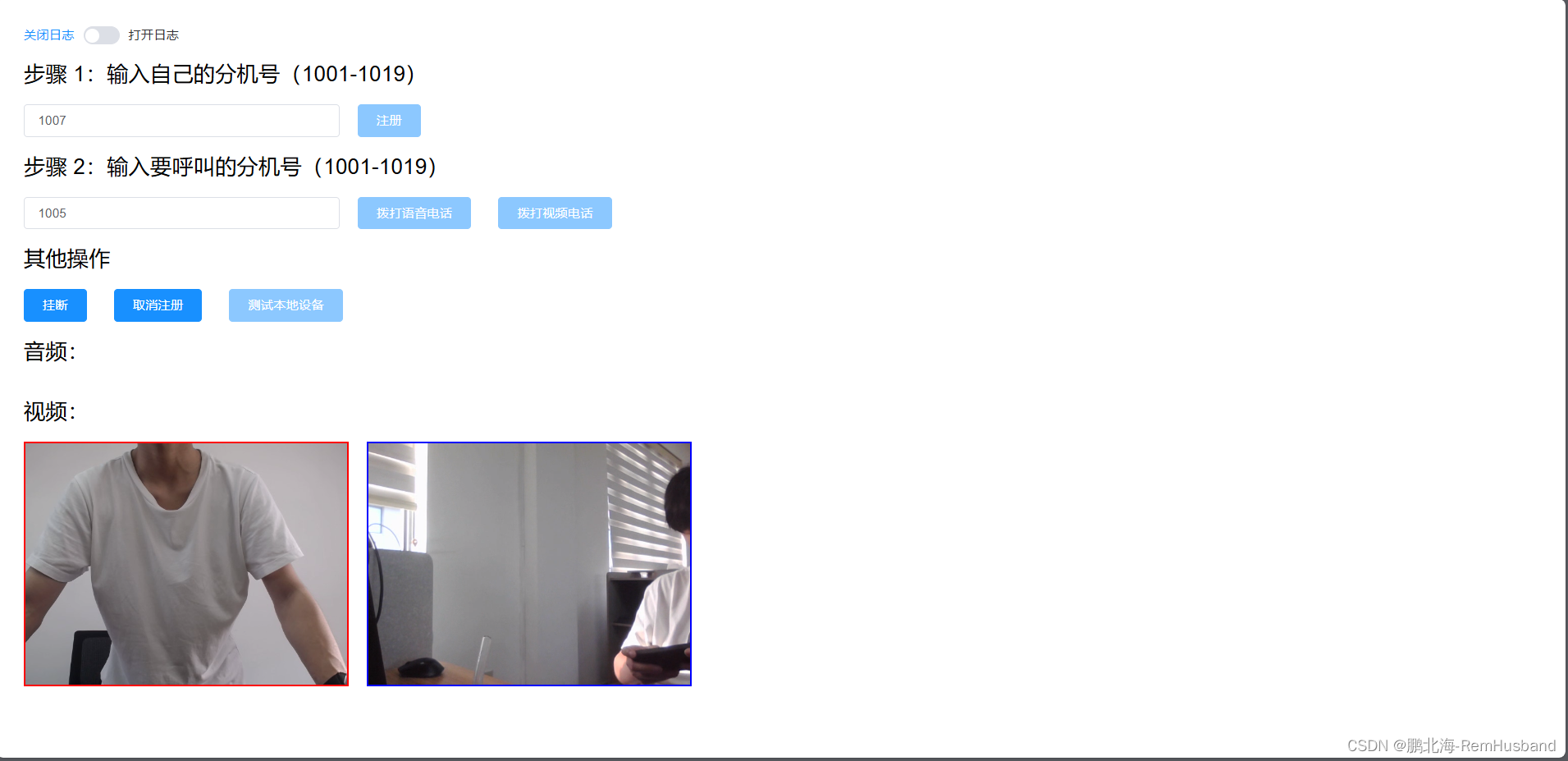
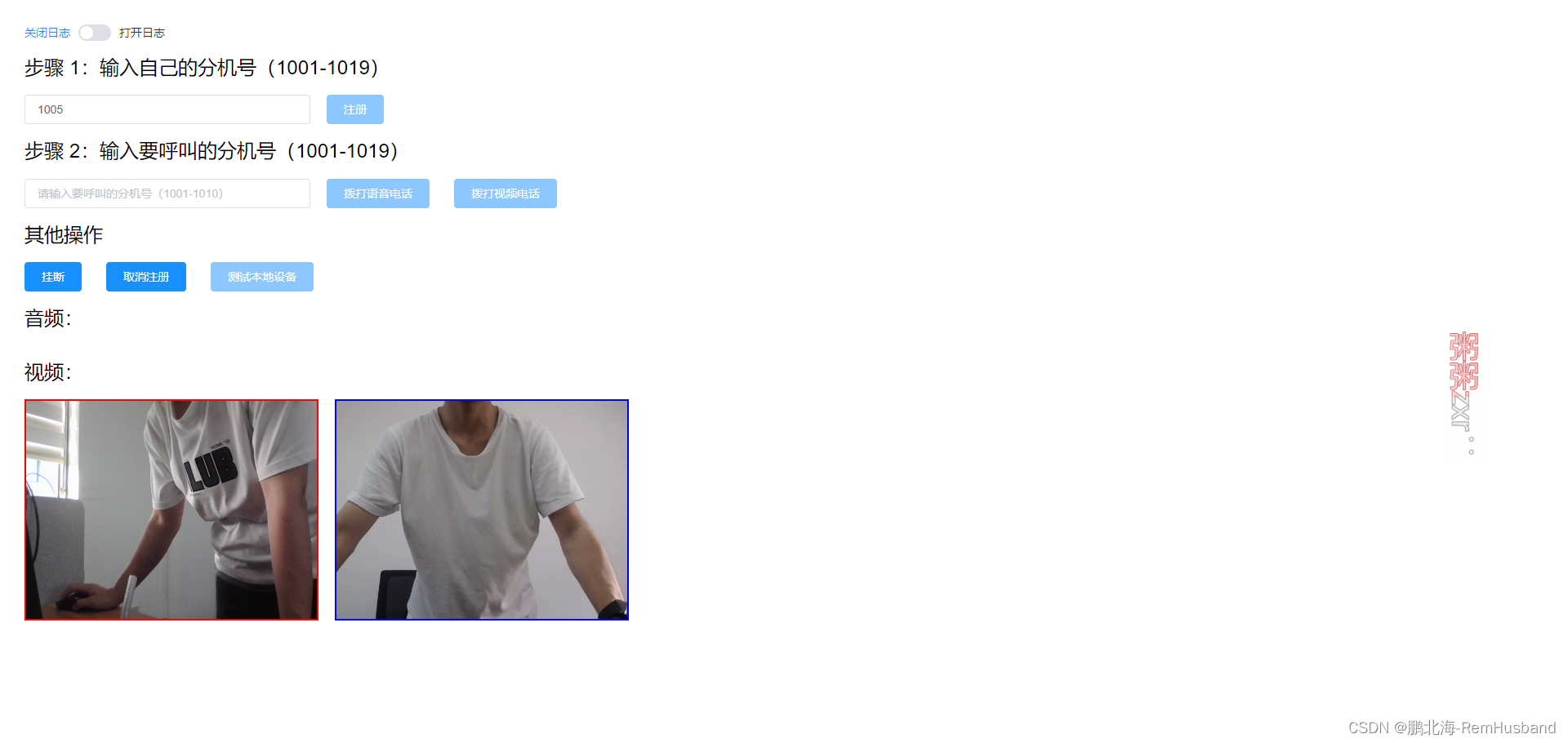
效果
让同事帮我测的,在两个电脑分别打开该页面,一个注册 1007 分机号,另一个注册 1005,然后拨打视频电话
依赖版本
-
jssip:3.6.1 -
freeswitch:1.10.5-release~64bit -
vue:2.6.12
488错误解决
在 freeswitch 配置文件 sip_profiles/internal.xml 中添加:
xml
<param name="apply-candidate-acl" value="rfc1918.auto"/>
<param name="apply-candidate-acl" value="wan.auto"/>
前端完整代码
html
<template>
  <div class="test-sip">
    <el-switch
      v-model="logFlag"
      active-text="打开日志"
      inactive-text="关闭日志"
    >
    </el-switch>
    <div class="step">
      <h2>步骤 1:输入自己的分机号(1001-1019)</h2>
      <div class="step-box">
        <el-input
          v-model="userExtension"
          placeholder="请输入自己的分机号(1001-1010)"
          class="input-box"
          :disabled="localStream !== null"
        ></el-input>
        <el-button
          type="primary"
          @click="registerUser"
          class="step-button"
          :disabled="!userExtension || isRegisted"
        >
          注册
        </el-button>
      </div>
    </div>

    <div class="step">
      <h2>步骤 2:输入要呼叫的分机号(1001-1019)</h2>
      <div class="step-box">
        <el-input
          v-model="targetExtension"
          placeholder="请输入要呼叫的分机号(1001-1010)"
          class="input-box"
          :disabled="!isRegisted"
        ></el-input>
        <el-button
          type="primary"
          @click="startCall(false)"
          class="step-button"
          :disabled="!targetExtension || currentSession !== null"
        >
          拨打语音电话
        </el-button>
        <el-button
          type="primary"
          @click="startCall(true)"
          class="step-button"
          :disabled="!targetExtension || currentSession !== null"
        >
          拨打视频电话
        </el-button>
      </div>
    </div>

    <div class="step">
      <h2>其他操作</h2>
      <div class="step-box">
        <el-button
          type="primary"
          @click="hangUpCall"
          class="step-button"
          :disabled="currentSession == null"
        >
          挂断
        </el-button>
        <el-button
          type="primary"
          @click="unregisterUser"
          class="step-button"
          :disabled="!isRegisted"
        >
          取消注册
        </el-button>
        <el-button
          v-if="!localStream"
          type="primary"
          class="step-button"
          @click="captureLocalMedia"
          :disabled="currentSession !== null"
        >
          测试本地设备
        </el-button>
        <el-button
          v-else
          type="primary"
          class="step-button"
          @click="stopLocalMedia"
          :disabled="currentSession"
        >
          停止测试本地设备
        </el-button>
      </div>
    </div>

    <div class="step">
      <h2>音频:</h2>
      <div class="step-box">
        <audio id="audio" autoplay></audio>
      </div>
    </div>

    <div class="step">
      <h2>视频:</h2>
      <div class="step-box">
        <video id="meVideo" playsinline autoplay></video>
        <video id="remoteVideo" playsinline autoplay></video>
      </div>
    </div>
  </div>
</template>

<script>
import JsSIP from "jssip";

export default {
  name: "TestSip",
  data() {
    return {
      logFlag: false, // 是否打开日志
      userExtension: "", // 当前用户分机号
      targetExtension: "", // 目标用户分机号
      userAgent: null, // 用户代理实例
      password: "xxxx", // 密码
      serverIp: "xxxx.xxxx.x", // 服务器ip
      isRegisted: false, // 是否已注册
      localStream: null, // 本地流
      incomingSession: null, // 呼入的会话
      outgoingSession: null, // 呼出的会话
      currentSession: null, // 当前会话
      myHangup: false, // 是否我方挂断

      audio: null, // 音频
      meVideo: null, // 我方视频
      remoteVideo: null, // 对方视频
      constraints: {
        audio: true,
        video: {
          width: { max: 1280 },
          height: { max: 720 },
        },
      },
    };
  },
  computed: {
    ws_url() {
      return `ws://${this.serverIp}:5066`;
    },
  },
  watch: {
    logFlag: {
      handler(nV, oV) {
        nV ? JsSIP.debug.enable("JsSIP:*") : JsSIP.debug.disable("JsSIP:*");
      },
      immediate: true,
    },
  },
  mounted() {
    this.audio = document.getElementById("audio");
    this.meVideo = document.getElementById("meVideo");
    this.remoteVideo = document.getElementById("remoteVideo");
  },
  methods: {
    // 获取本地媒体设备
    captureLocalMedia() {
      console.log("获取到本地音频/视频");
      navigator.mediaDevices
        .getUserMedia(this.constraints)
        .then((stream) => {
          console.log("获取到本地媒体流");
          this.localStream = stream;

          // 连接本地麦克风
          if ("srcObject" in this.audio) {
            this.audio.srcObject = stream;
          } else {
            this.audio.src = window.URL.createObjectURL(stream);
          }
          // 如果有视频流,则连接本地摄像头
          if (stream.getVideoTracks().length > 0) {
            if ("srcObject" in this.meVideo) {
              this.meVideo.srcObject = stream;
            } else {
              this.meVideo.src = window.URL.createObjectURL(stream);
            }
          }
        })
        .catch((e) => {
          this.$modal.msgError("获取用户媒体设备错误: " + e.name);
        });
    },
    // 停止本地媒体设备
    stopLocalMedia() {
      if (this.localStream) {
        this.localStream.getTracks().forEach((track) => track.stop());
        this.localStream = null;
        // 清空音频和视频的 srcObject
        this.clearMedia("audio");
        this.clearMedia("meVideo");
      }
    },
    // 验证分机号,因为 freeswitch 默认会创建这些分机号
    isValidExtension(extension) {
      const extNumber = parseInt(extension, 10);
      return extNumber >= 1001 && extNumber <= 1019;
    },
    // 注册
    registerUser() {
      if (!this.isValidExtension(this.userExtension)) {
        this.$modal.msgError("分机号无效,请输入1001-1019之间的分机号");
        return;
      }

      const configuration = {
        sockets: [new JsSIP.WebSocketInterface(this.ws_url)],
        uri: `sip:${this.userExtension}@${this.serverIp};transport=ws`,
        password: this.password,
        contact_uri: `sip:${this.userExtension}@${this.serverIp};transport=ws`,
        display_name: this.userExtension,
        register: true, //指示启动时JsSIP用户代理是否应自动注册
        session_timers: false, //关闭会话计时器(根据RFC 4028)
      };
      this.userAgent = new JsSIP.UA(configuration);

      this.userAgent.on("connecting", () => console.log("WebSocket 连接中"));
      this.userAgent.on("connected", () => console.log("WebSocket 连接成功"));
      this.userAgent.on("disconnected", () =>
        console.log("WebSocket 断开连接")
      );
      this.userAgent.on("registered", () => {
        this.isRegisted = true;
        console.log("用户代理注册成功");
      });
      this.userAgent.on("unregistered", () => {
        this.isRegisted = false;
        console.log("用户代理取消注册");
      });
      this.userAgent.on("registrationFailed", (e) => {
        this.$modal.msgError(`用户代理注册失败: ${e.cause}`);
      });
      // this.userAgent.on("registrationExpiring", (e) => {
      //   /*
      //     在注册到期前几秒钟触发。拦截默认重新注册事件。

      //   */
      //   console.warn("registrationExpiring");
      // });
      this.userAgent.on("newRTCSession", (e) => {
        console.log("新会话: ", e);
        if (e.originator == "remote") {
          console.log("接听到来电");
          this.incomingSession = e.session;
          this.sipEventBind(e);
        } else {
          console.log("打电话");
          this.outgoingSession = e.session;

          this.outgoingSession.on("connecting", (data) => {
            console.info("onConnecting - ", data.request);
            this.currentSession = this.outgoingSession;
            this.outgoingSession = null;
          });

          this.outgoingSession.connection.addEventListener("track", (event) => {
            console.log("接收到远端track:", event.track);
            this.trackHandle(event.track, event.streams[0]);
          });
        }
      });
      this.userAgent.start();
      console.log("用户代理启动");
    },
    sipEventBind(remotedata, callbacks) {
      //接受呼叫时激发
      remotedata.session.on("accepted", () => {
        console.log("onAccepted - ", remotedata);
        if (remotedata.originator == "remote" && this.currentSession == null) {
          this.currentSession = this.incomingSession;
          this.incomingSession = null;
          console.log("setCurrentSession:", this.currentSession);
        }
      });

      remotedata.session.on("sdp", (data) => {
        console.log("onSDP, type - ", data.type, " sdp - ", data.sdp);
      });

      remotedata.session.on("progress", () => {
        console.log(remotedata);
        console.log("onProgress - ", remotedata.originator);
        if (remotedata.originator == "remote") {
          console.log("onProgress, response - ", remotedata.response);

          const isVideoCall = remotedata.request.body.includes("m=video");
          this.$modal
            .confirm(
              `检测到${remotedata.request.from.display_name}的${
                isVideoCall ? "视频" : "语音"
              }来电,是否接听?`
            )
            .then(() => {
              //如果同一电脑两个浏览器测试则video改为false,这样被呼叫端可以看到视频,两台电脑测试让双方都看到改为true
              remotedata.session.answer({
                mediaConstraints: { audio: true, video: isVideoCall },
              });
            })
            .catch(() => {
              this.hangUpCall();
              return;
            });
        }
      });

      remotedata.session.on("peerconnection", () => {
        console.log("onPeerconnection - ", remotedata.peerconnection);

        if (remotedata.originator == "remote" && this.currentSession == null) {
          remotedata.session.connection.addEventListener("track", (event) => {
            console.info("接收到远端track:", event.track);
            this.trackHandle(event.track, event.streams[0]);
          });
        }
      });

      //确认呼叫后激发
      remotedata.session.on("confirmed", () => {
        console.log("onConfirmed - ", remotedata);
        if (remotedata.originator == "remote" && this.currentSession == null) {
          this.currentSession = this.incomingSession;
          this.incomingSession = null;
          console.log("setCurrentSession - ", this.currentSession);
        }
      });

      // 挂断处理
      remotedata.session.on("ended", () => {
        this.endedHandle();
        console.log("call ended:", remotedata);
      });

      remotedata.session.on("failed", (e) => {
        this.$modal.msgError("会话失败");
        console.error("会话失败:", e);
      });
    },
    trackHandle(track, stream) {
      const showVideo = () => {
        navigator.mediaDevices
          .getUserMedia({
            ...this.constraints,
            audio: false, // 不播放本地声音
          })
          .then((stream) => {
            this.meVideo.srcObject = stream;
          })
          .catch((error) => {
            that.$modal.msgError(`${error.name}:${error.message}`);
          });
      };
      // 根据轨道类型选择播放元素
      if (track.kind === "video") {
        // 使用 video 元素播放视频轨道
        this.remoteVideo.srcObject = stream;
        showVideo();
      } else if (track.kind === "audio") {
        // 使用 audio 元素播放音频轨道
        this.audio.srcObject = stream;
      }
    },
    endedHandle() {
      this.clearMedia("meVideo");
      this.clearMedia("remoteVideo");
      this.clearMedia("audio");
      if (this.myHangup) {
        this.$modal.msgSuccess("通话结束");
      } else {
        this.$modal.msgWarning("对方已挂断!");
      }
      this.myHangup = false;

      this.currentSession = null;
    },
    startCall(isVideo = false) {
      if (!this.isValidExtension(this.targetExtension)) {
        this.$modal.msgError("分机号无效,请输入1001-1019之间的分机号");
        return;
      }

      if (this.userAgent) {
        try {
          const eventHandlers = {
            progress: (e) => console.log("call is in progress"),
            failed: (e) => {
              console.error(e);
              this.$modal.msgError(`call failed with cause: ${e.cause}`);
            },
            ended: (e) => {
              this.endedHandle();
              console.log(`call ended with cause: ${e.cause}`);
            },
            confirmed: (e) => console.log("call confirmed"),
          };
          console.log("this.userAgent.call");
          this.outgoingSession = this.userAgent.call(
            `sip:${this.targetExtension}@${this.serverIp}`, // :5060
            {
              mediaConstraints: { audio: true, video: isVideo },
              eventHandlers,
            }
          );
        } catch (error) {
          this.$modal.msgError("呼叫失败");
          console.error("呼叫失败:", error);
        }
      } else {
        this.$modal.msgError("用户代理未初始化");
      }
    },
    hangUpCall() {
      this.myHangup = true;
      this.outgoingSession = this.userAgent.terminateSessions();
      this.currentSession = null;
    },
    clearMedia(mediaNameOrStream) {
      let mediaSrcObject = this[mediaNameOrStream].srcObject;
      if (mediaSrcObject) {
        let tracks = mediaSrcObject.getTracks();
        for (let i = 0; i < tracks.length; i++) {
          tracks[i].stop();
        }
      }
      this[mediaNameOrStream].srcObject = null;
    },
    unregisterUser() {
      console.log("取消注册");
      this.userAgent.unregister();
      this.resetState();
    },
    resetState() {
      this.userExtension = "";
      this.targetExtension = "";
      this.isRegisted = false;
    },
  },
};
</script>

<style lang="scss" scoped>
.test-sip {
  padding: 30px;

  .step {
    margin-bottom: 20px;

    .step-box {
      display: flex;
      align-items: flex-start;
      gap: 20px;

      .input-box {
        width: 350px;
      }

      .step-button {
        align-self: flex-start;
      }

      #meVideo,
      #remoteVideo {
        width: 360px;
        background-color: #333;
      }

      #meVideo {
        border: 2px solid red;
      }

      #remoteVideo {
        border: 2px solid blue;
      }
    }
  }
}
</style>