python的字符串

字符串

复制代码
#### 简单操作

*

  ##### 创建

  * 利用 ' ' 或 " " 将字符或数字包裹起来的都为字符串
    * a="你好"

<!-- -->

*

  ##### 格式化字符串

  * ![](https://img-blog.csdnimg.cn/img_convert/64e649079331977c0d3cbea9b289e265.png)
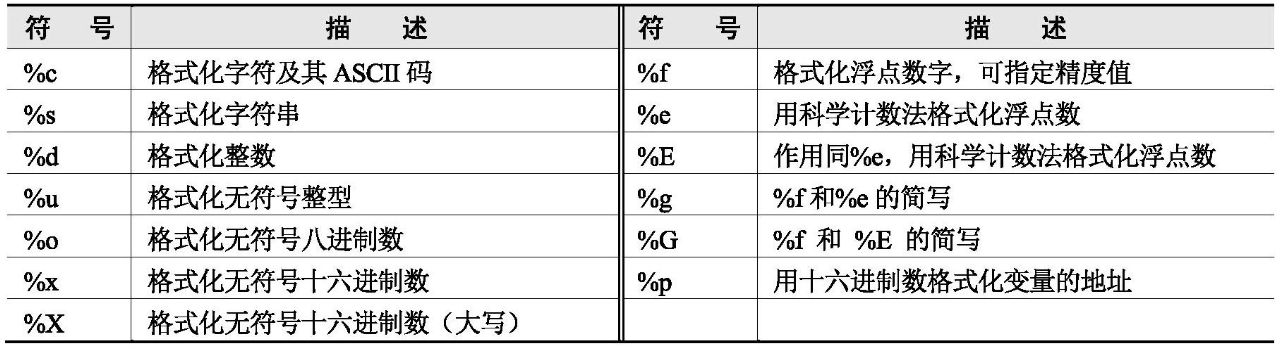
    ![](https://img-blog.csdnimg.cn/img_convert/6a83abb631ba35419bca66536d6c9454.png)

<!-- -->

*

  ##### 元组的字符格式化

  * ![](https://img-blog.csdnimg.cn/img_convert/af349ce6b6ca98b702d2a95a98de90b6.png)

<!-- -->

*

  ##### 字符串格式化函数

  * srt.format()
    * ![](https://img-blog.csdnimg.cn/img_convert/7570dec489c8061a9423111840f5b85f.png)

      ![](https://img-blog.csdnimg.cn/img_convert/a1967436114b9ede2a11d976a8ec5c22.png)

<!-- -->

*

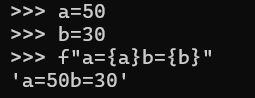
  ##### f格式化

  * ![](https://img-blog.csdnimg.cn/img_convert/32de44a124a96defea29008e23a8ee85.png)

    ![](https://img-blog.csdnimg.cn/img_convert/09cc362f9b1ca8c58885f707e715805d.png)

<!-- -->

*

  ##### 方法

  * split()//指定分割符经行分割
    * ![](https://img-blog.csdnimg.cn/img_convert/bfdd1eb053e784a94aad8243ab65af8f.png)
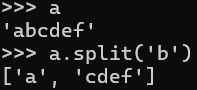
  <!-- -->

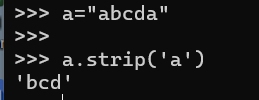
  * strip()//指定移除字符头尾的字符
    * ![](https://img-blog.csdnimg.cn/img_convert/ca942e59d2bb82bbd7e35b5fa507038b.png)

  <!-- -->

  * join()//指定序列中的字符连接成新的字符串
    * ![](https://img-blog.csdnimg.cn/img_convert/f96e2a2450d4a5aecdb8795694b18824.png)
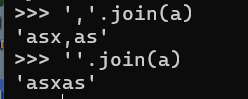
  <!-- -->

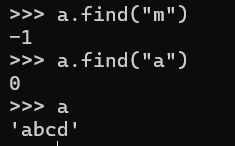
  * find()//检测是否有子字符串
    * ![](https://img-blog.csdnimg.cn/img_convert/2ede3669985c0a6de8d566b23ae4e5a4.png)

  <!-- -->

  * lower()//将所有大写转换为小写返回
    * ![](https://img-blog.csdnimg.cn/img_convert/43f439283b46f2bb6c3b282836eafd8d.png)

  <!-- -->

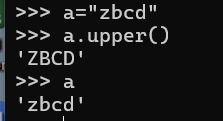
  * upper()//将小写转换为大写
    * ![](https://img-blog.csdnimg.cn/img_convert/829916685bffeaae52f47526c4c02388.png)

  <!-- -->

  * replace()//替换字符
    * ![](https://img-blog.csdnimg.cn/img_convert/d3bf130d588f897ad579bfed756a7798.png)

  <!-- -->

  * translate()//用于替换字符串中的字符
    * ![](https://img-blog.csdnimg.cn/img_convert/9e89330ff49819173fddcf269b89693c.png)
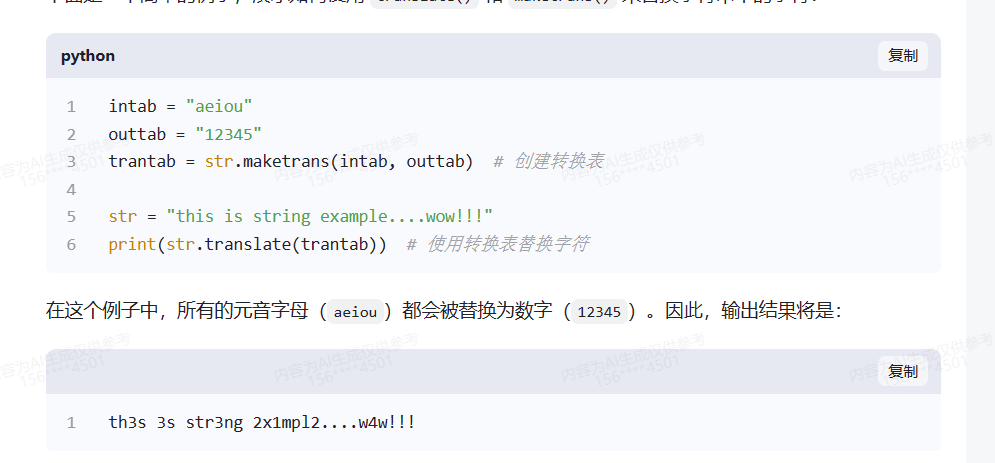
      ![](https://img-blog.csdnimg.cn/img_convert/bbfb6f494f53705d47318f8f34330799.png)
相关推荐
用户83562907805128 分钟前
Python 实现 PDF 文件加密与解密方法
后端·python
用户83562907805133 分钟前
使用 Python 冻结与拆分 Excel 窗格教程
后端·python
你好潘先生9 小时前
别再记命令了,用 yeero do 说句人话就能跑脚本,而且不烧 token
服务器·python·命令行
Agent_大师9 小时前
WebSocket 行情重连成功,K线缺口不会自动消失
python
荣码9 小时前
LLM结构化输出:让AI返回JSON而不是废话,我踩了4个坑
java·python
copyer_xyf9 小时前
FastAPI 如何连接 MySQL
后端·python
apocelipes1 天前
常用编程语言和库的正则表达式性能对比
c语言·c++·python·性能优化·golang·开发工具和环境
用户8356290780511 天前
使用 Python 在 PDF 中创建与管理书签
后端·python
MeixianAgent1 天前
Python 回测数据入口怎么验?历史 K 线入库前先做 5 个检查
后端·python
咕白m6251 天前
用 Python 实现一键批量查找与替换 Excel 数据
后端·python