之前学习过vue基础,在工作上使用的时候也没有什么问题。最近在看30分钟学会Vue之核心语法,发现有一些不常用的、但挺重要的都快忘掉了,在此补漏一下。

搭建演示环境
创建index.html 导入 vue.min.js文件
<!DOCTYPE html>
<html lang="en">
<head>
    <meta charset="UTF-8">
    <title>Title</title>
</head>
<body>
<div id="app">
    <p>{{ msg }}</p>
</div>
<script src="./vue.min.js"></script>
<script>
    const vm = new Vue({
        el: '#app',
        data() {
            return {
                msg: 'Hello World',
            }
        }
    })
</script>
</body>
</html>
1. 内容指令
    <p v-text="msg">1111</p>
    <p v-html="msg">1111</p>
不显示1111,显示msg内容 v-html 解析msg中的html标签
2. console.log 打印
console.log(newVal,oldVal);console打印可以直接进行参数拼接,并不需要+进行连接
3. for 遍历对象打印属性
   <p v-for="(item,key,index) in 5">item:{{ item }},key:{{ key }},index:{{ index }}</p>
   <p v-for="(item,key,index) in obj">item:{{ item }},key:{{ key }},index:{{ index }}</p>

    obj: {name: 'gggg', age: 1111}

item:1,key:0,index:

item:2,key:1,index:

item:3,key:2,index:

item:4,key:3,index:

item:5,key:4,index:

item:gggg,key:name,index:0

item:1111,key:age,index:1
4. 放到标签上进行文本提示
<p title="这是内容">{{ msg }}</p>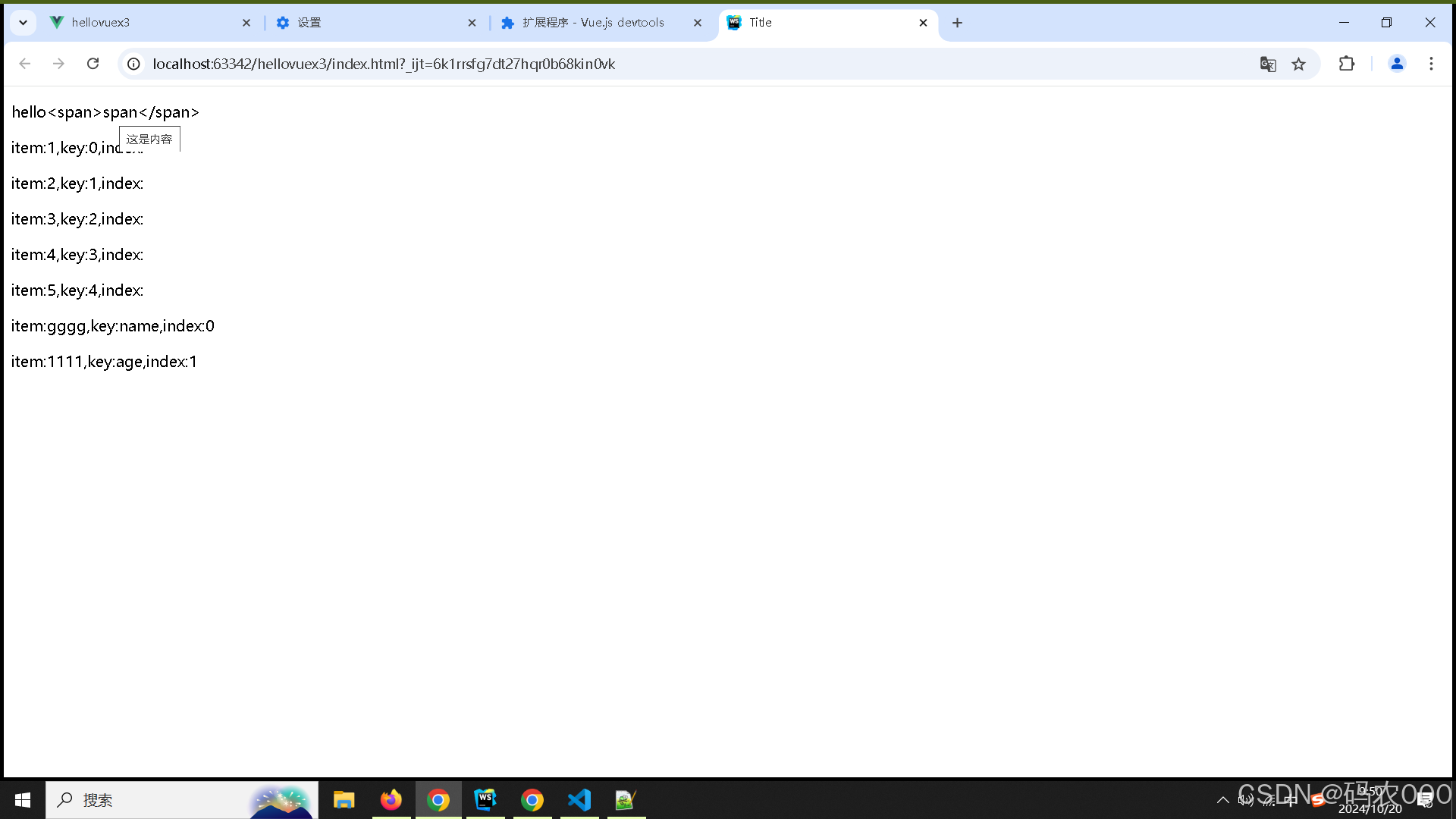
5. input自动去空格
<input type="text" v-model.trim="inputVal"/> 6. style、class绑定
在uniapp开发的时候,也会使用 当时云里雾里的。
<!DOCTYPE html>
<html lang="en">
<head>
    <meta charset="UTF-8">
    <title>Title</title>
</head>
<body>
<div id="app">

    <!--  前面两种指定style中定义的内容,必须使用'字符串',用,分割-->
    <!-- key:value  key 自动转为字符串 -->
    <div v-bind:class="{ textColorCls: textColorFlag,bgColorCls: bgColorFlag}">111111</div>
    <!-- 直接使用字符串,内嵌的对象,或者三元表达式 -->
    <div v-bind:class="[ 'textColorCls', {bgColorCls: bgColorFlag},textSizeFlag? 'textSizeCls' : '']">111111</div>
    <!-- 使用data中定义的 包含style的集合 -->
    <div v-bind:class="textColorClassObj">2222</div>
    <!-----------------------------不支持 {textSizeClassObj:  textSizeFlag}, --------------------------------------->
    <div v-bind:class="[textColorClassObj,  bgColorFlag ? bgColorClassObj:'']">2222
    </div>
    <div v-bind:style="{ color: textColor, fontSize: fontSize + 'px' }">333333</div>
    <div v-bind:style="textColorStyleObj">44444</div>
    <!-----------------------------不支持{textSizeStyleObj:true} --------------------------------------->
    <div v-bind:style="[{ background: bgColor}, textColorFlag ? textColorStyleObj:'']">
        44444
    </div>


</div>
<script src="./vue.min.js"></script>

<style>
    .textColorCls {
        color: red;
    }

    .bgColorCls {
        background: #ff0;
    }

    .textSizeCls {
        font-size: 30px;
    }
</style>

<script>
    const vm = new Vue({
        el: '#app',
        data() {
            return {
                textColor: 'red',
                bgColor: 'yellow',
                fontSize: 30,
                bgColorFlag: true,
                textSizeFlag: true,
                textColorFlag: true,
                //这两个不能混用
                textColorClassObj: {
                    textColorCls: true //只能指定class,并且必须写'显示'逻辑.
                },
                bgColorClassObj: {
                    bgColorCls: true //只能指定class,并且必须写'显示'逻辑.
                },
                textSizeClassObj: {
                    textSizeCls: true //只能指定class,并且必须写'显示'逻辑.
                },
                textColorStyleObj: {
                    color: 'red',
                },
                textSizeStyleObj: {
                    'font-size': 30 + 'px',
                },

            }
        },
    })
</script>
</body>
</html>