HttpClient是apache组织下面的一个用于处理HTTP请求和响应的来源工具,是一个在JDK基础类库是做了更好的封装的类库。
HttpClient 使用了连接池技术来管理 TCP 连接,这有助于提高性能并减少资源消耗。连接池允许 HttpClient 复用已经建立的连接,而不是每次请求都建立新的连接。此外,HttpClient 还支持多种认证机制、重定向处理、HTTP 头处理、请求重试等高级功能。
一.基础使用
1.引入依赖
<dependency>
    <groupId>org.apache.httpcomponents</groupId>
    <artifactId>httpclient</artifactId>
    <version>4.5.13</version> <!-- 请使用最新版本 -->
</dependency>
2. 发送 HTTP GET 请求
public class HttpClientExample {
    public static void main(String[] args) throws IOException {
        try (CloseableHttpClient httpClient = HttpClients.createDefault()) {
            HttpGet request = new HttpGet("https://www.baidu.com/");
            CloseableHttpResponse response = httpClient.execute(request);  //发送请求,获取响应
            if (response.getStatusLine().getStatusCode() == 200) {
                String responseBody = EntityUtils.toString(response.getEntity(),"utf-8");
                System.out.println(responseBody);
            }
        }
    }
}
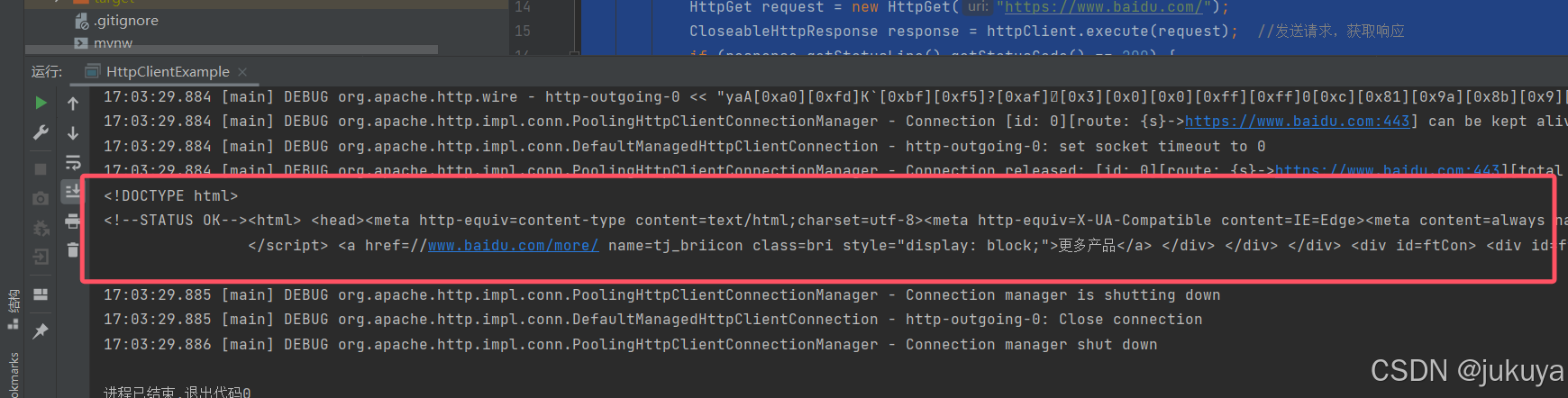
可以看到请求的结果为百度源代码,
二.爬取腾讯天气的数据
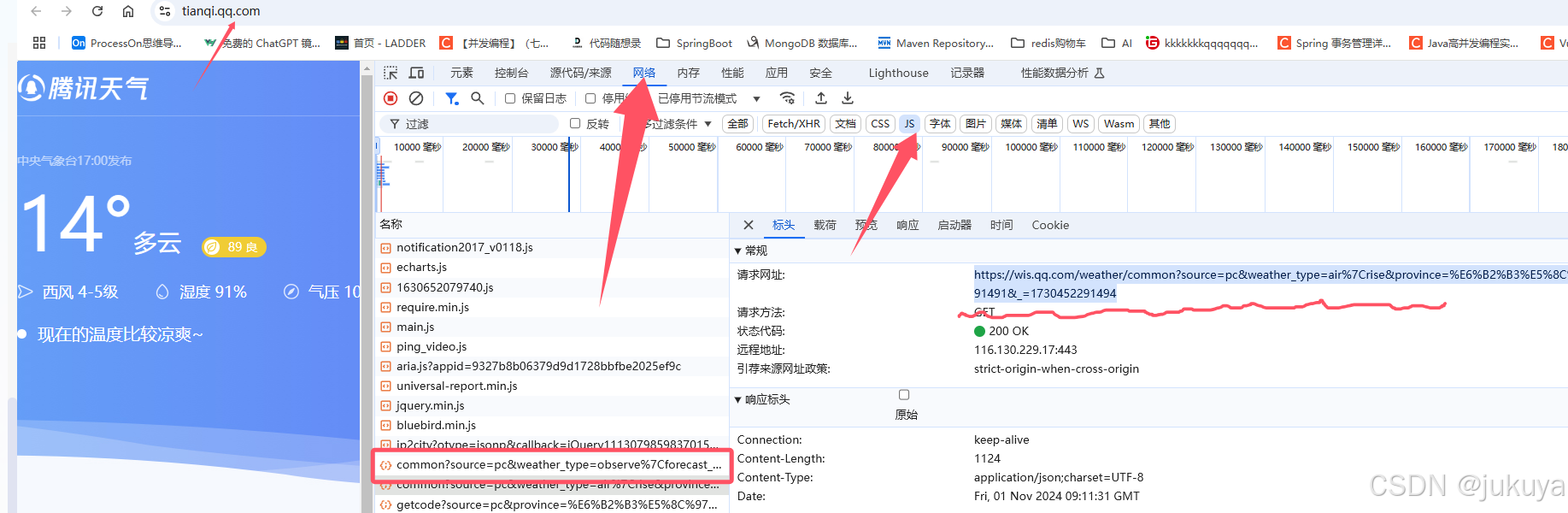
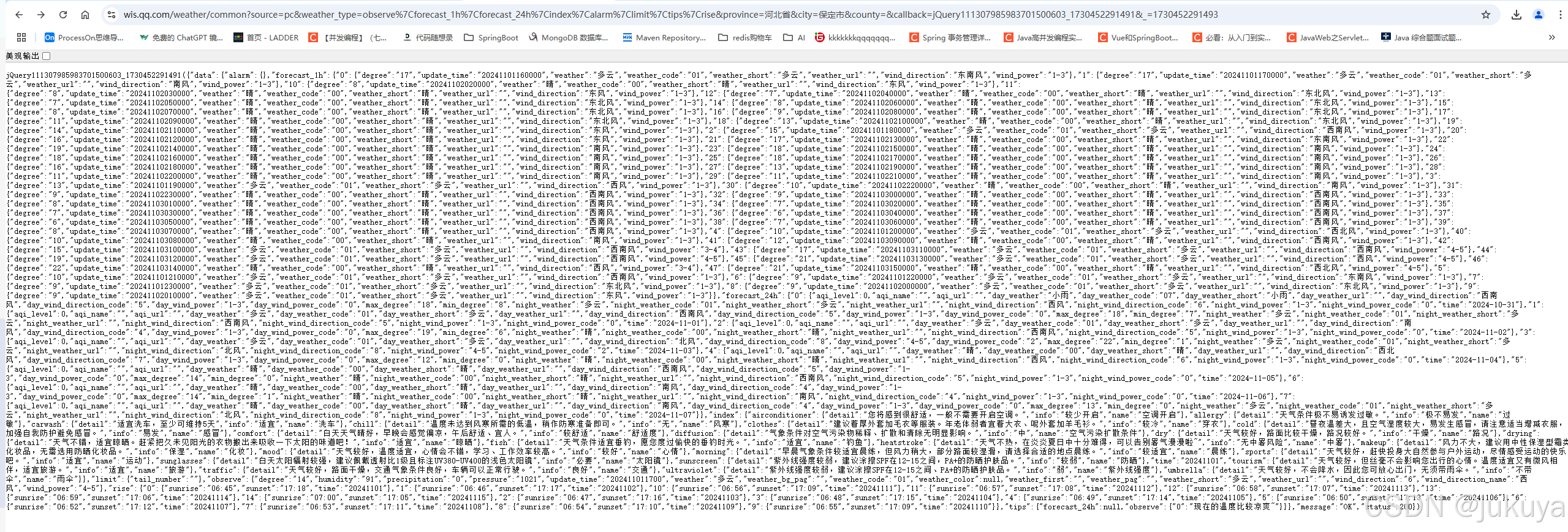
1.查询json格式数据
2.获取json数据
public class XXDemo {
    public static void main(String[] args) {
        CloseableHttpClient httpClient = HttpClients.createDefault();
        try {
            HttpGet httpGet = new HttpGet("https://wis.qq.com/weather/common?source=pc&weather_type=observe%7Cforecast_1h%7Cforecast_24h%7Cindex%7Calarm%7Climit%7Ctips%7Crise&province=%E6%B2%B3%E5%8C%97%E7%9C%81&city=%E4%BF%9D%E5%AE%9A%E5%B8%82&county=&callback=jQuery111307985983701500603_1730452291491&_=1730452291493");
            // 设置请求头
            httpGet.setHeader("Accept", "*/*");
            httpGet.setHeader("Accept-Encoding",  "gzip, deflate, br, zstd");
            httpGet.setHeader("Accept-Language", "zh-CN,zh;q=0.9");
            httpGet.setHeader("Cache-Control", "max-age=0");
            httpGet.setHeader("Connection", "keep-alive");

            httpGet.setHeader("Cookie", "pgv_pvid=7587513344; RK=viMJj838H2; ptcz=410fc81f9ad1719db0b83d1ae0b767a81c43f89b4d79b4f22f0f04bf476c4e44; qq_domain_video_guid_verify=50ba34f244950f77; _qimei_uuid42=17c02140117100fd9f4a0a8f7ddb1d4eb0eef0fe2b; _qimei_q36=; _qimei_h38=2db835139f4a0a8f7ddb1d4e02000003017c02; tvfe_boss_uuid=9dd0f4ca6252467b; _qimei_fingerprint=a8fdf4f9656a2285f66b7f0bb5dbefc2; fqm_pvqid=bfdb0333-6586-490e-9451-7e4628f24f32; pgv_info=ssid=s390182559; pac_uid=0_sBk6e1R1P4Zpc");
            httpGet.setHeader("Host", "wis.qq.com");
            httpGet.setHeader("Upgrade-Insecure-Requests", "1");
            httpGet.setHeader("User-Agent", "Mozilla/5.0 (Windows NT 10.0; Win64; x64) AppleWebKit/537.36 (KHTML, like Gecko) Chrome/126.0.0.0 Safari/537.36");
            // 执行请求
            CloseableHttpResponse response = httpClient.execute(httpGet);
            // 获取响应实体
            String responseBody = EntityUtils.toString(response.getEntity(),"UTF-8");

            //获取中间json数据
            String subStringA = responseBody.substring(0,42);
            String str = responseBody.replace(subStringA,"");
            String newStr = str.substring(0, str.length()-1);
            System.out.println(newStr);
            //JSON解析
            JSONObject json =  JSON.parseObject(newStr);
            // 关闭响应对象
            response.close();
        } catch (Exception e) {
            e.printStackTrace();
        } finally {
            try {
                httpClient.close();
            } catch (IOException e) {
                e.printStackTrace();
            }
        }
    }
}
3.java解析JSON数据
-
get() :参数就是 json 中的 key,是 String 类型; 返回值就是 key 对应的 value,返回值是 Object.
-
getJSONObject():参数是 json 中的 key,是 String类型;返回值 key 对应的 value,类型是 JSONObject.
-
getJSONArray():参数是 json 中的 key ,是 String 类型;返回值是 key 对应 json 数组,类型是 JSONArray.
package com.example.wormdemo.task;
import com.alibaba.fastjson.JSON;
import com.alibaba.fastjson.JSONArray;
import com.alibaba.fastjson.JSONObject;
import org.apache.http.client.methods.HttpGet;
import org.apache.http.impl.client.CloseableHttpClient;
import org.apache.http.impl.client.HttpClients;
import org.apache.http.client.methods.CloseableHttpResponse;
import org.apache.http.util.EntityUtils;
import org.springframework.util.StringUtils;import java.io.IOException;
public class XXDemo {
public static void main(String[] args) {
CloseableHttpClient httpClient = HttpClients.createDefault();
try {
HttpGet httpGet = new HttpGet("https://wis.qq.com/weather/common?source=pc&weather_type=observe|forecast_1h|forecast_24h|index|alarm|limit|tips|rise&province=河北省&city=保定市&county=&callback=jQuery111307985983701500603_1730452291491&_=1730452291493");
// 设置请求头
httpGet.setHeader("Accept", "/");
httpGet.setHeader("Accept-Encoding", "gzip, deflate, br, zstd");
httpGet.setHeader("Accept-Language", "zh-CN,zh;q=0.9");
httpGet.setHeader("Cache-Control", "max-age=0");
httpGet.setHeader("Connection", "keep-alive");
httpGet.setHeader("Cookie", "pgv_pvid=7587513344; RK=viMJj838H2; ptcz=410fc81f9ad1719db0b83d1ae0b767a81c43f89b4d79b4f22f0f04bf476c4e44; qq_domain_video_guid_verify=50ba34f244950f77; _qimei_uuid42=17c02140117100fd9f4a0a8f7ddb1d4eb0eef0fe2b; _qimei_q36=; _qimei_h38=2db835139f4a0a8f7ddb1d4e02000003017c02; tvfe_boss_uuid=9dd0f4ca6252467b; _qimei_fingerprint=a8fdf4f9656a2285f66b7f0bb5dbefc2; fqm_pvqid=bfdb0333-6586-490e-9451-7e4628f24f32; pgv_info=ssid=s390182559; pac_uid=0_sBk6e1R1P4Zpc");
httpGet.setHeader("Host", "wis.qq.com");
httpGet.setHeader("Upgrade-Insecure-Requests", "1");
httpGet.setHeader("User-Agent", "Mozilla/5.0 (Windows NT 10.0; Win64; x64) AppleWebKit/537.36 (KHTML, like Gecko) Chrome/126.0.0.0 Safari/537.36");
// 执行请求
CloseableHttpResponse response = httpClient.execute(httpGet);
// 获取响应实体
String responseBody = EntityUtils.toString(response.getEntity(),"UTF-8");//获取中间json数据 String subStringA = responseBody.substring(0,42); String str = responseBody.replace(subStringA,""); String newStr = str.substring(0, str.length()-1); //JSON解析----》JSONObject:处理json对象,根据可以值获取value值 JSONObject json = JSON.parseObject(newStr); //将字符串转换成json数组 JSONObject data = json.getJSONObject("data"); JSONObject forecast_24h = data.getJSONObject("forecast_24h"); JSONObject data0 = forecast_24h.getJSONObject("0"); System.out.println(data0.get("night_wind_direction")); // 关闭响应对象 response.close(); } catch (Exception e) { e.printStackTrace(); } finally { try { httpClient.close(); } catch (IOException e) { e.printStackTrace(); } } }}
public class HttpClient {
c
}
爬取拉钩招聘网站信息
java
public class ParseUtils {
    public static final String url ="https://www.lagou.com/wn/zhaopin?kd=Java&city=%E5%8C%97%E4%BA%AC";

    private static List<Job> jobs = new ArrayList<>();

    public static void main(String[] args) throws IOException {
        Document scriptHtml = Jsoup.connect(url)
                .header("cookie", "index_location_city=%E5%8C%97%E4%BA%AC; RECOMMEND_TIP=1; JSESSIONID=ABAABJAABCCABAF1AAA64980432C424AFAE7AEBC665098E; WEBTJ-ID=20241106142523-193002633ea581-04d9a4b30474bf-26011951-1327104-193002633eb20cf; sajssdk_2015_cross_new_user=1; sensorsdata2015session=%7B%7D; Hm_lvt_4233e74dff0ae5bd0a3d81c6ccf756e6=1730874329; HMACCOUNT=2E8A695D191AA561; user_trace_token=20241106142528-e1b996ac-c7a5-48fe-83c2-f2a57ef4d69b; LGSID=20241106142528-f18333e5-63ae-4ba3-a8df-186c92232ad2; PRE_UTM=; PRE_HOST=; PRE_SITE=https%3A%2F%2Fwww.lagou.com%2F; PRE_LAND=https%3A%2F%2Fpassport.lagou.com%2Flogin%2Flogin.html%3Fmsg%3Dneedlogin%26clientIp%3D223.160.138.96; LGUID=20241106142528-955e12cd-aac7-4415-b2e7-4d010ce59112; _ga=GA1.2.836312925.1730874329; _gid=GA1.2.1115293912.1730874330; Hm_lpvt_4233e74dff0ae5bd0a3d81c6ccf756e6=1730874350; _ga_DDLTLJDLHH=GS1.2.1730874330.1.1.1730874350.40.0.0; LGRID=20241106142549-de54e626-1235-4335-8083-72a680d43695; gate_login_token=v1####eb8a9ddad9fc4c1b95598ede531fc781fa7a3ba333dd7f86bbaa1ddaba312463; _putrc=227A04EF632FCAB4123F89F2B170EADC; login=true; unick=%E7%8E%8B%E5%B8%9D; showExpriedIndex=1; showExpriedCompanyHome=1; showExpriedMyPublish=1; hasDeliver=378; privacyPolicyPopup=false; sensorsdata2015jssdkcross=%7B%22distinct_id%22%3A%22193002634d8706-0bd3a99577aa22-26011951-1327104-193002634d910b8%22%2C%22first_id%22%3A%22%22%2C%22props%22%3A%7B%22%24latest_traffic_source_type%22%3A%22%E7%9B%B4%E6%8E%A5%E6%B5%81%E9%87%8F%22%2C%22%24latest_search_keyword%22%3A%22%E6%9C%AA%E5%8F%96%E5%88%B0%E5%80%BC_%E7%9B%B4%E6%8E%A5%E6%89%93%E5%BC%80%22%2C%22%24latest_referrer%22%3A%22%22%2C%22%24os%22%3A%22Windows%22%2C%22%24browser%22%3A%22Chrome%22%2C%22%24browser_version%22%3A%22130.0.0.0%22%7D%2C%22%24device_id%22%3A%22193002634d8706-0bd3a99577aa22-26011951-1327104-193002634d910b8%22%7D")
                .header("User-Agent","Mozilla/5.0 (Windows NT 10.0; Win64; x64) AppleWebKit/537.36 (KHTML, like Gecko) Chrome/126.0.0.0 Safari/537.36")
                .timeout(50000)
                .get();
        Elements list = scriptHtml.getElementsByClass("item__10RTO");
        for (Element element: list) {
            String jobName = element.getElementById("openWinPostion").text();
            String experience = element.getElementsByClass("p-bom__JlNur").text();
            String salary =  element.getElementsByClass("money__3Lkgq").text();
            String company = element.getElementsByClass("company-name__2-SjF").text();

            //将数据添加进集合
            Job job = new Job();
            job.setCompany(company);
            job.setExperience(experience);
            job.setSalary(salary);
            job.setJobName(jobName);

            DataClean(job);

            for (Job jb: jobs) {
                System.out.println(jb.toString());
            }
        }

    }

    /**
     * 数据清洗
     */
    public static void  DataClean(Job job){
        //现在薪资的最低值
        String salary = job.getSalary().substring(0,job.getSalary().indexOf("-"));
        job.setSalary(salary);

        //学历的要求
        String educational = job.getExperience().substring(job.getExperience().indexOf("/ ")).replaceAll("/ ","");
        job.setEducational(educational);
//
        //经验的要求
        String experience = job.getExperience().substring(job.getExperience().indexOf("经验"),job.getExperience().indexOf(" "));
        job.setExperience(experience);

        jobs.add(job);
    }