一、实现方案
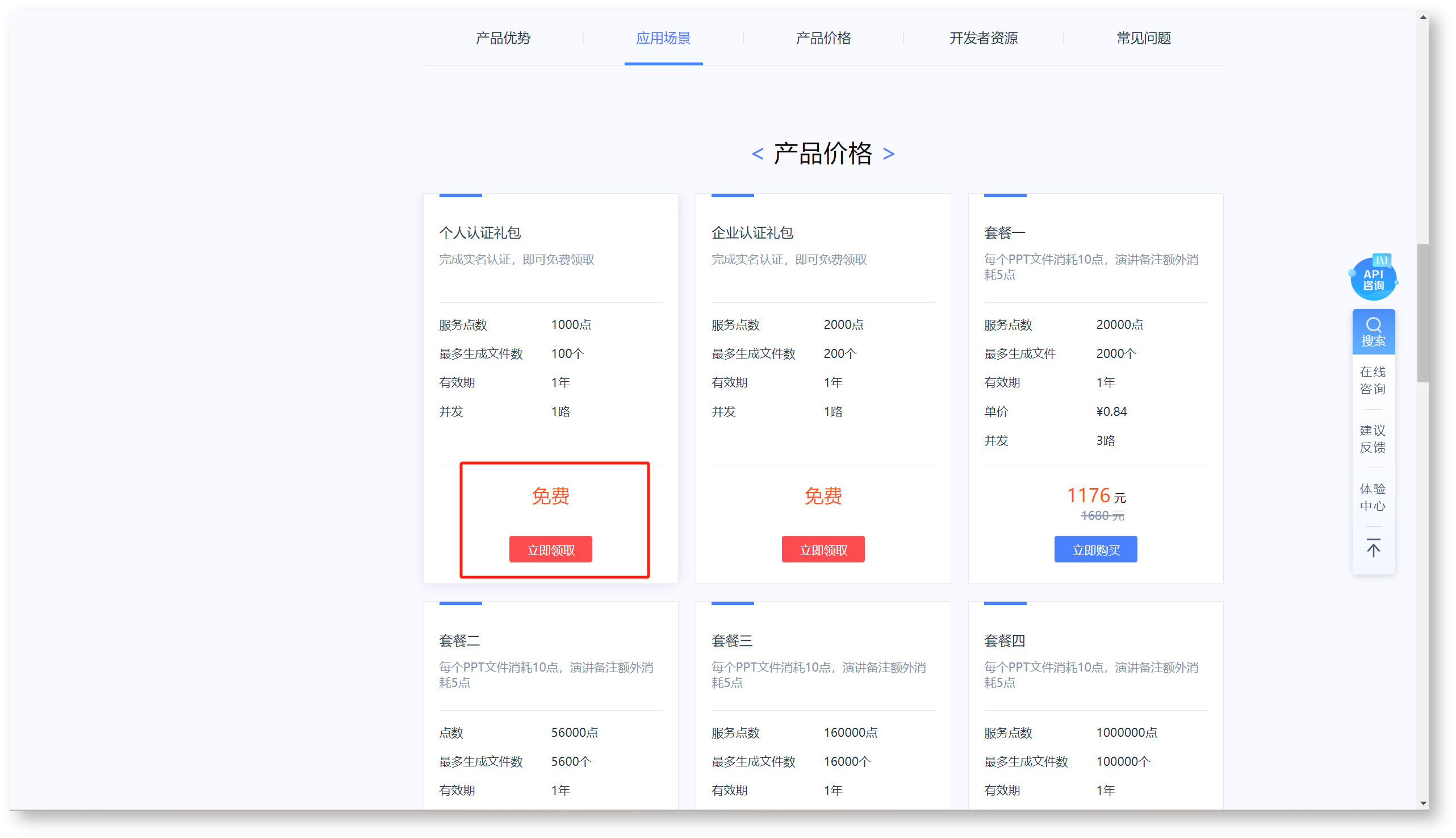
利用讯飞大模型智能 PPT 生成接口实现,具体参见:讯飞开放平台智能PPT生成 https://www.xfyun.cn/services/aippt#anchor4503211
二、新增函数
2.1函数脚本
# -*- coding:utf-8 -*-
import hashlib
import hmac
import base64
import json
import time

import requests
from requests_toolbelt.multipart.encoder import MultipartEncoder

class AIPPT():

    def __init__(self, APPId, APISecret, Text, templateId):
        self.APPid = APPId
        self.APISecret = APISecret
        self.text = Text
        self.header = {}
        self.templateId = templateId

    # 获取签名
    def get_signature(self, ts):
        try:
            # 对app_id和时间戳进行MD5加密
            auth = self.md5(self.APPid + str(ts))
            # 使用HMAC-SHA1算法对加密后的字符串进行加密
            return self.hmac_sha1_encrypt(auth, self.APISecret)
        except Exception as e:
            print(e)
            return None

    def hmac_sha1_encrypt(self, encrypt_text, encrypt_key):
        # 使用HMAC-SHA1算法对文本进行加密,并将结果转换为Base64编码
        return base64.b64encode(
            hmac.new(encrypt_key.encode('utf-8'), encrypt_text.encode('utf-8'), hashlib.sha1).digest()).decode('utf-8')

    def md5(self, text):
        # 对文本进行MD5加密,并返回加密后的十六进制字符串
        return hashlib.md5(text.encode('utf-8')).hexdigest()

    # 创建PPT生成任务
    def create_task(self):
        url = 'https://zwapi.xfyun.cn/api/ppt/v2/create'
        timestamp = int(time.time())
        signature = self.get_signature(timestamp)
        # body= self.getbody(self.text)

        formData = MultipartEncoder(
            fields={
                # "file": (path, open(path, 'rb'), 'text/plain'),  # 如果需要上传文件,可以将文件路径通过path 传入
                # "fileUrl":"",   #文件地址(file、fileUrl、query必填其一)
                # "fileName":"",   # 文件名(带文件名后缀;如果传file或者fileUrl,fileName必填)
                "query": self.text,
                "templateId": "20240718489569D",  # 模板的ID,从PPT主题列表查询中获取
                "author": "XXXX",  # PPT作者名:用户自行选择是否设置作者名
                "isCardNote": str(True),  # 是否生成PPT演讲备注, True or False
                "search": str(False),  # 是否联网搜索,True or False
                "isFigure": str(True),  # 是否自动配图, True or False
                "aiImage": "normal"
                # ai配图类型: normal、advanced (isFigure为true的话生效); normal-普通配图,20%正文配图;advanced-高级配图,50%正文配图
            }
        )

        print(formData)

        headers = {
            "appId": self.APPid,
            "timestamp": str(timestamp),
            "signature": signature,
            "Content-Type": formData.content_type
        }
        self.header = headers
        print(headers)
        response = requests.request(method="POST", url=url, data=formData, headers=headers).text
        print("生成PPT返回结果:", response)
        resp = json.loads(response)
        if (0 == resp['code']):
            return resp['data']['sid']
        else:
            print('创建PPT任务失败')
            return None

    # 构建请求body体
    def getbody(self, text):
        body = {
            "query": text,
            "templateId": self.templateId  # 模板ID举例,具体使用 /template/list 查询
        }
        return body

    # 轮询任务进度,返回完整响应信息
    def get_process(self, sid):
        # print("sid:" + sid)
        if (None != sid):
            response = requests.request("GET", url=f"https://zwapi.xfyun.cn/api/ppt/v2/progress?sid={sid}",
                                        headers=self.header).text
            print(response)
            return response
        else:
            return None

    # 获取PPT,以下载连接形式返回
    def get_result(self, task_id):

        # 创建PPT生成任务
        # task_id = self.create_task()
        # PPTurl = ''
        # 轮询任务进度
        while (True):
            response = self.get_process(task_id)
            resp = json.loads(response)
            pptStatus = resp['data']['pptStatus']
            aiImageStatus = resp['data']['aiImageStatus']
            cardNoteStatus = resp['data']['cardNoteStatus']

            if ('done' == pptStatus and 'done' == aiImageStatus and 'done' == cardNoteStatus):
                PPTurl = resp['data']['pptUrl']
                break
            else:
                time.sleep(3)
        return PPTurl

    def getHeaders(self):
        timestamp = int(time.time())
        signature = self.get_signature(timestamp)
        # body = self.getbody(self.text)

        headers = {
            "appId": self.APPid,
            "timestamp": str(timestamp),
            "signature": signature,
            "Content-Type": "application/json; charset=utf-8"
        }
        return headers

    def getTheme(self):
        url = "https://zwapi.xfyun.cn/api/ppt/v2/template/list"
        self.header = self.getHeaders()
        body = {
            "payType": "not_free",
            # "style": "简约",    # 支持按照类型查询PPT 模板
            # "color": "红色",   #  支持按照颜色查询PPT 模板
            # "industry": "教育培训",    # 支持按照颜色查询PPT 模板
            "pageNum": 2,
            "pageSize": 10
        }

        response = requests.request("GET", url=url, headers=self.header).text
        print(response)
        return response

    def createOutline(self):
        # if('' ==fileUrl and '' == filePath):
        url = "https://zwapi.xfyun.cn/api/ppt/v2/createOutline"
        body = {
            "query": self.text,
            "language": "cn",
            "search": str(False),  # 是否联网搜索,True or False
        }

        response = requests.post(url=url, json=body, headers=self.getHeaders()).text
        print("生成大纲完成:\n", response)

        return response

    def createOutlineByDoc(self, fileName, fileUrl=None, filePath=None):
        # if('' ==fileUrl and '' == filePath):
        url = "https://zwapi.xfyun.cn/api/ppt/v2/createOutlineByDoc"
        formData = MultipartEncoder(
            fields={
                "file": (filePath, open(filePath, 'rb'), 'text/plain'),  # 如果需要上传文件,可以将文件路径通过path 传入
                "fileUrl": fileUrl,  # 文件地址(file、fileUrl必填其一)
                "fileName": fileName,  # 文件名(带文件名后缀;如果传file或者fileUrl,fileName必填)
                "query": self.text,
                "language": "cn",
                "search": str(False),  # 是否联网搜索,True or False
            }
        )
        timestamp = int(time.time())
        signature = self.get_signature(timestamp)
        headers = {
            "appId": self.APPid,
            "timestamp": str(timestamp),
            "signature": signature,
            "Content-Type": formData.content_type
        }
        self.header = headers
        response = requests.post(url=url, data=formData, headers=headers).text
        print("生成大纲完成:\n", response)

        return response

    def createPptByOutline(self, outline):
        url = "https://zwapi.xfyun.cn/api/ppt/v2/createPptByOutline"
        body = {
            "query": self.text,
            "outline": outline,
            "templateId": self.templateId,  # 模板的ID,从PPT主题列表查询中获取
            "author": "XXXX",  # PPT作者名:用户自行选择是否设置作者名
            "isCardNote": True,  # 是否生成PPT演讲备注, True or False
            "search": False,  # 是否联网搜索,True or False
            "isFigure": True,  # 是否自动配图, True or False
            "aiImage": "normal",
            # ai配图类型: normal、advanced (isFigure为true的话生效); normal-普通配图,20%正文配图;advanced-高级配图,50%正文配图

        }
        print(body)

        response = requests.post(url, json=body, headers=self.getHeaders()).text
        print("创建生成任务成功:\n", response)
        resp = json.loads(response)
        if (0 == resp['code']):
            return resp['data']['sid']
        else:
            print('创建PPT任务失败')
            return None


def generate_ppt(count):
    # 控制台获取
    APPId = "*****"
    APISecret = "************"

    # 查询PPT主题列表
    # demo1 = AIPPT(APPId,APISecret,'','')
    # templateId = demo1.getTheme() # 获取模板列表
    # print("支持模板列表:\n",templateId)
    templateId = "20240718489569D"  # 该模板ID,需要通过getTheme() 方法获取模板列表,然后从中挑选

    # 流程一:根据描述或者文档直接生成PPT;(流程一、流程二代码不能同时打开)
    # # 流程一开始
    Text = count
    demo = AIPPT(APPId, APISecret, Text, templateId)
    taskid = demo.create_task()
    # # 流程一结束

    # 流程二: 先生成大纲(支持上传文本),再通过大纲生成PPT;(流程一、流程二代码不能同时打开)

    # # 流程二开始
    # title = "秋分时节的农业管理策略"   #设定大纲主题
    # filename = "test.pdf" # 需要根据文档上传时,请填写文档路径;要求:字数不得超过8000字,文件限制10M。上传文件支持pdf(不支持扫描件)、doc、docx、txt、md格式的文件。
    # filePath = "data/test.pdf" # 文件路径,也可以通过fileurl 字段上传对象存储地址,具体见方法:createOutlineByDoc
    # demo = AIPPT(APPId, APISecret, title, templateId)
    # res = demo.createOutlineByDoc(fileName=filename,filePath=filePath)
    # data = json.loads(res)
    # outline = data["data"]["outline"]
    # taskid = demo.createPptByOutline(outline)
    # # 流程二结束

    result = demo.get_result(taskid)
    print("生成的PPT请从此地址获取:\n" + result)
    return result
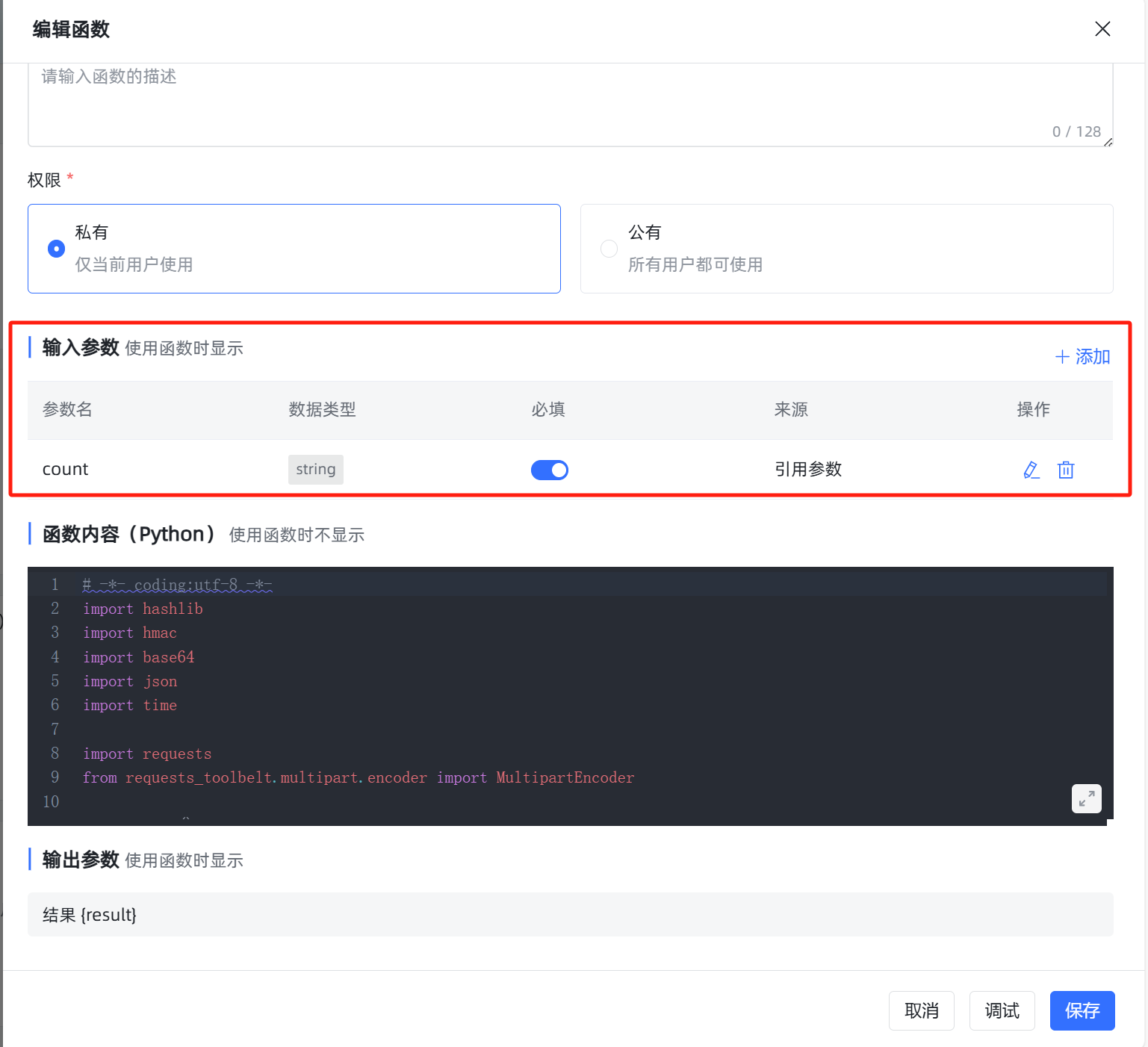
2.2函数参数配置
如下图所示添加 count 参数:
三、设计流程
使用 MaxKB 中的高级编排,其中工作流编排流程如下所示:
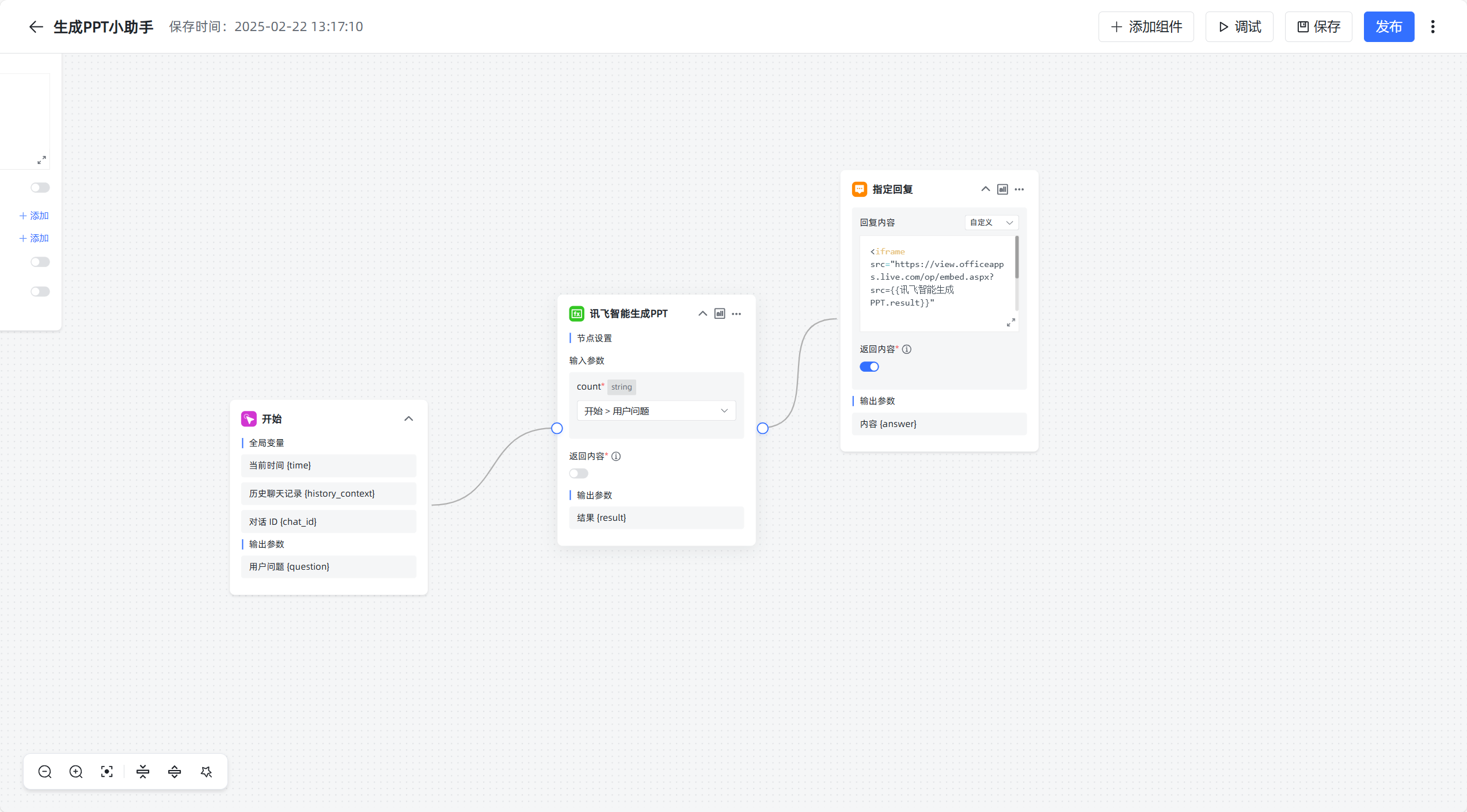
其中指定回复使用 Office Online Viewer 展示 PPT。
<iframe src="https://view.officeapps.live.com/op/embed.aspx?src={{讯飞智能生成PPT.result}}"
        width="800" height="600" frameborder="0">
</iframe>
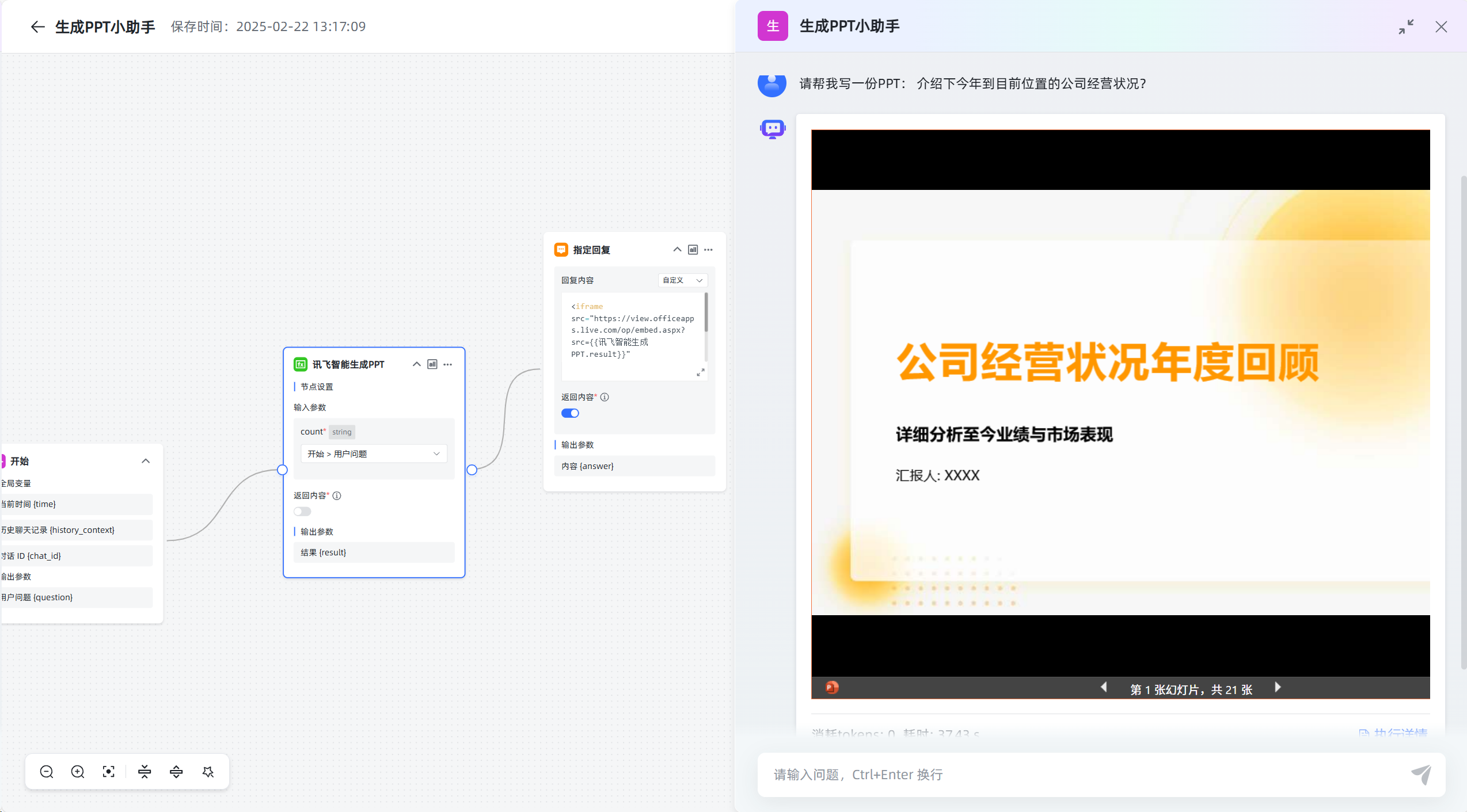
四、效果展示
相关资料:
MaxKB在线使用手册:https://maxkb.cn/docs/
MaxKB安装包:https://maxkb.cn/docs/installation/offline_installtion/