前言:哈喽,大家好,今天给大家分享一篇文章!并提供具体代码帮助大家深入理解,彻底掌握!创作不易,如果能帮助到大家或者给大家一些灵感和启发,欢迎收藏+关注哦 💕



目录
- [DeepSeek 助力 Vue3 开发:打造丝滑的表格(Table)之添加列宽调整功能,示例Table14_10空状态的固定表头表格](#DeepSeek 助力 Vue3 开发:打造丝滑的表格(Table)之添加列宽调整功能,示例Table14_10空状态的固定表头表格)
📚📗📕📘📖🕮💡📝🗂️✍️🛠️💻🚀🎉🏗️🌐🖼️🔗📊👉🔖⚠️🌟🔐⬇️·正文开始⬇️·🎥😊🎓📩😺🌈🤝🤖📜📋🔍✅🧰❓📄📢📈 🙋0️⃣1️⃣2️⃣3️⃣4️⃣5️⃣6️⃣7️⃣8️⃣9️⃣🔟🆗*️⃣#️⃣
DeepSeek 助力 Vue3 开发:打造丝滑的表格(Table)之添加列宽调整功能,示例Table14_10空状态的固定表头表格
📚页面效果

📘组件代码
html
<!-- TableView14_10.vue 空状态的固定表头表格 -->
<template>
  <div class="table-demo">
    <h2>10. 添加表头固定功能,空状态的固定表头表格</h2>
    <p class="description">自定义空状态显示内容</p>
    <div class="table-container">
      <Table
        :data="[]"
        :columns="columns"
        fixed-header
        fixed-header-height="300px"
        empty-text="暂无数据"
      >
        <template #empty>
          <div class="empty-content">
            <i class="empty-icon">📭</i>
            <p class="empty-text">没有找到相关数据</p>
            <button class="reload-btn" @click="loadData">加载数据</button>
          </div>
        </template>
      </Table>
    </div>
  </div>
</template>

<script setup>
import { ref } from 'vue'
import Table from '@/components/Table/Table.vue'

const columns = ref([
  { title: '姓名', dataIndex: 'name', width: '120px' },
  { title: '年龄', dataIndex: 'age', width: '80px' },
  { title: '城市', dataIndex: 'city', width: '120px' },
  { title: '会员等级', dataIndex: 'level', width: '120px' }
])

const loadData = () => {
  console.log('需编写,加载数据代码')
}
</script>

<style scoped>
.table-demo {
  padding: 20px;
}

.description {
  margin: 16px 0;
  color: #666;
}

.table-container {
  border: 1px solid #ebeef5;
  border-radius: 4px;
}

.empty-content {
  padding: 32px;
  text-align: center;
}

.empty-icon {
  font-size: 48px;
}

.empty-text {
  margin: 16px 0;
  color: #909399;
}

.reload-btn {
  padding: 6px 16px;
  border: 1px solid #dcdfe6;
  border-radius: 4px;
  background: #fff;
  cursor: pointer;
}

.reload-btn:hover {
  color: #409eff;
  border-color: #c6e2ff;
  background-color: #ecf5ff;
}
</style>
📚代码测试
运行正常
📚测试代码正常跑通,附其他基本代码
- 添加路由
- 页面展示入口
📘编写路由 src\router\index.js
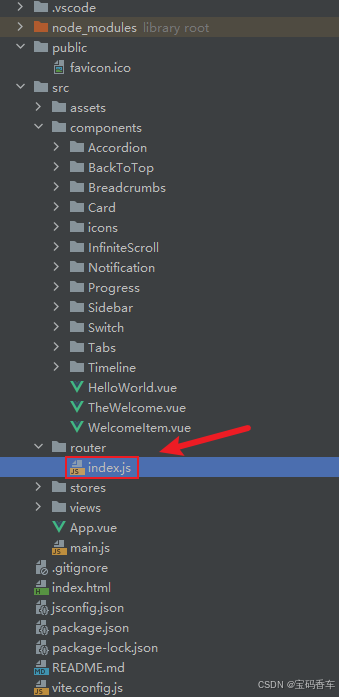
javascript
import { createRouter, createWebHistory } from 'vue-router'
import RightClickMenuView from '../views/RightClickMenuView.vue'
import RangePickerView from '../views/RangePickerView.vue'


const router = createRouter({
  history: createWebHistory(import.meta.env.BASE_URL),
  routes: [
    {
      path: '/',
      name: 'progress',
      component:  () => import('../views/ProgressView.vue'),
    },
    {
      path: '/tabs',
      name: 'tabs',
      // route level code-splitting
      // this generates a separate chunk (About.[hash].js) for this route
      // which is lazy-loaded when the route is visited.
      // 标签页(Tabs)
      component: () => import('../views/TabsView.vue'),
    },
    {
      path: '/accordion',
      name: 'accordion',
      // 折叠面板(Accordion)
      component: () => import('../views/AccordionView.vue'),
    },
    {
      path: '/timeline',
      name: 'timeline',
      // 时间线(Timeline)
      component: () => import('../views/TimelineView.vue'),
    },
    {
      path: '/backToTop',
      name: 'backToTop',
      component: () => import('../views/BackToTopView.vue')
    },
    {
      path: '/notification',
      name: 'notification',
      component: () => import('../views/NotificationView.vue')
    },
    {
      path: '/card',
      name: 'card',
      component: () => import('../views/CardView.vue')
    },
    {
      path: '/infiniteScroll',
      name: 'infiniteScroll',
      component: () => import('../views/InfiniteScrollView.vue')
    },
    {
      path: '/switch',
      name: 'switch',
      component: () => import('../views/SwitchView.vue')
    },
    {
      path: '/sidebar',
      name: 'sidebar',
      component: () => import('../views/SidebarView.vue')
    },
    {
      path: '/breadcrumbs',
      name: 'breadcrumbs',
      component: () => import('../views/BreadcrumbsView.vue')
    },
    {
      path: '/masonryLayout',
      name: 'masonryLayout',
      component: () => import('../views/MasonryLayoutView.vue')
    },
    {
      path: '/rating',
      name: 'rating',
      component: () => import('../views/RatingView.vue')
    },
    {
      path: '/datePicker',
      name: 'datePicker',
      component: () => import('../views/DatePickerView.vue')
    },
    {
      path: '/colorPicker',
      name: 'colorPicker',
      component: () => import('../views/ColorPickerView.vue')
    },
    {
      path: '/rightClickMenu',
      name: 'rightClickMenu',
      component: RightClickMenuView
    },
    {
      path: '/rangePicker',
      name: 'rangePicker',
      component: () => import('../views/RangePickerView.vue')
    },
    {
      path: '/navbar',
      name: 'navbar',
      component: () => import('../views/NavbarView.vue')
    },
    {
      path: '/formValidation',
      name: 'formValidation',
      component: () => import('../views/FormValidationView.vue')
    },
    {
      path: '/copyToClipboard',
      name: 'copyToClipboard',
      component: () => import('../views/CopyToClipboardView.vue')
    },
    {
      path: '/clickAnimations',
      name: 'clickAnimations',
      component: () => import('../views/ClickAnimationsView.vue')
    },
    {
      path: '/thumbnailList',
      name: 'thumbnailList',
      component: () => import('../views/ThumbnailListView.vue')
    },
    {
      path: '/keyboardShortcuts',
      name: 'keyboardShortcuts',
      component: () => import('../views/KeyboardShortcutsView.vue')
    },
    {
      path: '/commentSystem',
      name: 'commentSystem',
      component: () => import('../views/CommentSystemView.vue')
    },
    {
      path: '/qRCode',
      name: 'qRCode',
      component: () => import('../views/QRCodeView.vue')
    },
    {
      path: '/radioButton',
      name: 'radioButton',
      component: () => import('../views/RadioButtonView.vue')
    },
    {
      path: '/slider',
      name: 'slider',
      component: () => import('../views/SliderView.vue')
    },
    {
      path: '/scrollAnimations',
      name: 'scrollAnimations',
      component: () => import('../views/ScrollAnimationsView.vue')
    },
    {
      path: '/textInputView',
      name: 'textInputView',
      component: () => import('../views/TextInputView.vue')
    },
    {
      path: '/divider',
      name: 'divider',
      component: () => import('../views/DividerView.vue')
    },
    {
      path: '/checkbox',
      name: 'checkbox',
      component: () => import('../views/CheckboxView.vue')
    },
    {
      path: '/tagInput',
      name: 'tagInput',
      component: () => import('../views/TagInputView.vue')
    },
    {
      path: '/dropdownSelect',
      name: 'dropdownSelect',
      component: () => import('../views/DropdownSelectView.vue')
    },
    {
      path: '/list',
      name: 'list',
      component: () => import('../views/ListView.vue')
    },
    {
      path: '/header',
      name: 'header',
      component: () => import('../views/HeaderView.vue')
    },
    {
      path: '/footer',
      name: 'footer',
      component: () => import('../views/FooterView.vue')
    },
    {
      path: '/pagination',
      name: 'pagination',
      component: () => import('../views/PaginationView.vue')
    },
    {
      path: '/floatingActionButton',
      name: 'floatingActionButton',
      component: () => import('../views/FloatingActionButtonView.vue')
    },
    {
      path: '/gridLayout',
      name: 'gridLayout',
      component: () => import('../views/GridLayoutView.vue')
    },
    {
      path: '/passwordInput',
      name: 'passwordInput',
      component: () => import('../views/PasswordInputView.vue')
    },
    {
      path: '/flexbox',
      name: 'flexbox',
      component: () => import('../views/FlexboxView.vue')
    },
    {
      path: '/modal',
      name: 'modal',
      component: () => import('../views/ModalView.vue')
    },
    {
      path: '/richTextEditor',
      name: 'richTextEditor',
      component: () => import('../views/RichTextEditorView.vue')
    },
    {
      path: '/timePickerView',
      name: 'timePickerView',
      component: () => import('../views/TimePickerView.vue')
    },
    {
      path: '/multistepForm',
      name: 'multistepForm',
      component: () => import('../views/MultistepFormView.vue')
    },
    {
      path: '/table1',
      name: 'table1',
      component: () => import('../views/TableView1.vue')
    },
    {
      path: '/table2',
      name: 'table2',
      component: () => import('../views/TableView2.vue')
    },
    {
      path: '/table3',
      name: 'table3',
      component: () => import('../views/TableView3.vue')
    },
    {
      path: '/table4',
      name: 'table4',
      component: () => import('../views/TableView4.vue')
    },
    {
      path: '/table5',
      name: 'table5',
      component: () => import('../views/TableView5.vue')
    },
    {
      path: '/table6',
      name: 'table6',
      component: () => import('../views/TableView6.vue')
    },
    {
      path: '/table7',
      name: 'table7',
      component: () => import('../views/TableView7.vue')
    },
    {
      path: '/table8',
      name: 'table8',
      component: () => import('../views/TableView8.vue')
    },
    {
      path: '/table9',
      name: 'table9',
      component: () => import('../views/TableView9.vue')
    },
    {
      path: '/table10',
      name: 'table10',
      component: () => import('../views/TableView10.vue')
    },
    {
      path: '/table11',
      name: 'table11',
      component: () => import('../views/TableView11.vue')
    },
    {
      path: '/table12',
      name: 'table12',
      component: () => import('../views/TableView12.vue')
    },
    {
      path: '/table12_02',
      name: 'table12_02',
      component: () => import('../views/TableView12_02.vue')
    },
    {
      path: '/table14',
      name: 'table14',
      component: () => import('../views/TableView14.vue')
    },
    {
      path: '/table14_01',
      name: 'table14_01',
      component: () => import('../views/TableView14_01.vue')
    },
    {
      path: '/table14_02',
      name: 'table14_02',
      component: () => import('../views/TableView14_02.vue')
    },
    {
      path: '/table14_03',
      name: 'table14_03',
      component: () => import('../views/TableView14_03.vue')
    },
    {
      path: '/table14_04',
      name: 'table14_04',
      component: () => import('../views/TableView14_04.vue')
    },
    {
      path: '/table14_05',
      name: 'table14_05',
      component: () => import('../views/TableView14_05.vue')
    },
    {
      path: '/table14_06',
      name: 'table14_06',
      component: () => import('../views/TableView14_06.vue')
    },
    {
      path: '/table14_07',
      name: 'table14_07',
      component: () => import('../views/TableView14_07.vue')
    },
    {
      path: '/table14_08',
      name: 'table14_08',
      component: () => import('../views/TableView14_08.vue')
    },
    {
      path: '/table14_09',
      name: 'table14_09',
      component: () => import('../views/TableView14_09.vue')
    },
    {
      path: '/table14_10',
      name: 'table14_10',
      component: () => import('../views/TableView14_10.vue')
    }
  ],
})

export default router
📘编写展示入口 src\App.vue
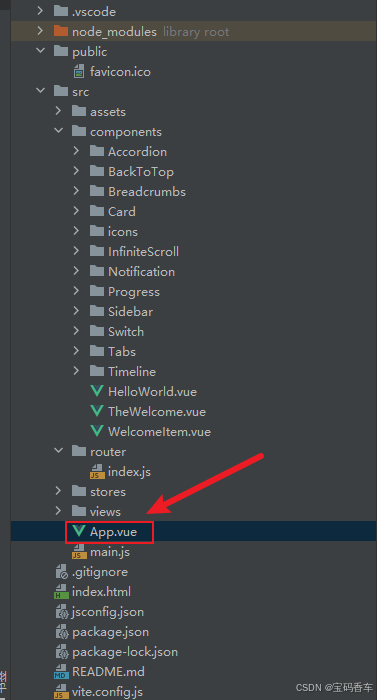
html
<script setup>
import { RouterLink, RouterView } from 'vue-router'
import HelloWorld from './components/HelloWorld.vue'
</script>

<template>
  <header>
    <img alt="Vue logo" class="logo" src="@/assets/logo.svg" width="125" height="125" />

    <div class="wrapper">
      <HelloWorld msg="You did it!" />
      <nav>
        <RouterLink to="/">Progress</RouterLink>
        <RouterLink to="/tabs">Tabs</RouterLink>
        <RouterLink to="/accordion">Accordion</RouterLink>
        <RouterLink to="/timeline">Timeline</RouterLink>
        <RouterLink to="/backToTop">BackToTop</RouterLink>
        <RouterLink to="/notification">Notification</RouterLink>
        <RouterLink to="/card">Card</RouterLink>
        <RouterLink to="/infiniteScroll">InfiniteScroll</RouterLink>
        <RouterLink to="/switch">Switch</RouterLink>
        <RouterLink to="/sidebar">Sidebar</RouterLink>
        <RouterLink to="/breadcrumbs">Breadcrumbs</RouterLink>
        <RouterLink to="/masonryLayout">MasonryLayout</RouterLink>
        <RouterLink to="/rating">Rating</RouterLink>
        <RouterLink to="/datePicker">DatePicker</RouterLink>
        <RouterLink to="/colorPicker">ColorPicker</RouterLink>
        <RouterLink to="/rightClickMenu">RightClickMenu</RouterLink>
        <RouterLink to="/rangePicker">RangePicker</RouterLink>
        <RouterLink to="/navbar">Navbar</RouterLink>
        <RouterLink to="/formValidation">FormValidation</RouterLink>
        <RouterLink to="/copyToClipboard">CopyToClipboard</RouterLink>
        <RouterLink to="/clickAnimations">ClickAnimations</RouterLink>
        <RouterLink to="/thumbnailList">ThumbnailList</RouterLink>
        <RouterLink to="/keyboardShortcuts">KeyboardShortcuts</RouterLink>
        <RouterLink to="/commentSystem">CommentSystem</RouterLink>
        <RouterLink to="/qRCode">QRCode</RouterLink>
        <RouterLink to="/radioButton">RadioButton</RouterLink>
        <RouterLink to="/slider">Slider</RouterLink>
        <RouterLink to="/scrollAnimations">ScrollAnimations</RouterLink>
        <RouterLink to="/textInputView">TextInput</RouterLink>
        <RouterLink to="/divider">Divider</RouterLink>
        <RouterLink to="/checkbox">Checkbox</RouterLink>
        <RouterLink to="/tagInput">TagInput</RouterLink>
        <RouterLink to="/dropdownSelect">DropdownSelect</RouterLink>
        <RouterLink to="/list">List</RouterLink>
        <RouterLink to="/header">Header</RouterLink>
        <RouterLink to="/footer">Footer</RouterLink>
        <RouterLink to="/pagination">Pagination</RouterLink>
        <RouterLink to="/floatingActionButton">FloatingActionButton</RouterLink>
        <RouterLink to="/gridLayout">GridLayout</RouterLink>
        <RouterLink to="/passwordInput">PasswordInput</RouterLink>
        <RouterLink to="/flexbox">Flexbox</RouterLink>
        <RouterLink to="/modal">Modal</RouterLink>
        <RouterLink to="/richTextEditor">RichTextEditor</RouterLink>
        <RouterLink to="/timePickerView">TimePickerView</RouterLink>
        <RouterLink to="/multistepForm">MultistepFormView</RouterLink>
        <RouterLink to="/table1">Table1</RouterLink>
        <RouterLink to="/table2">Table2</RouterLink>
        <RouterLink to="/table3">Table3</RouterLink>
        <RouterLink to="/table4">Table4</RouterLink>
        <RouterLink to="/table5">Table5</RouterLink>
        <RouterLink to="/table6">Table6空状态</RouterLink>
        <RouterLink to="/table7">Table7空状态2</RouterLink>
        <RouterLink to="/table8">Table8基础加载状态</RouterLink>
        <RouterLink to="/table9">Table9自定义加载文本</RouterLink>
        <RouterLink to="/table10">Table10完全自定义加载内容</RouterLink>
        <RouterLink to="/table11">Table11加载结合分页</RouterLink>
        <RouterLink to="/table12">Table12启用列宽调整</RouterLink>
        <RouterLink to="/table12_02">table12_02自定义选择列宽度</RouterLink>
        <RouterLink to="/table14">table14 添加表头固定功能</RouterLink>
        <RouterLink to="/table14_01">table14_01</RouterLink>
        <RouterLink to="/table14_02">table14_02</RouterLink>
        <RouterLink to="/table14_03">table14_03</RouterLink>
        <RouterLink to="/table14_04">table14_04</RouterLink>
        <RouterLink to="/table14_05">table14_05</RouterLink>
        <RouterLink to="/table14_06">table14_06</RouterLink>
        <RouterLink to="/table14_07">table14_07</RouterLink>
        <RouterLink to="/table14_08">table14_08</RouterLink>
        <RouterLink to="/table14_09">table14_09</RouterLink>
        <RouterLink to="/table14_10">table14_10</RouterLink>
      </nav>
    </div>
  </header>
  <RouterView />
</template>

<style scoped>
header {
  line-height: 1.5;
  max-height: 100vh;
}

.logo {
  display: block;
  margin: 0 auto 2rem;
}

nav {
  width: 100%;
  font-size: 12px;
  text-align: center;
  margin-top: 2rem;
}

nav a.router-link-exact-active {
  color: var(--color-text);
}

nav a.router-link-exact-active:hover {
  background-color: transparent;
}

nav a {
  display: inline-block;
  padding: 0 1rem;
  border-left: 1px solid var(--color-border);
}

nav a:first-of-type {
  border: 0;
}

@media (min-width: 1024px) {
  header {
    display: flex;
    place-items: center;
    padding-right: calc(var(--section-gap) / 2);
  }

  .logo {
    margin: 0 2rem 0 0;
  }

  header .wrapper {
    display: flex;
    place-items: flex-start;
    flex-wrap: wrap;
  }

  nav {
    text-align: left;
    margin-left: -1rem;
    font-size: 1rem;

    padding: 1rem 0;
    margin-top: 1rem;
  }
}
</style>
📚页面效果
📚展望
在性能方面,DeepSeek 的推理速度相对较快,在处理一些需要快速响应的任务时具有明显优势。在智能客服场景中,DeepSeek 能够迅速理解用户的问题,并快速给出准确的回答,大大缩短了用户等待时间,提升了用户体验。而 ChatGPT 在处理复杂任务时,虽然能够提供较为全面和深入的回答,但响应时间可能会相对较长。
📚相关文章
------------ 相 关 文 章 ------------
-
DeepSeek 助力 Vue 开发:打造丝滑的导航栏(Navbar)https://blog.csdn.net/qq_33650655/article/details/145732421
-
DeepSeek 助力 Vue 开发:打造丝滑的二维码生成(QR Code)https://blog.csdn.net/qq_33650655/article/details/145797928
-
DeepSeek 助力 Vue 开发:打造丝滑的滑块(Slider)https://blog.csdn.net/qq_33650655/article/details/145817161
-
DeepSeek 助力 Vue 开发:打造丝滑的文本输入框(Text Input)https://blog.csdn.net/qq_33650655/article/details/145837003
-
DeepSeek 助力 Vue 开发:打造丝滑的分割线(Divider)https://blog.csdn.net/qq_33650655/article/details/145849100
-
DeepSeek 助力 Vue 开发:打造丝滑的 复选框(Checkbox)https://blog.csdn.net/qq_33650655/article/details/145855695
-
DeepSeek 助力 Vue3 开发:打造丝滑的标签输入(Tag Input)https://blog.csdn.net/qq_33650655/article/details/145858574
-
DeepSeek 助力 Vue3 开发:打造丝滑的列表(List)https://blog.csdn.net/qq_33650655/article/details/145866384
-
DeepSeek 助力 Vue3 开发:打造丝滑的页眉(Header)https://blog.csdn.net/qq_33650655/article/details/145885122
-
DeepSeek 助力 Vue3 开发:打造丝滑的页脚(Footer)https://blog.csdn.net/qq_33650655/article/details/145886306
-
DeepSeek 助力 Vue3 开发:打造丝滑的分页(Pagination)https://blog.csdn.net/qq_33650655/article/details/145886824
-
DeepSeek 助力 Vue3 开发:打造丝滑的弹性布局(Flexbox)https://blog.csdn.net/qq_33650655/article/details/145938677
-
DeepSeek 助力 Vue3 开发:打造丝滑的模态框(Modal)https://blog.csdn.net/qq_33650655/article/details/145938939
到此这篇文章就介绍到这了,更多精彩内容请关注本人以前的文章或继续浏览下面的文章,创作不易,如果能帮助到大家,希望大家多多支持宝码香车~💕,若转载本文,一定注明本文链接。

更多专栏订阅推荐:
💕 vue
✈️ Electron
⭐️ js
📝 字符串