说明:c#使用wpf实现helloworld和login登录
效果图:
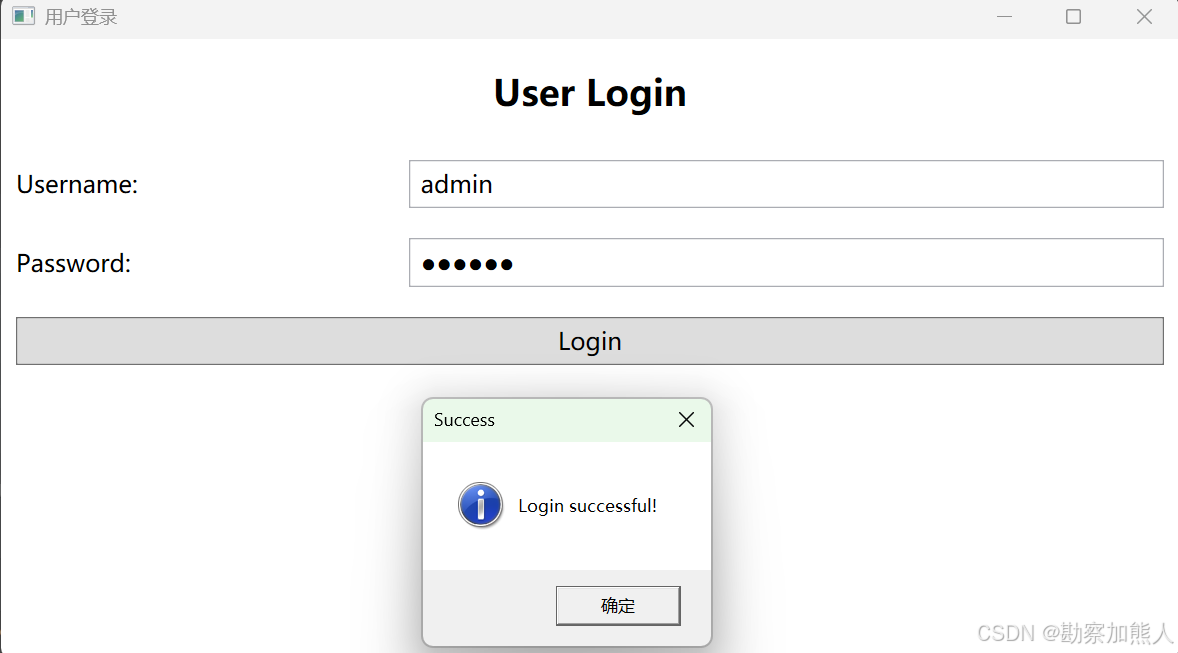
step1:C:\Users\wangrusheng\RiderProjects\WpfApp1\WpfApp1\MainWindow.xaml.cs
csharp
using System.Windows;

namespace WpfApp1;

public partial class MainWindow : Window
{
    public MainWindow()
    {
        InitializeComponent();
    }

    private void BtnLogin_Click(object sender, RoutedEventArgs e)
    {
        string username = txtUsername.Text.Trim();
        string password = txtPassword.Password;

        // 输入验证
        if (string.IsNullOrEmpty(username))
        {
            MessageBox.Show("Please enter username", "Warning", MessageBoxButton.OK, MessageBoxImage.Warning);
            txtUsername.Focus();
            return;
        }

        if (string.IsNullOrEmpty(password))
        {
            MessageBox.Show("Please enter password", "Warning", MessageBoxButton.OK, MessageBoxImage.Warning);
            txtPassword.Focus();
            return;
        }

        // 简单验证逻辑(实际项目应使用加密验证)
        if (username == "admin" && password == "123456")
        {
            MessageBox.Show("Login successful!", "Success", MessageBoxButton.OK, MessageBoxImage.Information);
            // 这里可以跳转到主界面
        }
        else
        {
            MessageBox.Show("Invalid username or password", "Error", MessageBoxButton.OK, MessageBoxImage.Error);
            txtPassword.Password = "";
            txtPassword.Focus();
        }
    }
}
step2:C:\Users\wangrusheng\RiderProjects\WpfApp1\WpfApp1\MainWindow.xaml
xml
<Window x:Class="WpfApp1.MainWindow"
        xmlns="http://schemas.microsoft.com/winfx/2006/xaml/presentation"
        xmlns:x="http://schemas.microsoft.com/winfx/2006/xaml"
        xmlns:d="http://schemas.microsoft.com/expression/blend/2008"
        xmlns:mc="http://schemas.openxmlformats.org/markup-compatibility/2006"
        xmlns:local="clr-namespace:WpfApp1"
        mc:Ignorable="d"
        Title="用户登录" Height="450" Width="800"
        WindowStartupLocation="CenterScreen">


        <Grid>
                <Grid.RowDefinitions>
                        <RowDefinition Height="Auto"/>
                        <RowDefinition Height="Auto"/>
                        <RowDefinition Height="Auto"/>
                        <RowDefinition Height="Auto"/>
                        <RowDefinition Height="*"/>
                </Grid.RowDefinitions>
                <Grid.ColumnDefinitions>
                        <ColumnDefinition Width="*"/>
                        <ColumnDefinition Width="2*"/>
                </Grid.ColumnDefinitions>

                <!-- Title -->
                <TextBlock Text="User Login"
                           Grid.ColumnSpan="2"
                           FontSize="24"
                           FontWeight="Bold"
                           HorizontalAlignment="Center"
                           Margin="0 20"
                           Grid.Row="0"/>

                <!-- Username -->
                <TextBlock Text="Username:"
                           Grid.Row="1"
                           VerticalAlignment="Center"
                           Margin="10"
                           FontSize="16"/>
                <TextBox x:Name="txtUsername"
                         Grid.Row="1"
                         Grid.Column="1"
                         Margin="10"
                         Padding="5"
                         FontSize="16"
                         VerticalContentAlignment="Center"/>

                <!-- Password -->
                <TextBlock Text="Password:"
                           Grid.Row="2"
                           VerticalAlignment="Center"
                           Margin="10"
                           FontSize="16"/>
                <PasswordBox x:Name="txtPassword"
                             Grid.Row="2"
                             Grid.Column="1"
                             Margin="10"
                             Padding="5"
                             FontSize="16"
                             VerticalContentAlignment="Center"/>

                <!-- Login Button -->
                <Button x:Name="btnLogin"
                        Content="Login"
                        Grid.Row="3"
                        Grid.ColumnSpan="2"
                        Margin="10"
                        Padding="10 5"
                        FontSize="16"
                        Click="BtnLogin_Click"
                        IsDefault="True"/>
        </Grid>


</Window>
step3:上面的登录写完了,下面是helloworld
C:\Users\wangrusheng\RiderProjects\WpfApp1\WpfApp1\MainWindow.xaml.cs
csharp
using System.Text;
using System.Windows;
using System.Windows.Controls;
using System.Windows.Data;
using System.Windows.Documents;
using System.Windows.Input;
using System.Windows.Media;
using System.Windows.Media.Imaging;
using System.Windows.Navigation;
using System.Windows.Shapes;

namespace WpfApp1;

/// <summary>
/// Interaction logic for MainWindow.xaml
/// </summary>
public partial class MainWindow : Window
{
    public MainWindow()
    {
        InitializeComponent();
    }
}
step4:C:\Users\wangrusheng\RiderProjects\WpfApp1\WpfApp1\MainWindow.xaml
xml
<Window x:Class="WpfApp1.MainWindow"
        xmlns="http://schemas.microsoft.com/winfx/2006/xaml/presentation"
        xmlns:x="http://schemas.microsoft.com/winfx/2006/xaml"
        xmlns:d="http://schemas.microsoft.com/expression/blend/2008"
        xmlns:mc="http://schemas.openxmlformats.org/markup-compatibility/2006"
        xmlns:local="clr-namespace:WpfApp1"
        mc:Ignorable="d"
        Title="MainWindow" Height="450" Width="800">
    <Grid>
        <TextBlock Text="Hello World!"
                   HorizontalAlignment="Center"
                   VerticalAlignment="Center"
                   FontSize="24"/>
    </Grid>
</Window>
end