说明:
c#使用windows forms app实现helloworld和login登录
效果图:
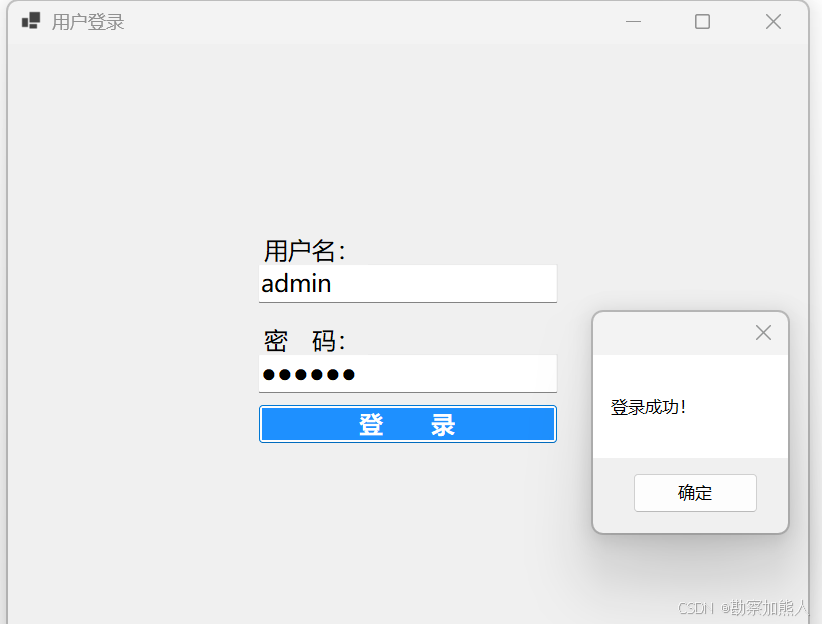
step1:登录 C:\Users\wangrusheng\RiderProjects\WinFormsApp1\WinFormsApp1\Form1.cs
csharp
 namespace WinFormsApp1;

public partial class Form1 : Form
{
    private TextBox txtUsername;
    private TextBox txtPassword;
    private Label lblError;

    public Form1()
    {
        InitializeComponent();
        CreateLoginControls();
    }

    private void CreateLoginControls()
    {
        // 窗口配置
        this.Text = "用户登录";
        this.ClientSize = new Size(800, 600);
        this.StartPosition = FormStartPosition.CenterScreen; // 屏幕居中

        // 使用Panel容器统一管理布局
        Panel mainPanel = new Panel();
        mainPanel.Size = new Size(400, 300);
        mainPanel.Location = new Point(
            (this.ClientSize.Width - mainPanel.Width) / 2,
            (this.ClientSize.Height - mainPanel.Height) / 2
        );

        // 用户名标签
        Label lblUser = new Label();
        lblUser.Text = "用户名:";
        lblUser.Font = new Font("微软雅黑", 12F);
        lblUser.Location = new Point(50, 40);
        lblUser.AutoSize = true;

        // 用户名输入框(加宽)
        txtUsername = new TextBox();
        txtUsername.Font = new Font("微软雅黑", 12F);
        txtUsername.Location = new Point(50, 70);
        txtUsername.Size = new Size(300, 30); // 宽度300

        // 密码标签
        Label lblPass = new Label();
        lblPass.Text = "密 码:";
        lblPass.Font = new Font("微软雅黑", 12F);
        lblPass.Location = new Point(50, 130);
        lblPass.AutoSize = true;

        // 密码输入框(与用户名对齐)
        txtPassword = new TextBox();
        txtPassword.Font = new Font("微软雅黑", 12F);
        txtPassword.Location = new Point(50, 160);
        txtPassword.Size = new Size(300, 30);
        txtPassword.PasswordChar = '●';

        // 登录按钮(加大尺寸)
        Button btnLogin = new Button();
        btnLogin.Text = "登  录";
        btnLogin.Font = new Font("微软雅黑", 12F, FontStyle.Bold);
        btnLogin.Size = new Size(300, 40);
        btnLogin.Location = new Point(50, 210);
        btnLogin.BackColor = Color.DodgerBlue;
        btnLogin.ForeColor = Color.White;
        btnLogin.Click += BtnLogin_Click;

        // 错误提示(居中显示)
        lblError = new Label();
        lblError.ForeColor = Color.Red;
        lblError.Font = new Font("微软雅黑", 10F);
        lblError.AutoSize = true;
        lblError.Location = new Point(
            (mainPanel.Width - lblError.Width) / 2,
            260
        );
        lblError.Visible = false;

        // 添加控件到Panel
        mainPanel.Controls.AddRange(new Control[] {
            lblUser, txtUsername,
            lblPass, txtPassword,
            btnLogin, lblError
        });

        // 添加Panel到窗体
        this.Controls.Add(mainPanel);
    }


	    private void BtnLogin_Click(object sender, EventArgs e)
    {
	  // 错误提示自动居中
        lblError.Location = new Point(
            (this.Controls[0].Width - lblError.Width) / 2,
            lblError.Location.Y
        );
        // 简单验证逻辑
        if (string.IsNullOrEmpty(txtUsername.Text) ||
            string.IsNullOrEmpty(txtPassword.Text))
        {
            lblError.Text = "用户名和密码不能为空!";
            lblError.Visible = true;
            return;
        }

        // 模拟验证(实际应连接数据库)
        if (txtUsername.Text == "admin" && txtPassword.Text == "123456")
        {
            lblError.Visible = false;
            MessageBox.Show("登录成功!");
            // 此处可跳转到主窗体:new MainForm().Show();
        }
        else
        {
            lblError.Text = "用户名或密码错误!";
            lblError.Visible = true;
        }
    }

}
step2:helloworld
csharp
namespace WinFormsApp1;

public partial class Form1 : Form
{
    public Form1()
    {
        InitializeComponent();

        // 添加Label控件
        Label label = new Label();
        label.Text = "Hello World!";
        label.AutoSize = true; // 自动调整标签大小
        label.Location = new System.Drawing.Point(20, 20); // 设置位置
        this.Controls.Add(label); // 将标签添加到窗体
    }
}
end