前言
最近在学习实例分割算法,参考b站视频课教程,使用labelme标注数据集,在csdn找到相关教程进行数据集格式转换,按照相关目标检测网络对数据集格式的训练要求划分数据集。
1.使用labelme标注图片
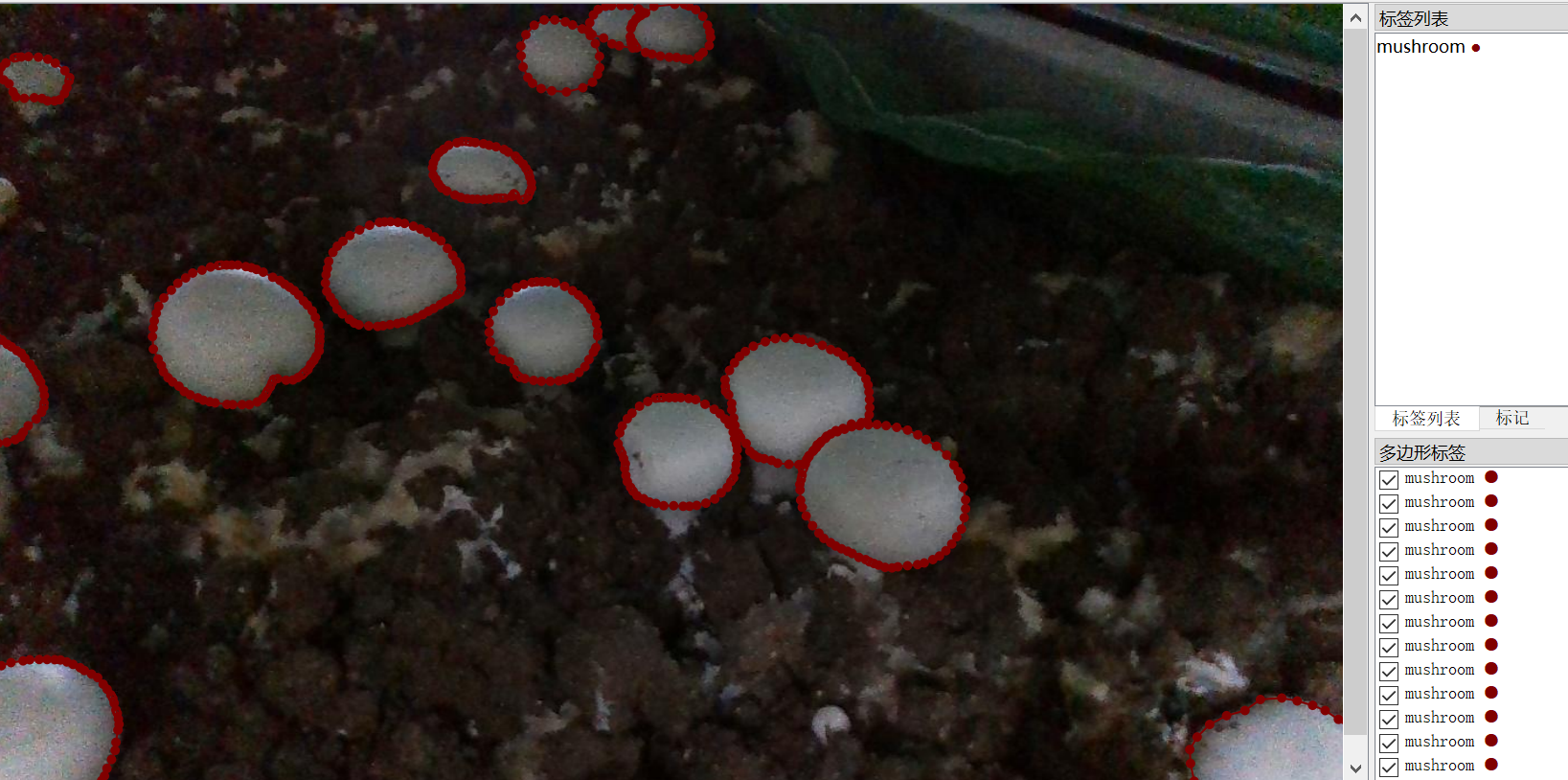
在网上随便找了几张蘑菇图片,使用多边形进行标注,标签设置为mushroom,
注意:实例分割标注疑惑:一张图片同类物体不同实例,如图片中显示多个蘑菇,该标注为mushroom1, mushroom2,mushroom3;或者全都标注为mushroom
在查看了一些实例相关的文献,发现以上两种情况均存在
在使用maskrcnn的文献中,一些是同类物体不同实例:显示不同掩膜颜色; 而另一些是同类物体不同实例:显示相同掩膜颜色。
最终决定选择全部标注为mushroom的原因:
1.参考github官方labelme的实例分割标注示例
E:\Github\github\labelme-main\examples\instance_segmentation\data_annotated
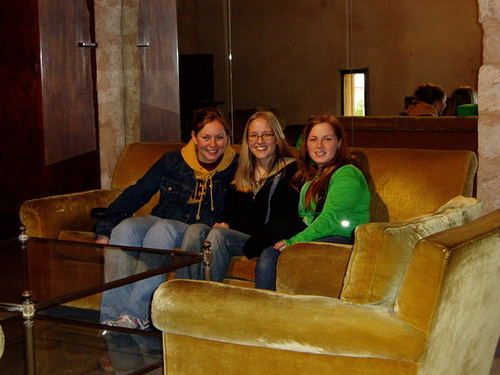
图片为2011_000006.jpg
labelme json标注信息,可以看到图片中有三个人,在json标签中三个实例同一种类(人)label均为person, 因此说明label指代是类别标签,而不是实例标签, 如果标注为person1,perosn2,person3,则是说明有三种不同的类别,如果再标注另一张带有人的标签,也标注为perosn1,perosn2,则会出现 每张图片不同的人,都有一个person1, 但是实际上他们类别都是person。 因此这样标显然不合理。
python
{
  "version": "4.0.0",
  "flags": {},
  "shapes": [
    {
      "label": "person",
      "points": [
        [
          204.936170212766,
          108.56382978723406
        ],
        [
          183.936170212766,
          141.56382978723406
        ],
        [
          166.936170212766,
          150.56382978723406
        ],
        [
          108.93617021276599,
          203.56382978723406
        ],
        [
          92.93617021276599,
          228.56382978723406
        ],
        [
          95.93617021276599,
          244.56382978723406
        ],
        [
          105.93617021276599,
          244.56382978723406
        ],
        [
          116.93617021276599,
          223.56382978723406
        ],
        [
          163.936170212766,
          187.56382978723406
        ],
        [
          147.936170212766,
          212.56382978723406
        ],
        [
          117.93617021276599,
          222.56382978723406
        ],
        [
          108.93617021276599,
          243.56382978723406
        ],
        [
          100.93617021276599,
          325.56382978723406
        ],
        [
          135.936170212766,
          329.56382978723406
        ],
        [
          148.936170212766,
          319.56382978723406
        ],
        [
          150.936170212766,
          295.56382978723406
        ],
        [
          169.936170212766,
          272.56382978723406
        ],
        [
          171.936170212766,
          249.56382978723406
        ],
        [
          178.936170212766,
          246.56382978723406
        ],
        [
          186.936170212766,
          225.56382978723406
        ],
        [
          214.936170212766,
          219.56382978723406
        ],
        [
          242.936170212766,
          157.56382978723406
        ],
        [
          228.936170212766,
          146.56382978723406
        ],
        [
          228.936170212766,
          125.56382978723406
        ],
        [
          216.936170212766,
          112.56382978723406
        ]
      ],
      "group_id": null,
      "shape_type": "polygon",
      "flags": {}
    },
    {
      "label": "person",
      "points": [
        [
          271.936170212766,
          109.56382978723406
        ],
        [
          249.936170212766,
          110.56382978723406
        ],
        [
          244.936170212766,
          150.56382978723406
        ],
        [
          215.936170212766,
          219.56382978723406
        ],
        [
          208.936170212766,
          245.56382978723406
        ],
        [
          214.936170212766,
          220.56382978723406
        ],
        [
          188.936170212766,
          227.56382978723406
        ],
        [
          170.936170212766,
          246.56382978723406
        ],
        [
          170.936170212766,
          275.56382978723406
        ],
        [
          221.936170212766,
          278.56382978723406
        ],
        [
          233.936170212766,
          259.56382978723406
        ],
        [
          246.936170212766,
          253.56382978723406
        ],
        [
          245.936170212766,
          256.56382978723406
        ],
        [
          242.936170212766,
          251.56382978723406
        ],
        [
          262.936170212766,
          256.56382978723406
        ],
        [
          304.936170212766,
          226.56382978723406
        ],
        [
          297.936170212766,
          199.56382978723406
        ],
        [
          308.936170212766,
          164.56382978723406
        ],
        [
          296.936170212766,
          148.56382978723406
        ]
      ],
      "group_id": null,
      "shape_type": "polygon",
      "flags": {}
    },
    {
      "label": "person",
      "points": [
        [
          308.936170212766,
          115.56382978723406
        ],
        [
          298.936170212766,
          145.56382978723406
        ],
        [
          309.936170212766,
          166.56382978723406
        ],
        [
          297.936170212766,
          200.56382978723406
        ],
        [
          305.936170212766,
          228.56382978723406
        ],
        [
          262.936170212766,
          258.56382978723406
        ],
        [
          252.936170212766,
          284.56382978723406
        ],
        [
          272.936170212766,
          291.56382978723406
        ],
        [
          281.936170212766,
          250.56382978723406
        ],
        [
          326.936170212766,
          235.56382978723406
        ],
        [
          351.936170212766,
          239.56382978723406
        ],
        [
          365.936170212766,
          223.56382978723406
        ],
        [
          371.936170212766,
          187.56382978723406
        ],
        [
          353.936170212766,
          168.56382978723406
        ],
        [
          344.936170212766,
          143.56382978723406
        ],
        [
          336.936170212766,
          115.56382978723406
        ]
      ],
      "group_id": null,
      "shape_type": "polygon",
      "flags": {}
    },
    {
      "label": "chair",
      "points": [
        [
          309.7054009819968,
          242.94844517184941
        ],
        [
          282.7054009819968,
          251.94844517184941
        ],
        [
          271.7054009819968,
          287.9484451718494
        ],
        [
          175.70540098199677,
          275.9484451718494
        ],
        [
          149.70540098199677,
          296.9484451718494
        ],
        [
          151.70540098199677,
          319.9484451718494
        ],
        [
          160.70540098199677,
          328.9484451718494
        ],
        [
          165.54250204582655,
          375.38461538461536
        ],
        [
          486.7054009819968,
          373.9484451718494
        ],
        [
          498.7054009819968,
          336.9484451718494
        ],
        [
          498.7054009819968,
          202.94844517184941
        ],
        [
          454.7054009819968,
          193.94844517184941
        ],
        [
          435.7054009819968,
          212.94844517184941
        ],
        [
          368.7054009819968,
          224.94844517184941
        ],
        [
          351.7054009819968,
          241.94844517184941
        ]
      ],
      "group_id": null,
      "shape_type": "polygon",
      "flags": {}
    },
    {
      "label": "person",
      "points": [
        [
          425.936170212766,
          82.56382978723406
        ],
        [
          404.936170212766,
          109.56382978723406
        ],
        [
          400.936170212766,
          114.56382978723406
        ],
        [
          437.936170212766,
          114.56382978723406
        ],
        [
          448.936170212766,
          102.56382978723406
        ],
        [
          446.936170212766,
          91.56382978723406
        ]
      ],
      "group_id": null,
      "shape_type": "polygon",
      "flags": {}
    },
    {
      "label": "__ignore__",
      "points": [
        [
          457.936170212766,
          85.56382978723406
        ],
        [
          439.936170212766,
          117.56382978723406
        ],
        [
          477.936170212766,
          117.56382978723406
        ],
        [
          474.936170212766,
          87.56382978723406
        ]
      ],
      "group_id": null,
      "shape_type": "polygon",
      "flags": {}
    },
    {
      "label": "sofa",
      "points": [
        [
          183.936170212766,
          140.56382978723406
        ],
        [
          125.93617021276599,
          140.56382978723406
        ],
        [
          110.93617021276599,
          187.56382978723406
        ],
        [
          22.936170212765987,
          199.56382978723406
        ],
        [
          18.936170212765987,
          218.56382978723406
        ],
        [
          22.936170212765987,
          234.56382978723406
        ],
        [
          93.93617021276599,
          239.56382978723406
        ],
        [
          91.93617021276599,
          229.56382978723406
        ],
        [
          110.93617021276599,
          203.56382978723406
        ]
      ],
      "group_id": 0,
      "shape_type": "polygon",
      "flags": {}
    },
    {
      "label": "sofa",
      "points": [
        [
          103.93617021276599,
          290.56382978723406
        ],
        [
          58.93617021276599,
          303.56382978723406
        ],
        [
          97.93617021276599,
          311.56382978723406
        ]
      ],
      "group_id": 0,
      "shape_type": "polygon",
      "flags": {}
    },
    {
      "label": "sofa",
      "points": [
        [
          348.936170212766,
          146.56382978723406
        ],
        [
          472.936170212766,
          149.56382978723406
        ],
        [
          477.936170212766,
          162.56382978723406
        ],
        [
          471.936170212766,
          196.56382978723406
        ],
        [
          453.936170212766,
          192.56382978723406
        ],
        [
          434.936170212766,
          213.56382978723406
        ],
        [
          368.936170212766,
          226.56382978723406
        ],
        [
          375.936170212766,
          187.56382978723406
        ],
        [
          353.936170212766,
          164.56382978723406
        ]
      ],
      "group_id": 0,
      "shape_type": "polygon",
      "flags": {}
    },
    {
      "label": "sofa",
      "points": [
        [
          246.936170212766,
          252.56382978723406
        ],
        [
          219.936170212766,
          277.56382978723406
        ],
        [
          254.936170212766,
          287.56382978723406
        ],
        [
          261.936170212766,
          256.56382978723406
        ]
      ],
      "group_id": 0,
      "shape_type": "polygon",
      "flags": {}
    }
  ],
  "imagePath": "2011_000006.jpg",
  "imageData": null,
  "imageHeight": 375,
  "imageWidth": 500
}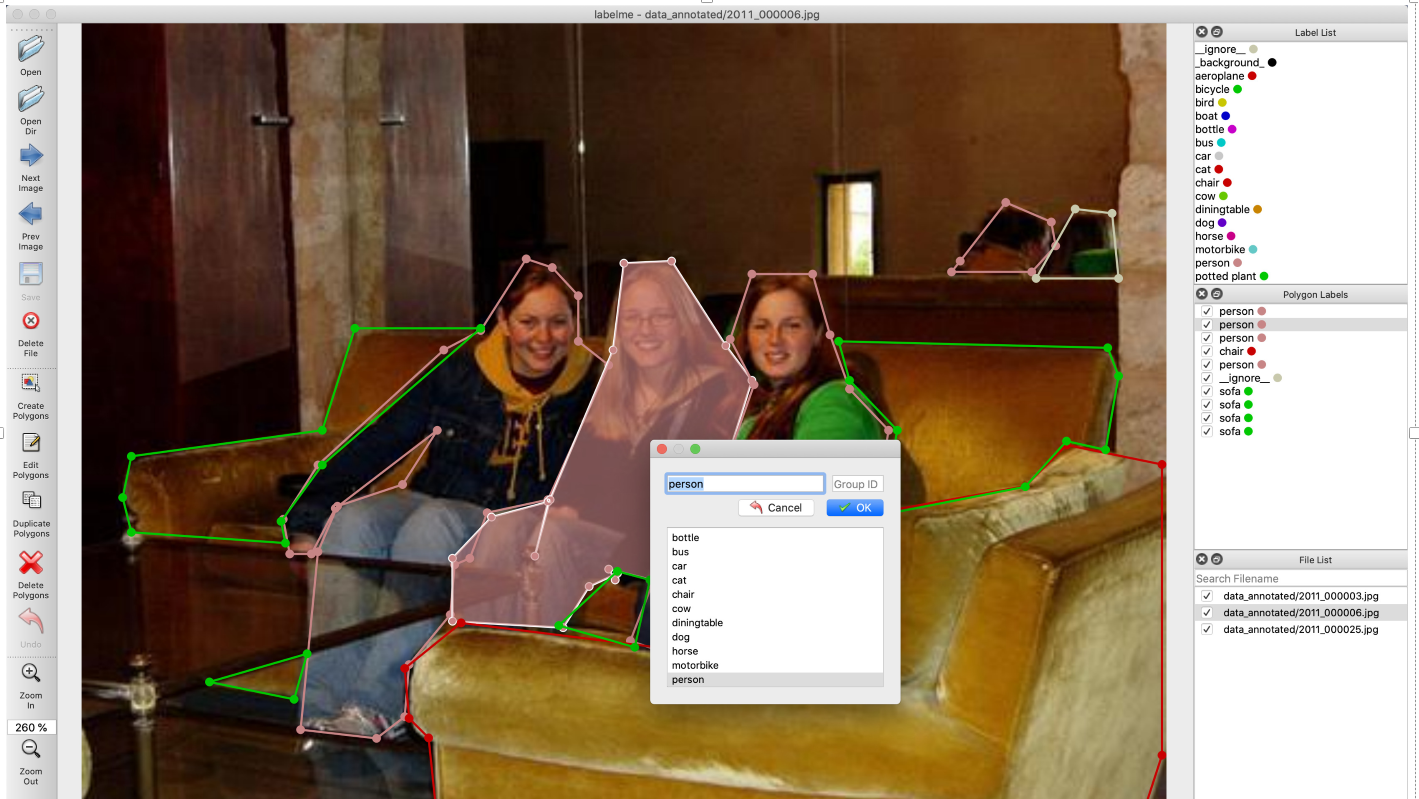
在github/labelme的官网中,作者是按上图进行标注的,三个person
2.github官方标注实例中voc数据集和coco数据集
labelme/voc数据集格式
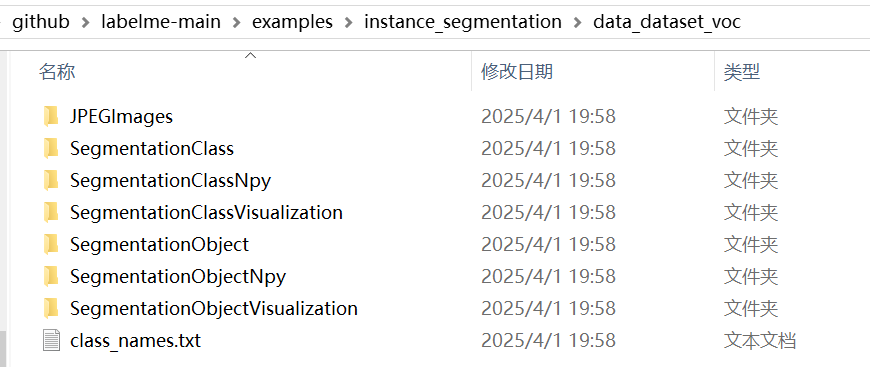
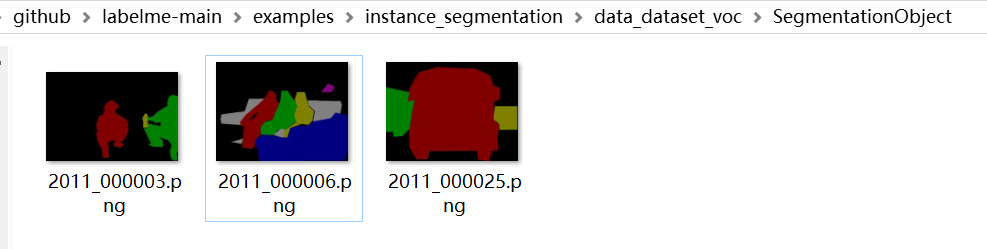
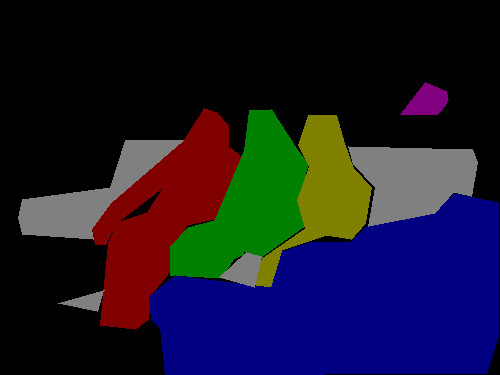
在github\labelme-main\examples\instance_segmentation\data_dataset_voc\SegmentationObject
文件中可以看到,实例分割标签中,三个人掩膜分别是不同的颜色
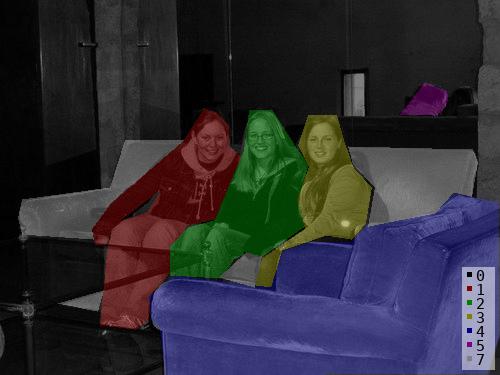
文件github\labelme-main\examples\instance_segmentation\data_dataset_voc\SegmentationObjectVisualization
在可视化实例分割标签中,可以看到不同人对应不同的数字和颜色
(红色1,绿色2,黄色3)
labelme/coco数据集格式
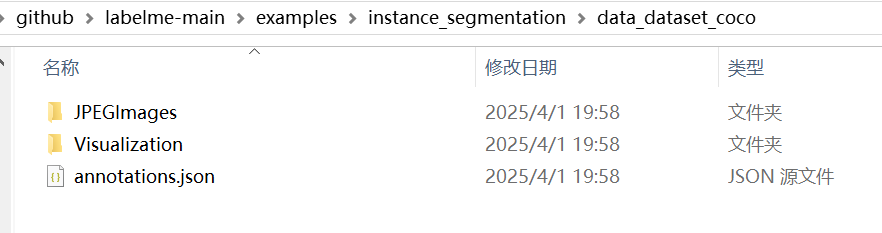
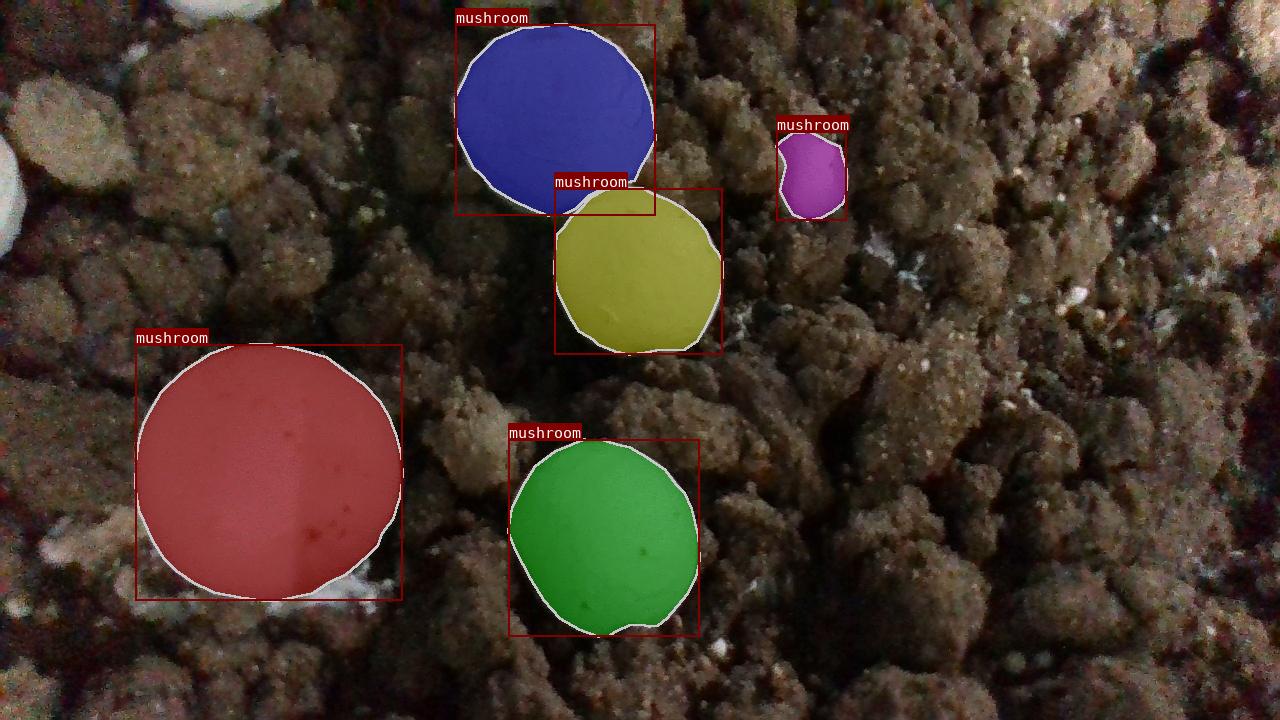
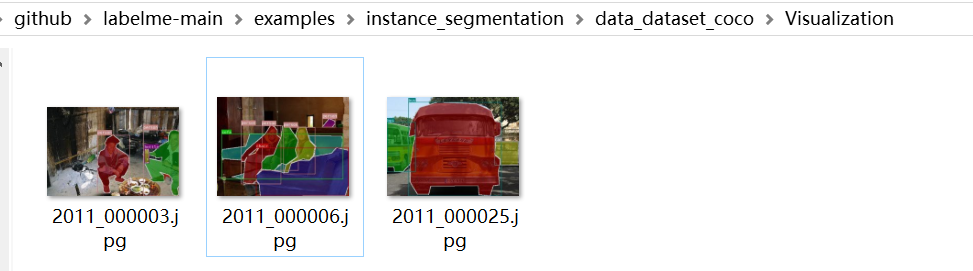 在github\labelme-main\examples\instance_segmentation\data_dataset_coco\Visualization文件夹中可以看到三个人,掩膜显示不同的颜色,标签均显示为person
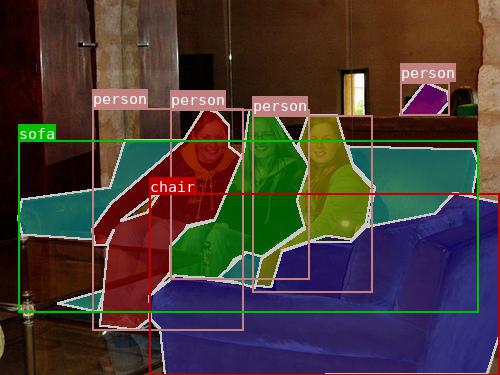
查看其annotations.json 标签文件,发现label 也都是person, 那怎么区分不同实例呢?
发现它这里是用id 来区分不同实例,每个id 代表不同种类不同实例的一个独立物体编号(不考虑背景)
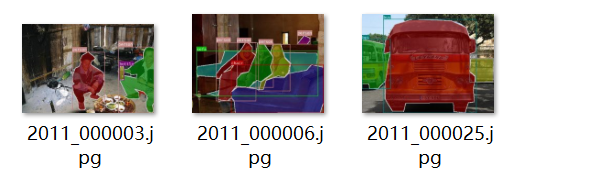
观察该图片,结合 annotations.json 标签文件分析
|-----------------|----------|-------------------------|--------------------------|
| 图片及其 | image_id | 物体 | annotations.json 中实例对应id |
| 2011_000003.jpg | 0 | (category_id=15) person | 0 |
| | | person | 1 |
| | | (category_id=5) bottel | 2 |
| 2011_000025.jpg | 1 | (category_id=6) bus | 3 |
| | | bus | 4 |
| | | (category_id=7) car | 5 |
| 2011_000006.jpg | 2 | person | 6 |
| | | person | 7 |
| | | person | 8 |
| | | (category_id=9) chair | 9 |
| | | person | 10 |
| | | (category_id=18) sofa | 11 |
| | | | |
注意:group_id
labelme标注生成的json标签文件中,可以看到4个 label为sofa, 并且group_id 均为0, 这表示这4个标注部分均属于同一个实例,而不是四个相互独立的实例(因为图片显示只有一张沙发,但是由于人遮挡关系,被分割为4个部分)
在voc数据集格式实例分割标签.png中,可以看到sofa的4个部分是同一个颜色(灰色),均属于图片中第7个实例(背景是第0个实例)
在coco数据集格式annotations.json文件中可以看到, 关于sofa的标注信息,内部使用四个分割列表组成,说明该实例对象有被遮挡,而成为几个不连贯的部分; 而其它实例对象是由一个分割列表组成,说明该实例对象没有被遮挡,内部连贯。
python
{"id": 11, "image_id": 2, "category_id": 18, "segmentation":
[[183.936170212766, 140.56382978723406, 125.93617021276599, 140.56382978723406, 110.93617021276599, 187.56382978723406, 22.936170212765987, 199.56382978723406, 18.936170212765987, 218.56382978723406, 22.936170212765987, 234.56382978723406, 93.93617021276599, 239.56382978723406, 91.93617021276599, 229.56382978723406, 110.93617021276599, 203.56382978723406],

[103.93617021276599, 290.56382978723406, 58.93617021276599, 303.56382978723406, 97.93617021276599, 311.56382978723406],

 [348.936170212766, 146.56382978723406, 472.936170212766, 149.56382978723406, 477.936170212766, 162.56382978723406, 471.936170212766, 196.56382978723406, 453.936170212766, 192.56382978723406, 434.936170212766, 213.56382978723406, 368.936170212766, 226.56382978723406, 375.936170212766, 187.56382978723406, 353.936170212766, 164.56382978723406],

[246.936170212766, 252.56382978723406, 219.936170212766, 277.56382978723406, 254.936170212766, 287.56382978723406, 261.936170212766, 256.56382978723406]],

 "area": 14001.0, "bbox": [18.0, 140.0, 460.0, 172.0],
 "iscrowd": 0}
使用labelme自带的格式转换代码进行格式转换
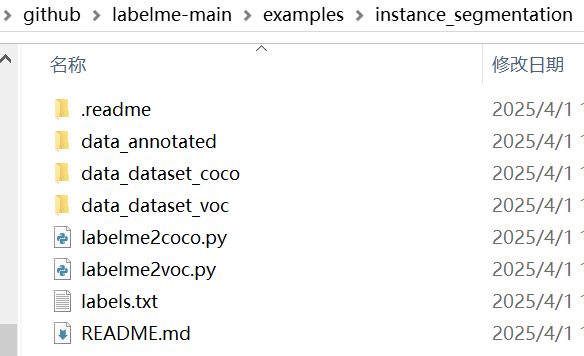
在github\labelme-main\examples\instance_segmentation 文件夹下,
有两个py文件
|-----------------|-------------------------------|
| labelme2coco.py | 将labelme标注的json标签转换为coco数据集格式 |
| labelme2voc.py | 将labelme标注的json标签转换为voc数据集格式 |
labelme2voc.py使用

在使用labelme-多边形标注完图片后,我们将得到 图片jpg,以及 标签json (存放于data_annotated文件夹)
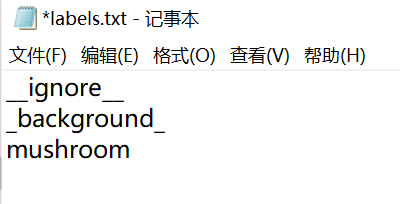
在转化前,需要再建立一个labels.txt文件,存放类别
注意:如果标注多个类别,该如何排序,观察labelme给示例,发现类别的排序与 coco数据集格式的 supercategory 的ID 序号对应。
labels.txt内容如下,background 对应序号supercategory_id 为0, person 对应supercategory_id 为15 。
python
__ignore__
_background_
aeroplane
bicycle
bird
boat
bottle
bus
car
cat
chair
cow
diningtable
dog
horse
motorbike
person
potted plant
sheep
sofa
train
tv/monitor
coco数据集 annotations.json文件内容
python
"categories": [{"supercategory": null, "id": 0, "name": "_background_"}, {"supercategory": null, "id": 1, "name": "aeroplane"}, {"supercategory": null, "id": 2, "name": "bicycle"}, {"supercategory": null, "id": 3, "name": "bird"}, {"supercategory": null, "id": 4, "name": "boat"}, {"supercategory": null, "id": 5, "name": "bottle"}, {"supercategory": null, "id": 6, "name": "bus"}, {"supercategory": null, "id": 7, "name": "car"}, {"supercategory": null, "id": 8, "name": "cat"}, {"supercategory": null, "id": 9, "name": "chair"}, {"supercategory": null, "id": 10, "name": "cow"}, {"supercategory": null, "id": 11, "name": "diningtable"}, {"supercategory": null, "id": 12, "name": "dog"}, {"supercategory": null, "id": 13, "name": "horse"}, {"supercategory": null, "id": 14, "name": "motorbike"}, {"supercategory": null, "id": 15, "name": "person"}, {"supercategory": null, "id": 16, "name": "potted plant"}, {"supercategory": null, "id": 17, "name": "sheep"}, {"supercategory": null, "id": 18, "name": "sofa"}, {"supercategory": null, "id": 19, "name": "train"}, {"supercategory": null, "id": 20, "name": "tv/monitor"}]}因此,创建labels.txt文件内容如下:
将下面四个文件存放在同一个文件夹, 程序py文件从github\labelme-main\examples\instance_segmentation 复制
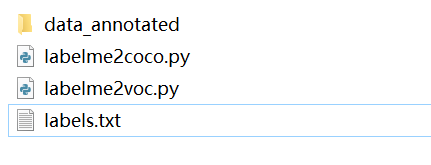
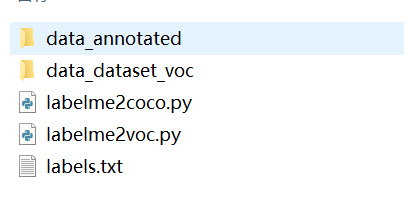
上面四个文件存放于文件夹test, 在该文件夹下打开终端, 激活虚拟环境,输入指令
python
python labelme2voc.py data_annotated data_dataset_voc --labels labels.txt即可得到 VOC数据集格式
labelme2voc.py代码
python
#!/usr/bin/env python

from __future__ import print_function

import argparse
import glob
import os
import os.path as osp
import sys

import imgviz
import numpy as np

import labelme


def main():
    parser = argparse.ArgumentParser(
        formatter_class=argparse.ArgumentDefaultsHelpFormatter
    )
    parser.add_argument("input_dir", help="Input annotated directory")
    parser.add_argument("output_dir", help="Output dataset directory")
    parser.add_argument(
        "--labels", help="Labels file or comma separated text", required=True
    )
    parser.add_argument(
        "--noobject", help="Flag not to generate object label", action="store_true"
    )
    parser.add_argument(
        "--nonpy", help="Flag not to generate .npy files", action="store_true"
    )
    parser.add_argument(
        "--noviz", help="Flag to disable visualization", action="store_true"
    )
    args = parser.parse_args()

    if osp.exists(args.output_dir):
        print("Output directory already exists:", args.output_dir)
        sys.exit(1)
    os.makedirs(args.output_dir)
    os.makedirs(osp.join(args.output_dir, "JPEGImages"))
    os.makedirs(osp.join(args.output_dir, "SegmentationClass"))
    if not args.nonpy:
        os.makedirs(osp.join(args.output_dir, "SegmentationClassNpy"))
    if not args.noviz:
        os.makedirs(osp.join(args.output_dir, "SegmentationClassVisualization"))
    if not args.noobject:
        os.makedirs(osp.join(args.output_dir, "SegmentationObject"))
        if not args.nonpy:
            os.makedirs(osp.join(args.output_dir, "SegmentationObjectNpy"))
        if not args.noviz:
            os.makedirs(osp.join(args.output_dir, "SegmentationObjectVisualization"))
    print("Creating dataset:", args.output_dir)

    if osp.exists(args.labels):
        with open(args.labels) as f:
            labels = [label.strip() for label in f if label]
    else:
        labels = [label.strip() for label in args.labels.split(",")]

    class_names = []
    class_name_to_id = {}
    for i, label in enumerate(labels):
        class_id = i - 1  # starts with -1
        class_name = label.strip()
        class_name_to_id[class_name] = class_id
        if class_id == -1:
            assert class_name == "__ignore__"
            continue
        elif class_id == 0:
            assert class_name == "_background_"
        class_names.append(class_name)
    class_names = tuple(class_names)
    print("class_names:", class_names)
    out_class_names_file = osp.join(args.output_dir, "class_names.txt")
    with open(out_class_names_file, "w") as f:
        f.writelines("\n".join(class_names))
    print("Saved class_names:", out_class_names_file)

    for filename in sorted(glob.glob(osp.join(args.input_dir, "*.json"))):
        print("Generating dataset from:", filename)

        label_file = labelme.LabelFile(filename=filename)

        base = osp.splitext(osp.basename(filename))[0]
        out_img_file = osp.join(args.output_dir, "JPEGImages", base + ".jpg")
        out_clsp_file = osp.join(args.output_dir, "SegmentationClass", base + ".png")
        if not args.nonpy:
            out_cls_file = osp.join(
                args.output_dir, "SegmentationClassNpy", base + ".npy"
            )
        if not args.noviz:
            out_clsv_file = osp.join(
                args.output_dir,
                "SegmentationClassVisualization",
                base + ".jpg",
            )
        if not args.noobject:
            out_insp_file = osp.join(
                args.output_dir, "SegmentationObject", base + ".png"
            )
            if not args.nonpy:
                out_ins_file = osp.join(
                    args.output_dir, "SegmentationObjectNpy", base + ".npy"
                )
            if not args.noviz:
                out_insv_file = osp.join(
                    args.output_dir,
                    "SegmentationObjectVisualization",
                    base + ".jpg",
                )

        img = labelme.utils.img_data_to_arr(label_file.imageData)
        imgviz.io.imsave(out_img_file, img)

        cls, ins = labelme.utils.shapes_to_label(
            img_shape=img.shape,
            shapes=label_file.shapes,
            label_name_to_value=class_name_to_id,
        )
        ins[cls == -1] = 0  # ignore it.

        # class label
        labelme.utils.lblsave(out_clsp_file, cls)
        if not args.nonpy:
            np.save(out_cls_file, cls)
        if not args.noviz:
            clsv = imgviz.label2rgb(
                cls,
                imgviz.rgb2gray(img),
                label_names=class_names,
                font_size=15,
                loc="rb",
            )
            imgviz.io.imsave(out_clsv_file, clsv)

        if not args.noobject:
            # instance label
            labelme.utils.lblsave(out_insp_file, ins)
            if not args.nonpy:
                np.save(out_ins_file, ins)
            if not args.noviz:
                instance_ids = np.unique(ins)
                instance_names = [str(i) for i in range(max(instance_ids) + 1)]
                insv = imgviz.label2rgb(
                    ins,
                    imgviz.rgb2gray(img),
                    label_names=instance_names,
                    font_size=15,
                    loc="rb",
                )
                imgviz.io.imsave(out_insv_file, insv)


if __name__ == "__main__":
    main()
更改版,如果不想在终端使用命令行的形式 运行,也可以在程序中输入文件夹路径直接运行
python
# 2025.4.12
"""

注意事项:
确保 labels.txt 文件存在且格式正确

输出目录不能预先存在(脚本会自动创建)

路径中的反斜杠建议使用原始字符串(字符串前加r)

如果出现权限问题,请以管理员身份运行
"""

# !/usr/bin/env python

from __future__ import print_function

import glob
import os
import os.path as osp
import sys

import imgviz
import numpy as np

import labelme


def main():
    # ====================== 需要修改的配置 ======================

    # 输入标注目录(包含.json文件)
    input_dir = r"你的标注文件目录(包含.json文件)"
    # 输出目录(会自动创建)
    output_dir = r"输出目录(会自动创建)"
    # 标签文件路径
    labels_path = r"标签文件路径(例如:labels.txt)"

    # 功能开关(True表示启用,False表示禁用)
    noobject = False  # 是否不生成实例分割
    nonpy = False  # 是否不生成.npy文件
    noviz = False  # 是否不生成可视化结果

    # noobject = True  # 设置为True则不生成实例分割相关文件
    # nonpy = True     # 设置为True则不生成.npy文件
    # noviz = True     # 设置为True则不生成可视化图片

    # ===========================================================

    # 检查输出目录
    if osp.exists(output_dir):
        print("Output directory already exists:", output_dir)
        sys.exit(1)
    os.makedirs(output_dir)

    # 创建子目录
    os.makedirs(osp.join(output_dir, "JPEGImages"))
    os.makedirs(osp.join(output_dir, "SegmentationClass"))
    if not nonpy:
        os.makedirs(osp.join(output_dir, "SegmentationClassNpy"))
    if not noviz:
        os.makedirs(osp.join(output_dir, "SegmentationClassVisualization"))
    if not noobject:
        os.makedirs(osp.join(output_dir, "SegmentationObject"))
        if not nonpy:
            os.makedirs(osp.join(output_dir, "SegmentationObjectNpy"))
        if not noviz:
            os.makedirs(osp.join(output_dir, "SegmentationObjectVisualization"))
    print("Creating dataset:", output_dir)

    # 读取标签
    with open(labels_path) as f:
        labels = [label.strip() for label in f if label]

    # 处理类别映射
    class_names = []
    class_name_to_id = {}
    for i, label in enumerate(labels):
        class_id = i - 1  # starts with -1
        class_name = label.strip()
        class_name_to_id[class_name] = class_id
        if class_id == -1:
            assert class_name == "__ignore__"
            continue
        elif class_id == 0:
            assert class_name == "_background_"
        class_names.append(class_name)
    class_names = tuple(class_names)
    print("class_names:", class_names)

    # 保存类别名称
    out_class_names_file = osp.join(output_dir, "class_names.txt")
    with open(out_class_names_file, "w") as f:
        f.write("\n".join(class_names))
    print("Saved class_names:", out_class_names_file)

    # 处理每个标注文件
    for filename in sorted(glob.glob(osp.join(input_dir, "*.json"))):
        print("Generating dataset from:", filename)

        label_file = labelme.LabelFile(filename=filename)

        base = osp.splitext(osp.basename(filename))[0]
        out_img_file = osp.join(output_dir, "JPEGImages", base + ".jpg")
        out_clsp_file = osp.join(output_dir, "SegmentationClass", base + ".png")

        # 生成类别标签
        img = labelme.utils.img_data_to_arr(label_file.imageData)
        imgviz.io.imsave(out_img_file, img)

        cls, ins = labelme.utils.shapes_to_label(
            img_shape=img.shape,
            shapes=label_file.shapes,
            label_name_to_value=class_name_to_id,
        )
        ins[cls == -1] = 0  # 忽略被标记的区域

        # 保存类别分割结果
        labelme.utils.lblsave(out_clsp_file, cls)
        if not nonpy:
            np.save(osp.join(output_dir, "SegmentationClassNpy", base + ".npy"), cls)
        if not noviz:
            clsv = imgviz.label2rgb(
                cls,
                imgviz.rgb2gray(img),
                label_names=class_names,
                font_size=15,
                loc="rb",
            )
            imgviz.io.imsave(
                osp.join(output_dir, "SegmentationClassVisualization", base + ".jpg"),
                clsv,
            )

        # 生成实例分割结果
        if not noobject:
            out_insp_file = osp.join(output_dir, "SegmentationObject", base + ".png")
            labelme.utils.lblsave(out_insp_file, ins)
            if not nonpy:
                np.save(
                    osp.join(output_dir, "SegmentationObjectNpy", base + ".npy"), ins
                )
            if not noviz:
                instance_ids = np.unique(ins)
                instance_names = [str(i) for i in range(max(instance_ids) + 1)]
                insv = imgviz.label2rgb(
                    ins,
                    imgviz.rgb2gray(img),
                    label_names=instance_names,
                    font_size=15,
                    loc="rb",
                )
                imgviz.io.imsave(
                    osp.join(
                        output_dir, "SegmentationObjectVisualization", base + ".jpg"
                    ),
                    insv,
                )


if __name__ == "__main__":
    main()
data_dataset_voc文件夹内容如下:
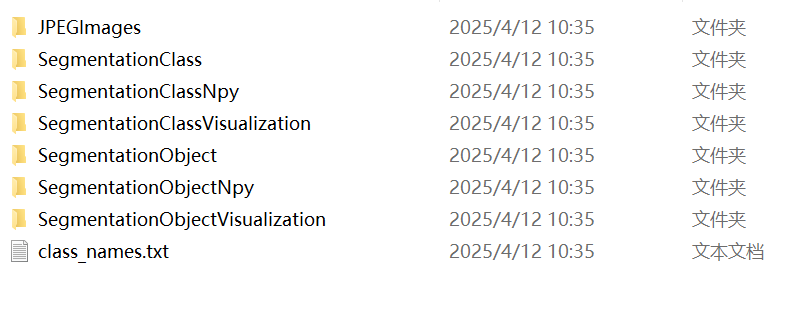
data_dataset_voc\JPEGImages(存放jpg图片)
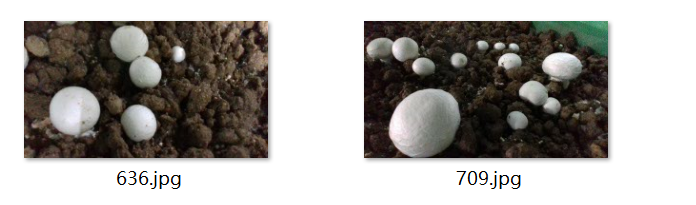
data_dataset_voc\SegmentationClass (存放语义分割标签)
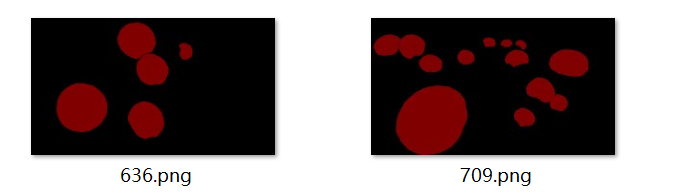
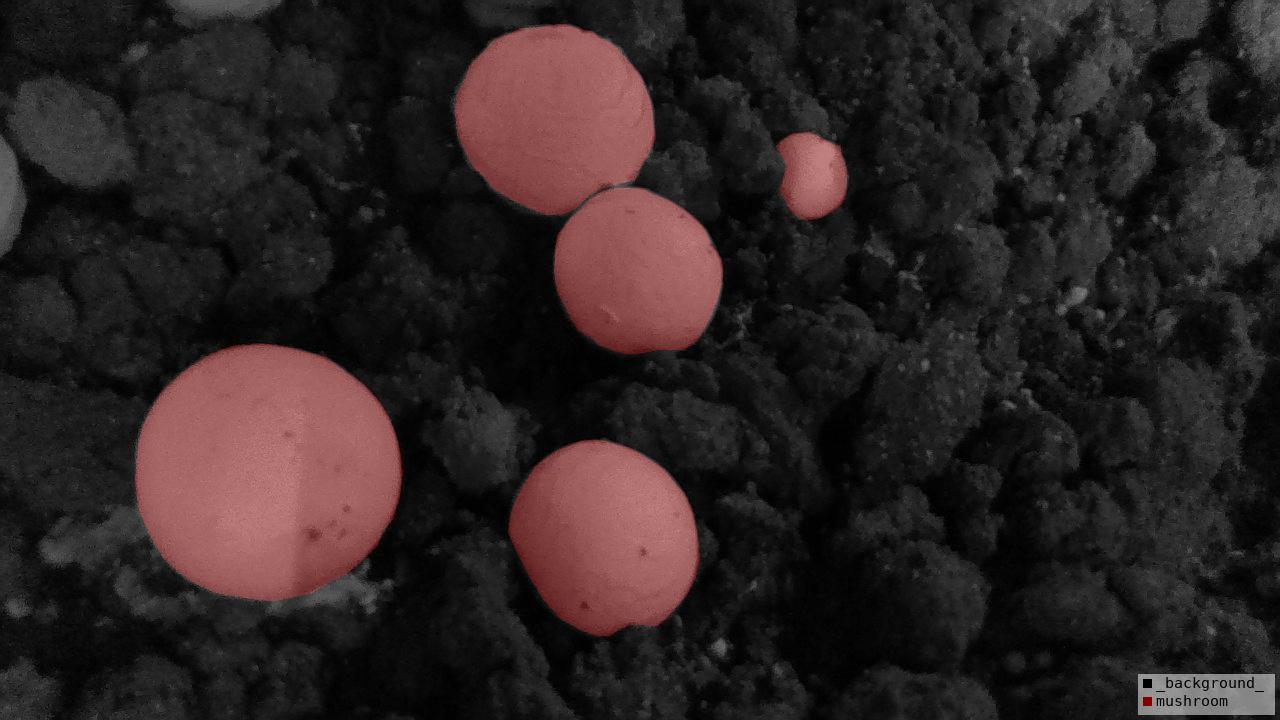
data_dataset_voc\SegmentationClassNpy (存放语义分割标签的npy格式文件, 好像训练时没有用到)

data_dataset_voc\SegmentationClassVisualization (语义分割标签-可视化)
 data_dataset_voc\SegmentationObject (实例分割标签)
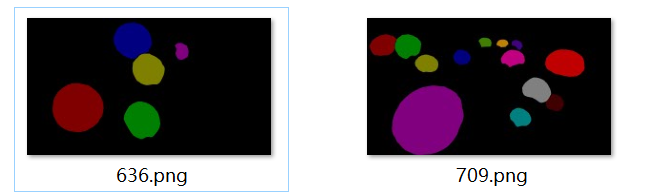
data_dataset_voc\SegmentationObjectNpy (存放实例分割标签的npy格式文件)

data_dataset_voc\SegmentationObjectVisualization (实例分割标签-可视化)
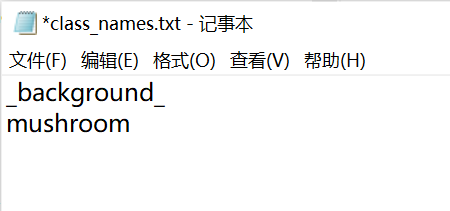
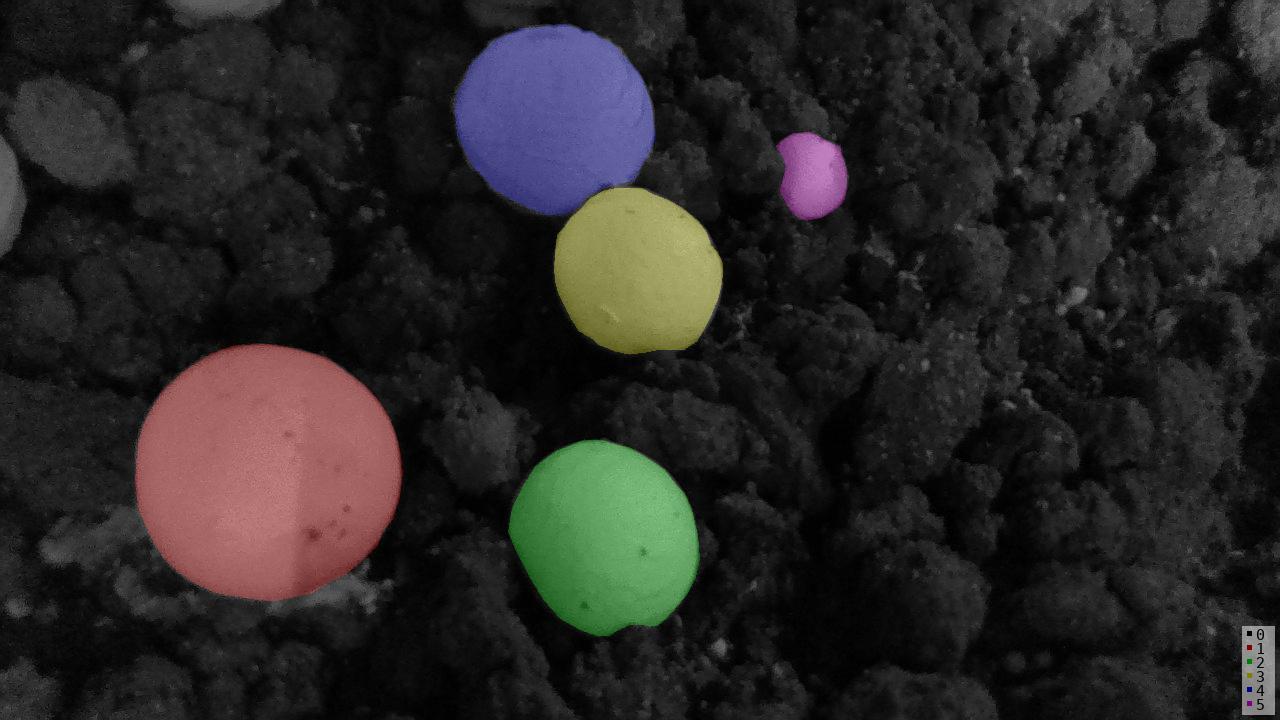 class_names.txt
内容
至此,labelme2voc.py 内容结束,但是在使用相关实例分割网络训练(mask-rcnn)的过程中,发现还需要xml文件,需要将labelme_json标签转换为xml标签,这个后续在其他文章再说。
labelme2coco.py使用
与上述一样,
在数据集文件夹中打开终端输入命令行参数
python
python labelme2coco.py data_annotated data_dataset_coco --labels labels.txt或者像上述更改版代码那样,进行修改,直接输入路径值
data_dataset_coco文件夹内容如下:
python
data_dataset_coco
             |__
                |------JPEGImages        图片.jpg
                |------Visualization     可视化实例分割标签 .png
                |------annotations.json  json标签信息 (所有图片)
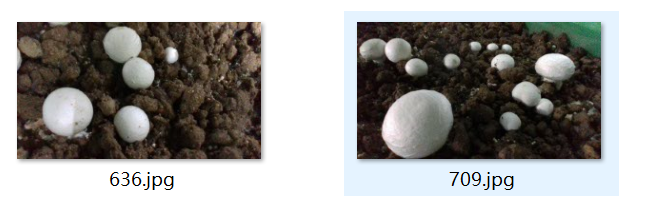
data_dataset_coco\JPEGImages
data_dataset_coco\Visualization
data_dataset_coco\annotations.json
内容太长,就不展示了