由于本人觉得语雀编辑器非常好用,很符合我的使用习惯,然后发现语雀的Chrome浏览器插件实现了编辑器的功能,所以将其富文本的功能拆分位一个单独的Vue3组件。
安装
sh
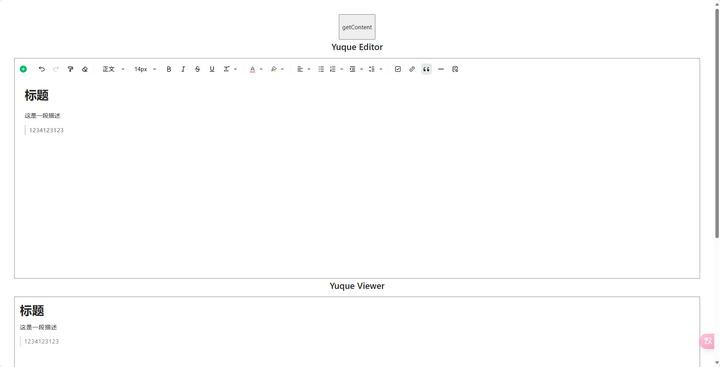
npm i yuque-rich-text截图
Props
ts
export interface EditorProps {
        value: string; // 传递给组件的内容
        children?: any;
        isview?: boolean; // 预览模式,用于在客户端页面展示结果。
        uploadImage?: (params: { data: string | File }) => Promise<{
            url: string;
            size: number;
            filename: string;
        }>;
        uploadVideo?: (params: { data: string | File }) => Promise<{
            url: string;
            size: number;
            filename: string;
        }>;
    }
Emit
ts
export interface EditorEmits{
        onChange?: (value: string) => void;
        onLoad?: () => void;
        onSave?: () => void;
    }
Expose
ts
export interface IEditorRef {
        /**
         * 追加html到文档
         * @param html html内容
         * @param breakLine 是否前置一个换行符
         */
        appendContent: (html: string, breakLine?: boolean) => void;
        /**
         * 设置文档内容,将清空旧的内容
         * @param html html内容
         */
        setContent: (content: string, type?: "text/lake" | "text/html") => void;
        /**
         * 获取文档内容
         * @param type 内容的格式
         * @return 文档内容
         */
        getContent: (type: "lake" | "text/html") => Promise<string>;
        /**
         * 判断当前文档是否是空文档
         * @return true表示当前是空文档
         */
        isEmpty: () => boolean;

        /**
         * 获取额外信息
         * @return
         */
        getSummaryContent: () => string;

        /**
         * 统计字数
         * @return
         */
        wordCount: () => number;

        /**
         * 聚焦到文档开头
         * @param {number} offset 偏移多少个段落,可以将选区落到开头的第offset个段落上, 默认是0
         * @return
         */
        focusToStart: (offset?: number) => void;

        /**
         * 插入换行符
         * @return
         */
        insertBreakLine: () => void;
    }
使用编辑器
使用非常简单,只需import组件即可
注意不可在onChange事件中修改value的值,否则会进入无限递归。
vue3
<template>
      <YuqueRichText ref="editRef" :value="modelValue"/>
</template>

<script setup lang="ts">
import { ref, watch, PropType } from "vue";
import { YuqueRichText } from "yuque-rich-text";

const editRef = ref<InstanceType<typeof YuqueRichText>>();
const modelValue = ref("hello yuque richtext");
</script>
⚠️ Disclaimer
This is an unofficial third-party extension for www.yuque.com. It is not affiliated with, maintained by, or endorsed by www.yuque.com.
- Use at your own risk. The developers are not responsible for any violations of www.yuque.com's terms or damages caused by this project.
- Do not use if www.yuque.com prohibits third-party modifications.
- This project does not redistribute any copyrighted materials from www.yuque.com.