装饰模式是一种结构型设计模式,它允许向一个现有的对象添加新的功能,同时又不改变其结构。这种模式创建了一个装饰类,用来包装原有的类,并在保持类方法签名完整性的前提下,提供了额外的功能。
优点:
1.灵活性高:可以在运行时动态地为对象添加或删除功能,而不需要修改对象的原有代码。
2.可扩展性强:可以通过组合不同的装饰器,为对象添加多种不同的功能,满足不同的需求。
3.符合开闭原则:对扩展开放,对修改关闭。当需要添加新的功能时,只需要创建新的装饰器类,而不需要修改原有的代码。
缺点:
1.产生过多的小对象 :大量小型装饰器类导致类数量膨胀,增加了系统的复杂性和内存开销。
优化:对象池复用。
2.调试困难:多层装饰器的嵌套可能会导致调试困难,因为很难确定每个装饰器的具体作用。
说明例子:
1.UML类图:
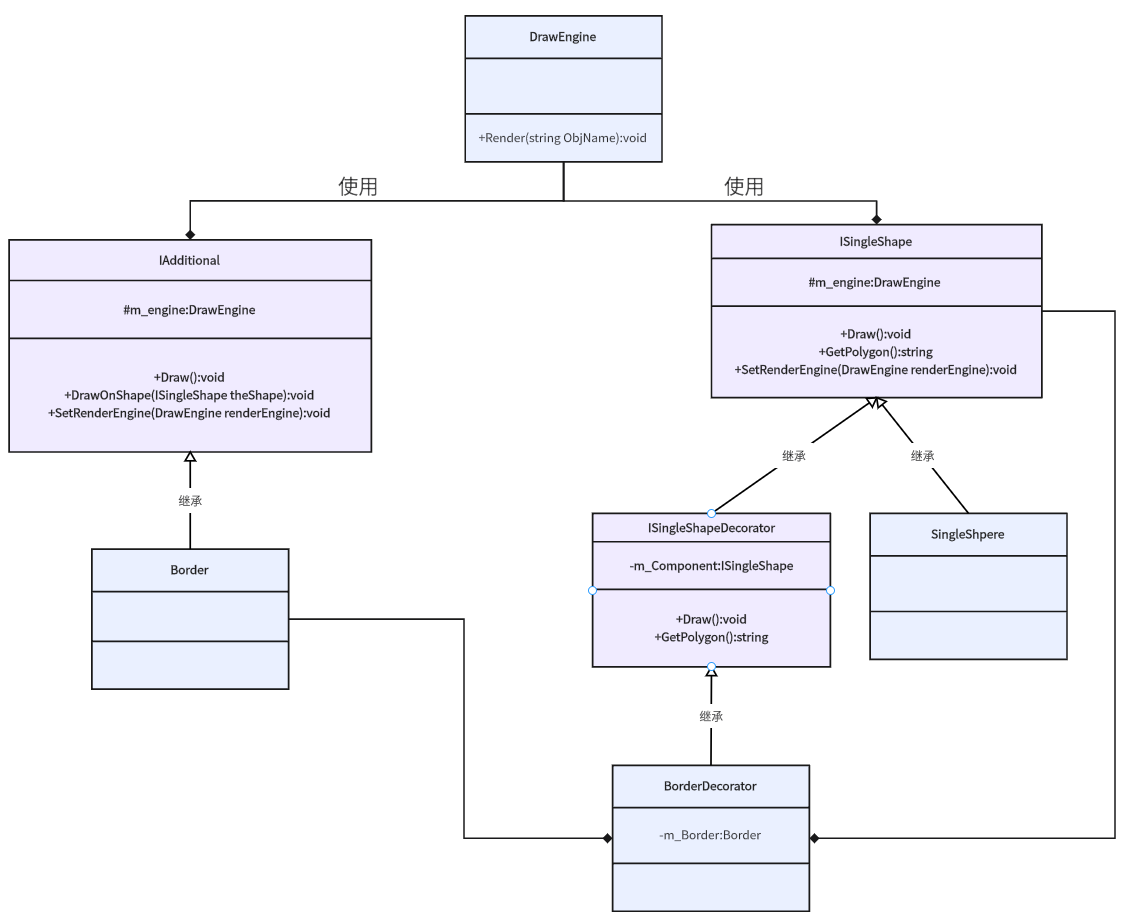
2.实现:
1.定义绘制类:
cs
   public class DrawEngine
   {
       public void Render(string ObjName)
       {
           Debug.Log("Render:" + ObjName);
       }
   }
2.定义形状类接口以及形状实现:
cs
  //形状接口类
  public abstract class ISingleShape
  {
      protected DrawEngine m_engine = null;

      public virtual void SetRenderEngine(DrawEngine renderEngine)
      {
          m_engine = renderEngine;
      }

      public abstract void Draw();
      public abstract string GetPolygon();
  }

  public class SingleSphere : ISingleShape
  {
      public override void Draw()
      {
          m_engine.Render("Draw SingleSphere");
      }

      public override string GetPolygon()
      {
          return "Single Sphere 多边形";
      }
  }
3.定义附加功能接口以及实现类:
cs
    //附加功能实现
    public abstract class IAdditional
    {
        protected DrawEngine m_engine = null;

        public void SetRenderEngine(DrawEngine renderEngine)
        {
            m_engine = renderEngine;
        }

        public abstract void DrawOnShape(ISingleShape theShape);
    }

    //外框类
    public class Border : IAdditional
    {
        public override void DrawOnShape(ISingleShape theShape)
        {
            m_engine.Render("Draw Border On" + theShape.GetPolygon());
        }
}- 定义形状装饰器接口类和实现类:
cs
    //形状装饰器接口类
    public abstract class ISingleShapeDecorator : ISingleShape
    {
        ISingleShape m_Component;

        public ISingleShapeDecorator(ISingleShape theComponent)
        {
            m_Component = theComponent;
        }

        public override void Draw()
        {
            m_Component.Draw();
        }

        public override string GetPolygon()
        {
            return m_Component.GetPolygon();
        }
    }

    //外框装饰器类
    public class BorderDecorator : ISingleShapeDecorator
    {
        //外框功能
        Border m_Border = null;

        public BorderDecorator(ISingleShape theComponent):base(theComponent) { m_Border = new Border(); }

        public override void SetRenderEngine(DrawEngine renderEngine)
        {
            base.SetRenderEngine(renderEngine);
            m_Border.SetRenderEngine(renderEngine);
        }

        public override void Draw()
        {
            //被装饰者功能
            base.Draw();
            //外框功能
            m_Border.DrawOnShape(this);
        }
    }
5.测试类:
cs
  public class DecoratorPattern : MonoBehaviour
  {
      // Start is called before the first frame update
      void Start()
      {
          DrawEngine theDraw = new DrawEngine();

          SingleSphere theSphere = new SingleSphere();
          theSphere.SetRenderEngine(theDraw);

          BorderDecorator theSphereWithBorder = new BorderDecorator(theSphere);
          theSphereWithBorder.SetRenderEngine(theDraw);
          theSphereWithBorder.Draw();
      }
  }
游戏中的使用场景:
1.角色属性加成系统 :装备/Buff 需要动态叠加属性且支持多种组合。
2.技能效果叠加 :基础技能需要支持动态添加元素效果(冰冻/燃烧/中毒)。
3.UI 系统增强 :需要动态为UI组件添加装饰效果(边框/阴影/动画)。
4.游戏状态叠加 :角色状态需要支持多种Buff/Debuff叠加(加速/中毒/隐身)。
5.音效系统增强 :需要动态调整音效(回声/混响/音量调节)。
6.成就系统扩展:基础成就需要支持条件叠加(首次达成/困难模式/无伤通关)。
总结:
通过装饰器模式,可在不修改现有对象结构的情况下,动态添加功能。在游戏开发中,这种模式特别适合实现装备系统、技能修饰、UI增强等需要灵活组合的场景。
参考书籍:
《Hands-On Game Development Patterns with Unity 2019》
《设计模式与游戏完美开发》