一、边框效果
| 属性 | 功能 | 示例值 | 说明 |
|---|---|---|---|
border-radius |
创建圆角 | border-radius: 20px; |
设置元素的圆角半径,支持像素(px)或百分比(%)。值为 50% 时可变为圆形。 |
box-shadow |
添加阴影 | box-shadow: 5px 5px 15px rgba(0, 0, 0, 0.5); |
为元素添加外部或内部阴影,支持颜色、模糊半径等。 |
1、border-radius语法:
border-radius: 水平半径 垂直半径
按左上→右上→右下→左下顺时针排列,省略时对角复制
(如
border-radius: 10px 20px;表示左上/右下为10px,右上/左下为20px)
使用 border-radius 制作特殊图形
html
<!DOCTYPE html>
<html lang="zh-cn">
<head>
<meta charset="UTF-8">
<meta name="viewport" content="width=device-width, initial-scale=1.0">
<title>使用 border-radius 制作特殊图形</title>
<style>
body {
font-family: Arial, sans-serif;
text-align: center;
margin: 20px;
}
.container {
display: flex;
justify-content: center;
flex-wrap: wrap;
gap: 20px;
}
.shape {
background-color: #25c447;
display: flex;
justify-content: center;
align-items: center;
color: #fff;
font-size: 14px;
font-weight: bold;
}
/* 圆形 */
/* 元素的宽度和高度必须相同,圆角的半径为元素宽度的一半,或者直接设置圆角半径值为50% */
.circle {
width: 100px;
height: 100px;
border-radius: 50%;
}
/* 椭圆 */
/* 元素的宽度和高度不相同,圆角的半径为元素宽度的一半,或者直接设置圆角半径值为50% */
.ellipse {
width: 150px;
height: 100px;
border-radius: 50%;
}
/* 半圆: */
/* 制作左半圆或右半圆时,元素的高度是宽度的2倍,而且圆角半径为元素的宽度值 */
.half-circle {
width: 50px;
height: 100px;
border-radius: 0 50px 50px 0 ;
}
/* 半圆: */
/* 制作上半圆或下半圆时,元素的宽度是高度的2倍,而且圆角半径为元素的高度值*/
.half-circle2 {
width: 100px;
height: 50px;
border-radius: 50px 50px 0 0;
}
/* 水滴形 */
.water-drop {
width: 50px;
height: 100px;
border-radius: 50% 50% 50% 50% / 70% 70% 20% 20%;
}
/* 扇形 */
/* "三同"是元素宽度、高度、圆角半径相同,一不同"是圆角取值位置不同 */
.fan {
width: 100px;
height: 100px;
border-radius: 100px 0 0 0;
}
/* 矩形 */
.li {
width: 100px;
height: 100px;
border-radius:0%; /*矩形有无角*/
}
</style>
</head>
<body>
<h1>使用 border-radius 制作特殊图形</h1>
<div class="container">
<div class="shape circle">圆形</div>
<div class="shape ellipse">椭圆</div>
<div class="shape half-circle">右半圆</div>
<div class="shape half-circle2">上半圆</div>
<div class="shape water-drop">水滴</div>
<div class="shape fan">扇形</div>
<div class="shape li">矩形</div>
</div>
</body>
</html>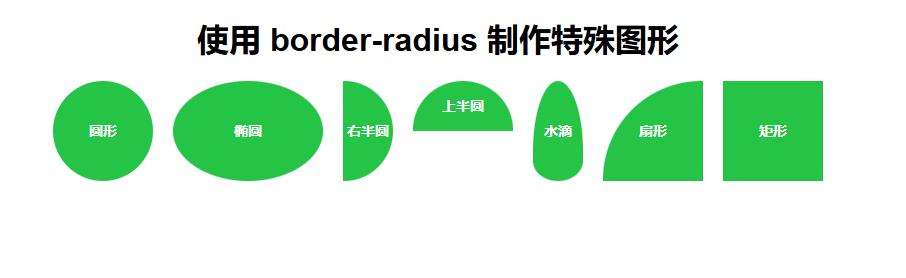 2、box-shadow 盒子阴影
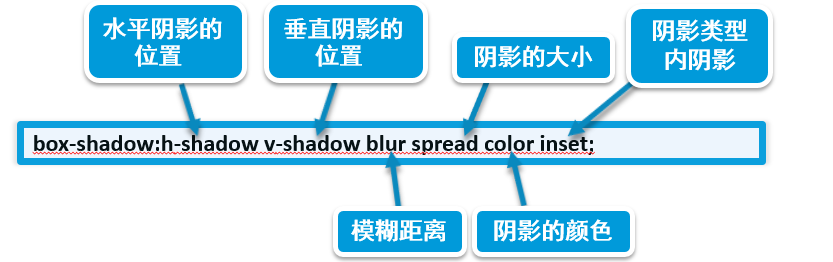
box-shadow: 水平偏移量 垂直偏移量 模糊半径 扩展半径 颜色 inset;
- 水平偏移量:阴影水平方向的距离(正值为右,负值为左)。
- 垂直偏移量:阴影垂直方向的距离(正值为下,负值为上)。
- 模糊半径:阴影的模糊程度(值越大越模糊,0 为无模糊)。
- 扩展半径:阴影的扩展范围(正值扩大,负值缩小)。
- 颜色:阴影颜色(支持 HEX、RGB、RGBA 等格式)。
- inset:可选关键字,表示阴影在元素内部(默认是外部)。
html
<!DOCTYPE html>
<html lang="zh-CN">
<head>
    <meta charset="UTF-8">
    <meta name="viewport" content="width=device-width, initial-scale=1.0">
    <title>Box-Shadow </title>
    <style>
        body {
            font-family: Arial, sans-serif;
            background-color: #ebecd5;
            margin: 0;
            padding: 20px;
            display: flex;
            justify-content: space-around;
            align-items: center;
            height: 100vh;
            flex-wrap: wrap;
        }

        /* 外阴影 */
        .box-outer-shadow {
            width: 300px;
            height: 200px;
            background-color: #fff;
            border-radius: 10px;
            box-shadow: 0 8px 16px rgba(0, 0, 0, 0.4); /* 增加偏移量和透明度 */
            display: flex;
            justify-content: center;
            align-items: center;
            text-align: center;
        }

        /* 内阴影 */
        .box-inner-shadow {
            width: 300px;
            height: 200px;
            background-color: #fff;
            border-radius: 10px;
            box-shadow: inset 0 8px 16px rgba(0, 0, 0, 0.3); /* 增加模糊半径和透明度 */
            display: flex;
            justify-content: center;
            align-items: center;
            text-align: center;
        }

        /* 多层阴影 */
        .box-multi-shadow {
            width: 300px;
            height: 200px;
            background-color: #fff;
            border-radius: 10px;
            box-shadow: 0 8px 16px rgba(0, 0, 0, 0.4), 0 16px 32px rgba(0, 0, 0, 0.2); /* 增加层次感 */
            display: flex;
            justify-content: center;
            align-items: center;
            text-align: center;
        }

        /* 扩展阴影 */
        .box-extended-shadow {
            width: 300px;
            height: 200px;
            background-color: #fff;
            border-radius: 10px;
            box-shadow: 0 30px 60px rgba(0, 0, 0, 0.4); /* 增加偏移量和模糊半径 */
            display: flex;
            justify-content: center;
            align-items: center;
            text-align: center;
        }

        .box p {
            font-size: 18px;
            color: #333;
        }
    </style>
</head>
<body>
    <div class="box-outer-shadow">
        <p>外阴影</p>
    </div>
    <div class="box-inner-shadow">
        <p>内阴影</p>
    </div>
    <div class="box-multi-shadow">
        <p>多层阴影</p>
    </div>
    <div class="box-extended-shadow">
        <p>扩展阴影</p>
    </div>
</body>
</html>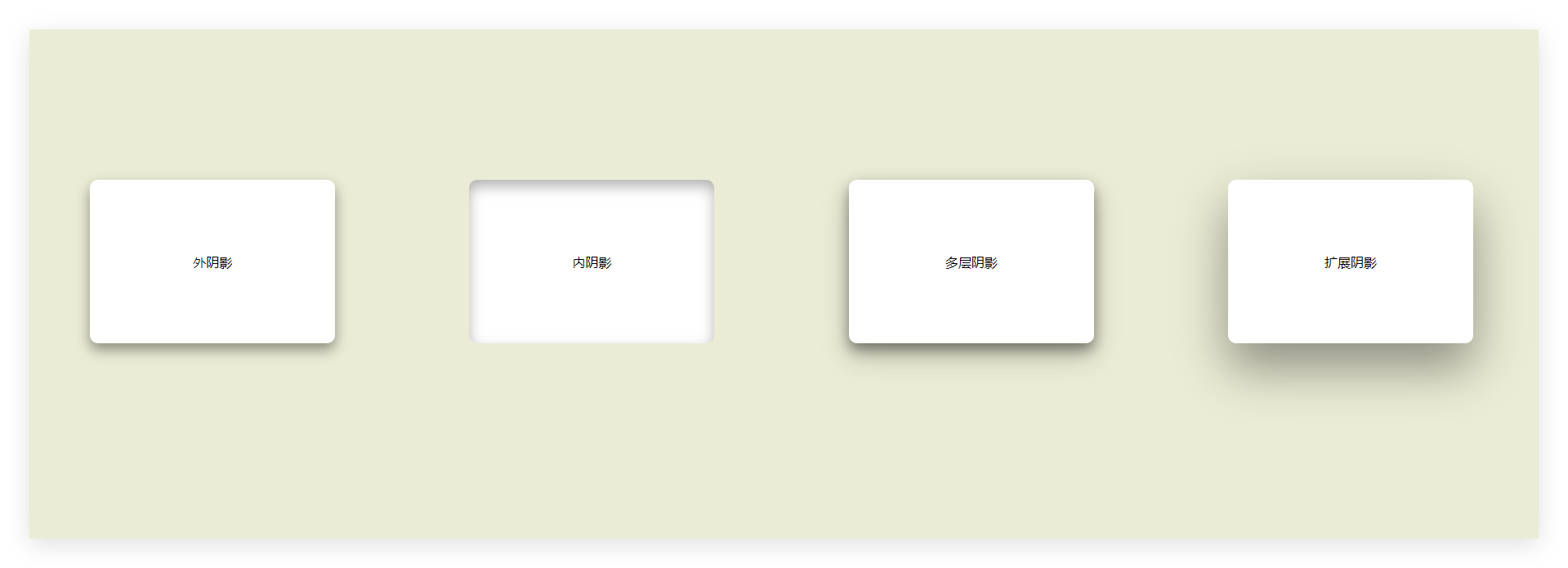
外阴影
- 向下方偏移 8px,模糊半径 16px,颜色为半透明黑色。
内阴影(inset)
- 在元素内部添加模糊阴影,常用于按钮按下效果。
多层阴影
- 叠加两层阴影,实现更立体的层次感。
扩展阴影
- 阴影不模糊,扩展 5px,常用于高亮边框效果。