本文介绍XML序列化和反序列化操作
本例子中被序列化的类(Devices)中有一个List,其元素类型为:DigitalInputInfo. 序列化以及反序列化都很简单:
序列化:即把类的对象输出到文件中。
StreamWriter streamWriter = new StreamWriter(filePath);
XmlSerializerNamespaces xmlSerializerNamespaces = new XmlSerializerNamespaces();
xmlSerializerNamespaces.Add("", "");
XmlSerializer xmlSerializer = new XmlSerializer(sourceObj.GetType());
xmlSerializer.Serialize(streamWriter, sourceObj, xmlSerializerNamespaces);
streamWriter.Close();
return true;
反序列化:从文件中加载生成类的对象。
StreamReader streamReader = new StreamReader(filePath);
XmlSerializer xmlSerializer = new XmlSerializer(type ?? typeof(T));
obj = xmlSerializer.Deserialize(streamReader);
streamReader.Close();
具体效果以及代码如下:
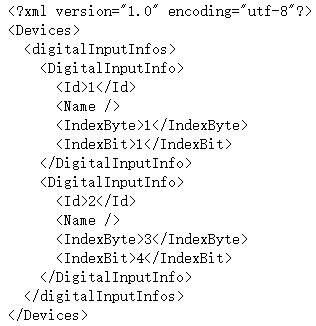
一、效果如下
生成的序列化文件打开后如下:
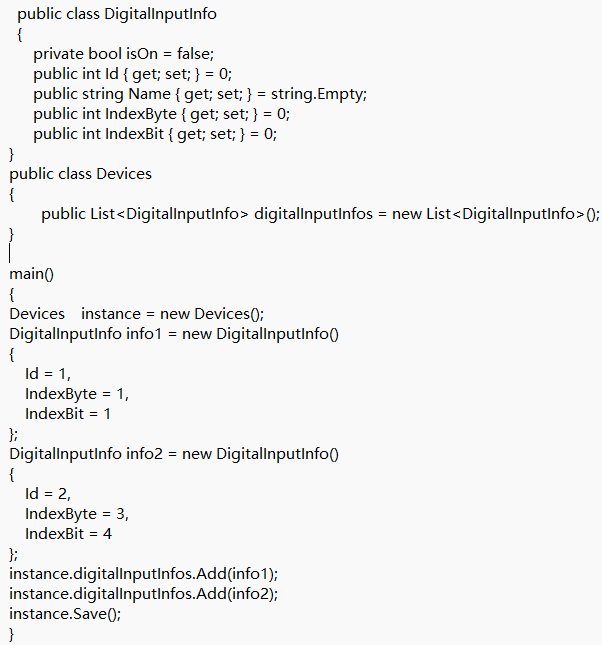
二、具体代码:
cs
public static bool SaveToXml_FileName<T>(string filePath, T sourceObj)
{
    if (!string.IsNullOrEmpty(filePath) && sourceObj != null)
    {
        try
        {
            StreamWriter streamWriter = new StreamWriter(filePath);
            XmlSerializerNamespaces xmlSerializerNamespaces = new XmlSerializerNamespaces();
            xmlSerializerNamespaces.Add("", "");
            XmlSerializer xmlSerializer = new XmlSerializer(sourceObj.GetType());
            xmlSerializer.Serialize(streamWriter, sourceObj, xmlSerializerNamespaces);
            streamWriter.Close();
            return true;
        }
        catch (Exception ex)
        {
            Log.Error(ex);

        }
    }
    return false;
}
cs
public static T LoadFromXml_FileName<T>(string filePath, Type type = null)
{
    object obj = null;
    try
    {
        StreamReader streamReader = new StreamReader(filePath);
        XmlSerializer xmlSerializer = new XmlSerializer(type ?? typeof(T));
        obj = xmlSerializer.Deserialize(streamReader);
        streamReader.Close();
    }
    catch (Exception ex)
    {
        Log.Error(ex);
    }
    return (obj == null) ? default(T) : ((T)obj);
}
cs
  public class DigitalInputInfo
  {
      private bool isOn = false;
      public int Id { get; set; } = 0;
      public string Name { get; set; } = string.Empty;
      public int IndexByte { get; set; } = 0;
      public int IndexBit { get; set; } = 0;
}
public class Devices
{
	public List<DigitalInputInfo> digitalInputInfos = new List<DigitalInputInfo>();
}

main()
{
Devices    instance = new Devices();
DigitalInputInfo info1 = new DigitalInputInfo()
{
    Id = 1,
    IndexByte = 1,
    IndexBit = 1
};
DigitalInputInfo info2 = new DigitalInputInfo()
{
    Id = 2,
    IndexByte = 3,
    IndexBit = 4
};
instance.digitalInputInfos.Add(info1);
instance.digitalInputInfos.Add(info2);
instance.Save();
}