📢博客主页:https://blog.csdn.net/2301_779549673
📢博客仓库:https://gitee.com/JohnKingW/linux_test/tree/master/lesson
📢欢迎点赞 👍 收藏 ⭐留言 📝 如有错误敬请指正!
📢本文由 JohnKi 原创,首发于 CSDN🙉
📢未来很长,值得我们全力奔赴更美好的生活✨


文章目录
- 🏳️🌈一、增加请求后缀
-
- [1.1 HttpRequest 类](#1.1 HttpRequest 类)
- [1.2 HttpHandler 类](#1.2 HttpHandler 类)
- [🏳️🌈二、状态码描述 及 自动跳转404](#🏳️🌈二、状态码描述 及 自动跳转404)
-
- [2.1 状态码描述](#2.1 状态码描述)
- [2.2 自动跳转404](#2.2 自动跳转404)
- 🏳️🌈三、重定向状态码
- 🏳️🌈四、注册等多功能服务
-
- [4.1 HttpRequest 类](#4.1 HttpRequest 类)
- [4.2 HttpHandler 类](#4.2 HttpHandler 类)
- [4.3 TcpServer.cpp](#4.3 TcpServer.cpp)
- [4.4 测试](#4.4 测试)
- 👥总结
🏳️🌈一、增加请求后缀
我们在浏览器上访问我们自己的服务端时,会遇到客户端发送来的请求,想要访问 1.jpg 或者 default.html 因此我们可以将这个后缀给整理一下,通过日志打印告诉我们自己目标想要访问的资源在当前的哪里。
1.1 HttpRequest 类
我们在这个类里进行如下操作
- 添加成员变量
_suffix- 在请求行解析方法中,增添一段,通过后缀分隔符
".",来找到我们的后缀,没有找到就返回默认后缀- 添加函数方法,获取当前请求的后缀名
const static std::string _suffixsep = ".";                      // 后缀分隔符

class HttpRequest {
private:
    // 解析请求行
    void PraseReqLine() {
        // 以空格为分隔符,不断读取
        std::stringstream ss(_req_line);
        ss >> _method >> _url >> _version;

        _path += _url;
        // 处理url,如果是根目录,则返回默认路径
        if (_url == "/")
            _path += _default_path;

        // 获取后缀
        auto pos = _path.rfind(_suffixsep);
        if (pos == std::string::npos)
            _suffix = ".default";
        else
            _suffix = _path.substr(pos);
    }

public:
    std::string Suffix() {
        LOG(LogLevel::INFO) << "client want suffix : " << _suffix;
        return _suffix;
    }
}
1.2 HttpHandler 类
这里我们需要先知道一个概念 - MIMIE
MIME 是一种 互联网标准,最初设计用于扩展电子邮件协议(如 SMTP),使其能传输非文本数据(如图片、音频)。后被 HTTP 协议广泛采用,用于标识网络资源的 数据类型。
- .html → text/html(HTML 文档)
- .jpg → image/jpeg(JPEG 图片)
- .json → application/json(JSON 数据)
这个类中我们需要增加一个后缀映射,并将其添加在返回报文的报头列表中
1, 增加成员变量
后缀与后缀存储的映射2.`构造函数 时,初始化映射
- 处理请求时,将映射结果添加到响应报头中
class HttpHandler {
public:
    HttpHandler() {
        _mime_type.insert(std::make_pair(".html", "text/html"));
        _mime_type.insert(std::make_pair(".jpg", "image/jpg"));
        _mime_type.insert(std::make_pair(".png", "image/png"));
        _mime_type.insert(std::make_pair(".default", "text/html"));
    }
    std::string HandleRequest(std::string req) {
        std::cout << "------------------------------------" << std::endl;
        std::cout << req;

        HttpRequest req_obj;
        req_obj.Descrialize(req);

        std::string content = GetFileContent(req_obj.Path());
        if (content.empty())
            return std::string();

        HttpResponse rsp;
        rsp.AddCode(200);
        rsp.AddHeader("Content-Length", std::to_string(content.size()));
        rsp.AddHeader("Content-type", _mime_type[req_obj.Suffix()]);
        rsp.AddBodyText(content);

        return rsp.Serialize();
    }
private:
    std::unordered_map<std::string, std::string> _mime_type;
};🏳️🌈二、状态码描述 及 自动跳转404
前面的文章中我们已经知道了状态码描述的存在,但是没有可利用过,这里再介绍一下这个状态码,添加一个状态码的映射,并且根据访问内容,去判断要不要显示404界面
2.1 状态码描述
这里需要进行两方面的更改,一个是 HttpResponse,一个是 HttpHandler 的构造和成员变量
HttpHandler 中我们添加
状态码和状态码描述的映射 ,然后在构造中表示出来
class HttpHandler {
public:
    HttpHandler() {
        _mime_type.insert(std::make_pair(".html", "text/html")); // HTML 类型
        _mime_type.insert(std::make_pair(".jpg", "image/jpeg")); // JPEG 图片
        _mime_type.insert(std::make_pair(".png", "image/png"));  // PNG 图片
        _mime_type.insert(std::make_pair(".default", "text/html")); // 默认文本类型

        _status_code_desc.insert(std::make_pair(100, "Continue"));
        _status_code_desc.insert(std::make_pair(200, "OK"));
        _status_code_desc.insert(std::make_pair(201, "Created"));
        _status_code_desc.insert(std::make_pair(404, "Not Found"));
    }
private:
    std::unordered_map<int, std::string> _status_code_desc;
};
HttpResponse 中的
AddCode方法,我们之前默认是不论什么都是 OK,现在我们对其进行专属化处理
// 添加 状态码 和 状态码描述
void AddCode(int code, std::string desc) {
    _status_code = code;
    _desc = desc;
}
2.2 自动跳转404
我们在 HttpHandler 的 HandleRequest 方法中,当判定访问的路径内容为空时,就将这个路径改成 404.html
std::string HandleRequest(std::string req) {
    std::cout << "------------------------------------" << std::endl;
    std::cout << req;

    HttpRequest req_obj;
    req_obj.Descrialize(req);

    std::string content = GetFileContent(req_obj.Path());
    HttpResponse rsp;

    if (content.empty()) {
        content = GetFileContent("wwwroot/404.html");
        rsp.AddCode(404, _status_code_desc[404]);
        rsp.AddHeader("Content-Length", std::to_string(content.size()));
        rsp.AddHeader("Content-type", _mime_type[".default"]);
        rsp.AddBodyText(content);
    } else {
        rsp.AddCode(200, _status_code_desc[200]);
        rsp.AddHeader("Content-Length", std::to_string(content.size()));
        rsp.AddHeader("Content-type", _mime_type[req_obj.Suffix()]);
        rsp.AddBodyText(content);
    }

    return rsp.Serialize();
}🏳️🌈三、重定向状态码
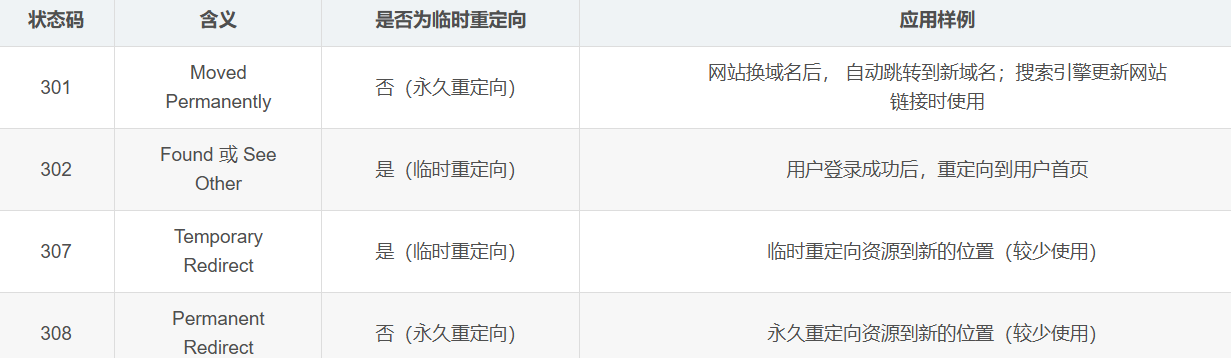
HTTP 状态码 301(永久重定向)和 302(临时重定向)都依赖 Location 选项。
无论是 HTTP 301 还是 HTTP 302 重定向,都需要依赖 Location 选项来指定资源的新位置。这个 Location 选项是一个标准的 HTTP 响应头部,用于告诉浏览器应该将请求重定向到哪个新的 URL 地址。
我们现在
default.html中添加测试重定向的选项
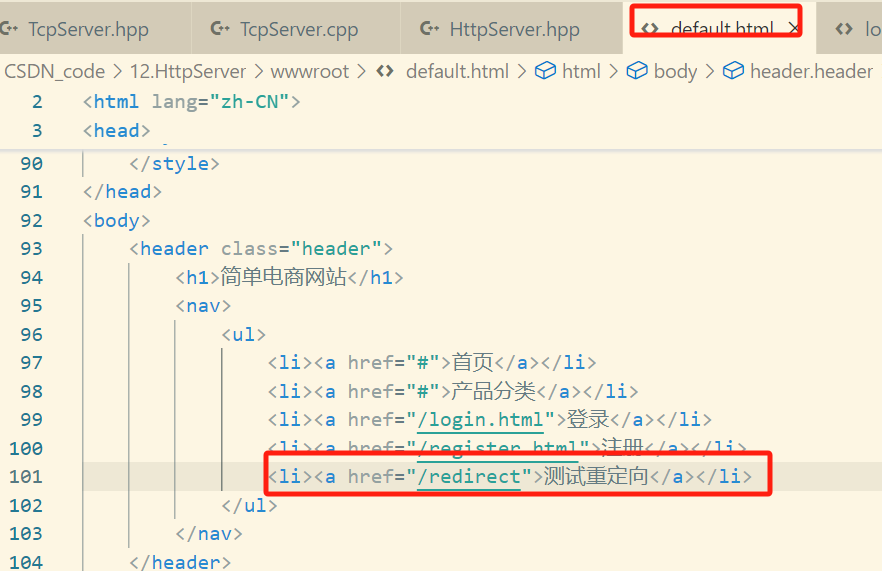
我们测试永久重定向,将当前的网址重定向到
qq.com中
std::string HandleRequest(std::string req) {
    std::cout << "------------------------------------" << std::endl;
    std::cout << req;

    HttpRequest req_obj;
    req_obj.Descrialize(req);
    HttpResponse rsp;
    if (req_obj.Url() == "/redirect") {
        // 重定向处理
        std::string redirect_path = "https://www.qq.com";
        rsp.AddCode(302, _status_code_desc[302]);
        rsp.AddHeader("Location", redirect_path);
        rsp.AddHeader("Content-Type", "text/plain"); // 添加 Content-Type
        rsp.AddHeader("Content-Length", "0");        // 显式设置内容长度为 0
        rsp.AddBodyText("");                         // 确保响应体为空
    } else {
        std::string content = GetFileContent(req_obj.Path());

        if (content.empty()) {
            content = GetFileContent("wwwroot/404.html");
            rsp.AddCode(404, _status_code_desc[404]);
            rsp.AddHeader("Content-Length", std::to_string(content.size()));
            rsp.AddHeader("Content-type", _mime_type[".default"]);
            rsp.AddBodyText(content);
        } else {
            rsp.AddCode(200, _status_code_desc[200]);
            rsp.AddHeader("Content-Length", std::to_string(content.size()));
            rsp.AddHeader("Content-type", _mime_type[req_obj.Suffix()]);
            rsp.AddBodyText(content);
        }
    }
    return rsp.Serialize();
}
🏳️🌈四、注册等多功能服务
因为存在两种主要的提交方式,分别是 POST 和 GET,因此参数的位置会不一样,
GET下,位于 网址 的?后面

POST 下,位于请求正文中
所以我们要根据不同的情况,分出响应的 参数,以及路径
4.1 HttpRequest 类
需要改的主要有三部分
-
增加新的成员变量,
_args用来记录参数,_isexcute用来记录是否有参数 -
构造函数 中给
_isexcute默认为false -
更改
Descrialize细节,使其区分GET和POST,并且能够准确提取出_args和_pathclass HttpRequest{
private:
public:
HttpRequest() : _blank_line(_base_sep), _path(_prefix_path), _isexcute(false) {}void Descrialize(std::string& reqstr){ // 基本的反序列化 _req_line = GetLine(reqstr); // 读取第一行请求行 // 请求报头 std::string header; do{ header = GetLine(reqstr); // 如果既不是空,也不是空行,就是请求报头,加入到请求报头列表中 if(header.empty()) break; else if(header == _base_sep) break; _req_headers.push_back(header); }while(true); // 正文 if(!reqstr.empty()) _req_body = reqstr; // 进一步反序列化请求行 PraseReqLine(); // 分割请求报头,获取键值对 PraseHeader(); // 判断是否需要动态执行 if(_method == "POST"){ _isexcute = true; _args = _req_body; LOG(LogLevel::INFO) << "POST _path : " << _path; LOG(LogLevel::INFO) << "POST _args : " << _args; } else if(_method == "GET"){ auto pos = _path.find("?"); if(pos != std::string::npos){ _isexcute = true; _args = _path.substr(pos + 1); _path = _path.substr(0, pos); LOG(LogLevel::INFO) << "GET _path : " << _path; LOG(LogLevel::INFO) << "GET _args : " << _args; } } } std::string Args(){ LOG(LogLevel::INFO) << "client want _args : " << _args; return _args; } bool Isexecute(){ LOG(LogLevel::INFO) << "client want _isexcute : " << _isexcute; return _isexcute; } private: bool _isexcute; // 是否需要动态执行 std::string _args; // 动态执行的参数 };
4.2 HttpHandler 类
增加功能路由表也就是映射目标路径和方法的
unoredered_map。同时也要构建能够处理相应操作的回调函数类型
using http_handler_t = std::function<HttpResponse(HttpRequest&)>;
std::unordered_map<std::string, http_handler_t> _route; // 功能路由表
增加注册服务的相关功能
	// 注册服务功能
    void RegisterHandler(std::string funcname, http_handler_t service) {
        std::string name = _prefix_path + funcname;
        _route.insert(std::make_pair(name, service));
    }

    // 判断是否存在该功能
    bool HasHandler(std::string funcname) {
        auto iter = _route.find(funcname);
        if (iter == _route.end())
            return false;
        else
            return true;
    }
将http请求处理主要分为三块
- 重定向处理
- 动态操作处理
- 静态页面变化处理
std::string HandleRequest(std::string req) {
    std::cout << "------------------------------------" << std::endl;
    std::cout << req;

    HttpRequest req_obj;
    req_obj.Descrialize(req);
    HttpResponse rsp;
    if (req_obj.Url() == "/redirect") {
        LOG(LogLevel::DEBUG) << "重定向服务";
        // 重定向处理
        std::string redirect_path = "https://www.qq.com";
        rsp.AddCode(302, _status_code_desc[302]);
        rsp.AddHeader("Location", redirect_path);
        rsp.AddHeader("Content-Type", "text/plain"); // 添加 Content-Type
        rsp.AddHeader("Content-Length", "0");        // 显式设置内容长度为 0
        rsp.AddBodyText("");                         // 确保响应体为空
    } else if (req_obj.Isexecute()) {
        LOG(LogLevel::DEBUG) << "注册服务";
        if (HasHandler(req_obj.Path())) {
            LOG(LogLevel::DEBUG) << "找到注册服务";
            rsp = _route[req_obj.Path()](req_obj);
        } else {
            LOG(LogLevel::DEBUG) << "没有找到注册服务";
            std::string content = GetFileContent("wwwroot/404.html");
            rsp.AddCode(404, _status_code_desc[404]);
            rsp.AddHeader("Content-Length", std::to_string(content.size()));
            rsp.AddHeader("Content-type", _mime_type[".default"]);
            rsp.AddBodyText(content);
        }
    } else {
        LOG(LogLevel::DEBUG) << "静态页面服务";
        std::string content = GetFileContent(req_obj.Path());
        if (content.empty()) {
            content = GetFileContent("wwwroot/404.html");
            rsp.AddCode(404, _status_code_desc[404]);
            rsp.AddHeader("Content-Length", std::to_string(content.size()));
            rsp.AddHeader("Content-type", _mime_type[".default"]);
            rsp.AddBodyText(content);
        } else {
            rsp.AddCode(200, _status_code_desc[200]);
            rsp.AddHeader("Content-Length", std::to_string(content.size()));
            rsp.AddHeader("Content-type", _mime_type[req_obj.Suffix()]);
            rsp.AddBodyText(content);
        }
    }
    return rsp.Serialize();
}
4.3 TcpServer.cpp
这里我们需要将注册服务具体化 ,并添加到 功能路由表 中
现实生活中,我们还需要对这个传进来的参数(用户名、密码等)进行序列化,到数据库中查找等操作,这里就不拓展了,简简单单地使用
success.html界面表示我们登录成功就行了
HttpResponse Login(HttpRequest& req){
    HttpResponse rsp;
    LOG(LogLevel::INFO) << "进入登录模块" << req.Path() << ", " << req.Args();
    std::string req_args = req.Args();

    // 1. 解析参数格式,得到要的参数
    // 2. 访问数据库,验证对应的用户是否是合法用户,以及...

    // 3. 登录成功
    HttpHandler httphandler;
    std::string content = httphandler.GetFileContent("wwwroot/success.html");
    rsp.AddCode(200, "OK");
    rsp.AddHeader("Content-Length", std::to_string(content.size()));
    rsp.AddHeader("Content-Type", "text/html");
    rsp.AddHeader("Set-Cokkie", "req_args");
    rsp.AddBodyText(content);

    return rsp;
}
4.4 测试
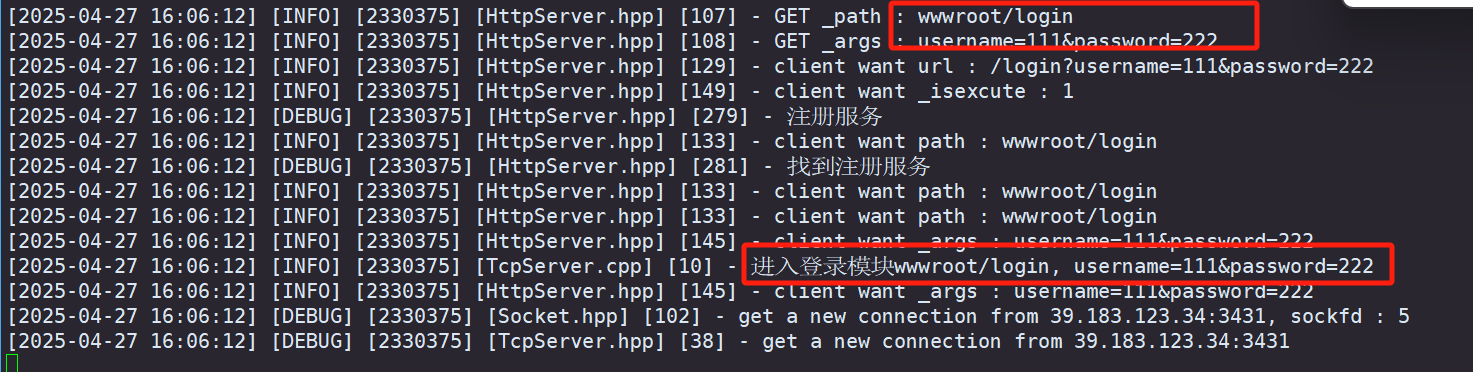
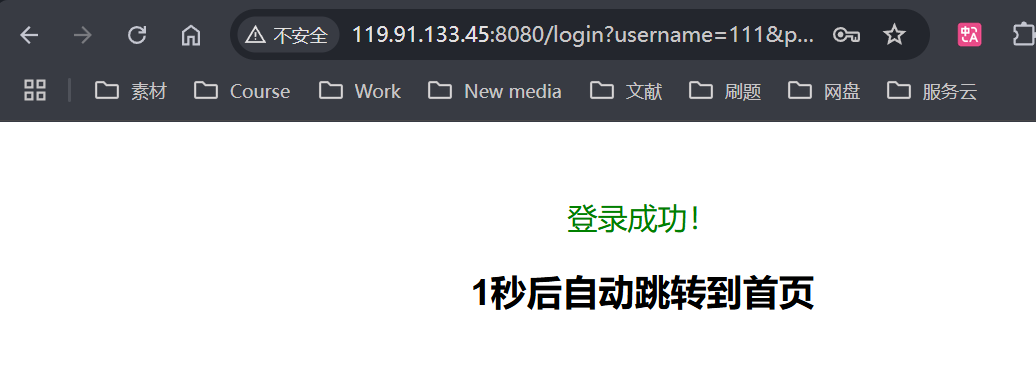
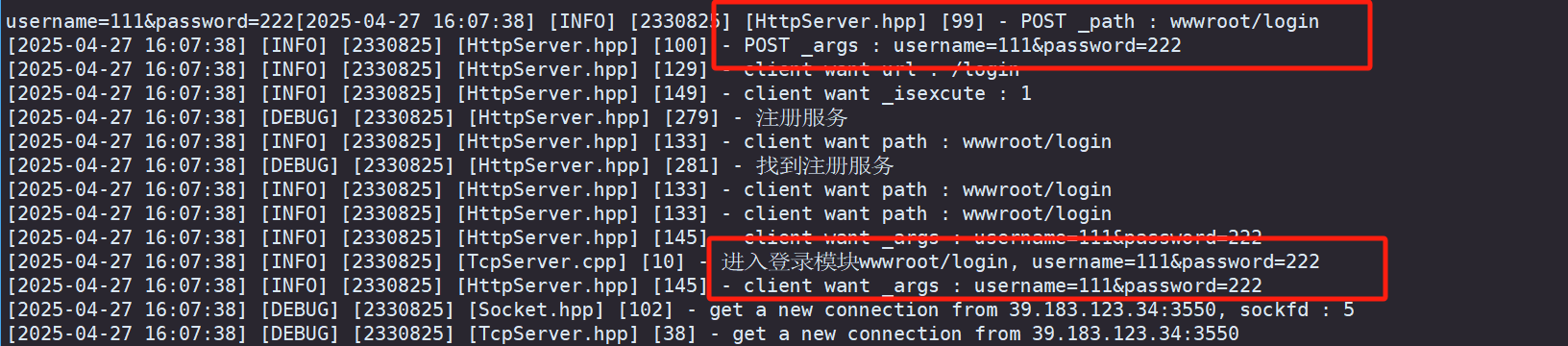
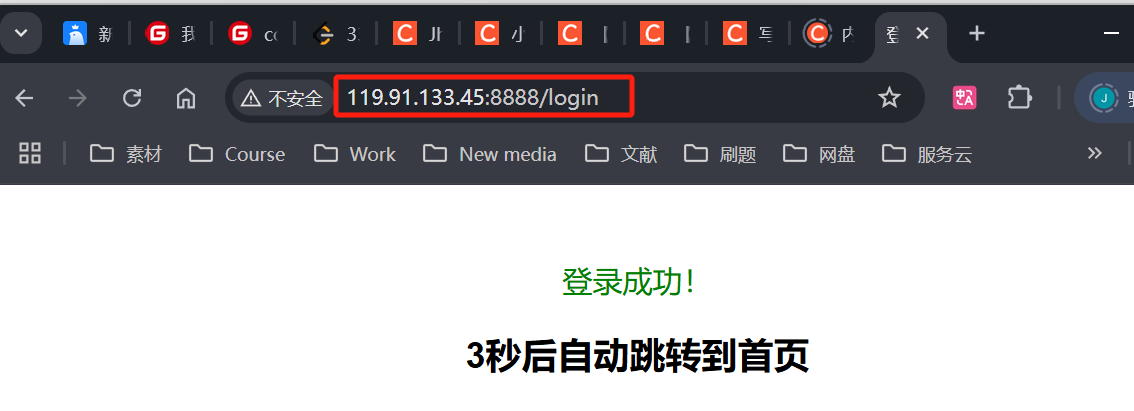
当 ·login 方法是 GET 时
当是 POST 时
👥总结
本篇博文对 【Linux网络】Http服务优化 - 增加请求后缀、状态码描述、重定向、自动跳转及注册多功能服务 做了一个较为详细的介绍,不知道对你有没有帮助呢
觉得博主写得还不错的三连支持下吧!会继续努力的~