效果预览
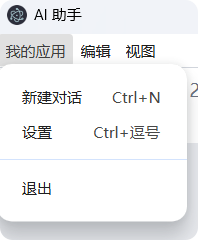
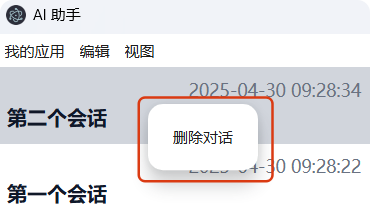
定义菜单 src/menu.ts
ts
import { Menu, BrowserWindow, MenuItemConstructorOptions } from "electron";

import { configManager } from "./config";
import en from "./language/en";
import zh from "./language/zh";

type MessageSchema = typeof zh;
const messages: Record<string, MessageSchema> = {
  en,
  zh,
};

// 创建一个通用的翻译函数
const createTranslator = () => {
  const config = configManager.get();
  return (key: string) => {
    const keys = key.split(".");
    let result: any = messages[config.language];
    for (const k of keys) {
      result = result[k];
    }
    return result as string;
  };
};

// 顶部菜单
const createMenu = (mainWindow: BrowserWindow) => {
  const t = createTranslator();
  const template: MenuItemConstructorOptions[] = [
    {
      label: t("menu.app.myApp"),
      submenu: [
        {
          label: t("menu.app.newConversation"),
          accelerator: "CmdOrCtrl+N",
          click: () => {
            mainWindow.webContents.send("menu-new-conversation");
          },
        },
        {
          label: t("menu.app.settings"),
          accelerator: "CmdOrCtrl+,",
          click: () => {
            mainWindow.webContents.send("menu-open-settings");
          },
        },
        { type: "separator" },
        {
          role: "quit",
          label: t("menu.app.quit"),
        },
      ],
    },
    {
      label: t("menu.edit.title"),
      submenu: [
        {
          role: "undo",
          label: t("menu.edit.undo"),
        },
        {
          role: "redo",
          label: t("menu.edit.redo"),
        },
        { type: "separator" },
        {
          role: "cut",
          label: t("menu.edit.cut"),
        },
        {
          role: "copy",
          label: t("menu.edit.copy"),
        },
        {
          role: "paste",
          label: t("menu.edit.paste"),
        },
        {
          role: "selectAll",
          label: t("menu.edit.selectAll"),
        },
        ...(process.platform === "darwin"
          ? ([
              { type: "separator" as const },
              {
                label: t("menu.edit.speech.title"),
                submenu: [
                  {
                    role: "startSpeaking",
                    label: t("menu.edit.speech.startSpeaking"),
                  },
                  {
                    role: "stopSpeaking",
                    label: t("menu.edit.speech.stopSpeaking"),
                  },
                ],
              },
              {
                role: "emoji",
                label: t("menu.edit.emoji"),
              },
            ] as MenuItemConstructorOptions[])
          : []),
      ],
    },
    {
      label: t("menu.view.title"),
      submenu: [
        {
          role: "reload",
          label: t("menu.view.reload"),
        },
        {
          role: "forceReload",
          label: t("menu.view.forceReload"),
        },
        {
          role: "toggleDevTools",
          label: t("menu.view.toggleDevTools"),
        },
        { type: "separator" },
        {
          role: "resetZoom",
          label: t("menu.view.resetZoom"),
        },
        {
          role: "zoomIn",
          label: t("menu.view.zoomIn"),
        },
        {
          role: "zoomOut",
          label: t("menu.view.zoomOut"),
        },
        { type: "separator" },
        {
          role: "togglefullscreen",
          label: t("menu.view.togglefullscreen"),
        },
      ],
    },
    ...(process.platform === "darwin"
      ? [
          {
            role: "windowMenu" as const,
          },
        ]
      : []),
  ];

  const menu = Menu.buildFromTemplate(template);
  Menu.setApplicationMenu(menu);
};

// 右键菜单
const createContextMenu = (win: BrowserWindow, id: number) => {
  const t = createTranslator();
  const template = [
    {
      label: t("contextMenu.deleteConversation"),
      click: () => {
        win.webContents.send("delete-conversation", id);
      },
    },
  ];
  const menu = Menu.buildFromTemplate(template);
  menu.popup({ window: win });
};

// 导出一个更新菜单的函数,在语言改变时调用
const updateMenu = (mainWindow: BrowserWindow) => {
  createMenu(mainWindow);
};

export { createMenu, updateMenu, createContextMenu };
顶部菜单
加载顶部菜单 src/main.ts
ts
import { createMenu } from "./menu";
ts
  // 加载菜单
  createMenu(mainWindow);
添加 IPC 通信 src/preload.ts
ts
  onMenuNewConversation: (callback: () => void) =>
    ipcRenderer.on("menu-new-conversation", () => callback()),
  onMenuOpenSettings: (callback: () => void) =>
    ipcRenderer.on("menu-open-settings", () => callback()),
全局监听菜单事件 src/App.vue
ts
// 监听菜单事件
window.electronAPI.onMenuNewConversation(() => {
  router.push("/");
});

window.electronAPI.onMenuOpenSettings(() => {
  router.push("/settings");
});
修改设置时,更新顶部菜单 src/ipc.ts
ts
import { createContextMenu, updateMenu } from "./menu";
ts
  ipcMain.handle("update-config", async (event, newConfig) => {
    const updatedConfig = await configManager.update(newConfig);
    // 如果语言发生变化,更新菜单
    if (newConfig.language) {
      updateMenu(mainWindow);
    }
    return updatedConfig;
  });
右键快捷菜单
目标元素上添加右键快捷菜单事件
src/components/ConversationList.vue
ts
@contextmenu.prevent="showContextMenu(item.id)"
ts
const showContextMenu = (id: number) => {
  window.electronAPI.showContextMenu(id);
};
添加 IPC 通信
src/preload.ts
ts
  // 显示右键菜单
  showContextMenu: (id: number) => ipcRenderer.send("show-context-menu", id),
  // 删除会话
  onDeleteConversation: (callback: (id: number) => void) =>
    ipcRenderer.on("delete-conversation", (_event, id) => callback(id)),
src/ipc.ts
ts
import { createContextMenu, updateMenu } from "./menu";
ts
  // 弹出右键菜单
  ipcMain.on("show-context-menu", (event, id) => {
    const win = BrowserWindow.fromWebContents(event.sender);
    if (!win) return;
    createContextMenu(win, id);
  });
页面响应右键快捷菜单事件
src/components/ConversationList.vue
ts
onMounted(() => {
  window.electronAPI.onDeleteConversation(async (id: number) => {
    await store.deleteConversation(id);
    if (store.selectedId === id) {
      store.selectedId = -1;
      router.push("/");
    }
  });
});