FAT AP 的主要特点
| 特性 | 说明 |
|---|---|
| 独立工作 | 不需要AC(无线控制器),自己处理认证、加密、漫游等功能。 |
| 内置完整功能 | 支持SSID、安全策略(WPA/WPA2)、VLAN、QoS、DHCP等。 |
| 适合小型网络 | 适用于家庭、小企业、分支机构等少量AP的场景。 |
| 成本较高(相比FIT AP) | 功能集成度高,硬件成本通常比FIT AP高。 |
| 配置复杂(大规模部署) | 每个AP需要单独配置,管理维护麻烦。 |
简单组网示例
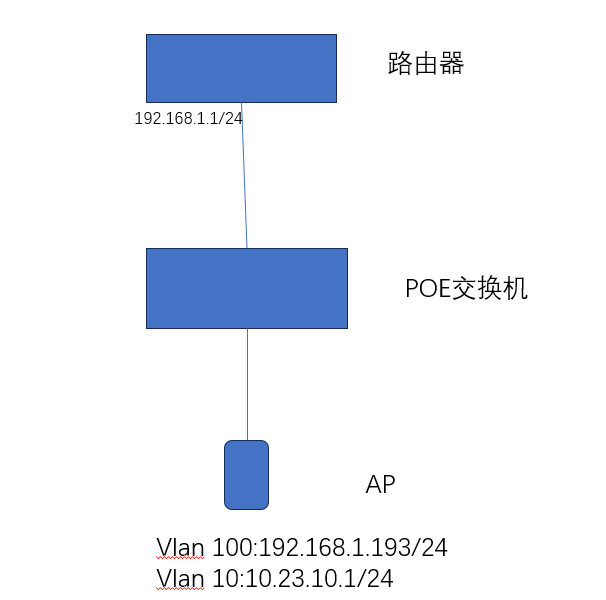
AP相关规划
设备:
AP:4050DN-HD
POE交换机 :S2700-9TP-PWR-EI
| 项目 | 说明 |
|---|---|
| 终端的业务VLAN | 10 |
| DHCP服务器 | AP作为终端的DHCP服务器 |
| 终端地址池 | 10.23.10.2~10.23.10.254 / 24 |
| SSID模板 | 名称 : anan_test SSID名称: anan_wlan |
| 安全模板 | 名称:anan_sec 安全策略:WPA-WPA2+PSK+AES 密码:anan123456@ |
| VAP模板 | 名称:anan_vap 业务VLAN : vlan10 引用模板:SSID模板anan_test ,安全模板anan_sec |
| NAT Outbound | 私网ip地址网段:10.23.10.0/24映射到私网网关 |
1.配置AP和上层接口网络互通
[AP]int Vlanif 100
[AP-Vlanif100]ip address 192.168.1.193 255.255.255.0
[AP-Vlanif100]quit
[AP]int GigabitEthernet 0/0/0
#如果上行直连路由器,那么上行口可以配置为access
[AP-GigabitEthernet0/0/0]port link-type trunk
[AP-GigabitEthernet0/0/0]port trunk allow-pass vlan 100
[AP-GigabitEthernet0/0/0]port trunk pvid vlan 100
[AP-GigabitEthernet0/0/0]quit
#配置缺省路由
[AP]ip route-static 0.0.0.0 0.0.0.0 192.168.1.1
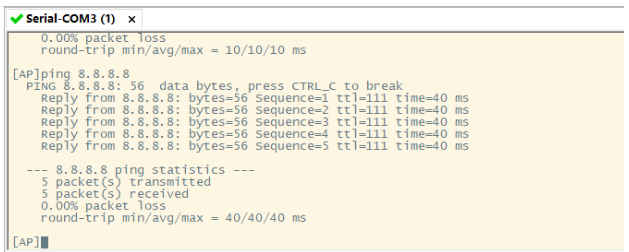
#完成后可以找一个外网ip  ping一下试试
配置后看能不能访问外网ip
配置DHCP
[AP]dhcp enable
[AP]vlan batch 10
Info: This operation may take a few seconds. Please wait for a moment...done.
[AP]int vlan 10
[AP-Vlanif10]ip address 10.23.10.1 24
#开启接口采用接口地址池的DHCP server功能
[AP-Vlanif10]dhcp select interface
[AP-Vlanif10]quit
配置国家码
[AP]wlan
#CN表示中国 ,不同国家射频特性不同
[AP-wlan-view]country-code CN
配置安全模板-创建名为anan_sec的安全模板,并配置安全策略WPA-WPA2+PSK+AES
[AP-wlan-view]security-profile name anan_sec
[AP-wlan-sec-prof-anan_sec]security wpa-wpa2 psk pass-phrase anan123456@ aes
[AP-wlan-sec-prof-anan_sec]quit
配置SSID模板,模板名为anan_test , SSID名称(WIFI名称)为anan_wlan
[AP-wlan-view]ssid-profile name anan_test
[AP-wlan-ssid-prof-anan_test]ssid anan_wlan
Info: This operation may take a few seconds, please wait.done.
[AP-wlan-ssid-prof-anan_test]quit
创建名为VAP模板,配置业务vlan,并引用安全模板和SSID模板
[AP-wlan-view]vap-profile name anan_vap
[AP-wlan-vap-prof-anan_vap]service-vlan vlan-id 10
Info: This operation may take a few seconds, please wait.done.
[AP-wlan-vap-prof-anan_vap]security-profile anan_sec
Info: This operation may take a few seconds, please wait.done.
[AP-wlan-vap-prof-anan_vap]ssid-profile anan_test
Info: This operation may take a few seconds, please wait.done.
[AP-wlan-vap-prof-anan_vap]quit
关闭AP射频的信道和功率自动调优功能 , 配置ap射频的信道和功率
[AP]interface Wlan-Radio 0/0/0
[AP-Wlan-Radio0/0/0]vap-profile anan_vap wlan 2
Info: This operation may take a few seconds, please wait.done.

[AP-Wlan-Radio0/0/0]calibrate auto-channel-select disable
Info: This operation will recover the redundant radio.

[AP-Wlan-Radio0/0/0]calibrate auto-txpower-select disable

[AP-Wlan-Radio0/0/0]channel 20mhz 1
Warning: This action may cause service interruption. Continue?[Y/N]Y
Info: The channel value and bandwidth value take effect only when automatic channel selection is disabled, and the value depends on the AP specifications and local laws and regulations.

[AP-Wlan-Radio0/0/0]eirp 127
Info: The EIRP value takes effect only when automatic transmit power selection is disabled, and the value depends on the AP specifications and local laws and regulations.

[AP-Wlan-Radio0/0/0]quit
[AP]int Wlan-Radio 0/0/1
[AP-Wlan-Radio0/0/1]vap-profile anan_vap wlan  2
Info: This operation may take a few seconds, please wait.done.
[AP-Wlan-Radio0/0/1]calibrate auto-txpower-select disable
[AP-Wlan-Radio0/0/1]calibrate auto-channel-select disable
Info: This operation will recover the redundant radio.
[AP-Wlan-Radio0/0/1]channel 20mhz 165
Warning: This action may cause service interruption. Continue?[Y/N]y
Info: The channel value and bandwidth value take effect only when automatic channel selection is disabled, and the value depends on the AP specifications and local laws and regulations.
[AP-Wlan-Radio0/0/1]eirp 127
Info: The EIRP value takes effect only when automatic transmit power selection is disabled, and the value depends on the AP specifications and local laws and regulations.
[AP-Wlan-Radio0/0/1]quit
配置NAT地址转换(这步配置完终端连上就能用了)
[AP]acl 2000
[AP-acl-basic-nat]ru
[AP-acl-basic-nat]rule 5 pe
[AP-acl-basic-nat]rule 5 permit s
[AP-acl-basic-nat]rule 5 permit source 10.23.10.0 0.0.0.255
[AP-acl-basic-nat]quit
[AP]int Vlanif 100
[AP-Vlanif100]nat outbound 2000
[AP-Vlanif100]quit
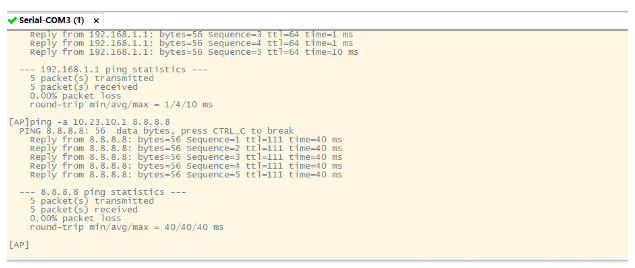
配置完成后验证下
关闭SSID广播 (隐藏wifi名称)
[AP-wlan-ssid-prof-anan_test]ssid-hide enable 配置DNS
[AP]dns proxy enable
[AP]dns resolve
[AP]dns server source-ip 192.168.1.193
Info: The source IP address used to exchange packets with the DNS server must belong to the same VPN as the DNS server IP address or the two IP addresses belong to a public network, and this source IP address must be the local device IP address. Otherwise, this function does not take effect.
[AP]dns server 61.139.2.69
#查看配置是否正确
[AP]dis current-configuration | include dns
portal pass dns enable
dns resolve
dns server 61.139.2.69
dns server source-ip 192.168.1.193
dns proxy enable
验证访问域名
