流程图: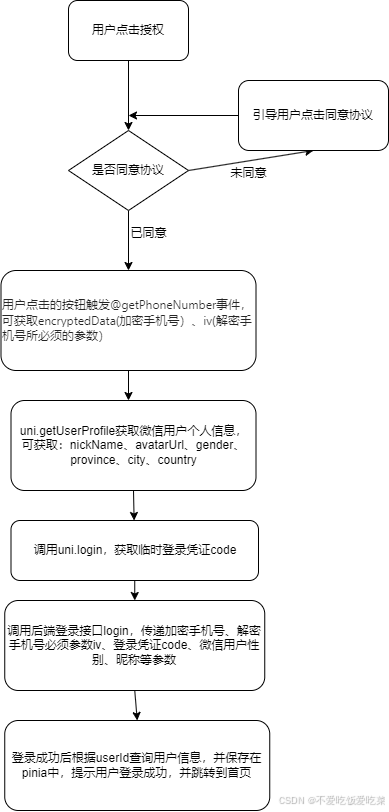
话不多说,上代码
javascript
<template>
  <view class="container">
    <!-- 商标 -->
    <view class="flex">
      <image
        src="../../static/pageImg/icon-login-logo.png"
        mode="aspectFill"
        class="logo-trademark"
      ></image>
    </view>
    <!-- 标题 -->
    <view class="flex">
      <image src="../../static/pageImg/icon-login-title.png" class="login-title"></image>
    </view>
    <!-- 背景图 -->
    <image src="../../static/pageImg/bg-aichat.png" mode="aspectFill" class="bg"></image>
    <!-- 未同意协议 -->
    <button class="submit-btn" v-if="!isAgree" @tap="argeePolicy">一键授权登录</button>
    <!-- 已同意协议 -->
    <button class="submit-btn" v-else open-type="getPhoneNumber" @getphonenumber="getPhoneNumber">
      一键授权登录
    </button>
    <p class="cancel-btn" @tap="navPage('3')">取消</p>
    <!-- 点击同意协议 -->
    <view class="flex">
      <view class="policy-btn flex" style="flex-wrap: nowrap; align-items: start">
        <!-- 未同意协议 -->
        <view class="check-btn" v-if="!isAgree" @tap="handlePolicy"></view>
        <!-- 已同意协议 -->
        <view class="checked-btn" v-else @tap="handlePolicy"></view>
        <view style="width: 85%" class="policy-text">
          已阅读并同意
          <text @tap="navPage('1')">《隐私协议》</text>
          和
          <text @tap="navPage('2')">《用户协议》</text>
        </view>
      </view>
    </view>
  </view>
</template>

<script setup lang="ts">
import { ref } from 'vue'
import { useUserStore } from '@/store'
import { showToast, goToPage } from '@/utils/index'
import { checkAgentApi } from '@/service/index/agent'
import { checkAgentParams } from '@/service/index/types/agent'

interface LoginParams {
  phoneCode?: string
  wxUser?: {
    gender: number
    nickName: string
    avatarUrl: string
  }
  iv?: string
  encryptedData?: string
}
interface WxUserInfo {
  gender: number
  nickName: string
  avatarUrl: string
  [key: string]: any
}
interface PhoneNumberEvent {
  detail: {
    errMsg: string
    code?: string
    iv?: string
    encryptedData?: string
  }
}

const userStore = useUserStore()
const isAgree = ref<boolean>(false)
const avatarUrl = ref<string>('')
const nickName = ref<string>('')

const handlePolicy = () => {
  isAgree.value = !isAgree.value
}

// 获取微信用户code
const getLoginCode = () => {
  return new Promise((resolve, reject) => {
    uni.login({
      provider: 'weixin',
      success: (res) => {
        if (res.code) {
          resolve(res.code)
        } else {
          uni.showToast({
            title: res.errMsg,
            icon: 'none',
            duration: 2000,
          })
          reject(new Error(res.errMsg))
        }
      },
      fail: () => {
        reject(new Error())
      },
    })
  })
}
/**
 * 调用后端接口进行登录
 */
const userAuthCode = async (params: LoginParams) => {
  try {
    uni.showLoading({
      title: '登录中',
      mask: true, // 不知道为啥这个蒙层没生效
    })
    // 获取微信用户code
    const userCode = await getLoginCode()
    if (!userCode) {
      uni.hideLoading()
      return
    }
    const requestParams: checkAgentParams = {
      code: userCode as string,
      phoneCode: params.phoneCode,
      avatarUrl: params.wxUser?.avatarUrl, // 微信头像
      // encryptedData: params.encryptedData,
      // iv: params.iv,
      // sex: params.wxUser?.gender,
      // userName: params.wxUser?.nickName,
    }
    // 调用后端接口登录
    await checkAgentApi(requestParams)
      .then((res: any) => {
        console.log('获取会话列表', res)
        const { code, data } = res
        if (code === 200) {
          uni.showToast({
            title: '登录成功',
            icon: 'success',
            duration: 2000,
            success: () => {
              // 登录成功后返回首页
              setTimeout(() => {
                uni.redirectTo({
                  url: '/pages/index/index',
                })
              }, 2000)
            },
          })
          // 存储登录信息
          userStore.setUserInfo(data)
        }
      })
      .catch((err) => {
        console.error('获取会话列表异常:', err)
        uni.showToast({
          title: '登录失败,请重试',
          icon: 'none',
          duration: 2000,
        })
      })
      .finally(() => {
        uni.hideLoading()
      })
  } catch (err) {
    console.error('登录失败:', err)
    uni.hideLoading()
    uni.showToast({
      title: '登录失败,请重试',
      icon: 'none',
    })
  }
}

/**
 * 获取微信用户信息
 */
const getWXUserInfo = (): Promise<WxUserInfo | null> => {
  return new Promise((resolve) => {
    uni.showModal({
      title: '温馨提示',
      content: '授权微信登录后才能正常使用小程序功能',
      success(res) {
        if (res.confirm) {
          uni.getUserProfile({
            desc: '获取你的昵称、头像、地区及性别',
            success: (res) => {
              resolve(res.userInfo as unknown as WxUserInfo)
            },
            fail: () => {
              showToast('您拒绝了请求,暂时不能正常使用小程序', 'none')
              resolve(null)
            },
          })
        } else if (res.cancel) {
          showToast('您拒绝了请求,暂时不能正常使用小程序', 'none')
          resolve(null)
        }
      },
    })
  })
}

/**
 * 获取用户手机授权
 * @param e 手机号授权事件对象
 */
const getPhoneNumber = async (e: PhoneNumberEvent) => {
  if (e.detail.errMsg !== 'getPhoneNumber:ok') return false

  const wxUserInfo = await getWXUserInfo()
  if (!wxUserInfo) return

  userAuthCode({
    phoneCode: e.detail.code,
    wxUser: wxUserInfo,
    iv: e.detail.iv,
    encryptedData: e.detail.encryptedData,
  })
}

const argeePolicy = () => {
  uni.showToast({
    title: '请先勾选用户协议',
    icon: 'error',
    duration: 2000,
  })
}

/**
 * @param {string} type 协议类型:1-隐私协议 2-用户协议 3-取消关闭页面
 * @desc 协议页面跳转
 */
const navPage = (type: string) => {
  if (type === '3') {
    // 返回上一页
    uni.navigateBack()
    return
  }
  goToPage(`/pages-sub/policy/index?type=${type}`, null, { needLogin: false })
}
</script>

<style lang="scss" scoped>
.flex {
  display: flex;
  flex-wrap: wrap;
  align-items: center;
  justify-content: center;
}
.logo-trademark {
  width: 140rpx;
  height: 140rpx;
  margin-top: 180rpx;
}
.login-title {
  width: 400rpx;
  height: 40rpx;
  margin-top: 50rpx;
}
.bg {
  width: 720rpx;
  height: 248rpx;
  margin-top: 300rpx;
}
.submit-btn {
  width: 540rpx;
  height: 88rpx;
  margin-top: 56rpx;
  font-family: PingFang SC;
  font-size: 32rpx;
  font-weight: 700;
  line-height: 88rpx;
  color: #ffffff;
  text-align: center;
  letter-spacing: 0rpx;
  background: linear-gradient(99deg, #ff7451 0%, #ff833f 50%, #ff5149 100%);
  border-radius: 52rpx;
}
.cancel-btn {
  width: 100%;
  margin-top: 44rpx;
  font-family: PingFang SC;
  font-size: 28rpx;
  color: #666666;
  text-align: center;
}
.policy-btn {
  width: 70%;
  margin-top: 130rpx;
  .check-btn {
    box-sizing: border-box;
    width: 28rpx;
    height: 28rpx;
    margin-top: 2rpx;
    margin-right: 6rpx;
    border: 2rpx solid #cdcdcd;
    border-radius: 50%;
  }
  .checked-btn {
    box-sizing: border-box;
    width: 28rpx;
    height: 28rpx;
    margin-top: 2rpx;
    margin-right: 6rpx;
    background: url('/static/icon/icon-agree-policy.png') no-repeat center center;
    background-size: 28rpx;
    border-radius: 50%;
  }
  .policy-text {
    font-family: PingFang SC;
    font-size: 24rpx;
    font-weight: normal;
    line-height: normal;
    color: #999999;
    letter-spacing: normal;
  }
  text {
    color: #ff6d2b;
  }
}
</style>