1, 部署开发环境
(ppoc) H:\work\daodan_move\PaddleOCR-main>pip list
Package                   Version
------------------------- -----------
aiofiles                  24.1.0
aiohappyeyeballs          2.6.1
aiohttp                   3.11.18
aiosignal                 1.3.2
albucore                  0.0.13
albumentations            1.4.10
altgraph                  0.17.4
annotated-types           0.7.0
anyio                     4.9.0
astor                     0.8.1
async-timeout             4.0.3
attrs                     25.3.0
backoff                   2.2.1
beautifulsoup4            4.13.4
cachetools                5.5.2
certifi                   2025.1.31
cffi                      1.17.1
chardet                   5.2.0
charset-normalizer        3.4.2
chinese_calendar          1.10.0
click                     8.2.1
colorama                  0.4.6
colorlog                  6.9.0
contourpy                 1.3.2
cryptography              45.0.2
cssselect                 1.3.0
cssutils                  2.11.1
cycler                    0.12.1
Cython                    3.1.1
dataclasses-json          0.6.7
decorator                 5.2.1
decord                    0.6.0
distro                    1.9.0
emoji                     2.14.1
et_xmlfile                2.0.0
exceptiongroup            1.2.2
faiss-cpu                 1.8.0.post1
filelock                  3.18.0
filetype                  1.2.0
fire                      0.7.0
fonttools                 4.58.0
frozenlist                1.6.0
fsspec                    2025.5.0
ftfy                      6.3.1
GPUtil                    1.4.0
greenlet                  3.2.2
h11                       0.14.0
html5lib                  1.1
httpcore                  1.0.8
httpx                     0.28.1
huggingface-hub           0.31.4
idna                      3.10
imageio                   2.37.0
imagesize                 1.4.1
imgaug                    0.4.0
jieba                     0.42.1
Jinja2                    3.1.6
jiter                     0.10.0
joblib                    1.5.0
jsonpatch                 1.33
jsonpointer               3.0.0
kiwisolver                1.4.8
langchain                 0.2.17
langchain-community       0.2.17
langchain-core            0.2.43
langchain-openai          0.1.25
langchain-text-splitters  0.2.4
langdetect                1.0.9
langsmith                 0.1.147
lazy_loader               0.4
lmdb                      1.6.2
lxml                      5.4.0
MarkupSafe                3.0.2
marshmallow               3.26.1
matplotlib                3.10.3
more-itertools            10.7.0
multidict                 6.4.4
mypy_extensions           1.1.0
nest-asyncio              1.6.0
networkx                  3.4.2
nltk                      3.9.1
numpy                     1.24.4
nvidia-cublas-cu11        11.11.3.6
nvidia-cuda-nvrtc-cu11    11.8.89
nvidia-cuda-runtime-cu11  11.8.89
nvidia-cudnn-cu11         8.9.4.19
nvidia-cufft-cu11         10.9.0.58
nvidia-curand-cu11        10.3.0.86
nvidia-cusolver-cu11      11.4.1.48
nvidia-cusparse-cu11      11.7.5.86
olefile                   0.47
openai                    1.63.2
opencv-contrib-python     4.10.0.84
opencv-python             4.5.5.64
opencv-python-headless    4.10.0.84
openpyxl                  3.1.5
opt-einsum                3.3.0
orjson                    3.10.18
packaging                 24.2
paddleocr                 2.9.1
paddlepaddle-gpu          3.0.0rc0
paddlex                   3.0.0rc0
pandas                    2.2.3
Parsley                   1.3
pefile                    2023.2.7
pillow                    11.1.0
pip                       25.1.1
premailer                 3.10.0
prettytable               3.16.0
propcache                 0.3.1
protobuf                  6.30.2
psutil                    7.0.0
py-cpuinfo                9.0.0
pyclipper                 1.3.0.post6
pycocotools               2.0.8
pycparser                 2.22
pydantic                  2.11.5
pydantic_core             2.33.2
pyinstaller               6.13.0
pyinstaller-hooks-contrib 2025.4
PyMuPDF                   1.26.0
pyparsing                 3.2.3
pypdf                     5.5.0
pyquaternion              0.9.9
python-dateutil           2.9.0.post0
python-docx               1.1.2
python-iso639             2025.2.18
python-magic              0.4.27
python-oxmsg              0.0.2
pytz                      2025.2
pywin32-ctypes            0.2.3
PyYAML                    6.0.2
RapidFuzz                 3.13.0
regex                     2024.11.6
requests                  2.32.3
requests-toolbelt         1.0.0
ruamel.yaml               0.18.10
ruamel.yaml.clib          0.2.12
safetensors               0.5.3
scikit-image              0.25.2
scikit-learn              1.6.1
scipy                     1.15.3
sentencepiece             0.2.0
setuptools                80.8.0
shapely                   2.1.1
six                       1.17.0
sniffio                   1.3.1
soundfile                 0.13.1
soupsieve                 2.7
SQLAlchemy                2.0.41
tenacity                  8.5.0
termcolor                 3.1.0
threadpoolctl             3.6.0
tifffile                  2025.5.10
tiktoken                  0.9.0
tokenizers                0.19.1
tomli                     2.2.1
tqdm                      4.67.1
transformers              4.40.0
typing_extensions         4.13.2
typing-inspect            0.9.0
typing-inspection         0.4.1
tzdata                    2025.2
ujson                     5.10.0
unstructured              0.17.2
unstructured-client       0.35.0
urllib3                   2.4.0
wcwidth                   0.2.13
webencodings              0.5.1
wheel                     0.45.1
wrapt                     1.17.2
yarl                      1.20.0

(ppoc) H:\work\daodan_move\PaddleOCR-main>
2,准备代码
from paddleocr import PaddleOCR
# 初始化 PaddleOCR 实例
# ocr = PaddleOCR(
    # use_doc_orientation_classify=False,
    # use_doc_unwarping=False,
    # use_textline_orientation=False)
# # 对示例图像执行 OCR 推理
# result = ocr.predict(
    # input="https://paddle-model-ecology.bj.bcebos.com/paddlex/imgs/demo_image/general_ocr_002.png")
# # 可视化结果并保存 json 结果
# for res in result:
    # res.print()
    # res.save_to_img("output")
    # res.save_to_json("output")

from paddleocr import PaddleOCR
import os
import time

ocr = PaddleOCR(use_angle_cls=False, lang="ch",device='gpu:0',
det_model_dir=r"./inference/hx_mobile_det",
rec_model_dir=r".inference/hx_mobile_rec")  # need to run only once to download and load model into memory
# img_path = './imgs/11.jpg'
datapath=r"./data/data2"
datalist=os.listdir(datapath)
for itimg in datalist:
    imgpath=os.path.join(datapath,itimg)
    start=time.time()
    result = ocr.ocr(imgpath, cls=False)
    end=time.time()
    print(result)
    # print("22222222222222222222",end-start)
    print(f"Program execution time: {end-start} seconds")

    # for idx in range(len(result)):
        # res = result[idx]
        # for line in res:
            # print(line)


# det_model_dir=, cls_model_dir=r"./.paddleocr/whl\cls\ch_ppocr_mobile_v2.0_cls_infer", rec_model_dir=r"./.paddleocr/whl\rec\ch\ch_PP-OCRv4_rec_infer"
3,准备91.spec文件
# -*- mode: python ; coding: utf-8 -*-
block_cipher = None
a = Analysis(['91.py'],
     pathex=['H:\\work\\anaconda3\\envs\\ppoc\\Lib\\site-packages\\paddleocr', 'H:\\work\\anaconda3\\envs\\ppoc\\Lib\\site-packages\\paddle\\libs'],
     binaries=[('H:\\work\\anaconda3\\envs\\ppoc\\Lib\\site-packages\\paddle\\libs', '.')],
     datas=[],
     hiddenimports=[],
     hookspath=['.'],
     runtime_hooks=[],
     excludes=['matplotlib'],
     win_no_prefer_redirects=False,
     win_private_assemblies=False,
     cipher=block_cipher,
     noarchive=False)
pyz = PYZ(a.pure, a.zipped_data,
     cipher=block_cipher)
exe = EXE(pyz,
     a.scripts,
     [],
     exclude_binaries=True,
     name='91',
     debug=False,
     bootloader_ignore_signals=False,
     strip=False,
     upx=True,
     console=True)
coll = COLLECT(exe,
     a.binaries,
     a.zipfiles,
     a.datas,
     strip=False,
     upx=True,
     upx_exclude=[],
     name='91')
4,运行
pyinstaller -y 91.spec5,复制文件
复制完成后如下图所示:
a,将.inference复制到91.exe同目录下;
b,将.inference复制到91.exe同目录下;
c,将data图片数据复制到91.exe同目录下;
e,将H:\work\anaconda3\envs\ppoc\Lib\site-packages\paddle 下的libs复制到91.exe同目录下;
将H:\work\anaconda3\envs\ppoc\Lib\site-packages\paddleocr 下的ppocr复制到91.exe目录下和_internel目录下
f,将H:\work\anaconda3\envs\ppoc\Lib\site-packages\paddleocr 下的tools复制到_internel目录下

h,将 H:\work\anaconda3\envs\ppoc\Lib\site-packages下的Cython复制到_internel目录下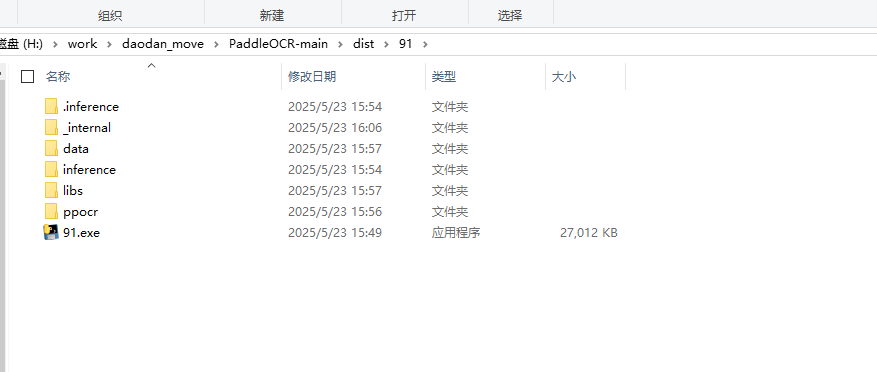
6,在cmd里面运行可执行文件。