最终效果
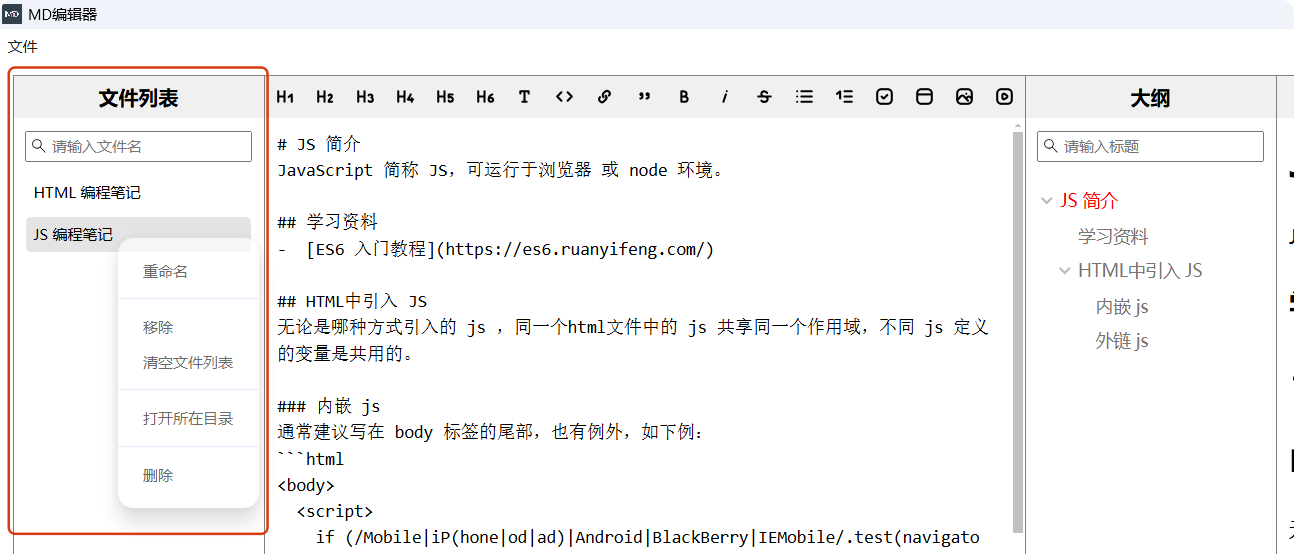
页面
src/renderer/src/App.vue
c
    <div class="dirPanel">
      <div class="panelTitle">文件列表</div>
      <div class="searchFileBox">
        <Icon class="searchFileInputIcon" icon="material-symbols-light:search" />
        <input
          v-model="searchFileKeyWord"
          class="searchFileInput"
          type="text"
          placeholder="请输入文件名"
        />
        <Icon
          v-show="searchFileKeyWord"
          class="clearSearchFileInputBtn"
          icon="codex:cross"
          @click="clearSearchFileInput"
        />
      </div>
      <div class="dirListBox">
        <div
          v-for="(item, index) in fileList_filtered"
          :id="`file-${index}`"
          :key="item.filePath"
          class="dirItem"
          spellcheck="false"
          :class="currentFilePath === item.filePath ? 'activeDirItem' : ''"
          :contenteditable="item.editable"
          @click="openFile(item)"
          @contextmenu.prevent="showContextMenu(item.filePath)"
          @blur="saveFileName(item, index)"
          @keydown.enter.prevent="saveFileName_enter(index)"
        >
          {{ item.fileName.slice(0, -3) }}
        </div>
      </div>
    </div>
相关样式
css
.dirPanel {
  width: 200px;
  border: 1px solid gray;
}
.dirListBox {
  padding: 0px 10px 10px 10px;
}
.dirItem {
  padding: 6px;
  font-size: 12px;
  cursor: pointer;
  border-radius: 4px;
  margin-bottom: 6px;
}
.searchFileBox {
  display: flex;
  align-items: center;
  justify-content: center;
  padding: 10px;
}
.searchFileInput {
  display: block;
  font-size: 12px;
  padding: 4px 20px;
}
.searchFileInputIcon {
  position: absolute;
  font-size: 16px;
  transform: translateX(-80px);
}
.clearSearchFileInputBtn {
  position: absolute;
  cursor: pointer;
  font-size: 16px;
  transform: translateX(77px);
}
.panelTitle {
  font-size: 16px;
  font-weight: bold;
  text-align: center;
  background-color: #f0f0f0;
  height: 34px;
  line-height: 34px;
}
相关依赖
实现图标
c
npm i --save-dev @iconify/vue导入使用
c
import { Icon } from '@iconify/vue'搜索图标
https://icon-sets.iconify.design/?query=home
常规功能
文件搜索
根据搜索框的值 searchFileKeyWord 的变化动态计算 computed 过滤文件列表 fileList 得到 fileList_filtered ,页面循环遍历渲染 fileList_filtered
ts
const fileList = ref<FileItem[]>([])
const searchFileKeyWord = ref('')
const fileList_filtered = computed(() => {
  return fileList.value.filter((file) => {
    return file.filePath.toLowerCase().includes(searchFileKeyWord.value.toLowerCase())
  })
})
文件搜索框的清空按钮点击事件
ts
const clearSearchFileInput = (): void => {
  searchFileKeyWord.value = ''
}
当前文件高亮
c
const currentFilePath = ref('')
c
:class="currentFilePath === item.filePath ? 'activeDirItem' : ''"
css
.activeDirItem {
  background-color: #e4e4e4;
}
切换打开的文件
点击文件列表的文件名称,打开对应的文件
c
@click="openFile(item)"
c
const openFile = (item: FileItem): void => {
  markdownContent.value = item.content
  currentFilePath.value = item.filePath
}
右键快捷菜单
c
@contextmenu.prevent="showContextMenu(item.filePath)"
c
const showContextMenu = (filePath: string): void => {
  window.electron.ipcRenderer.send('showContextMenu', filePath)
  // 隐藏其他右键菜单 -- 不能同时有多个右键菜单显示
  hide_editor_contextMenu()
}
触发创建右键快捷菜单
src/main/ipc.ts
c
import { createContextMenu } from './menu'
c
  ipcMain.on('showContextMenu', (_e, filePath) => {
    createContextMenu(mainWindow, filePath)
  })
执行创建右键快捷菜单
src/main/menu.ts
c
const createContextMenu = (mainWindow: BrowserWindow, filePath: string): void => {
  const template = [
    {
      label: '重命名',
      click: async () => {
        mainWindow.webContents.send('do-rename-file', filePath)
      }
    },
    { type: 'separator' }, // 添加分割线
    {
      label: '移除',
      click: async () => {
        mainWindow.webContents.send('removeOut-fileList', filePath)
      }
    },
    {
      label: '清空文件列表',
      click: async () => {
        mainWindow.webContents.send('clear-fileList')
      }
    },
    { type: 'separator' }, // 添加分割线
    {
      label: '打开所在目录',
      click: async () => {
        // 打开目录
        shell.openPath(path.dirname(filePath))
      }
    },
    { type: 'separator' }, // 添加分割线
    {
      label: '删除',
      click: async () => {
        try {
          // 显示确认对话框
          const { response } = await dialog.showMessageBox(mainWindow, {
            type: 'question',
            buttons: ['确定', '取消'],
            title: '确认删除',
            message: `确定要删除文件 ${path.basename(filePath)} 吗?`
          })
          if (response === 0) {
            // 用户点击确定,删除本地文件
            await fs.unlink(filePath)
            // 通知渲染进程文件已删除
            mainWindow.webContents.send('delete-file', filePath)
          }
        } catch {
          dialog.showMessageBox(mainWindow, {
            type: 'error',
            title: '删除失败',
            message: `删除文件 ${path.basename(filePath)} 时出错,请稍后重试。`
          })
        }
      }
    }
  ]
  const menu = Menu.buildFromTemplate(template as MenuItemConstructorOptions[])
  menu.popup({ window: mainWindow })
}
export { createMenu, createContextMenu }
隐藏其他右键菜单
c
// 隐藏编辑器右键菜单
const hide_editor_contextMenu = (): void => {
  if (isMenuVisible.value) {
    isMenuVisible.value = false
  }
}
重命名文件
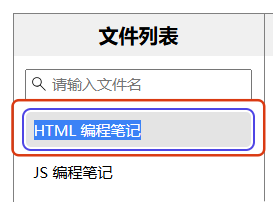
实现思路
- 点击右键快捷菜单的"重命名"
- 将被点击的文件列表项的 contenteditable 变为 true,使其成为一个可编辑的div
- 全选文件列表项内的文本
- 输入新的文件名
- 在失去焦点/按Enter键时,开始尝试保存文件名
- 若新文件名与旧文件名相同,则直接将被点击的文件列表项的 contenteditable 变为 false
- 若新文件名与本地文件名重复,则弹窗提示该文件名已存在,需换其他文件名
- 若新文件名合规,则执行保存文件名
- 被点击的文件列表项的 contenteditable 变为 false
src/renderer/src/App.vue
c
  window.electron.ipcRenderer.on('do-rename-file', (_, filePath) => {
    fileList_filtered.value.forEach(async (file, index) => {
      // 找到要重命名的文件
      if (file.filePath === filePath) {
        // 将被点击的文件列表项的 contenteditable 变为 true,使其成为一个可编辑的div
        file.editable = true
        // 等待 DOM 更新
        await nextTick()
        // 全选文件列表项内的文本
        let divElement = document.getElementById(`file-${index}`)
        if (divElement) {
          const range = document.createRange()
          range.selectNodeContents(divElement) // 选择 div 内所有内容
          const selection = window.getSelection()
          if (selection) {
            selection.removeAllRanges() // 清除现有选择
            selection.addRange(range) // 添加新选择
            divElement.focus() // 聚焦到 div
          }
        }
      }
    })
  })
c
          @blur="saveFileName(item, index)"
          @keydown.enter.prevent="saveFileName_enter(index)"
c
// 重命名文件时,保存文件名
const saveFileName = async (item: FileItem, index: number): Promise<void> => {
  // 获取新的文件名,若新文件名为空,则命名为 '无标题'
  let newFileName = document.getElementById(`file-${index}`)?.textContent?.trim() || '无标题'
  // 若新文件名与旧文件名相同,则直接将被点击的文件列表项的 contenteditable 变为 false
  if (newFileName === item.fileName.replace('.md', '')) {
    item.editable = false
    return
  }
  // 拼接新的文件路径
  const newFilePath = item.filePath.replace(item.fileName, `${newFileName}.md`)
  // 开始尝试保存文件名
  const error = await window.electron.ipcRenderer.invoke('rename-file', {
    oldFilePath: item.filePath,
    newFilePath,
    newFileName
  })
  if (error) {
    // 若重命名报错,则重新聚焦,让用户重新输入文件名
    document.getElementById(`file-${index}`)?.focus()
  } else {
    // 没报错,则重命名成功,更新当前文件路径,文件列表中的文件名,文件路径,将被点击的文件列表项的 contenteditable 变为 false
    if (currentFilePath.value === item.filePath) {
      currentFilePath.value = newFilePath
    }
    item.fileName = `${newFileName}.md`
    item.filePath = newFilePath
    item.editable = false
  }
}
c
// 按回车时,直接失焦,触发失焦事件执行保存文件名
const saveFileName_enter = (index: number): void => {
  document.getElementById(`file-${index}`)?.blur()
}
src/main/ipc.ts
- 检查新文件名是否包含非法字符 (\ / : * ? " < > |)
- 检查新文件名是否在本地已存在
- 检查合规,则重命名文件
c
  ipcMain.handle('rename-file', async (_e, { oldFilePath, newFilePath, newFileName }) => {
    // 检查新文件名是否包含非法字符(\ / : * ? " < > |)
    if (/[\\/:*?"<>|]/.test(newFileName)) {
      return await dialog.showMessageBox(mainWindow, {
        type: 'error',
        title: '重命名失败',
        message: `文件名称 ${newFileName} 包含非法字符,请重新输入。`
      })
    }
    try {
      await fs.access(newFilePath)
      // 若未抛出异常,说明文件存在
      return await dialog.showMessageBox(mainWindow, {
        type: 'error',
        title: '重命名失败',
        message: `文件 ${path.basename(newFilePath)} 已存在,请选择其他名称。`
      })
    } catch {
      // 若抛出异常,说明文件不存在,可以进行重命名操作
      return await fs.rename(oldFilePath, newFilePath)
    }
  })
移除文件
将文件从文件列表中移除(不会删除文件)
c
  window.electron.ipcRenderer.on('removeOut-fileList', (_, filePath) => {
    // 过滤掉要删除的文件
    fileList.value = fileList.value.filter((file) => {
      return file.filePath !== filePath
    })
    // 若移除的当前打开的文件
    if (currentFilePath.value === filePath) {
      // 若移除目标文件后,还有其他文件,则打开第一个文件
      if (fileList_filtered.value.length > 0) {
        openFile(fileList_filtered.value[0])
      } else {
        // 若移除目标文件后,没有其他文件,则清空内容和路径
        markdownContent.value = ''
        currentFilePath.value = ''
      }
    }
  })
清空文件列表
c
  window.electron.ipcRenderer.on('clear-fileList', () => {
    fileList.value = []
    markdownContent.value = ''
    currentFilePath.value = ''
  })
用资源管理器打开文件所在目录
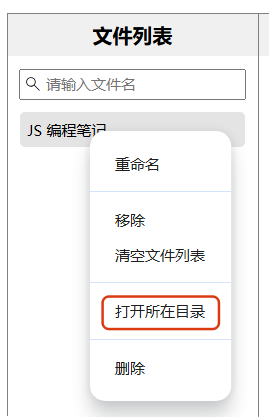
直接用 shell 打开
src/main/menu.ts
c
    {
      label: '打开所在目录',
      click: async () => {
        shell.openPath(path.dirname(filePath))
      }
    },
删除文件
src/main/menu.ts
c
    {
      label: '删除',
      click: async () => {
        try {
          // 显示确认对话框
          const { response } = await dialog.showMessageBox(mainWindow, {
            type: 'question',
            buttons: ['确定', '取消'],
            title: '确认删除',
            message: `确定要删除文件 ${path.basename(filePath)} 吗?`
          })
          if (response === 0) {
            // 用户点击确定,删除本地文件
            await fs.unlink(filePath)
            // 通知渲染进程,将文件从列表中移除
            mainWindow.webContents.send('removeOut-fileList', filePath)
          }
        } catch {
          dialog.showMessageBox(mainWindow, {
            type: 'error',
            title: '删除失败',
            message: `删除文件 ${path.basename(filePath)} 时出错,请稍后重试。`
          })
        }
      }
    }
src/renderer/src/App.vue
同移除文件
c
  window.electron.ipcRenderer.on('removeOut-fileList', (_, filePath) => {
    // 过滤掉要删除的文件
    fileList.value = fileList.value.filter((file) => {
      return file.filePath !== filePath
    })
    // 若移除的当前打开的文件
    if (currentFilePath.value === filePath) {
      // 若移除目标文件后,还有其他文件,则打开第一个文件
      if (fileList_filtered.value.length > 0) {
        openFile(fileList_filtered.value[0])
      } else {
        // 若移除目标文件后,没有其他文件,则清空内容和路径
        markdownContent.value = ''
        currentFilePath.value = ''
      }
    }
  })