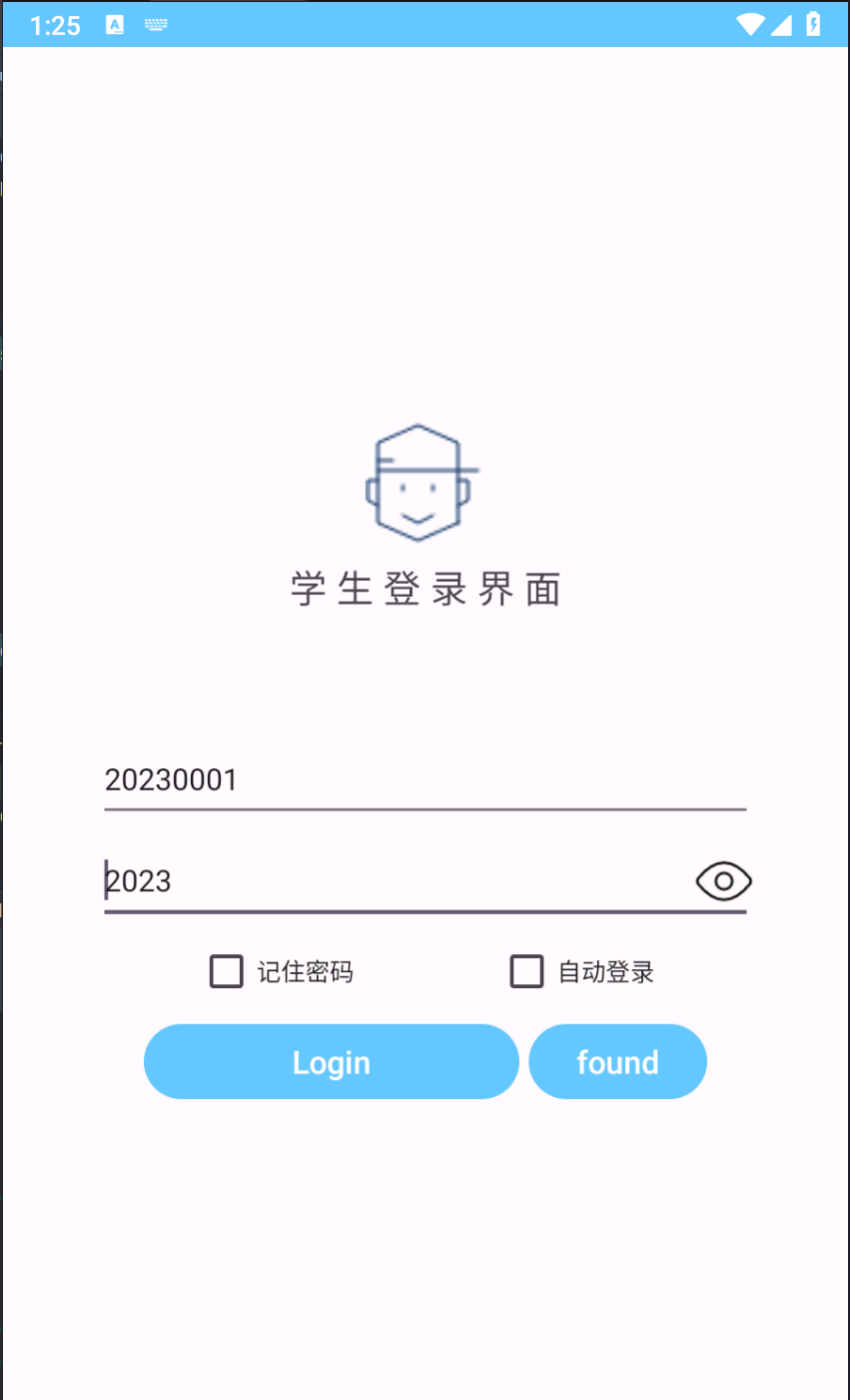
我们已经讲过了okhttp和登录系统的使用,我们今天做一个完整的登录系统,后端用spring+mybatis去做
数据库内容
sql
-- 创建学生信息表
CREATE TABLE student_info (
    id SERIAL PRIMARY KEY,  -- 添加自增主键
    name VARCHAR(255) NOT NULL,
    number INT NOT NULL,
    code INT NOT NULL,
    student_id INT UNIQUE NOT NULL,  -- 学号唯一
    Ptteacher VARCHAR(255),
    Zone INT,
    grade INT NOT NULL,
    created_at TIMESTAMP DEFAULT CURRENT_TIMESTAMP  -- 添加创建时间戳
);

-- 插入示例数据
INSERT INTO student_info (name, number, code, student_id, Ptteacher, Zone, grade)
VALUES
    ('张三', 1001, 2023, 20230001, '王老师', 2, 1),
    ('李四', 1002, 2023, 20230002, '刘老师', 1, 1),
    ('王五', 2001, 2022, 20220001, '张老师', 3, 2),
    ('赵六', 2002, 2022, 20220002, '谢老师', 2, 2),  -- 导师可以为空
    ('钱七', 3001, 2021, 20210001, '陈老师', 1, 3);

-- 查询验证数据
SELECT * FROM student_info;
效果图

后端
Student.java
java
package com.example.threes;


public class Student { // 改为更有意义的类名
    private Integer id; // 添加主键
    private String name;
    private Integer number;
    private Integer code;
    private Integer studentId; // 改为Java命名规范
    private String ptTeacher; // 改为Java命名规范
    private Integer zone;
    private Integer grade;

    // 所有getter/setter
    public Integer getId() {
        return id;
    }

    public void setId(Integer id) {
        this.id = id;
    }

    public String getName() {
        return name;
    }

    public void setName(String name) {
        this.name = name;
    }

    public Integer getNumber() {
        return number;
    }

    public void setNumber(Integer number) {
        this.number = number;
    }

    public Integer getCode() {
        return code;
    }

    public void setCode(Integer code) {
        this.code = code;
    }

    public Integer getStudentId() {
        return studentId;
    }

    public void setStudentId(Integer studentId) {
        this.studentId = studentId;
    }

    public String getPtTeacher() {
        return ptTeacher;
    }

    public void setPtTeacher(String ptTeacher) {
        this.ptTeacher = ptTeacher;
    }

    public Integer getZone() {
        return zone;
    }

    public void setZone(Integer zone) {
        this.zone = zone;
    }

    public Integer getGrade() {
        return grade;
    }

    public void setGrade(Integer grade) {
        this.grade = grade;
    }
}
StudentController.java
java
package com.example.threes;

import org.springframework.beans.factory.annotation.Autowired;
import org.springframework.web.bind.annotation.GetMapping;
import org.springframework.web.bind.annotation.RequestMapping;
import org.springframework.web.bind.annotation.RequestParam;
import org.springframework.web.bind.annotation.RestController;

import java.util.List;

@RestController
@RequestMapping("/students")
public class StudentController {

    @Autowired
    private StudentService studentService;

    @GetMapping("/all")
    public List<Student> getAllStudents() {
        return studentService.getAllStudents();
    }

    @GetMapping("/search")
    public List<Student> getStudentById(
            @RequestParam(value = "student_id", required = true) Integer studentId) {
        return studentService.getStudentById(studentId);
    }
}
StudentDao.java
java
package com.example.threes;
import java.util.List;


import java.util.List;
import org.apache.ibatis.annotations.Mapper;

@Mapper
public interface StudentDao { // 接口改名
    List<Student> findAll();
    List<Student> findByStudentId(Integer studentId); // 单一查询方法
    // 删除其他不相关的方法
}
StudentService.java
java
package com.example.threes;

import org.springframework.beans.factory.annotation.Autowired;
import org.springframework.stereotype.Service;

import java.util.List;

@Service
public class StudentService {
    @Autowired
    private StudentDao studentDao;

    public List<Student> getAllStudents(){
        return studentDao.findAll();
    }

    public List<Student> getStudentById(Integer studentId){
        return studentDao.findByStudentId(studentId);
    }
}
Student.xml
xml
<?xml version="1.0" encoding="UTF-8"?>
<!DOCTYPE mapper PUBLIC "-//mybatis.org//DTD Mapper 3.0//EN"
        "http://mybatis.org/dtd/mybatis-3-mapper.dtd">
<mapper namespace="com.example.threes.StudentDao"> <!-- 更新为正确的接口名 -->

    <!-- 结果映射 -->
    <resultMap id="studentResultMap" type="com.example.threes.Student">
        <id property="id" column="id"/>
        <result property="name" column="name"/>
        <result property="number" column="number"/>
        <result property="code" column="code"/>
        <result property="studentId" column="student_id"/>
        <result property="ptTeacher" column="ptteacher"/>
        <result property="zone" column="zone"/>
        <result property="grade" column="grade"/>
    </resultMap>

    <!-- 查询所有学生 -->
    <select id="findAll" resultMap="studentResultMap">
        SELECT * FROM student_info
    </select>

    <!-- 按student_id查询 -->
    <select id="findByStudentId" resultMap="studentResultMap" parameterType="int">
        SELECT * FROM student_info
        WHERE student_id = #{studentId}
    </select>
</mapper>
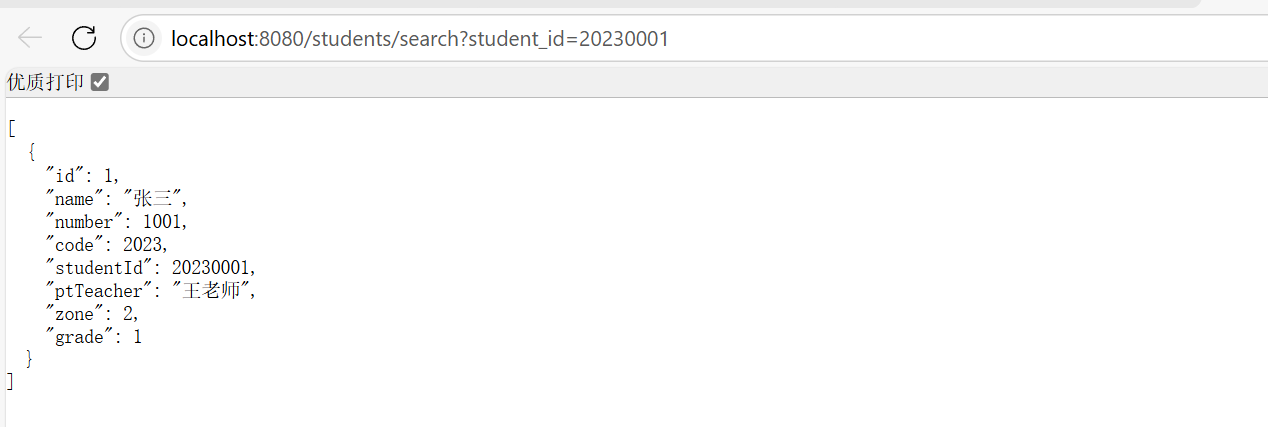
效果图
客户端
student.java
java
package com.example.project_a.Information;

public class Student {
    public String name;
    public int number;
    public int code;
    public int student_id;
    public String Ptteacher;
    public int Zone;
    public int grade;
    //学生的必要信息,可从数据库中修改


    public String getName() {
        return name;
    }

    public void setName(String name) {
        this.name = name;
    }

    // number 属性的getter和setter
    public int getNumber() {
        return number;
    }

    public void setNumber(int number) {
        this.number = number;
    }

    // code 属性的getter和setter
    public int getCode() {
        return code;
    }

    public void setCode(int code) {
        this.code = code;
    }

    // student_id 属性的getter和setter
    public int getStudent_id() {
        return student_id;
    }

    public void setStudent_id(int student_id) {
        this.student_id = student_id;
    }

    // Ptteacher 属性的getter和setter
    public String getPtteacher() {
        return Ptteacher;
    }

    public void setPtteacher(String Ptteacher) {
        this.Ptteacher = Ptteacher;
    }

    // Zone 属性的getter和setter
    public int getZone() {
        return Zone;
    }

    public void setZone(int Zone) {
        this.Zone = Zone;
    }

    // grade 属性的getter和setter
    public int getGrade() {
        return grade;
    }

    public void setGrade(int grade) {
        this.grade = grade;
    }
}
Stu_Login_Activity.java
java
package com.example.project_a;

import androidx.annotation.NonNull;
import androidx.appcompat.app.AppCompatActivity;

import android.Manifest;
import android.content.Intent;
import android.content.SharedPreferences;
import android.net.Uri;
import android.os.Build;
import android.os.Bundle;
import android.text.method.HideReturnsTransformationMethod;
import android.text.method.PasswordTransformationMethod;
import android.text.method.TransformationMethod;
import android.view.Gravity;
import android.view.View;
import android.widget.Button;
import android.widget.CheckBox;
import android.widget.EditText;
import android.widget.ImageView;
import android.widget.TextView;
import android.widget.Toast;

import com.example.project_a.Information.Student;
import com.example.project_a.tools.PermissionsInfo;

import org.json.JSONArray;
import org.json.JSONException;
import org.json.JSONObject;

import java.io.IOException;
import java.util.HashMap;
import java.util.Map;
import java.util.concurrent.TimeUnit;

import okhttp3.Call;
import okhttp3.Callback;
import okhttp3.HttpUrl;
import okhttp3.OkHttpClient;
import okhttp3.Request;
import okhttp3.Response;
import pub.devrel.easypermissions.AfterPermissionGranted;
import pub.devrel.easypermissions.EasyPermissions;

public class Stu_Login_Activity extends AppCompatActivity {
    // 控件声明
    private EditText mEtUsername;
    private EditText mEtPassword;
    private Button mBtnLogin;
    private Button mBtnFound;
    private ImageView mImgEye;
    private CheckBox mChbRemember;
    private TextView tv_result;
    private CheckBox mChbAutoLogin;

    // 额外声明
    private SharedPreferences loginPreferences;

    // Student对象作为成员变量
    private Student student;
    private boolean studentDataLoaded = false;

    // 常量定义
    private static String strUsername = "1";
    private static String strPassword = "1";
    private static boolean hide = true;
    private static String CheckOrNot = "checked";
    private static String UserName = "UserName";
    private static String PassWord = "PassWord";
    private boolean isNetworkVerificationInProgress = false; // 新增标志位

    @Override
    protected void onCreate(Bundle savedInstanceState) {
        super.onCreate(savedInstanceState);
        setContentView(R.layout.activity_stu_login);

        checkingAndroidVersion(); // 检查安卓版本

        // 初始化Student对象
        student = new Student();

        // 控件绑定
        mEtUsername = findViewById(R.id.ed_stuLogin_username);
        mEtPassword = findViewById(R.id.et_stuLogin_Password);
        mBtnLogin = findViewById(R.id.btn_stuLogin_login);
        mBtnFound = findViewById(R.id.btn_stuLogin_find);
        mImgEye = findViewById(R.id.img_stuLogin_eye);
        mChbRemember = findViewById(R.id.cb_stuLogin_remember);
        mChbAutoLogin = findViewById(R.id.cb_stuLogin_autologin);
        tv_result = findViewById(R.id.tv_result); // 确保有这个TextView

        loginPreferences = getSharedPreferences("Login_stu", MODE_PRIVATE);
        boolean checked = loginPreferences.getBoolean(CheckOrNot, false);
        if (checked) {
            Map<String, String> map = readLogin();
            if (map != null) {
                mEtUsername.setText(map.get(UserName).toString());
                mEtPassword.setText(map.get(PassWord).toString());
                mChbRemember.setChecked(checked);
            }
        }

        // 功能实现
        // 登录
        mBtnLogin.setOnClickListener(new View.OnClickListener() {
            @Override
            public void onClick(View v) {
                // 读取是否保存了密码
                configLoginInfo(mChbRemember.isChecked());

                // 防止重复点击
                if (isNetworkVerificationInProgress) {
                    return;
                }

                // 正常登录
                if (onCheck(v)) {
                    Intent intent = new Intent(Stu_Login_Activity.this, Activity_Student_Homepage.class);
                    startActivity(intent);
                }
            }
        });

        // 跳转到网页
        mBtnFound.setOnClickListener(new View.OnClickListener() {
            @Override
            public void onClick(View v) {
                Uri uri = Uri.parse("http://www.bing.com"); // 账户找回url修改位置
                Intent intent = new Intent(Intent.ACTION_VIEW, uri);
                startActivity(intent);
            }
        });

        // 密码显示与否设置
        mImgEye.setImageResource(R.drawable.invisible);
        mImgEye.setOnClickListener(new View.OnClickListener() {
            @Override
            public void onClick(View v) {
                if (v.getId() == R.id.img_stuLogin_eye) {
                    if (hide == true) {
                        mImgEye.setImageResource(R.drawable.visible);
                        HideReturnsTransformationMethod method = HideReturnsTransformationMethod.getInstance();
                        mEtPassword.setTransformationMethod(method);
                        hide = false;
                    } else if (hide == false) {
                        mImgEye.setImageResource(R.drawable.invisible);
                        TransformationMethod method = PasswordTransformationMethod.getInstance();
                        mEtPassword.setTransformationMethod(method);
                        hide = true;
                    }
                }
            }
        });
    }

    // 发起GET方式的HTTP请求
    private void doGet() {
        isNetworkVerificationInProgress = true; // 设置网络验证开始标志

        final String username = mEtUsername.getText().toString().trim();
        if (username.isEmpty()) {
            runOnUiThread(() -> {
                Toast.makeText(Stu_Login_Activity.this, "用户名不能为空", Toast.LENGTH_SHORT).show();
                isNetworkVerificationInProgress = false;
            });
            return;
        }

        // 1. 构建带参数的URL
        HttpUrl url = new HttpUrl.Builder()
                .scheme("http")
                .host("192.168.43.9") // 替换为实际IP
                .port(8080)
                .addPathSegments("students/search") // 层级路径的正确写法
                .addQueryParameter("student_id", username) // 查询参数 - 使用真实的用户名
                .build();

        OkHttpClient client = new OkHttpClient.Builder()
                .connectTimeout(15, TimeUnit.SECONDS)  // 添加超时配置
                .readTimeout(20, TimeUnit.SECONDS)
                .build();

        Request request = new Request.Builder()
                .url(url)
                .header("Accept-Language", "zh-CN")
                .build();

        runOnUiThread(() -> Toast.makeText(Stu_Login_Activity.this, "正在验证账号...", Toast.LENGTH_SHORT).show());

        client.newCall(request).enqueue(new Callback() {
            @Override
            public void onFailure(Call call, IOException e) {
                runOnUiThread(() -> {
                    Toast.makeText(Stu_Login_Activity.this, "网络请求失败: " + e.getMessage(), Toast.LENGTH_SHORT).show();
                    tv_result.setText("请求失败: " + e.getMessage());
                    isNetworkVerificationInProgress = false;
                });
            }

            @Override
            public void onResponse(Call call, Response response) throws IOException {
                if (response.isSuccessful()) {
                    String resp = response.body().string();
                    try {
                        JSONArray jsonArray = new JSONArray(resp);
                        // 检查是否有数据
                        if (jsonArray.length() > 0) {
                            // 只取第一组学生数据
                            JSONObject jsonObject = jsonArray.getJSONObject(0);

                            // 填充Student对象数据
                            student.name = jsonObject.optString("name", "未知");
                            student.number = jsonObject.optInt("number", 0);
                            student.code = jsonObject.optInt("code", 0);
                            student.student_id = jsonObject.optInt("studentId", 0);
                            student.Ptteacher = jsonObject.optString("ptTeacher", "未知");
                            student.Zone = jsonObject.optInt("zone", 0);
                            student.grade = jsonObject.optInt("grade", 0);

                            // 标记数据已加载
                            studentDataLoaded = true;

                            // 在UI线程中完成密码验证
                            runOnUiThread(() -> {
                                // 获取用户输入的密码
                                String password = mEtPassword.getText().toString().trim();

                                // 验证服务器返回的code是否与密码匹配
                                if (password.equals(String.valueOf(student.code))) {
                                    Toast.makeText(Stu_Login_Activity.this, "登录成功!", Toast.LENGTH_SHORT).show();
                                    Intent intent = new Intent(Stu_Login_Activity.this, Activity_Student_Homepage.class);
                                    startActivity(intent);
                                } else {
                                    Toast.makeText(Stu_Login_Activity.this, "密码错误", Toast.LENGTH_SHORT).show();
                                }

                                isNetworkVerificationInProgress = false; // 重置网络验证标志
                            });
                        } else {
                            runOnUiThread(() -> {
                                Toast.makeText(Stu_Login_Activity.this, "未找到学生信息", Toast.LENGTH_SHORT).show();
                                tv_result.setText("未找到学生信息");
                                isNetworkVerificationInProgress = false;
                            });
                        }
                    } catch (JSONException e) {
                        runOnUiThread(() -> {
                            Toast.makeText(Stu_Login_Activity.this, "JSON解析失败", Toast.LENGTH_SHORT).show();
                            tv_result.setText("JSON解析失败\n原始数据:" + resp);
                            isNetworkVerificationInProgress = false;
                        });
                    }
                } else {
                    runOnUiThread(() -> {
                        Toast.makeText(Stu_Login_Activity.this, "服务器返回错误: " + response.code(), Toast.LENGTH_SHORT).show();
                        tv_result.setText("服务器返回错误\n状态码:" + response.code());
                        isNetworkVerificationInProgress = false;
                    });
                }
                response.close(); // 确保关闭响应资源
            }
        });
    }

    /*onCheck确认密码事件*/
    private boolean onCheck(View v) {
        // 需要获取输入的用户名和密码
        String username = mEtUsername.getText().toString();
        String password = mEtPassword.getText().toString();

        // 弹出内容设置
        String ok = "登陆成功!";
        String fail = "密码或用户名有误,登陆失败。";

        // 1. 检查本地测试账号(特殊硬编码账号)
        if (username.equals(strUsername) && password.equals(strPassword)) {
            Toast.makeText(getApplicationContext(), ok, Toast.LENGTH_SHORT).show();
            return true;
        }

        // 2. 检查是否已加载学生数据(网络验证已成功且加载过数据)
        if (studentDataLoaded && password.equals(String.valueOf(student.code))) {
            Toast.makeText(getApplicationContext(), ok, Toast.LENGTH_SHORT).show();
            return true;
        }

        // 3. 尝试网络验证
        doGet();

        Toast toastCenter = Toast.makeText(Stu_Login_Activity.this, "正在验证账号...", Toast.LENGTH_SHORT);
        toastCenter.setGravity(Gravity.CENTER_HORIZONTAL, 0, 0);
        toastCenter.show();

        return false; // 返回false,等待网络验证回调处理登录结果
    }

    /*保存密码*/
    private void configLoginInfo(boolean checked) {
        SharedPreferences.Editor editor = loginPreferences.edit();
        editor.putBoolean(CheckOrNot, mChbRemember.isChecked());
        if (checked) {
            editor.putString(UserName, mEtUsername.getText().toString());
            editor.putString(PassWord, mEtPassword.getText().toString());
        } else {
            editor.remove(UserName).remove(PassWord);
        }
        editor.commit();
    }

    /*登录临时信息读取*/
    private Map<String, String> readLogin() {
        Map<String, String> map = new HashMap<>();
        String username = loginPreferences.getString(UserName, "");
        String password = loginPreferences.getString(PassWord, "");
        map.put(UserName, username);
        map.put(PassWord, password);
        return map;
    }

    // PermissionInfo
    private static final int REQUEST_PERMISSIONS = 9527;

    public void checkingAndroidVersion() {
        Toast toastCenter = Toast.makeText(getApplicationContext(), "当前安卓版本为" + Build.VERSION.SDK_INT, Toast.LENGTH_SHORT);
        toastCenter.show();
        if (Build.VERSION.SDK_INT >= Build.VERSION_CODES.M) {
            // Android6.0及以上先获取权限再定位
            requestPermission();
        } else {
            // Android6.0以下直接定位
            Toast toastCenter1 = Toast.makeText(getApplicationContext(), "ok", Toast.LENGTH_SHORT);
            toastCenter1.show();
        }
    }

    @AfterPermissionGranted(REQUEST_PERMISSIONS)
    public void requestPermission() {
        String[] permissions = {
                android.Manifest.permission.ACCESS_COARSE_LOCATION,
                android.Manifest.permission.ACCESS_FINE_LOCATION,
                android.Manifest.permission.READ_PHONE_STATE,
                Manifest.permission.WRITE_EXTERNAL_STORAGE
        };

        if (EasyPermissions.hasPermissions(this, permissions)) {
            // true 有权限 开始定位
            Toast info = Toast.makeText(getApplicationContext(), "已获得权限,可以定位啦!", Toast.LENGTH_SHORT);
            info.show();
        } else {
            // false 无权限
            EasyPermissions.requestPermissions(this, "需要权限", REQUEST_PERMISSIONS, permissions);
        }
    }

    @Override
    public void onRequestPermissionsResult(int requestCode, @NonNull String[] permissions, @NonNull int[] grantResults) {
        super.onRequestPermissionsResult(requestCode, permissions, grantResults);
        // 设置权限请求结果
        EasyPermissions.onRequestPermissionsResult(requestCode, permissions, grantResults, this);
    }
}
stu_log.xml
xml
<?xml version="1.0" encoding="utf-8"?>
<LinearLayout xmlns:android="http://schemas.android.com/apk/res/android"
xmlns:app="http://schemas.android.com/apk/res-auto"
xmlns:tools="http://schemas.android.com/tools"
android:layout_width="match_parent"
android:layout_height="match_parent"
android:orientation="vertical"
tools:context=".Stu_Login_Activity">
<ImageView
android:layout_width="64dp"
android:layout_height="64dp"
android:src="@drawable/kids"
android:layout_marginTop="200dp"
android:layout_gravity="center_horizontal"/>
<TextView
android:layout_width="wrap_content"
android:layout_height="wrap_content"
android:textSize="20sp"
android:text="学 生 登 录 界 面"
android:layout_marginTop="10dp"
android:gravity="center_horizontal"
android:layout_gravity="center_horizontal"/>
<LinearLayout
android:layout_width="wrap_content"
android:layout_height="wrap_content"
android:orientation="vertical"
android:layout_marginTop="65dp"
android:layout_gravity="center_horizontal">
<EditText
android:id="@+id/ed_stuLogin_username"
android:layout_width="350dp"
android:layout_height="48dp"
android:layout_gravity="center"
android:hint="Username"
android:maxLines="1"
android:textSize="16sp"/>
<RelativeLayout
android:layout_width="wrap_content"
android:layout_height="wrap_content"
android:orientation="horizontal">
<EditText
android:id="@+id/et_stuLogin_Password"
android:layout_width="350dp"
android:layout_height="48dp"
android:layout_marginTop="6dp"
android:layout_gravity="center_horizontal"
android:hint="Password"
android:inputType="textPassword"
android:maxLines="1"
android:textSize="16sp"/>
<ImageView
android:id="@+id/img_stuLogin_eye"
android:layout_width="32dp"
android:layout_height="32dp"
android:layout_alignBottom="@+id/et_stuLogin_Password"
android:layout_alignEnd="@+id/et_stuLogin_Password"
android:layout_alignTop="@+id/et_stuLogin_Password"
android:src="@drawable/invisible"/>
</RelativeLayout>
<LinearLayout
android:layout_width="wrap_content"
android:layout_height="wrap_content"
android:orientation="horizontal"
android:layout_gravity="center_horizontal">
<CheckBox
android:id="@+id/cb_stuLogin_remember"
android:layout_width="0dp"
android:layout_height="wrap_content"
android:layout_weight="1"
android:text="记住密码"
android:textSize="13sp"/>
<CheckBox
android:id="@+id/cb_stuLogin_autologin"
android:layout_width="0dp"
android:layout_height="wrap_content"
android:layout_weight="1"
android:text="自动登录"
android:textSize="13sp"
android:layout_marginLeft="76dp"/>
</LinearLayout>
</LinearLayout>
<RelativeLayout
android:layout_width="wrap_content"
android:layout_height="wrap_content"
android:layout_gravity="center_horizontal">
<Button
android:id="@+id/btn_stuLogin_login"
android:layout_width="200dp"
android:layout_height="wrap_content"
android:text="Login"
android:textSize="17sp"/>
<Button
android:id="@+id/btn_stuLogin_find"
android:layout_width="95dp"
android:layout_height="wrap_content"
android:text="found"
android:textSize="17sp"
android:layout_toRightOf="@id/btn_stuLogin_login"
android:layout_marginLeft="5dp"/>
</RelativeLayout>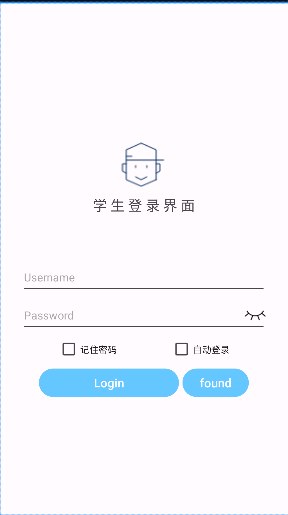
<TextView
android:id="@+id/tv_result"
android:layout_width="match_parent"
android:layout_height="wrap_content"
android:paddingLeft="5dp"
android:textColor="@color/black"
android:textSize="17sp" />
</LinearLayout>之后我们通过数据库中的student_id和code来进行登录,同时还要保证网络连接的相同,就可以正常连接了。