文章目录
- 前言
- 一、完整解决方案架构
- 二、实现步骤
-
- [1.配置 Identity 和 JWT 认证](#1.配置 Identity 和 JWT 认证)
- [2. SignalR JWT配置](#2. SignalR JWT配置)
- [3.SignalR Hub 集成认证和授权](#3.SignalR Hub 集成认证和授权)
- 4.控制器
- 5.客户端集成 (JavaScript)
- [6.配置 appsettings.json](#6.配置 appsettings.json)
- 三、认证流程详解
-
- 1.用户登录:
- [2.SignalR 连接:](#2.SignalR 连接:)
- [3.JWT 验证:](#3.JWT 验证:)
- [4.Hub 授权:](#4.Hub 授权:)
- 四、常见问题及解决方案:
- 总结
前言
本文将详细介绍如何在 ASP.NET Core SignalR 应用中结合 Identity 框架和 JWT 实现安全的身份认证与授权。
一、完整解决方案架构
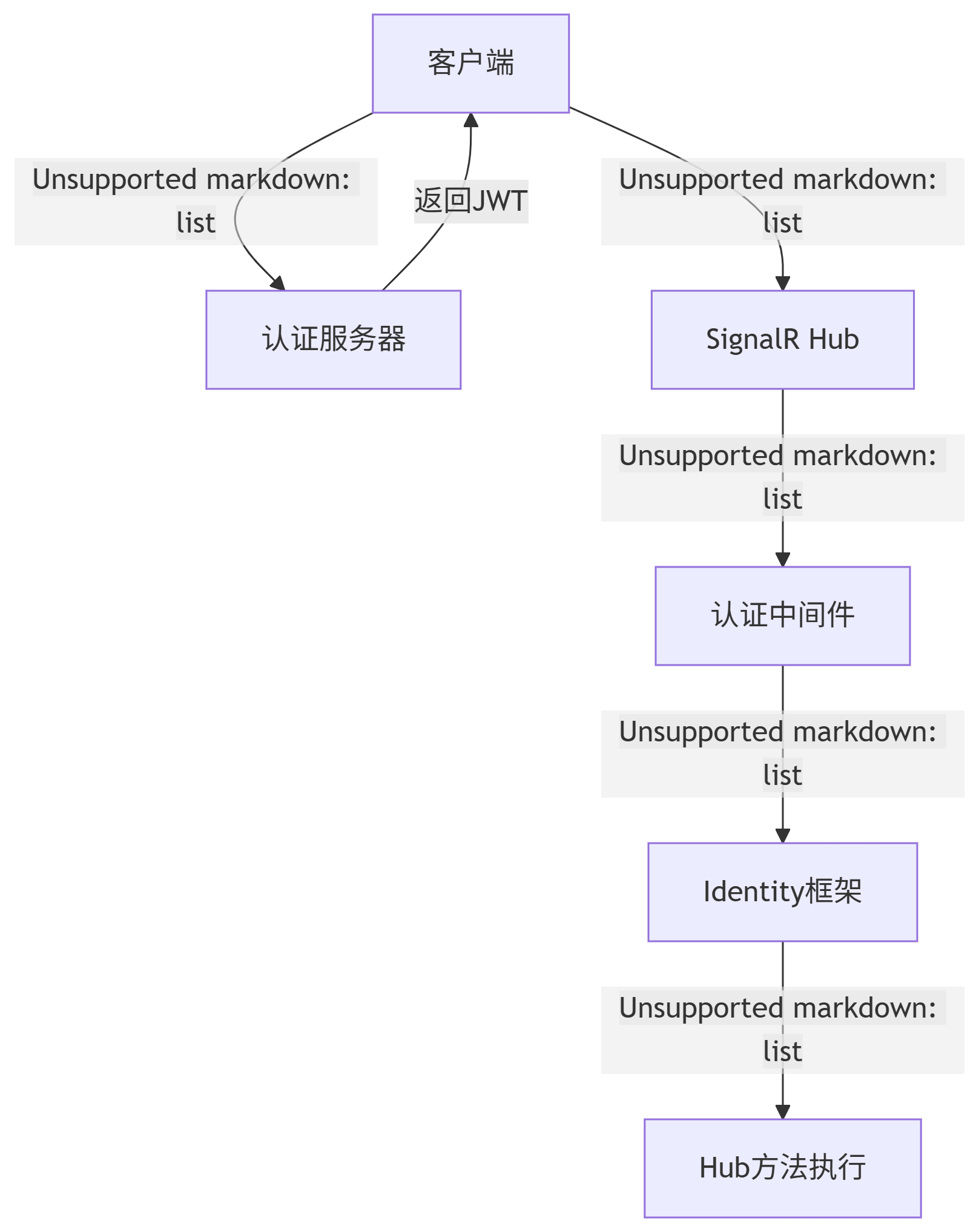
二、实现步骤
1.配置 Identity 和 JWT 认证
Identity、JWT请参照【ASP.NET Core 中JWT的基本使用】、【ASP.NET Core Identity框架使用指南】
-
Program.cs
csharpusing Microsoft.AspNetCore.Identity; using Microsoft.EntityFrameworkCore; using Microsoft.Extensions.Options; using Microsoft.OpenApi.Models; using SignalRDemo.Data; using SignalRDemo.Entity; using SignalRDemo.Extensions; using SignalRDemo.HubService; using SignalRDemo.Interfaces; using SignalRDemo.Repositories; var builder = WebApplication.CreateBuilder(args); // Add services to the container. builder.Services.AddControllers(); // Learn more about configuring Swagger/OpenAPI at https://aka.ms/aspnetcore/swashbuckle builder.Services.AddEndpointsApiExplorer(); builder.Services.AddSwaggerGen(); //数据库上下文 var connectionString = uilder.Configuration.GetConnectionString("DefaultConnection"); builder.Services.AddDbContext<MyDbContext>(opt => { opt.UseSqlServer(connectionString); }); //配置Identity builder.Services.AddIdentityCore<User>(opt => { opt.Lockout.MaxFailedAccessAttempts = 5;//登录失败多少次账号被锁定 opt.Lockout.DefaultLockoutTimeSpan = TimeSpan.FromMinutes(1);//锁定多长时间 opt.Password.RequireDigit = false;//密码是否需要数字 opt.Password.RequireLowercase = false;//密码是否需要小写字符 opt.Password.RequireUppercase = false;//密码是否需要大写字符 opt.Password.RequireNonAlphanumeric = false;//密码是否需要非字母数字的字符 opt.Password.RequiredLength = 6;//密码长度 opt.Tokens.PasswordResetTokenProvider = TokenOptions.DefaultEmailProvider;//密码重置令牌,使用默认的邮箱令牌提供程序来生成和验证令牌。此提供程序通常与用户邮箱关联,生成的令牌会通过邮件发送给用户,保证用户通过邮件接收密码重置链接。 opt.Tokens.EmailConfirmationTokenProvider = TokenOptions.DefaultEmailProvider;//配置邮箱确认令牌(Email Confirmation Token)的生成和验证所使用的提供程序(Provider) }); var idBuilder = new IdentityBuilder(typeof(User), typeof(Role), builder.Services); idBuilder.AddEntityFrameworkStores<MyDbContext>() .AddDefaultTokenProviders().AddUserManager<UserManager<User>>() .AddRoleManager<RoleManager<Role>>(); builder.Services.Configure<JwtSettings>(builder.Configuration.GetSection("JwtSettings")); // 5. 注册应用服务 builder.Services.AddScoped<IUserRepository, UserRepository>(); builder.Services.AddScoped<IAuthService, AuthService>(); // 添加 SignalR 服务 string redisServerAddress = ""; if (!string.IsNullOrWhiteSpace(redisServerAddress)) { builder.Services.AddSignalR().AddStackExchangeRedis(redisServerAddress, opt => { opt.Configuration.ChannelPrefix = "MyAppSignalR"; // 通道前缀 }); } else { builder.Services.AddSignalR(); } //跨域 string[] urls = new[] { "http://localhost:5173" }; builder.Services.AddCors(opt => opt.AddDefaultPolicy(builder => builder.WithOrigins(urls) .AllowAnyMethod().AllowAnyHeader().AllowCredentials()) ); // 添加JWT认证 // 认证服务配置(来自ServiceExtensions) builder.Services.ConfigureJwtAuthentication(builder.Configuration); // 扩展方法 ServiceExtensions.cs // 授权策略配置(来自ServiceExtensions) builder.Services.ConfigureAuthorizationPolicies(); // 扩展方法ServiceExtensions.cs //配置Swagger中带JWT报文头 builder.Services.AddSwaggerGen(c => { c.SwaggerDoc("v1", new OpenApiInfo { Title = "My API", Version = "v1" }); var securityScheme = new OpenApiSecurityScheme { Name = "Authorization", Description = "JWT Authorization header using the Bearer scheme.\r\nExample:'Bearer fadffdfadfds'", In = ParameterLocation.Header, Type = SecuritySchemeType.ApiKey, Scheme = "bearer", BearerFormat = "JWT", Reference = new OpenApiReference { Type = ReferenceType.SecurityScheme, Id = "Authorization" } }; c.AddSecurityDefinition("Authorization", securityScheme); var securityRequirement = new OpenApiSecurityRequirement { { securityScheme, new[] { "Bearer" } } }; c.AddSecurityRequirement(securityRequirement); }); var app = builder.Build(); // Configure the HTTP request pipeline. if (app.Environment.IsDevelopment()) { app.UseSwagger(); app.UseSwaggerUI(); } app.UseHttpsRedirection(); app.UseAuthentication(); app.UseAuthorization(); app.UseCors(); // 配置路由 app.MapHub<MyHubService>("/Hubs/MyHubService");// SignalR 终结点 app.MapControllers(); app.Run();
2. SignalR JWT配置
-
ServiceExtensions.cs
csharpusing Microsoft.AspNetCore.Authentication.JwtBearer; using Microsoft.IdentityModel.Tokens; using SignalRDemo.Entity; using System.Security.Claims; using System.Text; namespace SignalRDemo.Extensions { public static class ServiceExtensions { // JWT认证配置 public static void ConfigureJwtAuthentication(this IServiceCollection services, IConfiguration configuration) { var jwtSettings = configuration.GetSection("JwtSettings").Get<JwtSettings>(); services.AddAuthentication(options => { options.DefaultAuthenticateScheme = JwtBearerDefaults.AuthenticationScheme; options.DefaultChallengeScheme = JwtBearerDefaults.AuthenticationScheme; }) .AddJwtBearer(options => { options.TokenValidationParameters = new TokenValidationParameters { ValidateIssuer = false, ValidIssuer = jwtSettings.Issuer, ValidateAudience = false, ValidAudience = jwtSettings.Audience, ValidateLifetime = false, ValidateIssuerSigningKey = false, IssuerSigningKey = new SymmetricSecurityKey( Encoding.UTF8.GetBytes(jwtSettings.SecretKey!)), //ClockSkew = TimeSpan.Zero, RoleClaimType = ClaimTypes.Role }; options.Events = new JwtBearerEvents { OnAuthenticationFailed = context => { if (context.Exception.GetType() == typeof(SecurityTokenExpiredException)) { context.Response.Headers.Append("Token-Expired", "true"); } return Task.CompletedTask; }, //SignalR JWT配置 OnMessageReceived = context => { //websocket不支持自定义报文头 //所以需要把JWT通过URL中的Querystring传递 //然后在服务器端的OnMessageReceived中,把Querystring中的JWT读取出来 var accessToken = context.Request.Query["access_token"]; var path = context.HttpContext.Request.Path; if (!string.IsNullOrEmpty(accessToken) && path.StartsWithSegments("/Hubs/MyHubService")) { context.Token = accessToken; } return Task.CompletedTask; } }; }); } // 授权策略配置 public static void ConfigureAuthorizationPolicies(this IServiceCollection services) { services.AddAuthorization(options => { // 基于角色的策略 options.AddPolicy("AdminOnly", policy => policy.RequireRole("admin")); options.AddPolicy("ManagerOnly", policy => policy.RequireRole("admin")); // 基于自定义权限的策略 options.AddPolicy("ContentEditor", policy => policy.RequireClaim("permission", "content.edit")); options.AddPolicy("UserManagement", policy => policy.RequireClaim("permission", "user.manage")); }); } } }
3.SignalR Hub 集成认证和授权
-
MyHubService.cs
csharpusing Microsoft.AspNetCore.Authorization; using Microsoft.AspNetCore.SignalR; namespace SignalRDemo.HubService { //[Authorize] public class MyHubService:Hub { [Authorize(Roles = "admin")] public Task SendMessageAsync(string user,string content) { var connectionId=this.Context.ConnectionId; string msg = $"{connectionId},{DateTime.Now.ToString()}:{user}"; return Clients.All.SendAsync("ReceiveMsg", msg, content); } } }
4.控制器
-
AuthController.cs
csharpusing Microsoft.AspNetCore.Authorization; using Microsoft.AspNetCore.Http; using Microsoft.AspNetCore.Identity.Data; using Microsoft.AspNetCore.Mvc; using Microsoft.Extensions.Options; using Microsoft.IdentityModel.Tokens; using SignalRDemo.Entity; using SignalRDemo.Interfaces; using System.IdentityModel.Tokens.Jwt; using System.Runtime; using System.Security.Claims; using System.Text; namespace SignalRDemo.Controllers { [Route("api/[controller]/[action]")] [ApiController] public class AuthController : ControllerBase { private readonly IAuthService _authService; public AuthController(IConfiguration config, IOptionsSnapshot<JwtSettings> settings, IAuthService authService) { _config = config; _settings = settings; _authService = authService; } [HttpPost] [AllowAnonymous] public async Task<IActionResult> Login([FromBody] LoginModel request) { var result = await _authService.Authenticate(request.Username, request.Password); if (result == null) return Unauthorized(); return Ok(result); } } }
5.客户端集成 (JavaScript)
-
代码示例
csharp<template> <div style="padding: 20px; max-width: 800px; margin: 0 auto;"> <h2 style="color: #2c3e50;">SignalR 聊天室</h2> <!-- 消息发送区域 - 始终显示但禁用状态 --> <div style="margin-bottom: 20px; display: flex; flex-wrap: wrap; gap: 10px; align-items: center;"> <div style="flex: 1 1 200px;"> <label style="display: block; font-weight: bold; margin-bottom: 5px;">用户:</label> <input type="text" v-model="state.username" placeholder="输入用户名" :disabled="state.isLoggingIn || state.isConnected" style="padding: 10px; border: 1px solid #ddd; border-radius: 4px; width: 100%;" /> </div> <div style="flex: 1 1 200px;"> <label style="display: block; font-weight: bold; margin-bottom: 5px;">密码:</label> <input type="password" v-model="state.password" placeholder="输入密码" :disabled="state.isLoggingIn || state.isConnected" style="padding: 10px; border: 1px solid #ddd; border-radius: 4px; width: 100%;" /> </div> <div style="flex: 1 1 200px;"> <label style="display: block; font-weight: bold; margin-bottom: 5px;">消息内容:</label> <input type="text" v-model="state.contentMsg" @keydown.enter="sendMessage" placeholder="输入消息后按回车发送" :disabled="!state.isConnected || state.isConnecting" style="padding: 10px; border: 1px solid #ddd; border-radius: 4px; width: 100%;" /> </div> </div> <!-- 登录控制区域 --> <div style="margin-bottom: 20px; background: #f8f9fa; padding: 15px; border-radius: 4px;"> <div style="display: flex; margin-bottom: 10px;"> <label style="margin-right: 10px; font-weight: bold; min-width: 80px;">服务器:</label> <input type="text" v-model="state.serverUrl" placeholder="输入 SignalR Hub URL" :disabled="state.isConnected" style="padding: 8px; border: 1px solid #ddd; border-radius: 4px; flex: 1;" /> </div> <div style="display: flex; gap: 10px;"> <button @click="login" :disabled="state.isLoggingIn || state.isConnected" style="padding: 8px 15px; background: #3498db; color: white; border: none; border-radius: 4px; cursor: pointer; flex: 1;" > {{ state.isLoggingIn ? '登录中...' : '登录' }} </button> <button @click="reconnect" :disabled="!state.token" style="padding: 8px 15px; background: #2ecc71; color: white; border: none; border-radius: 4px; cursor: pointer; flex: 1;" > {{ state.isConnected ? '重新连接' : '连接' }} </button> </div> </div> <!-- 消息记录区域 --> <div style="border: 1px solid #e0e0e0; border-radius: 4px; overflow: hidden; margin-bottom: 20px;"> <div style="background: #f0f0f0; padding: 10px; font-weight: bold;">消息记录</div> <div style="max-height: 300px; overflow-y: auto; padding: 10px; background: white;"> <div v-for="(msg, index) in state.messages" :key="index" style="padding: 8px 0; border-bottom: 1px solid #f5f5f5;"> {{ msg }} </div> <div v-if="state.messages.length === 0" style="text-align: center; color: #999; padding: 20px;"> 暂无消息 </div> </div> </div> <!-- 状态显示区域 --> <div :style="{ padding: '12px', borderRadius: '4px', marginBottom: '15px', backgroundColor: state.connectionStatus.includes('失败') ? '#ffebee' : state.connectionStatus.includes('连接') ? '#e8f5e9' : '#e3f2fd', color: state.connectionStatus.includes('失败') ? '#b71c1c' : state.connectionStatus.includes('连接') ? '#1b5e20' : '#0d47a1', border: state.connectionStatus.includes('失败') ? '1px solid #ffcdd2' : 'none' }"> <div style="font-weight: bold; margin-bottom: 5px;">连接状态:</div> <div>{{ state.connectionStatus }}</div> <div v-if="state.errorDetails" style="margin-top: 10px; font-size: 0.9em; color: #b71c1c;"> <div style="font-weight: bold;">错误详情:</div> <div style="word-break: break-all;">{{ state.errorDetails }}</div> </div> </div> </div> </template> <script> import { reactive, onUnmounted } from 'vue'; import * as signalR from '@microsoft/signalr'; export default { setup() { const state = reactive({ username: "", password: "", contentMsg: "", messages: [], connectionStatus: "未连接", isConnected: false, isConnecting: false, isLoggingIn: false, serverUrl: "https://localhost:7183/Hubs/MyHubService", errorDetails: "", connection: null, retryCount: 0, token: null }); const sendMessage = async () => { if (!state.contentMsg.trim()) return; if (!state.isConnected || !state.connection) { state.connectionStatus = "连接尚未建立,无法发送消息"; return; } try { const possibleMethods = [ // "SendMessage", "SendMessageAsync" // "BroadcastMessage", // "SendToAll", // "PublishMessage" ]; let lastError = null; for (const method of possibleMethods) { try { await state.connection.invoke(method, state.username, state.contentMsg); state.contentMsg = ""; return; } catch (error) { lastError = error; } } state.connectionStatus = `发送失败: 未找到服务端方法`; state.errorDetails = `尝试的方法: ${possibleMethods.join(", ")}\n错误: ${lastError.message}`; } catch (error) { state.connectionStatus = `发送失败: ${error.message}`; state.errorDetails = error.toString(); } }; const initSignalRConnection = async (token) => { // token='12332131321'; state.isConnecting = true; state.connectionStatus = "正在连接..."; state.errorDetails = ""; try { if (state.connection) { await state.connection.stop(); state.connection = null; } state.connection = new signalR.HubConnectionBuilder() .withUrl(state.serverUrl, { accessTokenFactory: () => token, skipNegotiation: true, transport: signalR.HttpTransportType.WebSockets }) .withAutomaticReconnect({ nextRetryDelayInMilliseconds: retryContext => { state.retryCount = retryContext.previousRetryCount + 1; return Math.min(1000 * Math.pow(2, state.retryCount), 30000); } }) .configureLogging(signalR.LogLevel.Debug) .build(); state.connection.on('ReceiveMessage', rcvMsg => { state.messages.push(rcvMsg); }); state.connection.on('ReceiveMsg', (rcvMsg, rcvContent) => { state.messages.push(`${rcvMsg}: ${rcvContent}`); }); state.connection.onreconnecting(() => { state.isConnected = false; state.connectionStatus = "连接丢失,正在重连..."; }); state.connection.onreconnected(connectionId => { state.isConnected = true; state.isConnecting = false; state.retryCount = 0; state.connectionStatus = `已重新连接 (ID: ${connectionId})`; }); state.connection.onclose(error => { state.isConnected = false; state.isConnecting = false; state.connectionStatus = error ? `连接关闭: ${error.message}` : "连接已关闭"; }); await state.connection.start(); state.isConnected = true; state.isConnecting = false; state.retryCount = 0; state.connectionStatus = `已连接 (ID: ${state.connection.connectionId})`; } catch (error) { console.error("SignalR 连接失败:", error); state.isConnected = false; state.isConnecting = false; state.connectionStatus = `连接失败: ${error.message}`; state.errorDetails = error.toString(); } }; const reconnect = async () => { if (state.token) { await initSignalRConnection(state.token); } else { state.connectionStatus = "请先登录"; } }; const login = async () => { if (state.isLoggingIn || state.isConnected) return; state.isLoggingIn = true; state.connectionStatus = "正在登录..."; try { const apiUrl = state.serverUrl.split('/Hubs/')[0] || 'https://localhost:7183'; const response = await fetch(`${apiUrl}/api/auth/login`, { method: 'POST', headers: { 'Content-Type': 'application/json' }, body: JSON.stringify({ username: state.username, password: state.password }) }); if (!response.ok) { throw new Error(`登录失败: ${response.status}`); } const result = await response.json(); state.token = result.token; localStorage.setItem('jwtToken', result.token); // alert(result.token); // 登录成功后初始化SignalR连接 await initSignalRConnection(result.token); } catch (error) { state.connectionStatus = `登录失败: ${error.message}`; state.errorDetails = error.toString(); } finally { state.isLoggingIn = false; } }; onUnmounted(() => { if (state.connection) { state.connection.stop(); } }); return { state, sendMessage, reconnect, login }; } } </script> <style> body { font-family: 'Segoe UI', Tahoma, Geneva, Verdana, sans-serif; background-color: #f5f7fa; margin: 0; padding: 20px; color: #333; } input, button { font-size: 1rem; transition: all 0.3s; } input:focus { outline: none; border-color: #3498db; box-shadow: 0 0 0 2px rgba(52, 152, 219, 0.2); } button { font-weight: 500; } button:hover:not(:disabled) { opacity: 0.9; transform: translateY(-1px); } button:disabled { opacity: 0.6; cursor: not-allowed; } label { display: block; margin-bottom: 5px; } </style> -
界面展示:
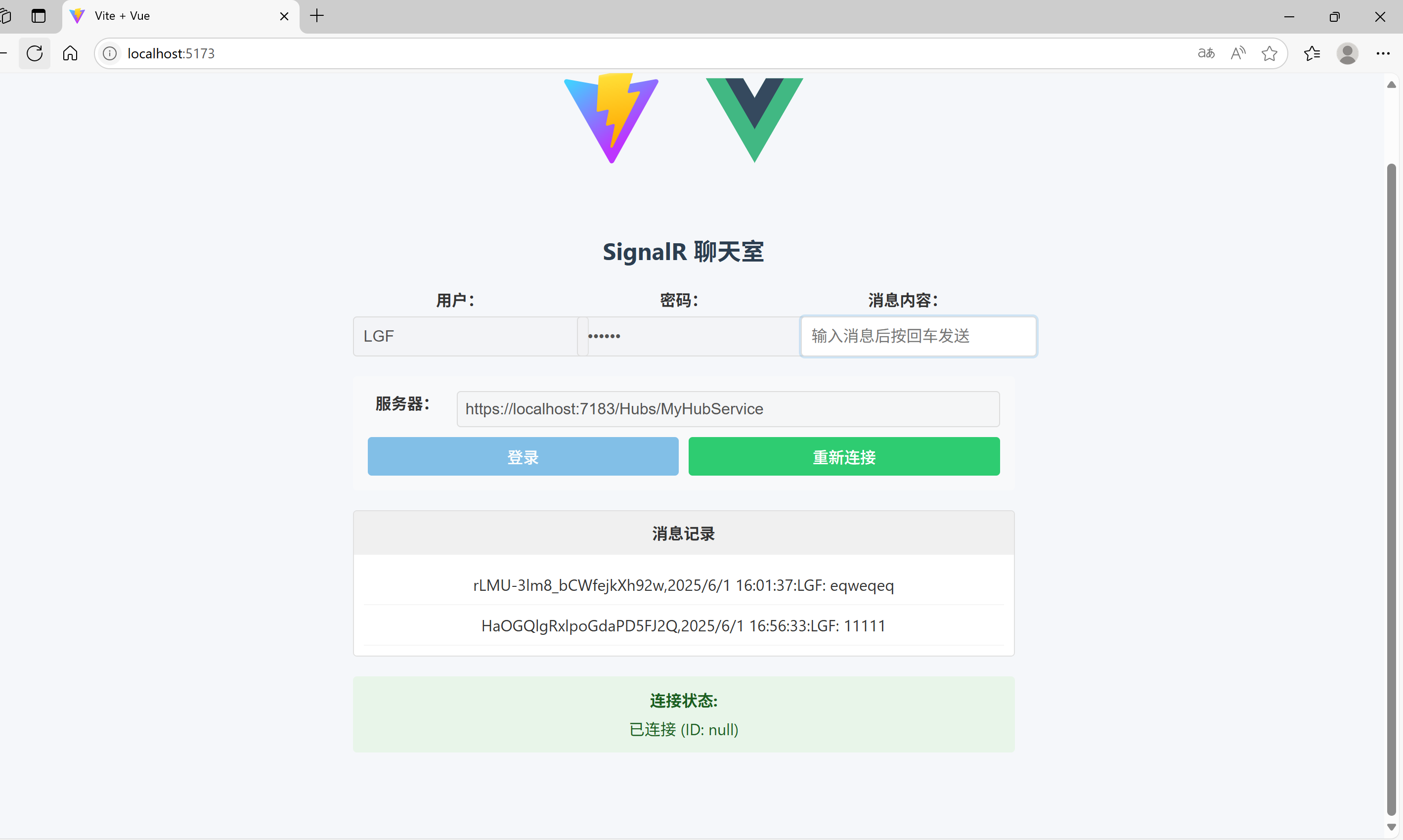
6.配置 appsettings.json
-
appsettings.json
csharp{ "Logging": { "LogLevel": { "Default": "Information", "Microsoft.AspNetCore": "Warning" } }, "AllowedHosts": "*", "ConnectionStrings": { "DefaultConnection": "Server=XXX;Database=XXX;User Id=sa;Password=XXX;TrustServerCertificate=True;Trusted_Connection=True;MultipleActiveResultSets=True" }, "JwtSettings": { "Issuer": "yourdomain.com", "Audience": "yourapp", "SecretKey": "YourSuperSecretKeyAtLeast32CharactersLong", "ExpirationMinutes": 60, "RefreshTokenExpirationDays": 7 } }
三、认证流程详解
1.用户登录:
- 客户端发送凭据到 /api/auth/login
- 服务器验证凭据,使用 Identity 检查用户
- 生成包含用户声明和角色的 JWT
- 返回 JWT 给客户端
2.SignalR 连接:
- 客户端使用 accessTokenFactory 提供 JWT
- SignalR 通过 WebSocket 或长轮询连接时携带 JWT
- 服务器在 OnMessageReceived 事件中提取 JWT
3.JWT 验证:
- 认证中间件验证 JWT 签名、有效期等
- 创建 ClaimsPrincipal 并附加到 HttpContext
- SignalR 继承此安全上下文
4.Hub 授权:
- Authorize 属性检查用户是否认证
- Authorize(Roles = "Admin") 检查角色权限
四、常见问题及解决方案:
| 问题 | 解决方案 |
|---|---|
| 401 Unauthorized | 检查 JWT 是否过期,验证签名密钥 |
| 连接失败 | 确保 OnMessageReceived 正确提取令牌 |
| 角色授权失败 | 检查 JWT 是否包含正确的角色声明 |
| WebSocket 问题 | 检查服务器和代理的 WebSocket 配置 |
| CORS 问题 | 确保 CORS 策略包含 AllowCredentials() |
总结
通过以上配置,您可以构建一个安全、可扩展的 ASP.NET Core SignalR 应用,充分利用 Identity 框架进行用户管理,并通过 JWT 实现无状态认证。这种架构特别适用于需要实时通信的现代 Web 应用和移动应用。