SpringBoot中使用@Cacheable:
错误代码:
java
@Cacheable(value = "FrontAdvertiseVOList", keyGenerator = "cacheKey")
@Override
public List<FrontAdvertiseVO> getFrontAdvertiseVOList(Integer count) {
    return this.list(Wrappers.<Advertise>lambdaQuery()
                    .select(Advertise::getPic, Advertise::getUrl)
                    .eq(Advertise::getState, 1)
                    .orderByDesc(Advertise::getPriority)
                    .last("limit " + count))
            .stream()
            .map(advertise -> new FrontAdvertiseVO(advertise.getPic(), advertise.getUrl()))
            .toList();   // ----------- ①
}
运行程序,出错:
java
org.springframework.data.redis.serializer.SerializationException: Could not read JSON:Unexpected token (START_OBJECT), expected VALUE_STRING: need String, Number of Boolean value that contains type id (for subtype of java.lang.Object)
 at [Source: REDACTED (`StreamReadFeature.INCLUDE_SOURCE_IN_LOCATION` disabled); line: 1, column: 2]
解决方案
只需要将编号①处的代码修改为:
java
.collect(Collectors.toList());原理
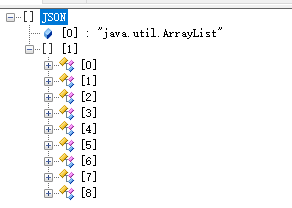
- collect(Collectors.toList())返回的数据:
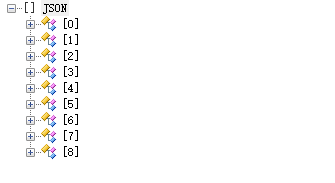
- toList()返回的数据:
collect(Collectors.toList()) 和 toList() 的主要区别在于返回的列表类型和可变性:
- collect(Collectors.toList()):返回的是一个普通的 ArrayList ,因此可以进行添加、删除和修改操作
- toList():返回的是通过对原始数组创建一个不可修改的列表。一旦创建,就不能对其进行添加、删除或修改操作
使用场景:
- toList():适用于不需要对列表进行修改的场景,如从数据库查询数据等,因为它返回的是不可变列表,可以防止数据被意外修改
- collect(Collectors.toList()):适用于需要对列表进行修改的场景,因为它返回的是普通的ArrayList,可以进行各种操作