需求描述
- 利用 Java 基于命令行调用 Python
实现步骤
安装 Python + PIP 环境
以基于 Ubuntu 24 的 Docker 环境为例
- Dockerfile
shell
# OS: Ubuntu 24.04
FROM swr.cn-north-4.myhuaweicloud.com/xxx/eclipse-temurin:17-noble

COPY ./target/*.jar /app.jar
COPY ./target/classes/xxx/ /xxx/

# install : python + pip (前置操作: 更新 apt 源)
RUN sed -i 's#http[s]*://[^/]*#http://mirrors.aliyun.com#g' /etc/apt/sources.list \
  && apt-get update \
  && apt-get -y install vim \
  && apt-get -y install --no-install-recommends python3 python3-pip python3-venv \
  && python3 -m venv $HOME/.venv \
  && . $HOME/.venv/bin/activate \ # 注:Linux 中 高版本 Python (3.5以上),必须在虚拟环境下方可正常安装所需依赖包
  && pip install -i https://mirrors.aliyun.com/pypi/simple/ can cantools
#   && echo "alias python=python3" >> ~/.bashrc \ # Java程序的子进程调用中试验:未此行命令未生效;但开发者独自登录 docker 容器内,有生效
#   && echo '. $HOME/.venv/bin/activate' >> ~/.bashrc \ # Java程序的子进程调用中试验:未此行命令未生效;但开发者独自登录 docker 容器内,有生效
#   && echo 'export PYTHON=$HOME/.venv/bin/python' >> /etc/profile \ # Java程序的子进程调用中试验:未此行命令未生效;但开发者独自登录 docker 容器内,有生效

#  && echo '. /etc/profile' > $HOME/app.sh \ # Java程序的子进程调用中试验:未测通,有衍生问题未解决掉
#  && echo 'java ${JAVA_OPTS:-} -jar app.jar > /dev/null 2>&1 &' >> $HOME/app.sh \  # Java程序的子进程调用中试验:未测通,有衍生问题未解决掉
#  && echo 'java ${JAVA_OPTS:-} -jar app.jar' >> $HOME/app.sh \  # Java程序的子进程调用中试验:未测通,有衍生问题未解决掉
#  && chmod +x $HOME/app.sh \  # Java程序的子进程调用中试验:未测通,有衍生问题未解决掉
#  && chown 777 $HOME/app.sh  # Java程序的子进程调用中试验:未测通,有衍生问题未解决掉

EXPOSE 8080

# ENTRYPOINT exec sh $HOME/app.sh # Java程序的子进程调用中试验:未测通,有衍生问题未解决掉
ENTRYPOINT exec java ${JAVA_OPTS:-} -DPYTHON=$HOME/.venv/bin/python -jar app.jar # 通过 Java 获取 JVM 参数( System.getProperty("PYTHON") ) 方式获取 【 Python 可执行文件的绝对路径】的值
编写和准备 Python 业务脚本
-
step1 编写 Python 业务脚本 (略)
-
step2 如果 Python 脚本在 JAVA 工程内部(JAR包内),则需在 执行 Python 脚本前,将其提前拷贝为一份新的脚本文件到指定位置。
shell
public XXX {
    private static String scriptFilePath;
    public static String TMP_DIR = "/tmp/xxx-sdk/";

	static {
        prepareHandleScript( TMP_DIR );
	}

    /**
     *  准备脚本文件到目标路径
     * @note 无法直接执行 jar 包内的脚本文件,需要拷贝出来。
     * @param targetScriptDirectory 目标脚本的文件夹路径
     *     而非脚本文件路径 eg: "/tmp/xxx-sdk"
     */
    @SneakyThrows
    public static void prepareHandleScript(String targetScriptDirectory){
        File file = new File(targetScriptDirectory);
        //如果目标目录不存在,则创建该目录
        if (!file.exists() && !file.isDirectory()) {
            file.mkdirs();
        }
        File targetScriptFile = new File(targetScriptDirectory + "/xxx-converter.py");// targetScriptFile = "\tmp\xxx-sdk\xxx-converter.py"
        scriptFilePath = targetScriptFile.getAbsolutePath(); // scriptFilePath = "D:\tmp\xxx-sdk\xxx-converter.py"

        URL resource = CanAscLogGenerator.class
            .getClassLoader()
            .getResource( "bin/xxx-converter.py");

        InputStream converterPythonScriptInputStream = null;
        try {
            converterPythonScriptInputStream = resource.openStream();
            FileUtils.copyInputStreamToFile( converterPythonScriptInputStream, targetScriptFile );
        } catch (IOException exception){
            log.error("Fail to prepare the script!targetScriptDirectory:{}, exception:", targetScriptDirectory, exception);
            throw new RuntimeException(exception);
        } finally {
            if(converterPythonScriptInputStream != null){
                converterPythonScriptInputStream.close();
            }
        }
    }
}
Java 调用 Python 脚本
关键点:程序阻塞问题
- 推荐文献
程序阻塞问题
-
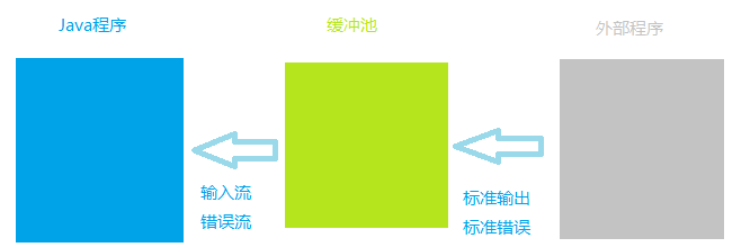
通过 Process实例.getInputStream() 和 Process实例.getErrorStream() 获取的输入流 和错误信息流 是缓冲池向当前Java程序提供的,而不是直接获取外部程序的标准输出流和标准错误流。
-
而缓冲池的容量是一定的。
因此,若外部程序 在运行过程中不断向缓冲池 输出内容,当缓冲池 填满,那么: 外部程序 将暂停运行 直到缓冲池 有空位可接收外部程序的输出内容为止。(
注:采用xcopy命令复制大量文件时将会出现该问题
- 解决办法: 当前的Java程序不断读取缓冲池的内容,从而为腾出缓冲池的空间。
java
Runtime r = Runtime.getRuntime();
try {
    Process proc = r.exec("cmd /c dir"); // 假设该操作为造成大量内容输出
  	// 采用字符流读取缓冲池内容,腾出空间
  	BufferedReader reader = new BufferedReader(new InputStreamReader(proc.getInputStream(), "gbk")));
  	String line = null;
  	while ((line = reader.readLine()) != null){
  	   System.out.println(line);
  	}

  	/* 或采用字节流读取缓冲池内容,腾出空间
  	 ByteArrayOutputStream pool = new ByteArrayOutputStream();
  	 byte[] buffer = new byte[1024];
  	 int count = -1;
  	 while ((count = proc.getInputStream().read(buffer)) != -1){
  	   pool.write(buffer, 0, count);
  	   buffer = new byte[1024];
  	 }
  	 System.out.println(pool.toString("gbk"));
  	 */

  	int exitVal = proc.waitFor();
  	System.out.println(exitVal == 0 ? "成功" : "失败");
} catch(Exception e){
  	e.printStackTrace();
}- 注意:外部程序在执行结束后需自动关闭 ;否则,不管是字符流还是字节流均由于既读不到数据,又读不到流结束符,从而出现阻塞Java进程运行的情况。
cmd的参数 "/c" 表示当命令执行完成后关闭自身。
关键点: Java Runtime.exec() 方法
基本方法: Runtime.exec()
- 首先,在Linux系统下,使用Java调用Python脚本,传入参数,需要使用
Runtime.exec()方法
即 在
java中使用shell命令
这个方法有两种使用形式:
- 方式1 无参数传入 ,直接执行Linux相关命令:
Process process = Runtime.getRuntime().exec(String cmd);无参数可以直接传入字符串,如果需要传参数,就要用方式2的字符串数组实现。
- 方式2 有参数传入 ,并执行Linux命令:
Process process = Runtime.getRuntime().exec(String[] cmd);
执行结果
- 使用
exec方法执行命令,如果需要执行的结果,用如下方式得到:
java
	String line;
    while ((line = processInputStream.readLine()) != null) { // InputStream processInputStream = process.getInputStream();
    	System.out.println(line);
         if ("".equals(line)) {
               break;
          }
    }
    System.out.println("line ----> " + line);
查看错误信息
java
	BufferedReader errorResultReader = new BufferedReader(new InputStreamReader(process.getErrorStream()));
	String errorLine;
	while ((errorLine = shellErrorResultReader.readLine()) != null) {
    	System.out.println("errorStream:" + errorLine);
    }
    int exitCode = process.waitFor();
    System.out.println("exitCode:" + exitCode);
简单示例
java
	String result = "";
	String[] cmd = new String [] { "pwd" };
	Process process = Runtime.getRuntime().exec(cmd);
	InputStreamReader inputStreamReader = new InputStreamReader(process.getInputStream());
	LineNumberReader input = new LineNumberReader(inputStreamReader);
	result = input.readLine();
	System.out.println("result:" + result);
关键点: python 绝对路径
- 查看python使用的路径,然后在Java调用的时候写出绝对路径。
以解决 Linux 环境中的 Python 3.X 的虚拟环境 异常问题(
pip install XXX : error: externally-managed-environment)。
Python 虚拟环境管理 - 博客园/千千寰宇
Cannot run program "python": error=2, No such file or director(因虚拟环境问题,找不到python命令和pip安装的包)
Java 调用 Python 的实现 (必读)
java
@Slf4j
public class XxxxGenerator implements IGenerator<XxxxSequenceDto> {
    //python jvm 变量 (`-DPYTHON=$HOME/.venv/bin/python`)
    public static String PYTHON_VM_PARAM = "PYTHON";//System.getProperty(PYTHON_VM_PARAM)
    //python 环境变量名称 //eg: "export PYTHON=$HOME/.venv/bin/python" , pythonEnv="$HOME/.venv/bin/python"
    public static String PYTHON_ENV_PARAM = "PYTHON";//;System.getenv(PYTHON_ENV_PARAM);
    private static String PYTHON_COMMAND ;
    //默认的 python 命令
    private static String PYTHON_COMMAND_DEFAULT = "python";

	//...

    static {
        PYTHON_COMMAND = loadPythonCommand();
        log.info("PYTHON_COMMAND:{}, PYTHON_VM:{}, PYTHON_ENV:{}", PYTHON_COMMAND, System.getProperty(PYTHON_VM_PARAM), System.getenv(PYTHON_ENV_PARAM) );

		//...
    }

    /**
     * 加载 python 命令的可执行程序的路径
     * @note
     *   Linux 中,尤其是 高版本 Python(3.x) ,为避免 Java 通过 `Runtime.getRuntime().exec(args)` 方式 调用 Python 命令时,报找不到 可执行程序(`Python` 命令)\
     *   ------------建议: java 程序中使用的 `python` 命令的可执行程序路径,使用【绝对路径】
     * @return
     */
    private static String loadPythonCommand(){
        String pythonVm = System.getProperty(PYTHON_VM_PARAM);
        String pythonEnv = System.getenv(PYTHON_ENV_PARAM);
        String pythonCommand = pythonVm != null?pythonVm : pythonEnv;
        pythonCommand = pythonCommand != null?pythonCommand : PYTHON_COMMAND_DEFAULT;
        return pythonCommand;
    }


    /**
     * 业务方法: CAN ASC LOG 转 BLF
     * @param ascLogFilePath
     * @param blfFilePath
     */
    protected void convertToBlf(File ascLogFilePath, File blfFilePath){
        //CanAsclogBlfConverterScriptPath = "/D:/Workspace/CodeRepositories/xxx-platform/xxx-sdk/xxx-sdk-java/target/classes/bin/can-asclog-blf-converter.py"
        //String CanAsclogBlfConverterScriptPath = CanAscLogGenerator.class.getClassLoader().getResource("bin/can-asclog-blf-converter.py").getPath();

        String canAscLogBlfConverterScriptPath = XxxxGenerator.scriptFilePath;//python 业务脚本的文件路径, eg: "D:\tmp\xxx-sdk\can-asclog-blf-converter.py"

        //String [] args = new String [] {"python", "..\\bin\\can-asclog-blf-converter.py", "-i", ascLogFilePath, "-o", blfFilePath};// ascLogFilePath="/tmp/xxx-sdk/can-1.asc" , blfFilePath="/tmp/xxx-sdk/can-1.blf"
        String [] args = new String [] { PYTHON_COMMAND, canAscLogBlfConverterScriptPath, "-i", ascLogFilePath.getPath(), "-o", blfFilePath.getPath()};
        log.info("args: {} {} {} {} {} {}", args);
        Process process = null;
        Long startTime = System.currentTimeMillis();
        try {
            process = Runtime.getRuntime().exec(args);
            Long endTime = System.currentTimeMillis();
            log.info("Success to convert can asc log file to blf file!ascLogFile:{}, blfFile:{}, timeConsuming:{}ms, pid:{}", ascLogFilePath, blfFilePath, endTime - startTime, process.pid());
        } catch (IOException exception) {
            log.error("Fail to convert can asc log file to blf file!ascLogFile:{}, blfFile:{}, exception:", ascLogFilePath, blfFilePath,  exception);
            throw new RuntimeException(exception);
        }

        //读取 python 脚本的标准输出
        // ---- input stream ----
        List<String> processOutputs = new ArrayList<>();
        try(
            InputStream processInputStream = process.getInputStream();
            BufferedReader processReader = new BufferedReader( new InputStreamReader( processInputStream ));
        ) {
            Long readProcessStartTime = System.currentTimeMillis();
            String processLine = null;
            while( (processLine = processReader.readLine()) != null ) {
                processOutputs.add( processLine );
            }
            process.waitFor();
            Long readProcessEndTime = System.currentTimeMillis();
            log.info("Success to read the can asc log to blf file's process standard output!timeConsuming:{}ms", readProcessEndTime - readProcessStartTime );
            log.info("processOutputs(System.out):{}", JSON.toJSONString( processOutputs ));
        } catch (IOException exception) {
            log.error("Fail to get input stream!IOException:", exception);
            throw new RuntimeException(exception);
        } catch (InterruptedException exception) {
            log.error("Fail to wait for the process!InterruptedException:{}", exception);
            throw new RuntimeException(exception);
        }

        // ---- error stream ----
        List<String> processErrors = new ArrayList<>();
        try(
            InputStream processInputStream = process.getErrorStream();
            BufferedReader processReader = new BufferedReader( new InputStreamReader( processInputStream ));
        ) {
            Long readProcessStartTime = System.currentTimeMillis();
            String processLine = null;
            while( (processLine = processReader.readLine()) != null ) {
                processErrors.add( processLine );
            }
            process.waitFor();
            Long readProcessEndTime = System.currentTimeMillis();
            log.error("Success to read the can asc log to blf file's process standard output!timeConsuming:{}ms", readProcessEndTime - readProcessStartTime );
            log.error("processOutputs(System.err):{}", JSON.toJSONString( processOutputs ));
        } catch (IOException exception) {
            log.error("Fail to get input stream!IOException:", exception);
            throw new RuntimeException(exception);
        } catch (InterruptedException exception) {
            log.error("Fail to wait for the process!InterruptedException:{}", exception);
            throw new RuntimeException(exception);
        }
        if( processErrors.size() > 0 ) {
            throw new RuntimeException( "convert to blf failed!\nerrors:" + JSON.toJSONString(processErrors) );
        }
    }
}
Y 推荐文献
程序阻塞问题
X 参考文献
在Java调用的时候写出绝对路径:
String[] cmd = {"/root/miniconda3/bin/python", "/home/test.py"};
Cannot run program "python": error=2, No such file or director(因虚拟环境问题,找不到python命令和pip安装的包)