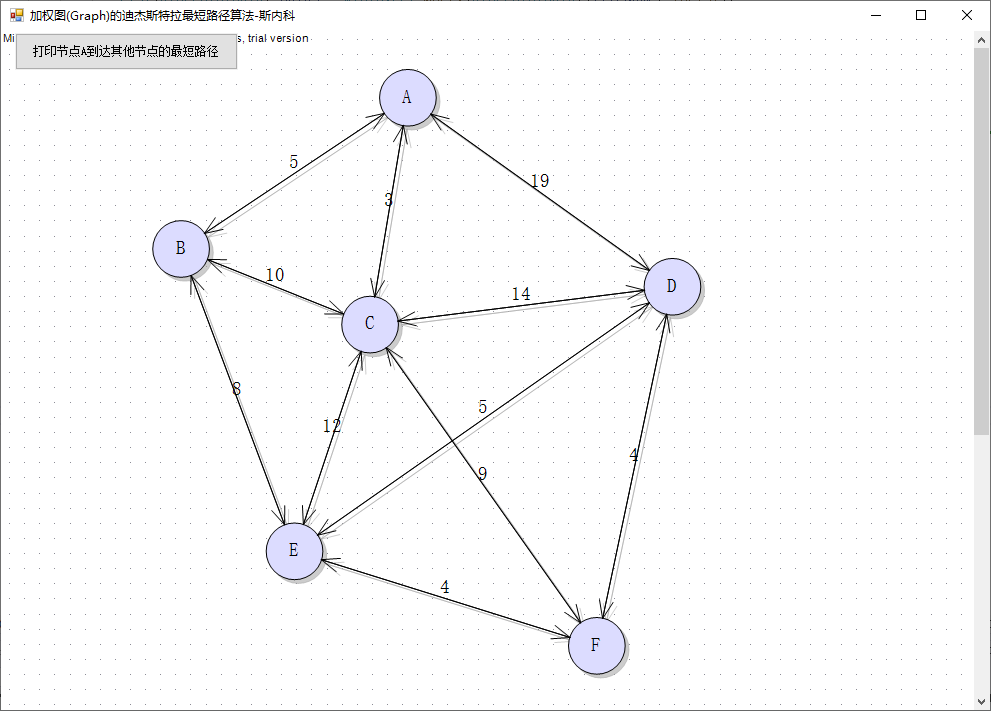
上一篇流程图示例
C#使用MindFusion.Diagramming框架绘制流程图(2):流程图示例-CSDN博客
这里我们以之前的最短路径算法为例
使用MindFusion.Diagramming画出流程图,并按照当前示例图实现最短路径算法
迪杰斯特拉最短路径算法
我们使用MindFusion.Diagramming.DiagramItem的属性Weight权重来进行处理
我们设定MindFusion.Diagramming.DiagramLink连接是双向的权重,连接的文本就显示为权重Weight
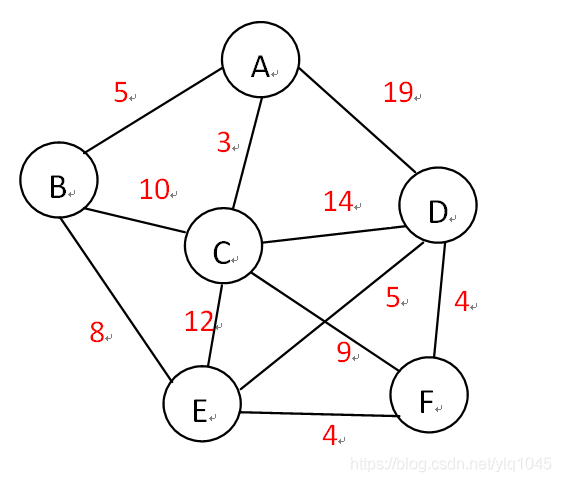
MindFusion.Diagramming.DiagramNode节点之间的最短路径
如下图:
新建窗体FormDijkstraDiagram,
窗体FormDijkstraDiagram设计器程序如下:
文件:FormDijkstraDiagram.designer.cs
cs
namespace FlowDiagramDemo
{
    partial class FormDijkstraDiagram
    {
        /// <summary>
        /// Required designer variable.
        /// </summary>
        private System.ComponentModel.IContainer components = null;

        /// <summary>
        /// Clean up any resources being used.
        /// </summary>
        /// <param name="disposing">true if managed resources should be disposed; otherwise, false.</param>
        protected override void Dispose(bool disposing)
        {
            if (disposing && (components != null))
            {
                components.Dispose();
            }
            base.Dispose(disposing);
        }

        #region Windows Form Designer generated code

        /// <summary>
        /// Required method for Designer support - do not modify
        /// the contents of this method with the code editor.
        /// </summary>
        private void InitializeComponent()
        {
            this.diagramView1 = new MindFusion.Diagramming.WinForms.DiagramView();
            this.diagram1 = new MindFusion.Diagramming.Diagram();
            this.btnGetMinRouter = new System.Windows.Forms.Button();
            this.SuspendLayout();
            //
            // diagramView1
            //
            this.diagramView1.Diagram = this.diagram1;
            this.diagramView1.Dock = System.Windows.Forms.DockStyle.Fill;
            this.diagramView1.LicenseKey = null;
            this.diagramView1.Location = new System.Drawing.Point(0, 0);
            this.diagramView1.Name = "diagramView1";
            this.diagramView1.Size = new System.Drawing.Size(989, 679);
            this.diagramView1.TabIndex = 3;
            this.diagramView1.Text = "diagramView1";
            //
            // diagram1
            //
            this.diagram1.TouchHitDistance = null;
            //
            // btnGetMinRouter
            //
            this.btnGetMinRouter.Location = new System.Drawing.Point(14, 2);
            this.btnGetMinRouter.Name = "btnGetMinRouter";
            this.btnGetMinRouter.Size = new System.Drawing.Size(223, 37);
            this.btnGetMinRouter.TabIndex = 4;
            this.btnGetMinRouter.Text = "打印节点A到达其他节点的最短路径";
            this.btnGetMinRouter.UseVisualStyleBackColor = true;
            this.btnGetMinRouter.Click += new System.EventHandler(this.btnGetMinRouter_Click);
            //
            // FormDijkstraDiagram
            //
            this.AutoScaleDimensions = new System.Drawing.SizeF(6F, 12F);
            this.AutoScaleMode = System.Windows.Forms.AutoScaleMode.Font;
            this.ClientSize = new System.Drawing.Size(989, 679);
            this.Controls.Add(this.btnGetMinRouter);
            this.Controls.Add(this.diagramView1);
            this.Name = "FormDijkstraDiagram";
            this.Text = "加权图(Graph)的迪杰斯特拉最短路径算法-斯内科";
            this.Load += new System.EventHandler(this.FormDijkstraDiagram_Load);
            this.ResumeLayout(false);

        }

        #endregion

        private MindFusion.Diagramming.WinForms.DiagramView diagramView1;
        private MindFusion.Diagramming.Diagram diagram1;
        private System.Windows.Forms.Button btnGetMinRouter;
    }
}
窗体FormDijkstraDiagram相关程序如下:
文件:FormDijkstraDiagram.cs
cs
using MindFusion.Diagramming;
using System;
using System.Collections.Generic;
using System.ComponentModel;
using System.Data;
using System.Diagnostics;
using System.Drawing;
using System.Linq;
using System.Text;
using System.Threading.Tasks;
using System.Windows.Forms;

namespace FlowDiagramDemo
{
    public partial class FormDijkstraDiagram : Form
    {
        /// <summary>
        /// 顶点个数
        /// </summary>
        public const int VertexCount = 6;
        /// <summary>
        /// 无法直接到达的距离,无限远的距离
        /// </summary>
        public const float Infinity = 99999;
        /// <summary>
        /// 图的顶点集合,数组的每一个元素代表一个顶点【元组的第一项代表顶点名称,第二项代表是否已被访问】
        /// </summary>
        public Tuple<string, bool>[] VertexTuples = new Tuple<string, bool>[VertexCount];
        /// <summary>
        /// 表示两点之间的距离。如:
        /// MatrixDistance[0,1]=88 表示 【索引为0的顶点】 到 【索引为1的顶点】 之间的距离是88
        /// </summary>
        public float[,] MatrixDistance = new float[VertexCount, VertexCount];
        /// <summary>
        /// 起点到终点的最短距离
        /// 元组的第一项代表起点名称,第二项代表终点名称,第三项代表最短距离值,第四项代表当前最短距离的上一个顶点索引
        /// 本文起点名称固定设置为A,获取A到其他任何一个顶点之间的最短距离,以及运行轨迹路线
        /// </summary>
        public Tuple<string, string, float, int>[] MinDistanceTuples = new Tuple<string, string, float, int>[VertexCount];
        int sequence = 0;
        public FormDijkstraDiagram()
        {
            InitializeComponent();
            diagram1.AllowSelfLoops = false;//不允许自旋链接
            diagram1.ShowGrid = true;//显示网格
            diagram1.AllowUnconnectedLinks = false;//不允许用户绘制未连接到任何节点的链接
            diagram1.NodeCreating += Diagram1_NodeCreating;//不允许创建节点
            diagram1.LinkCreating += Diagram1_LinkCreating;//不允许创建连接
            diagram1.NodeDeleting += Diagram1_NodeDeleting;//不允许删除节点
            diagram1.LinkDeleting += Diagram1_LinkDeleting;//不允许删除连接
        }

        private void Diagram1_LinkDeleting(object sender, LinkValidationEventArgs e)
        {
            e.Cancel = true;
        }

        private void Diagram1_NodeDeleting(object sender, NodeValidationEventArgs e)
        {
            e.Cancel = true;
        }

        private void Diagram1_LinkCreating(object sender, LinkValidationEventArgs e)
        {
            e.Cancel = true;
        }

        private void Diagram1_NodeCreating(object sender, NodeValidationEventArgs e)
        {
            e.Cancel = true;
        }

        /// <summary>
        /// 初始化所有节点
        /// </summary>
        private void InitNode()
        {
            sequence = 0;//复位序列号
            char label = 'A';
            for (int i = 0; i < VertexTuples.Length; i++)
            {
                VertexTuples[i] = Tuple.Create(((char)(label + i)).ToString(), false);

                ShapeNode diagramNode = new ShapeNode(diagram1);
                diagramNode.AllowIncomingLinks = true;
                diagramNode.AllowOutgoingLinks = true;
                diagramNode.Text = VertexTuples[i].Item1;
                diagramNode.ToolTip = VertexTuples[i].Item1;
                diagramNode.Font = new Font("宋体", 14);
                sequence++;
                diagramNode.Id = sequence;
                diagramNode.Tag = i;
                float x = 100;//i==0时,起点A坐标
                float y = 10;//i==0时,起点A坐标
                if (i == 1)
                {
                    x = 40;
                    y = 50;
                }
                else if (i == 2)
                {
                    x = 90;
                    y = 70;
                }
                else if (i == 3)
                {
                    x = 170;
                    y = 60;
                }
                else if (i == 4)
                {
                    x = 70;
                    y = 130;
                }
                else if (i == 5)
                {
                    x = 150;
                    y = 155;
                }
                diagramNode.Bounds = new RectangleF(x, y, 15, 15);
                diagramNode.Shape = Shapes.Ellipse;//形状:圆
                diagram1.Nodes.Add(diagramNode);
            }
        }

        /// <summary>
        /// 添加一条无向边【认为距离是无向的 即A→B,同时B→A】
        /// 对图来说,就是增加两条连线←→【正向连线 与 反向连线】
        /// </summary>
        /// <param name="startIndex">起始索引</param>
        /// <param name="endIndex">到达索引</param>
        /// <param name="distance">两点之间的距离</param>
        private void AddLink(int startIndex, int endIndex, float distance)
        {
            MatrixDistance[startIndex, endIndex] = distance;
            //如果距离是有方向的,则去掉下面一行代码
            MatrixDistance[endIndex, startIndex] = distance;
            DiagramLink diagramLink = new DiagramLink(diagram1, diagram1.Nodes[startIndex], diagram1.Nodes[endIndex]);
            diagramLink.Weight = distance;//设置连接的权重
            diagramLink.Font = new Font("宋体", 14);
            diagramLink.Text = distance.ToString();
            if (diagram1.Links.Any(x => x.Origin == diagram1.Nodes[endIndex] && x.Destination == diagram1.Nodes[startIndex]))
            {
                //如果链接是双向的即←→,则设置文本为空
                diagramLink.Text = "";
            }
            sequence++;
            diagramLink.Id = sequence;
            diagramLink.Tag = $"【{diagram1.Nodes[startIndex].Text}】->【{diagram1.Nodes[endIndex].Text}】,权重Weight为【{distance}】";
            diagram1.Links.Add(diagramLink);

            //增加反向连线,权重Weight与正向连线一致
            DiagramLink reverseLink = new DiagramLink(diagram1, diagram1.Nodes[endIndex], diagram1.Nodes[startIndex]);
            reverseLink.Weight = distance;//设置连接的权重
            reverseLink.Font = new Font("宋体", 14);
            reverseLink.Text = distance.ToString();
            if (diagram1.Links.Any(x => x.Origin == diagram1.Nodes[startIndex] && x.Destination == diagram1.Nodes[endIndex]))
            {
                //如果链接是双向的即←→,则设置文本为空
                reverseLink.Text = "";
            }
            sequence++;
            reverseLink.Id = sequence;
            reverseLink.Tag = $"【{diagram1.Nodes[startIndex].Text}】->【{diagram1.Nodes[startIndex].Text}】,权重Weight为【{distance}】";
            diagram1.Links.Add(reverseLink);
        }

        /// <summary>
        /// 初始化【权重图】或【距离图】:
        /// 一、初始化所有顶点,并标记所有顶点都是未访问的
        /// 二、初始化任意两点的距离都是无穷大的
        /// 三、图的实际距离【两点之间可以直接连接的部分,也就是 直接连接的顶点之间的距离 覆盖原来的默认值无穷大】
        /// </summary>
        public void InitGraph()
        {
            InitNode();
            //初始化最短距离为无穷大,所有矩阵距离都为无穷大
            for (int i = 0; i < VertexCount; i++)
            {
                for (int j = 0; j < VertexCount; j++)
                {
                    MatrixDistance[i, j] = Infinity;
                }
            }

            #region 添加边Edge:图的连线部分
            //AB AC AD
            AddLink(0, 1, 5);
            AddLink(0, 2, 3);
            AddLink(0, 3, 19);
            //BC BE
            AddLink(1, 2, 10);
            AddLink(1, 4, 8);
            //CD CE CF
            AddLink(2, 3, 14);
            AddLink(2, 4, 12);
            AddLink(2, 5, 9);
            //DE DF
            AddLink(3, 4, 5);
            AddLink(3, 5, 4);
            //EF
            AddLink(4, 5, 4);
            #endregion

            #region 默认最短距离为无穷大
            for (int i = 0; i < VertexCount; i++)
            {
                MinDistanceTuples[i] = Tuple.Create(VertexTuples[0].Item1, VertexTuples[i].Item1, Infinity, 0);
            }
            #endregion
        }

        /// <summary>
        /// 设置第一个顶点A到其他顶点的距离是直连的
        /// ①如果当前顶点A到其他顶点的距离小于Infinity,就以当前距离作为初始最小的距离
        /// ②找出未访问的顶点中,距离最小的顶点的顶点,然后标记顶点为已访问的
        /// ③如果当前节点未访问,并且 最短距离+【最短距离的顶点可到达的顶点的距离之和】,那么就设置当前路径为最小距离 需要一个双重循环
        /// </summary>
        public void GetRouterPath()
        {
            int startIndex = 0;
            //将第一个顶点更新为已访问
            VertexTuples[startIndex] = Tuple.Create(VertexTuples[startIndex].Item1, true);
            for (int i = 0; i < VertexCount; i++)
            {
                if (MatrixDistance[startIndex, i] < MinDistanceTuples[i].Item3)
                {
                    //因元组无法为第三项赋值,只能重建元组了
                    MinDistanceTuples[i] = Tuple.Create(MinDistanceTuples[i].Item1, MinDistanceTuples[i].Item2, MatrixDistance[startIndex, i], startIndex);
                }
            }
            for (int cnt = 1; cnt < VertexCount; cnt++)
            {
                //找出最小的距离对应的顶点索引,并将当前顶点设置为已访问
                int minIndex = FindMinDistanceIndex();
                float minDist = MinDistanceTuples[minIndex].Item3;
                //设置为已访问该顶点
                VertexTuples[minIndex] = Tuple.Create(VertexTuples[minIndex].Item1, true);
                for (int i = 0; i < VertexCount; i++)
                {
                    //如果当前节点未访问,并且 最短距离+【最短距离的顶点可到达的顶点的距离之和】 还要比原来的还要短,就用新的最短距离赋值
                    if (!VertexTuples[i].Item2 && minDist + MatrixDistance[minIndex, i] < MinDistanceTuples[i].Item3)
                    {
                        //记录上一个最短距离顶点的索引
                        MinDistanceTuples[i] = Tuple.Create(MinDistanceTuples[i].Item1, MinDistanceTuples[i].Item2, minDist + MatrixDistance[minIndex, i], minIndex);
                    }
                }
            }
        }

        /// <summary>
        /// 显示最短路径的详细信息
        /// </summary>
        /// <param name="vertexIndex"></param>
        /// <returns></returns>
        public string DisplayDescription(int vertexIndex)
        {
            return $"最短路径长度:{VertexTuples[0].Item1}->{VertexTuples[vertexIndex].Item1},最短距离{MinDistanceTuples[vertexIndex].Item3},上一个顶点索引:{MinDistanceTuples[vertexIndex].Item4}.\n" +
                $"  完整路由:{GetSerialPath(vertexIndex)}";
        }

        /// <summary>
        /// 获取连续节点路线
        /// </summary>
        /// <param name="parentIndex"></param>
        /// <returns></returns>
        private string GetSerialPath(int parentIndex)
        {
            Stack<string> stack = new Stack<string>();
            stack.Push(VertexTuples[parentIndex].Item1);
            while (parentIndex != 0)
            {
                parentIndex = MinDistanceTuples[parentIndex].Item4;
                stack.Push(VertexTuples[parentIndex].Item1);
            }
            return string.Join("->", stack);
        }

        /// <summary>
        /// 找出最小的距离对应的顶点索引
        /// </summary>
        /// <returns></returns>
        private int FindMinDistanceIndex()
        {
            //找出未访问的顶点中,距离最小的顶点的起点索引
            int minIndex = -1;//最小距离所在的索引
            float minDist = Infinity;//最小距离
            for (int i = 0; i < VertexCount; i++)
            {
                if (!VertexTuples[i].Item2 && MinDistanceTuples[i].Item3 < minDist)
                {
                    minIndex = i;
                    minDist = MinDistanceTuples[i].Item3;
                }
            }
            return minIndex;
        }

        private void FormDijkstraDiagram_Load(object sender, EventArgs e)
        {
            InitGraph();
        }

        private async void btnGetMinRouter_Click(object sender, EventArgs e)
        {
            await Task.Run(() =>
            {
                Stopwatch stopwatch = new Stopwatch();
                stopwatch.Start();
                //这里最短路径算法
                GetRouterPath();
                List<string> pathRouterList = new List<string>();
                for (int vertexIndex = 0; vertexIndex < VertexCount; vertexIndex++)
                {
                    pathRouterList.Add(DisplayDescription(vertexIndex));
                }
                stopwatch.Stop();
                MessageBox.Show($"获取最短路径耗时:【{stopwatch.Elapsed.TotalMilliseconds}】ms", "运行耗时(ms)");
                MessageBox.Show($"{string.Join("\n\n", pathRouterList)}");
            });
        }
    }
}
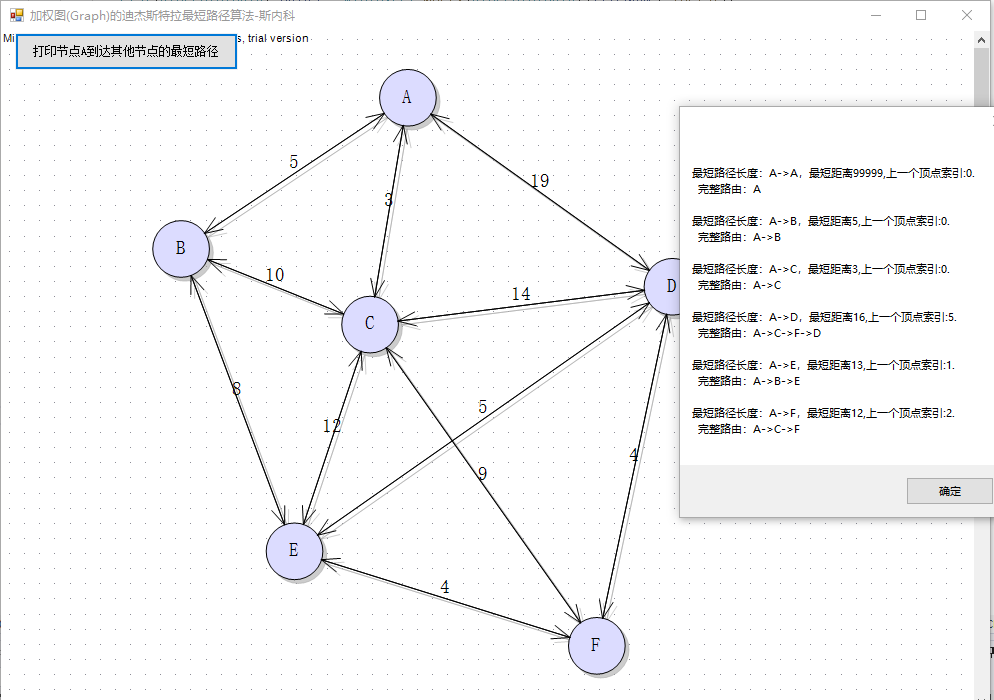
运行如图: