目录

介绍
Spring Cloud Alibaba Seata 是一款开源的分布式事务解决方案,致力于提供高性能和简单易用的分布式事务服务。Seata 为用户提供了AT(自动事务)、TCC(补偿事务)、SAGA(长事务) 和 XA(强一致性) 四种事务模式,为用户打造一站式的分布式解决方案。
核心功能
1. 分布式事务支持
- AT 模式: 基于 SQL 解析自动生成回滚日志,适合高频事务场景(如订单支付)。
- TCC 模式: 通过 Try-Confirm-Cancel 三阶段操作实现灵活控制,适合金融等强一致性场景。
- SAGA 模式: 通过编排长流程事务,支持跨系统长时间运行的任务(如物流跟踪)。
- XA 模式: 依赖数据库的 XA 协议,提供强一致性保障。
2. 高可用与可扩展性
- 支持多节点部署,通过注册中心 (如 Nacos) 动态管理服务实例。
- 提供灵活的配置方式,支持文件、数据库、Nacos 等多种配置源。
三层核心架构
1. TC(Transaction Coordinator,事务协调器)
- 独立部署的服务端,负责全局事务的协调、提交和回滚。
- 通过状态机维护事务生命周期,确保跨服务一致性。
2. TM(Transaction Manager,事务管理器)
- 嵌入在客户端应用中,负责开启、提交或回滚全局事务。
- 通过注解 (如 @GlobalTransactional) 标记需要分布式事务的方法。
3. RM(Resource Manager,资源管理器)
- 管理本地事务,与 TC 交互注册分支事务并上报状态。
- 支持主流数据库 (MySQL、Oracle 等) 和缓存 (Redis)。
安装
1. 官网下载
下载地址:Seate 下载
2. mysql8数据库中建库建表
创建seata库
sql
CREATE DATABASE seata;
USE seata;
在seata数据库中建表,当seata的存储模式为db时才需要以下的建表操作。
建表脚本地址: 建表脚本
sql
-- -------------------------------- The script used when storeMode is 'db' --------------------------------
-- the table to store GlobalSession data
CREATE TABLE IF NOT EXISTS `global_table`
(
    `xid`                       VARCHAR(128) NOT NULL,
    `transaction_id`            BIGINT,
    `status`                    TINYINT      NOT NULL,
    `application_id`            VARCHAR(32),
    `transaction_service_group` VARCHAR(32),
    `transaction_name`          VARCHAR(128),
    `timeout`                   INT,
    `begin_time`                BIGINT,
    `application_data`          VARCHAR(2000),
    `gmt_create`                DATETIME,
    `gmt_modified`              DATETIME,
    PRIMARY KEY (`xid`),
    KEY `idx_status_gmt_modified` (`status` , `gmt_modified`),
    KEY `idx_transaction_id` (`transaction_id`)
) ENGINE = InnoDB
  DEFAULT CHARSET = utf8mb4;

-- the table to store BranchSession data
CREATE TABLE IF NOT EXISTS `branch_table`
(
    `branch_id`         BIGINT       NOT NULL,
    `xid`               VARCHAR(128) NOT NULL,
    `transaction_id`    BIGINT,
    `resource_group_id` VARCHAR(32),
    `resource_id`       VARCHAR(256),
    `branch_type`       VARCHAR(8),
    `status`            TINYINT,
    `client_id`         VARCHAR(64),
    `application_data`  VARCHAR(2000),
    `gmt_create`        DATETIME(6),
    `gmt_modified`      DATETIME(6),
    PRIMARY KEY (`branch_id`),
    KEY `idx_xid` (`xid`)
) ENGINE = InnoDB
  DEFAULT CHARSET = utf8mb4;

-- the table to store lock data
CREATE TABLE IF NOT EXISTS `lock_table`
(
    `row_key`        VARCHAR(128) NOT NULL,
    `xid`            VARCHAR(128),
    `transaction_id` BIGINT,
    `branch_id`      BIGINT       NOT NULL,
    `resource_id`    VARCHAR(256),
    `table_name`     VARCHAR(32),
    `pk`             VARCHAR(36),
    `status`         TINYINT      NOT NULL DEFAULT '0' COMMENT '0:locked ,1:rollbacking',
    `gmt_create`     DATETIME,
    `gmt_modified`   DATETIME,
    PRIMARY KEY (`row_key`),
    KEY `idx_status` (`status`),
    KEY `idx_branch_id` (`branch_id`),
    KEY `idx_xid` (`xid`)
) ENGINE = InnoDB
  DEFAULT CHARSET = utf8mb4;

CREATE TABLE IF NOT EXISTS `distributed_lock`
(
    `lock_key`       CHAR(20) NOT NULL,
    `lock_value`     VARCHAR(20) NOT NULL,
    `expire`         BIGINT,
    primary key (`lock_key`)
) ENGINE = InnoDB
  DEFAULT CHARSET = utf8mb4;

INSERT INTO `distributed_lock` (lock_key, lock_value, expire) VALUES ('AsyncCommitting', ' ', 0);
INSERT INTO `distributed_lock` (lock_key, lock_value, expire) VALUES ('RetryCommitting', ' ', 0);
INSERT INTO `distributed_lock` (lock_key, lock_value, expire) VALUES ('RetryRollbacking', ' ', 0);
INSERT INTO `distributed_lock` (lock_key, lock_value, expire) VALUES ('TxTimeoutCheck', ' ', 0);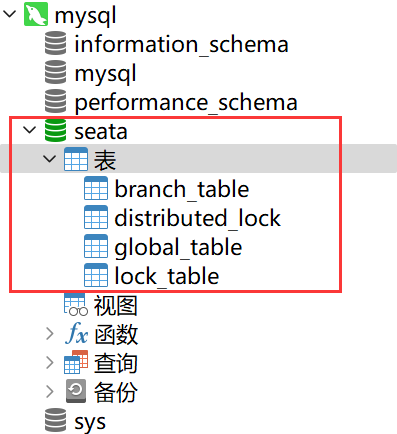
3. 修改seata配置
在 seata-server-2.0.0 的 conf 目录下,先备份 application.yml 文件,再参考 application.example.yml 模板修改原来的 application.yml 文件,修改后的内容如下:
yaml
server:
  port: 7091

spring:
  application:
    name: seata-server

logging:
  config: classpath:logback-spring.xml
  file:
    path: ${log.home:${user.home}/logs/seata}
  extend:
    logstash-appender:
      destination: 127.0.0.1:4560
    kafka-appender:
      bootstrap-servers: 127.0.0.1:9092
      topic: logback_to_logstash

console:
  user:
    username: seata
    password: seata

seata:
  config:
    type: nacos
    nacos:
      server-addr: 127.0.0.1:8848
      namespace:
      group: SEATA_GROUP #后续自己在nacos里面新建,不想新建SEATA_GROUP,就写DEFAULT_GROUP
      username: nacos
      password: nacos
  registry:
    type: nacos
    nacos:
      application: seata-server
      server-addr: 127.0.0.1:8848
      group: SEATA_GROUP #后续自己在nacos里面新建,不想新建SEATA_GROUP,就写DEFAULT_GROUP
      namespace:
      cluster: default
      username: nacos
      password: nacos
  store:
    mode: db
    db:
      datasource: druid
      db-type: mysql
      driver-class-name: com.mysql.cj.jdbc.Driver
      url: jdbc:mysql://localhost:3306/seata?characterEncoding=utf8&useSSL=false&serverTimezone=GMT%2B8&rewriteBatchedStatements=true&allowPublicKeyRetrieval=true
      user: root
      password: root
      min-conn: 10
      max-conn: 100
      global-table: global_table
      branch-table: branch_table
      lock-table: lock_table
      distributed-lock-table: distributed_lock
      query-limit: 1000
      max-wait: 5000
  #  server:
  #    service-port: 8091 #If not configured, the default is '${server.port} + 1000'
  security:
    secretKey: SeataSecretKey0c382ef121d778043159209298fd40bf3850a017
    tokenValidityInMilliseconds: 1800000
    ignore:
      urls: /,/**/*.css,/**/*.js,/**/*.html,/**/*.map,/**/*.svg,/**/*.png,/**/*.jpeg,/**/*.ico,/api/v1/auth/login,/metadata/v1/**
4. 启动 nacos-server-2.5.1 在 bin 目录下执行 startup.cmd -m standalone
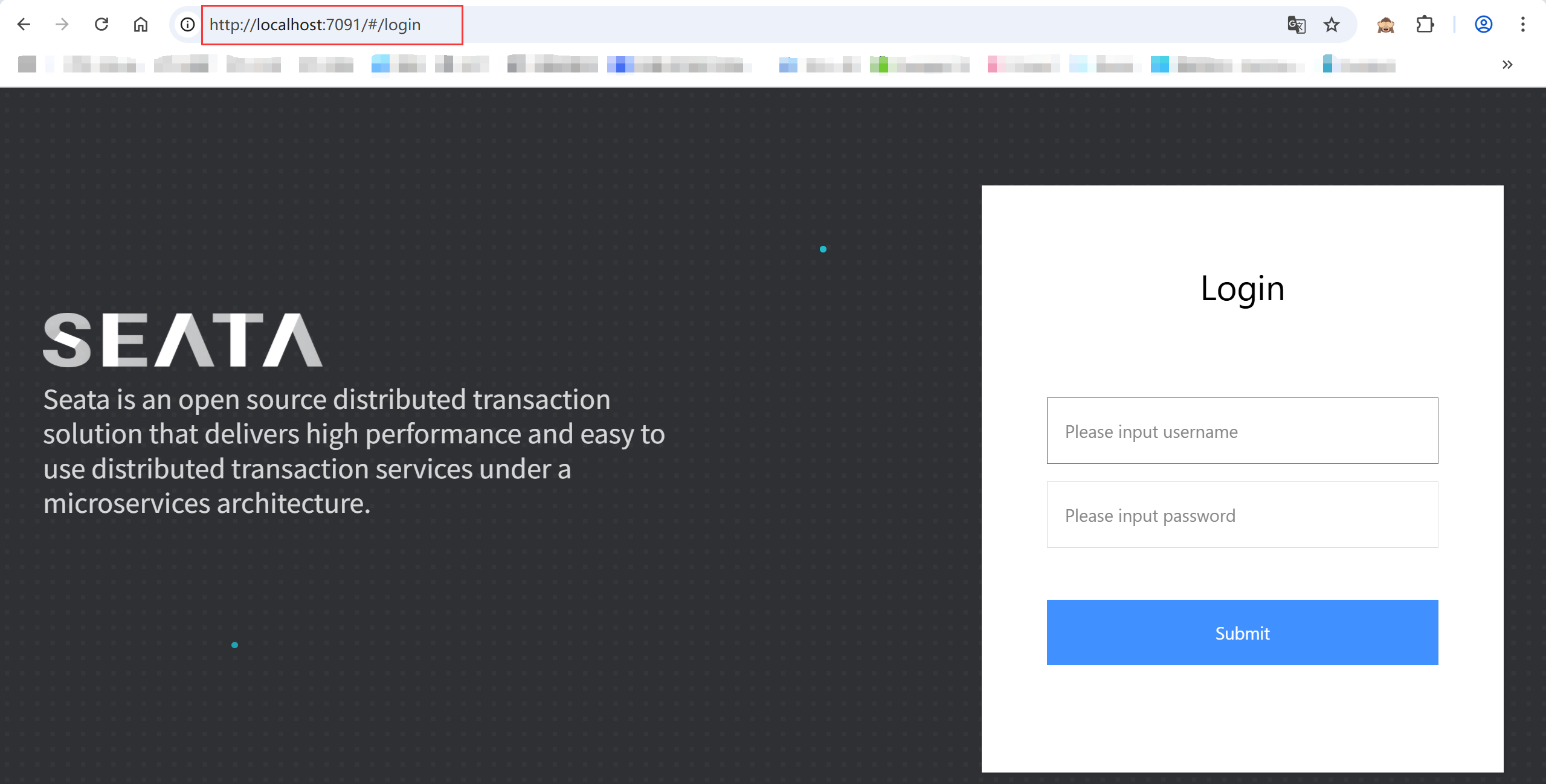
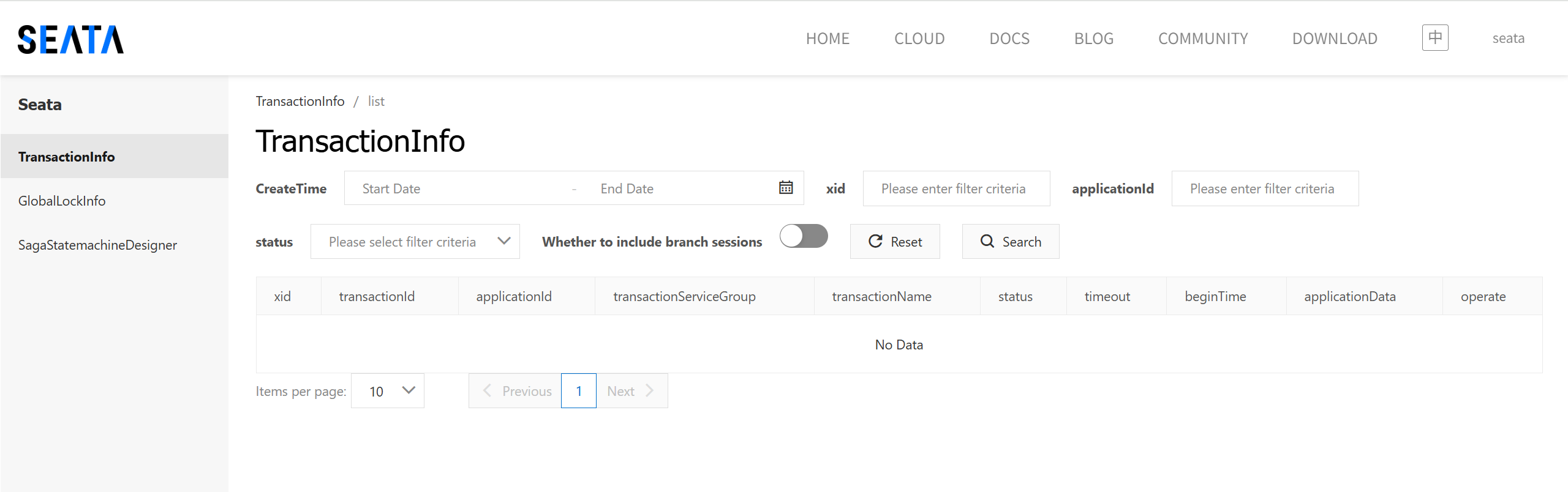
5. 启动 seata-server-2.0.0 在 bin 目录下执行 seata-server.bat
- 访问地址: http://localhost:7091
- 用户名 / 密码: seata / seata
微服务实战
创建三个业务数据库
1. 订单数据库 seata_order,创建 t_order 和 undo_log 表
sql
CREATE DATABASE seata_order;

USE seata_order;

CREATE TABLE t_order(
		`id` BIGINT(11) NOT NULL AUTO_INCREMENT PRIMARY KEY,
		`user_id` BIGINT(11) DEFAULT NULL COMMENT '用户id',
		`product_id` BIGINT(11)DEFAULT NULL COMMENT '产品id',
		`count` INT(11) DEFAULT NULL COMMENT '数量',
		`money` DECIMAL(11,0) DEFAULT NULL COMMENT '金额',
		`status` INT(1) DEFAULT NULL COMMENT '订单状态: 0:创建中; 1:已完结'
)ENGINE=INNODB AUTO_INCREMENT=1 DEFAULT CHARSET=utf8;

SELECT * FROM t_order;

-- for AT mode you must to init this sql for you business database. the seata server not need it.

CREATE TABLE IF NOT EXISTS `undo_log`
(
    `branch_id`     BIGINT       NOT NULL COMMENT 'branch transaction id',
    `xid`           VARCHAR(128) NOT NULL COMMENT 'global transaction id',
    `context`       VARCHAR(128) NOT NULL COMMENT 'undo_log context,such as serialization',
    `rollback_info` LONGBLOB     NOT NULL COMMENT 'rollback info',
    `log_status`    INT(11)      NOT NULL COMMENT '0:normal status,1:defense status',
    `log_created`   DATETIME(6)  NOT NULL COMMENT 'create datetime',
    `log_modified`  DATETIME(6)  NOT NULL COMMENT 'modify datetime',
    UNIQUE KEY `ux_undo_log` (`xid`, `branch_id`)
) ENGINE = InnoDB AUTO_INCREMENT = 1 DEFAULT CHARSET = utf8mb4 COMMENT ='AT transaction mode undo table';

ALTER TABLE `undo_log` ADD INDEX `ix_log_created` (`log_created`);
2. 库存数据库 seata_store,创建 t_store 和 undo_log 表
sql
CREATE DATABASE seata_store;

USE seata_store;

CREATE TABLE t_store(
		`id` BIGINT(11) NOT NULL AUTO_INCREMENT PRIMARY KEY,
		`product_id` BIGINT(11) DEFAULT NULL COMMENT '产品id',
		`total` INT(11) DEFAULT NULL COMMENT '总库存',
		`used` INT(11) DEFAULT NULL COMMENT '已用库存',
		`residue` INT(11) DEFAULT NULL COMMENT '剩余库存'
)ENGINE=INNODB AUTO_INCREMENT=1 DEFAULT CHARSET=utf8;

INSERT INTO t_store(`id`,`product_id`,`total`,`used`,`residue`)VALUES('1','1','100','0','100');

SELECT * FROM t_store;

-- for AT mode you must to init this sql for you business database. the seata server not need it.

CREATE TABLE IF NOT EXISTS `undo_log`
(
    `branch_id`     BIGINT       NOT NULL COMMENT 'branch transaction id',
    `xid`           VARCHAR(128) NOT NULL COMMENT 'global transaction id',
    `context`       VARCHAR(128) NOT NULL COMMENT 'undo_log context,such as serialization',
    `rollback_info` LONGBLOB     NOT NULL COMMENT 'rollback info',
    `log_status`    INT(11)      NOT NULL COMMENT '0:normal status,1:defense status',
    `log_created`   DATETIME(6)  NOT NULL COMMENT 'create datetime',
    `log_modified`  DATETIME(6)  NOT NULL COMMENT 'modify datetime',
    UNIQUE KEY `ux_undo_log` (`xid`, `branch_id`)
) ENGINE = InnoDB AUTO_INCREMENT = 1 DEFAULT CHARSET = utf8mb4 COMMENT ='AT transaction mode undo table';

ALTER TABLE `undo_log` ADD INDEX `ix_log_created` (`log_created`);
3. 账户数据库 seata_account,创建 t_account 和 undo_log 表
sql
CREATE DATABASE seata_account;

USE seata_account;

CREATE TABLE t_account(
		`id` BIGINT(11) NOT NULL AUTO_INCREMENT PRIMARY KEY COMMENT 'id',
		`user_id` BIGINT(11) DEFAULT NULL COMMENT '用户id',
		`total` DECIMAL(10,0) DEFAULT NULL COMMENT '总额度',
		`used` DECIMAL(10,0) DEFAULT NULL COMMENT '已用余额',
		`residue` DECIMAL(10,0) DEFAULT '0' COMMENT '剩余可用额度'
)ENGINE=INNODB AUTO_INCREMENT=2 DEFAULT CHARSET=utf8;

INSERT INTO t_account(`id`,`user_id`,`total`,`used`,`residue`)VALUES('1','1','1000','0','1000');

SELECT * FROM t_account;

-- for AT mode you must to init this sql for you business database. the seata server not need it.

CREATE TABLE IF NOT EXISTS `undo_log`
(
    `branch_id`     BIGINT       NOT NULL COMMENT 'branch transaction id',
    `xid`           VARCHAR(128) NOT NULL COMMENT 'global transaction id',
    `context`       VARCHAR(128) NOT NULL COMMENT 'undo_log context,such as serialization',
    `rollback_info` LONGBLOB     NOT NULL COMMENT 'rollback info',
    `log_status`    INT(11)      NOT NULL COMMENT '0:normal status,1:defense status',
    `log_created`   DATETIME(6)  NOT NULL COMMENT 'create datetime',
    `log_modified`  DATETIME(6)  NOT NULL COMMENT 'modify datetime',
    UNIQUE KEY `ux_undo_log` (`xid`, `branch_id`)
) ENGINE = InnoDB AUTO_INCREMENT = 1 DEFAULT CHARSET = utf8mb4 COMMENT ='AT transaction mode undo table';

ALTER TABLE `undo_log` ADD INDEX `ix_log_created` (`log_created`);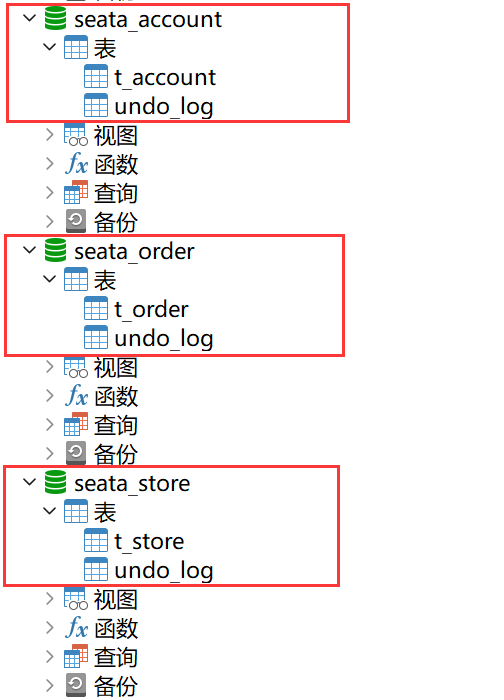
undo_log回滚日志表脚本地址: undo_log建表脚本
编写库存和账户两个Feign接口
1. 通用模块 cloud-common-api 新增 StoreFeignApi 接口
java
@FeignClient("seata-store-service")
public interface StoreFeignApi {

    // 扣减库存
    @PostMapping(value = "/store/decrease")
    Result decrease(@RequestParam("productId") Long productId, @RequestParam("count") Integer count);
}
2. 通用模块 cloud-common-api 新增 AccountFeignApi 接口
java
@FeignClient("seata-account-service")
public interface AccountFeignApi {

    // 扣减账户余额
    @PostMapping("/account/decrease")
    Result decrease(@RequestParam("userId") Long userId, @RequestParam("money") Long money);
}
订单微服务 seata-order-service9701
1. 引入依赖
xml
<!-- nacos -->
<dependency>
    <groupId>com.alibaba.cloud</groupId>
    <artifactId>spring-cloud-starter-alibaba-nacos-discovery</artifactId>
</dependency>
<!-- alibaba-seata -->
<dependency>
    <groupId>com.alibaba.cloud</groupId>
    <artifactId>spring-cloud-starter-alibaba-seata</artifactId>
</dependency>
<!-- openfeign -->
<dependency>
    <groupId>org.springframework.cloud</groupId>
    <artifactId>spring-cloud-starter-openfeign</artifactId>
</dependency>
<!-- loadbalancer -->
<dependency>
    <groupId>org.springframework.cloud</groupId>
    <artifactId>spring-cloud-starter-loadbalancer</artifactId>
</dependency>
<!-- cloud-common-api -->
<dependency>
    <groupId>com.zzyy.cloud</groupId>
    <artifactId>cloud-common-api</artifactId>
    <version>1.0-SNAPSHOT</version>
</dependency>
<!-- web + actuator -->
<dependency>
    <groupId>org.springframework.boot</groupId>
    <artifactId>spring-boot-starter-web</artifactId>
</dependency>
<dependency>
    <groupId>org.springframework.boot</groupId>
    <artifactId>spring-boot-starter-actuator</artifactId>
</dependency>
<!-- Swagger3 调用方式 http://你的主机IP地址:5555/swagger-ui/index.html -->
<dependency>
    <groupId>org.springdoc</groupId>
    <artifactId>springdoc-openapi-starter-webmvc-ui</artifactId>
</dependency>
<!-- mybatis和springboot整合 -->
<dependency>
    <groupId>com.baomidou</groupId>
    <artifactId>mybatis-plus-spring-boot3-starter</artifactId>
</dependency>
<!-- Mysql8数据库驱动 -->
<dependency>
    <groupId>mysql</groupId>
    <artifactId>mysql-connector-java</artifactId>
</dependency>
<!-- lombok -->
<dependency>
    <groupId>org.projectlombok</groupId>
    <artifactId>lombok</artifactId>
    <optional>true</optional>
</dependency>
<!--test-->
<dependency>
    <groupId>org.springframework.boot</groupId>
    <artifactId>spring-boot-starter-test</artifactId>
    <scope>test</scope>
</dependency>
2. yml配置
yaml
server:
  port: 9701

# =============== applicationName + mysql8 driver ===============
spring:
  application:
    name: seata-order-service
  cloud:
    nacos:
      discovery:
        server-addr: localhost:8848
  datasource:
    driver-class-name: com.mysql.cj.jdbc.Driver
    url: jdbc:mysql://localhost:3306/seata_order?characterEncoding=utf8&useSSL=false&serverTimezone=GMT%2B8&rewriteBatchedStatements=true&allowPublicKeyRetrieval=true
    username: root
    password: root

# =============== mybatis-plus ===============
mybatis-plus:
  mapper-locations: classpath:mapper/*.xml
  configuration:
    # mybatis日志
    log-impl: org.apache.ibatis.logging.stdout.StdOutImpl

# =============== seata ===============
seata:
  registry:
    type: nacos
    nacos:
      server-addr: 127.0.0.1:8848
      namespace: ""
      group: SEATA_GROUP
      application: seata-server
  tx-service-group: default_tx_group # 事务组,由它获得TC服务的集群名称
  service:
    vgroup-mapping:
      default_tx_group: default # 事务组与TC服务集群的映射关系
  data-source-proxy-mode: AT

logging:
  level:
    io:
      seata: info
3. 主启动类
java
@SpringBootApplication
@EnableDiscoveryClient  //服务注册与发现
@EnableFeignClients
@MapperScan("com.zzyy.cloud.mapper")
public class SeataOrderMain9701 {

    public static void main(String[] args) {
        SpringApplication.run(SeataOrderMain9701.class, args);
    }
}
4. 控制层 OrderController
java
@RestController
public class OrderController {

    @Resource
    private OrderService orderService;

    //创建订单
    @GetMapping("/order/create")
    public Result create(Order order) {
        orderService.create(order);
        return Result.success(order);
    }
}
5. 服务层 OrderServiceImpl
java
@Service
@Slf4j
public class OrderServiceImpl extends ServiceImpl<OrderMapper, Order> implements OrderService{

    @Resource
    private OrderMapper orderMapper;
    @Resource  //库存微服务Feign接口
    private StoreFeignApi storeFeignApi;
    @Resource  //账户微服务Feign接口
    private AccountFeignApi accountFeignApi;

    @Override
    @GlobalTransactional(name = "zzyy-create-order", rollbackFor = Exception.class) //AT
    public void create(Order order) {
        // xid全局事务id的检查,重要
        String xid = RootContext.getXID();
        //1.创建订单
        log.info("------------创建订单-开始-xid: " + xid);
        Order orderFromDB = null;
        //初始创建订单时默认订单状态为0
        order.setStatus(0);
        int i = orderMapper.insert(order);
        if (i > 0) {
            //从mysql中查出刚创建的订单记录
            orderFromDB = orderMapper.selectById(order.getId());
            //2.扣减库存
            storeFeignApi.decrease(orderFromDB.getProductId(), orderFromDB.getCount());
            //3.扣减账户余额
            accountFeignApi.decrease(orderFromDB.getUserId(), orderFromDB.getMoney());
            //4.修改订单状态,将订单状态由0修改为1,表示已完成
            log.info("------------修改订单状态-开始");
            orderFromDB.setStatus(1);
            orderMapper.updateById(orderFromDB);
            log.info("------------修改订单状态-结束");
        }
        log.info("------------创建订单-结束-xid: " + xid);
    }
}
库存微服务 seata-store-service9702
1. 引入依赖
库存微服务所需依赖可直接复制上述订单微服务相关依赖
2. yml配置
yaml
server:
  port: 9702

# =============== applicationName + mysql8 driver ===============
spring:
  application:
    name: seata-store-service
  cloud:
    nacos:
      discovery:
        server-addr: localhost:8848
  datasource:
    driver-class-name: com.mysql.cj.jdbc.Driver
    url: jdbc:mysql://localhost:3306/seata_store?characterEncoding=utf8&useSSL=false&serverTimezone=GMT%2B8&rewriteBatchedStatements=true&allowPublicKeyRetrieval=true
    username: root
    password: root

# =============== mybatis-plus ===============
mybatis-plus:
  mapper-locations: classpath:mapper/*.xml
  configuration:
    # mybatis日志
    log-impl: org.apache.ibatis.logging.stdout.StdOutImpl

# =============== seata ===============
seata:
  registry:
    type: nacos
    nacos:
      server-addr: 127.0.0.1:8848
      namespace: ""
      group: SEATA_GROUP
      application: seata-server
  tx-service-group: default_tx_group # 事务组,由它获得TC服务的集群名称
  service:
    vgroup-mapping:
      default_tx_group: default # 事务组与TC服务集群的映射关系
  data-source-proxy-mode: AT

logging:
  level:
    io:
      seata: info
3. 主启动类
java
@SpringBootApplication
@EnableDiscoveryClient  //服务注册与发现
@EnableFeignClients
@MapperScan("com.zzyy.cloud.mapper")
public class SeataStoreMain9702 {

    public static void main(String[] args) {
        SpringApplication.run(SeataStoreMain9702.class, args);
    }
}
4. 控制层 StoreController
java
@RestController
public class StoreController {

    @Resource
    private StoreService storeService;

    //扣减库存
    @PostMapping("/store/decrease")
    public Result decrease(@RequestParam("productId") Long productId,
                           @RequestParam("count") Integer count) {
        storeService.decrease(productId, count);
        return Result.success("扣减库存成功");
    }
}
5. 服务层 StoreServiceImpl
java
@Service
@Slf4j
public class StoreServiceImpl extends ServiceImpl<StoreMapper, Store> implements StoreService{

    @Resource
    private StoreMapper storeMapper;

    @Override
    public void decrease(Long productId, Integer count) {
        log.info("------------扣减库存-开始");
        QueryWrapper<Store> wrapper = new QueryWrapper<>();
        wrapper.eq("product_id", productId);
        Store store = storeMapper.selectOne(wrapper);
        Integer used = store.getUsed() + count;
        store.setUsed(used);
        store.setResidue(store.getTotal() - used);
        storeMapper.updateById(store);
        log.info("------------扣减库存-结束");
    }
}
账户微服务 seata-account-service9703
1. 引入依赖
库存微服务所需依赖可直接复制上述订单微服务相关依赖
2. yml配置
yaml
server:
  port: 9703

# =============== applicationName + mysql8 driver ===============
spring:
  application:
    name: seata-account-service
  cloud:
    nacos:
      discovery:
        server-addr: localhost:8848
  datasource:
    driver-class-name: com.mysql.cj.jdbc.Driver
    url: jdbc:mysql://localhost:3306/seata_account?characterEncoding=utf8&useSSL=false&serverTimezone=GMT%2B8&rewriteBatchedStatements=true&allowPublicKeyRetrieval=true
    username: root
    password: root

# =============== mybatis-plus ===============
mybatis-plus:
  mapper-locations: classpath:mapper/*.xml
  configuration:
    # mybatis日志
    log-impl: org.apache.ibatis.logging.stdout.StdOutImpl

# =============== seata ===============
seata:
  registry:
    type: nacos
    nacos:
      server-addr: 127.0.0.1:8848
      namespace: ""
      group: SEATA_GROUP
      application: seata-server
  tx-service-group: default_tx_group # 事务组,由它获得TC服务的集群名称
  service:
    vgroup-mapping:
      default_tx_group: default # 事务组与TC服务集群的映射关系
  data-source-proxy-mode: AT

logging:
  level:
    io:
      seata: info
3. 主启动类
java
@SpringBootApplication
@EnableDiscoveryClient  //服务注册与发现
@EnableFeignClients
@MapperScan("com.zzyy.cloud.mapper")
public class SeataAccountMain9703 {

    public static void main(String[] args) {
        SpringApplication.run(SeataAccountMain9703.class, args);
    }
}
4. 控制类 AccountController
java
@RestController
public class AccountController {

    @Resource
    private AccountService accountService;

    //扣减账户余额
    @PostMapping("/account/decrease")
    public Result decrease(@RequestParam("userId") Long userId,
                           @RequestParam("money") Integer money){
        accountService.decrease(userId, money);
        return Result.success("扣减账户余额成功");
    }
}
5. 服务层 AccountServiceImpl
java
@Service
@Slf4j
public class AccountServiceImpl extends ServiceImpl<AccountMapper, Account> implements AccountService{

    @Resource
    private AccountMapper accountMapper;

    @Override
    public void decrease(Long userId, Integer money) {
        log.info("------------扣减账户余额-开始");
        QueryWrapper<Account> wrapper = new QueryWrapper<>();
        wrapper.eq("user_id", userId);
        Account account = accountMapper.selectOne(wrapper);
        Integer used = account.getUsed() + money;
        account.setUsed(used);
        account.setResidue(account.getTotal() - used);
        accountMapper.updateById(account);
        //模拟超时
//        try {
//            // 暂停62秒
//            TimeUnit.SECONDS.sleep(62);
//        } catch (InterruptedException e) {
//            e.printStackTrace();
//        }
        log.info("------------扣减账户余额-结束");
    }
}
测试结果
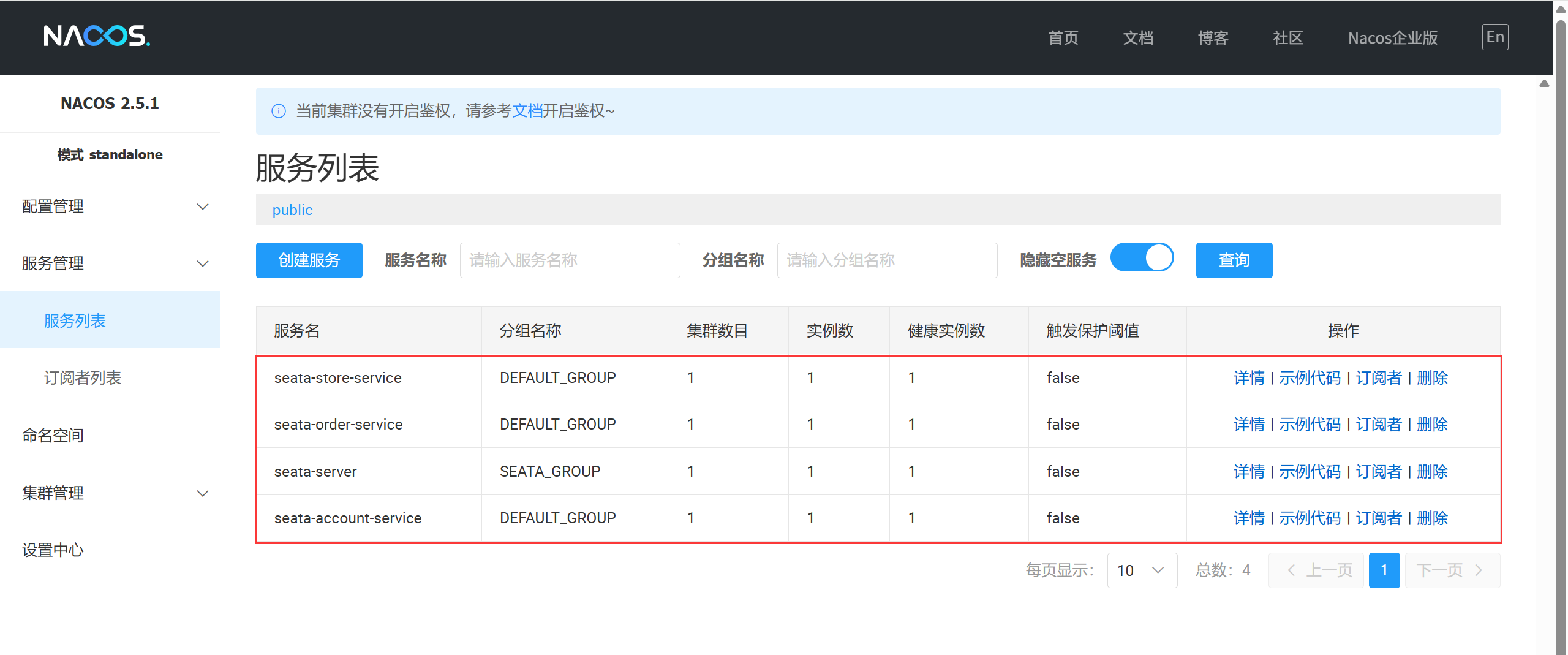
启动 Nacos、Seata、以及三个业务微服务
测试一
访问: http://localhost:9701/order/creata?userId=1\&productId=1\&count=10\&money=100
返回: {"code":"200", "msg": "success", "data": {"id": 6, "userId": 1, "productId": 1, "count": 10, "money": 100, "status": 0}, "timestamp": 1748786900259}
结果: 订单、库存、账户表都新增1条记录,库存和账户余额都已扣减,订单状态为1表示已完成。
测试二
未使用@GlobalTransactional注解,在账户余额扣减逻辑后添加模拟超时逻辑,等待62秒(Feign的超时时间默认是60秒)
访问: http://localhost:9701/order/creata?userId=1\&productId=1\&count=10\&money=100
返回: {"code": "500", "msg": "Read timed out executing POST http://seata-account-service/account/decrease?userId=1\&money=100", "data": null, "timestamp": 1748788205704}
结果: 订单、库存、账户表都新增1条记录,库存和账户余额都已扣减,但订单状态为0表示未完成。
测试三
使用@GlobalTransactional注解,在账户余额扣减逻辑后添加模拟超时逻辑,等待62秒(Feign的超时时间默认是60秒)
访问: http://localhost:9701/order/creata?userId=1\&productId=1\&count=10\&money=100
返回: {"code": "500", "msg": "Read timed out executing POST http://seata-account-service/account/decrease?userId=1\&money=100", "data": null, "timestamp": 1748789082880}
结果: 超时触发事务回滚,订单、库存、账户表数据最终都未发生变化。
总结
以上主要介绍了 Seata 安装、微服务实战的相关知识,想了解更多 Seata 知识的小伙伴请参考 Seata 官网 和 Spring Cloud Alibaba 官网 进行学习,学习更多 Spring Cloud 实战实用技巧的小伙伴,请关注后期发布的文章,认真看完一定能让你有所收获。