Next.js入门 - v13
什么是Next.js
Next.js是一款基于React的全栈SSR框架,提供一系列自动配置React的工具,让我们可以专注于构建应用,简化配置流程。
Next.js官网 
什么是SSR(服务端渲染)
SPA
说到服务端渲染,就要提到SPA(单页面应用程序),单页面应用程序的例子就是React和Vue,他们是通过将js下载到客户端运行,进行编译、构建,然后创建出js虚拟DOM对象,再一次性挂载到index.html上,由于只是挂载到单个html上,比如:
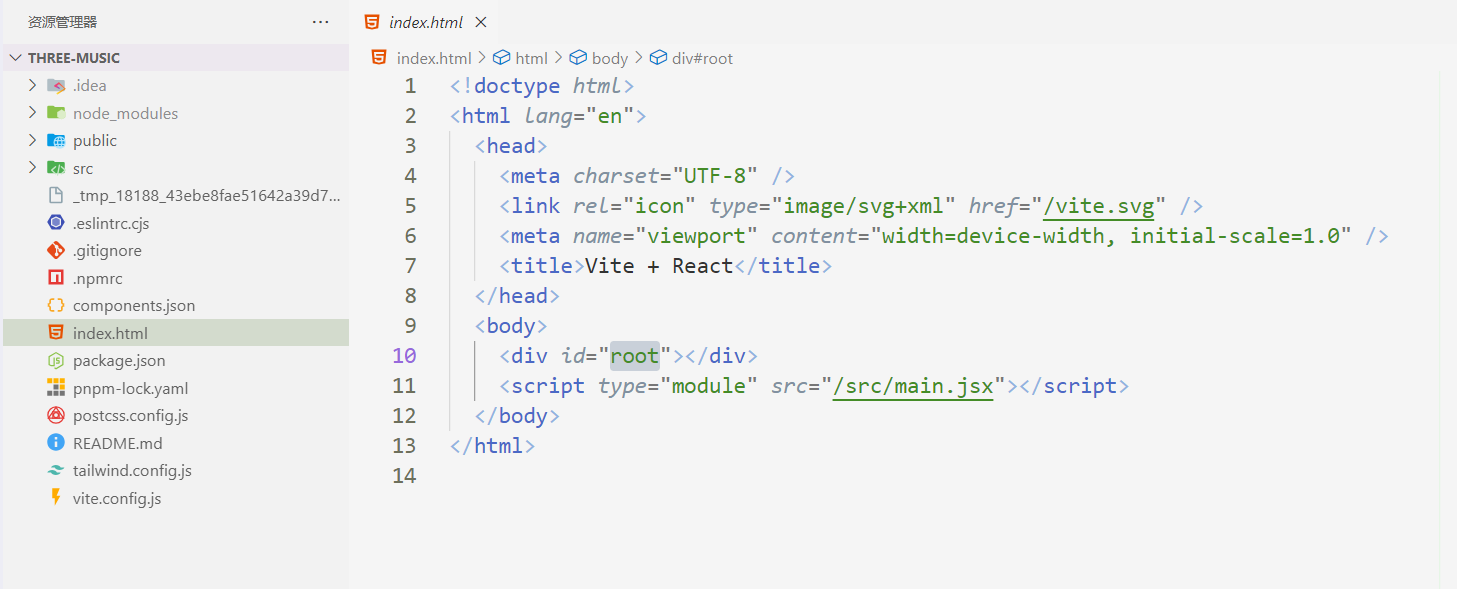

其他修改都是基于它来进行,所以是单页面应用程序。并且,SPA程序会将进行渲染和逻辑处理的js文件放在客户端,渲染的工作是交给客户端进行所以也叫CSR(客户端渲染)程序。
而服务端渲染则是由服务器将HTML文件渲染后交给客户端的,根据不同请求返回对应的html文件。
对比
- 性能
CSR将渲染的任务交给客户端,对于性能不好的设备来说,将会变得卡顿,但是相对的,减轻了服务器的负担。而SSR则相反,在请求高峰期需要处理大量请求,这将会是巨大的压力,但是可以减轻客户端的压力。 - SEO友好性
客户端渲染在渲染前是很难获取到网页具体信息的,对于SEO来说并不友好,而服务端渲染则可以将渲染好的文件交给搜索引擎爬虫,此时页面内容基本完整,利于引擎算法进行分析识别。 - 首次加载时间
CSR需要将js下载到客户端进行渲染,所以在js下载到客户端之前有可能遭遇到一段时间的页面空白(首屏渲染问题)。而SSR在服务端先渲染好HTML,省去了这个步骤,并且减少了客户端压力,所以可以更快地向用户展示内容。
Setup Nextjs Project
Git仓库
本文的教学内容将放入GitHub仓库,可以结合着学习,不同分支将对应不同的章节。
课程仓库
创建项目
shell
npx create-next-app@latest next-course
# or
pnpm dlx create-next-app@latest next-course
# or
pnpm create next-app
或者使用我的开源项目来创建:
rust-init-cli
rust-cli-panel
功能1:文件路由系统
在版本13中,Next.js引入了一个基于React Server Components构建的新App Router,它支持共享布局、嵌套路由、加载状态、错误处理等。
Next.js路由文档Next.js会自动识别app目录中的
page.jsx/.tsx文件来创建页面,而父级或同级的layout.jsx/.tsx会作为页面布局进行渲染。
来试一下
假设我们要创建一个博客网站,站点中的博客的访问路径为site.example/blog/test/,那么,让我们来创建这样的目录文件结构:
- app
    + blog
        + test
            + page.tsx
    - page.tsx
    - layout.tsx
typescript
// app/blog/test/page.tsx
export default function TestBlogPage() {
    return (
        <div>
            Hi, there is a blog page!
        </div>
    )
}在app/page.tsx中添加指向它的链接:
typescript
// app/page.tsx
export default function Home() {
    return (
        <div>
            <a href={'/blog/test'}>
                Go to test blog
            </a>
        </div>
    );
}
启动它:
shell
npm run dev
# or
pnpm dev
因为默认CSS样式的原因,看起来有点怪。修改一下globals.css里的内容,将背景变得好看点:
css
:root {
    /*--foreground-rgb: 0, 0, 0;*/
    /*--background-start-rgb: 214, 219, 220;*/
    /*--background-end-rgb: 255, 255, 255;*/
}
效果:


Ok, 你完成了这个挑战!😎
route映射到URL
从刚才的例子我们可以看出,文件到路由的映射关系为:
file://site.dir/app/a/b/page.jsx -> site.example/a/b
动态路由
你或许注意到了,现在的URL是硬编码的,如果我们需要10个不同的blog页面(比如blog/test2, blog/abc, blog/start),那使用这种方式将要手动创建10个不同的xxx/page.js/jsx/ts/tsx,这是非常耗时且低效率的。
当然,Next.js为我们提供了名为动态路由的解决方案。
它的文件路由映射是这样的:
file://site.dir/app/blog/[slug]/page.jsx -> site.example/blog/a, site.example/blog/b, site.example/blog/c
试一下
修改我们的目录结构:
- app
    - blog
        + [slug]
            + page.tsx
创建博客内容页面:
typescript
// app/blog/[slug]/page.tsx
export default function BlogPage() {
    return (
        <div>
            {/*生成随机数*/}
            blog {Math.round(Math.random() * 10)}
        </div>
    )
}
布局
Next.js提供layout文件,提供布局功能,它是在多个路由之间共享的UI。在导航时,布局保留状态、保持交互性并且不重新渲染。布局也可以嵌套。
分析一下layout文件:
typescript
import type {Metadata} from "next";
import {Inter} from "next/font/google";
import "./globals.css";
// 这个是字体,暂时不用管
const inter = Inter({subsets: ["latin"]});
// 提供页面的元数据
export const metadata: Metadata = {
    title: "Create Next App",
    description: "Generated by create next app",
};
export default function RootLayout({
                                       children,
                                   }: Readonly<{
    children: React.ReactNode;
}>) {
    return (
        <html lang="en">
        <body className={inter.className}>
        {/*children就是子目录里的内容(包含子目录的layout和page)*/}
        {children}
        </body>
        </html>
    );
}
让我们添加navbar和footbar
typescript
// components/footbar.tsx
export default function Footbar() {
    return (
        <footer className={'bg-gray-200 border-b border-b-gray-300 border-t border-t-gray-300 sticky h-20 w-full'}>
            footbar
        </footer>
    )
}
// components/navbar.tsx
export default function Navbar() {
    return (
        <nav className={'bg-green-200 border-b border-b-gray-300 sticky w-full h-20'}>
            navbar
        </nav>
    )
}
你或许还没学过TailwindCSS?看这篇文章(todo)
将它们添加到layout.tsx:
typescript
// app/layout.tsx
///
export default function RootLayout({
                                       children,
                                   }: Readonly<{
    children: React.ReactNode;
}>) {
    return (
        <html lang="en">
        <body className={inter.className}>
        <Navbar/>
        {/*children就是子目录里的内容(包含子目录的layout和page)*/}
        {children}
        <Footbar/>
        </body>
        </html>
    );
}
效果:

提供博客内容
OK, 你现在已经有了可以匹配不同名称的动态的路由,以及创建了navbar和footbar,但是,我们希望页面能呈现更多内容。
编写Markdown
现在很多笔记软件都支持Markdown语法,这也是我本人比较喜欢的一种方式,而现在也有很多npm库支持将Markdown文件内容解析为HTML富文本串。
学习Markdown语法?
查看wiki或者等待我的新文章(todo)让我们改变目录结构:
- app
    - ...
- contents
    - mountain.md
    - bird.md
    - flower.md
markdown
# mountain.md

# Title: Summit Reflections: A Mountain's Mirror to the Soul
Climbing mountains is more than a physical endeavor; it's a journey of the spirit, where each peak reveals a facet of inner strength. As I scaled the rugged trails, the grind of my boots against rock echoed the resilience required to surmount life's challenges. The ascent, steep and demanding, taught me endurance. With each step, I found a metaphor for the effort needed to achieve one's dreams.
The view from the summit was not just a vista of vast landscapes but a perspective on the infinite possibilities life offers. It reminded me that after every great effort comes a broad expanse of opportunity. The descent, often overlooked, was no less instructive. It spoke of humility and caution; a reminder that what goes up must come down with grace.
This mountain experience distilled life into a simple yet profound truth: the journey matters as much as the destination. It's in the climb that we discover our mettle and in the view that we savor our triumphs.
(_create by AI_)
markdown
# flower.md

# Title: Blossoming Insights: A Whiff of Flowers
As I meandered through the garden, the air was thick with the sweet perfume of blooming flowers. Each petal, a tender brushstroke on nature's canvas, painted a picture of grace and resilience. The flowers, in their silent language, spoke of beauty that survives amidst the harshest conditions.
A delicate rose, its petals softer than silk, nodded gently in the breeze. It reminded me that even the most stunning forms can emerge from thorny paths. In the blossoms, I saw a reflection of life's inherent beauty and the fortitude to flourish despite challenges.
The garden, with its kaleidoscope of colors, became a sanctuary where every flower told a story of transformation and growth. My spirits were lifted by this quiet symphony of scents and hues, a testament to nature's power to inspire and replenish the soul.
(_create by AI_)
markdown
# bird.md

# Title: Capturing the Charm of Feathered Friends
Today's venture into the serene woods was a delightful encounter with nature's delicate treasures. As I wandered through the dappled sunlight under the canopy, my camera was my faithful companion, ready to freeze moments in time.
A soft trill caught my attention, leading me to a vibrant avian presence. A tiny bird, with feathers arrayed in hues of blue and green, perched gracefully on a branch. It seemed almost aware of its own charm, bobbing and turning, as if posing for an unseen audience.
I snapped a sequence of shots, each click capturing a different angle of this natural splendor. The bird, in its innocence, carried on with its song, unaware of the beauty it bestowed upon my day.
As I left the woods, my heart felt lighter, and my camera held a piece of joy that I will cherish. These moments of connection with nature are what truly nourish the soul.
(_create by AI_)读取并显示
安装解析Markdown需要的依赖:
shell
npm i marked
# or
pnpm i marked
在代码中读取文件并解析:
typescript
// app/blog/[slug]/page.tsx
import {readFile} from "node:fs/promises";
import {marked} from "marked";
// 服务端组件可以使用async
export default async function BlogPage({
                                           params,
                                           searchParams,
                                       }: {
    params: { slug: string } // 接收url参数: (/blog/[slug] -> slug)
    searchParams: {}
}) {
    const text = await readFile(`./contents/${params.slug}.md`, 'utf8')
    const html = marked(text)
    return (
        <div>
            <div dangerouslySetInnerHTML={{__html: html}}></div>
        </div>
    )
}
很好,现在我们成功解析渲染了Markdown文本到页面上!
效果:

解决文字样式问题
你或许发现了,我们的标题样式和普通文字是一样的,这是因为TailwindCSS清除了默认的CSS样式,我们可以使用一个库来解决。
Next.js官方文档
shell
npm i -save-dev @tailwindcss/typography
# or
pnpm i -save-dev @tailwindcss/typography
注册为Tailwind插件:
typescript
// tailwind.config.ts
const config: Config = {
    /// ...
    plugins: [
        require('@tailwindcss/typography')
    ],
};
export default config;
然后使用为组件添加prose类名:
typescript
// app/blog/[slug]/page.tsx
import {readFile} from "node:fs/promises";
import {marked} from "marked";
export default async function BlogPage({
                                           params,
                                           searchParams,
                                       }: {
    params: { slug: string } // 接收url参数: (/blog/[slug] -> slug)
    searchParams: {}
}) {
    const text = await readFile(`./contents/${params.slug}.md`, 'utf8')
    const html = marked(text)
    return (
        // flex flex-row justify-center -> 内容居中
        <div className={'w-screen flex flex-row justify-center'}>
            {/* prose让文本中的标题有对应的样式 */}
            <div className={'prose'} dangerouslySetInnerHTML={{__html: html}}></div>
        </div>
    )
}
重新启动服务,再次访问页面:

功能2:提供API接口
Next.js会将api目录下的文件解析为后端接口,接收HTTP请求并进行处理。
我们将读取和解析Markdown文件的操作放到后端(api目录)去,而将渲染的工作留在前端(app目录)。
试一下
改变我们的目录结构:
- app
  + api
      + blogs
          + [slug]
              + route.ts
此时文件系统和URL的对应关系是:
app/api/blogs/[slug]/route.ts -> site.example.com/api/blogs/a, site.example.com/api/blogs/b, ...编写处理请求的代码:
typescript
// api/blogs/route.ts
import {NextRequest, NextResponse} from "next/server";
import {readFile} from "node:fs/promises";
import {marked} from "marked";
// 接收GET请求
export async function GET(req: NextRequest) {
    // 解析url
    let slug = req.url.slice(
        req.url.lastIndexOf('/') + 1,
        req.url.length
    )
    let html
    try {
        // 读取md文件
        const text = await readFile(`./contents/${slug}.md`, 'utf8')
        html = marked(text)
    } catch (err) {
        console.error(err)
        // 错误返回
        return NextResponse.json({error: err})
    }
    // 返回html内容
    return NextResponse.json({html})
}
// 接收POST请求
export async function POST(req: NextRequest) {
    return NextResponse.json({})
}
看看结果:


在前端请求后端数据:
typescript
// app/blog/[slug]/page.tsx
// 服务端组件可以使用async
export default async function BlogPage({
                                           params,
                                           searchParams,
                                       }: {
    params: { slug: string } // 接收url参数: (/blog/[slug] -> slug)
    searchParams: {}
}) {
    // 请求后端数据
    let res = await fetch(`http://localhost:3000/api/blogs/${params.slug}`, {
        method: "GET"
    })
    let json = await res.json()
    let html
    if (json.error)
        html = "Ooh! Something went wrong"
    else
        html = json.html
    return (
        // flex flex-row justify-center -> 内容居中
        <div className={'w-screen flex flex-row justify-center'}>
            {/* prose让文本中的标题有对应的样式 */}
            <div className={'prose'} dangerouslySetInnerHTML={{__html: html}}></div>
        </div>
    )
}
结果:


到这里,我们就告一段落了,为了防止文章过长,我将其他内容放到了单独的篇章,你可以在下面点击跳转阅读。
下一步
使用next-themes进行日夜主题切换
你见过别人的网站可以切换为明亮和黑暗样式的主题吗,我们也可以实现。
Next-themes %%
博客文章 %%
使用Prisma连接数据库
通过文件系统或缓存系统存储数据是一种选择,但是使用数据库存储数据是更加常用的选择。
Prisma %%
使用NextAuth进行身份验证
身份验证是应用程序常见的功能,使用NextAuth可以免去自己编写登录注册页的麻烦,专注于实现身份验证逻辑。
NextAuth %%
使用Tiptap作为富文本编辑器
Tiptap是一款现代化的无头富文本编辑器,可以让我们轻松编写好看的页面内容。
如何通过代码定制Tiptap? 查看我的最新文章(todo)
Tiptap官方文档 %%