OpenAI 的 Prompt 工程是指通过设计和构建与大语言模型进行交互的输入方式,以引导模型生成期望输出的过程。
**任务:**本文将以引导AI根据用户指令输出符合用户要求的json格式数据。
一)测试 Azure OpenAI 服务
python
import openai
import time
from openai import AzureOpenAI
from openai.types.chat import ChatCompletion
import json

class AIJSONProcessor:
    def __init__(self, endpoint, deployment, subscription_key, api_version, max_retries=2, timeout=30, proxy=None):
        self.endpoint = endpoint.rstrip('/')
        self.deployment = deployment
        self.subscription_key = subscription_key
        self.api_version = api_version
        self.max_retries = max_retries

        # 配置Azure OpenAI客户端
        self.client = AzureOpenAI(
            api_key=subscription_key,
            api_version=api_version,
            azure_endpoint=endpoint
        )

        # 设置超时
        self.timeout = timeout

    def testOpenaiConnection(self):
        '''
            测试程序
        '''
        for attempt in range(self.max_retries + 1):
            try:
                print(f"正在尝试连接到Azure OpenAI: {self.deployment} (尝试 {attempt + 1}/{self.max_retries + 1})")
                print(f"端点: {self.endpoint}")
                print(f"超时设置: {self.timeout}秒")

                # 调用Azure OpenAI API
                response = self.client.chat.completions.create(
                    model=self.deployment,
                    messages=[
                        {"role": "system", "content": "你是一个AI助手。"},
                        {"role": "user", "content": "你是openai的哪个版本"}
                    ],
                    max_tokens=50
                )

                # 提取模型回复
                message = response.choices[0].message.content.strip()
                return {
                    "success": True,
                    "deployment": self.deployment,
                    "response": message
                }
            except openai.AuthenticationError as e:
                return {
                    "success": False,
                    "error": "认证失败,请检查订阅密钥或API端点",
                    "details": str(e)
                }
            except openai.RateLimitError as e:
                wait_time = 2 ** attempt  # 指数退避
                print(f"速率限制错误,等待 {wait_time} 秒后重试...")
                time.sleep(wait_time)
                continue
            except openai.APITimeoutError as e:
                return {
                    "success": False,
                    "error": "请求超时,请检查网络连接或增加超时时间",
                    "details": str(e)
                }
            except openai.APIError as e:
                if attempt < self.max_retries:
                    wait_time = 2 ** attempt  # 指数退避
                    print(f"API错误: {str(e)},等待 {wait_time} 秒后重试...")
                    time.sleep(wait_time)
                    continue
                else:
                    return {
                        "success": False,
                        "error": "多次尝试后API请求仍失败",
                        "details": str(e)
                    }
            except ValueError as e:
                return {
                    "success": False,
                    "error": "配置错误,请确认OpenAI库版本和参数设置",
                    "details": str(e)
                }
            except Exception as e:
                return {
                    "success": False,
                    "error": "发生未知错误",
                    "details": str(e)
                }

processor = AIJSONProcessor(
    endpoint="https://XXXXX-openai.openai.azure.com/",
    deployment="gpt-4.1",
    subscription_key="10XXXXXXXXXXXXXXXXXXXXXXXXXXXe",
    api_version="2025-XXXXXX-preview",
    max_retries=2,
    timeout=60,
)

print("正在测试Azure OpenAI API连接...")
result = processor.testOpenaiConnection()

print(result)- endpoint 指定 Azure OpenAI 服务的 API 访问地址(端点)。
- deployment 指定你在 Azure OpenAI 上部署的模型名称,告诉API要使用的是哪个模型。
- subscription_key 你的 Azure OpenAI 订阅密钥(API Key)。
- api_version 指定调用的 API 版本,Azure OpenAI 的 API 可能会有多个版本,不同版本可能有不同的功能或参数要求。
- max_retries 请求失败时最多重试的次数。
- timeout 每次 API 请求的超时时间(秒)。如果请求在指定时间内没有响应,就会报超时错误,防止程序一直卡住。
测试可以正常通信后,就可以开始构建OpenAI的Prompt工程了。
二)设计有效的提示词
2.1 系统级prompt
在调用Azure OpenAI API的时候,会给AI传递对应的prompt
python
# 调用Azure OpenAI API
response = self.client.chat.completions.create(
    model=self.deployment,
    messages=[
        {"role": "system", "content": "你是一个AI助手。"},
        {"role": "user", "content": "你是openai的哪个版本"}
    ],
    max_tokens=50
)
在如上的示例中传递的prompt是两种类型的prompt,即系统级prompt和用户级prompt,实际上还有AI本身的prompt,这种prompt其实是保留AI之前的回答,在下次用户prompt输入的时候一起被输入,保留记忆。
对于系统级prompt,其提示词会让AI明确自己的身份定位,从而制约说话语气,和表达方式。
由于本文任务是引导AI根据用户指令输出符合用户要求的json格式数据,其对于自身定位没有要求,只有一些前提可以告诉AI,比如json数据中属性对应的自然语言,这样AI就能理解自然语言的表达,并按着用户需求来生成对应的json格式数据。
其prompt设置如下:
python
referPrompt = 'json格式其属性和中文的对应关系如下:公司=company,姓名=name,年龄=age,工作经验=workExperience,职位=position,入职时间=duration'当然,其实这个任务中不需要AI明确自己的身份定位,这个提示词也可以被放入用户提示词中。
2.2 用户级prompt
对于用户级别的prompt来说,该prompt的作用是核心的prompt,用户prompt是任务完美完成的核心,是影响着AI输出的关键。
python
# 示例JSON数据
input_data = {
    "name": "张三",
    "age": 25,
    "skills": ["Python", "SQL", "AI"],
    "workExperience": [
        {
            "company": "科技公司A",
            "position": "数据分析师",
            "duration": "2022-2024"
        }
    ]
}

aiPrompt = (
    prompt + "\n"
    "请创建新的 json。请不要添加任何说明文字或补充内容,严格遵守 json 格式,确保每一层级的括号必须    闭合,仅输出 json。"+ "\n"
    + json.dumps(input_data, ensure_ascii=False)
)
2.3 AI级prompt
由于这里的任务不需要上下文的记忆,因此不需要加入词prompt。
三)测试
python
import openai
import time
from openai import AzureOpenAI
from openai.types.chat import ChatCompletion
import json

class AIJSONProcessor:
    def __init__(self, endpoint, deployment, subscription_key, api_version, max_retries=2, timeout=30, proxy=None):
        self.endpoint = endpoint.rstrip('/')  # 确保端点不以斜杠结尾
        self.deployment = deployment
        self.subscription_key = subscription_key
        self.api_version = api_version
        self.max_retries = max_retries

        # 配置Azure OpenAI客户端
        self.client = AzureOpenAI(
            api_key=subscription_key,
            api_version=api_version,
            azure_endpoint=endpoint
        )

        # 设置超时
        self.timeout = timeout

    def process(self, prompt):
        '''
            执行程序 参数列表
            prompt: 用户指令
        '''
        for attempt in range(self.max_retries + 1):
            try:
                print(f"正在尝试连接到Azure OpenAI: {self.deployment} (尝试 {attempt + 1}/{self.max_retries + 1})")
                print(f"端点: {self.endpoint}")
                print(f"超时设置: {self.timeout}秒")

                referPrompt = 'json格式其属性和中文的对应关系如下:公司=company,姓名=name,年龄=age,工作经验=workExperience,职位=position,入职时间=duration'

                # 示例JSON数据
                input_data = {
                    "name": "张三",
                    "age": 25,
                    "skills": ["Python", "SQL", "AI"],
                    "workExperience": [
                        {
                            "company": "科技公司A",
                            "position": "数据分析师",
                            "duration": "2022-2024"
                        }
                    ]
                }

                aiPrompt = (
                    prompt + "\n"
                    "请创建新的 json。请不要添加任何说明文字或补充内容,严格遵守 json 格式,确保每一层级的括号必须闭合,仅输出 json。"+"\n"
                    + json.dumps(input_data, ensure_ascii=False)
                )

                # 调用Azure OpenAI API
                response = self.client.chat.completions.create(
                    model=self.deployment,
                    messages=[
                        {"role": "system", "content": referPrompt },
                        {"role": "user", "content": aiPrompt }
                    ],
                    max_tokens=100
                )
                # 提取模型回复
                message = response.choices[0].message.content.strip()
                return message
            except openai.AuthenticationError as e:
                return {
                    "success": False,
                    "error": "认证失败,请检查订阅密钥或API端点",
                    "details": str(e)
                }
            except openai.RateLimitError as e:
                wait_time = 2 ** attempt  # 指数退避
                print(f"速率限制错误,等待 {wait_time} 秒后重试...")
                time.sleep(wait_time)
                continue
            except openai.APITimeoutError as e:
                return {
                    "success": False,
                    "error": "请求超时,请检查网络连接或增加超时时间",
                    "details": str(e)
                }
            except openai.APIError as e:
                if attempt < self.max_retries:
                    wait_time = 2 ** attempt  # 指数退避
                    print(f"API错误: {str(e)},等待 {wait_time} 秒后重试...")
                    time.sleep(wait_time)
                    continue
                else:
                    return {
                        "success": False,
                        "error": "多次尝试后API请求仍失败",
                        "details": str(e)
                    }
            except ValueError as e:
                return {
                    "success": False,
                    "error": "配置错误,请确认OpenAI库版本和参数设置",
                    "details": str(e)
                }
            except Exception as e:
                return {
                    "success": False,
                    "error": "发生未知错误",
                    "details": str(e)
                }


processor = AIJSONProcessor(
    endpoint="https://XXXXXXXXXXopenai.openai.azure.com/",
    deployment="gpt-4.1",
    subscription_key="103XXXXXXXXXXXXXXXXXXXXXXXXXXXXXXfe",
    api_version="2025-0XXXXXXXXXeview",
    max_retries=2,
    timeout=60,
)

print("正在测试Azure OpenAI API连接...")
result = processor.process("把姓名改成cce,年龄改为22,职位改为小白")

print(result)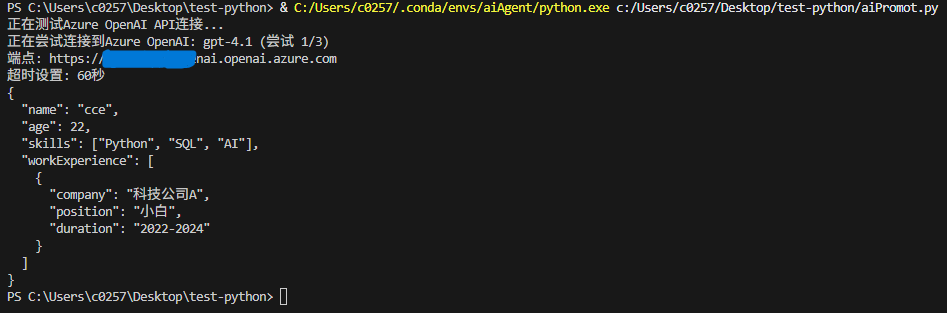
成功输出!!测试完成!!