

欢迎 🌟star : github.com/iHongRen/Sa...
一个专为 HarmonyOS 应用开发者设计的沙箱文件浏览器,通过内置 HTTP 服务器提供 Web 界面访问应用沙箱目录。
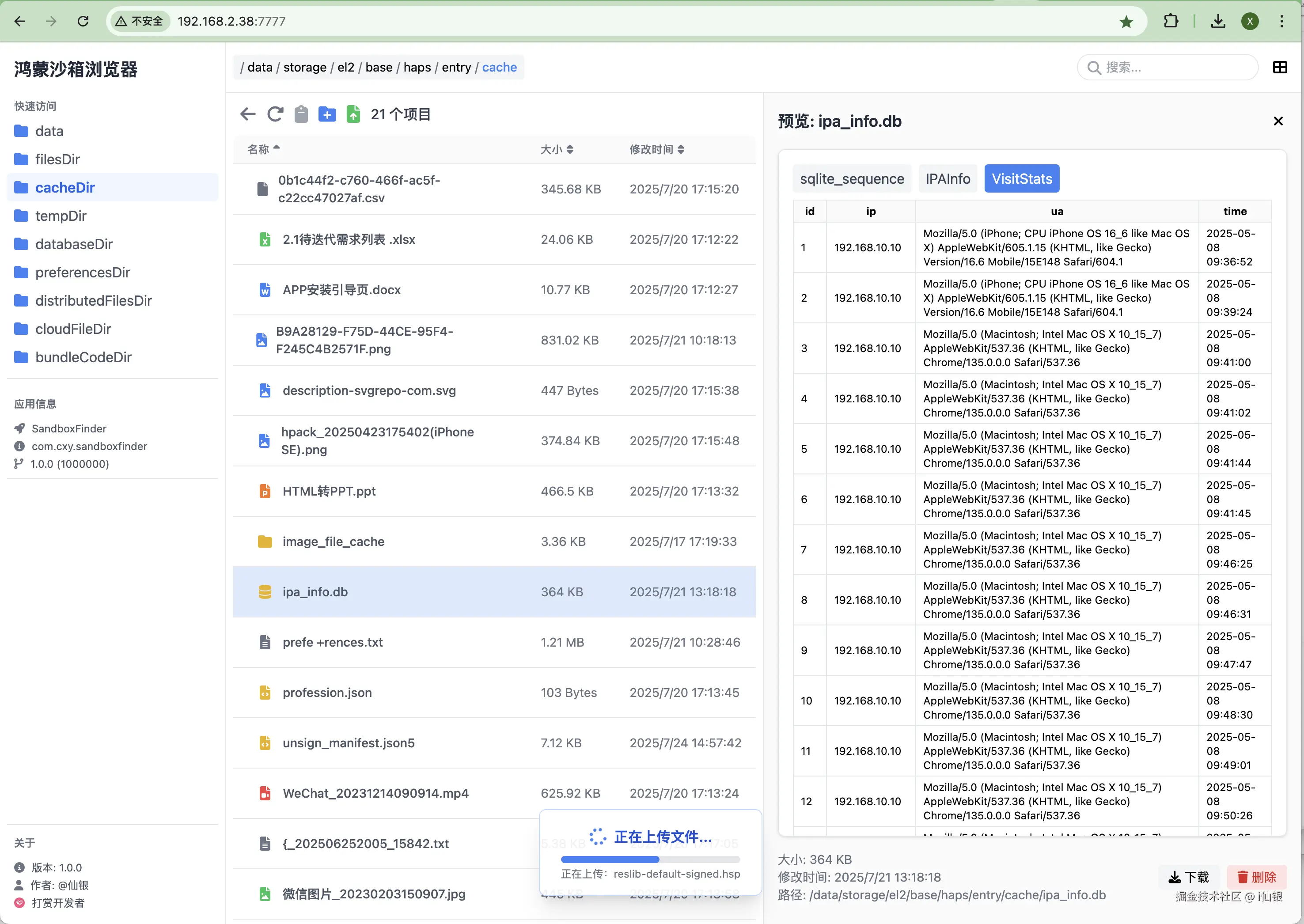
核心特性
🗂️ 沙箱文件系统
- 内置 HTTP 服务器 - 基于
TCP Socket实现的轻量级 HTTP 服务器 - 多设备 - 支持模拟器和真机
- 文件类型识别 - 智能识别文本、图片、视频、音频、SQLite 数据库等文件类型
- 自定义端口 - 默认端口
7777
🌐 Web 界面访问
- 响应式 Web UI - 使用 Vue 3 + Tailwind CSS 构建的现代化界面
- 快速访问 - 提供便捷的沙箱目录访问(
filesDir、cacheDir、tempDir、databaseDir等) - 预览 - 支持文本、图片、视频、音频、SQLite 数据库预览
- 排序 - 支持按名称、大小、时间排序
- 搜索 - 实时关键字搜索
📁 文件操作功能
-
基础文件操作 - 创建、删除、重命名
-
文件上传 - 支持大文件分块、批量、拖放上传
-
下载 - 直链下载
快速开始
集成到项目
- 安装
sh
ohpm install @cxy/sandboxfinder或 添加依赖,然后同步
json5
// oh-package.json5
{
  "dependencies": {
    "@cxy/sandboxfinder": "^1.0.0"
  }
}- 导入并启动
typescript
// EntryAbility.ets

// 导入BuildProfile,编译工程自动生成
import BuildProfile from 'BuildProfile';

onWindowStageCreate(windowStage: window.WindowStage): void {
  windowStage.loadContent('pages/Index', (err) => {
    if (err.code) {
      return;
    }

    // 推荐在 DEBUG 模式下使用 - 动态加载
    if (BuildProfile.DEBUG) {
      import('@cxy/sandboxfinder').then(async (ns: ESObject) => {
        // 默认绑定到端口 7777
        ns.SandboxFinder.run()
      });

      // 避免服务挂起,设置不息屏
      windowStage.getMainWindowSync().setWindowKeepScreenOn(true)
    }
  });
}-
确保鸿蒙设备和电脑在同一网络, 获取访问地址: 查看打印log -> 搜索 '--'。
或者直接查看设备IP:设置 -> WLAN -> 已连接的WIFI详情 -> IP地址。
sh
 ----------------------------------------------------------

 沙箱浏览器启动成功
 请浏览器访问: http://192.168.2.38:7777

----------------------------------------------------------- 浏览器直接访问: http://192.168.2.38:7777 (换成你的IP)
模拟器使用
沙箱浏览器开启后,模拟器需转发端口,才能访问。
sh
# 查看模拟器设备
> hdc list targets   # 输出: 127.0.0.1:5555

# 转发端口 fport tcp:<localPort> tcp:<serverPort>
hdc -t 127.0.0.1:5555 fport tcp:7777 tcp:7777

# 输出: Forwardport result:OK 表示成功
转发成功后,访问: http://127.0.0.1:7777 , 如果无法访问,关闭网络代理工具试试看。
SandboxFinder 类说明
1、SandboxFinder 提供了两个对外静态方法:
ts
/**
 * 运行服务
 * @param port  端口号,默认7777
 * @param context UIAbilityContext, 默认 getContext()
 * @returns ServerInfo =》 { address: string , port: number }
 */
static async run(port: number = 7777,
  context: common.UIAbilityContext = getContext() as common.UIAbilityContext): Promise<ServerInfo>;


 /**
 * 停止服务
 */
static async stop();
2、查看 ServerInfo
ts
// EntryAbility.ets  - onWindowStageCreate()
import('@cxy/sandboxfinder').then(async (ns: ESObject) => {
  // 绑定到端口 6666
  ns.SandboxFinder.run(6666, this.context).then((serverInfo: ESObject) => {
    console.log(JSON.stringify(serverInfo))
  })
});
作者
@仙银 其他鸿蒙相关开源作品,欢迎使用和 🌟star :
1、hpack - 鸿蒙内部测试分发,一键脚本打包工具
2、Open-in-DevEco-Studio - macOS 直接在 Finder 工具栏上,使用 DevEco-Studio 打开鸿蒙工程。
3、cxy-theme - DevEco-Studio 绿色背景主题