0x01 设置5次失败后锁定账户30分钟
bash
secpol.msc
# 导航到: 安全设置 > 账户策略 > 账户锁定策略
0x02 复制保存到 BlockFailedRDP.ps1
bash
<#
.DESCRIPTION
此脚本分析Windows安全日志中的RDP登录失败事件(ID 4625),
统计每个IP的失败次数,对达到阈值的IP自动创建防火墙阻止规则。

.VERSION
1.2
#>

# 设置正确的编码环境(UTF-8)
[Console]::OutputEncoding = [System.Text.Encoding]::UTF8
$OutputEncoding = [System.Text.Encoding]::UTF8

# 配置参数
$config = @{
    LogName = "Security"
    EventID = 4625
    TimeRangeDays = 1
    BlockThreshold = 5
    MaxEvents = 5000
    Whitelist = @("192.168.1.100", "10.0.0.1", "127.0.0.1") # 信任IP列表
    RulePrefix = "AutoBlockRDP" # 防火墙规则前缀
    LogFile = "D:\SecurityScripts\Logs\RDP_Protection.log" # 日志文件路径
}

# 创建日志目录
if (-not (Test-Path (Split-Path $config.LogFile -Parent))) {
    New-Item -ItemType Directory -Path (Split-Path $config.LogFile -Parent) -Force | Out-Null
}

# 记录日志函数
function Write-Log {
    param(
        [string]$Message,
        [ValidateSet("INFO","WARNING","ERROR")]
        [string]$Level = "INFO"
    )
    $timestamp = Get-Date -Format "yyyy-MM-dd HH:mm:ss"
    $logEntry = "[$timestamp][$Level] $Message"
    Add-Content -Path $config.LogFile -Value $logEntry -Encoding UTF8
    if ($Level -eq "ERROR") { Write-Error $Message }
    elseif ($Level -eq "WARNING") { Write-Warning $Message }
    else { Write-Output $Message }
}

# 主程序
try {
    # 1. 收集日志数据
    $startTime = (Get-Date).AddDays(-$config.TimeRangeDays)
    $endTime = Get-Date

    Write-Log " "
    Write-Log "开始分析RDP登录失败日志 ($startTime 至 $endTime)"

    $filter = @{
        LogName   = $config.LogName
        ID        = $config.EventID
        StartTime = $startTime
        EndTime   = $endTime
    }

    $events = Get-WinEvent -FilterHashtable $filter -MaxEvents $config.MaxEvents -Oldest -ErrorAction Stop

    # 2. 统计IP失败次数
    $ipFailCount = @{}
    $totalEvents = 0

    foreach ($event in $events) {
        $totalEvents++
        if ($event.Message -match "(?<IP>\d{1,3}\.\d{1,3}\.\d{1,3}\.\d{1,3})(?::\d{1,5})?") {
            $ip = $matches.IP
            if ($config.Whitelist -notcontains $ip) {
                $ipFailCount[$ip] = ($ipFailCount[$ip] + 1)
            }
        }
    }

    Write-Log "共分析 $totalEvents 条日志记录,发现 $($ipFailCount.Count) 个唯一IP地址"
    Write-Log "======================================================================"
    Write-Log " "

    # 3. 处理恶意IP
    $blockedIPs = 0
    $skippedIPs = 0

    foreach ($ip in $ipFailCount.Keys) {
        $failCount = $ipFailCount[$ip]

        if ($failCount -ge $config.BlockThreshold) {
            $ruleName = "$($config.RulePrefix)_$ip"

            # 检查是否已存在规则
            if (-not (Get-NetFirewallRule -DisplayName $ruleName -ErrorAction SilentlyContinue)) {
                try {
                    New-NetFirewallRule -DisplayName $ruleName `
                        -Direction Inbound `
                        -Action Block `
                        -RemoteAddress $ip `
                        -Description "自动阻止于 $(Get-Date -Format 'yyyy-MM-dd'), 失败次数: $failCount" `
                        -ErrorAction Stop

                    Write-Log "已创建防火墙规则阻止IP: $ip (失败次数: $failCount)"
                    $blockedIPs++
                }
                catch {
                    Write-Log "创建防火墙规则失败 ($ip): $_" -Level "ERROR"
                }
            }
            else {
                Write-Log "IP $ip 已在阻止列表中 (失败次数: $failCount)"
                $skippedIPs++
            }
        }
        else {
            Write-Log "IP $ip 未达阻止阈值 (失败次数: $failCount)"
        }
    }

    # 4. 生成报告
    Write-Log " "
    $report = @"
                ===== RDP防护报告 =====
分析时间范围: $($startTime.ToString('yyyy-MM-dd HH:mm')) 至 $($endTime.ToString('yyyy-MM-dd HH:mm'))
分析日志条目: $totalEvents
检测到的唯一IP: $($ipFailCount.Count)
达到阈值的IP: $($ipFailCount.Values.Where({$_ -ge $config.BlockThreshold}).Count)
新增阻止的IP: $blockedIPs
已有规则的IP: $skippedIPs
"@

    Write-Log $report

    # 5. 清理旧规则(可选)
    # Get-NetFirewallRule | Where { $_.DisplayName -like "$($config.RulePrefix)*" -and $_.CreationTime -lt (Get-Date).AddDays(-30) } | Remove-NetFirewallRule

}
catch {
    Write-Log "脚本执行出错: $_" -Level "ERROR"
    exit 1
}

exit 0
0x03 使用PowerShell执行脚本:
bash
.\BlockFailedRDP.ps10x04 设置定时任务
javascript
# 创建任务触发器(每15分钟运行一次)
$trigger = New-ScheduledTaskTrigger -Once -At (Get-Date) `
    -RepetitionInterval (New-TimeSpan -Minutes 15) `
    -RepetitionDuration ([TimeSpan]::MaxValue)

# 创建任务动作
$action = New-ScheduledTaskAction `
    -Execute "powershell.exe" `
    -Argument "-ExecutionPolicy Bypass -File `"D:\SecurityScripts\BlockFailedRDP.ps1`""

# 注册计划任务
Register-ScheduledTask `
    -TaskName "RDP防护" `
    -Trigger $trigger `
    -Action $action `
    -RunLevel Highest `
    -User "SYSTEM"  # 使用SYSTEM账户运行,如果报错,改成当前使用的账户

# 查看任务是否添加成功
PS C:\Windows\system32> Get-ScheduledTask -TaskName "RDP防护"

TaskPath                                       TaskName                          State
--------                                       --------                          -----
\                                              RDP防护                           Ready
0x05 如果提示系统禁止运行脚本:

javascript
# 以管理员身份打开PowerShell
Set-ExecutionPolicy RemoteSigned -Scope Process -Force

# 测试运行(不会实际修改防火墙)
cd C:\SecurityScripts
.\BlockFailedRDP.ps1 -WhatIf
如果遇到中文乱码,使用PowerShell命令转换编码,或者用vscode转码。
bash
# 将文件转换为UTF-8 with BOM编码
$content = Get-Content -Path "D:\SecurityScripts\BlockFailedRDP.ps1" -Raw
Set-Content -Path "D:\SecurityScripts\BlockFailedRDP.ps1" -Value $content -Encoding UTF8
其他几种检查方法:
javascript
# 1. 检查脚本错误
$Error[0] | Format-List * -Force

# 2. 测试事件日志访问
Get-WinEvent -LogName Security -MaxEvents 1 -ErrorAction Stop

# 3. 检查防火墙模块
Get-Module -Name NetSecurity -ListAvailable

# 4. 查看最近的4625事件
Get-WinEvent -FilterHashtable @{LogName='Security'; ID=4625} -MaxEvents 5 |
    Select-Object TimeCreated, Message


# 备份规则:定期导出防火墙配置
Export-NetFirewallRule -Path "C:\FirewallBackup\firewall-rules.xml"


# 查看所有脚本创建的规则
Get-NetFirewallRule | Where-Object {
    $_.DisplayName -like "Block IP *"
} | Format-Table DisplayName, Enabled, Direction, Action


# 启用RDP网络级认证(NLA),设置为1
(Get-ItemProperty -Path "HKLM:\SYSTEM\CurrentControlSet\Control\Terminal Server\WinStations\RDP-Tcp" -Name "UserAuthentication").UserAuthentication

Set-ItemProperty -Path "HKLM:\SYSTEM\CurrentControlSet\Control\Terminal Server\WinStations\RDP-Tcp" -Name "UserAuthentication" -Value 1


# 修改默认RDP端口,修改注册表
Set-ItemProperty -Path "HKLM:\SYSTEM\CurrentControlSet\Control\Terminal Server\WinStations\RDP-Tcp" -Name "PortNumber" -Value 3390
# 重启生效
Restart-Service TermService -Force


# 限制RDP访问IP, 创建防火墙规则只允许特定IP访问
New-NetFirewallRule -DisplayName "允许特定IP访问RDP" `
    -Direction Inbound `
    -Protocol TCP `
    -LocalPort 3389,3390 `
    -RemoteAddress 192.168.1.0/24,123.45.67.89 `
    -Action Allow
0x99 几种安全措施,根据实际情况选择:
| 安全措施 | 作用 | 实施方法 |
|---|---|---|
| 修改端口 | 减少扫描攻击 | 注册表 + 防火墙 |
| NLA | 防止未授权连接 | 远程桌面设置 |
| IP 白名单 | 限制访问来源 | 防火墙/安全组 |
| MFA | 防止暴力破解 | 微软 Authenticator |
| VPN/RD Gateway | 加密通信 | 企业级部署 |
通过以上方法,可大幅降低 RDP 被攻击的风险。对于企业用户,建议结合 RD Gateway(需要Win服务器) + MFA(需微软账户) + IP 白名单 提供最高级别的保护。
如果还是报错(允许脚本本地运行):
javascript
PS D:\SecurityScripts> Set-ExecutionPolicy -Scope CurrentUser -ExecutionPolicy RemoteSigned -Force

PS D:\SecurityScripts> Get-ExecutionPolicy -List

        Scope ExecutionPolicy
        ----- ---------------
MachinePolicy       Undefined
   UserPolicy       Undefined
      Process       Undefined
  CurrentUser    RemoteSigned
 LocalMachine       Undefined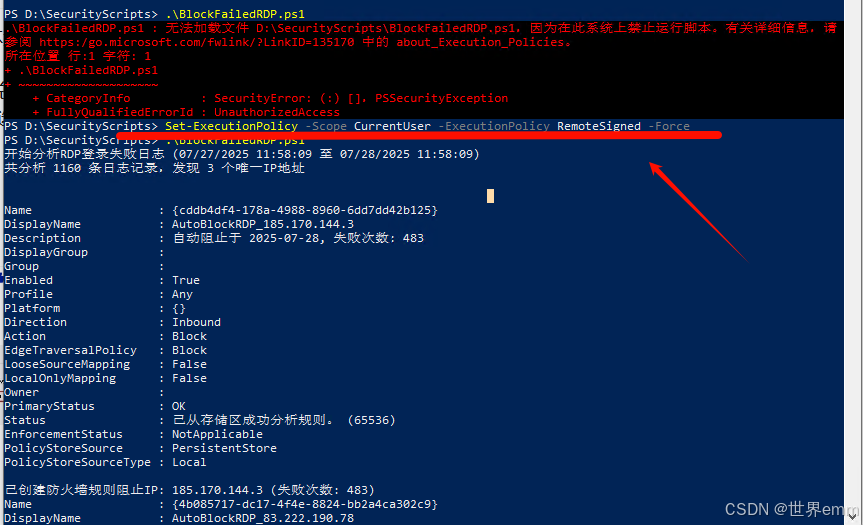
也可以给脚本进行数字签名(自签也可以)呦,发现github有现成的了