需求:给定Word模板,完成数据的单个导出 或者批量导出,不需要携带图片。
Word模板
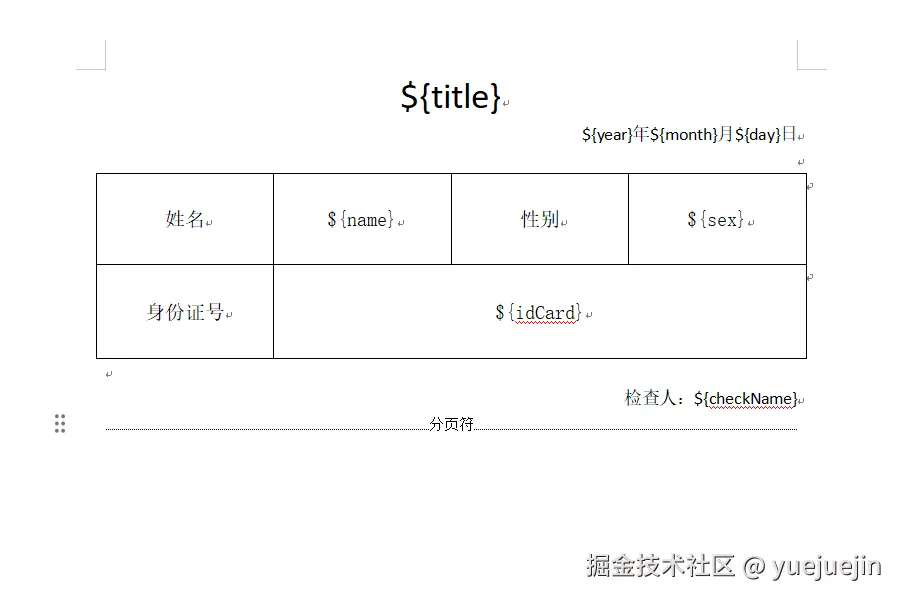
Word模板如下  我们把需要填充内容的地方打上标记,并添加分页符,保证之后在填充的时候每一页只有一条记录,如下图所示。
Freemarker需要使用xml文件,我们将Word另存为xml文件,如下图所示。
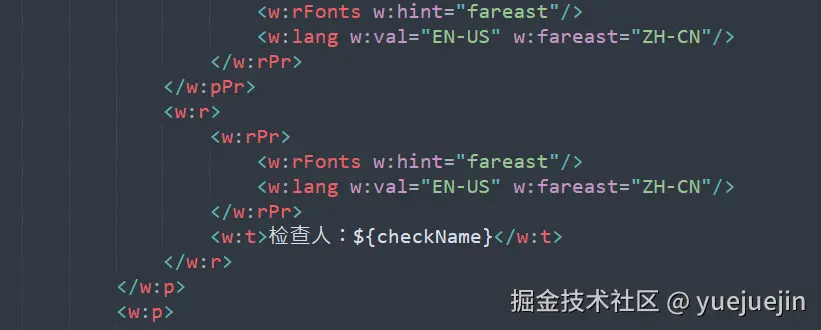
另存后的xml内容是压缩过的,我们可以通过在线XML格式化。另存之后记得检查一下${xxx},有时候Word看着是正常的,但是转为xml格式之后,${xxx}有可能就分家了。
然后我们需要对xml文件进行处理,用来接收数据列表。
- 定位到
<w:body>标签,输入<#list elems as elem>,其中elems为集合,elem为集合中的一个对象
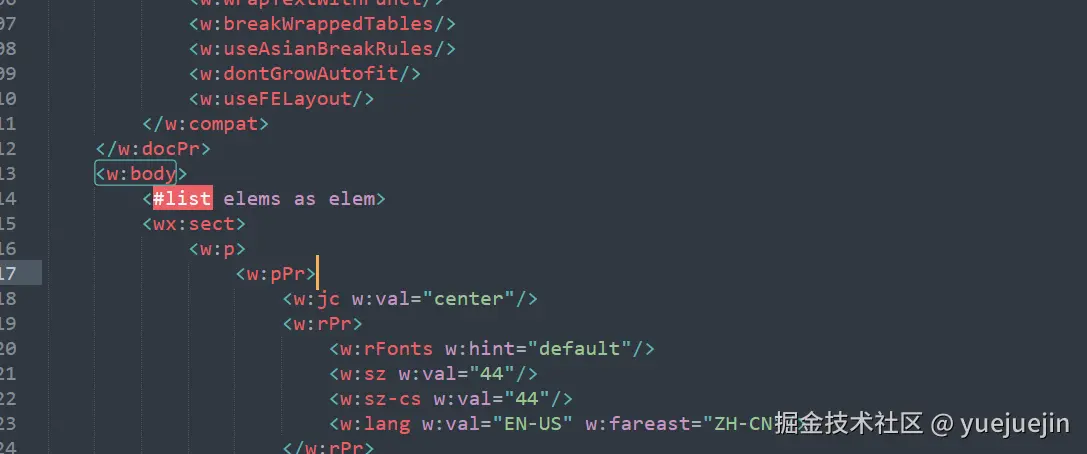
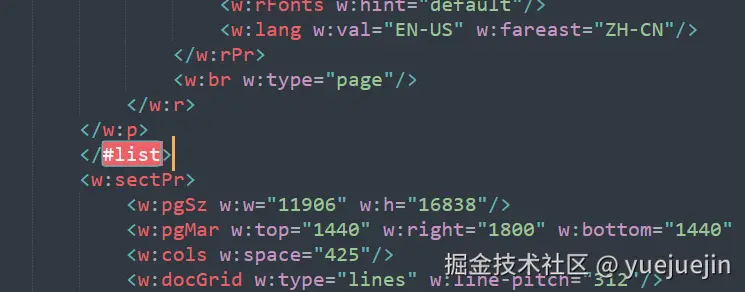
- 定位到
<w:sectPr>,差不多就是分页符结束的地方,我们添加上闭合标签</#list>
使用FreeMarker填充模板
引入Maven坐标
.xml
<dependency>
    <groupId>org.freemarker</groupId>
    <artifactId>freemarker</artifactId>
    <version>2.3.31</version>
</dependency>
实体类:最好不要用内部类,因为FreeMarker会访问实体类的get方法,如果访问不到会报错的。
java
import lombok.Data;

@Data
public class TestInfo {
    private String name;
    private String sex;
    private String idCard;
    private String year;
    private String month;
    private String day;
    private String title;
    private String checkName;
}
填充模板并生成文件
java
public class Test01 {
    public static void main(String[] args) {
        List<TestInfo> testData = new ArrayList<>();
        // 第一组测试数据
        TestInfo info1 = new TestInfo();
        info1.setName("张三");
        info1.setSex("男");
        info1.setIdCard("110101199003071234");
        info1.setYear("1990");
        info1.setMonth("03");
        info1.setDay("07");
        info1.setTitle("软件工程师");
        info1.setCheckName("李四");
        testData.add(info1);
        downloadFile(testData);
    }

    public static void downloadFile(List<TestInfo> detail) {
        Map<String, Object> data = new HashMap<>();
        data.put("elems", detail);
        // 预加载模板文件
        File xmlFile = new File("D:\test01.xml");
        InputStream templateStream = null;
        try {
            templateStream = new FileInputStream(xmlFile);
        } catch (FileNotFoundException e) {
            throw new RuntimeException(e);
        }
        try {
            Configuration cfg = new Configuration(Configuration.VERSION_2_3_31);
            cfg.setDirectoryForTemplateLoading(xmlFile.getParentFile());
            cfg.setDefaultEncoding("UTF-8");
            Template template = cfg.getTemplate(xmlFile.getName());
            // 4. 加载模板并生成文件
            File outputFile = new File("D:\testfile" + System.currentTimeMillis() + ".docx");
            try (Writer out = new BufferedWriter(new OutputStreamWriter(Files.newOutputStream(outputFile.toPath()), StandardCharsets.UTF_8))) {
                template.process(data, out);
            }
        } catch (IOException | TemplateException e) {
            throw new RuntimeException(e);
        } finally {
            // 关闭 InputStream
            try {
                templateStream.close();
            } catch (IOException e) {
                throw new RuntimeException(e);
            }
        }
    }
}
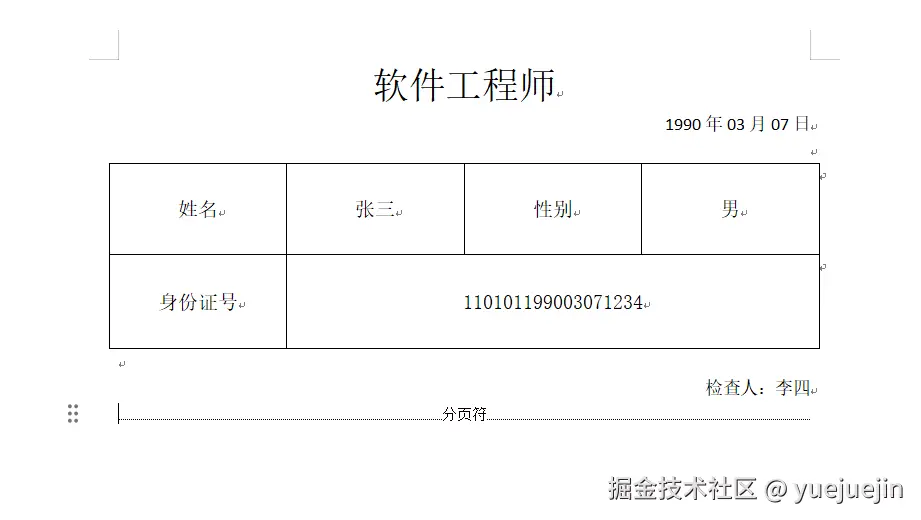
导出效果:
填充模板并写入响应体返回给前端
可以参考这个,先创建一个填充好的临时文件,返回给前端后,将临时文件删除。
java
// 创建临时文件
File tempFile = null;
try {
    tempFile = File.createTempFile(fileName, ".xml");
    Files.copy(templateStream, tempFile.toPath(), StandardCopyOption.REPLACE_EXISTING);
} catch (IOException e) {
    throw new RuntimeException(e);
}
try {
    Configuration cfg = new Configuration(Configuration.VERSION_2_3_31);
    cfg.setDirectoryForTemplateLoading(tempFile.getParentFile());
    cfg.setDefaultEncoding("UTF-8");

    // 3. 设置响应头信息
    response.setContentType("application/vnd.openxmlformats-officedocument.spreadsheetml.sheet");
    response.setHeader("Content-Disposition", "attachment;");
    response.setCharacterEncoding("UTF-8");
    // 4. 加载模板并生成文件
    Template template = cfg.getTemplate(tempFile.getName());
    Writer out = response.getWriter();
    template.process(data, out);
} catch (IOException | TemplateException e) {
    throw new RuntimeException(e);
} finally {
    // 关闭 InputStream
    try {
        templateStream.close();
    } catch (IOException e) {
        throw new RuntimeException(e);
    }
    tempFile.delete();
}
写在最后:导出Excel的方法,和这个差不多,有空可以试一试